
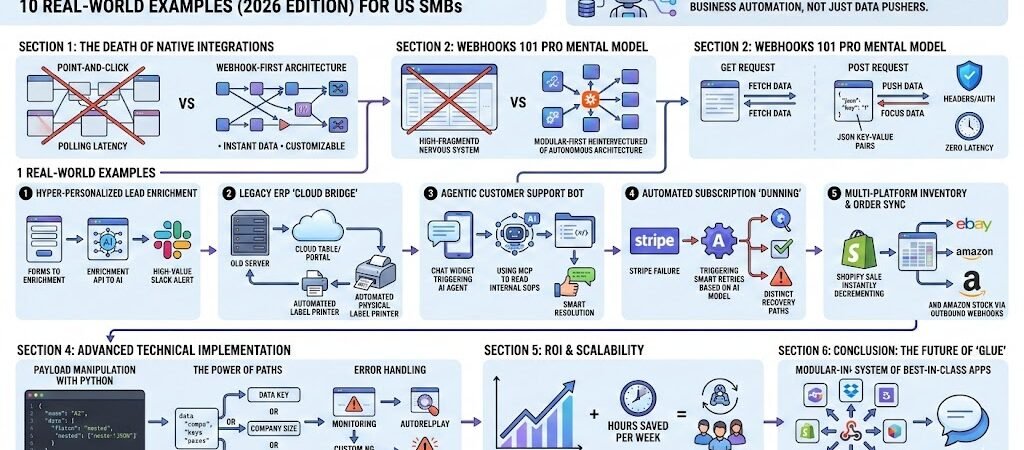
Key Takeaways: Zapier Webhooks Masterclass
- The “Agentic” Shift: In 2026, webhooks are no longer just for syncing rows to spreadsheets; they are the primary trigger for AI Agents that perform complex reasoning and multi-step tasks.
- Efficiency over Native: Webhooks bypass the limitations and “task-heavy” overhead of native integrations,allowing US SMBs to build bespoke solutions at a fraction of the cost.
- Real-Time Competitive Advantage: Instantaneous data transfer (Zero-Latency) is now a requirement for customer-facing AI and dynamic inventory management.
- Security is Paramount: Advanced SMB workflows now prioritize HMAC signature verification and Basic Authheaders to protect sensitive business data.
Introduction: The Death of Native Integrations
The year 2026 marks a turning point for the American SMB. For years, “point-and-click” native integrations were the gold standard for efficiency. However, as business complexity has scaled and AI has become the core of operations, these pre-built connectors have hit a ceiling. They are often too slow, too rigid, and hidden behind premium paywalls that penalize growth.
Enter the Zapier Webhook.
Webhooks are the “universal glue” of the modern web. Instead of waiting for a platform like Salesforce or Shopify to build a specific integration for your niche software, webhooks allow you to create a direct, instant line of communication between any two systems. In the context of 2026, this is the foundation of Agentic Automation. When a customer submits a complex inquiry via a custom portal, a webhook doesn’t just “save” that data; it triggers an AI Agent to analyze the sentiment, check your inventory, draft a personalized response, and alert the relevant account manager—all in under two seconds.
For the US SMB owner, mastering webhooks is no longer a “developer-only” skill. It is a strategic necessity. By using webhooks, you are effectively building a custom enterprise-grade infrastructure without the enterprise-grade price tag. This guide will walk you through 10 transformative examples that prove why the most successful businesses in 2026 have stopped asking “Does this app connect to Zapier?” and started asking “Does this app support webhooks?”
Technical Deep Dive: To understand the specific logic behind custom connections, refer to the official documentation on Webhooks by Zapier. It details how to send and receive data via API.
Webhooks 101: The “Pro” Mental Model
To master webhooks, you have to stop thinking of them as “digital mail” and start viewing them as “Remote Procedure Calls” (RPC). In a native Zapier integration, you are at the mercy of the developer’s update cycle. With a webhook, you are the developer.
The Mechanics: GET, POST, and JSON
In the US SMB context, 99% of your work will involve POST requests.
- POST: This is “pushing” a package of data to Zapier. It’s used for new leads, completed orders, or sensor alerts.
- GET: This is “fetching” data. In 2026, Pros use GET requests to ping AI models or external databases to pull specific information into the middle of a workflow.
- JSON (JavaScript Object Notation): This is the “language” of webhooks. It’s just a way of organizing data into
Key: Valuepairs.
Pro Tip: Always look for the “Raw” data view in Zapier. It allows you to see the nested data that simple UI “mappers” often hide.
Why Webhooks in 2026?
- Zero Latency: Native integrations often “poll” (check for updates) every 1 to 15 minutes. Webhooks are instant. In a world of AI customer service, a 5-minute delay is a lost sale.
- Data Granularity: Native integrations often only give you “Name” and “Email.” A webhook can pass every hidden metadata tag, tracking ID, and custom attribute your software possesses.
- Cost Efficiency: By using a single “Catch Hook” and then using Paths by Zapier, you can consolidate five different Zaps into one, significantly lowering your monthly Zapier bill.
Security: The SMB “Must-Haves”
As cyber threats evolve, simply having a “secret URL” isn’t enough. For a production-grade 2026 workflow, you should implement:
- Headers: Use custom headers (like
X-API-Key) to ensure the data hitting your Zap is actually from your software. - IP Whitelisting: If your source software allows it, only accept webhooks from specific IP ranges to prevent “spoofing.”
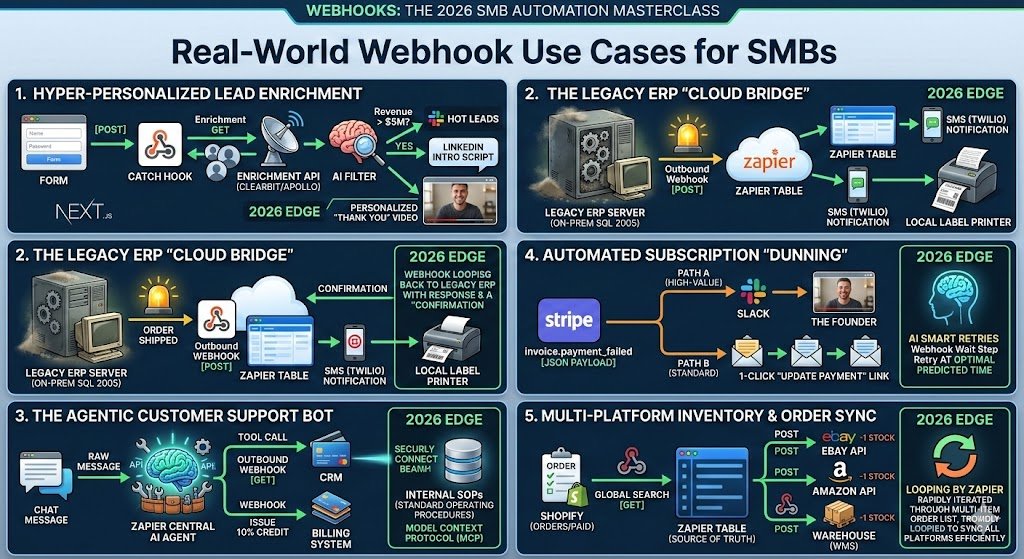
Real-World Example 1: Hyper-Personalized Lead Enrichment
The Problem: A US-based B2B SaaS company receives 200 leads a day. Sales reps waste 4 hours daily manually researching LinkedIn profiles and company sizes to prioritize high-value targets.
The Webhook Architecture:
- Trigger: A “Catch Hook” in Zapier receives a POST request from a custom Next.js lead form.
- Action (The Enrichment): Zapier sends an outbound Webhook (GET) to an enrichment API (like Clearbit or Apollo) using the email address as the key.
- AI Filtering: An AI Agent step analyzes the enriched data (e.g., “Is the company revenue > $5M?”).
- The Result: If “Yes,” a webhook sends a rich-format notification to a specific “Hot Leads” Slack channel with a pre-written LinkedIn intro script.
The 2026 “Edge”: Instead of just “saving a lead,” we are using Webhook Response logic. This allows Zapier to send a “Success” message back to the website immediately, which then triggers a personalized “Thank You” video on the user’s screen based on the data just processed.
Moving from the “Mental Model” into execution, these next two examples illustrate how US SMBs can bridge the gap between “dinosaur” software and cutting-edge AI.
Example 2: The Legacy ERP “Cloud Bridge”
The Problem: Many US SMBs in manufacturing or logistics rely on “on-premise” ERPs (like older versions of Sage, NetSuite, or custom SQL databases) that don’t have modern cloud APIs. This creates a data silo where office staff can’t see warehouse updates in real-time.
The Webhook Architecture:
- The Trigger: A small script or “Database Trigger” on the local server detects a status change (e.g., Order Shipped).
- The Outbound Webhook: The server sends a POST request to a Zapier “Catch Hook” URL containing the order ID and tracking number.
- The Cloud Action: Zapier receives the data and instantly updates a modern front-end (like a Zapier Table or a Customer Portal) and pings the customer via SMS (Twilio).
The 2026 “Edge”: Instead of a simple sync, use Webhook Response logic. Zapier can send a confirmation back to the legacy ERP, which then automatically prints a physical shipping label locally. This creates a “Closed Loop” between your 20-year-old server and your 2026 cloud apps.
Example 3: The Agentic Customer Support Bot
The Problem: Standard chatbots are frustrating; they just link to help docs. In 2026, customers expect a bot that actually does things—like processing a refund or rescheduling a delivery—without a human agent.
The Webhook Architecture:
- Trigger: A webhook from your site’s chat widget (e.g., Intercom or LiveChat) sends the customer’s raw message to Zapier.
- The Reasoning Step: Use the Zapier Central AI Agent step. This isn’t just a prompt; it’s an agent with “Tools.”
- The Tool Call: The Agent decides it needs more info. It triggers an outbound Webhook (GET) to your CRM to check the customer’s “Lifetime Value” and “Subscription Status.”
- The Action: Based on that data, the Agent triggers a third webhook to your billing system to issue a 10% credit.
The 2026 “Edge”: By using the Model Context Protocol (MCP) within this workflow, your AI Agent can securely “read” your company’s internal SOPs (Standard Operating Procedures) in real-time to ensure the resolution it offers is 100% compliant with company policy.
Comparison: Native Integration vs. Webhook Method (2026)
| Feature | Native Integration | Webhook Method |
| Update Speed | 1–15 Minute Polling | Instant (Zero Latency) |
| Data Access | Limited to “Approved” Fields | Full Access to All API Data |
| Cost | Usually requires “Premium” Zaps | Consolidated (Lower Task Usage) |
| Flexibility | Rigid / Pre-set | Infinite Customization |
Moving further into our masterclass, these two examples demonstrate how webhooks handle high-stakes financial recovery and complex multi-channel logistics—areas where native integrations often fall short.
Example 4: Automated Subscription “Dunning” (Stripe Custom Flows)
The Problem: For US-based SaaS and subscription box SMBs, “involuntary churn” (failed credit cards) is a silent killer. Stripe’s native dunning is good, but it’s generic. You can’t easily trigger different recovery paths based on a customer’s lifetime value (LTV) or specific plan type.
The Webhook Architecture:
- Trigger: Configure a Stripe Webhook to send a
invoice.payment_failedevent to Zapier. - Logic (The Filter): Zapier inspects the JSON payload for the
customer_metadataorsubscription_interval. - Path A (High-Value): If the customer is on an Annual Plan (> $500), Zapier triggers a personal video message from the founder and alerts a Slack channel for manual outreach.
- Path B (Standard): If it’s a monthly user, Zapier triggers a standard sequence of “Update your card” emails via Mailchimp or Klaviyo, but includes a 1-click “Update Payment” link unique to that invoice.
The 2026 “Edge”: In 2026, we use Smart Retries. Instead of static intervals, the Webhook triggers a “wait” step in Zapier that consults an AI model to predict the best time to retry the charge based on the customer’s timezone and historical payment patterns.
Example 5: Multi-Platform Inventory & Order Sync
The Problem: An SMB selling on Shopify, eBay, and Amazon Seller Central often struggles with “ghost inventory”—selling an item on eBay that just sold out on Shopify three minutes ago. Native sync apps can be laggy and expensive.
The Webhook Architecture:
- Trigger: A Webhook from Shopify (
orders/paid) pings Zapier the moment a sale happens. - Action (Global Search): Zapier uses a GET request to find that SKU in a central Zapier Table (serving as the “Source of Truth”).
- Outbound Webhooks (The Broadcast): Zapier simultaneously sends POST requests to the eBay and Amazon APIs to decrement the stock by 1.
- Confirmation: Once all platforms are updated, a final webhook pings your warehouse management system (WMS) to prepare the pick-list.
The 2026 “Edge”: By using Looping by Zapier within this webhook flow, you can handle bulk orders (10+ SKUs) in a single transaction, ensuring that your entire multi-channel ecosystem stays in sync in under 5 seconds, preventing overselling entirely.
Section 4. Advanced Technical Implementation
To reach the “Master” level, you must be comfortable with the Developer Tools inside the Zapier Webhook step.
Payload Manipulation with Python
Sometimes a webhook sends you a giant “blob” of data, but you only need one piece. Instead of using 5 different Formatter steps, use a single Code by Zapier step:
Python
# Extracting a specific value from a nested JSON webhook
input_data = pd.get('raw_body')
order_id = input_data['order']['id']
return {'order_id': order_id}
The “Webhook Response” Step
This is the most underrated feature of 2026. Normally, Zapier just “catches” data. With the Webhook Response action, you can send data back to the source.
- Use Case: Your website sends a webhook to Zapier; Zapier runs an AI check; Zapier sends a “Verified” status back to your website, allowing the user to proceed to the next page without a refresh.
Advanced Technical Implementation: Mastering the Data Flow
To graduate from “Zapier user” to “Automation Architect,” you must master the mechanics of data manipulation and system resilience. Raw webhook payloads are rarely perfect; they are often “noisy,” containing nested arrays or unnecessary metadata that can confuse simple workflows.
Payload Manipulation via Custom Code
While Formatter by Zapier is excellent for simple text splits, the 2026 pro uses the Code by Zapier (Python) step for complex JSON cleaning. Python allows you to handle “nested” data—where an address is hidden inside three layers of brackets—with a single line of code. By flattening these structures early, you ensure that every subsequent step in your Zap is clean and reliable.
The Power of Paths: Intelligent Routing
Strategic routing is what separates a basic sync from a business process. Using Paths by Zapier, you can inspect specific “data keys” within a webhook. For example, if a lead’s “Company Size” key is > 500, Path A triggers an immediate AI-driven research sequence. If the key indicates a smaller firm, Path B routes them to a self-service email sequence. This “logic-first” approach ensures your most expensive resources (your team) are only touching high-value data.
Error Handling & Resiliency
In a webhook-first architecture, a “silent failure” is your biggest risk. In 2026, setting up Custom Alerts is mandatory. By adding a “Filter” step that catches status codes other than 200 OK, you can trigger an emergency Slack alert or a text message if a critical webhook fails to fire. Combined with Zapier’s Autoreplay feature, your system can automatically re-attempt failed tasks, ensuring that a temporary server hiccup doesn’t lead to a lost customer.
ROI & Scalability for US SMBs
The ROI of webhooks isn’t just about “saving time”; it’s about expanding capacity. For a typical US SMB, manual data entry and “context switching” between apps consume roughly 20–30 hours per week. By automating these bridges via webhooks, you effectively reclaim a full-time employee’s worth of productivity.
This efficiency allows a lean team of three to operate with the output of a 30-person department. Instead of managing data, your team manages the systems that move the data, allowing you to scale your revenue without an equivalent increase in headcount.
Optimize your task usage. Custom webhooks are powerful but can be expensive if not configured correctly. Learn how to reduce your Zapier costs by optimizing your webhook triggers and avoiding “Task Trap” fees.
Conclusion: The Future of “Glue”
As we move further into 2026, the “all-in-one” software dream has been replaced by a “best-in-class” reality. Success belongs to the SMBs that can successfully “glue” these specialized tools together. Webhooks are the primary medium of this new modular architecture—they are faster, cheaper, and infinitely more flexible than native integrations.
The message for the modern business owner is clear: Stop waiting for a “native app” to be built. If your software has a webhook URL, you have the power to build the exact connection your business needs. Start small, catch your first hook, and begin building your company’s automated nervous system today.

About the Author
Aapt DubeyAapt Dubey is an automation specialist and software developer dedicated to eliminating manual workflows for small businesses. With deep, hands-on experience building complex Zapier integrations, API connections, and real-world applications, Aapt writes actionable, tested tutorials to help businesses scale efficiently.