
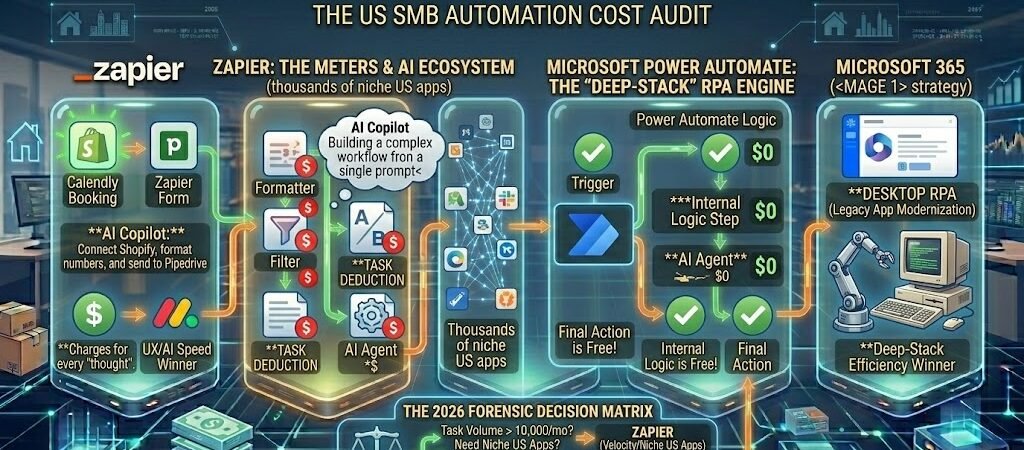
Key Takeaways: Zapier vs Microsoft Power Automate 2026
- The “Context” Advantage: Microsoft Power Automate wins on “Deep Intelligence” within the Microsoft Graph—it understands your meetings, emails, and SharePoint files natively. Zapier wins on “Cross-SaaS Intelligence”—it is the only platform that can reason across 8,000+ non-Microsoft apps (Slack, HubSpot, Shopify) with equal fluidity.
- The RPA Distinction: Power Automate offers Desktop Flows (RPA) to automate legacy software without APIs (e.g., old desktop accounting apps). Zapier remains strictly API-centric, focusing on modern cloud-to-cloud orchestration.
- The Total Cost of Ownership (TCO): For teams already on Microsoft 365 Business Premium, Power Automate is essentially “pre-paid,” making it the forensic choice for high-volume internal workflows. Zapier’s “Task Tax”remains a premium for its unmatched ease of use and 3rd-party variety.
- AI Philosophy: Microsoft’s Copilot is an embedded assistant that helps you build within the stack. Zapier Central/Agents are autonomous teammates that you “hire” to work across your entire tech stack.
Introduction: The “App-Agnostic” vs. “Stack-Native” Conflict
In 2026, the definition of a “productive” small business has evolved. It is no longer enough to have a “Single Source of Truth”; you must have a “Single Source of Logic.” For American freelancers and small teams, the central question is no longer “Which tool is better?” but “Where does my work actually happen?”
The 2026 Automation Archetypes
Small businesses generally fall into two categories:
- The SaaS-Agile Team: You use Slack for chat, Notion for docs, HubSpot for CRM, and Shopify for sales. Your stack is a “Best-of-Breed” collection of independent tools.
- The Microsoft-Native Team: You live in Teams, collaborate in SharePoint, draft in Word, and manage data in Excel. Your stack is a unified, secure ecosystem.
Defining the Contenders
- Zapier (The Universal Digital Glue): In 2026, Zapier has transitioned from a “trigger-action” tool to an AI Orchestration Platform. With over 8,000 integrations, it remains the only “Universal Translator” for the modern web. It is built for speed to ROI, allowing a non-technical founder to deploy a complex “Agentic Workflow” (image_38.png) in under 15 minutes.
- Microsoft Power Automate (The Native Powerhouse): Part of the Power Platform, this is the “Internal Engine”for the Microsoft 365 universe. It offers deep-stack automation that can touch every corner of your OS, including legacy desktop apps via RPA. It is built for forensic precision and enterprise-grade compliance, often sitting “silently” within the licenses you already pay for.
The Decision Thesis: If your business is a mosaic of different SaaS tools, Zapier is your digital architect. If your business is a pillar of the Microsoft ecosystem, Power Automate is your internal superpower. Choosing the wrong one doesn’t just cost money—it creates “Logic Fragmentation,” where your automations work against your natural workflow.
Comparing Enterprise Features: Before you commit, look into Zapier’s enterprise-grade security features to see how they compete with the Microsoft ecosystem for large-scale deployments.
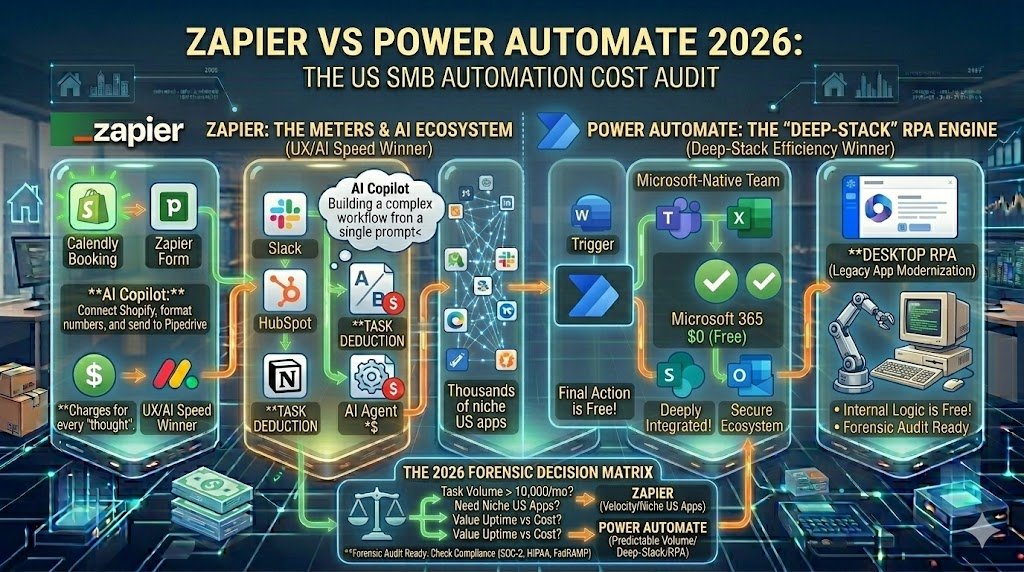
Category 1: The “Microsoft Tax” vs. The “Task Tax”
In 2026, the financial decision between these two platforms isn’t just about the monthly bill—it’s about whether you prefer a Predictable Subscription or a Metered Consumption model. For US SMBs, this choice often determines whether automation feels like a fixed utility or a fluctuating overhead.
1. Power Automate Pricing: The “All-You-Can-Eat” Bundle
For most US small businesses, Power Automate often feels like a “hidden” asset. If your team is already on Microsoft 365 Business Standard or Premium (approx. $12.50–$22/user/mo), you already have access to standard cloud flows.
- The Power Automate Premium Plan ($15/user/mo): This is the gold standard for individual power users in 2026. For a flat monthly fee, you get:
- Unlimited Cloud Flows: Run as many background automations as you need without watching a “task meter.”
- Attended RPA: The ability to automate desktop software (like legacy accounting tools) that doesn’t have a modern API.
- 5,000 AI Builder Credits: Use AI to extract data from invoices or ID cards natively.
- The Forensic Reality: If you have 5 employees who need deep automation, your cost is a predictable $75/month.
2. Zapier Pricing: The “Usage-Based” Premium
Zapier operates on a tiered, consumption-based model. You pay for Tasks—every time an automation actually performs an action (e.g., sending an email or creating a CRM record).
- The Professional Plan ($19.99/mo billed annually): This starting tier includes 750 tasks per month.
- The “Pricing Anxiety” Factor: If your business has a high-volume month (e.g., a viral marketing campaign or a seasonal sales spike), your Zapier bill can jump significantly.
- Example: 2,000 tasks per month on the Professional plan can cost closer to $49/mo, and the Team plan (essential for shared folders and 25 users) starts at $69/mo for 2,000 tasks.
- The Logic Advantage: Unlike Pabbly, Zapier in 2026 does not count internal logic steps (Filters, Paths, Formatters) as tasks on paid plans. This helps keep the “Task Tax” focused only on final results.
3. The “Logic” Cost Comparison
The forensic distinction lies in how they handle high-frequency data.
| Feature | Power Automate (2026 Premium) | Zapier (2026 Professional) |
| Monthly Entry Cost | $15 /user | $19.99 (Solo) |
| Task/Flow Limit | Unlimited Cloud Flows | 750 Tasks (Metered) |
| Best For | High-volume internal processing | Low-to-mid volume 3rd-party SaaS |
| Hidden Costs | Add-on RPA bots ($150+) | Over-limit task charges |
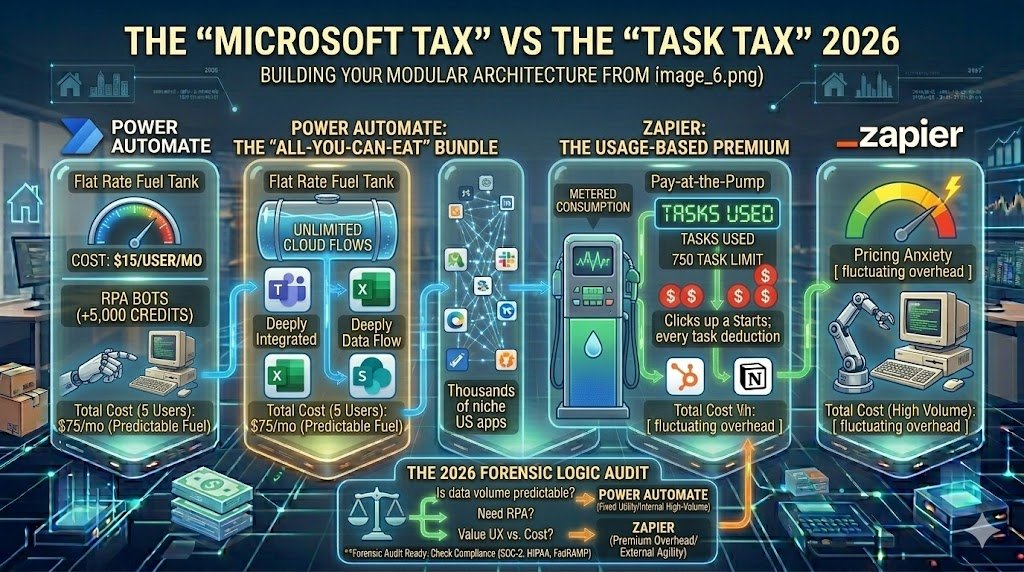
The 2026 Forensic Rule: If your workflows run thousands of times a day (e.g., processing every single row in a massive Excel sheet), Power Automate’s per-user pricing will save you thousands of dollars. If your workflows are high-value but lower frequency (e.g., qualifying a $20k consulting lead), Zapier’s premium for ease-of-use is a rounding error.
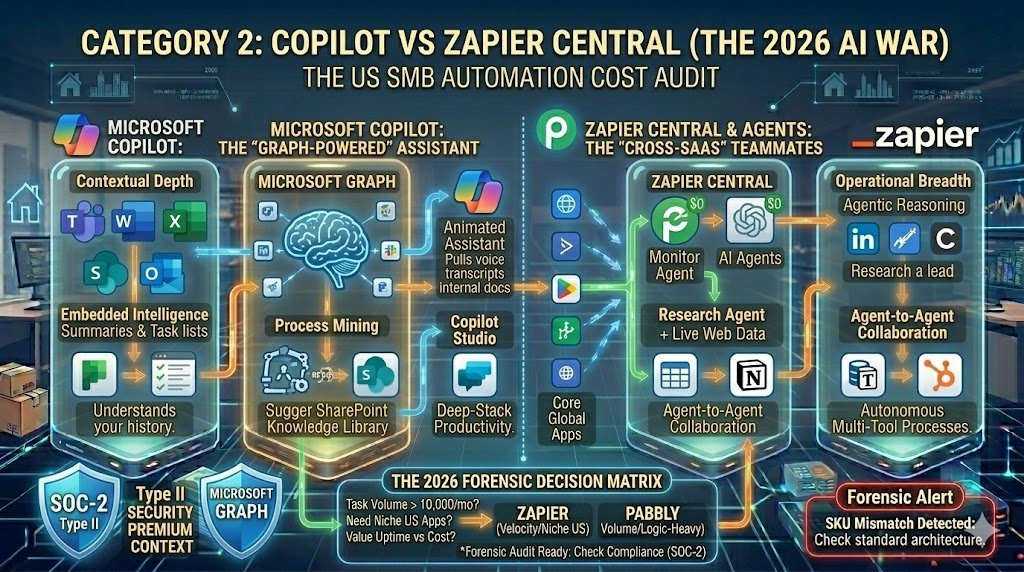
Category 2: Copilot vs. Zapier Central (The 2026 AI War)
In 2026, automation is no longer just about “moving data”—it is about “orchestrating intelligence.” Both platforms have embedded AI at their core, but they serve two different types of digital brains. Microsoft focuses on Deep Context, while Zapier focuses on Autonomous Action.
1. Microsoft Copilot: The “Graph-Powered” Assistant
The genius of Microsoft’s 2026 AI lies in its connection to the Microsoft Graph. Because Copilot is native, it doesn’t just see your data; it understands your professional relationships and history.
- Embedded Intelligence: Copilot lives inside Power Automate, Word, and Excel. You can ask it to “Summarize the feedback from my last three Teams meetings and create a prioritized action list in Microsoft Planner,” and it does so by pulling context from your actual voice transcripts and internal docs.
- Process Mining: Copilot can analyze your team’s existing M365 usage to proactively suggest automations you haven’t built yet, identifying bottlenecks in how you handle email approvals or expense reports.
- Knowledge Grounding: Through Copilot Studio, you can ground your AI in your company’s SharePoint library, ensuring the “Assistant” only uses your verified internal procedures to answer questions.
2. Zapier Central & Agents: The “Cross-SaaS” Teammates
While Microsoft builds an assistant for your stack, Zapier has built AI Teammates that can work across any stack. In 2026, Zapier Central is the command center for these autonomous agents.
- Agentic Reasoning: Unlike a standard “if-this-then-that” flow, a Zapier Agent can make decisions. You can “hire” an agent to: “Monitor my LinkedIn mentions. If it’s a potential lead, research their company in Crunchbase; if it’s a support issue, draft a reply in Zendesk; if it’s a recruiter, archive it.” * Live Data Access: Zapier Agents can browse the web in real-time or pull from Zapier Tables and Notion simultaneously. They act as “Digital Private Investigators” (as seen in our Elite Intake guide) that work 24/7.
- Agent-to-Agent Collaboration: You can now instruct one agent to “call” another. For example, your Research Agent can hand off a summarized brief to your Sales Agent for final outreach.
3. Forensic Comparison: Depth vs. Breadth
| Feature | Microsoft Copilot (M365) | Zapier Central / Agents |
| Primary Strength | Contextual Depth: Understands your emails, meetings, and files natively. | Operational Breadth: Can reason and act across 8,000+ non-Microsoft apps. |
| Data Source | Microsoft Graph (SharePoint, Teams, OneDrive) | Live Web + 8,000 SaaS Connectors + Zapier Tables |
| Decision Making | High-level summaries & internal drafting | Autonomous execution & cross-app handoffs |
| Best For | Improving personal/team productivity within the suite. | Automating complex, multi-tool business processes across the web. |
The 2026 Forensic Rule: Use Microsoft Copilot when you need an AI that “knows” you and your internal team. Use Zapier Agents when you need an AI that “works” for you across the diverse tools of the open web.
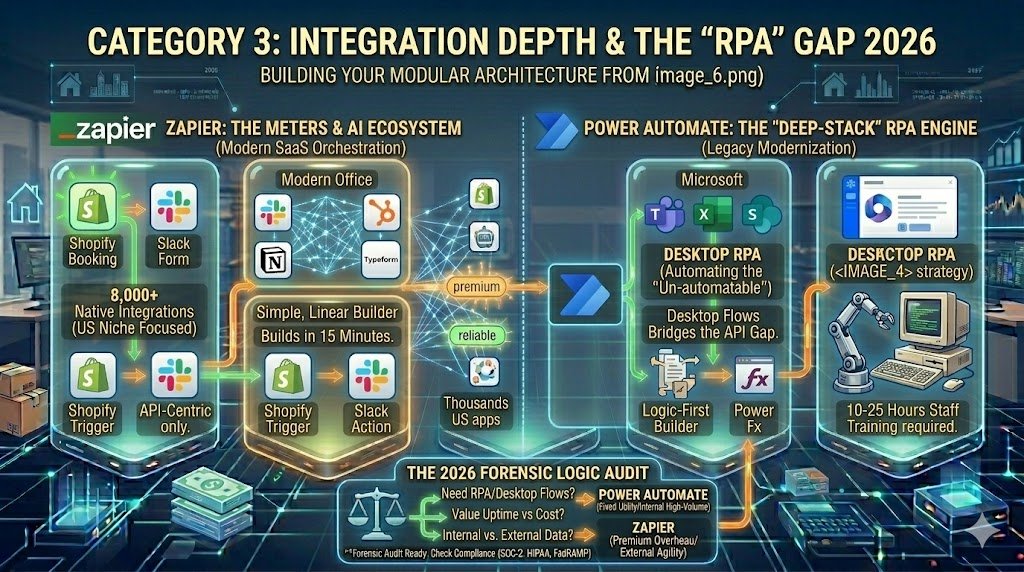
Category 3: Integration Depth & The “RPA” Gap
In 2026, the primary differentiator between these two platforms isn’t just how many apps they connect to, but how they connect to them. For US SMBs, this is the choice between Modern SaaS Orchestration and Legacy Modernization.
1. The Ecosystem Gap: 8,000 vs. 1,000
The sheer volume of integrations remains the most visible divide.
- Zapier (8,000+ Integrations): Zapier is the undisputed “Universal Translator.” Because it is 100% cloud-focused and API-driven, it acts as a plug-and-play bridge for almost any SaaS tool a freelancer or startup might use—from niche marketing tools like TikTok Lead Ads and Typeform to specialized US real estate MLS systems.
- Power Automate (1,000+ Connectors): While Microsoft’s library is smaller, it is designed for depth. These connectors are high-quality, enterprise-grade links into the most common business software (Salesforce, Adobe, SAP). However, its true power is native: no other tool can interact with the Microsoft Graph (Teams, SharePoint, Excel) with the same level of granular security and speed.
2. The RPA Factor: Automating the “Un-automatable”
This is the “Secret Weapon” of the Microsoft stack. While Zapier is limited to apps with an internet-facing API, Power Automate includes Desktop Flows (RPA – Robotic Process Automation).
- Bridging the Legacy Gap: Many US SMBs still rely on legacy software—older desktop-based accounting apps, local inventory databases, or government portals that don’t have APIs.
- How it Works: Power Automate can literally “mimic” a human by recording clicks, typing, and screen scraping. It bridges the gap between your modern cloud flows and your “old school” desktop tools.
- The Zapier Reality: In 2026, Zapier remains strictly API-centric. While they have introduced a “Desktop Agent” for basic file monitoring, they do not offer a native RPA solution for UI-based automation.
3. Ease of Use: Linear vs. Logic-First
The user experience reflects the intended audience.
- Zapier (The 15-Minute ROI): Built for the non-technical user. Its builder is a simple, linear “Trigger -> Action” sequence. You can build your first automation during a lunch break without opening a manual.
- Power Automate (The Low-Code Learning Curve): Marketed as no-code, but once you move beyond basic templates, it feels like “Light Coding.” To handle complex data or conditional logic, you often have to learn Power Fx (Microsoft’s formula language).
| Feature | Zapier (2026) | Power Automate (2026) |
| Connectivity | 8,000+ Cloud Apps (Breadth) | 1,000+ Connectors (Depth) |
| Legacy Apps | No (API only) | Yes (RPA/Desktop Flows) |
| Building Style | Simple, Linear Builder | Advanced, Logic-Based Flow |
| Staff Training | ~5-10 Minutes | ~10-25 Hours (for proficiency) |
The 2026 Forensic Rule: If your business is built on modern, cloud-native tools (Shopify, Slack, HubSpot), Zapier will get you to ROI faster. If you need to “drag” an old desktop accounting system into the 21st century, Power Automate is the only logical choice.
Category 4: Security, Compliance & The “Forensic” Audit
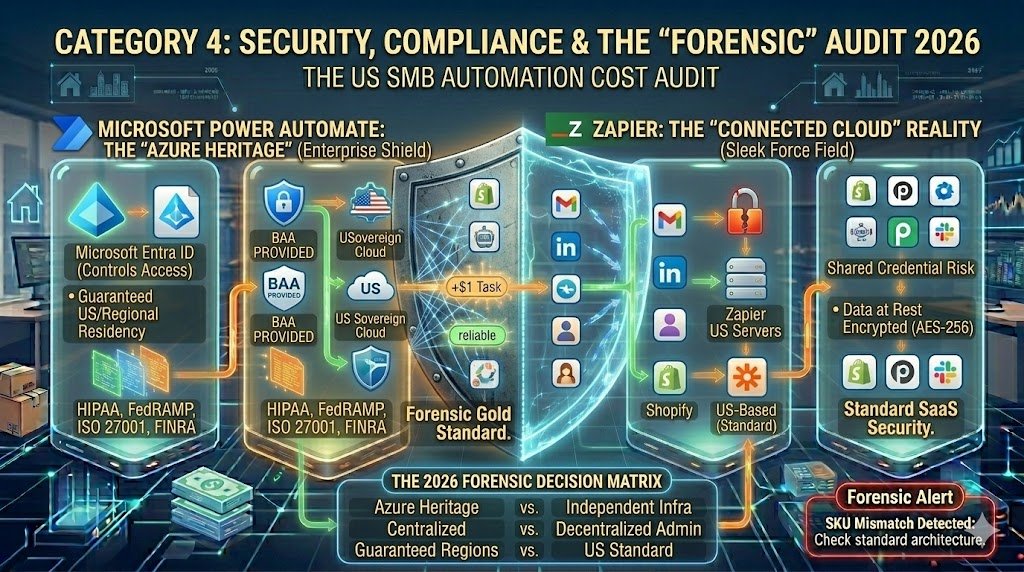
In 2026, automation is no longer just a productivity hack; it is a Compliance Anchor. For US SMBs—especially those in healthcare, finance, or government contracting—where your data “lives” and how it is protected can be the difference between a successful audit and a catastrophic legal liability.
1. Power Automate’s Enterprise Shield: The “Azure Heritage”
Microsoft Power Automate is not an isolated tool; it is a direct extension of the Microsoft Azure security cloud. For a US business, this means inheriting a multibillion-dollar security infrastructure by default.
- Native Compliance Gold Standard: Power Automate is the “Forensic” choice because it natively supports HIPAA (healthcare), FedRAMP (government), ISO 27001, and FINRA (finance). If your client base requires a Business Associate Agreement (BAA), Microsoft provides this as a standard part of their enterprise cloud services.
- Identity & Access Management (Entra ID): Access is governed by Microsoft Entra ID (formerly Azure AD). You can enforce Conditional Access Policies—ensuring that an automation only runs if the user is on a managed company laptop or within a specific US-based IP range.
- Data Residency: You can choose exactly where your data resides. For US government contractors, you can ensure data never leaves US Sovereign Cloud regions.
2. Zapier’s SMB Security: The “Connected Cloud” Reality
Zapier has made massive strides in 2026 to shed its “Shadow IT” reputation. While it is highly secure for 90% of US small businesses, it operates under a different trust model.
- SOC-2 Type II & SOC-3 Certified: Zapier maintains rigorous third-party audits for security, availability, and confidentiality. It is fully GDPR and CCPA compliant, making it a safe harbor for standard marketing and sales data.
- The “Shared Credential” Risk: In Zapier, a team member might connect a personal Gmail or LinkedIn account to a company Zap. Without the Zapier Enterprise “Admin Center,” it is harder for IT to see exactly which apps are authorized and what data is being moved, creating a risk of “Data Leakage.”
- Data at Rest: Zapier encrypts data in transit (TLS 1.2+) and at rest (AES-256). However, because Zapier is a “Universal Translator,” your data must briefly pass through their US-based servers to be “translated” between apps—a step that some ultra-high-security firms may find risky.
3. Forensic Comparison: The Audit Trail
| Feature | Microsoft Power Automate | Zapier (Professional/Team) |
| Primary Security Base | Azure Entra ID / Microsoft 365 | Independent SOC-2 Infrastructure |
| Compliance Certs | HIPAA, FedRAMP, ISO, FINRA | SOC-2 Type II, GDPR, CCPA |
| Admin Oversight | Centralized (Power Platform Admin) | Decentralized (unless on Enterprise) |
| Data Residency | Guaranteed US/Regional Regions | US-Based (Standard) |
The 2026 Forensic Rule: If your business is required to provide a Forensic Audit Trail for legal or regulatory reasons, Power Automate is the only choice that will satisfy a corporate compliance officer. If you are a creative agency or e-commerce shop where standard SOC-2 protection is sufficient, Zapier offers the speed you need without the “Security Overkill.”
Is the original still the king? Before you switch your entire workflow to Microsoft, read our honest Zapier review for US SMBs to see if it still offers the best ROI for small business owners this year.
Conclusion: The Strategic Choice for Your 2026 Budget
The contest between Zapier and Microsoft Power Automate in 2026 is a battle of philosophies: Agility vs. Architecture. For US SMBs and freelancers, the final decision rests on where your team “lives” 80% of the day and how much technical friction you are willing to tolerate.
- The Zapier Case: The “Universal Digital Glue”
- Choose Zapier if your business is built on a diverse “Best-of-Breed” SaaS stack (Slack, HubSpot, Shopify, Notion).
- It is the only platform that offers Zero-Friction AI Orchestration, allowing non-technical owners to build autonomous AI Agents that reason across the open web.
- The Bottom Line: You pay a premium for speed. Zapier is the choice for teams that value moving fast and having access to every niche US app on day one.
- The Power Automate Case: The “Native Powerhouse”
- Choose Power Automate if you are already invested in the Microsoft 365 ecosystem.
- It provides Deep-Stack Intelligence that no other tool can match, along with Desktop RPA to drag legacy, non-API software into the modern age.
- The Bottom Line: It is the most cost-effective and secure solution for high-volume internal processes, offering enterprise-grade compliance (HIPAA/FedRAMP) as a standard.
The 2026 Strategy Map
| If your priority is… | The Winner is… | Forensic Reason |
| Speed to ROI | Zapier | AI Copilot builds complex 3rd-party flows in minutes. |
| Budget Efficiency | Power Automate | Often “pre-paid” in M365; unlimited flows for $15/user. |
| Legacy Systems | Power Automate | Native RPA automates desktop apps without APIs. |
| App Variety | Zapier | 8,000+ native connectors vs. Microsoft’s ~1,000. |
| Compliance | Power Automate | Inherits Azure’s forensic security and data residency. |
The 2026 Forensic Rule: Don’t let a $15 subscription fee dictate your business logic. Choose the tool that connects your Revenue-Generating Apps with the least amount of manual maintenance. In many high-performance US teams, the answer is actually Both: Power Automate for the internal “Microsoft” back-office and Zapier for the external “SaaS” growth engine.

About the Author
Aapt DubeyAapt Dubey is an automation specialist and software developer dedicated to eliminating manual workflows for small businesses. With deep, hands-on experience building complex Zapier integrations, API connections, and real-world applications, Aapt writes actionable, tested tutorials to help businesses scale efficiently.