
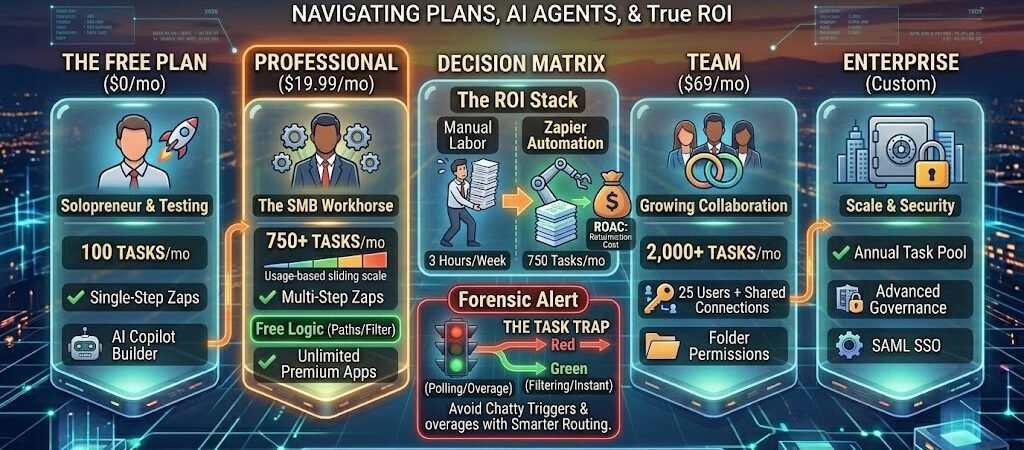
Key Takeaways: Navigating Zapier Pricing 2026 Shift
- The “Unified Stack” Reality: Zapier now bundles Zaps, Tables, Interfaces, and AI Chatbots into single tiers. You aren’t just buying automation; you’re buying a no-code app infrastructure.
- Built-in Logic is Free: In 2026, Filters, Paths, and Formatter steps do not count toward your task limit. This is a massive cost-saver for complex, multi-branch workflows.
- The Rise of AI Agent Credits: Beyond the base subscription, Zapier Agents use an “Activity” credit system (separate from Tasks) for self-directed AI tasks.
- The “Task Trap” is Predictable: Zapier’s 2026 model includes unlimited overages at a fixed 1.25x rate on the Professional plan, preventing total workflow shutdowns when you hit your limit.
- Team Efficiency: The Team Plan is no longer just about “more tasks”—it’s the entry point for Shared App Connections, which eliminates the security risk (and cost) of individual seat management.
Introduction: The State of Automation in 2026
The automation landscape in 2026 has undergone a fundamental shift. For years, US small businesses viewed Zapier as a “utility bill”—a necessary expense for moving data from Point A to Point B. Today, that perspective is obsolete. As AI agents and autonomous workflows become the backbone of SMB operations, Zapier has transitioned from a background tool to a Unified AI Orchestration Platform.
From “Zaps” to “Systems”
In 2026, Zapier’s pricing reflects a move toward Bundled Value. You no longer pay separately for a database (Tables), a custom client portal (Interfaces), or an AI support bot (Chatbots). These are now natively integrated into your core subscription. This “all-in-one” approach is designed to compete with lower-cost rivals like Make and n8n by offering a level of speed-to-market that single-service tools can’t match.
Why Price Perception is Changing
While Zapier remains a “premium” choice, its 2026 ROI calculation has changed. Small businesses are now looking at Labor Replacement Value. If a $19.99/month Professional plan automates a lead-vetting process that used to take a human 10 hours a week, the “price-per-task” becomes secondary to the hundreds of dollars in labor saved. This guide will break down the 2026 tiers to help you find the “sweet spot” where automation power meets budget reality.
Verify the latest rates: While we track the best ways to save, it is always a good idea to check the official Zapier pricing page for real-time updates on task limits and feature availability for each plan tier.
The 2026 Pricing Tiers: A Comparative Breakdown
In 2026, Zapier has streamlined its offering into four primary buckets. The most significant change is the “Usage-Based Sliding Scale” within each tier—allowing you to stay on the same feature set while only paying more as your volume grows.
1. The Free Plan ($0 / month)
The Free plan is no longer just a “trial”; it’s a functional entry point for solopreneurs.
- Task Limit: 100 tasks per month.
- Zaps: Single-step only (Trigger -> Action).
- The 2026 AI Perk: Includes Zapier Copilot, the natural language builder that lets you describe a workflow (e.g., “When I get a lead in Facebook, text them and add them to my sheet”) and builds the draft for you.
- Best For: Simple “Set and Forget” syncs like pushing Instagram posts to a Discord channel.
2. The Professional Plan (Starting at $19.99 / month)
This is the “Modular Powerhouse” for US small businesses. In 2026, this plan unlocks the “Logic-is-Free” benefit, where Filter and Formatter steps don’t cost credits.
- Task Limit: Starts at 750 tasks (scalable).
- Multi-Step Zaps: Build workflows with 100+ steps.
- Paths (Conditional Logic): The ability to say “If lead is from California, do X; if from New York, do Y.”
- Unlimited Premium Apps: No extra charge for “High-Value” apps like Salesforce, Shopify, or QuickBooks.
- Autoreplay: If a 2026 API update breaks your Zap (the “Forensic Error” we discussed), Zapier will automatically retry the task for you.
3. The Team Plan (Starting at $69 / month)
The Team plan is designed for businesses where more than one person manages the “Data Plumbing.”
- Task Limit: Starts at 2,000 tasks.
- Shared App Connections: This is the killer feature. One person connects the company’s LinkedIn or Bank account, and the whole team can use it in Zaps without sharing passwords.
- Folder Permissions: Organize Zaps by department (e.g., Sales, HR, Finance) and control who can edit them.
- Support: Priority “Premier” support with 2026-standard 1-hour response times.
4. The Enterprise Plan (Custom Pricing)
Reserved for businesses processing 100,000+ tasks or requiring high-level security compliance.
- Consolidated Billing: One “Annual Task Pool” shared across all departments.
- Advanced Governance: Administrative “Kill Switches” to prevent employees from connecting unauthorized apps (Shadow IT).
- SAML SSO: Integrated with Okta or Azure AD for 2026-grade security.
2026 Decision Matrix: At a Glance
| Feature | Free | Professional | Team |
| Price (Annual) | $0 | $19.99/mo | $69/mo |
| Tasks Included | 100 | 750 | 2,000 |
| Multi-Step Zaps | No | Yes | Yes |
| Logic (Paths/Filter) | No | Yes (Free) | Yes (Free) |
| Shared Connections | No | No | Yes |
| AI Copilot | Yes | Advanced | Collaboration Mode |
If the current price tiers feel too high for your task volume, you might find a better deal with a visual workflow builder. Check out our Zapier vs Make cost comparison to see how much you could save by switching.
The “Hidden” 2026 Costs: AI Agents & Activity Credits
In 2026, the biggest surprise for most US small businesses isn’t the cost of their Zaps, but the introduction of the “Activity Credit” system for Zapier Agents. While Zaps follow a predictable “Trigger -> Action” path, Agents are autonomous; they can perform multiple tasks to reach a single goal. To reflect this, Zapier has unbundled Agent usage from your standard Task count.
1. Zapier Agents: The “Activity” Economy
Instead of tasks, Agents consume Activities. An activity is counted every time an agent uses a tool, searches the web, or queries a knowledge source.
- The Free Plan ($0): Includes 400 activities per month. Great for testing, but a “chatty” agent researching leads can burn through this in 48 hours.
- The Pro Agent Add-on ($33.33 / month billed annually): Unlocks 1,500 activities per month. This is the sweet spot for an “AI Teammate” that handles daily customer support triage or inbox management.
- The Activity Guardrail: To prevent runaway costs, agents are limited to 40 activities per individual run. If an agent gets stuck in a loop, it will pause and ask for human permission before spending more of your credits.
2. Premium Interfaces & Tables
In 2026, Zapier is no longer just “the glue” between apps; it’s also where you store data. While basic usage is included in your plan, power users may encounter “Advanced Plan” costs for these products:
- Advanced Tables ($20 / month): Required if you need more than 100,000 records or specialized “Views” for your team.
- Advanced Interfaces ($20 / month): Needed for custom branding, removing the “Built on Zapier” badge, and using custom domains (e.g.,
portal.yourbusiness.com).
3. The 1.25x Overage Standard
Gone are the days when hitting your task limit meant your business came to a halt. In 2026, Zapier uses an “Overflow Buffer.”
- If you cross your 750-task limit on the Pro plan, your Zaps keep running.
- You are billed for extra tasks at a rate of 1.25x the cost of your plan’s normal task rate.
- Strategic Tip: If you consistently hit 1,200 tasks on a 750-task plan, it is nearly always $15–$20 cheaper to simply upgrade to the next task tier rather than paying the monthly overages.
Cost Comparison: Tasks vs. Activities
| Unit | What triggers it? | Best for… |
| Task | A single successful action (e.g., “Add to Sheet”) | Repetitive, fixed-logic data moves. |
| Activity | AI reasoning, web searches, or tool calls | Research, synthesis, and autonomous decision-making. |
Avoiding the “Task Trap”: Efficiency Strategies
In 2026, the key to a low Zapier bill isn’t doing less automation—it’s doing Smarter Data Routing. Zapier’s pricing model rewards users who understand the difference between a “Chatty Trigger” and a “Silent Workflow.” By applying these three forensic strategies, you can often cut your task consumption by 40% without losing a single lead.
1. The “Logic-is-Free” Rule
The most important 2026 pricing update is that Built-in Logic steps are now essentially free of charge in terms of your task quota.
- The Strategy: Place a Filter by Zapier or a Path as early as possible in your Zap.
- How it saves money: If a lead comes in but doesn’t meet your “Qualified” criteria (e.g., they are outside your service area), the Filter stops the Zap. Because Filters and Paths don’t count as tasks, you just “screened” a lead for $0.
- Pro-Tip: Always use Formatter by Zapier to clean data inside the Zap. Since Formatter is also a free step, you shouldn’t pay for a separate “cleanup” app to do this work.
2. Eliminating “Chatty” Polling Triggers
In 2026, some apps use “Polling” (checking every 1–15 minutes), while others use “Webhooks” (sending data instantly only when it exists).
- The “Task Trap”: Polling itself is free, but it can trigger “Successful Runs” for minor updates you don’t actually need, burning tasks on 1,000 “empty” syncs.
- The Solution: Whenever possible, choose triggers labeled “Instant”. These use Webhooks, meaning Zapier only wakes up when there is real work to do.
- Forensic Audit: Check your Zap History. If you see a Zap running hundreds of times but “Stopping” at the first step, you have a chatty trigger. Switch to a Webhook or refine your trigger criteria to save those task credits.
3. The “Batching” Loophole (Looping & Sub-Zaps)
Processing 100 orders one-by-one costs 100 tasks. In 2026, power users use Looping by Zapier to batch process data.
- The Strategy: Use a single Zap to “Find 20 New Orders” and then use a Loop to process them all within that same single execution.
- Sub-Zaps: If you have a complex process (like the “1099 Gatekeeper” from our previous guide) that appears in 5 different Zaps, don’t rebuild it 5 times. Create one Sub-Zap.
- The Benefit: Sub-Zaps make your system modular and easier to troubleshoot. While the steps inside a Sub-Zap still count as tasks, the “Call Sub-Zap” action itself is a highly efficient way to manage complex data without creating “Spaghetti Zaps” that are prone to expensive errors.
2026 Task Efficiency Checklist
| Strategy | Task Cost | Benefit |
| Standard Filter | FREE | Stops unqualified data from spending your budget. |
| Formatter Step | FREE | Cleans names/dates without third-party fees. |
| Delay Step | FREE | Batches data to be processed during “Off-Peak” hours. |
| Instant Trigger | 1 Task | Only fires when data actually exists (No “Empty” runs). |
Zapier vs. The 2026 Competition (The ROI Battle)
In 2026, the question isn’t whether Zapier is the “best,” but whether it is the most cost-efficient for your specific data volume. While Zapier dominates in ease of use, rivals like Make and n8n have carved out niches for businesses with complex, high-volume AI workflows.
The 2026 Competitive Landscape
| Platform | Pricing Model | Best For… | Starting Price |
| Zapier | Per Task (Each action) | Non-technical teams & rapid prototyping. | ~$20/mo (750 tasks) |
| Make | Per Operation (Bundled) | Visual logic & high-volume data parsing. | ~$9/mo (10k ops) |
| n8n | Per Execution (Full Run) | Technical teams & AI-heavy “agents.” | ~$20/mo (Cloud) / $0 (Self-Host) |
1. Zapier: The “Speed-to-Market” Leader
Zapier remains the “gold standard” for 2026 because of its 8,000+ app integrations.
- The Value: If you need to connect a niche real estate CRM to a local SMS provider, Zapier likely has the “Plug-and-Play” connector ready.
- The Verdict: Use Zapier if you value employee time over software costs. It is the only platform where a marketing manager can build a complex AI-vetting system in 15 minutes without calling a developer.
2. Make: The “Visual Logic” Expert
Make (formerly Integromat) is Zapier’s biggest threat for logic-heavy users.
- The “Operation” Advantage: While Zapier charges for every step, Make’s “Operations” are significantly cheaper at scale. 10,000 operations on Make cost less than half of Zapier’s 750-task starter plan.
- The Verdict: Use Make for Batch Processing (e.g., “Every Friday, find all 500 unpaid invoices and email them”). On Zapier, this could cost 500 tasks; on Make, it’s a fraction of the cost.
3. n8n: The “AI Powerhouse”
In 2026, n8n has become the go-to for technical teams building “AI Agents.”
- Execution-Based Pricing: Unlike Zapier or Make, n8n Cloud charges per Execution. Whether your workflow has 5 steps or 50 steps, one successful run equals one execution credit.
- Self-Hosting (The $0 Option): For businesses with a developer or DevOps resource, n8n can be “self-hosted” on your own servers. This eliminates monthly subscription fees entirely, allowing for unlimited automation for just the cost of your server ($10–$20/mo).
- The Verdict: Use n8n for complex AI chains where an agent might need to perform 20 “reasoning steps” before sending one email. On Zapier, that single email could cost 20 tasks; on n8n, it costs 1 execution.
The 2026 Hybrid Strategy
Many successful US small businesses no longer pick just one. They use a Hybrid Stack:
- Zapier for “Front-End” triggers (Lead Gen, CRM syncs, and Slack alerts).
- Make or n8n for “Back-End” heavy lifting (Database cleaning, complex AI research, and monthly reporting).
This strategy keeps your Zapier bill within the $20–$50 range while allowing you to scale your most data-intensive operations for pennies.
Decision Matrix: Which Plan Do You Actually Need?
By 2026, the choice between Zapier plans is less about “features” and more about complexity and team collaboration. Use the following matrix to identify your business profile and the corresponding plan that maximizes your ROI.
The 2026 Plan Selection Matrix
| If your business is… | And you need to… | The Best Plan for 2026 is… |
| A Solo Founder | Sync simple data between 2 apps (e.g., Form to Email). | Free ($0/mo) |
| A Solopreneur / Power User | Use AI logic, multi-step Zaps, and premium apps like Salesforce or QuickBooks. | Professional ($19.99/mo) |
| A Growing SMB Team | Shared folders, collaborative building, and shared app connections. | Team ($69/mo) |
| A High-Volume Agency | Manage 100,000+ tasks with advanced security and audit logs. | Enterprise (Custom) |
The “Upgrade Trigger” Checklist
In 2026, don’t wait for your Zaps to stop to upgrade. Move to the next tier if you hit any of these three “Forensic” triggers:
- The Multi-Step Hurdle: You need one trigger to fire three or more actions (e.g., Lead enters -> Email goes out -> CRM updates -> Slack alert). This requires Professional.
- The Password Risk: You have two or more people logging into the same Zapier account. To maintain SOC-2 security hygiene, move to Team for individual user seats.
- The ROI Threshold: You are spending more than 3 hours per week manually fixing data errors that a “Formatter” or “Filter” step could handle. Since these steps are free on the Professional plan, the upgrade pays for itself in labor savings within the first month.
Conclusion: Future-Proofing Your Ops
The 2026 Zapier pricing model is designed to reward Smarter Automation. By moving toward a unified system that integrates AI Agents, Tables, and Interfaces, Zapier has made it easier for US small businesses to build a “Digital Workforce” without a six-figure engineering budget.
Your goal shouldn’t be to minimize your Zapier bill, but to maximize your Automation-to-Labor ratio. Whether you start on the Free tier or scale into a 25-user Team workspace, remember that the most expensive task is the one a human is still doing manually.

About the Author
Aapt DubeyAapt Dubey is an automation specialist and software developer dedicated to eliminating manual workflows for small businesses. With deep, hands-on experience building complex Zapier integrations, API connections, and real-world applications, Aapt writes actionable, tested tutorials to help businesses scale efficiently.