
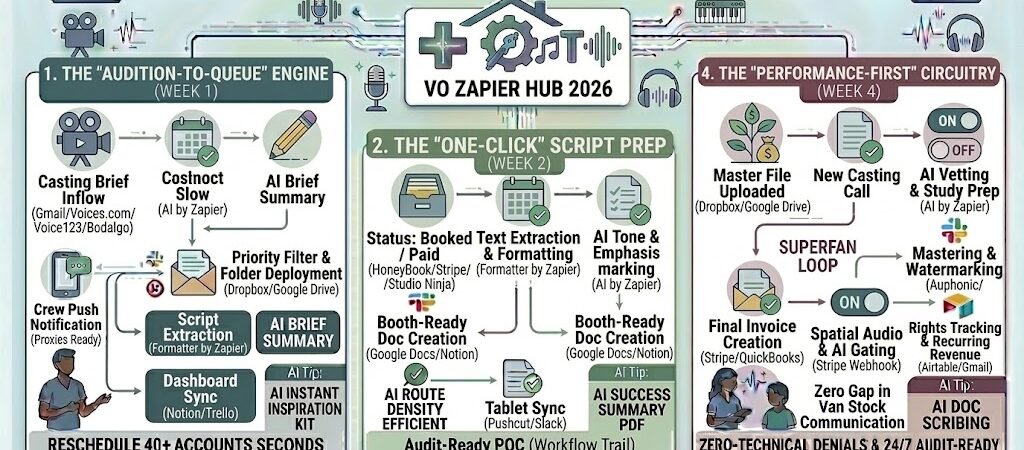
Key Takeaways: Zapier for Voice Over Artists
- The “Instant-Audition” Portal: Use Zapier to instantly sync auditions from casting sites to your recording queue and notify you via Slack of high-priority briefs.
- Secure Script-to-Booth Workflow: Automatically convert script PDFs into teleprompter-ready text in Google Docs or Notion the moment a job is booked.
- The “Watermarked” Delivery Gate: Trigger the release of “clean” high-res audio only after the final Stripe or PayPal payment is confirmed.
- Agentic Usage-Rights Tracking: Use AI by Zapier to log and set reminders for “Usage Expiry” dates (e.g., 12-month web use) so you can automate renewal invoices.
The “Booth Fatigue” of 2026
In 2026, the voice-over industry is experiencing a massive paradox. While the global demand for human performance is surging—driven by a “back-to-human” trend in response to AI saturation—the time an artist spends actually performing has plummeted. This is Booth Fatigue, where the physical act of recording is eclipsed by the relentless digital paperwork required to run a modern remote studio.
By 2026, a Voice-Over artist’s career is often throttled by three specific “Operational Drags”:
- The “Audition Triage” Lag: Voice actors now compete in a high-velocity market where being the 50th person to submit is often as bad as not submitting at all. Many artists spend 3–4 hours a day just filtering through casting sites and manually renaming audition files to meet specific client specs. In 2026, if you are still manually downloading briefs and creating folders for auditions, you’re losing the most lucrative “rush” jobs.
- The “Script-to-Tablet” Friction: A common workflow killer is the manual prep of scripts. Corporate e-learning and video game projects in 2026 can feature thousands of lines in messy spreadsheets or locked PDFs. Artists lose 20% of their billable energy cleaning up formatting, highlighting cues, and syncing text to their booth tablets.
- The “Master File” Risk: The final handover is the most dangerous stage for a freelancer’s cash flow. Sending “clean” high-res audio before payment is a 2024 liability. However, manually watermarking previews and then manually releasing the masters after checking a bank statement adds hours of “Admin Tax” to every single booking.
The Zapier Solution: Zapier acts as your “Virtual Studio Manager” and “Digital Engineer.” It creates an automated pipeline between your casting platforms, your recording environment, and your accounting software. By 2026, an automated VO artist doesn’t “check” for work; Zapier has already scanned the casting brief, alerted them to a “High-Value” match via Slack, and pre-formatted the script for their iPad. You don’t “chase” payments; Zapier has already watermarked your preview and is “standing guard” to release the high-res WAV the millisecond the Stripe payment clears.
Practical AI Tip for 2026: Use AI by Zapier to “Scan for Usage Rights.” Have Zapier read your incoming contracts and automatically log the “Usage Expiry” dates into a 2026 Airtable tracker. Zapier can then send you a nudge 30 days before a commercial license expires, allowing you to automate the “Renewal Inquiry” and secure easy recurring revenue.
Blueprint #1 – The “Audition-to-Queue” Engine
In 2026, the voice-over market moves at the speed of social media. “First-to-file” is a real competitive advantage. If you spend your morning manually sorting through casting emails and renaming files, you are essentially paying a “speed tax” on your own career. This blueprint uses Zapier to turn your inbox into an automated casting director that preps your booth before you even step inside.
1. The Trigger: The “Casting Brief” Inflow
- The 2026 Tech: A new audition invite or job brief arrives via Gmail or a webhook from platforms like Voices.com, Voice123, or Bodalgo.
- The Action: Zapier catches the data, instantly extracting the project name, client, budget, and the script attachment.
2. The Logic: AI Vetting & Studio Prep
Zapier acts as your Virtual Agent, performing a high-speed “vibe check” on the opportunity:
- The AI Brief Summary (AI by Zapier): The AI scans the script and artistic directions. It tags the project with categories like “Corporate / Authoritative” or “Animation / Character / High-Energy” and creates a 2-sentence summary of the “vocal target.”
- The Priority Filter: Using Zapier Paths, the system checks the budget. If it meets your “Premium Tier” criteria, it bypasses the standard queue and sends a Pushcut notification to your phone: “🚀 High-Value Audition: [Project Name] – $[Budget]. Script is ready.”
- The Folder Deployment: Zapier creates a dedicated folder in Dropbox or Google Drive using a standardized naming convention:
2026_Auditions / [Date]_[Client]_[Project].
3. The Action: The “Booth Sync”
- The Script Prep: The script is automatically converted from PDF to a clean text file and saved into your “Booth” folder.
- The Dashboard Update: A new task card appears in your Notion or Trello “Audition Board” with the script text, the AI’s vocal summary, and a direct link to the submission portal.
- The Result: When you enter your booth, your tablet is already synced with the new script, and your “To-Do” list is prioritized by ROI, not just by time of arrival.
Summary: The Audition-to-Queue Zap
| Step | Component | 2026 Recommended Tool |
| Trigger | New Casting Email/Webhook | Voices.com / Gmail |
| Logic 1 | AI Vibe & Budget Check | AI by Zapier |
| Logic 2 | Project Folder Creation | Dropbox / Google Drive |
| Action 1 | Script Extraction | Formatter by Zapier |
| Action 2 | Production Dashboard Sync | Notion / Trello |
Practical AI Tip for 2026: Use AI by Zapier to “Auto-Rename for Submission.” Most casting directors have strict naming rules (e.g.,
FirstName_LastName_Project.wav). Have Zapier “watch” yourFinished_Auditionsfolder; the second you drop a file there, it renames it perfectly to match the brief’s requirements and pings you the submission link.
Blueprint #2 – The “One-Click” Script Prep
In 2026, the physical act of “prepping a script”—highlighting lines, adjusting font sizes, and cleaning up messy PDF formatting—is a relic of the past. For a Voice-Over artist, this is manual labor that distracts from the vocal performance. This blueprint uses Zapier to ensure that by the time you close the booth door, your tablet is perfectly configured for a “cold read” that sounds like a master take.
1. The Trigger: The “Booked” Milestone
- The 2026 Tech: You move a project from “Audition” to “Booked” in your CRM (HoneyBook, Trello, or Studio Ninja) or receive a deposit via Stripe.
- The Action: Zapier triggers the “Production Prep” sequence, pulling the final script from the client’s latest attachment.
2. The Logic: Booth-Optimization & AI Cues
Zapier acting as your Digital Script Supervisor, formatting the text for maximum legibility in a low-light environment:
- The PDF-to-Text Conversion: Zapier extracts the raw text from the client’s PDF or Word Doc, stripping out messy headers, footers, and page numbers that lead to mid-read stumbles.
- The AI Emphasis Engine (AI by Zapier): The AI scans the script for tone markers. If the brief says “Conversational,” the AI can automatically bold or italicize key operative words to give you instant “cold read” guidance.
- The Script Paging: Zapier pushes the cleaned text into a Google Doc or Notion Page set to your personal “Booth Preset” (e.g., 18pt font, OpenDyslexic for readability, and double line spacing).
3. The Action: The “Booth Mirror” Sync
- The Tablet Deployment: Zapier sends a webhook to your booth tablet (iPad/Android) to open the specific Notionlink or Google Doc you just created.
- The Engineer’s Brief: A summary of the technical specs (e.g., “Mono, 48kHz, 24-bit, -3db Peak”) is appended to the bottom of the script doc, so you don’t have to keep switching apps to check your DAW settings.
- The Result: You walk into the booth, pick up the tablet, and start recording immediately. No scrolling through emails, no zooming into PDFs, and no “wait, what were the specs?” moments.
Summary: The One-Click Script Prep Zap
| Step | Component | 2026 Recommended Tool |
| Trigger | Status: Booked / Paid | HoneyBook / Stripe |
| Logic 1 | Text Extraction & Formatting | Formatter by Zapier |
| Logic 2 | AI Tone & Emphasis Marking | AI by Zapier |
| Action 1 | Booth-Ready Doc Creation | Google Docs / Notion |
| Action 2 | Tablet Notification | Pushcut / Slack |
Practical AI Tip for 2026: Use AI by Zapier to “Auto-Pronounce.” Have Zapier scan the script for difficult brand names, medical terms, or technical jargon. The AI can then find the correct phonetic pronunciation and insert it in brackets next to the word in your booth-ready script.
The “Paid-to-Unlock” Master Delivery
In 2026, the “trust gap” between finishing a recording and receiving payment is the most stressful part of a voice actor’s week. Many artists fall into the trap of sending the high-res master file along with the invoice, essentially handing over the “keys to the car” before the check clears. This blueprint uses Zapier to create an automated digital escrow: the client gets a watermarked preview for approval, but the “clean” master file stays locked until the Stripe or PayPal payment is confirmed.
1. The Trigger: The “Master Upload”
- The 2026 Tech: You finish your edit in your DAW (Adobe Audition, Pro Tools, or Reaper) and export the final file into a specific Dropbox or Google Drive folder labeled
03_Ready_for_Review. - The Action: Zapier detects the new file and triggers the “Secure Delivery” sequence.
2. The Logic: Watermarking & Invoicing
Zapier acting as your Digital Gatekeeper, ensuring your work is protected:
- The Watermark Step (AI by Zapier / Auphonic): Zapier can trigger an audio processor like Auphonic to overlay a subtle “PREVIEW” beep or a low-volume music bed over the track.
- The Invoice Generation: Zapier pings QuickBooks, FreshBooks, or Stripe to generate the final invoice based on the “Booked” price.
- The “Approval” Email: An automated email is sent to the client: “Hi [Client]! Your VO is ready. You can listen to the watermarked preview here: [Link]. Once the invoice below is settled, the high-res master will be released to you instantly.”
3. The Action: The “Instant Unlock”
- The Payment Listener: Zapier “listens” for the webhook from your payment processor.
- The File Release: The millisecond the payment is marked “Paid,” Zapier:
- Moves the “Clean” high-res WAV from your private folder to a “Client_Download” folder.
- Sends a follow-up email/Slack: “Payment received! Thank you. Here is your clean, high-res master file: [Direct Download Link].”
- The Result: You get paid faster, and you never have to worry about a client “ghosting” you after receiving the final audio.
Summary: The Master Delivery Zap
| Step | Component | 2026 Recommended Tool |
| Trigger | Master File Uploaded | Dropbox / Google Drive |
| Logic 1 | Automated Watermarking | Auphonic / AI by Zapier |
| Logic 2 | Final Invoice Creation | Stripe / QuickBooks |
| Action 1 | Payment Confirmation | Stripe Webhook |
| Action 2 | Master File Release | Email / Slack |
Practical AI Tip for 2026: Use AI by Zapier to “Check for Retakes.” Have Zapier scan the client’s feedback in Frame.io or Slack. If the AI detects words like “wrong word,” “mispronounced,” or “redo,” it can automatically move the project back to your “Recording Queue” in Notion and flag it as a priority retake.
The 2026 Voice-Over Tech Stack
In 2026, the human voice is a premium asset, but your studio’s efficiency is what determines your profit margin. To compete in a market moving at the speed of social media, your tech stack must act as a seamless extension of your booth. The goal is to automate every “non-vocal” task—from noise floor management to usage-rights tracking—so that your energy is reserved for the performance.
1. The 2026 Core Stack
| Function | 2026 Recommended Tool | Why It Wins in 2026 |
| Business Hub | HoneyBook / Studio Ninja | Handles the “Creative Business” essentials: automated contracts, scheduling, and the “Secure Payout” bridge. |
| Audio Engineer AI | Auphonic / Descript | Zapier triggers these to auto-master your audio, remove mouth clicks, and normalize loudness to -16 LUFS instantly. |
| Review & Collab | Frame.io (for Audio) | Allows clients to leave timestamped feedback on wave files, which Zapier can then turn into “Retake Tasks” in your CRM. |
| Rights Tracker | Airtable | A dedicated database for logging commercial usage licenses, tracking expiry dates, and triggering renewal invoices. |
| Booth Display | Notion / Google Docs | Syncs your booth tablet with high-contrast, AI-enhanced scripts that feature phonetic guides for difficult jargon. |
2. The 2026 “Performance-First” Circuitry
In 2026, Zapier acts as your “Studio Assistant,” routing your creative data through three critical growth circuits:
- The “Zero-Latency” Audition Circuit: Connect Voices.com to Notion. When a high-value brief hits your inbox, Zapier creates the project folder, extracts the script, and pings your Apple Watch. You can go from “Notification” to “Recording” in under 60 seconds.
- The “Clean-Master” Delivery Circuit: Link Dropbox to Auphonic and Stripe. When you drop a raw take into your “Export” folder, Zapier triggers the AI mastering, generates a watermarked preview for the client, and sends the final invoice.
- The “Recurring Revenue” Circuit: Connect Airtable to Gmail. Zapier monitors your “Usage Rights” table. 30 days before a commercial license (e.g., a 12-month web ad) expires, it sends an automated “Renewal Inquiry” to the client, securing passive income without manual tracking.
3. Hardware for the 2026 “Smart Studio”
- Spatial Audio Monitors: With the 2026 shift toward immersive content, monitors like the Neumann KH Serieswith built-in DSP are essential for checking how your voice sits in a 3D soundstage.
- AI-Gated Microphones: 2026 mics (like the Lewitt Pure Connect) feature hardware-level AI that can “learn” your room’s noise floor and apply transparent gating before the signal even reaches your DAW.
- Booth Automation Triggers: Use a Stream Deck paired with Zapier webhooks to trigger “Recording Mode”—one button click mutes your house’s smart speakers, turns on your “On Air” light, and opens the correct script on your tablet.
Conclusion: Your 30-Day “VO Autopilot” Roadmap
- Week 1: The Audition Engine. Connect your Email to Notion to stop manually sorting casting calls.
- Week 2: The Script Bridge. Set up the Section 3 workflow to have booth-ready, AI-enhanced scripts waiting on your tablet.
- Week 3: The Payment Gate. Link Dropbox to Stripe to automate your watermarked previews and final high-res releases.
- Week 4: The Rights Monitor. Build your Airtable usage tracker to turn past jobs into future renewal checks.

About the Author
Aapt DubeyAapt Dubey is an automation specialist and software developer dedicated to eliminating manual workflows for small businesses. With deep, hands-on experience building complex Zapier integrations, API connections, and real-world applications, Aapt writes actionable, tested tutorials to help businesses scale efficiently.