
Key Takeaways: Zapier for Videographers 2026
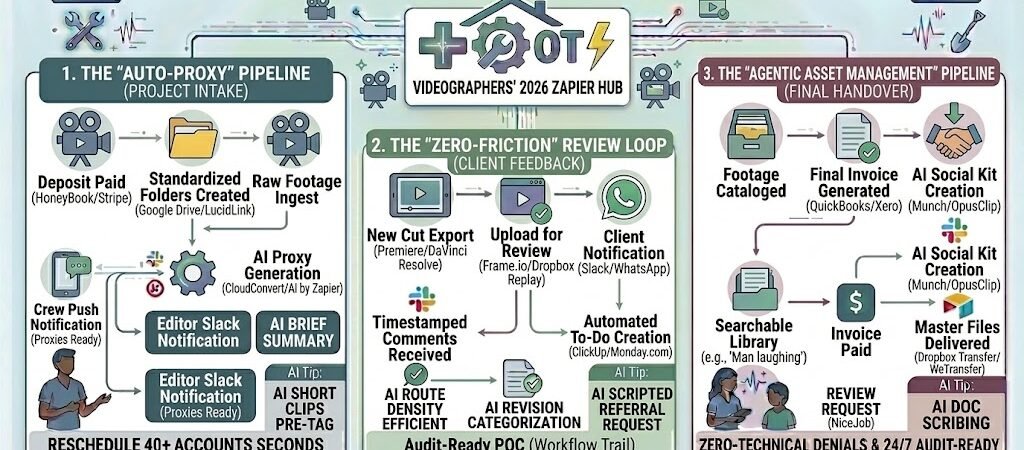
- The “Auto-Proxy” Pipeline: Use Zapier to trigger the creation of low-res proxies the moment raw footage hits your Dropbox or Frame.io.
- The “Zero-Friction” Review Loop: Automatically move project statuses and notify clients in Slack or WhatsApp when a new cut is ready for review.
- Agentic Asset Management: Use AI by Zapier to auto-tag B-roll and interview clips by sentiment and topic, making your library searchable in seconds.
- The “Final Delivery” Handover: A single status change in your CRM triggers the final invoice, the high-res download link, and a social media “Teaser Kit.”
The “Rendering Bottleneck” of 2026
In 2026, the demand for high-fidelity video content has reached a fever pitch, but for the average studio, the “Rendering Bottleneck” is no longer about CPU power—it’s about Data Logistics. As 4K becomes the bare minimum and 8K/Log footage becomes the standard for commercial work, videographers are drowning in the sheer volume of file management and client communication.
By 2026, a videographer’s profitability is threatened by three primary operational “Drags”:
- The “Data Logistics” Sinkhole: The modern videographer spends nearly 50% of their total project time on non-editing tasks. This includes creating folder structures, renaming files, generating proxies, and moving terabytes of data between local drives and the cloud. In 2026, if you are still manually dragging files into folders, you are losing billable hours to a task that costs $0 to automate.
- The Revision “Ping-Pong”: The most fragile part of the client relationship is the review cycle. In 2026, clients expect frame-accurate feedback loops. Manually chasing clients for timestamps via email or, worse, deciphering vague WhatsApp messages like “Change the bit near the end,” is a recipe for project creep and frustration. If your feedback loop isn’t integrated into your editing timeline, you’re working twice as hard for the same fee.
- The Delivery Friction: In a “Right-Now” economy, the gap between “Project Approved” and “Files Delivered” should be minutes, not days. Waiting to send a final invoice until after you’ve uploaded the master file is a 2024 mistake. In 2026, your cash flow depends on an automated “Payment-for-Download” gate.
The Zapier Solution: Zapier acts as your “Digital DIT” (Digital Imaging Technician). It bridges the gap between your production suite (Adobe Premiere, DaVinci Resolve) and your business tools. By 2026, a high-growth videographer doesn’t “setup” a project; Zapier has already created the LucidLink directory and the Monday.com board the moment the deposit hits. You don’t “send” files for review; Zapier has already notified the client on Slack the second the render finished in Frame.io.
Practical AI Tip for 2026: Use AI by Zapier to “Auto-Tag B-Roll.” Have Zapier scan your metadata or transcriptions as files are uploaded. The AI can automatically tag clips as “High Energy,” “Nature,” or “Interview,” making your entire 2026 asset library searchable by mood rather than just file name.
Blueprint #1 – The “Smart-Start” Intake & Proxy Flow
In 2026, the first 60 minutes after a client signs a contract are the most critical for project momentum. Manually setting up folder structures and project boards is “low-value” labor that delays the actual creative work. This blueprint uses Zapierto build a standardized production environment the moment a project is greenlit, ensuring that you—and your editors—can start cutting footage immediately.
1. The Trigger: The “Project Greenlight”
- The 2026 Tech: A client pays the deposit or signs the contract in your CRM (HoneyBook, Dubsado, or Studio Ninja).
- The Action: Zapier catches the “Contract Signed” or “Payment Received” hook and pulls the project details: Client Name, Project Type (e.g., “Commercial 30s”), and Due Date.
2. The Logic: Automated Infrastructure Deployment
Zapier acts as your System Architect, building out your workspace in seconds:
- The Cloud Directory: Zapier triggers Google Drive, Dropbox, or LucidLink to create a master project folder using a standardized template.
- Example Structure:
[Client Name]_[Project Name] / 01_RAW / 02_PROXIES / 03_ASSETS / 04_PROJECT_FILES / 05_REVIEWS.
- Example Structure:
- The Project Hub (Monday.com / Asana): Zapier creates a new project board. Using Paths by Zapier, it assigns specific task templates based on the project type. A “Wedding Highlight” gets a different set of milestones than a “Corporate Brand Film.”
- The Slack Notification: Zapier sends a message to your production channel: “🚀 Project [Name] is Live! Cloud folders created and Monday board is staged. Ready for Data Ingest.”
3. The Action: The “Auto-Proxy” Handover
- The Ingest Trigger: When you drop your first batch of raw footage into the
/01_RAWfolder, Zapier (via a webhook to a tool like CloudConvert or MediaBox) triggers the creation of low-res H.264 Proxies. - The Handover: The proxies are automatically moved to the
/02_PROXIESfolder, and a “Proxies Ready” task is checked off in your project management tool. - The Result: Your infrastructure is built before you’ve even finished offloading your camera cards.
Summary: The Smart-Start Zap
| Step | Component | 2026 Recommended Tool |
| Trigger | Contract Signed / Paid | HoneyBook / Stripe |
| Logic 1 | Standardized Folder Gen | Google Drive / LucidLink |
| Logic 2 | Project Board Creation | Monday.com / Asana |
| Action 1 | Proxy Creation Trigger | CloudConvert / Webhooks |
| Action 2 | Team Notification | Slack / Microsoft Teams |
Practical AI Tip for 2026: Use AI by Zapier to “Read the Creative Brief.” If your intake form includes a text area for “Project Vision,” have Zapier summarize the key visual requirements (e.g., “Slow-mo,” “Drone shots needed,” “Moody lighting”) and add them as a “Pinned Note” in your Slack channel so your team has the creative North Star instantly.
Blueprint #2 – The Automated Feedback Loop
In 2026, the revision phase is where most video projects either maintain their profit margins or bleed out through “death by a thousand emails.” Manually notifying clients of new edits and then transcribing their feedback into your editing timeline is a massive waste of creative energy. This blueprint uses Zapier to turn Frame.io or Dropbox Replay into a two-way communication bridge that updates your task list automatically.
1. The Trigger: The “New Cut” Upload
- The 2026 Tech: You export a version of the video directly from Premiere Pro or DaVinci Resolve to your review platform (Frame.io).
- The Action: Zapier detects the “New Version Uploaded” event.
2. The Logic: Multi-Channel Client Nudging
Zapier acts as your Client Account Manager, ensuring the review doesn’t sit in an inbox for three days:
- The “Smart-Nudge” (WhatsApp/SMS): Zapier sends a branded message via Twilio or WhatsApp Business: “Hi [Client Name]! Version 2 of [Project] is ready for your eyes. You can leave comments directly on the video here: [Link].”
- The Status Update: Zapier automatically moves the project card in Monday.com or Trello to the “Client Review” column and sets a “Feedback Due” date for 48 hours out.
3. The Action: From “Comment” to “Task”
- The Feedback Sync: As the client leaves frame-accurate comments (e.g., “01:12 – Can we make this logo bigger?”), Zapier pulls those comments in real-time.
- The Editor’s To-Do List: Zapier creates individual sub-tasks in your project management tool for every comment.
- The “Round Complete” Alert: Once the client clicks “Request Changes” or “Approve,” Zapier pings the editor on Slack: “Review Complete! 5 new tasks added for [Project Name]. Ready for the next pass.”
- The Result: You eliminate the “Email Ping-Pong” and ensure no client feedback ever gets lost in a thread.
Summary: The Feedback Loop Zap
| Step | Component | 2026 Recommended Tool |
| Trigger | New Version Uploaded | Frame.io / Dropbox Replay |
| Logic 1 | Client Notification | WhatsApp / SMS (Twilio) |
| Logic 2 | Project Status Move | Monday.com / ClickUp |
| Action 1 | Comment-to-Task Sync | Asana / Trello |
| Action 2 | Editor Alert | Slack |
Practical AI Tip for 2026: Use AI by Zapier to “Categorize Revisions.” Have the AI scan the client’s comments for keywords like “color,” “audio,” or “text.” It can then automatically assign the “Audio” tasks to your sound mixer and the “Color” tasks to your colorist, saving you from manually triaging the feedback.
Blueprint #3 – The “Master-Delivery” & Upsell Handover
In 2026, the final delivery of a project is more than just a file transfer—it is your most powerful marketing event. Too many videographers kill their momentum by sending a “Wetransfer” link and then forgetting to send the final invoice. This blueprint ensures that your Final Handover is gated by payment and followed by an automated sequence that secures reviews and future work.
1. The Trigger: The “Final Approval”
- The 2026 Tech: The client marks the video as “Approved” in Frame.io or you move the project status to “Complete” in Monday.com.
- The Action: Zapier detects the status change and initiates the closing sequence.
2. The Logic: The “Payment Gate” & Asset Packaging
Zapier acts as your Financial Gatekeeper, ensuring the assets aren’t released until the check clears:
- The Final Bill: Zapier triggers QuickBooks or Xero to generate and send the final invoice.
- The Payment Watch: A second Zap “waits” for the invoice status to change to “Paid.”
- The “Social-Kit” Generator (AI by Zapier): While waiting for payment, Zapier sends the final video link to an AI tool like Munch or OpusClip. It automatically extracts a 15-second “Teaser” and a 30-second “LinkedIn Promo” to be included in the final delivery package.
3. The Action: The “Master-Link” Release
- The Handover: The moment payment is confirmed, Zapier sends an automated email (and a WhatsApp message) containing:
- The Dropbox Transfer or WeTransfer link for the high-res Master files.
- The “Social-Kit” vertical clips for immediate posting.
- A “Usage Guide” PDF stored in your Google Drive.
- The Reputation Loop: 3 days later, Zapier sends a NiceJob or Google Review link: “We loved telling your story! Would you mind sharing your experience with others?”
Summary: The Master-Delivery Zap
| Step | Component | 2026 Recommended Tool |
| Trigger | Project Status: Approved | Frame.io / Monday.com |
| Logic 1 | Final Invoice Generation | QuickBooks / Xero |
| Logic 2 | AI Social Clip Extraction | Munch / OpusClip |
| Action 1 | Master Link Release (on Pay) | Dropbox Transfer / Gmail |
| Action 2 | Review Harvest | NiceJob / Google Business |
Practical AI Tip for 2026: Use AI by Zapier to “Script the Referral Request.” Instead of a generic “Thanks,” have the AI draft a personalized email 14 days after delivery that mentions a specific high-performing moment from their video and asks if they know any other businesses in [Client’s Industry] who need similar results.
The 2026 Videography Tech Stack
In 2026, the divide between a “struggling freelancer” and a “scalable studio” is the efficiency of their tech stack. To handle the massive data requirements of 8K workflows and the rapid-fire demands of multi-platform distribution, your stack must prioritize cloud-native collaboration, agentic asset management, and automated financial gating.
1. The 2026 Core Stack
| Function | 2026 Recommended Tool | Why It Wins in 2026 |
| Studio CRM | HoneyBook / Studio Ninja | The “Executive Brain.” Manages contracts, deposits, and the “Payment Gate” for final delivery. |
| Production Hub | Monday.com / ClickUp | Essential for tracking multi-stage revision cycles and editor assignments. |
| Review & Feedback | Frame.io / Dropbox Replay | Frame-accurate, timestamped feedback that Zapier can turn into actionable tasks. |
| Cloud Editing | LucidLink / PostLab | Allows remote editors to cut raw 4K/8K footage directly from the cloud without “downloading” first. |
| AI Repurposing | Munch / OpusClip | Automatically turns a 10-minute brand film into 10 viral “Shorts” for social distribution. |
2. The 2026 “Production” Circuitry
In 2026, Zapier acts as your “Digital Studio Manager,” routing data through these three growth-critical circuits:
- The “Ingest” Circuit: Connect Google Drive to CloudConvert. As soon as you offload footage to the cloud, Zapier triggers the proxy generation and notifies the editor on Slack that the “Edit-Ready” files are live.
- The “Review” Circuit: Link Frame.io to Asana. When a client leaves a comment, Zapier creates a sub-task for the editor, ensuring no feedback is lost in the “Revision Ping-Pong.”
- The “Delivery” Circuit: Connect Stripe to Dropbox Transfer. Zapier holds the “Master Download” link hostage until the final invoice is paid, then releases it automatically with a bonus “Social Media Teaser Kit.”
3. Hardware for the 2026 “Hyper-Efficient” Studio
- Cloud-Connected Cameras: Systems like the Sony FX6 or RED V-Raptor now feature native “Camera-to-Cloud” (C2C) integration, uploading proxies to Frame.io via 5G/6G while you are still on set.
- AI-Accelerated Workstations: 2026 Mac Studios and high-end PCs utilize NPU (Neural Processing Units) to handle AI-based rotoscoping, noise reduction, and upscaling in real-time.
- Smart Storage (DAS/NAS): High-speed NVMe RAID arrays (like the OWC ThunderBlade) that sync 1:1 with your LucidLink cloud, providing a “Zero-Lag” experience for local and remote teams simultaneously.
Conclusion: Your 30-Day “Efficiency” Roadmap
- Week 1: The Foundation. Connect your CRM to Google Drive and Monday.com to automate your project setup and folder structures.
- Week 2: The Feedback Bridge. Link Frame.io to your task manager to turn client comments into an automated “To-Do” list.
- Week 3: The Payment Gate. Set up the Section 4 workflow to ensure no master files are released without a cleared final invoice.
- Week 4: The Asset Archive. Use AI by Zapier to start auto-tagging your raw footage library, turning your “old drives” into a searchable stock-footage goldmine.

About the Author
Aapt DubeyAapt Dubey is an automation specialist and software developer dedicated to eliminating manual workflows for small businesses. With deep, hands-on experience building complex Zapier integrations, API connections, and real-world applications, Aapt writes actionable, tested tutorials to help businesses scale efficiently.