
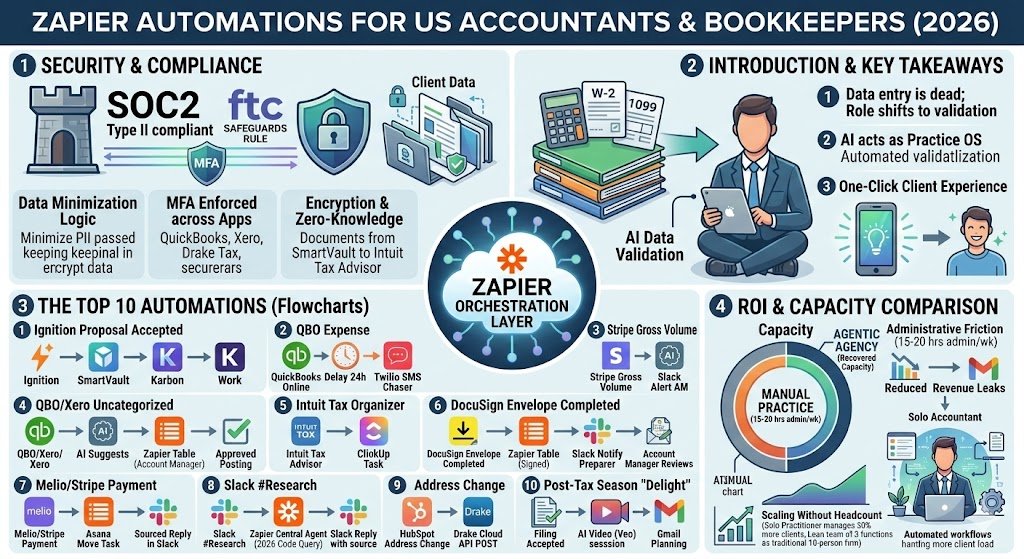
Key Takeaways : Zapier for US Accountants & Bookkeepers
- The “Data Entry” Obsession is Dead: In 2026, highly paid CPAs no longer key in data from W-2s or 1099s. Automation has shifted the role to “Data Validation,” where machines extract data and humans verify the edge cases.
- Agentic Tax Research: Accountants are now using Agentic AI (like CoCounsel or Zapier Central) to sift through massive amounts of new 2026 regulatory codes and draft client memos in seconds.
- Security-First Automation: With rising cybersecurity threats, 2026 accounting workflows prioritize SOC2-compliant automation layers and encrypted document hubs like SmartVault or TaxDome to protect sensitive PII.
- The “One-Click” Client Experience: The most successful firms have replaced the “back-and-forth” email chase with integrated ecosystems where clients upload, sign, and pay in a single, automated mobile journey.
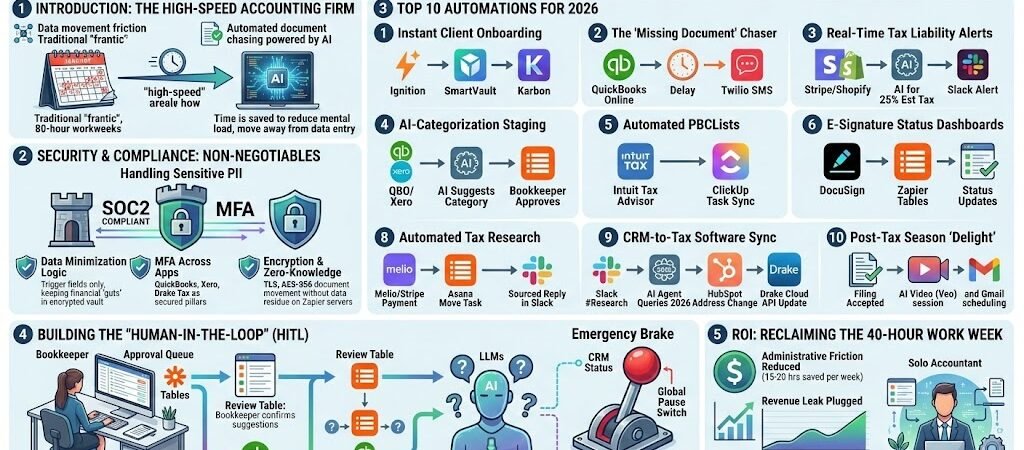
Introduction: The High-Speed Accounting Firm
The 2026 tax season is officially the era of the “High-Speed Firm.” For decades, January through April meant “the grind”—a frantic period defined by 80-hour workweeks and the manual “swivel-chair” movement of data between spreadsheets, tax software, and client portals. But as we enter 2026, the landscape has fundamentally shifted.
Artificial Intelligence is no longer a futuristic concept discussed at CPE seminars; it is a daily driver that 46% of accountants now use to reduce their mental load. The bottleneck of the modern firm is no longer “doing the work”—it is the friction of data movement. Every hour spent chasing a missing K-1 or manually updating a client’s address in HubSpot is an hour not spent on high-value strategic advisory work.
Zapier acts as the “Practice Operating System” for the modern US firm. By connecting your practice management tools (like Karbon or TaxDome) with your core accounting engines (QuickBooks or Xero) and communication apps (Slack or Twilio), you are building a financial nervous system. This guide provides the blueprint for 10 “Tax Season Ready” automations that don’t just save time—they reclaim your sanity and protect your margins during the busiest months of the year.
Accounting Accuracy: Security is paramount for financial data. Review the official QuickBooks Online integration documentation to understand the encryption protocols Zapier uses to keep books safe.
Security & Compliance: The Non-Negotiables
For US accountants, “automation” cannot come at the expense of “obligation.” Handling sensitive Personally Identifiable Information (PII)—Social Security numbers, EINs, and bank details—requires more than just a clever workflow; it requires a fortress. In 2026, the regulatory environment (including the FTC Safeguards Rule) has made multi-layer security a prerequisite for every firm.
Data Privacy in 2026: Protecting PII
In an automated world, PII is constantly in motion. The risk isn’t just a hack of your primary tax software; it’s the “data residue” left behind in the apps that connect them. To stay compliant, 2026-grade firms use Data Minimization logic. Instead of passing a client’s full tax return through a Zap, you should only pass the specific “trigger” fields needed to move the workflow forward (e.g., Client Name and Return Status), keeping the sensitive financial “guts” inside your encrypted document vault.
Secure Workflows: SOC2 & MFA
Zapier has evolved into an enterprise-grade orchestration layer, maintaining SOC2 Type II and SOC3 compliance. This means their internal controls for data security and privacy are independently audited to meet the highest industry standards. However, the strongest lock is useless if the key is left under the mat. It is imperative to enforce Multi-Factor Authentication (MFA) across your entire stack. In 2026, core apps like QuickBooks, Xero, and Drake Tax (which now enables MFA by default) act as the pillars of your security. If a Zap triggers an action in these apps, it must be done through a secure, authenticated token—never a shared password.+2
Encryption & Zero-Knowledge Buffers
A common concern for accountants is whether their data is “sitting” on Zapier’s servers. To address this, 2026 workflows utilize Custom Data Retention. For Enterprise users, you can set your “Zap History” to delete sensitive data as soon as the task is successful—minimizing the window of exposure. Furthermore, all data is encrypted using TLS protocols in transit and AES-256 at rest. By ensuring your documents move directly from a client’s upload (like SmartVault) to your prep software (like Intuit Tax Advisor) via an encrypted “zero-knowledge” bridge, you ensure that even if a system were compromised, your client’s most sensitive documents remain unreadable.
In 2026, the firms that scale are those that stop acting as the “courier” for data. Here is the technical blueprint for the 10 automations that will redefine your firm’s efficiency this tax season.
The Top 10 Automations for 2026
1. Instant Client Onboarding
- The Friction Point: After a lead says “yes,” it typically takes 2–3 days to manually set up folders, create the project in practice management, and invite the team.
- The Technical Setup: Trigger: Ignition (Proposal Accepted) → Action: SmartVault (Create Client Folder Structure) → Action: Karbon (Create Work from Template).
- The ROI: Eliminates 90 minutes of administrative setup per client. For a firm onboarding 20 clients a month, this saves a full work week annually.
2. The “Missing Document” Chaser
- The Friction Point: Accountants waste up to 20% of their time manually emailing clients for receipts or missing 1099s.
- The Technical Setup: Trigger: QuickBooks Online (New Expense without Attachment) → Action: Delay by Zapier (Wait 24h) → Action: Twilio (Send SMS: “Hi [Name], we noticed a transaction at [Vendor] is missing a receipt. Please upload it to your portal.”)
- The ROI: Reduces the “unreconciled” queue by 40% without a single human follow-up.
3. Real-Time Tax Liability Alerts
- The Friction Point: Clients are often hit with massive, unexpected tax bills because their quarterly estimates were based on last year’s (lower) revenue.
- The Technical Setup: Trigger: Stripe/Shopify (Gross Volume Threshold Reached) → Action: AI by Zapier(Calculate 25% Estimated Tax) → Action: Slack (Alert Accountant: “Client X just had a $50k week. Recommend adjusting Q3 estimates.”)
- The ROI: Positions the firm as a proactive advisor rather than a reactive historian.
4. AI-Categorization Staging
- The Friction Point: Coding hundreds of transactions is tedious. Direct AI-to-GL (General Ledger) posting is risky for accuracy.
- The Technical Setup: Trigger: QBO/Xero (New Uncategorized Transaction) → Action: AI (Gemini) (Suggest Category based on Chart of Accounts) → Action: Zapier Tables (Update Row).
- The ROI: Bookkeepers simply “check a box” in the table to approve batches of 50+ transactions at once, reducing coding time by 80%.
5. Automated PBC (Provided by Client) Lists
- The Friction Point: The tax organizer is in one app, but the project tasks are in another (like ClickUp). They are never in sync.
- The Technical Setup: Trigger: Intuit Tax Advisor (New Document Request) → Action: ClickUp (Create Task in Client List with Due Date).
- The ROI: Ensures the “Work” and the “Data Collection” are mirrored, preventing staff from starting work on incomplete files.
6. E-Signature Status Dashboards
- The Friction Point: Partners constantly asking, “Has [Client] signed their 8879 yet?”
- The Technical Setup: Trigger: DocuSign (Envelope Completed) → Action: Google Sheets/Zapier Tables(Update Status to “Signed”) → Action: Slack (Notify Preparer to File).
- The ROI: Real-time visibility into the filing pipeline, eliminating 50+ internal “status update” emails per week during April.
7. Payment-Before-Work Enforcement
- The Friction Point: Doing the work only to realize the client hasn’t paid their retainer, leading to difficult collections.
- The Technical Setup: Trigger: Melio/Stripe (Payment Received) → Action: Asana (Move Task from “Waiting for Payment” to “Ready for Prep”).
- The ROI: Zero accounts receivable (AR) friction. Work only begins when the “digital green light” of a confirmed deposit is lit.
8. Automated Tax Research
- The Friction Point: Spending an hour searching the tax code for a specific 2026 state-level nexus change.
- The Technical Setup: Trigger: Slack (Message starting with #Research) → Action: Zapier Central Agent(Querying 2026 IRS and State Tax Databases) → Action: Slack (Reply with sourced summary).
- The ROI: Instant “Level 1” research. Saves the partner from basic search tasks, allowing them to focus on complex interpretation.
9. CRM-to-Tax Software Sync
- The Friction Point: Client moves to a new state; you update the CRM but forget to update the tax software, leading to an incorrect 1040.
- The Technical Setup: Trigger: HubSpot (Address Change) → Action: Webhooks by Zapier (POST to Tax Software API / Drake Cloud).
- The ROI: Ensures 100% data integrity across the firm’s ecosystem, reducing the risk of “incorrect mailing address” rejections.
10. Post-Tax Season “Delight”
- The Friction Point: Once the return is filed, the client relationship goes cold until next year.
- The Technical Setup: Trigger: Tax Prep Software (Status: Filed & Accepted) → Action: Veo (Generate Video: “Hi [Name], your return is done! Enjoy your summer!”) → Action: Gmail (Send Video + Link to Schedule Post-Tax Planning Session).
- The ROI: Drastically increases client retention and generates “off-season” advisory revenue.
Building the “Human-in-the-Loop” (HITL)
As an accountant or bookkeeper, your greatest asset is your professional judgment. While automation in 2026 can handle the movement and initial processing of data, the “compliance buck” stops with you. To maintain IRS standards and ensure the integrity of your General Ledger, you must build Human-in-the-Loop (HITL) checkpoints into your Zaps.
The “Approval Queue” Strategy
The most dangerous mistake an automated firm can make is letting a Zap post a transaction or a document directly to a final destination without a sanity check. Instead, use Zapier Tables as a staging area.
- The Logic: When a webhook catches a new expense or an AI agent suggests a tax categorization, the data is first sent to a specific “Review Table.”
- The Action: Your junior staff or bookkeeper receives a daily Slack notification to “Clear the Queue.” They review the AI’s suggestions, make necessary tweaks, and click an “Approve” button.
- The Execution: Only upon that button click does a second Zap trigger to push the finalized, verified data into QuickBooks Online or Xero.
Managing AI Hallucinations
In 2026, Large Language Models (LLMs) are incredibly powerful for summarizing tax law, but they are not infallible. When using Automated Tax Research (Example 8), always configure your Zap to include a “Source Verification” step.
- The Pro Method: Prompt your AI agent to not only provide the answer but to cite the specific section of the Internal Revenue Code (IRC) or the specific State Department of Revenue bulletin it is referencing. This allows you to verify the “why” behind the automation in seconds rather than minutes.
The “Global Pause” Switch
Every robust accounting ecosystem needs an emergency brake. Ensure your primary workflows are governed by a Filter step connected to a “Status” field in your CRM. If a client goes on a “Billing Hold” or if you discover a data integrity issue with a specific vendor, you can toggle a single field in your CRM to “Paused,” instantly halting all automated document chasing and filing for that account until the issue is resolved.
ROI: Reclaiming the 40-Hour Work Week
The Return on Investment (ROI) for automation in a 2026 accounting firm isn’t just measured in dollars; it is measured in recovered capacity. For the average US solo practitioner or small firm owner, administrative friction—chasing documents, manual data entry, and status reporting—consumes approximately 15 to 20 hours per week during the peak of tax season.
The Math of Automation
If your billable rate is $250/hour, losing 15 hours a week to “low-value” tasks costs your firm $3,750 weekly, or $60,000 over a four-month tax season. By implementing the 10 Zaps outlined in this guide, you aren’t just “saving time”; you are plugging a massive revenue leak.
Scaling Without Headcount
In 2026, the primary barrier to firm growth is the talent shortage. Automation allows a lean team of three to handle the caseload of a traditional ten-person firm. By delegating the “chasing” and “coding” to Zapier, your staff can transition into Advisory Roles, where they analyze the data rather than just moving it. This shift allows you to manage 30% more clients without adding a single dollar to your payroll, effectively turning your firm into a high-margin, automated engine.
Collaborating with Marketing? Financial experts often work with growth teams to track ROI. If you are managing clients in the creative space, see how to use Zapier for marketing agencies to automate reporting and spend alerts.
Conclusion: Your Practice, Reimagined
The 2026 tax season does not have to be a marathon of manual labor. Shifting toward a “Zapier-first” practice is about more than just operational efficiency; it is about reclaiming the professional dignity of the accountant. Automation isn’t about replacing the accountant; it’s about replacing the calculator, the filing cabinet, and the repetitive follow-up email.
By building a secure, automated financial nervous system, you free your mind to focus on high-level strategy and tax-saving insights that clients truly value. Don’t let another season pass buried in spreadsheets. Choose one bottleneck today and “Zap” it. Your future self—and your firm’s profit margins—will thank you.

About the Author
Aapt DubeyAapt Dubey is an automation specialist and software developer dedicated to eliminating manual workflows for small businesses. With deep, hands-on experience building complex Zapier integrations, API connections, and real-world applications, Aapt writes actionable, tested tutorials to help businesses scale efficiently.