
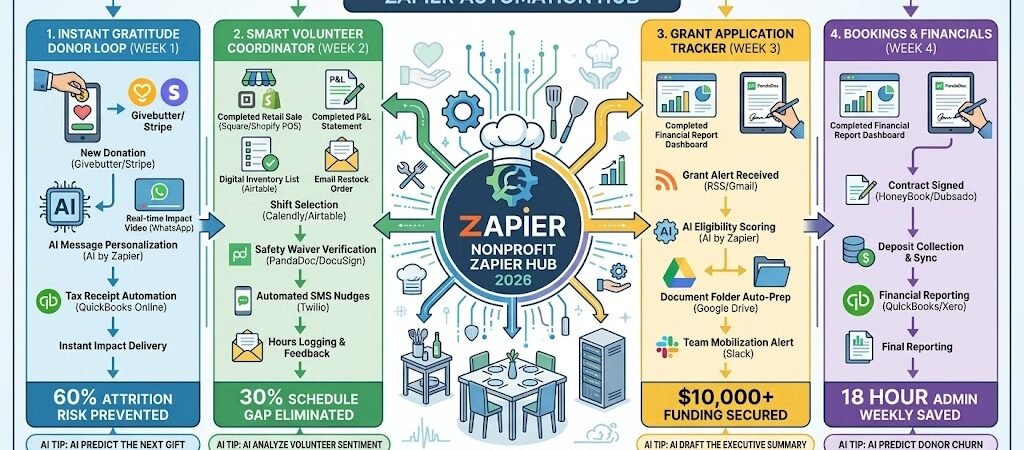
Key Takeaways: Zapier for Small Nonprofits 2026
- The “Zero-Leak” Donor Funnel: Connect Stripe/PayPal to Salesforce/HubSpot, ensuring every donor receives a personalized “Impact Video” via WhatsApp within 5 minutes of their gift.
- The “Grant Engine” Organizer: Use AI by Zapier to scan incoming Grant Opportunities (via RSS or Email) and automatically populate an Airtable board with deadlines and eligibility scores.
- The “Reliable Volunteer” Loop: Link Typeform volunteer sign-ups to Google Calendar, automatically sending a “Reminder + Liability Waiver” 24 hours before their shift.
- The “Transparency” Automator: Use Zapier to sync QuickBooks expense data to a public-facing Google Sheet(or “Impact Dashboard”) to show donors exactly how funds are being used in real-time.
The “Scarcity Friction” of 2026
In 2026, small nonprofits are operating in a “High-Accountability, Low-Attention” economy. Donors are no longer satisfied with a once-a-year paper newsletter; they expect to see the “path of their dollar” in real-time. For a small organization where the founder often doubles as the bookkeeper and social media manager, the primary obstacle isn’t a lack of passion—it’s the “Administrative Noise” that prevents actual impact.
Small nonprofits in 2026 are currently fighting three critical “Scarcity Frictions”:
- The “Gratitude Gap” Attrition: The first 48 hours after a donation are the most critical for retention. In 2026, if a donor gives $100 and receives nothing but a generic system receipt, the attrition risk is 60%. Manually sending personalized “thank you” videos or impact stories is impossible for a small team, yet it’s the only way to build the loyalty required for recurring monthly giving.
- The “Volunteer Flake” Factor: Relying on volunteers means managing people who have other full-time priorities. Without a robust, automated coordination system, small nonprofits face a 30% schedule gap due to no-shows or volunteers arriving without having signed the necessary 2026 digital liability waivers. This turns a day of service into a day of chasing paperwork.
- The “Grant Triage” Burnout: Grant writing is a high-stakes lottery. Small teams often spend dozens of hours on 40-page applications only to realize late in the process they weren’t actually eligible. Missing a deadline by 15 minutes because of a manual file-upload error can cost a charity $10,000+ in lost funding, a margin that most small nonprofits cannot survive.
The Zapier Solution: Zapier acts as your “Digital Executive Director,” bridging the gap between your Givebutter/Stripe donations, your Asana project boards, and your WhatsApp community. By 2026, a lean nonprofit doesn’t “try to remember” to thank a donor; Zapier has already sent the personalized video. You don’t guess if a volunteer is coming; Zapier has already confirmed their attendance and their signature. This automation ensures your limited human energy is spent on solving the problem, not managing the spreadsheet.
Nonprofit Efficiency Benchmarks 2026
| Friction Category | 2026 Impact | Zapier Automation Fix |
| Donor Retention | 60% Attrition Rate | Instant “Gratitude” & Impact Loops |
| Volunteer No-Shows | 30% Schedule Gap | Automated SMS Nudges & Waivers |
| Grant Deadlines | 15% Missed Opportunities | AI-Powered Grant Triage & Alerts |
Practical AI Tip for 2026: Use AI by Zapier to “Draft the Impact Story.” Have Zapier monitor your Airtable “Field Notes” (where volunteers upload photos and quotes from the site). At the end of the week, the AI can summarize these into a 3-sentence “Impact Update” and draft a Mailchimp newsletter for you to approve and send.
Blueprint #1 – The “Instant Gratitude” Donor Loop
In 2026, donors don’t just give to a cause; they give to an experience of impact. If a donor contributes to your nonprofit and only receives a sterile, automated tax receipt, you have failed the “Gratitude Test.” This blueprint ensures that every donor—whether they give $5 or $5,000—feels like the hero of your story within minutes of their transaction.
1. The Trigger: The “Donation Captured”
- The 2026 Tech: A donation is successfully processed via Givebutter, Stripe, or Donorbox.
- The Action: Zapier pulls the donor’s name, the specific amount, and the “Designation” (e.g., “Animal Rescue” or “Food Bank”).
2. The Logic: Smart Donor Segmentation
Zapier acts as your Donor Relations Director, ensuring the response matches the magnitude of the gift:
- The High-Value Alert: If the donation is above your “Major Donor” threshold (e.g., $500), Zapier bypasses the standard flow and sends an Urgent Slack to the Founder: “Major Donor Alert: [Name] just gave $500 to the ‘Clean Water’ fund. Call them: [Phone Number].”
- The Personalization Engine: AI by Zapier scans the donor’s history. If this is their 3rd gift, it adds a special note to the communication: “Welcome back, [Name]! Your consistent support means the world to us.”
- The Tax Compliance Sync: Zapier automatically creates a “Paid Invoice” in QuickBooks Online and generates a 2026-compliant digital tax receipt.
3. The Action: The “Impact Delivery” Sequence
- The Action: Zapier sends a WhatsApp (via Twilio) with a 30-second “Impact Video” showing the team in the field and a personalized message: “Hi [Name]! Your $[Amount] gift just landed. Because of you, we are providing [Impact] today. Here is your receipt: [Link]”
- The Social Invite: 2 hours later, Zapier sends a follow-up email inviting them to join your “Inner Circle” community on Discord or Facebook Groups.
Instant Gratitude Summary
| Step | Component | 2026 Recommended Tool |
| Trigger | Donation Success | Givebutter / Stripe |
| Logic 1 | Major Donor Alert | Slack |
| Logic 2 | AI Message Personalization | AI by Zapier |
| Action 1 | Real-time Impact Video | WhatsApp / Twilio |
| Action 2 | Tax Receipt Automation | QuickBooks Online |
Practical AI Tip for 2026: Use AI by Zapier to “Predict the Next Gift.” Have the AI analyze the donor’s behavior. If they always give on the first Monday of the month, Zapier can schedule a “Warm-up Email” for the Sunday before, sharing a success story from the previous month to keep your mission top-of-mind.
Blueprint #2 – The “Smart Volunteer” Coordinator
In 2026, the success of a grassroots movement depends on the reliability of its volunteers. However, managing human schedules—especially unpaid ones—is a logistical nightmare. Small nonprofits often find that 30% of their event capacity is lost to volunteers who simply forget they signed up or arrive without completing their required 2026 safety certifications. This blueprint turns your volunteer onboarding into an automated, “high-touch” experience.
1. The Trigger: The “Shift Selection”
- The 2026 Tech: A volunteer selects an available slot on Calendly, Sign-up Genius, or your Airtable portal.
- The Action: Zapier captures the volunteer’s contact info and the specific event details (e.g., “Saturday Food Distribution”).
2. The Logic: Credential & Safety Gatekeeping
Zapier acts as your Volunteer Manager, ensuring everyone on-site is ready and compliant:
- The Waiver Check: Zapier cross-references the volunteer’s email with your PandaDoc or DocuSign records. If they haven’t signed the “2026 Liability & Photo Release,” Zapier sends a WhatsApp link instantly: “We can’t wait to see you, [Name]! Please sign this 2-minute waiver so we can get you straight into the action: [Link]”
- The Experience Match: If the shift requires specialized skills (e.g., “Heavy Lifting” or “Social Media”), Zapier checks the volunteer’s tags. If they aren’t qualified, it pings the coordinator in Slack to reassign them.
3. The Action: The “On-Site” Success Sequence
- The 24-Hour Nudge: Zapier sends an SMS reminder: “Hey [Name], see you tomorrow at 9 AM! Parking is at the North Gate. Bring a reusable water bottle! 📍 [Google Maps Link]”
- The Post-Shift Gratitude: 2 hours after the shift ends, Zapier sends a WhatsApp: “You were amazing today! Because of your help, we served 40 families. Log your hours here: [Link]”
Smart Volunteer Coordinator Summary
| Step | Component | 2026 Recommended Tool |
| Trigger | Shift Signed Up | Calendly / Airtable |
| Logic 1 | Safety Waiver Verification | PandaDoc / DocuSign |
| Logic 2 | Event-Specific Prep | Zapier Tables |
| Action 1 | Automated SMS Nudges | Twilio / SMS by Zapier |
| Action 2 | Hours Logging & Feedback | Google Forms / Airtable |
Practical AI Tip for 2026: Use AI by Zapier to “Analyze Volunteer Sentiment.” After a shift, have Zapier send a one-question survey: “How was your experience today?” If the AI detects “frustration” or “confusion” in the text response, it alerts the team lead: “Volunteer [Name] had a rough shift—reach out to them so we don’t lose a valuable supporter.”
Blueprint #3 – The “Grant Application” Tracker
In 2026, grant funding is the lifeblood of small nonprofits, yet the application process is notoriously punishing. Small teams often waste dozens of hours on 40-page proposals only to realize they missed a minor eligibility clause or a deadline by 15 minutes. This blueprint uses AI by Zapier to act as a “Grant Triage Officer,” ensuring you only spend energy on the applications you are most likely to win.
1. The Trigger: The “New Grant Opportunity”
- The 2026 Tech: A new grant alert arrives via an RSS Feed (from a database like Candid) or a dedicated Gmailfolder.
- The Action: Zapier pulls the grant’s description, the funding amount, and the submission deadline.
2. The Logic: AI Eligibility Triage
Zapier acts as your Grant Writer’s Assistant, filtering for the highest “Return on Effort”:
- The Mission Match: AI by Zapier compares the grant’s requirements against your “Organization Profile” (stored in Airtable). It checks for tax status (501c3/NGO), geographic focus, and mission alignment.
- The Deadline Score: Zapier calculates the time remaining. If the deadline is less than 7 days away and the complexity is “High,” it flags the opportunity as “Last Minute Risk.”
- The Opportunity Rank: If the grant is a 90%+ match, Zapier creates a record in your Airtable “Grant Pipeline” and sets the status to “High Priority.”
3. The Action: The “Team Mobilization”
- The Action: Zapier sends a Slack notification to the fundraising channel: “🚨 High-Value Grant Found: ‘2026 Urban Youth Fund’ ($25,000). Eligibility Match: 94%. Deadline: April 15. Task created in Asana for [Name].”
- The Document Prep: Zapier automatically creates a new folder in Google Drive for the grant, pre-populating it with your “Standard Attachments” (Tax ID, Board List, and Audited Financials).
Grant Application Tracker Summary
| Step | Component | 2026 Recommended Tool |
| Trigger | Grant Alert Received | RSS / Gmail |
| Logic 1 | AI Eligibility Scoring | AI by Zapier |
| Logic 2 | Priority Ranking | Airtable |
| Action 1 | Team Mobilization Alert | Slack |
| Action 2 | Document Folder Auto-Prep | Google Drive |
Practical AI Tip for 2026: Use AI by Zapier to “Draft the Executive Summary.” Have Zapier take your previous successful grant applications and the current grant’s specific goals. It can draft a 200-word “First Pass” of the mission statement tailored exactly to that grantor’s keywords, giving your human writer a massive head start.
The 2026 Small Nonprofit Tech Stack
In 2026, the most impactful nonprofits are not the ones with the largest staffs, but those with the smartest “Digital Infrastructure.” When you are lean, your tech stack must act as a force multiplier, automating the “grunt work” so your human team can focus on empathy, storytelling, and high-level strategy. The 2026 standard is a “Radically Transparent Studio” where every dollar is tracked and every donor feels seen.
1. The 2026 Core Stack
| Function | 2026 Recommended Tool | Why It Wins in 2026 |
| Fundraising/CRM | Givebutter | A “Zapier-first” platform that combines donation forms, events, and donor management with zero platform fees for nonprofits. |
| Operational Brain | Airtable | The “Master Database.” Stores volunteer rosters, grant pipelines, and impact metrics in a visual, collaborative way. |
| Impact Reporting | QuickBooks Online | Crucial for “Real-time Transparency.” Use it to auto-generate the “Path of a Dollar” reports for your donors. |
| Communication | WhatsApp / Twilio | In 2026, email is for receipts; WhatsApp is for relationships. Used for instant “Impact Videos” and volunteer alerts. |
| Project Mgmt | Asana | Keeps the “Grant Engine” moving. Essential for tracking deadlines across a team of remote staff and volunteers. |
2. The 2026 “Impact Intelligence” Circuitry
In 2026, Zapier acts as your “Virtual Executive Director,” routing data through three high-trust circuits:
- The “Hero” Circuit: Connect Stripe/Givebutter to Twilio. When a donation arrives, Zapier doesn’t just send a receipt; it triggers a personalized WhatsApp “Thank You” with a link to a live Impact Dashboard.
- The “Compliance” Circuit: Link Typeform to PandaDoc. When a new volunteer signs up, Zapier ensures they cannot be assigned to a shift in Airtable until their digital liability waiver is signed and filed.
- The “Grant Radar” Circuit: Connect Gmail to AI by Zapier. Every grant opportunity is scanned by AI for eligibility. If it’s a match, Zapier creates the Asana task and the Google Drive folder automatically.
3. Hardware for the 2026 “Lean Office”
- “Impact” Tablets: Field staff use iPad Minis to snap photos and record 15-second “Thank You” clips. Zapier automatically routes these to the correct donor’s WhatsApp.
- The “Transparency” Monitor: A wall-mounted screen in the office (or a public link) showing a live Airtable Interface dashboard of “Meals Served,” “Trees Planted,” or “Lives Impacted” today.
- The “Mobile HQ” Laptop: Using the ASUS Zenbook Duo (2026), the Director keeps the QuickBooks budget on the bottom screen and the Asana grant timeline on the top for rapid decision-making.
- Haptic “Goal” Wearables: The team wears Apple Watch Ultra 3. When a major funding milestone is hit, Zapier pushes a synchronized “Victory Vibration” to the whole team, wherever they are in the field.
Conclusion: Your 30-Day “Lean Impact” Roadmap
- Week 1: The Gratitude Loop. Connect your donation platform to WhatsApp so every donor gets a personalized “Thank You” within 5 minutes.
- Week 2: The Compliance Gate. Link your volunteer forms to PandaDoc to ensure no one works a shift without a signed waiver.
- Week 3: The Grant Engine. Set up an AI by Zapier flow to scan grant emails and score them for eligibility in Airtable.
- Week 4: The Transparency Dashboard. Use Airtable Interface Designer to create a public-facing “Impact Map” that updates as your team completes tasks in the field.

About the Author
Aapt DubeyAapt Dubey is an automation specialist and software developer dedicated to eliminating manual workflows for small businesses. With deep, hands-on experience building complex Zapier integrations, API connections, and real-world applications, Aapt writes actionable, tested tutorials to help businesses scale efficiently.