
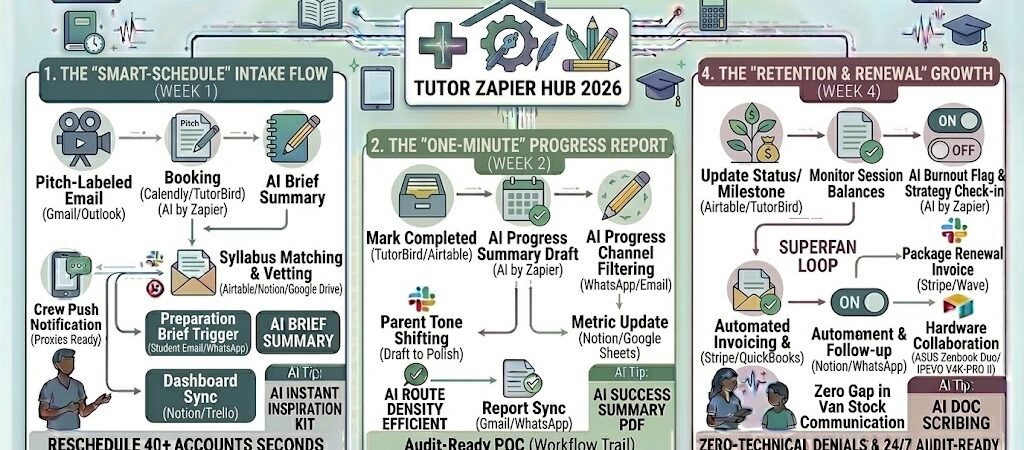
Key Takeaways: Zapier for Private Tutors 2026
- The “Frictionless” Booking Loop: Use Zapier to sync Calendly or TutorBird with your personal calendar and instantly trigger a “Preparation Brief” for the student.
- Agentic Progress Summaries: Use AI by Zapier to analyze your session notes and draft a professional, 2026-style progress report for parents in seconds.
- The “Zero-Latency” Parent Portal: Automatically push lesson summaries and attendance to a shared Notionboard or WhatsApp notification.
- Dynamic Payment Reminders: Link your Stripe or QuickBooks to your lesson completion to automate invoicing and follow-ups for unpaid sessions.
The “Administrative Homework” of 2026
In 2026, the value of a private tutor is no longer just about subject matter expertise—it’s about educational project management. Parents today are not just paying for an hour of teaching; they are investing in a data-driven path to success for their child. However, most elite tutors find themselves drowning in “Administrative Homework”—the endless cycle of logistics that happens outside the classroom.
By 2026, a tutor’s growth is often stunted by three specific “Operational Leaks”:
- The “Scheduling Tug-of-War”: Tutors lose an average of 6 hours a week managing last-minute cancellations, rescheduling sports conflicts, and chasing parents via multiple chat apps. In 2026, if you are still manually negotiating time slots, you are sacrificing hours that could be spent on curriculum development.
- The “Feedback Vacuum”: Parents in 2026 demand immediate transparency. If a session ends and the parent doesn’t receive a summary of what was learned and what the homework is by the time they pick up their child, the perceived value of the lesson drops. Manually writing these reports at 10:00 PM is the fastest route to tutor burnout.
- The “Manual Invoicing Trap”: Cross-referencing attendance logs with bank transfers is a relic of the past. Tutors spend 15% of their month reconciling who paid for which session, sending awkward “payment reminder” texts, and managing late fees.
The Zapier Solution: Zapier acts as your “Virtual Registrar” and “Academic Concierge.” It bridges the gap between your teaching tools (Zoom, Google Drive, Miro) and your business tools (Calendly, Stripe, WhatsApp). By 2026, a high-performance tutor doesn’t “remind” a student about a test; Zapier has already detected the test date in the syllabus and triggered a personalized “Review Packet” to the student’s device. You don’t “bill” for a lesson; Zapier has already logged the attendance and processed the payment the moment the session link closes.
Practical AI Tip for 2026: Use AI by Zapier to “Analyze Student Sentiment.” Have Zapier scan your session notes for words like “frustrated,” “confused,” or “mastered.” The AI can then automatically flag specific students in your Airtable dashboard who might need a “Motivation Check” or an extra check-in, allowing you to be proactive rather than reactive.
Blueprint #1 – The “Smart-Schedule” Intake Flow
In 2026, the back-and-forth “Are you free at 4 PM on Tuesday?” email chain is not just a time-sink—it’s a sign of a low-tech business. For elite private tutors, the intake and scheduling process should be a high-speed, automated “onboarding” that prepares the student for success before the first word is even spoken. This blueprint uses Zapier to turn a simple calendar booking into a comprehensive academic setup.
1. The Trigger: The “Frictionless” Booking
- The 2026 Tech: A parent or student selects a time slot via Calendly, TutorBird, or your personal booking page on PracticalAISMB.com.
- The Action: Zapier catches the booking data, including the student’s name, grade level, and the specific “Focus Topic” for the session (e.g., “SAT Math: Geometry”).
2. The Logic: Syllabus Matching & AI Vetting
Zapier acting as your Academic Coordinator, ensuring you never walk into a session unprepared:
- The Student Record Audit (Airtable/Notion): Zapier pulls the student’s “History Log.” It checks their last mock test scores and any “Red Flag” topics noted in previous sessions.
- The Resource Retrieval: Using the “Focus Topic” extracted from the booking, Zapier searches your Google Drive“Curriculum Library.”
- The AI Prep Brief (AI by Zapier): AI summarizes the student’s current standing: “Student has mastered 2D Geometry but struggled with 3D volumes in Lesson 4. Suggest starting with a 5-minute refresher on Sphere Surface Area.”
3. The Action: The “Ready-to-Learn” Multi-Channel Sync
- For the Student: Zapier sends a WhatsApp (via Twilio) with the Zoom/Google Meet link and a “Warm-up” PDF worksheet to look over before the session starts.
- For the Parent: An automated Gmail confirms the booking and includes a link to the “Parent Portal” where they can see the upcoming lesson plan.
- For the Tutor: A new “Lesson Card” is created in Trello or Notion, with the AI Prep Brief and the curriculum links attached, so you can prep in under 60 seconds.
Summary: The Smart-Schedule Zap
| Step | Component | 2026 Recommended Tool |
| Trigger | New Session Booked | Calendly / TutorBird |
| Logic 1 | History & Goal Audit | Airtable / Notion |
| Logic 2 | AI Lesson Personalization | AI by Zapier |
| Action 1 | Student Resource Delivery | WhatsApp / Google Drive |
| Action 2 | Tutor Dashboard Sync | Notion / Trello |
Practical AI Tip for 2026: Use AI by Zapier to “Monitor Lesson Density.” If a student books three sessions in one week, have Zapier flag it as a “High-Stress Warning.” You can then automate a quick check-in message to the parent: “I noticed [Student] has a heavy load this week. Would they like to pivot one session to a ‘Mindset & Organization’ check-in instead?”
Blueprint #2 – The “One-Minute” Progress Report
In 2026, the era of the “Black Box” session—where parents have no idea what happened behind the closed door of a Zoom room or classroom—is over. However, manual reporting is the leading cause of tutor burnout. This blueprint uses Zapier and AI to transform your raw, shorthand session notes into professional, pedagogical insights that prove your value to parents every single week.
1. The Trigger: The “Lesson End” Note
- The 2026 Tech: Immediately after a session, you type a quick summary into a dedicated Google Form, Airtablefield, or TutorBird note. You don’t need perfect grammar; you just need the facts (e.g., “Did well on active voice, still stalling on past participle irregulars. Homework: Ex 4 & 5”).
- The Action: Zapier catches this update and initiates the “Parent Communication” workflow.
2. The Logic: AI Tone-Shifting & Data Logging
Zapier acting as your Editorial Assistant, turning “teacher-speak” into “parent-clarity”:
- The AI Report Generator (AI by Zapier): The AI takes your raw notes and drafts a professional message. It highlights:
- The “Win”: One area where the student showed growth.
- The “Work”: The specific concept that needs more focus.
- The “Way Forward”: Clear homework instructions.
- The Mastery Tracker (Google Sheets / Notion): Zapier updates a row in the student’s longitudinal progress chart, turning your note into a data point (e.g., converting “stalling on past participle” into a 60% mastery score for that topic).
3. The Action: Multi-Channel Transparency
- The Parent Update: Zapier sends the polished report via Gmail or WhatsApp.
- The Portal Sync: The report is automatically posted to the student’s private Notion board, allowing parents to see a visual timeline of progress over the last 6 months.
- The Result: The parent feels informed and confident in your services, often before you’ve even finished your post-session coffee.
Summary: The Progress Report Zap
| Step | Component | 2026 Recommended Tool |
| Trigger | Session Note Submission | Google Forms / Airtable |
| Logic 1 | AI Report Generation | AI by Zapier |
| Logic 2 | Dashboard Mastery Update | Google Sheets / Notion |
| Action 1 | Parent Email / WhatsApp | Gmail / Twilio |
| Action 2 | Portal Archiving | Notion |
Practical AI Tip for 2026: Use AI by Zapier to “Flag Burnout.” Have the AI look for patterns in your notes over 4 weeks. If it sees keywords like “tired,” “unfocused,” or “declining performance,” it can trigger a special “Strategy Check-in” email to the parent to discuss adjusting the student’s workload or schedule.
Blueprint #3 – The “Transparent-Parent” Notification Loop
In 2026, the #1 reason parents switch tutors isn’t because of a lack of results—it’s because of a lack of communication. In a fast-paced world, parents appreciate “passive transparency”—knowing exactly what is happening without having to ask for it. This blueprint uses Zapier to turn your lesson milestones into real-time notifications, keeping the family aligned and ensuring your value is “felt” every single day, not just on invoice day.
1. The Trigger: The “Milestone” or “Alert” Update
- The 2026 Tech: You update a status in your Airtable student database or a “Lesson Complete” checkbox in TutorBird.
- The Action: Zapier triggers a “Priority Notification” flow based on the specific type of update (e.g., Attendance, Test Score, or Homework Completion).
2. The Logic: Smart Channel Routing
Zapier acting as your Communications Director, ensuring the right message reaches the parent on their preferred platform:
- The Channel Filter: Zapier checks the parent’s profile in your CRM. Does this parent prefer a WhatsApp nudge for quick updates or a formal Email for academic milestones?
- The “Next-Step” Nudge (AI by Zapier): The AI scans the milestone and adds a personalized action item.
- Example: If the milestone is “Mock Exam Passed,” the AI adds: “Great time to schedule a 15-minute goal-setting call for the final finals.”
- The Multi-Student Logic: If you tutor siblings, Zapier groups the notifications into a single “Family Digest” to avoid spamming the parent’s phone.
3. The Action: The Real-Time Transparency Pulse
- The Instant Nudge: An automated WhatsApp (via Twilio) is sent the moment a session ends: “Hi [Parent Name]! [Student] just finished their session. Attendance: On-time. Engagement: 5/5. They have a focus task on ‘Ionic Bonding’ for tomorrow. Have a great evening!”
- The Portal Sync: Zapier pushes a “Badge” or “Achievement” to the student’s Notion dashboard.
- The Result: You eliminate the “invisible tutor” problem. Even if the parent is at work or traveling, they are emotionally connected to their child’s academic journey.
Summary: The Parent Notification Zap
| Step | Component | 2026 Recommended Tool |
| Trigger | Milestone/Status Change | Airtable / TutorBird |
| Logic 1 | Parent Preference Filtering | Zapier Paths |
| Logic 2 | AI Action-Item Generation | AI by Zapier |
| Action 1 | Real-Time Messaging | WhatsApp / Twilio |
| Action 2 | Visual Badge / Portal Update | Notion |
Practical AI Tip for 2026: Use AI by Zapier to “Predict Scheduling Friction.” If Zapier notices a parent hasn’t opened the last three lesson notifications, it can flag them as “Low Engagement.” You can then automate a personal video message (via Loom) to check in and ensure they still feel the value of the service, preventing “silent churn.”
The 2026 Private Tutor Tech Stack
In 2026, the elite private tutor is part educator, part data scientist. To justify premium rates in an increasingly automated world, your value must be visible, measurable, and constant. This tech stack is designed to create a “surround-sound” educational experience, where the administration is invisible but the progress is impossible to miss.
1. The 2026 Core Stack
| Function | 2026 Recommended Tool | Why It Wins in 2026 |
| Academic Command Center | TutorBird / Wise.live | Specifically built for tutors; handles global multi-currency billing, complex scheduling, and robust student portals. |
| Progress Dashboard | Notion / Airtable | Your “Single Source of Truth” for curriculum tracking, mastery levels, and shared student-parent resources. |
| AI Teaching Assistant | MagicSchool AI / Khanmigo | Automates differentiated quiz drafting, rubrics, and Socratic-style student coaching between sessions. |
| Parent Sync Hub | Illumine / WhatsApp Business | Offers real-time notifications, daily activity reports, and direct two-way messaging in 20+ languages. |
| Financial Gatekeeper | Stripe / Wave | Automates “Prepaid Credit” tracking and “Attendance-to-Invoice” triggers so you never chase a payment manually. |
2. The 2026 “Academic Concierge” Circuitry
In 2026, Zapier acts as your “Director of Operations,” routing student data through these three critical growth circuits:
- The “Zero-Admin” Onboarding Circuit: Connect Calendly to TutorBird and Airtable. When a new parent books a trial, Zapier creates their student profile, sends a “Pre-Session Assessment” via Google Forms, and pings your Slack with a summary of the student’s goals.
- The “Mastery Feedback” Circuit: Link TutorBird to AI by Zapier and WhatsApp. The second you mark a lesson as “Complete,” Zapier takes your raw session notes, uses AI to draft a polished progress report, and pushes a “Lesson Summary” notification to the parent’s phone.
- The “Retention & Renewal” Circuit: Connect Airtable to Stripe. Zapier monitors “Session Balances.” When a student has only one prepaid lesson left, it automatically sends a “Package Renewal” invoice and a summary of their achievements to encourage a 10-lesson top-up.
3. Hardware for the 2026 “Hybrid” Tutor
- Spatial Canvas Displays: Tutors use 2026 dual-screen setups (like the ASUS Zenbook Duo) to keep the student’s video feed on one screen and an interactive digital whiteboard (Miro or Microsoft Whiteboard) on the other.
- AI-Enhanced Document Cameras: Tools like the IPEVO V4K-PRO II now feature hardware-level AI that can “clean” a student’s handwritten work in real-time, making it instantly legible for collaborative digital marking.
- Biometric Engagement Sensors: High-end online tutors use webcams with built-in AI Attention Tracking. Zapier can pull “Engagement Scores” from these sessions and alert you if a student’s focus is consistently dipping on a specific subject, allowing for immediate curriculum adjustment.
Conclusion: Your 30-Day “Tutor Autopilot” Roadmap
- Week 1: The Booking Shield. Connect Calendly to TutorBird to stop the “manual scheduling” dance.
- Week 2: The Insight Bridge. Set up the Section 3 workflow to turn shorthand notes into professional AI-generated parent reports.
- Week 3: The Transparency Loop. Link Airtable to WhatsApp to provide real-time attendance and milestone updates.
- Week 4: The Revenue Guard. Automate your Prepaid Session Reminders to ensure you’re never teaching on an empty account.

About the Author
Aapt DubeyAapt Dubey is an automation specialist and software developer dedicated to eliminating manual workflows for small businesses. With deep, hands-on experience building complex Zapier integrations, API connections, and real-world applications, Aapt writes actionable, tested tutorials to help businesses scale efficiently.