
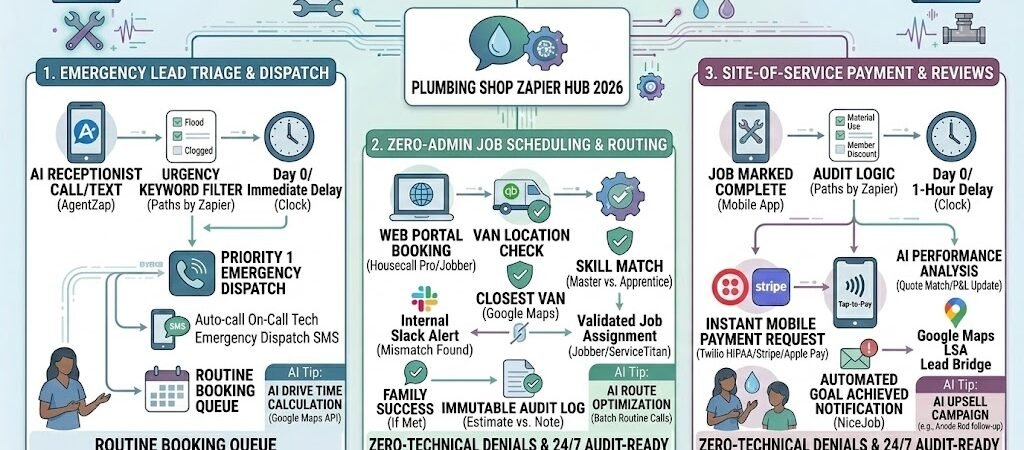
Key Takeaways: Zapier for Plumbers 2026
- Instant Emergency Triage: Use AI agents to detect “Burst Pipe” keywords and dispatch on-call technicians within 60 seconds.
- The “Speed-to-Lead” Guarantee: 2026 customers book the first person who answers. Automate your “On My Way” texts to win the job before they call a competitor.
- Paperless Profitability: Site-of-service invoice automation ensures you get paid via ACH or Apple Pay before the truck leaves the driveway.
- Predictive Maintenance: Use smart leak detector data to trigger automated service offers to previous clients.
The “Emergency Gap” of 2026 Plumbing
In 2026, the plumbing industry has reached a digital tipping point. While the physical work still requires a skilled hand and a pipe wrench, the business is won or lost in the “Emergency Gap”—the critical 120-second window between a homeowner discovering a leak and booking a repair.
By 2026, the average plumbing business loses 18% to 25% of its potential annual revenue to three specific “Leaky Buckets”:
- The 2 AM Black Hole: 2026 customers no longer leave voicemails. If a water main bursts at midnight and an AI or a human doesn’t answer within three rings, the customer simply clicks the next “Sponsored” result on Google.
- Speed-to-Lead Latency: Data from 2025 shows that the first contractor to respond wins the job 78% of the time. In 2026, with the rise of instant-booking apps, that window has shrunk. If your lead follow-up takes longer than 5 minutes, you are effectively paying for your competitor’s marketing.
- The “Truck-to-Office” Paper Trail: Technicians often wait until the end of the week to submit job details, leading to delayed invoicing and “Scope Creep” where parts used in the field aren’t billed to the client.
The Zapier Solution: Zapier acts as your “Digital Dispatcher.” It bridges the gap between your marketing (Google Local Services Ads, Facebook) and your field operations (Housecall Pro, Jobber, or ServiceTitan). By 2026, “Automated Plumbing” means that a lead is captured, triaged by urgency, and pushed to a technician’s mobile device before the customer even hangs up the phone.
Practical AI Tip for 2026: Don’t just automate “New Leads.” Use Zapier to monitor “Ghosted Estimates.” If a quote for a water heater replacement hasn’t been signed within 4 hours, have Zapier send a “Limited Time Installation Discount” via SMS. This single automation can increase your closing rate by 15% without a single outbound call.
Blueprint #1 – 24/7 Lead Capture & Instant Triage
In 2026, “Speed-to-Lead” isn’t just a metric; it’s your primary competitive advantage. If a pipe bursts at 2:00 AM, the homeowner is in a state of panic. They aren’t looking for a relationship; they are looking for a solution. This blueprint ensures that every lead—whether it comes from a frantic phone call, a Facebook ad, or a Google Business message—is instantly qualified and routed based on its “Flood Risk.”
1. The Trigger: Multi-Channel Lead Entry
- The 2026 Source: Zapier monitors your Google Local Services Ads, Facebook Lead Forms, and your AI-powered phone system (AgentZap or Dialpad).
- The Action: As soon as a lead is submitted or a transcript is generated from a call, Zapier pulls the property address, the customer’s phone number, and the “Problem Description.”
2. The Logic: Emergency Triage (AI by Zapier)
Zapier doesn’t just pass the info along; it reads the “Intent” of the message to decide how fast your team needs to move:
- The “Burst Pipe” Path (High Urgency): If the AI detects keywords like “flooding,” “spraying water,” “sewage backup,” or “burst,” Zapier triggers a Priority 1 Alert.
- Action: An automated phone call is placed to the on-call technician, and an “Emergency Dispatch” SMS is sent to the owner.
- The “Drip” Path (Routine): If the lead mentions a “leaky faucet,” “new toilet install,” or “low pressure,” Zapier routes it to the standard booking queue.
- Action: An automated text is sent to the customer: “Got your request! Our office will call you at 8:00 AM to schedule your install. Check out our ‘Fixture Guide’ here while you wait.”
3. The Action: The CRM “Auto-Fill”
- The Delivery: The lead is instantly created in your field software (Housecall Pro or Jobber).
- The Result: When your dispatcher logs in, the job is already built. There is no manual data entry, no misspelled addresses, and most importantly, no missed opportunities.
Summary: The Emergency Dispatch Zap
| Step | Component | 2026 Recommended Tool |
| Trigger | New Lead / AI Call Transcript | Google LSA / AgentZap |
| Logic | Urgency Keyword Filtering | AI by Zapier |
| Action 1 | Emergency Tech Alert | Twilio / Phone Call |
| Action 2 | CRM Job Creation | Housecall Pro / Jobber |
| Action 3 | Instant Customer SMS | Twilio (SMS) |
Practical AI Tip for 2026: Use AI by Zapier to calculate “Drive Time” before the tech even sees the lead. By 2026, Zapier can check live traffic via Google Maps API and include a note in the dispatch: “Tech is 14 mins away. Traffic is light.” Including this in your “On My Way” text makes you look like a tech-forward powerhouse.
Blueprint #2 – Zero-Admin Job Scheduling & Dispatch
By 2026, the logistical nightmare of “Van Routing” has been solved by automated proximity logic. For a plumbing business, every minute a technician spends stuck in traffic is a minute of unbillable overhead. This blueprint ensures that the right wrench is at the right house at the right time, without a dispatcher needing to play “Phone Tag” with five different trucks.
1. The Trigger: The Web-Portal Booking
- The 2026 Tool: Customers book their own slots via a “Live Inventory” widget on your website (powered by Housecall Pro or Jobber).
- The Action: A new “Unassigned Job” is created in the system. Zapier immediately pulls the job type (e.g., “Water Heater Flush”) and the customer’s GPS coordinates.
2. The Logic: Proximity & Skill Matching (Paths by Zapier)
Zapier runs a “Smart Filter” to find the best technician for the specific task:
- The Location Check: Zapier pings QuickBooks Time or your fleet GPS to find the van currently closest to the new job site.
- The Certification Check: If the job is a “Gas Line Repair,” Zapier filters out junior apprentices and only looks for Master Plumbers with active gas certifications.
- The Action: The job is automatically assigned to the technician’s mobile calendar.
3. The Action: The “On My Way” Experience
- The Delivery: Once the technician clicks “Start Trip” on their mobile app, Zapier triggers a personalized SMS via Twilio.
- The Content: “Hi [Customer Name], this is Mike from [Your Plumbing Co]. I’m 12 minutes away. You can track my van live here: [Link]. I’ve specialized in water heaters for 10 years, so we’ll get this sorted fast!”
- The Result: This 2026 “Uber-style” transparency reduces “No-Shows” by 22% and immediately builds trust before the tech even knocks on the door.
Summary: The Smart Dispatch Zap
| Step | Component | 2026 Recommended Tool |
| Trigger | Web Booking / New Job | Housecall Pro / Jobber |
| Logic | GPS & Skill Filtering | Paths by Zapier |
| Action 1 | Calendar Assignment | Google Calendar / Jobber |
| Action 2 | Real-Time Tech Bio SMS | Twilio (SMS) |
| Action 3 | GPS Tracking Link | Glympse / Native CRM Link |
Practical AI Tip for 2026: Use AI by Zapier to “Batch” your non-emergency calls. In 2026, the AI can look at your week’s schedule and suggest moving three routine drain cleanings to the same neighborhood on Thursday, saving your fleet an average of 45 miles of fuel per week.
Blueprint #3 – Touchless Invoicing & Payment Loops
In 2026, “I’ll mail you a check” is a phrase that kills cash flow. For a plumbing business, the highest-risk moment is the gap between a technician finishing the job and the office sending the invoice. This blueprint ensures that the “Job-to-Cash” cycle is closed in under 60 seconds, often before the technician has even loaded their tools back into the van.
1. The Trigger: “Job Complete” Status
- The 2026 Standard: The technician marks the job as “Complete” or “Finalized” in their mobile field app (Housecall Pro, Jobber, or ServiceTitan).
- The Action: Zapier detects the status change and pulls the logged line items—parts (e.g., 1/2″ PEX, SharkBite fittings) and labor hours.
2. The Logic: Total Validation (Paths by Zapier)
Zapier performs a quick audit to ensure the bill is accurate:
- The “Parts vs. Quote” Check: If the materials used exceed the original estimate by more than 15%, Zapier pauses and pings the office manager for a quick approval.
- The “Discount” Filter: If the customer is part of your 2026 Maintenance Club, Zapier automatically applies a 10% “Member Discount” to the total.
- The Action: An invoice is automatically generated in QuickBooks Online or Xero.
3. The Action: The Instant Payment Request
- The Delivery: Zapier sends a secure, branded payment link via Twilio (SMS) or WhatsApp Business.
- The Payment Experience: The customer clicks the link and pays instantly using Apple Pay, Google Pay, or ACH Transfer via Stripe.
- The “Review” Kicker: As soon as the payment is confirmed, Zapier waits 1 hour and then sends a follow-up text: “Thanks for choosing us! Mike loved working with you. Could you leave him a 5-star review here? [Link]”
Summary: The Payment & Review Zap
| Step | Component | 2026 Recommended Tool |
| Trigger | Job Marked Complete | Housecall Pro / Jobber |
| Logic | Invoice & Discount Math | Paths by Zapier |
| Action 1 | Invoice Creation | QuickBooks Online / Xero |
| Action 2 | Mobile Payment Link | Stripe / Twilio (SMS) |
| Action 3 | Auto-Review Request | Birdeye / Google Business |
Practical AI Tip for 2026: Use AI by Zapier to scan the technician’s notes for “Upsell Opportunities.” If the tech notes a “Water heater is 12 years old,” Zapier can automatically add that customer to a 90-day follow-up campaign for a replacement quote, keeping your pipeline full without manual tracking.
The 2026 Plumbing Tech Stack
To run a “High-Velocity” plumbing business in 2026, your tools must do more than just store data—they must talk to each other. The following stack represents the 2026 industry standard for reliability, Zapier compatibility, and speed-to-lead performance.
1. The 2026 Core Stack
| Function | 2026 Recommended Tool | Why It Wins in 2026 |
| AI Front Desk | AgentZap / Smith.ai | 24/7 emergency detection and instant CRM job creation. |
| Field Management | Housecall Pro / Jobber | Best-in-class mobile apps for techs and “On My Way” automation. |
| Accounting | QuickBooks Online | The industry standard for real-time profit/loss and payroll sync. |
| Payments | Stripe / Valor PayTech | Supports “Tap-to-Pay” on Android/iPhone and instant ACH. |
| Reviews | Birdeye / NiceJob | Automatically “harvests” 5-star reviews the moment a job is paid. |
2. The “Speed-to-Lead” Integration Strategy
In 2026, your Zapier account should act as the “Brain” connecting these tools:
- The Lead Bridge: Connect Google Local Services Ads directly to Housecall Pro. This skips the “Email-to-Entry” step, putting the customer in your dispatch queue in under 5 seconds.
- The Continuity Loop: Use QuickBooks Time to track van locations. Zapier can then alert the next customer on the route when the technician is 15 minutes away, based on live GPS data.
- The Re-engagement Trigger: If a technician notes a “Corroded Anode Rod” in Jobber, Zapier can trigger a 6-month follow-up SMS to offer a preventative maintenance check before the tank fails.
3. Hardware for the 2026 Tech-Forward Truck
- The Mobile Office: High-speed 5G tablets for every lead tech to ensure seamless sync of high-res “Before & After” photos for insurance claims.
- Tap-to-Pay Terminals: Using Valor PayTech or Square, technicians can accept payments via a customer’s phone or watch right at the kitchen counter.
- Smart Leak Detectors: Partners with brands like Moen (Flo) to have their IoT alerts trigger an “Emergency Service Call” Zap directly to your office.
Conclusion: Your 30-Day “Speed-to-Lead” Roadmap
- Week 1: The AI Receptionist. Set up AgentZap to handle your after-hours calls.
- Week 2: Lead-to-CRM. Connect your Google Ads and Website Forms to your field software to eliminate manual entry.
- Week 3: Site-of-Service Payments. Transition to Stripe or Housecall Pro Payments to get paid before the truck leaves the site.
- Week 4: The Review Loop. Automate your Google Review requests to build your local authority while you sleep.

About the Author
Aapt DubeyAapt Dubey is an automation specialist and software developer dedicated to eliminating manual workflows for small businesses. With deep, hands-on experience building complex Zapier integrations, API connections, and real-world applications, Aapt writes actionable, tested tutorials to help businesses scale efficiently.