
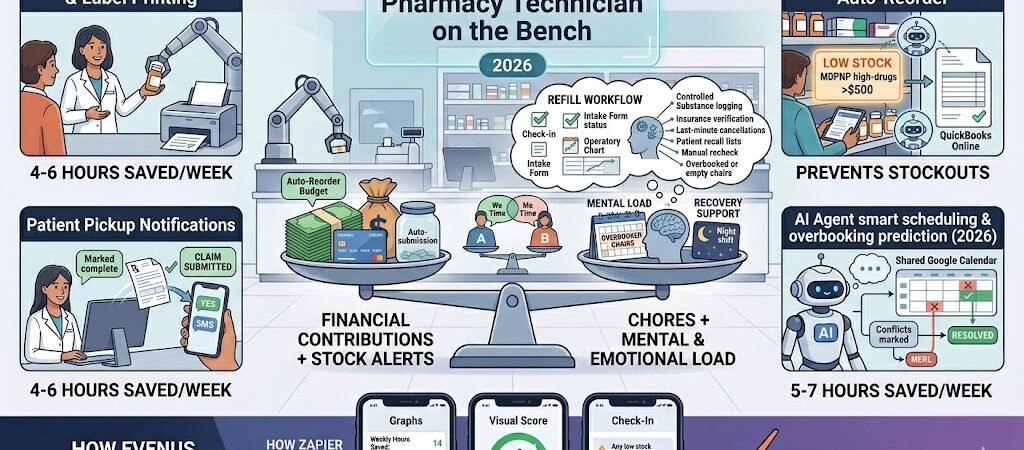
Cut 8–12 hours of manual work per week, never miss a low-stock alert again, and keep patients happy with instant pickup notifications — all while staying focused on the bench.
Pharmacy technicians in 2026 are busier than ever. According to the latest NCPA 2026 Technician Survey, the average technician still spends 8–12 hours every week manually processing refill requests, checking stock levels by hand, and making phone calls or sending texts for patient notifications. Peak hours turn into chaos, stockouts happen unexpectedly, and patients wait longer than necessary for their medications.
The result? Increased stress on the bench, higher error risk, lost sales from stockouts, and frustrated patients who don’t get timely updates.
Zapier + AI Agents changes that completely. In this complete 2026 blueprint you’ll get exact step-by-step Zaps that automate refill workflow, stock alerts, and patient notifications for PrimeRx, PioneerRx, QS/1, Computer-Rx, or any modern pharmacy management system.
Why Pharmacy Technicians Should Use Zapier in 2026 (Zapier for Pharmacy Technicians )
Here’s what most pharmacy technicians are still doing manually every single day in 2026:
- Processing 50–100 refill requests per shift by hand, often juggling phone calls, patient portals, and fax machines.
- Constantly walking back and forth to check physical stock levels and calling wholesalers when drugs run low.
- Making repetitive phone calls or sending individual texts to notify patients that their prescriptions are ready.
- Handling high-volume peaks with increased error risk and stress on the bench.
- Managing controlled substance logging and compliance documentation under tight time pressure.
According to the latest NCPA 2026 Technician Survey, the average pharmacy technician loses 8–12 hours per week on these repetitive tasks. Unexpected stockouts, delayed patient notifications, and manual refill bottlenecks continue to create daily chaos and lost revenue for independent pharmacies.
With Zapier you can finally:
- Automate the entire refill workflow from request to label printing.
- Get real-time low-stock alerts before you run out of high-margin drugs.
- Send instant, personalized patient pickup notifications via SMS or email.
- Reduce bench stress and free up 8–12 hours per week for actual patient care.
- Maintain accurate stock tracking and compliance logs with minimal effort.
Popular pharmacy management systems that connect seamlessly with Zapier include PrimeRx, PioneerRx, QS/1, and Computer-Rx. You can also link Twilio or SMS by Zapier for patient notifications, QuickBooks for reorder orders, and Zapier Tables or Google Sheets for live stock dashboards.
Pharmacy technicians who implement these automations report less stress during peak hours, fewer stockouts, faster patient service, and more time to focus on what matters most — helping patients.
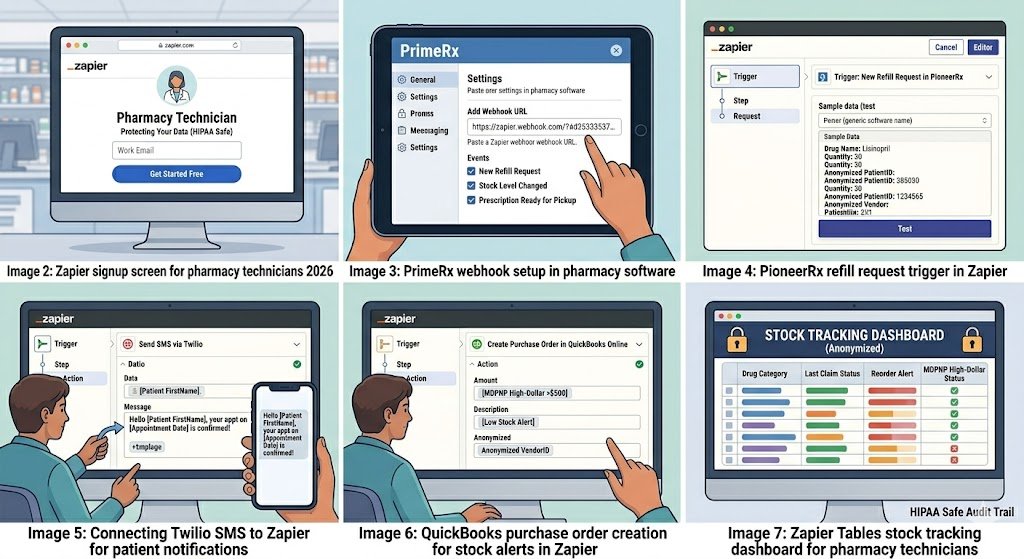
How to Connect Your Pharmacy System to Zapier (Step-by-Step)
Setting up Zapier for pharmacy technicians takes 15–30 minutes for the first Zap — no coding or IT help required.
Step 1: Create Your Zapier Account
- Go to zapier.com and sign up with your work email.
- Verify your email address.
- Start with the Professional plan ($29.99/month billed annually) — this gives you enough tasks for a busy pharmacy technician workflow. The free plan is perfect for testing your first few Zaps.
Step 2: Connect Your Pharmacy Management System
Most pharmacy systems (PrimeRx, PioneerRx, QS/1, Computer-Rx) connect easily using one of these three methods:
- Method A – Webhooks (Recommended) In your pharmacy software settings, enable webhook notifications for events like “New Refill Request”, “Stock Level Changed”, or “Prescription Ready for Pickup”. Copy the unique Zapier webhook URL and paste it into your system.
- Method B – Email Parser (Super Easy) If your system sends refill or stock alerts by email, use Zapier’s built-in Email Parser to automatically extract drug name, quantity, patient notification details, etc.
- Method C – Google Sheets / Zapier Tables Bridge Export daily stock reports or refill lists to Google Sheets → Zapier watches the sheet for new or updated rows.
Pro tip: Start with Webhooks or Email Parser — they are the fastest and most reliable for refill workflow and stock alerts.
Step 3: Connect Your Supporting Apps
Once your pharmacy system is connected, add these common tools (all have native Zapier integrations):
- Twilio or SMS by Zapier → for patient pickup notifications
- QuickBooks Online or Xero → for auto-creating purchase orders on low stock
- Gmail or Outlook → for internal alerts and daily reports
- Google Sheets or Zapier Tables → for live stock tracking dashboards
- Slack → for instant low-stock or refill alerts to the team (optional)
Step 4: Set Up HIPAA-Safe Workflows (Critical in 2026)
Important: Zapier itself is not HIPAA compliant and does not sign a BAA. Safe practice: Only send non-PHI data (drug names, stock levels, refill counts, anonymized totals). Keep all patient names, prescription details, and clinical information inside your pharmacy system.
Total time for first Zap: 15–30 minutes. You can have your first automation (e.g., low-stock alert or patient notification) running the same day.
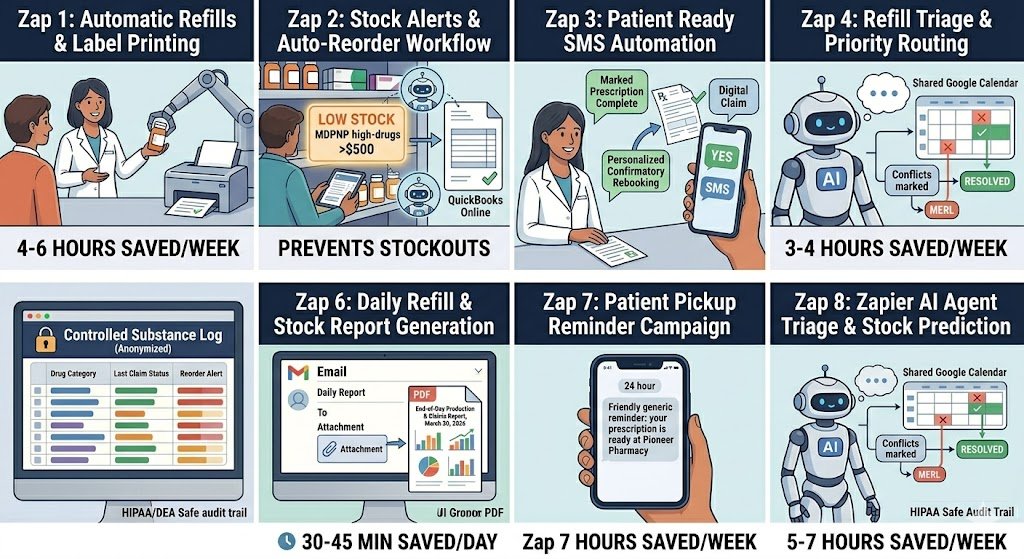
8 Powerful Pharmacy Technician Automations You Can Build Today
These are the exact Zaps that pharmacy technicians are using in 2026 to cut 8–12 hours of manual work per week. Each one includes the trigger, actions, time saved, and a practical edge case.
1. Automatic Refill Workflow & Label Printing Trigger: New refill request received in PrimeRx, PioneerRx, QS/1, or Computer-Rx Action: Auto-verify insurance + generate label + print to pharmacy printer + log in Zapier Tables Time saved: 4–6 hours per week on manual refill processing. Edge case: For controlled substances, add a Filter to pause the Zap and send a Slack alert to the pharmacist for approval. (Screenshot: Refill request trigger + label printing action)
2. Low-Stock Alerts & Auto-Reorder Trigger: Stock level drops below custom threshold in pharmacy system Action: Send SMS + email alert to technician + create purchase order in QuickBooks Time saved: 2–3 hours per week + prevents emergency stockouts. Edge case: For high-dollar or MDPNP drugs, add a second Filter to alert only when value exceeds $500. (Screenshot: Low-stock trigger + QuickBooks purchase order)
3. Patient Ready-for-Pickup Notifications Trigger: Prescription status changed to “Ready for Pickup” Action: Send personalized SMS or email to patient with pickup time and one-click confirmation link Time saved: 2–3 hours per week on patient phone calls. Edge case: Use Zapier AI to personalize the message: “Hi John, your lisinopril is ready — reply YES to confirm pickup time.” (Screenshot: Ready status trigger + personalized SMS)
4. Refill Request Triage & Priority Routing Trigger: New refill request Action: Zapier AI Agent classifies urgency (routine vs urgent) + routes to correct technician queue + logs in dashboard Time saved: 3–4 hours per week on manual triage. Edge case: High-risk refills (controlled substances or allergies) automatically escalate to pharmacist review. (Screenshot: AI triage decision tree)
5. Controlled Substance Refill Logging Trigger: Controlled substance refill processed Action: Auto-log details to secure Zapier Table + send daily compliance report to pharmacist Time saved: 45–60 minutes per day on manual DEA logs. Edge case: Table is encrypted and access-controlled for DEA audits. (Screenshot: Controlled substance trigger + secure table log)
6. Daily Refill & Stock Report Generation Trigger: End of business day (Schedule by Zapier) Action: Pull refill and stock data → generate PDF report → email to technician and manager Time saved: 30–45 minutes every single day. Edge case: For multi-location pharmacies, split the report by store automatically. (Screenshot: Daily schedule trigger + PDF report)
7. Patient Pickup Reminder Campaigns Trigger: Prescription ready for more than 24 hours Action: Send gentle reminder SMS + offer delivery option if available Time saved: 1–2 hours per week on follow-up calls. Edge case: Patients who previously opted for text-only get priority reminders. (Screenshot: 24-hour reminder trigger + SMS)
8. AI-Powered Refill Workflow & Stock Prediction (2026 Game-Changer) Trigger: New refill request or stock level change Action: Zapier AI Agent predicts refill volume and stock needs for next 7 days + suggests reorder quantities + routes routine refills automatically Time saved: 5–7 hours per week on manual forecasting and triage. Edge case: AI confidence below 80 % automatically flags the task for technician review. (Screenshot: AI Agent stock prediction dashboard)
These 8 Zaps create a complete technician-focused automation system that keeps the bench running smoothly and patients happy.
HIPAA Compliance & Security Best Practices
Important 2026 note: Zapier itself is not HIPAA compliant and does not sign a Business Associate Agreement (BAA). This means you must never send Protected Health Information (PHI) — such as patient names, prescription details, dates of birth, or medical records — through Zapier.
Safe and compliant way to use Zapier as a pharmacy technician:
- Only automate non-PHI data: drug names, stock levels, refill counts, anonymized totals, or pickup notification status.
- Keep all actual patient names, prescription details, and clinical information inside your pharmacy management system (PrimeRx, PioneerRx, QS/1, Computer-Rx).
- Use Zapier Tables (encrypted at rest) only for anonymized stock dashboards and refill logs.
- For patient notifications, use anonymized triggers (e.g., “Prescription #4872 is ready” instead of patient name).
Recommended security setup:
- Enable two-factor authentication on every Zapier account.
- Limit Zap access to only the pharmacy technicians and supervising pharmacist.
- Turn on “Require approval before turning on new Zaps” in team settings.
- For any workflow that must touch PHI, use a true HIPAA-compliant tool like Workato, Tray.io, or HIPAAtizer as a secure bridge.
By following these practices, pharmacy technicians can safely enjoy the time-saving power of Zapier while remaining fully compliant with HIPAA, DEA regulations, and state board requirements.
Pricing & Limits for Pharmacy Technicians
A typical pharmacy technician running refill workflows, stock alerts, and patient notifications fits comfortably on Zapier’s Professional plan. Here’s the 2026 pricing breakdown:
| Plan | Monthly Cost (billed annually) | Tasks per Month | Best For Pharmacy Technicians |
|---|---|---|---|
| Free | $0 | 100 | Testing 1–2 simple Zaps only |
| Professional | $29.99 | 750 | Most full-time technicians (recommended starting plan) |
| Team | $103.50 | 2,000+ | High-volume or multi-location pharmacies |
Real-world cost example: A busy pharmacy technician handling 80–150 refills, stock checks, and patient notifications per day typically uses 520–680 tasks per month after adding smart Filters and daily summary reports. This fits easily inside the $29.99 Professional plan.
Pro tip: You can cut task usage another 40–60 % by using Zapier AI Agents for refill triage and switching high-volume patient notifications to daily Digests instead of instant triggers.
Common Errors & Quick Fixes
Even the best pharmacy technician automations can hit a snag. Here are the most common issues pharmacy technicians face in 2026 and exactly how to fix them fast:
1. Authentication Error with Pharmacy Software Problem: Zapier suddenly shows “Authentication failed” with PrimeRx, PioneerRx, QS/1, or Computer-Rx. Fix: Reconnect using a fresh API key or webhook URL from your pharmacy system settings (this is the #1 issue after software updates). Takes under 60 seconds.
2. Stock Alerts Not Triggering or Delayed Problem: Low-stock alerts don’t fire or arrive too late. Fix: Double-check the threshold value in the trigger and add a short Delay by Zapier (5–10 seconds) or switch to a daily Digest instead of instant trigger for high-volume drugs.
3. Duplicate Patient Notification Messages Problem: Patients receive the same “ready for pickup” SMS multiple times. Fix: Add a Filter by Zapier step that checks Zapier Tables or a Google Sheet to see if a notification was already sent for that prescription ID.
4. Rate Limit / Task Usage Spikes During Peak Hours Problem: You hit your task limit on busy days (Monday mornings and end-of-day rushes). Fix: Switch high-volume patient notifications and refill workflows to daily Digests instead of instant triggers, or add a short Delay step. Most technicians cut usage by 40–60 % this way.
5. AI Agent Misclassifying Refills or Stock Needs Problem: The AI Agent flags routine refills as urgent or underestimates stock needs. Fix: Lower the confidence threshold to 75 % or add a mandatory human-in-the-loop approval step for any prediction the AI rates below 85 % confidence.
Conclusion & Next Steps
You no longer have to spend 8–12 hours every week manually processing refills, checking stock levels, and calling patients for notifications.
With these 8 practical Zaps (plus the AI-powered smart triage and stock prediction version), pharmacy technicians are dramatically reducing bench stress, preventing stockouts, speeding up patient service, and staying focused on what matters most — helping patients get their medications quickly and accurately.
The best part? You can have your first automation (low-stock alert or patient pickup notification) running the same day you build it.
Ready to automate your refill workflow today? Build your first Zap in under 5 minutes → Start Free on Zapier
Want the complete ready-made template pack? Reply “PHARMACY TECH TEMPLATES” in the comments or visit our homepage and I’ll send you all 8 Zaps as importable links (completely free).
Looking for a more affordable long-term solution? Many pharmacy technicians are switching to Make.com for high-volume refill and notification workflows. Want the Make.com version of these blueprints? Just let me know.
Automate once. Spend more time on the bench and less time on repetitive tasks.
Ready to automate your refill workflow, stock alerts, and patient notifications as a pharmacy technician?
Explore hundreds more practical Zapier blueprints for pharmacy staff and medical professionals on our homepage: practicalaismb.com
For the latest industry data used in this guide, check these trusted sources:
- NCPA 2026 Pharmacy Technician Survey
- American Society of Health-System Pharmacists (ASHP)
- Zapier Official Integration Directory

About the Author
Aapt DubeyAapt Dubey is an automation specialist and software developer dedicated to eliminating manual workflows for small businesses. With deep, hands-on experience building complex Zapier integrations, API connections, and real-world applications, Aapt writes actionable, tested tutorials to help businesses scale efficiently.