
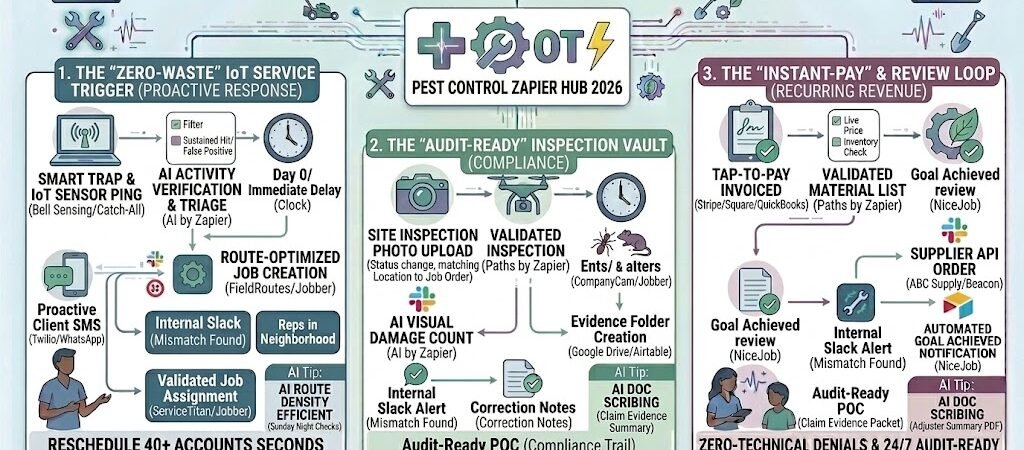
Key Takeaways: Zapier for Pest Control 2026
- The “Smart-Trap” Trigger: Integrate IoT rodent and insect sensors to trigger service calls only when activity is detected, saving thousands in unnecessary site visits.
- Compliance on Autopilot: Automate the generation and filing of chemical usage reports (EPA/State requirements) the second the technician closes a job.
- The “Pre-Arrival” Safety Loop: Send automated, property-specific prep instructions (e.g., “Keep pets inside,” “Clear under-sink cabinets”) 24 hours before service.
- Dynamic Subscription Management: Automate the transition from “Active Infestation” pricing to “Preventative Maintenance” billing once target pests are cleared.
The “Compliance & Route” Crunch of 2026
In 2026, the pest control industry is facing a dual-pronged challenge: tighter environmental regulations and a shifting labor market. Gone are the days of “spray and pray” routes. Modern Pest Control Operators (PCOs) are now required to act as data analysts and compliance officers. We call this the “Compliance & Route” Crunch—the point where the administrative cost of proving you did the job safely starts to outweigh the profit of the service itself.
By 2026, the average PCO loses 22% of their potential net revenue to three specific operational “Infestations”:
- The “No-Access” Ghost Trip: In a hybrid-work world, homeowners are less predictable. If a technician arrives to find a locked side-gate or a dog in the yard, that’s a “dead stop.” In 2026, with high fuel costs and technician wages, two “no-access” stops can render an entire route unprofitable.
- The Manual Chemical Log Jam: State and federal agencies now demand real-time, digital chemical usage reports. Manually transcribing ounces-per-gallon from a paper clipboard to a state database at the end of the week isn’t just slow—it’s a massive liability risk. One clerical error in 2026 can lead to a “Stop Work” order or a five-figure fine.
- The “Smart Trap” Data Silo: Many shops have invested in IoT rodent sensors or “Smart Traps,” but the data lives in a separate app. If your technician has to check three different apps to see which trap “fired,” they aren’t saving time; they’re just adding digital clutter to their day.
The Zapier Solution: Zapier acts as your “Operations Tower,” bridging the gap between your specialized field software (FieldRoutes, Briostack, or Jobber) and your compliance databases. By 2026, an automated pest control shop doesn’t hope a customer is ready for them; Zapier has already sent a “Gate & Pet” reminder 24 hours prior and automatically filed the chemical SDS report in a secure audit vault the second the technician hits “Complete” on their mobile device.
Practical AI Tip for 2026: Use AI by Zapier to perform “Service Note Sentiment Analysis.” If a technician notes “Customer mentioned seeing ants in the kitchen again” for three consecutive visits, have Zapier flag that account for a “Supervisor Review.” In 2026, preventing a “cancellation” via proactive AI detection is 5x cheaper than acquiring a new customer.
Blueprint #1 – The “Zero-Waste” IoT Service Trigger
In 2026, the most expensive way to catch a mouse is to send a technician to check an empty trap. With “Smart Trap” technology now the industry standard, the most profitable Pest Control Operators (PCOs) have moved to an on-demand service model. Instead of rigid monthly “check-ins,” your business responds to real-time activity. This blueprint ensures that your technicians only spend time on properties where there is a confirmed “hit,” maximizing route efficiency and customer peace of mind.
1. The Trigger: IoT Activity “Ping”
- The 2026 Tech: Your commercial or residential accounts are equipped with IoT sensors (like Bell Sensing, Anticimex SMART, or Catch-All).
- The Action: A rodent enters a trap or an infrared sensor detects movement in a “high-risk” zone (like a restaurant kitchen or a server room). This sends a Webhook signal to Zapier.
2. The Logic: Activity Verification & Triage (AI by Zapier)
Zapier filters out the “noise” to ensure your technicians aren’t chasing shadows:
- The False Positive Filter: AI analyzes the sensor data (heat signature and duration). If it’s a “quick pass” (likely a leaf or a pet), it logs the activity but doesn’t trigger a visit. If it’s a “sustained hit,” it proceeds.
- The Route Match: Zapier checks the FieldRoutes or Jobber dispatch board. If a technician is already scheduled for a “General Maintenance” visit at that property in the next 48 hours, Zapier simply adds an “Emergency Trap Service” task to that existing job.
- The Priority Shift: If no visit is scheduled, Zapier creates an “Active Infestation” work order immediately.
3. The Action: The “Smart-Response” Alert
- The Technician Dispatch: A high-priority notification hits the technician’s mobile app: “Trap Trigger: Station #14 (Kitchen North). Customer: [Name]. Added to today’s route.”
- The Client Reassurance: An automated SMS is sent via Twilio: “Our 24/7 monitoring system just detected activity in your [Zone]. We’ve already dispatched a technician to reset the station and inspect the perimeter. No action needed on your part!”
- The Result: You provide a “Platinum Level” service experience that feels like magic to the customer, while significantly reducing your “Zero-Result” stops.
Summary: The IoT Service Trigger Zap
| Step | Component | 2026 Recommended Tool |
| Trigger | IoT Sensor “Hit” | Bell Sensing / Catch-All |
| Logic | AI Activity Verification | AI by Zapier |
| Action 1 | Dynamic Work Order Creation | FieldRoutes / Jobber |
| Action 2 | Proactive Client SMS | Twilio / WhatsApp |
| Action 3 | Route Triage Update | Dispatch Board (CRM) |
Practical AI Tip for 2026: Use AI by Zapier to “Predict Seasonal Surges.” Have Zapier look at your “Smart Trap” data across all accounts in a specific zip code. If the AI sees a 25% spike in activity in one neighborhood, it can automatically trigger a “Neighborhood Alert” email to your sales leads in that area: “We’re seeing a rise in rodent activity on your street—lock in your 2026 prevention plan today.”
Blueprint #2 – The “Audit-Ready” Inspection Vault
In 2026, regulatory scrutiny on chemical usage—especially PFAS-free alternatives and pollinator-safe treatments—has reached an all-time high. For a Pest Control Operator (PCO), “losing the paperwork” isn’t just an inconvenience; it’s a risk to your operating license. This blueprint automates the collection of EPA-required chemical logs and safety data, ensuring you are 100% “Audit-Ready” without spending your Sunday nights at a desk.
1. The Trigger: Field Service “Job Closed”
- The 2026 Tech: A technician finishes a perimeter spray or an attic treatment and hits “Complete” in their FieldRoutes, Briostack, or Jobber mobile app.
- The Data: The app captures the specific chemical used (oz/gal), the target pest, the wind speed/weather at the time of application, and the technician’s digital signature.
2. The Logic: Compliance Verification (AI by Zapier)
Zapier acts as your Virtual Compliance Officer, checking the work before it’s filed:
- The SDS Match: Zapier cross-references the chemical name against your master Safety Data Sheet (SDS) library in Airtable.
- The Triage Logic: If a technician logs an unusually high concentration of a restricted-use pesticide (RUP), Zapier pauses the filing and sends an “Immediate Review” alert to the owner.
- The Weather Check: Zapier pulls the 2026 local weather data for that exact hour. If wind speeds exceeded 15 mph (risking chemical drift), it flags the record for a “Safety Justification” note.
3. The Action: The “Zero-Paper” Compliance Trail
- The State Vault: Zapier creates a timestamped row in a secure Google Sheet or Airtable “Compliance Log.” This is your 2026 “Insurance Policy” for state audits.
- The Customer Safety Report: Zapier triggers a branded “Post-Service Safety Summary” via Formstack or Email: “Service Complete at 2:14 PM. Treatment: [Product Name]. Targeted Pests: Ants/Spiders. Safety Note: Property is safe for pet/human re-entry at 4:15 PM.”
- The Result: You provide the transparency that commercial clients (like restaurants and schools) demand, while building an ironclad digital defense for your business.
Summary: The Compliance Vault Zap
| Step | Component | 2026 Recommended Tool |
| Trigger | Job Marked “Complete” | FieldRoutes / Jobber |
| Logic | Chemical & Weather Audit | AI by Zapier |
| Action 1 | Permanent Compliance Log | Airtable / Google Sheets |
| Action 2 | Safety Summary PDF | Formstack / Google Docs |
| Action 3 | Automated Client Email | Gmail / SendGrid |
Practical AI Tip for 2026: Use AI by Zapier to “Auto-Scribe” technician notes. If a technician records a voice memo like “Found a crack in the foundation by the AC unit, likely termite entry point,” Zapier can transcribe that into a professional “Repair Recommendation” and automatically email it to the homeowner with a quote for a bait station upgrade.
Blueprint #3 – Automated Recurring Subs & “Prep” Alerts
In 2026, the lifeblood of a Pest Control Service is its recurring revenue. However, that revenue is only as healthy as your access to the property. A “No-Access” stop—where a technician is blocked by a locked gate, a loose dog, or a customer who forgot to clear out under the sink for a German Cockroach treatment—is a 100% loss of that time slot’s profitability. This blueprint automates the “Pre-Arrival Safety Loop,” ensuring your customers are prepared and your technicians are never standing in front of a locked gate.
1. The Trigger: The “Day-Before” Dispatch
- The 2026 Tech: Your CRM (FieldRoutes, Briostack, or Jobber) identifies all recurring services scheduled for the next 24 hours.
- The Action: At 9:00 AM the day before service, Zapier pulls the list of tomorrow’s appointments.
2. The Logic: Property-Specific “Prep” Triage (Paths by Zapier)
Zapier uses Paths to send different instructions based on the specific pest being targeted:
- Path A: General Perimeter (Residential): Sends a “Pet & Gate” checklist. “Please ensure the backyard gate is unlocked and [Dog’s Name] is inside from 8 AM to 12 PM.”
- Path B: Indoor Infestation (Kitchen/Bathroom): Sends a “Clearance” checklist. “To treat the active ant trail, please remove all items from under the kitchen and bathroom sinks before our 10 AM arrival.”
- Path C: Commercial/Kitchen: Sends a “Facility Manager” alert. “Please ensure the loading dock is clear and the kitchen night manager is available for a 4:00 AM walkthrough.”
3. The Action: The “Confirmation” Loop
- The SMS Outreach: An automated text is sent via Twilio or WhatsApp Business: “Hi [Name], we’re scheduled for your quarterly protection tomorrow. Please confirm you’ve cleared the sinks and the dog is inside by replying ‘READY’.”
- The “No-Response” Escalation: If the customer doesn’t reply by 4:00 PM, Zapier pings your office Slack: “Action Needed: [Name] at [Address] hasn’t confirmed tomorrow’s prep. Call to avoid a wasted trip.”
- The Result: Your “No-Access” rate drops to near zero, and your technicians arrive at properties that are actually ready to be treated.
Summary: The Prep & Confirmation Zap
| Step | Component | 2026 Recommended Tool |
| Trigger | Job Scheduled for “Tomorrow” | FieldRoutes / Jobber |
| Logic | Service-Specific Instructions | Paths by Zapier |
| Action 1 | Automated “Prep” SMS | Twilio / WhatsApp |
| Action 2 | Confirmation Tracking | Zapier Tables / CRM |
| Action 3 | Admin “No-Response” Alert | Slack / Microsoft Teams |
Practical AI Tip for 2026: Use AI by Zapier to “Predict Cancellations.” If a customer has ignored the prep SMS for two consecutive quarters, have Zapier automatically flag them as a “Churn Risk” and trigger a personalized email from the owner: “We want to make sure we’re providing the best value. Is there a better time or day that works for your schedule?”
The 2026 Pest Control Tech Stack
In 2026, the most profitable Pest Control Operators (PCOs) are no longer just “sprayers”—they are data managers. To scale a 2026 service business, your tech stack must bridge the gap between physical sensors in the crawlspace and the compliance databases at the state capital. This “Smart Stack” focuses on IoT connectivity, automated compliance, and high-density routing.
1. The 2026 Core Stack
| Function | 2026 Recommended Tool | Why It Wins in 2026 |
| Field CRM | FieldRoutes / Briostack | Industry-standard for complex recurring scheduling and technician dispatch. |
| IoT Intelligence | Bell Sensing / Catch-All | Provides the “Smart-Trap” triggers that eliminate unbillable “empty trap” inspections. |
| Compliance Vault | Airtable / Google Sheets | Acts as the permanent, audit-ready record for chemical usage and weather logs. |
| Field Ops | Jobber | Best-in-class mobile app for small-to-midsize PCOs focusing on residential speed. |
| Client Alerts | Twilio / WhatsApp Business | Essential for the “Prep & Confirmation” loops that prevent “No-Access” trips. |
2. The 2026 “Smart-Pest” Circuitry
In 2026, Zapier acts as your “Central Command,” routing data through these three critical circuits:
- The Response Circuit: Connect your IoT Sensors directly to FieldRoutes. When a trap “fires,” Zapier doesn’t just send an email—it creates a high-priority work order and moves it to the top of the nearest tech’s mobile queue.
- The Audit Circuit: Link your Mobile App to Airtable. Every time a technician logs a “Perimeter Spray,” Zapier pulls the 2026 local wind-speed data and attaches it to the chemical log, creating a 100% “Audit-Proof” safety record.
- The Revenue Circuit: Connect Stripe (Subscriptions) to NiceJob. After the second successful quarterly treatment is paid, Zapier triggers a “Refer-a-Neighbor” discount, turning your recurring clients into a passive sales force.
3. Hardware for the 2026 “High-Margin” Rig
- 5G Thermal Inspection Drones: Use drones equipped with thermal imaging to spot “Heat Signatures” (hives or nests) inside walls without drilling. Zapier can sync these thermal maps directly to the customer’s digital “Home Health Vault.”
- Smart Bait Stations: Bluetooth-enabled stations that “check in” daily. If a station goes offline or is moved, Zapier alerts the technician instantly to prevent equipment loss.
- AI-Powered “Pest-ID” Apps: Technicians snap a photo of a rare insect; AI identifies it in 2 seconds and Zapier pulls the specific 2026 SDS (Safety Data Sheet) and treatment protocol for that exact species.
Conclusion: Your 30-Day “Smart-Pest” Roadmap
- Week 1: The Confirmation Loop. Connect your CRM to Twilio to launch Section 4 “Prep Alerts” and stop wasting gas on “No-Access” stops.
- Week 2: The Audit Vault. Automate your chemical logging in Airtable so you never have to “catch up” on paperwork before a state inspection.
- Week 3: The Smart-Trap Trial. Deploy your first 5 IoT sensors and use Webhooks to trigger Blueprint #1 (The “Zero-Waste” Response).
- Week 4: The Review Engine. Set up a “Job Complete” trigger that asks for a 5-star review the moment the “Safety Re-Entry” time has passed.

About the Author
Aapt DubeyAapt Dubey is an automation specialist and software developer dedicated to eliminating manual workflows for small businesses. With deep, hands-on experience building complex Zapier integrations, API connections, and real-world applications, Aapt writes actionable, tested tutorials to help businesses scale efficiently.