
Key Takeaways: Zapier for Personal Trainers
- The “Admin-to-Athlete” Ratio: In 2026, top-tier coaches spend less than 5% of their time on data entry, down from 30% in 2022.
- Hyper-Personalization at Scale: Zapier allows a single trainer to provide “concierge-level” adjustments (like changing a workout based on last night’s sleep) for 50+ clients simultaneously.
- Proactive vs. Reactive Coaching: Automation shifts the trainer from reviewing what happened last week to intervening in what is happening right now.
- The AI Buffer: Zapier isn’t just moving data; it’s using AI to “interpret” it, giving the coach a summarized “Daily Action List” instead of a raw spreadsheet.
The Death of the Spreadsheet
For decades, the “gold standard” for a meticulous personal trainer was a complex, color-coded Excel sheet. You’d spend Sunday nights squinting at columns, manually typing in squat maxes from emails, and cross-referencing MyFitnessPal screenshots.
In 2026, that manual approach isn’t just slow—it’s a liability.
The modern client no longer settles for a static “Tuesday is Leg Day” plan. They are wearing Oura rings that know they have a fever before they do; they have smart scales that track cellular hydration; and they use AI-integrated journals that log their stress levels. As a coach, you cannot manually process this firehose of data. If you try, you become a data clerk, not a transformer of lives.
The Shift to “AI Orchestration”
The “Data-Driven Coach” has replaced the spreadsheet with a central nervous system. By using Zapier, you aren’t just “connecting apps”; you are building an automated ecosystem.
- The Old Way: You check a client’s app, see they missed a workout, and text them three hours later.
- The 2026 Way: Zapier detects the missed session in your training software, checks the client’s Google Calendar for a “Late Meeting” block, and automatically pushes a “Don’t sweat it—here’s a 10-minute evening de-stress routine instead” notification to their phone.
Why Zapier is the 2026 Essential
Zapier acts as the “translation layer” between your technical tools (biometrics, CRM, Billing) and your coaching intuition. It allows you to automate the information gathering so that your 1-on-1 time is spent on human transformation. In a world where AI-only coaching apps are free, your value as a human coach lies in your ability to use this data to provide empathy, nuance, and high-level strategy—things a spreadsheet can never do.
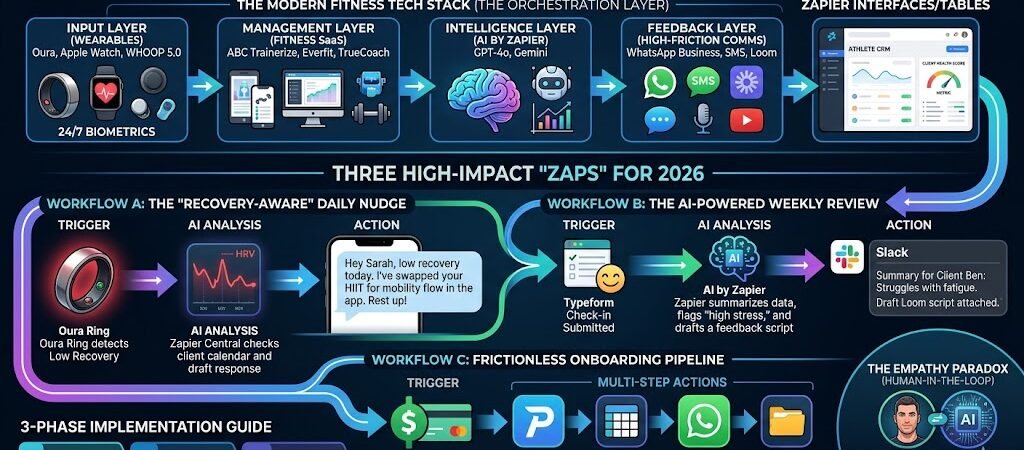
The Modern Fitness Tech Stack (The Orchestration Layer)
To be a data-driven coach in 2026, you must stop thinking about apps in isolation. Your “Stack” is composed of four distinct layers that Zapier binds together into a single, intelligent workflow.
1. The Input Layer: Wearables & Biometric Sensors
In 2026, the primary data source isn’t the client’s word—it’s their biology.
- The Big Three: Oura Ring 4, WHOOP 5.0, and Apple Watch Series 11 are the industry standards for 24/7 recovery and strain data.
- The Goal: Use these to track HRV (Heart Rate Variability) and Sleep Stages.
- The Zapier Trigger: These devices now sync natively with HealthConnect or Apple Health, which Zapier monitors to trigger “Readiness Alerts” the moment a client wakes up.
2. The Management Layer: Fitness SaaS Platforms
This is where your programming lives. You need a platform that “plays well” with others.
- Top Picks: ABC Trainerize, Everfit, and TrueCoach remain the heavy hitters.
- The Integration: These platforms serve as your “Action” destinations. For example, when a client hits a PR in a workout, Zapier can automatically log that achievement in your CRM or trigger a celebratory video message.
3. The Intelligence Layer: AI by Zapier & Gemini
This is the newest and most critical addition to the 2026 stack.
- AI Agents: Instead of looking at raw spreadsheets, you use Zapier Central or AI by Zapier.
- The Role: Think of this as your “Virtual Assistant Coach.” It sits in the middle of your workflows, analyzing incoming data. If a client’s “Strain” is high but their “Protein Intake” is low, the AI flags this for you before you even open your laptop for the day.
4. The Feedback Layer: High-Friction Communication
The best data is useless if the client doesn’t act on it.
- Tools: WhatsApp Business, Slack, or SMS by Zapier.
- The Strategy: Use Zapier to move away from generic “Weekly Check-ins” and toward Contextual Nudges.
- Example: If a client hasn’t logged a meal by 2:00 PM, Zapier sends a friendly nudge: “Hey [Name], I noticed a gap in the logs—let’s make sure we’re fueled for tonight’s session!”
Summary of the 2026 “Pro” Stack:
| Category | Recommended Tools | Zapier Role |
| Biometrics | Oura, WHOOP, Garmin | Trigger (Data Input) |
| Programming | Everfit, Trainerize | Action (Execution) |
| Analysis | AI by Zapier, ChatGPT/Gemini | Filter (Reasoning) |
| Communication | WhatsApp, Slack, Loom | Delivery (Feedback) |
Three High-Impact “Zaps” for 2026
The following workflows move beyond basic data syncing. They utilize Conditional Logic and AI Analysis to make your coaching feel like it’s happening in real-time, even while you’re asleep.
Workflow A: The “Recovery-Aware” Daily Nudge
The Goal: Adjust training volume based on real-time biometric readiness.
- Trigger: New Sleep or Readiness Score in Oura or WHOOP (via HealthConnect).
- The Logic (Paths by Zapier):
- Path A (Score < 50): Send a WhatsApp message: “Hey [Name], your recovery is in the red today. I’ve swapped your heavy squats for a 20-minute mobility flow in the app. Rest up!”
- Path B (Score > 85): Send a WhatsApp message: “You’re primed for a PR today. I’ve added a ‘plus-set’ to your final lift. Let’s get it!”
- Action: Update the “Today’s Workout” note in Trainerize or Everfit.
Workflow B: The AI-Powered Weekly Review
The Goal: Eliminate the 2-hour “Sunday Admin” session by having AI draft your feedback.
- Trigger: New Typeform or Zapier Forms check-in submission.
- The Processing (AI by Zapier):
- The AI agent reviews the form (e.g., “Energy levels were a 3/10”) and compares it against the last 7 days of workout data from your coaching platform.
- It drafts a suggested response: “Client [Name] is struggling with mid-week fatigue. Recommend increasing carbs on Wednesday or moving the rest day.”
- Action: Send a Slack notification to the trainer with the summary and a draft script for a Loom video.
Workflow C: The “Frictionless Onboarding” Pipeline
The Goal: Transform a “Lead” into an “Onboarded Athlete” in 60 seconds without lifting a finger.
- Trigger: New Successful Payment in Stripe.
- Multi-Step Actions:
- Trainerize: Create a new client profile and assign the “Onboarding Phase 1” program.
- Zapier Tables: Log the client’s start date and projected “Goal Reach Date” based on their intake form.
- WhatsApp: Send a “Welcome” video and a link to book their strategy call via Calendly.
- Google Drive: Create a private “Client Results” folder for their progress photos.
Pro-Tip: The “Human-in-the-Loop” Toggle
In 2026, “Auto-pilot” can sometimes feel cold. For your high-ticket clients, add a “Delay by Zapier” step or a “Filter”that sends the message to you for approval before it goes to the client. This ensures the AI drafts the work, but the human provides the final “okay.”
Leveraging “Zapier Tables” as Your Athlete CRM
While platforms like Trainerize are great for delivering workouts, they aren’t always designed to track the “business of the athlete.” In 2026, elite coaches use Zapier Tables to build a custom, automated Command Center.
1. The “Single Source of Truth”
Instead of toggling between five different apps to see how a client is doing, you can use Zapier to funnel every data point—Stripe payments, Oura readiness, MyFitnessPal macros, and workout completion—into one master Table.
- Automation Logic: Every time a “trigger” occurs in another app, a row is updated in your Table.
- The Benefit: You have a real-time leaderboard of your entire roster, sorted by “Compliance” or “Progress.”
2. Calculating the “Client Health Score”
This is the holy grail of retention. By using Zapier’s Formula columns, you can create a live score for every client (e.g., 1–10).
- The Formula: (Average Sleep Score + % Workouts Completed + Protein Goal Met) / 3.
- The Proactive Alert: You can set a Zap to notify you in Slack if a client’s Health Score drops below 6.5 for three consecutive days. This allows you to intervene before they lose motivation or decide to quit.
3. Automated Lifecycle Management
Zapier Tables allows you to trigger actions based on dates or milestones within the table itself:
- Milestone 1: When a client hits their 30-day mark, the Table triggers a “Progress Review” email.
- Milestone 2: If a client hasn’t logged data in 48 hours, the “Last Active” column turns red, and an AI-drafted “Re-engagement” text is queued for your approval.
4. Visualization: From Rows to Insights
In 2026, Zapier Tables integrates directly with Zapier Interfaces, allowing you to turn your raw data table into a sleek, client-facing dashboard. You can give your clients a private URL where they can see their own “Power Rankings,” “Recovery Trends,” and “Upcoming Milestones” without them ever seeing your messy backend notes.
The 2026 Edge: The “Data-Driven Coach” doesn’t just collect data; they visualize it to prove ROI to the client. When a client can see a direct correlation between their “Automated Recovery Score” and their “Strength Gains” in a single chart, they stay for years, not months.
The Empathy Paradox (The Human-in-the-Loop Model)
As you automate more of your coaching, you encounter the Empathy Paradox: The more data you have, the more “robotic” your coaching can feel if not handled with care. In 2026, clients don’t pay for data—they pay for how that data makes them feel.
1. AI Drafts, Humans Deliver
The most successful coaches use Zapier to perform the “Heavy Lifting” of analysis, but they never let the AI have the final word.
- The Workflow: Zapier analyzes a client’s bad week and drafts a 3-paragraph explanation of why their cortisol is high.
- The Human Touch: You take that draft, edit it into your own voice, and record a quick Loom or Voxer message. The client sees a deep, data-driven insight delivered with your unique tone and encouragement.
2. Guarding the “Emotional High-Ground”
Automation should handle the quantitative (macros, sets, reps, sleep hours), leaving you to handle the qualitative (stress at work, body image, relationship with food).
- The Rule: If a Zap detects a biometric “Red Zone,” the automated response should be a “Check-in Request,” not a lecture.
- Example: Instead of an automated message saying “Your sleep was 4 hours, go to bed earlier,” Zapier alerts you to call the client for 5 minutes to ask, “Hey, I saw the data—is everything okay at home?”
3. The “Surprise and Delight” Automation
Use Zapier to automate kindness, not just critiques.
- The “PR” Celebration: Set a Zap so that when a client hits a lifetime best in a lift, Zapier triggers a physical postcard via Lob or a $5 Starbucks gift card via Guusto.
- The Connection: Because the “boring” admin is automated, you finally have the mental bandwidth to remember their kid’s birthday or their upcoming work presentation.
4. Scaling the “Unscalable”
In 2026, the “Data-Driven Coach” uses automation to buy back time. That time isn’t for more admin; it’s for deeper connection. If you save 10 hours a week through Zapier, invest 5 of those hours back into personalized video calls or community-building.
The 2026 Mantra: Use AI to understand the numbers, but use your heart to understand the person. The machine sees the “what,” but the coach sees the “why.”
Implementation Guide—From Manual to Automated
You don’t need to build a “Skynet” for your coaching business overnight. In fact, trying to automate everything at once is a recipe for broken workflows and frustrated clients. Follow this 3-step rollout to transition into a Data-Driven Coach.
Phase 1: The “Busy Work” Audit (Week 1)
Before opening Zapier, track your daily tasks for seven days. Identify “The Repetitive Three”:
- Onboarding: Sending the same welcome email and intake form.
- Reporting: Pulling data from a fitness app into a spreadsheet.
- Alerting: Manually checking who hasn’t logged their workout today.
- Action: Choose one of these and build your first Zap. Start with “Lead-to-Locker” (Stripe payment to Onboarding).
Phase 2: Layering in the “Biometric Bridge” (Week 2-4)
Once your admin is stable, connect your clients’ wearables.
- The Setup: Use HealthConnect or Apple Health integrations to pull one key metric—ideally Sleep Score or HRV.
- The Goal: Create a “Silent Alert” for yourself. Don’t message the client yet; just have Zapier send you a daily summary of who is “in the red.” This trains you to look at the data before you coach.
Phase 3: The “AI-Review” Integration (Month 2)
Now that data is flowing, introduce AI by Zapier to help with the heavy lifting of analysis.
- The Workflow: Feed your weekly check-in form results into an AI step. Ask the AI to: “Summarize the top 3 wins and top 2 blockers for this client based on their responses.”
- The Result: You spend 30 seconds reading an AI summary instead of 10 minutes digging through form entries.
Phase 4: Optimization & Scaling
By month three, you should have a “Closed Loop” system. Use this time to:
- Refine your Zapier Tables to track your business LTV (Lifetime Value) and churn rates.
- Automate your marketing: Use Zapier to find “Success Stories” (clients who hit a 12-week milestone) and prompt them for a Google Review.
Conclusion: The Competitive Advantage of 2026
The fitness industry in 2026 is bifurcating. On one side, you have low-cost AI apps that provide generic plans for $10 a month. On the other, you have the Elite Human Coach who uses those same AI tools to provide a level of service that was previously impossible.
Being a “Data-Driven Coach” isn’t about being a tech expert; it’s about being a Time-Efficiency Expert. By offloading the data collection and basic analysis to Zapier, you free yourself to do the only thing AI can’t: build a transformative human relationship.
The future of coaching isn’t “Man vs. Machine”—it’s the Coach + Machine vs. the status quo.
Build your first “Recovery Trigger” today. Your future self (and your clients) will thank you.

About the Author
Aapt DubeyAapt Dubey is an automation specialist and software developer dedicated to eliminating manual workflows for small businesses. With deep, hands-on experience building complex Zapier integrations, API connections, and real-world applications, Aapt writes actionable, tested tutorials to help businesses scale efficiently.