
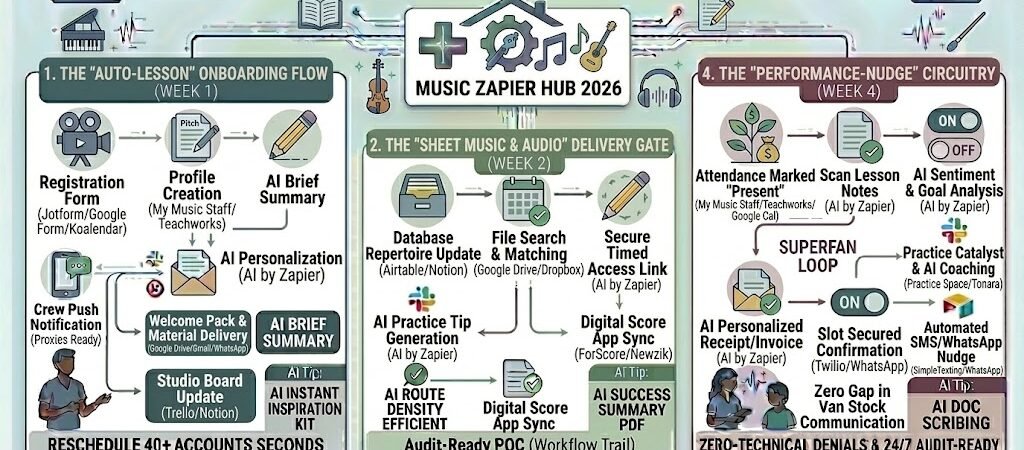
Key Takeaways: Zapier for Music Teachers 2026
- The “Zero-Conflict” Calendar: Use Zapier to sync specialized tools like My Music Staff or Koalendar with your Google Calendar to handle recurring lessons and make-ups automatically.
- Automated Repertoire Delivery: Trigger a Google Drive or Dropbox link to specific sheet music PDFs the moment a student books a lesson or pays their monthly fee.
- The “Invoice Autopilot”: Link Stripe or QuickBooks to your attendance log to generate and send invoices the moment a lesson is marked as “Complete.”
- Practice-Nudge Automation: Use AI by Zapier to scan your lesson notes and send a personalized SMS with the “Top 3 Practice Goals” for the week.
The “Logistical Crescendo” of 2026
In 2026, the global online music education market is projected to reach $23.53 billion, with nearly 80% of learnerspreferring digital or hybrid platforms for their flexibility. However, this growth has brought a “Logistical Crescendo”—a point where the sheer volume of digital coordination threatens to overwhelm the teacher’s primary mission: making music.
By 2026, a music teacher’s effectiveness is often throttled by three specific “Operational Discord” factors:
- The “Scheduling Sync” Lag: Managing a studio of 30+ students involves constant rescheduling due to school events, illness, or travel. In 2026, teachers lose an average of 8 hours per week on back-and-forth messaging. If your calendar isn’t “Self-Healing” (automatically filling empty slots from a waitlist), you are leaking revenue every time a student cancels.
- The “Repertoire Retrieval” Tax: Students often lose track of their practice materials. Tutors spend 15% of their lesson time re-sending PDF links or locating backing tracks. In 2026, the transition from “Checking Homework” to “Playing the Piece” must be instantaneous; searching through email threads for a sheet music link is a relic that erodes your professional authority.
- The “Tuition-Chasing” Fatigue: The most common source of teacher burnout is the “Payment Dance.” Manually tracking who paid for which lesson, sending “gentle” SMS reminders, and handling late fees consumes 3–5 hours of emotional energy every month. In 2026, a high-output studio doesn’t “ask” for payment; the system secures it as a prerequisite for the lesson.
The Zapier Solution: Zapier acts as your “Studio Business Manager,” orchestrating the flow between your teaching tools (Zoom, MuseScore, Google Drive) and your business tools (My Music Staff, Stripe, WhatsApp). By 2026, an automated music studio doesn’t “remind” a student to practice; Zapier has already scanned the lesson notes and pushed the “Top 3 Goals” to the student’s phone. You don’t “send” sheet music; Zapier delivers the correct PDF the moment the lesson is booked.
Practical AI Tip for 2026: Use AI by Zapier to “Monitor Practice Consistency.” Have Zapier check your student’s digital practice logs (like those in Yousician or Tonara). If the AI detects a 3-day lapse in practice, it can trigger an automated, encouraging “Nudge” via WhatsApp: “Hey [Name]! Just a reminder to try 10 minutes of scales today. You’re so close to mastering that Mozart passage!”
Blueprint #1 – The “Auto-Lesson” Onboarding Flow
In 2026, a music teacher’s first impression isn’t made during the trial lesson—it’s made in the ten seconds after a student hits “Submit” on your registration form. Modern learners expect instant confirmation and immediate access to their materials. If you wait until the next morning to manually send a welcome email, you’ve already lost the “excitement window.” This blueprint uses Zapier to turn your intake process into an automated onboarding engine.
1. The Trigger: The “Instant Intake” Form
- The 2026 Tech: A prospective student or parent completes your Jotform, Google Form, or Koalendar registration widget on PracticalAISMB.com.
- The Action: Zapier catches the data—instrument, skill level, and goals—and instantly checks it against your studio’s capacity.
2. The Logic: Automated Studio Set-Up
Zapier acts as your Digital Studio Manager, preparing the student’s ecosystem without you lifting a finger:
- The Studio Management Entry (My Music Staff / Teachworks): Zapier creates a new student profile. If they selected “Violin,” Zapier automatically assigns them to your “String Studio” tag and sets their status to “Trial.”
- The Welcome Pack Retrieval (Google Drive): Using the “Skill Level” tag, Zapier selects the correct onboarding PDF (e.g., “First Steps for Adult Piano Beginners”) and generates a unique download link.
- The AI Intro Generator (AI by Zapier): AI drafts a personalized greeting that references their specific goals (e.g., “I’m so excited to help you learn Jazz Improvisation!”) to make the automation feel human and authentic.
3. The Action: The “Ready-to-Play” Launch
- To the Student: An automated Gmail or WhatsApp is sent with the lesson link, the Welcome Pack PDF, and a link to your studio’s portal.
- To the Teacher: Zapier adds a new card to your Trello “New Students” board, including the student’s background and the AI-generated prep notes.
- The Result: The student feels fully supported from second one. You walk into the first lesson with their profile already built and their introductory materials already in their hands.
Summary: The Auto-Lesson Onboarding Zap
| Step | Component | 2026 Recommended Tool |
| Trigger | New Registration | Koalendar / Jotform |
| Logic 1 | Profile Creation | My Music Staff / Teachworks |
| Logic 2 | AI Personalization | AI by Zapier |
| Action 1 | Material Delivery | Google Drive / Gmail |
| Action 2 | Studio Board Update | Trello / Notion |
Practical AI Tip for 2026: Use AI by Zapier to “Predict Instrument Needs.” If a student registers for “Cello” but leaves the “Rent or Own” field blank, have Zapier automatically append a list of your recommended local rental shops to their welcome email, removing one more barrier to their first lesson.
Blueprint #2 – The “Sheet Music & Audio” Delivery Gate
In 2026, the mid-lesson scramble to “find that PDF” or “send the backing track” is a momentum killer. For a music teacher, these 3-minute delays per student add up to hours of lost instruction time every month. This blueprint uses Zapier to ensure that your student’s digital music stand is populated with the correct repertoire the moment a goal is set or a lesson is booked.
1. The Trigger: The “Repertoire Update”
- The 2026 Tech: You update a “Current Song” field in your Airtable student database or move a task to “Mastering” in a Trello board.
- The Action: Zapier detects the change and identifies the specific title or exam grade assigned to the student.
2. The Logic: Secure Asset Retrieval
Zapier acts as your Digital Librarian, pulling the necessary files from your cloud library:
- The Library Match (Google Drive/Dropbox): Zapier searches your “Master Repertoire” folder for the matching Song Title. It retrieves both the PDF Score and the corresponding MP3 Accompaniment (high-res for 2026 standards).
- The Access Control: Instead of sending a raw file, Zapier generates a “Timed Access” link. This protects your intellectual property and ensures the student is looking at the most current version.
- The Practice Instruction (AI by Zapier): AI scans your library’s “Teacher Notes” for that piece and drafts a quick tip: “Focus on the staccato passage in measure 14 this week!”
3. The Action: The “Instant Stand” Sync
- To the Student: A WhatsApp or Slack notification is sent: “New music added! Your score for ‘[Song Name]’ and the backing track are now in your portal.”
- To the Tablet: If the student uses a digital score app like ForScore or Newzik, Zapier can use a webhook to push the file directly into their “Incoming” folder.
- The Result: The student arrives at the lesson—or their practice chair—with zero technical barriers. The music is already there.
Summary: The Repertoire Delivery Zap
| Step | Component | 2026 Recommended Tool |
| Trigger | Database Field Change | Airtable / Notion |
| Logic 1 | File Search & Matching | Google Drive / Dropbox |
| Logic 2 | AI Practice Tip Generation | AI by Zapier |
| Action 1 | Secure Link Delivery | WhatsApp / Gmail |
| Action 2 | Digital Score App Sync | ForScore / Newzik |
Practical AI Tip for 2026: Use AI by Zapier to “Auto-Transpose.” If a student’s profile notes they play an E-flat instrument but the library file is in C, have Zapier trigger an AI music service (like Moises or a MuseScore script) to transpose the backing track or score before sending it.
Blueprint #3 – The “Paid-to-Play” Tuition Tracker
In 2026, the “Payment Dance”—that awkward moment at the end of a lesson where you have to remind a parent about an overdue invoice—is the leading cause of “professional erosion.” For a music teacher, your time in the studio should be for artistry, not accounting. This blueprint uses Zapier to create a high-integrity, automated billing cycle where access to your time and expertise is tethered to clear, frictionless payment.
1. The Trigger: The “Lesson Logged” Event
- The 2026 Tech: You mark a student as “Present” in My Music Staff or Teachworks, or a scheduled session ends in your Google Calendar.
- The Action: Zapier detects the completion of the service and initiates the “Financial Reconciliation” workflow.
2. The Logic: Balance Auditing & AI Invoicing
Zapier acts as your Virtual Accountant, checking the “Ledger” before any communication is sent:
- The “Auto-Pay” Check (Stripe/PayPal): Zapier checks the student’s family account. If they are enrolled in “Auto-Pay” (a 2026 industry standard), Zapier triggers the charge immediately and sends a receipt.
- The Dynamic Invoice (QuickBooks / Wave): If no payment method is on file, Zapier triggers QuickBooks to generate an invoice.
- The AI Tone-Filter (AI by Zapier): AI drafts a short, friendly message that acknowledges the great work done in the session: “Great job on the Chopin today! Here is the invoice for next month’s tuition to keep our 4:00 PM slot locked in.”
3. The Action: The “Secure Slot” Confirmation
- The Instant Receipt: Once payment is detected via a Stripe Webhook, Zapier:
- Updates the student’s status to “Active/Paid” in Airtable.
- Sends a WhatsApp confirmation: “Tuition received! You’re all set for our sessions through April.”
- The “Overdue” Guard: If the invoice remains unpaid for 48 hours, Zapier triggers a “Gentle Nudge” and temporarily pauses the “Blueprint #2” sheet music delivery until the account is balanced.
- The Result: You remove the emotion from the transaction. The system handles the “ask,” and you simply show up to teach a student whose commitment is financially confirmed.
Summary: The Tuition Tracker Zap
| Step | Component | 2026 Recommended Tool |
| Trigger | Attendance: Present | My Music Staff / Google Cal |
| Logic 1 | Credit & Balance Audit | Stripe / QuickBooks |
| Logic 2 | AI Personalized Receipt | AI by Zapier |
| Action 1 | Automated Payment Charge | Stripe Auto-Pay |
| Action 2 | “Slot Secured” WhatsApp | Twilio / WhatsApp |
Practical AI Tip for 2026: Use AI by Zapier to “Manage Multi-Student Discounts.” If you teach siblings, have Zapier detect the family name in My Music Staff and automatically apply a “Family Bundle” discount code to the Stripe invoice before it is sent, ensuring your billing is always accurate and parent-friendly.
The 2026 Music Teacher Tech Stack
In 2026, the elite music studio is a “Spatial-First” environment. As the human touch becomes a premium in a world of AI-generated music, your tech stack must protect the nuance of your teaching while removing the friction of your business. The goal is to create a “Surround-Sound” educational experience where the administration is silent, but the progress is audible.
1. The 2026 Core Stack
| Function | 2026 Recommended Tool | Why It Wins in 2026 |
| Studio Command | My Music Staff / Teachworks | The 2026 standard for SMB music studios; handles global billing, “Self-Healing” calendars, and student repertoire logs. |
| Digital Music Stand | Noteflight / Newzik | Zapier triggers these to deliver interactive, transposable scores directly to student tablets. |
| Practice Catalyst | Practice Space / Tonara | Uses AI to track student practice consistency and can trigger Zapier nudges when a student skips a session. |
| AI Teaching Aide | MusicGPT / ChatGPT-4o | Best for drafting personalized 12-week curricula or turning messy lesson notes into polished parent reports. |
| Creative Sandbox | ROLI Learn / Soundtrap | Zapier can auto-enroll students into these platforms the moment they pay their first “Creator Tier” tuition. |
2. The 2026 “Studio Manager” Circuitry
In 2026, Zapier acts as your “Behind-the-Scenes Engineer,” routing data through these three growth-critical circuits:
- The “First-Note” Onboarding Circuit: Connect Jotform to My Music Staff. When a new student signs up, Zapier builds their profile, pulls a “Beginner’s PDF” from Google Drive, and sends a personalized AI welcome email. You show up to the trial lesson with the “Logistical Overture” already finished.
- The “Repertoire Delivery” Circuit: Link Airtable to Newzik. When you assign a new piece in your database, Zapier retrieves the PDF and MP3 backing track from your cloud library and pushes it directly into the student’s digital score app.
- The “Financial Rhythm” Circuit: Connect My Music Staff to Stripe. Zapier monitors attendance; the second a lesson is marked “Present,” it checks the student’s “Auto-Pay” status. If a payment fails, Zapier temporarily restricts access to the “Digital Music Stand” until the account is balanced.
3. Hardware for the 2026 “High-Fidelity” Studio
- Spatial Audio Monitors: Teachers are moving to monitors like the Neumann KH 120 II or Kali Audio LP-6 V2to provide the “Spatial Audio Perception” required for modern immersive music lessons.
- AI-Gated Microphones: The Rode NT1 5th Gen (XLR/USB hybrid) is the 2026 workhorse, offering 32-bit float recording that makes it impossible for a student’s loudest “Fortissimo” to clip your audio feed.
- Dual-Screen Pedagogy: Using the ASUS Zenbook Duo, tutors keep the sheet music and DAW on the bottom screen while maintaining a full-size eye-level video feed of the student’s hands on the top screen.
- MPE Controllers: Tools like the ROLI Seaboard or Yamaha Montage M are used in 2026 to teach “Polyphonic Expression”—allowing students to see and hear MIDI data that mirrors the nuances of acoustic vibrato and pressure.
Conclusion: Your 30-Day “Studio Autopilot” Roadmap
- Week 1: The Booking Shield. Connect My Music Staff to Google Calendar to eliminate manual scheduling conflicts.
- Week 2: The Material Bridge. Link your Google Drive to WhatsApp to automate the delivery of sheet music and backing tracks.
- Week 3: The Revenue Guard. Set up Stripe Auto-Pay triggers to ensure your tuition is collected before the first note of the month is played.
- Week 4: The Practice Nudge. Use AI by Zapier to turn your lesson notes into automated weekly goals for every student.

About the Author
Aapt DubeyAapt Dubey is an automation specialist and software developer dedicated to eliminating manual workflows for small businesses. With deep, hands-on experience building complex Zapier integrations, API connections, and real-world applications, Aapt writes actionable, tested tutorials to help businesses scale efficiently.