
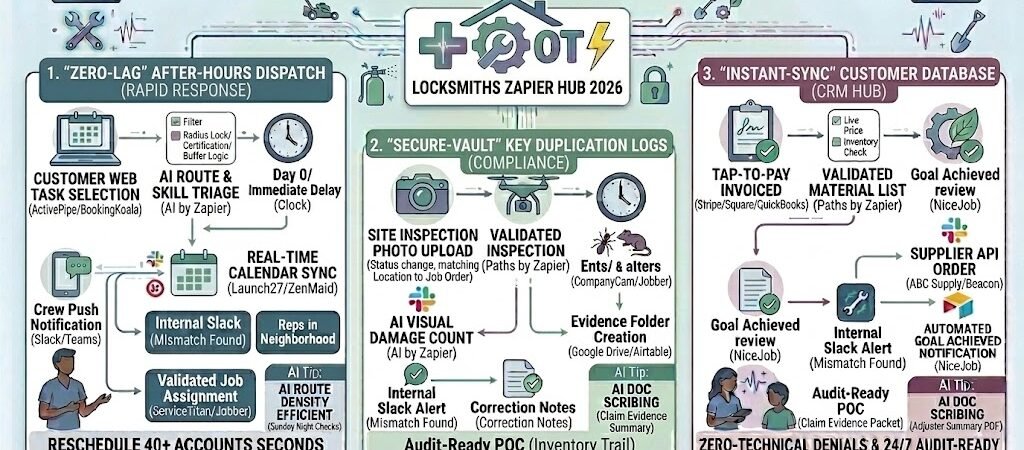
Key Takeaways: Zapier for Locksmiths 2026
- The “Midnight Dispatch” Bot: Automatically triage lockout calls and dispatch the closest tech via GPS without a human dispatcher.
- Digital Credentialing Vault: Auto-sync smart lock codes and digital keys to a secure, client-specific portal.
- The “Key-Code” Audit Trail: Create an automated, timestamped log of every duplication or re-key for high-security commercial clients.
- Preventative Battery Alerts: Use IoT data from smart locks to trigger proactive service calls for battery replacements before the client is locked out.
The “24/7 Security” Crunch of 2026
In 2026, a locksmith’s value is measured in minutes, not just metal. As physical keys increasingly give way to biometrics, NFC “phone keys,” and cloud-managed smart locks, the modern locksmith has evolved into a Digital Access Specialist. However, this transition has created a new operational bottleneck: the “24/7 Security” Crunch. This is the point where the demand for instant, round-the-clock response times collides with the administrative burden of managing sensitive digital credentials.
By 2026, the average locksmith loses 25% of their emergency revenue to three specific operational “Security Flaws”:
- The “Midnight Miss”: In a world of 24/7 expectations, an unanswered call at 3:00 AM isn’t just a missed job—it’s a customer lost to the competitor with an automated dispatch system. If your “Emergency” line still relies on a human dispatcher to wake up and check a map, your response time is already ten minutes behind the 2026 industry standard.
- The “Credential Chaos”: Managing smart lock master codes, MAC addresses, and digital “guest” permissions across hundreds of clients is a massive liability. If these codes are stored in unencrypted spreadsheets or paper folders, you are one data breach away from a catastrophic security failure and a total loss of business reputation.
- The “Commercial Compliance” Burden: High-value B2B clients—like hospitals, schools, and corporate offices—now require real-time, timestamped logs of every key duplication and cylinder re-key for their insurance audits. Manually compiling these “Security Trails” at the end of the month is a non-billable task that eats into your most profitable hours.
The Zapier Solution: Zapier acts as your “Secure Gatekeeper,” bridging the gap between your intake channels (Bland AI, Typeform, or Google Voice) and your field management tools (Jobber or ServiceTitan). By 2026, an automated locksmith shop doesn’t “hope” a tech is awake; Zapier has already triaged the “Residential Lockout,” identified the nearest technician with the correct smart-lock bypass tools in their van, and sent an encrypted “Track My Tech” link to the customer before the dispatcher’s coffee is even brewed.
Practical AI Tip for 2026: Use AI by Zapier to “Analyze Urgency Sentiment.” If an AI voice agent detects a caller is in a high-crime area or has a “child-locked-in-car” emergency, have Zapier automatically escalate the job to “Priority 0.” This triggers a distinct siren-style notification on your technicians’ phones, ensuring the most critical lives and security situations are handled first.
Blueprint #1 – The “Rapid-Response” After-Hours Dispatch
In 2026, the homeowner standing on a porch at 2:00 AM isn’t just looking for a locksmith; they are looking for certainty. If they hit your voicemail, they are already clicking the next result on Google. To capture high-margin after-hours revenue, your response must be instantaneous and automated. This blueprint uses AI Voice Agents to handle the intake and Zapier to handle the logistics, ensuring your business stays “open” even when you are asleep.
1. The Trigger: AI-Emergency Triage
- The 2026 Tech: Your business line is handled by an AI Voice Agent (like Bland AI or JustCall AI) specifically trained in locksmith terminology.
- The Action: The AI answers the call on the first ring. It asks: “Is this an emergency lockout, or are you looking to schedule a re-key?” * The Diagnostic: If the caller says, “I’m locked out of my apartment and my phone is at 5% battery,” the AI recognizes the “Urgency” and “Lockout” tags and triggers the Zap immediately.
2. The Logic: Priority Scoring & Proximity Dispatch
Zapier acts as your Digital Dispatcher, making decisions based on your live field data:
- The Urgency Filter (AI by Zapier): AI scans the call transcript. It identifies “Child in Car” or “Nighttime/Vulnerable Area” and elevates the job to Priority 1.
- The Geofence Match: Zapier checks the GPS location of your “On-Call” technician via Jobber or ServiceTitan.
- The Availability Check: If the tech is currently finishing another job, Zapier calculates their “ETA to Site” and provides that data to the next step.
3. The Action: The “Instant-Assurance” Loop
- The Tech Alert: Zapier sends a persistent, high-volume notification via PagerDuty or Slack to the tech’s phone: “PRIORITY 1 LOCKOUT: 456 Oak St. 12 mins away. Tap to Accept.”
- The Customer Reassurance: Simultaneously, Zapier sends a “Track My Tech” SMS via Twilio: “Help is on the way, [Name]! Technician [Tech Name] has been dispatched and should arrive in 14 minutes. View their live location here: [Link].”
- The Result: The customer stops calling competitors because they have a live tracking link and a confirmed name, locking in the job for you.
Summary: The After-Hours Dispatch Zap
| Step | Component | 2026 Recommended Tool |
| Trigger | AI Voice Emergency Call | Bland AI / JustCall |
| Logic | AI Urgency & GPS Match | AI by Zapier |
| Action 1 | Persistent Tech Alert | PagerDuty / Slack |
| Action 2 | Live Tracking SMS | Twilio / Jobber |
| Action 3 | CRM Job Creation | ServiceTitan / Jobber |
Practical AI Tip for 2026: Use AI by Zapier to “Monitor Dispatch Burnout.” If a technician has handled four “Emergency Lockouts” in a single 8-hour shift, have Zapier automatically route the fifth call to the “Backup Tech” or flag it for a “Supervisor Review.” In 2026, keeping your best techs from burning out is essential for long-term retention.
Blueprint #2 – The “Digital Key” Access Vault
In 2026, the transition to smart locks and cloud-based access control means a locksmith’s most valuable tool isn’t a pick set—it’s an encrypted data pipe. Handling sensitive master codes, MAC addresses, and digital “guest” permissions via unencrypted email or paper notes is a catastrophic liability. This blueprint automates the “Secure Handover” process, ensuring that digital credentials move from the technician’s mobile device into a secure, client-specific vault with zero human error.
1. The Trigger: Smart Lock “Deployment”
- The 2026 Tech: A technician finishes installing a smart lock system (e.g., August, Schlage, or Salto) or resets a master code.
- The Action: The tech logs the Master Code, Serial Number, and Installation Date into the secure “Equipment” field of their mobile CRM (ServiceTitan or Jobber).
2. The Logic: The “Credential Auditor” (AI by Zapier)
Zapier acts as your Digital Security Officer, ensuring the data is formatted and protected:
- The Encryption Gate: Zapier extracts the sensitive codes. AI by Zapier redacts this information from the standard “Job Notes” so it isn’t visible to non-admin staff.
- The Triage Logic: Zapier checks the “Account Type.” If it’s a Commercial Account, it flags the data for the “Audit Trail” (Section 4). If it’s a Residential Account, it prepares the “Owner Handover.”
3. The Action: The “Secure Handover” & Archive
- The Secure Archive: Zapier pushes the credentials into a password-protected Airtable “Client Vault” or a secure folder in Bitwarden.
- The Customer “Key-Drop”: Zapier triggers a “Secure Access” email via Mailchimp or Gmail: “Your smart lock is now active. For your security, your master recovery code has been stored in your encrypted digital vault. Access it here using your biometrics: [Secure Link].”
- The Result: You eliminate the risk of “lost codes” while providing a high-tech service experience that justifies your 2026 premium pricing.
Summary: The Digital Key Vault Zap
| Step | Component | 2026 Recommended Tool |
| Trigger | Job Status “Installed” | ServicePro / Jobber |
| Logic | AI Code Redaction | AI by Zapier |
| Action 1 | Encrypted Vault Storage | Bitwarden / Airtable |
| Action 2 | Secure Handover Email | Mailchimp / Gmail |
| Action 3 | Admin Success Notification | Slack / Microsoft Teams |
Practical AI Tip for 2026: Use AI by Zapier to “Predict Battery Failure.” Have Zapier look at the install date and the specific lock model. If that model typically has an 18-month battery life, Zapier can set a “Maintenance Nudge” for 17 months out: “Safety Alert: Your front door smart lock battery is estimated at 10%. Shall we send a tech to replace it and perform a 10-point security check?”
Blueprint #3 – Automated Commercial Compliance Logs
In 2026, the liability landscape for commercial locksmiths has shifted dramatically. With the implementation of the 2026 UL 10C revisions and stricter data protection rules for smart cities, commercial clients—including hospitals, schools, and corporate campuses—now require a “Continuous Audit” of their physical and digital access points. Providing a high-security key is no longer enough; you must provide the immutable data trail that proves who authorized the copy and when it was created. This blueprint automates your Compliance Reporting, turning a tedious admin task into a high-value, billable security service.
1. The Trigger: The “Key-Control” Event
- The 2026 Tech: A technician duplicates a restricted key or updates a digital credential in a Matter-certified access system.
- The Action: Using a mobile field app (like Jobber or ServiceTitan), the tech scans the original key’s profile and the client’s “Authorized Signer” ID. This “Security Event” triggers the Zap.
2. The Logic: The “Audit Scribe” (AI by Zapier)
Zapier acts as your Compliance Officer, ensuring every entry meets 2026 regulatory standards:
- Validation Check: AI by Zapier cross-references the technician’s log against the “Authorized Signer” list in your database. If the ID doesn’t match, Zapier pauses the workflow and alerts the shop manager.
- Metadata Enrichment: Zapier pulls the UL Certification Grade of the hardware and the specific Encryption Protocol used for the digital key, automatically adding these technical specs to the log.
- Triage: For government or banking clients, Zapier flags the entry as “High-Security Asset Update,” triggering a secondary “Verification Required” notification.
3. The Action: The “Audit-Ready” Delivery
- The Live Ledger: Zapier pushes the verified entry into a client-specific Airtable “Security Audit Log.” This ledger is shared with the client as a “View-Only” portal, giving them real-time visibility into their facility’s security.
- The Monthly Compliance PDF: On the 1st of every month, Zapier uses PDF.co or Google Docs to compile all entries into a professional “Access Integrity Report” and emails it to the facility manager.
- The Result: You lock in long-term B2B contracts by making your clients “Audit-Proof” for their insurance and fire-marshal inspections.
Summary: The Compliance Log Zap
| Step | Component | 2026 Recommended Tool |
| Trigger | Key/Credential Event Logged | Jobber / ServiceTitan |
| Logic | AI Authorization Check | AI by Zapier |
| Action 1 | Real-Time Audit Ledger | Airtable / Tables by Zapier |
| Action 2 | Automated Compliance PDF | PDF.co / Google Docs |
| Action 3 | Monthly “Integrity Report” | Gmail / Outlook |
Practical AI Tip for 2026: Use AI by Zapier to “Forecast Security Gaps.” If the AI notices a high volume of re-keys for a specific wing of a building over 90 days, it can automatically add a “Security Risk Assessment Recommended” note to the monthly report. This positions you as a Consultant, not just a vendor, opening the door for a high-margin system upgrade.
The 2026 Locksmith Tech Stack
In 2026, the most successful locksmiths are those who have successfully merged the “Physical” with the “Digital.” Your tech stack must be able to handle a 3:00 AM lockout with the same precision that it manages an encrypted commercial database. To scale in this environment, you need a “Security First” configuration that prioritizes automated intake, credential encryption, and real-time fleet visibility.
1. The 2026 Core Stack
| Function | 2026 Recommended Tool | Why It Wins in 2026 |
| Field CRM | ServiceTitan / Jobber | The industry standard for dispatching, GPS tracking, and mobile invoicing. |
| AI Intake | Bland AI / Phonely | A 24/7 AI receptionist that triages emergencies and logs lead data into Zapier. |
| Secure Vault | Bitwarden / Airtable | Stores sensitive master codes and digital credentials with end-to-end encryption. |
| Audit Ledger | Airtable / Tables by Zapier | Creates the “Immutable Audit Trail” required for 2026 commercial compliance. |
| Comms Hub | Twilio / WhatsApp Business | Handles the “Track My Tech” SMS alerts and secure digital key handovers. |
2. The 2026 “Secure-Gatekeeper” Circuitry
In 2026, Zapier acts as your “Operations Manager,” routing data through these three critical circuits:
- The Response Circuit: Connect your AI Voice Agent to ServiceTitan. When a caller is identified as a “Priority 1 Lockout,” Zapier bypasses the standard queue and triggers a siren-style alert on the on-call technician’s phone.
- The Credential Circuit: Link ServiceTitan to Bitwarden. As soon as a tech logs a new smart-lock master code, Zapier moves it into a secure, encrypted vault and triggers a “Secure Access” email to the client.
- The Compliance Circuit: Connect your Mobile Field App to Airtable. Every re-key or duplication event is instantly logged into a client-specific ledger, making them 100% “Audit-Proof” for insurance inspections.
3. Hardware for the 2026 “Digital Locksmith”
- NFC-Enabled Service Tags: Attach a small NFC tag to every installed lock. When a customer taps it with their phone, it triggers a Zapier workflow that pulls up their specific key code for the technician and offers the customer a “Request Service” button.
- Biometric Field Tablets: Technicians use biometric login to access sensitive client codes. Zapier can log every time a “Master Code” is viewed, creating an internal audit trail of your own staff’s data access.
- IoT Battery Monitors: For your premium clients, install smart locks with 2026-standard battery reporting. Zapier captures “Low Battery” pings and automatically schedules a “Preventative Maintenance” visit before the lockout happens.
Conclusion: Your 30-Day “Secure & Automated” Roadmap
- Week 1: The Midnight Guard. Connect your Emergency Leads to PagerDuty or Slack to ensure you never miss a high-margin lockout call.
- Week 2: The Digital Vault. Implement the Section 3 workflow to stop storing master codes in unencrypted notes.
- Week 3: The Commercial Ledger. Set up your first Airtable Audit Log for a B2B client to prove your 2026 compliance value.
- Week 4: The Battery Nudge. Set up a “Safety Check” trigger for 18 months after every smart-lock install to generate passive service revenue.

About the Author
Aapt DubeyAapt Dubey is an automation specialist and software developer dedicated to eliminating manual workflows for small businesses. With deep, hands-on experience building complex Zapier integrations, API connections, and real-world applications, Aapt writes actionable, tested tutorials to help businesses scale efficiently.