
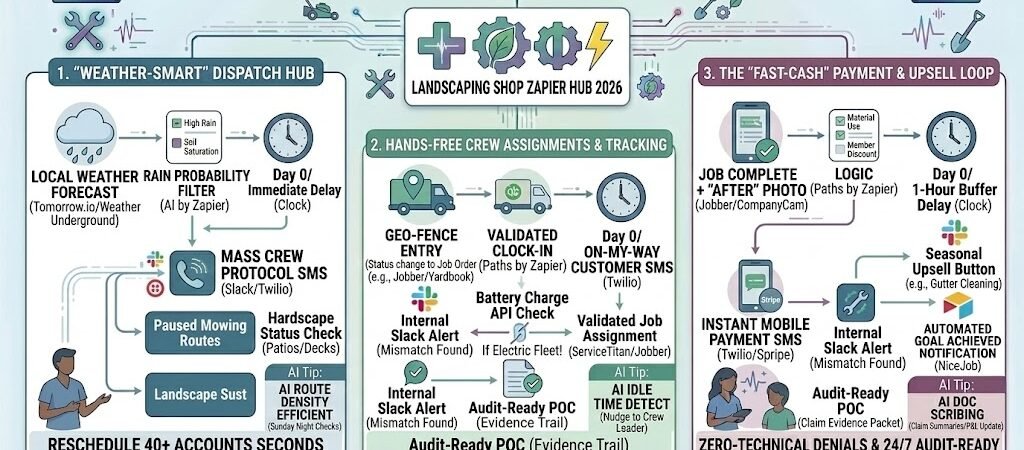
Key Takeaways: Zapier for Landscapers
- The “Weather-Smart” Schedule: Use real-time 2026 weather data to automatically pause and reschedule mow lists during rain events.
- Geo-Fenced Crew Tracking: Automate “Job Start” and “Job Finish” alerts based on the crew’s vehicle GPS, eliminating manual time-sheets.
- Dynamic Seasonal Triggers: Automatically switch your service offerings from “Lawn Care” to “Leaf Removal” or “Snow Prep” based on the calendar and local climate.
- Auto-Pilot Receivables: Use automated SMS payment loops to ensure residential “mow-and-go” clients pay within 24 hours of service.
The “Operational Overgrowth” of 2026 Landscaping
In 2026, the landscaping industry is defined by extreme weather volatility and high labor costs. While the demand for outdoor living spaces and sustainable “low-mow” turf is at an all-time high, the administrative burden of managing these projects has become the primary “weed” choking out profit margins. We call this Operational Overgrowth—the point where your office staff spends more time on the phone rescheduling crews than your crews spend on the mowers.
By 2026, landscape owners lose an average of 20% of their net margin to three specific operational “Profit Eaters”:
- The “Rain-Out” Domino Effect: When a Tuesday morning storm hits, the manual effort to reschedule 40+ residential accounts and notify 5 separate crews takes hours. Without automation, this lead to “Route Chaos,” where crews overlap, fuel is wasted driving to soggy sites, and high-margin hardscape projects are neglected.
- The Time-Sheet Friction: In 2026, labor is your most expensive line item. Relying on technicians to manually “clock in” to specific jobs leads to “Time Leakage”—a 10-minute rounding error per job across a 4-man crew can cost a shop over $15,000 annually in unbilled labor.
- The “Net-30” Cash Trap: Residential landscaping is a high-volume, high-frequency game. Waiting for a monthly billing cycle to send invoices means the business is effectively acting as a bank for its clients. In 2026’s fast-paced economy, a 30-day “Cash Conversion Cycle” is the fastest way to run out of payroll funds during a growth spurt.
The Zapier Solution: Zapier acts as your “Digital Crew Leader.” It connects your field management software (Jobber, LMN, or Yardbook) with real-time weather APIs and GPS tracking. By 2026, an automated shop doesn’t wait for the owner to wake up and check the radar; Zapier has already analyzed the rainfall, paused the mowing routes, and sent a “Rain Day” SMS to the entire crew and client list before 6:00 AM.
Practical AI Tip for 2026: Use AI by Zapier to calculate “Route Density Efficiency.” Have Zapier look at your weekly schedule every Sunday night. The AI can suggest moving two “Friday Mows” to Wednesday because a crew is already performing a “Mulch Install” next door. This “clumping” of jobs can save your fleet an average of 60 miles of travel per week.
Blueprint #1 – The “Weather-Smart” Dispatch Hub
In 2026, checking the weather isn’t a manual task for the owner; it’s a data feed for the business. With unpredictable weather patterns, a “fixed” schedule is a recipe for wasted fuel and damaged turf. This blueprint creates a self-adjusting calendar that protects your equipment, your crew’s time, and your customers’ lawns.
1. The Trigger: Real-Time Local Weather Forecast
- The 2026 Connection: Zapier monitors Tomorrow.io or Weather Underground for your specific service zip codes.
- The Threshold: A “Rain Probability” of over 60% or a forecasted rainfall of more than 0.25 inches triggers the automation sequence at 5:30 AM.
2. The Logic: Soil Saturation & Job Triage (AI by Zapier)
Zapier doesn’t just cancel everything; it makes surgical decisions:
- The “Mow vs. Hardscape” Filter: AI checks the job type in Jobber or LMN. Mowing jobs are flagged for rescheduling (to prevent turf rutting). Hardscape jobs (like stone walls or deck framing) are checked for “Safety Status”—if no lightning is present, they stay on the schedule.
- The Accumulation Logic: If it rained more than 1 inch the previous day, the AI automatically extends the “Mow Pause” by an additional 24 hours to allow for soil drainage.
3. The Action: Mass Communication & Re-Routing
- The Crew Alert: An automated message hits the Slack/Teams channel: “Rain Protocol Active. Routes 1-4 are paused. Report to the shop for equipment maintenance and battery inventory.”
- The Customer Sync: Every affected customer receives an automated SMS: “Hi [Name], for the health of your turf, we are delaying today’s service due to the rain. We’ve moved you to tomorrow’s priority list. Thank you for helping us keep your lawn healthy!”
- The CRM Update: Zapier moves all “Paused” jobs to the next available dry day on the dispatch board.
Summary: The Weather-Smart Dispatch Zap
| Step | Component | 2026 Recommended Tool |
| Trigger | High Rain Probability | Tomorrow.io / AccuWeather |
| Logic | Job Triage & Soil Saturation | AI by Zapier |
| Action 1 | Automatic Schedule Shift | Jobber / LMN / Yardbook |
| Action 2 | Crew Rerouting SMS | Twilio / Slack |
| Action 3 | Customer Delay Notification | Twilio (SMS) |
Practical AI Tip for 2026: Use AI by Zapier to monitor “Extreme Heat Indices.” In 2026, labor safety is paramount. If the heat index is projected to hit 105°F, have Zapier automatically shift the crew’s start time to 5:30 AM and send a notification to customers that the mowers will be starting earlier than usual to ensure worker safety.
Blueprint #2 – Hands-Free Crew Assignments & Tracking
In 2026, the morning huddle has gone digital. One of the biggest “Profit Leaks” in landscaping is the transition time between jobs—the “windshield time” where crews are on the clock but not on the mower. This blueprint uses Geo-Fencing and GPS Telematics to eliminate manual time-sheets and provide homeowners with real-time transparency, ensuring your crews spend more time on properties and less time on paperwork.
1. The Trigger: Geo-Fence Entry
- The 2026 Tech: Your fleet is equipped with Samsara or Verizon Connect GPS trackers. Zapier monitors these for when a crew vehicle enters a 500-foot radius of a customer’s property.
- The Action: The moment the truck crosses the “Digital Fence,” Zapier triggers the job sequence.
2. The Logic: Automated “Clock-In” & Validation
Zapier acts as your Virtual Foreman, validating the arrival:
- The Match: Zapier cross-references the GPS location with the scheduled job in Jobber or Yardbook.
- The Auto-Start: The job status is automatically changed to “In Progress.”
- The Verification: Zapier checks the crew’s “Battery Inventory” (for electric fleets) via an API to ensure they have enough “Charge” to complete the estimated 2-hour mow.
3. The Action: The “Uber-Style” Experience
- The Customer Alert: An automated SMS is sent via Twilio: “Great news, [Name]! Mike’s crew just arrived at your property. They’ll be starting with the front lawn and should be finished in about 45 minutes.”
- The “Before” Capture: A notification is pushed to the crew leader’s phone: “Job Started. Please snap a quick ‘Before’ photo of the gate and turf.”
- The Result: You gain 100% accuracy in your labor-cost tracking while providing a level of service that justifies a 2026 “Premium” price point.
Summary: The Geo-Fence Tracking Zap
| Step | Component | 2026 Recommended Tool |
| Trigger | Geo-Fence Entry (GPS) | Samsara / Verizon Connect |
| Logic | Location-to-Job Matching | Zapier / Paths |
| Action 1 | Automatic Job Clock-In | Jobber / Yardbook / LMN |
| Action 2 | Arrival Notification SMS | Twilio (SMS) |
| Action 3 | “Before” Photo Prompt | CompanyCam |
Practical AI Tip for 2026: Use AI by Zapier to detect “Idle Time.” If a crew vehicle stays at a property for 15 minutes after the job is marked “Complete,” have Zapier send a friendly Slack nudge to the crew leader: “Hey Mike, just checking in! Is the truck ready to move to the next site?” This keeps your route velocity high throughout the day.
Blueprint #3 – The “Fast-Cash” Payment & Upsell Loop
In 2026, the traditional “Monthly Invoice” is a relic that kills cash flow. For residential “mow-and-go” services, the highest-risk moment is the gap between the crew leaving the property and the office sending the bill. This blueprint ensures that your cash conversion cycle is measured in minutes, not weeks, while simultaneously planting the seeds for your next high-margin service.
1. The Trigger: Geo-Fence Exit & “After” Photo
- The 2026 Standard: The crew marks the job “Complete” in Jobber and uploads an “After” photo via CompanyCam.
- The Action: Zapier detects the “Job Closed” status and the vehicle leaving the 500-foot geo-fence.
2. The Logic: The 60-Minute “Walkthrough” Buffer (Delay by Zapier)
Zapier doesn’t send the bill immediately; it gives the customer time to admire the work:
- The Delay: Zapier waits 60 minutes. This allows the homeowner to walk the property, see the fresh stripes, and feel the “Value” of the service.
- The Dynamic Upsell (AI by Zapier): AI checks the current date.
- If it’s March: It adds an “Aeration/Overseeding” offer.
- If it’s October: It adds a “Gutter Cleaning” or “Snow Removal” waitlist link.
- The Action: A final invoice is generated in QuickBooks Online or Stripe.
3. The Action: The Mobile Payment Request
- The Delivery: An automated SMS is sent: “Your lawn is all set, [Name]! View your ‘After’ photo and pay securely here: [Link]. P.S. We’re booking Fall Leaf Removal now—members get 15% off if you book today!”
- The Payment Experience: The customer pays instantly via Apple Pay, Google Pay, or Tap-to-Pay.
- The Review Trigger: Once the payment clears, Zapier waits 24 hours and triggers a NiceJob request. If they pay within the first hour, Zapier adds a “Fast-Payer” tag to their profile for future priority scheduling.
Summary: The Payment & Upsell Zap
| Step | Component | 2026 Recommended Tool |
| Trigger | Job Complete + Photo Upload | Jobber / CompanyCam |
| Logic | 60-Min Delay & Seasonal Upsell | Delay & AI by Zapier |
| Action 1 | Invoice Generation | QuickBooks Online / Stripe |
| Action 2 | Mobile Payment Link SMS | Twilio (SMS) |
| Action 3 | Goal-Achieved Review | NiceJob / Birdeye |
Practical AI Tip for 2026: Use AI by Zapier to scan “After” photos for brown spots or weed outbreaks. If the AI detects a problem, have Zapier suppress the review request and instead trigger a “Consultation Needed” email to the owner: “Our AI noticed some stress on your turf today. Should we have Mike come by for a soil test?” This turns a potential complaint into a sales opportunity.
The 2026 Landscaper Tech Stack
To run a “Weather-Smart” landscaping operation in 2026, your software must be as rugged and interconnected as your field equipment. The 2026 gold standard moves away from manual data entry and toward “Event-Driven” automation—where the weather, the truck’s location, and the completion of a job trigger the next business action.
1. The 2026 Core Stack
| Function | 2026 Recommended Tool | Why It Wins in 2026 |
| Field Operations | Jobber / LMN | Deep Zapier integration for job status, quote approvals, and multi-crew dispatch. |
| GPS & Telematics | Samsara / Verizon Connect | Provides the “Ground Truth” for geo-fencing and automated crew tracking. |
| Weather Logic | Tomorrow.io / Weather Underground | Hyper-local data (down to the zip code) to trigger rain-out protocols. |
| Visual Evidence | CompanyCam | Syncs high-res “Before & After” photos directly to invoices for proof of service. |
| Accounting | QuickBooks Online | Automatically reconciles mobile payments and tracks seasonal chemical/fuel costs. |
2. The 2026 “Green-Growth” Integration Strategy
In 2026, your Zapier account acts as the “Irrigation Controller” of your data, ensuring it flows exactly where it’s needed:
- The Lead Flow: Connect your Google Local Services Ads directly to Jobber. This puts new mow requests into your route-optimization queue in under 10 seconds.
- The Route Flow: Use Verizon Connect to feed data into Zapier. If a truck leaves a site without a job being marked “Complete,” Zapier pings the crew leader to ensure no unbilled work is left behind.
- The Retention Flow: Connect QuickBooks to NiceJob. When a “Fall Cleanup” is paid, Zapier triggers a personalized thank-you video and a request for a 5-star review.
3. Hardware for the 2026 Automated Fleet
- Solar-Powered Tablets: Every crew leader needs a rugged, solar-charging tablet to manage routes and upload photos without worrying about battery life in the field.
- IoT Soil Sensors: Partner with brands like Rachio for your “Premium” clients. When their soil sensors detect low moisture, Zapier can trigger a “Lawn Stress” alert to your sales team for a proactive service call.
- Electric Fleet Hubs: For shops running electric mowers, integrate your Charging Station API with Zapier. If a mower isn’t at 100% by 5:00 AM, Zapier alerts the shop manager to swap the battery before the crew leaves.
Conclusion: Your 30-Day “Green-to-Gold” Roadmap
- Week 1: The Lead Capture. Add a “Request Quote” form to your site and connect it to your CRM to stop manual data entry.
- Week 2: The Weather Guard. Set up Blueprint #1 to automate your rain-delay communications and save 4 hours of “Phone Tag” per storm.
- Week 3: The Geo-Fence Pilot. Connect your vehicle GPS to your Jobber account to automate arrival alerts for your top 10 clients.
- Week 4: The Instant Invoice. Launch Blueprint #3 to send payment links via SMS, aiming for a “Zero-Paper” billing cycle.

About the Author
Aapt DubeyAapt Dubey is an automation specialist and software developer dedicated to eliminating manual workflows for small businesses. With deep, hands-on experience building complex Zapier integrations, API connections, and real-world applications, Aapt writes actionable, tested tutorials to help businesses scale efficiently.