
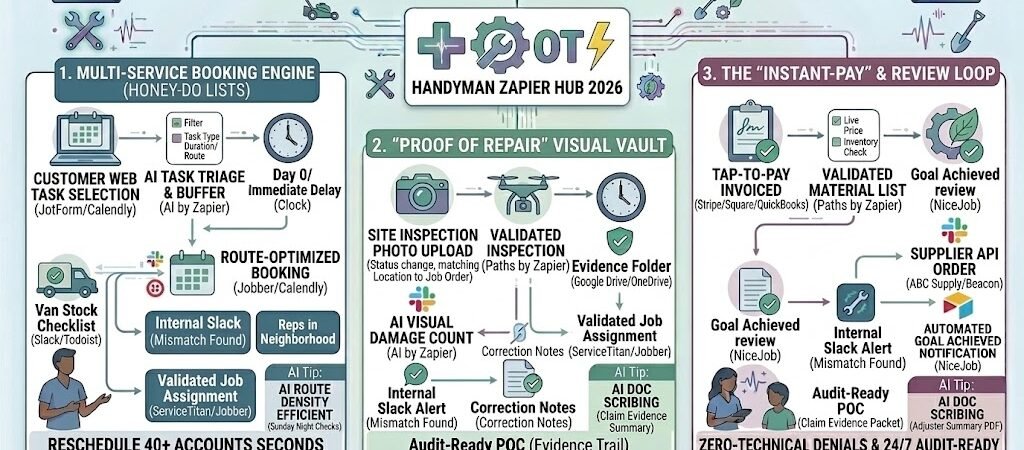
Key Takeaways: Zapier for Handymen 2026
- The “One-Trip” Estimator: Use AI to analyze task lists and photos to ensure your van is stocked with the right parts before you leave the shop.
- Touchless Multi-Service Scheduling: Group small “honey-do” tasks by category (plumbing, electrical, assembly) to optimize your daily route density.
- Automated Visual Proof: Every “fixed” item is timestamped and sent to the client instantly, eliminating “he-said-she-said” disputes.
- The Review Magnet: Trigger 5-star review requests the moment the digital invoice is paid at the door.
The “Small Job” Margin Drain of 2026
In 2026, the handyman business is no longer just about being handy; it’s about being hyper-efficient. As consumer demand shifts toward aging-in-place modifications (like grab bars and ramps) and complex smart-home integrations, your daily schedule is likely packed with a high volume of diverse, small-scale tasks. We call this the “Small Job” Margin Drain—the point where the administrative time spent on a project begins to cannibalize the actual labor profit.
By 2026, the average solo handyman or small crew loses 25% of their daily profit to three specific “Admin Leaks”:
- The “Phone Tag” Trap: In an era of instant gratification, customers expect to book a “honey-do” list as easily as they order a ride-share. If you spend 2 hours a day returning calls just to find a time slot that works, you’ve lost a quarter of your billable day.
- The “Double-Trip” Inventory Error: There is nothing more expensive in 2026 than driving to a hardware store twice for a single $150 repair. Without a system to analyze a task list and photos before you arrive, you’re essentially gambling with your fuel and time.
- The Trust Gap: Homeowners in 2026 are increasingly security-conscious. Without an automated way to provide “Proof of Repair”—timestamped photos of work behind a wall or a finished assembly—you invite disputes that delay payment and damage your reputation.
The Zapier Solution: Zapier acts as your “Digital Dispatcher,” turning website inquiries into confirmed, part-ready appointments without you ever touching your phone. By 2026, an automated handyman shop doesn’t just “show up”; Zapier has already matched the customer’s task list to your van’s inventory, calculated the drive time based on real-time traffic, and sent a professional arrival notification to the homeowner.
Practical AI Tip for 2026: Use AI by Zapier to perform “Tool-Path Audits.” When a customer uploads a photo of a broken fence or a complex furniture assembly manual, have Zapier scan it and send you a Slack alert: “Heads up: This job requires the oscillating multi-tool and the metric hex-head set. Ensure they are on the van today.” This ensures you never have to tell a customer, “I’ll have to come back tomorrow with the right tool.”
Blueprint #1 – The Multi-Service Booking Engine
In 2026, the “Honey-Do” list has become significantly more complex. A single client might need a smart doorbell installed, a kitchen faucet repaired, and a flat-pack desk assembled—all in one visit. Manually estimating these disparate tasks is a recipe for a scheduling nightmare. This blueprint turns your website into a high-precision booking engine that calculates time, groups tasks, and optimizes your route before you ever see the lead.
1. The Trigger: The “Smart Task” Submission
- The 2026 Tech: Your website features a dynamic JotForm or Typeform where customers check off specific tasks and upload a quick photo or video of the project.
- The Action: The form submission triggers Zapier the moment the customer hits “Get My Time Slot.”
2. The Logic: AI Task Triage & Buffer (AI by Zapier)
Zapier acts as your Virtual Project Manager to ensure you aren’t overbooked:
- The Duration Engine: AI analyzes the checked items. Example: It knows a “TV Mount” on drywall takes 45 minutes, but on brick, it takes 90. It totals the project time and adds a “2026 Traffic Buffer” based on the customer’s location.
- The Route Density Check: Zapier looks at your Jobber or Google Calendar. It only displays available time slots that are within a 10-mile radius of your existing morning or afternoon jobs, virtually eliminating “Cross-Town” travel waste.
- The Action Path: If the total time exceeds 4 hours, it automatically flags the job as a “Half-Day Project” and offers specific morning blocks.
3. The Action: Confirmed Booking & Van Prep
- The Calendar Lock: The job is instantly pushed to Jobber or Workiz as a “Confirmed Appointment.”
- The Van Checklist: Zapier sends an automated notification to your phone: “New Booking for Tuesday. Inventory needed: 1x Delta Faucet Cartridge, 1x Heavy-Duty Wall Anchors, 1x Smart Doorbell Chime. Ensure these are in the van.”
- The Result: The customer is booked in seconds, and you arrive with the exact parts needed to finish the job in a single trip.
Summary: The Multi-Service Booking Zap
| Step | Component | 2026 Recommended Tool |
| Trigger | Multi-Task Form Entry | JotForm / Typeform |
| Logic | AI Time & Distance Est. | AI by Zapier |
| Action 1 | Route-Optimized Booking | Jobber / Calendly |
| Action 2 | SMS Confirmation | Twilio (SMS) |
| Action 3 | Morning “Van Prep” List | Slack / Todoist |
Practical AI Tip for 2026: Use AI by Zapier to “Scan for Upsells.” If a customer books a “Ceiling Fan Install,” have the AI check the local 2026 weather. If a heatwave is forecasted, Zapier can add a line to the confirmation email: “We noticed it’s going to be 95° next week. While we’re there, would you like us to clean your AC filters for an extra $25?” This small automation can increase your daily ticket by 15%.
Blueprint #2 – The “Proof of Repair” Visual Vault
In 2026, a handyman’s reputation is built on transparency. Because your work often involves “invisible” repairs—fixing a leak inside a cabinet, reinforcing a subfloor, or rewiring a smart switch—homeowners want to see exactly what they are paying for. This blueprint automates the collection and delivery of visual evidence, creating a “Digital Paper Trail” that eliminates disputes and builds massive trust.
1. The Trigger: Task Completion & Photo Capture
- The 2026 Tech: As you finish each task on the “Honey-Do” list, you snap a photo using CompanyCam or directly within your Jobber mobile app.
- The Action: Marking a task as “Complete” and uploading the “After” image triggers the Zap.
2. The Logic: Smart Archiving & Labeling
Zapier organizes your files so you don’t have to spend your evenings sorting through your camera roll:
- The Folder Logic: Zapier checks the “Customer Name” and “Job ID.” It then searches your Google Drive or OneDrive for a matching folder. If one doesn’t exist, it creates a new one:
[2026] - [Customer Name] - [Job Address]. - The AI Description (AI by Zapier): AI looks at the photo and adds a description to the file metadata: “Repair of Moen kitchen faucet, replaced internal cartridge.” This makes your records fully searchable by keyword later.
3. The Action: The “Real-Time” Homeowner Update
- The Progress SMS: Zapier sends a WhatsApp or SMS to the client: “Just finished the faucet repair! You can view the ‘Before & After’ photos here: [Link]. Moving on to the TV mounting now.”
- The Final “Proof Packet”: Once the entire job is marked “Closed,” Zapier compiles all photos into a clean PDF “Home Health Report” and attaches it to the customer’s profile for future reference.
- The Result: The customer feels involved in the process even if they aren’t home, and you have ironclad, timestamped proof of work performed.
Summary: The Visual Proof Zap
| Step | Component | 2026 Recommended Tool |
| Trigger | Task Marked “Complete” | Jobber / Workiz / CompanyCam |
| Logic | Folder Routing & AI Labeling | AI by Zapier |
| Action 1 | Instant Photo Link SMS | Twilio (SMS) / WhatsApp |
| Action 2 | Cloud Archive Upload | Google Drive / OneDrive |
| Action 3 | PDF “Home Health” Report | Zapier Tables / Formstack |
Practical AI Tip for 2026: Use AI by Zapier to “Flag Future Needs.” If you take a photo of a water heater during a different repair, have the AI look at the manufacturer’s label. If it detects the unit is over 10 years old, Zapier can automatically add a “Future Project” lead to your CRM: “Water Heater Replacement – Recommended 2026/2027.”
Blueprint #3 – The “Instant-Pay” & Review Loop
In 2026, the moment of highest customer satisfaction is exactly three minutes after you’ve fixed their problem. That is when the dopamine hit of a “job well done” is strongest. If you wait until Friday to send an invoice, you’re missing the golden window for both payment and a 5-star review. This blueprint automates the “Close-Out” so you can get paid at the door and grow your online reputation without lifting a finger.
1. The Trigger: The Digital “Job Closed” Signal
- The 2026 Tech: You tap “Finish Job” on your tablet or phone in Jobber or Workiz.
- The Action: This status change signals Zapier to begin the financial and feedback loop.
2. The Logic: The “Payment Verification” Gate
Zapier acts as your Virtual Accountant to ensure the sequence only proceeds if the money is in flight:
- The Verification: Zapier waits for a “Success” webhook from your payment processor (Stripe, Square, or Jobber Payments).
- The Smart Delay: Once payment is confirmed, Zapier introduces a 10-minute “Cool Down” delay. This ensures the customer has a moment to put their phone down and actually enjoy the repaired item before being asked for a favor.
3. The Action: Receipt & The “Review Magnet”
- The Instant Receipt: Zapier triggers QuickBooks Online to email a professional, itemized receipt including the “Before & After” photos from Section 3.
- The Review Request: An automated SMS is sent via NiceJob or Birdeye: “Thanks for choosing [Business Name], [Name]! If you’re happy with the repairs today, would you mind sharing a quick 5-star review? It’s the best way to support a local business like mine!”
- The Reward (Optional): If they leave a review, Zapier can automatically tag them for a “Loyalty Discount” on their next seasonal maintenance call.
Summary: The Instant-Pay & Review Zap
| Step | Component | 2026 Recommended Tool |
| Trigger | Job Marked “Closed” | Jobber / Workiz |
| Logic | Payment Confirmation | Stripe / Square |
| Action 1 | Automated Receipt | QuickBooks Online |
| Action 2 | 10-Minute Review Delay | Delay by Zapier |
| Action 3 | Review Request SMS | NiceJob / Birdeye |
Practical AI Tip for 2026: Use AI by Zapier to “Monitor Review Sentiment.” If a customer leaves a review that is less than 4 stars, have Zapier stop the public posting and instead trigger an “Internal Alert” to your phone: “Low rating received from [Name]. Call immediately to resolve.” This allows you to fix the issue privately before it damages your 2026 search ranking.
The 2026 Handyman Tech Stack
In 2026, a handyman’s “Digital Toolbelt” is just as important as their physical one. To handle a high volume of diverse tasks without drowning in paperwork, you need a stack that favors mobile-first automation and visual proofing. The 2026 gold standard is a “Unified Field Office” that keeps your van moving and your bank account growing.
1. The 2026 Core Stack
| Function | 2026 Recommended Tool | Why It Wins in 2026 |
| Field CRM | Jobber / Workiz | Best-in-class mobile apps for on-site quoting, scheduling, and task management. |
| Smart Booking | JotForm / Calendly | Allows customers to “Self-Triage” their multi-task lists and upload project photos. |
| Visual Evidence | CompanyCam | Essential for timestamped, “Proof of Repair” photos that sync to the cloud. |
| Payments | Stripe / Square | Supports 2026 “Tap-to-Pay” on your phone for instant, on-site settlement. |
| Reputation | NiceJob / Birdeye | Automatically mines your “Just-Paid” customers for 5-star reviews. |
2. The 2026 “One-Trip” Integration Strategy
In 2026, Zapier acts as your “Virtual Assistant,” connecting your tools into a seamless loop:
- The Inventory Loop: Connect JotForm to Slack. When a customer uploads a photo of a broken door handle, Zapier pings your phone: “Check stock for Schlage Camelot trim before leaving.”
- The Evidence Loop: Link Jobber to Google Drive. As soon as you mark a task “Fixed,” Zapier creates a dated folder and drops in the “After” photo, making your 2026 tax and audit prep a breeze.
- The “Warm-Lead” Loop: Connect QuickBooks to Mailchimp. When a job is paid, Zapier adds them to a “6-Month Maintenance” sequence, ensuring you’re the first person they call for their next seasonal project.
3. Hardware for the 2026 “Smart Handyman”
- Wearable “Point-of-View” Cameras: Use 2026-grade body cams that sync with Zapier. This allows you to record “Instructional Snippets” for the homeowner (e.g., how to reset their new smart thermostat) and send it as a value-add video link.
- Mobile “Tap-to-Pay” Terminals: Eliminate the need for bulky card readers. Use your phone’s native NFC to accept payments the second the job is done.
- IoT Tool Trackers: Tag your expensive drills and saws with AirTags or Tile. Have Zapier alert you if a tool is left behind at a job site based on your truck’s GPS location.
Conclusion: Your 30-Day “Efficiency” Roadmap
- Week 1: The Digital Intake. Move your “Services List” to a JotForm and connect it to your CRM to stop manual data entry of task lists.
- Week 2: The Photo Vault. Start using CompanyCam for every job and automate the Section 3 archive to build your proof library.
- Week 3: The Instant Close. Enable Stripe/Square on-site and connect it to NiceJob to start seeing reviews roll in within minutes of finishing a job.
- Week 4: The Seasonal Nudge. Set up a “6-Month Delay” trigger to remind your best customers to book their 2026 winterization or spring maintenance.

About the Author
Aapt DubeyAapt Dubey is an automation specialist and software developer dedicated to eliminating manual workflows for small businesses. With deep, hands-on experience building complex Zapier integrations, API connections, and real-world applications, Aapt writes actionable, tested tutorials to help businesses scale efficiently.