
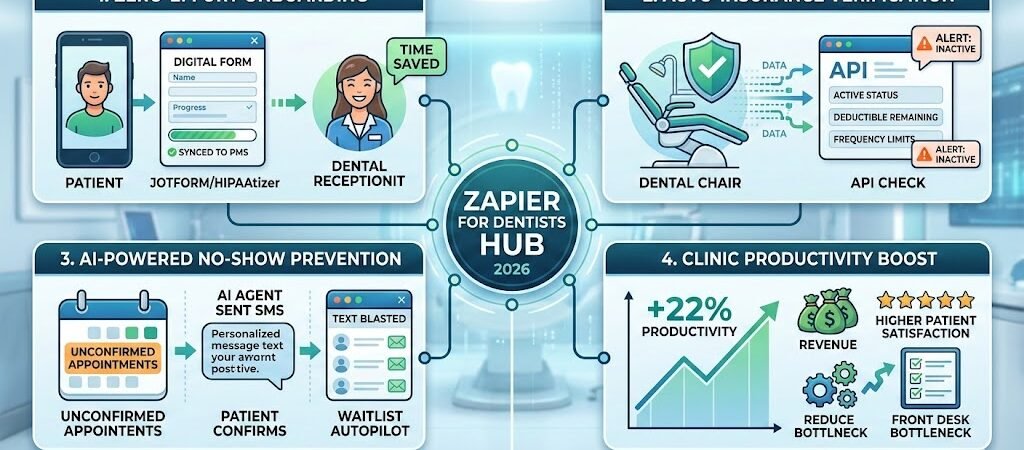
Key Takeaways: The “Cheat Sheet” for Practice Owners ( Zapier for Dentists )
- The 22% Productivity Jump: According to 2026 industry benchmarks, dental practices utilizing automation for scheduling and reminders see an average 22% increase in productivity and a 16% boost in patient satisfaction.
- The “Silent” Revenue Killer: Manual no-shows and “dead” hygiene slots cost the average US dental practice $20,000–$50,000 annually in lost chair time.
- HIPAA is the Barrier, Not the End: Standard Zapier tiers are not HIPAA-compliant. To automate safely, you must use HIPAA-compliant intermediaries (like HIPAAtizer or JotForm Enterprise) that sign Business Associate Agreements (BAAs).
- AI Receptionists are the 2026 Standard: 24/7 AI-driven voice and text assistants now integrate directly with Zapier, allowing for “instant booking” even when the front desk is closed.
- Topical Moat: Automation is no longer just for “sending emails”—in 2026, it’s about AI-driven insurance verification and automated audit-proofing.
The “Front Desk Bottleneck” in 2026
In 2026, the biggest constraint on a dental practice’s growth isn’t the skill of the dentist—it’s the speed of the schedule.Most practices suffer from the “Front Desk Bottleneck.” While your clinical team is using 3D scanners and AI-assisted diagnostics, your front desk is often still stuck in “1990s mode”: manually dialing patients for confirmations, chasing insurance companies on hold for 20 minutes, and hand-copying intake forms into the Practice Management System (PMS).
The High Cost of Manual Operations
Every minute your front office staff spends on data entry is a minute they aren’t spent on patient experience or case acceptance. * Revenue Leakage: When a lead calls after hours and hits a voicemail, there is a 60% chance they will call your competitor next.
- Staff Burnout: The 2026 labor market for dental admin is tight. Manual, repetitive tasks are the #1 cause of staff turnover in suburban clinics.
- The “Leaky Bucket” Schedule: Without automated recalls, your hygiene chair sits empty for 5–10 hours a month—a silent drain that can impact your EBITDA by up to 15%.
Zapier: The “Digital Office Manager”
Think of Zapier not as a “software,” but as a Digital Office Manager that never sleeps, never takes a lunch break, and never makes a typo. By connecting your website, your phone system, and your clinical software, you move from a reactive office (responding to fires) to an agentic office (where systems work for you).
Practical AI Tip: In 2026, “Agentic AI” (AI that can take actions) is the trend. We aren’t just sending “reminders” anymore; we are building Zaps that can autonomously plan and execute multi-step workflows, like rescheduling a canceled surgery by automatically text-blasting the top 5 people on your waitlist.
The HIPAA Compliance Blueprint (The “Golden Rule”)
In 2026, the question isn’t if you can automate your dental practice, but how you do it without a $50,000 HIPAA fine. The most important technical reality of this guide is this: Zapier is not HIPAA-compliant out of the box.
Zapier does not sign Business Associate Agreements (BAAs) for its standard or Professional plans. If you send a patient’s name and treatment plan directly through a standard Zap, you are in violation of federal law. However, savvy 2026 practices use a “Secure Bridge” strategy to get the benefits of automation while staying 100% compliant.
1. The “Secure Bridge” Strategy
The key to HIPAA-compliant automation is ensuring that Protected Health Information (PHI) never touches Zapier’s servers in an unencrypted, identifiable way. You achieve this by using a “HIPAA-Gateway” tool that sits between your patient and your automation.
- HIPAAtizer & JotForm Enterprise: These tools are built specifically for healthcare. They will sign a BAA with your practice.
- The Workflow: The patient submits sensitive data (like a medical history or SSN) into the gateway tool. The gateway tool then sends only “Anonymized Metadata” to Zapier.
- Example: Zapier receives a notification that “Form #8821 was submitted at 10:00 AM.” It doesn’t see the patient’s name. Zapier then triggers a “Welcome” SMS through a compliant carrier, using a unique Record ID rather than a name.
2. The 2026 HIPAA Checklist for Zaps
Before you turn on any automation, ensure your “Digital Office” meets these four technical safeguards:
- The BAA Chain: You must have a signed BAA with your Form provider (e.g., JotForm), your Patient Management System (PMS), and your communication tool (e.g., Twilio’s HIPAA tier).
- Data De-identification: Use Zapier’s Formatter tool or your gateway’s internal settings to strip names and birthdates from data streams. Use “Internal Patient IDs” to track leads instead.
- Audit Logging: In 2026, “shadow IT” is a major audit risk. Ensure your Zapier account has MFA (Multi-Factor Authentication) enabled and that you maintain a log of who has access to your automation workflows.
- Encryption in Transit: Ensure every app in your stack uses TLS 1.3 encryption (the 2026 standard) to prevent data interception.
3. PHI vs. Non-PHI: What Can You Automate?
You can vastly simplify your life by separating your data into two buckets:
| Data Type | Can it go through Zapier? | Recommendation |
| Marketing Leads | Yes | General contact info before they become a “patient.” |
| Appointment Times | Yes (Anonymized) | Use Record IDs, not “John Doe – Root Canal.” |
| Treatment Plans | NO | Keep this inside your encrypted PMS (like Dentrix or Open Dental). |
| Insurance ID #s | NO | Never pass these through non-BAA platforms. |
Practical AI Tip: If you are a high-volume practice, don’t just rely on Zapier. Consider a hybrid stack where Make.com handles your complex, non-PHI logic (like staff scheduling), while a dedicated healthcare integrator handles the medical records.
Blueprint #1 – The “Zero-Effort” New Patient Onboarding
In a modern dental practice, the “onboarding” process begins the second a lead interacts with your website—not when they walk through the front door. A delay of just 15 minutes in responding to a web inquiry can decrease the odds of a successful booking by 400%.
Here is how you build an automated “Fast-Response” system that turns web traffic into confirmed appointments without your front desk lifting a finger.
1. The Trigger: The High-Intent Intake Form
- Recommended App: JotForm Enterprise or HIPAAtizer (Must be the HIPAA-compliant tier).
- The Action: A prospective patient fills out a “New Patient Inquiry” or “Virtual Consultation” form on your site.
- 2026 Pro Tip: Use Conditional Logic on your form. If a patient checks “Severe Tooth Pain,” the form should flag this as an “Emergency” status in Zapier, triggering a faster notification for your clinical team.
2. The Logic: “The Filter & Sort”
- Zapier Tool: Filter by Zapier or Paths.
- The Action: Zapier looks at the form data.
- Path A (High Value/Emergency): If the patient needs a “Dental Implant” or has “Pain,” route them to an immediate SMS follow-up.
- Path B (Routine): If they just need a “Cleaning,” route them to the standard online booking link.
3. The Action: Instant SMS Engagement
- Recommended App: Twilio (using their HIPAA-compliant SID) or RingCentral.
- The Action: Send an automated text: “Hi [Name], we received your request! While we review your info, you can grab an immediate opening on our calendar here: [Booking Link].”
- Why it works: In 2026, patients prefer SMS over phone calls by a ratio of 4 to 1. Instant confirmation reduces “no-show” risk from the very first touchpoint.
4. The Sync: Practice Management System (PMS) Handoff
- Recommended App: Dentrix G7+, Open Dental, or Dengro.
- The Action: Zapier sends the de-identified contact record to your PMS or a dedicated Lead CRM.
- The Result: Your front desk arrives in the morning to a list of pre-qualified, partially onboarded patients rather than a stack of random voicemails.
Section 3 Summary Table: The Onboarding Zap
| Step | Component | 2026 Recommended Tool |
| Trigger | Web Form Submission | JotForm (HIPAA Tier) |
| Logic | Urgency Filtering | Paths by Zapier |
| Action 1 | Immediate SMS Follow-up | Twilio (via HIPAA Bridge) |
| Action 2 | Lead Logging / PMS Sync | Dengro / Dentrix |
| Action 3 | Internal Staff Alert | Slack (Encrypted Channel) |
Practical AI Tip: Use Zapier Central to analyze your lead volume. You can set an “AI Agent” to watch your intake sheet and alert you if more than 3 high-value implant leads haven’t booked an appointment within 4 hours, ensuring no revenue falls through the cracks.
Blueprint #2 – Automated Insurance Verification (The 2026 Edge)
In 2026, the #1 source of front-desk burnout and billing “surprises” is manual insurance verification. If your staff is still spending 3 hours a day on hold with payers or logging into 15 different portals, you are losing money.
By using Zapier to bridge your schedule with Insurance APIs, you can move to a “Verify-by-Exception” model where staff only intervenes when the automation flags a problem.
1. The Problem: The “Silent” Denials
Many practices only verify insurance once—at the first visit. In 2026, with high-turnover employment and fluctuating gig-economy plans, a patient’s coverage can change overnight.
- The Cost: The average practice loses $15,000/year simply due to “Inactive Coverage” denials that could have been caught before the chair was even prepped.
2. The Zap: Real-Time Eligibility Checks
To build this, you need a Zapier-compatible insurance gateway like pVerify, Change Healthcare, or Dentistry Automation.
- The Trigger: A new appointment is scheduled in your PMS or booking tool (e.g., Calendly or Acuity).
- The Action (Webhooks by Zapier): Zapier sends a secure “Eligibility Request” to your insurance API.
- The Data Points: The API checks for:
- Active/Inactive Status (Is the plan currently live?)
- Deductible Remaining (How much will the patient owe today?)
- Frequency Limits (Has the patient already had their 2 cleanings this year?)
3. The 2026 “Alert Stack”
Don’t just bury this data in a folder. Use Zapier to route the results where they matter:
- Success: If coverage is active, Zapier automatically updates a “Verified” checkbox in your PMS.
- Alert: If coverage is inactive or the deductible is over $500, Zapier sends a Slack or Microsoft Teams notification to the front desk: “Warning: [Patient Name] has inactive coverage for tomorrow’s 10 AM appointment.”
4. Comparison: API vs. Browser Bots
In 2026, you have two ways to automate this:
| Method | How it works | Best for… |
| Direct API (e.g., pVerify) | High-speed data exchange via Zapier Webhooks. | Speed and 100% data accuracy. |
| Browser-Native AI (e.g., Ventus) | AI “bots” that log into portals like a human. | Payers that don’t have modern APIs. |
Practical AI Tip: Use AI-Powered Predictive Verification (available in 2026 via RCM tools). These tools can predict if a claim will be denied before you even perform the procedure, by analyzing historical payer patterns.
Blueprint #3 – AI-Powered “No-Show” Prevention & Recall
In 2026, a “No-Show” isn’t just a missed appointment; it’s a wasted surgical suite, idle staff, and lost revenue that you can never recover. While traditional systems send a single generic reminder, the 2026 Automation Blueprint uses “Agentic AI” to handle the nuances of human behavior—automatically filling holes in your schedule before they happen.
1. The Problem: The “Confirmation Gap”
The biggest mistake dental practices make is assuming a “Sent” reminder equals a “Confirmed” appointment. If a patient hasn’t responded to a text 24 hours prior, they are a 60% no-show risk. #### 2. The Zap: The “Intelligent Escaler”This workflow doesn’t just remind; it monitors and reacts.
- Trigger: Appointment status remains “Unconfirmed” in your PMS (e.g., Dentrix) 24 hours before the start time.
- The Action (Zapier Central AI Agent): Instead of a generic text, Zapier triggers an AI Agent to send a personalized SMS: “Hi [Name], we haven’t heard back for your 2 PM cleaning tomorrow. Since we have a waitlist, can you confirm by 4 PM today so we can hold your spot?”
- The Follow-up: If still unconfirmed by 4 PM, Zapier automatically:
- Alerts the front desk to call.
- Flags the slot as “Potentially Open” in your waitlist manager.
2. The “Waitlist Autopilot” (The Revenue Saver)
When a cancellation does happen, don’t let your staff spend an hour calling people.
- Trigger: Appointment status changed to “Cancelled” in the PMS.
- The Action: Zapier searches your “ASAP Waitlist” (stored in Airtable or Zapier Tables).
- The Blast: Zapier sends a bulk SMS via Twilio: “A last-minute opening just appeared for tomorrow at 2 PM! First to reply ‘YES’ gets the spot.”
- The Result: The slot is often filled within 180 seconds, saving roughly $300–$800 in lost production.
3. Automated Hygiene Recalls (The Long-Term Growth)
Most practices lose 15-20% of their patient base annually simply because patients forget to book their 6-month cleaning.
- The Zap: 5 months after the last “Cleaning” code is logged in your PMS, Zapier triggers a friendly “Time to Book” sequence with a direct Calendly link.
Practical AI Tip: In 2026, use AI Voice Agents (like Retell AI or Bland AI) integrated with Zapier. If a high-value surgery remains unconfirmed, the AI can actually call the patient, speak in a natural human voice, and handle the rescheduling logic entirely on its own.
| Function | 2026 Industry Standard Tools | Zapier Integration Status | Primary Use Case |
| PMS (Practice Mgmt) | DenGro / Dentally | Native (Instant Triggers) | Lead tracking and clinical record sync. |
| Online Booking | Calendly / Acuity | Native (Premium) | Instant appointment triggers for SMS. |
| Compliance Forms | HIPAAtizer / JotForm | Native (BAA Required) | Secure digital intake & medical history. |
| Patient Engagement | Birdeye / Intercom | Native (High-Speed) | Automated review requests & AI chat. |
| Insurance Gateway | pVerify / Change Healthcare | Webhooks Required | Real-time eligibility & deductible checks. |
| Communications | Twilio / RingCentral | Native (HIPAA Tier) | Two-way patient SMS and auto-calls. |
Advanced: Moving from Zapier to Make.com (The ROI Angle)
While Zapier is the undisputed king of “Set it and Forget it” simplicity, high-growth dental practices and Multi-location Dental Service Organizations (DSOs) often hit a “Task Ceiling.” If your practice is running 5,000+ automations a month, the cost of Zapier can begin to impact your margins.
This is where Make.com enters the 2026 blueprint. Unlike Zapier’s linear “If This, Then That” structure, Make.com uses a visual “Scenario” builder that allows for infinite branching logic in a single workflow.
Why Make.com wins for high-volume Dental Practices:
- Massive Cost Savings: In 2026, Make.com remains roughly 60-70% more cost-effective for high-task volumes than Zapier.
- Complex Routing: You can build a single “Master Scenario” that routes leads to 10 different clinics based on zip code, treatment type, and doctor availability—something that would require 10+ separate Zaps.
- Advanced Error Handling: Make.com allows you to “Directive” an error. If a patient’s insurance API is down, Make can automatically wait 15 minutes and retry, whereas Zapier often just “halts” the task.
Practical AI Tip: Start with Zapier for your basic “Lead-to-SMS” wins. But once you begin automating your entire Revenue Cycle Management (RCM), switching to Make.com can save your practice thousands in software overhead.
Conclusion: Your 30-Day Automation Roadmap
Transforming your dental practice into an automated powerhouse doesn’t happen overnight. In 2026, the most successful clinics follow a “1-2-3 Blueprint” to ensure they don’t overwhelm their staff.
Step 1: Audit the “Paper Trail” (Week 1)
Identify your most manual, repetitive task. For 90% of practices, this is Patient Intake or Insurance Verification. Track how many hours your front desk spends on this weekly. That is your “Automation ROI” target.
Step 2: Secure the “Gateway” (Week 2)
Do not automate until you are safe. Sign up for a BAA-compliant form tool like HIPAAtizer or JotForm Enterprise. Connect this to your website so that patient data is encrypted and “Audit-Ready” from the moment of entry.
Step 3: Build Your First “Lead-to-SMS” Zap (Week 3-4)
Connect your new secure form to Twilio via Zapier. Set a simple trigger: When a New Lead is Submitted → Send a Welcome SMS. By Day 30, you will see a measurable drop in “Leaked Leads” and a significant increase in your front desk’s morale.

About the Author
Aapt DubeyAapt Dubey is an automation specialist and software developer dedicated to eliminating manual workflows for small businesses. With deep, hands-on experience building complex Zapier integrations, API connections, and real-world applications, Aapt writes actionable, tested tutorials to help businesses scale efficiently.