
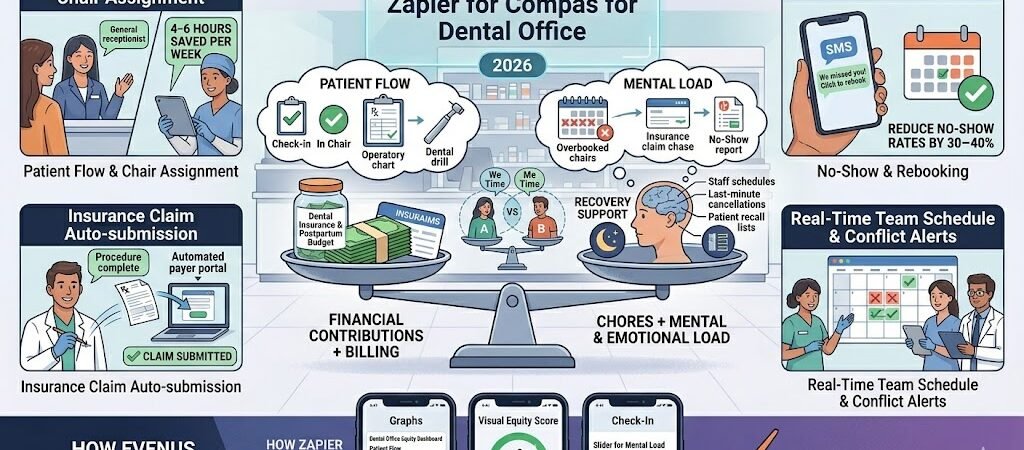
Save 12–18 hours per week, reduce no-show rates by 30–40 %, and get insurance claims paid faster — all while keeping your team perfectly scheduled.
Zapier for Dental Office Managers: Patient Flow – Dental office managers in 2026 are under more pressure than ever. According to the latest ADA Health Policy Institute data and practice surveys, the average dental office manager still spends 12–18 hours every week on manual patient flow coordination, insurance claim chasing, and constant rescheduling of dentists, hygienists, and assistants. Manual check-in processes alone take 11–14 minutes per patient, and no-shows or last-minute cancellations continue to cost practices thousands in lost production each month.
Patient flow bottlenecks, delayed billing, and chaotic team schedules create daily chaos: overbooked chairs, frustrated patients, unpaid claims, and burned-out staff.
Zapier + AI Agents changes that. In this complete 2026 blueprint you’ll get exact step-by-step Zaps that automate patient flow, billing, and team scheduling for Dentrix, Eaglesoft, OpenDental, Curve Dental, Practice-Web, or any modern dental software.
Why Dental Office Managers Should Use Zapier in 2026
Here’s what most dental office managers are still doing manually every single day in 2026:
- Coordinating patient flow between front desk, hygienists, dentists, and treatment rooms — often using spreadsheets or whiteboards.
- Chasing insurance claims and dealing with rejected or delayed payments.
- Constantly rescheduling appointments due to no-shows, cancellations, or staff changes.
- Manually updating team calendars and sending confirmations, leading to double-bookings or gaps in the schedule.
- Spending hours each week on recall lists, new patient onboarding, and end-of-day production reports.
According to the latest ADA Health Policy Institute and dental practice surveys, the average dental office manager loses 12–18 hours per week on these repetitive tasks. No-shows and last-minute cancellations alone cost the typical practice $3,000–$8,000 per month in lost production.
With Zapier you can finally: (Zapier for Dental Office Managers )
- Automate smooth patient flow from check-in to checkout.
- Submit clean insurance claims instantly and auto-follow up on rejections.
- Keep the entire team’s schedule updated in real time across Google Calendar, Dentrix, Eaglesoft, or OpenDental.
- Reduce no-show rates by 30–40 % with smart reminders.
- Cut billing delays and improve cash flow dramatically.
Popular dental software that works seamlessly with Zapier includes Dentrix, Eaglesoft, OpenDental, Curve Dental, and Practice-Web. You can also connect QuickBooks for billing, Twilio or SMS by Zapier for patient reminders, Google Calendar for team scheduling, and Zapier Tables for live dashboards.
Dental office managers who implement these automations report less daily chaos, happier patients, and more time to focus on practice growth instead of admin work.
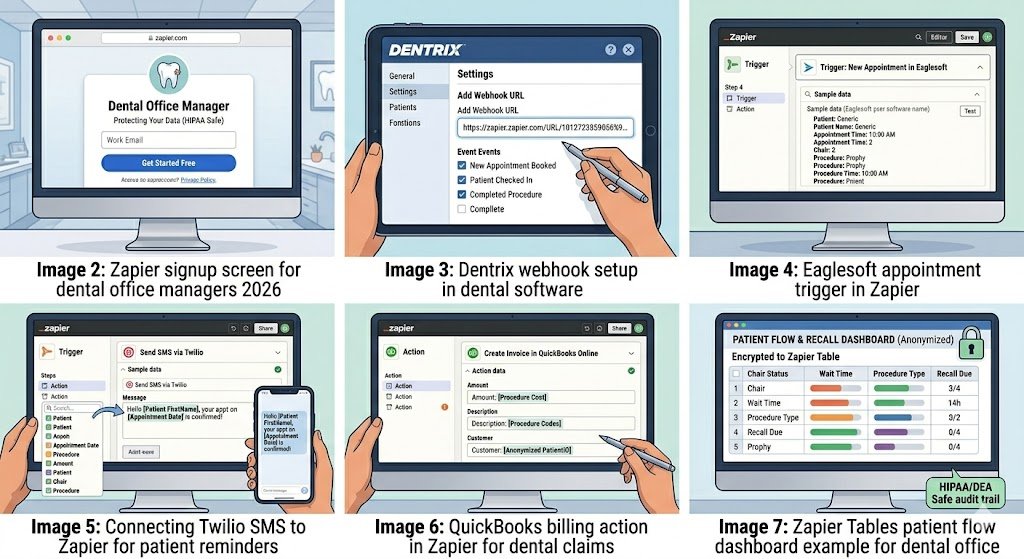
How to Connect Your Dental Software to Zapier (Step-by-Step)
Setting up Zapier for your dental practice takes 15–30 minutes for the first Zap — no coding or IT help required.
Step 1: Create Your Zapier Account
- Go to zapier.com and sign up with your work email.
- Verify your email address.
- Start with the Professional plan ($29.99/month billed annually) — this gives you enough tasks for a typical 3–5 chair dental office. The free plan is perfect for testing your first few Zaps.
Step 2: Connect Your Dental Practice Management Software
Most dental software (Dentrix, Eaglesoft, OpenDental, Curve Dental, Practice-Web) connects easily using one of these three methods:
- Method A – Webhooks (Recommended) In your dental software settings, enable webhook notifications for events like “New Appointment Booked”, “Patient Checked In”, “Appointment Completed”, or “Insurance Claim Submitted”. Copy the unique Zapier webhook URL and paste it into your software. Zapier receives the data instantly.
- Method B – Email Parser (Super Easy) If your system sends confirmation or claim emails, use Zapier’s built-in Email Parser to automatically extract patient name, appointment time, procedure codes, and claim status.
- Method C – Google Sheets / Zapier Tables Bridge Export daily schedules or reports to Google Sheets → Zapier watches the sheet for new or updated rows.
Pro tip: Start with Webhooks or Email Parser — they are the fastest and most reliable for dental workflows.
Step 3: Connect Your Supporting Apps
Once your dental software is connected, add these common tools (all have native Zapier integrations):
- Google Calendar or Outlook → for team scheduling and real-time availability
- QuickBooks Online or Xero → for automatic billing and insurance claim tracking
- Twilio or SMS by Zapier → for patient reminders and confirmation texts
- Gmail or Outlook → for internal team notifications
- Zapier Tables → for live patient flow dashboards and no-show tracking
Step 4: Set Up HIPAA-Safe Workflows (Critical in 2026)
Important: Zapier itself is not HIPAA compliant and does not sign a BAA. Safe practice: Only send non-PHI data (appointment times, procedure codes, claim status, anonymized totals). Keep all patient names, charts, and clinical notes inside your dental software.
Total time for first Zap: 15–30 minutes. You can have your first automation (e.g., patient flow or team schedule update) running the same day.
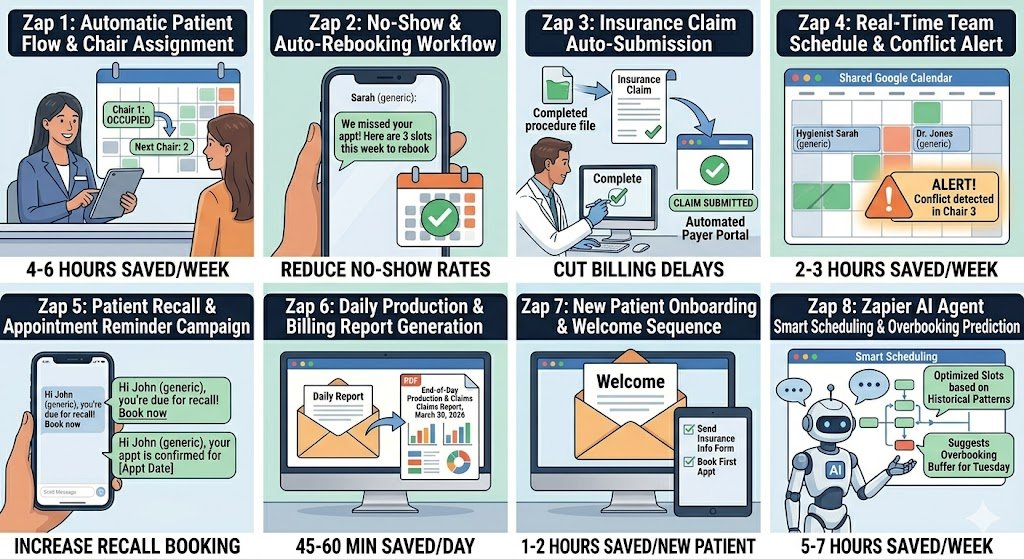
8 Powerful Dental Office Automations You Can Build Today
These are the exact Zaps that dental office managers are using in 2026 to run smoother practices. Each one includes the trigger, actions, time/revenue saved, and a practical edge case.
1. Automatic Patient Flow & Chair Assignment Trigger: Patient checks in via Dentrix, Eaglesoft, or OpenDental Action: Update Google Calendar + notify hygienist/dentist via Slack + move patient to “In Chair” status in Zapier Tables Time saved: 4–6 hours per week on manual patient tracking. Edge case: For multi-chair offices, add a Filter to assign patients only to available operatories based on procedure type. (Screenshot: Check-in trigger + real-time chair dashboard)
2. No-Show & Cancellation Auto-Rebooking Trigger: Appointment status = No-Show or Cancelled Action: Send SMS reminder + automatically offer next 3 available slots + log in no-show report Time saved: Reduces no-show rate by 30–40 % and recovers $2,000–$5,000/month in lost production. Edge case: Use Zapier AI to personalize the message based on patient history (e.g., “We noticed you missed your cleaning — here are 3 slots this week”). (Screenshot: No-show trigger + AI personalized SMS)
3. Insurance Claim Auto-Submission & Follow-Up Trigger: Procedure marked “Completed” in dental software Action: Auto-submit clean claim to insurance payer + log claim ID in Zapier Tables Time saved: 3–5 hours per week on manual billing. Edge case: If claim is rejected, automatically create a follow-up task for the billing coordinator. (Screenshot: Completed procedure trigger + claim submission action)
4. Real-Time Team Schedule Updates & Conflict Alerts Trigger: New appointment booked or staff availability changes Action: Sync to Google Calendar/Outlook for all team members + send Slack alert if double-booking is detected Time saved: 2–3 hours per week on schedule coordination. Edge case: For hygienist vs. dentist overlap, add conditional logic to block conflicting appointments. (Screenshot: Schedule sync + conflict alert)
5. Patient Recall & Appointment Reminder Campaigns Trigger: Patient due for recall (based on last visit date) Action: Send personalized SMS/email 7 days and 2 days before appointment Time saved: 2 hours per week + increases recall booking rate. Edge case: Use Zapier AI to customize messages (“Hi Sarah, it’s time for your 6-month cleaning — reply YES to confirm”). (Screenshot: Recall trigger + personalized reminder)
6. Daily Production & Billing Report Generation Trigger: End of business day (Schedule by Zapier) Action: Pull production data → generate PDF report → email to owner and accountant Time saved: 45–60 minutes every single day. Edge case: For multi-location practices, split reports by office automatically. (Screenshot: Daily schedule trigger + PDF report)
7. New Patient Onboarding & Welcome Sequence Trigger: New patient added in dental software Action: Send welcome email + request insurance info + add to recall list + create first appointment reminder Time saved: 1–2 hours per new patient. Edge case: Route high-value cosmetic patients to a special welcome sequence. (Screenshot: New patient trigger + onboarding sequence)
8. AI-Powered Smart Scheduling & Overbooking Prediction (2026 Game-Changer) Trigger: New appointment request or schedule change Action: Zapier AI Agent analyzes historical no-show patterns + predicts optimal slots + suggests overbooking buffer + requires human approval for high-risk slots Time saved: 5–7 hours per week on manual scheduling decisions. Edge case: AI confidence below 80 % automatically escalates to office manager for final approval. (Screenshot: AI Agent decision tree + smart scheduling example)
These 8 Zaps create a complete automated system that turns chaotic daily operations into a smooth, predictable workflow.
HIPAA Compliance & Security Best Practices
Important 2026 note: Zapier itself is not HIPAA compliant and does not sign a Business Associate Agreement (BAA). This means you must never send Protected Health Information (PHI) — such as patient names, treatment notes, clinical charts, Social Security numbers, or full insurance details — through Zapier.
Safe and compliant way to use Zapier in your dental office:
- Only automate non-PHI data: appointment times, procedure codes, claim status, room numbers, no-show counts, or anonymized production totals.
- Keep all actual patient records, treatment plans, and clinical notes inside your dental software (Dentrix, Eaglesoft, OpenDental, etc.).
- Use Zapier Tables (encrypted at rest) only for anonymized dashboards and scheduling overviews.
- For patient reminders, use anonymized triggers (e.g., “Appointment #4721 confirmed” instead of patient name).
Recommended security setup:
- Enable two-factor authentication on every Zapier account.
- Limit Zap access to only the office manager and billing coordinator.
- Turn on “Require approval before turning on new Zaps” in team settings.
- For any workflow that must touch PHI, use a true HIPAA-compliant tool like Workato, Tray.io, or HIPAAtizer as a secure bridge.
By following these practices, dental office managers can safely enjoy the time-saving power of Zapier while remaining fully compliant with HIPAA, state dental board rules, and insurance audit requirements.
Pricing & Limits for Dental Offices
A typical 3–5 chair dental office runs comfortably on Zapier’s Professional plan without hitting limits. Here’s the 2026 pricing breakdown:
| Plan | Monthly Cost (billed annually) | Tasks per Month | Best For Dental Offices |
|---|---|---|---|
| Free | $0 | 100 | Testing 1–2 simple Zaps only |
| Professional | $29.99 | 750 | Most single-location 3–5 chair practices (recommended start) |
| Team | $103.50 | 2,000+ | Multi-location or very high-volume offices |
Real-world cost example: A typical 3–5 chair dental office (150–250 appointments + 40–60 insurance claims per day) uses about 550–720 tasks per month once you add smart Filters, daily summary reports, and batching. This fits easily inside the $29.99 Professional plan.
Pro tip: You can cut task usage another 40–60 % by using Zapier AI Agents for smart scheduling triage and switching high-volume reminders to daily Digests instead of instant triggers.
Common Errors & Quick Fixes
Even the best dental office automations can hit a snag. Here are the most common issues dental office managers face in 2026 and exactly how to fix them fast:
1. Authentication Error with Dental Software Problem: Zapier suddenly shows “Authentication failed” with Dentrix, Eaglesoft, OpenDental, or Curve Dental. Fix: Reconnect using a fresh API key or webhook URL from your dental software settings (this is the most common issue after software updates). Takes under 60 seconds.
2. Calendar Sync Conflicts or Double-Bookings Problem: Google Calendar shows overlapping appointments or the team schedule doesn’t update in real time. Fix: Add a Filter by Zapier step that checks availability before creating the event, or use a short Delay by Zapier (5–10 seconds) after the trigger.
3. Insurance Claim Rejection Loops Problem: A rejected claim keeps re-triggering the same Zap over and over. Fix: Add a Filter by Zapier that only continues if the rejection reason contains specific keywords (e.g., “missing procedure code”). Or mark the claim as “handled” in Zapier Tables.
4. Rate Limit / Task Usage Spikes on Busy Days Problem: You hit your task limit during peak hours (Monday mornings are the worst). Fix: Switch high-volume Zaps (reminders, patient flow) to daily Digests instead of instant triggers, or add a short Delay step. Most offices cut usage by 40–60 % this way.
5. AI Agent Scheduling Prediction Issues Problem: The AI Agent suggests overbooking or flags routine appointments incorrectly. Fix: Lower the confidence threshold to 75 % or add a mandatory human-in-the-loop approval step for any slot the AI rates below 85 % confidence.
Conclusion & Next Steps
You no longer have to spend 12–18 hours every week juggling patient flow, billing, and team schedules.
With these 8 practical Zaps (plus the AI-powered smart scheduling version), dental office managers are dramatically reducing no-show rates by 30–40 %, speeding up insurance reimbursements, and creating much smoother, predictable daily operations.
The best part? You can have your first automation (patient flow or appointment reminders) running the same day you build it.
Ready to transform your dental office operations? Build your first Zap in under 5 minutes → Start Free on Zapier
Want the complete ready-made template pack? Reply “DENTAL TEMPLATES” in the comments or visit our homepage and I’ll send you all 8 Zaps as importable links (completely free).
Looking for a more affordable long-term solution? Many dental offices are switching to Make.com for high-volume scheduling and patient flow. Want the Make.com version of these blueprints? Just let me know.
Automate once. Run a calmer, more profitable dental practice every day.

About the Author
Aapt DubeyAapt Dubey is an automation specialist and software developer dedicated to eliminating manual workflows for small businesses. With deep, hands-on experience building complex Zapier integrations, API connections, and real-world applications, Aapt writes actionable, tested tutorials to help businesses scale efficiently.