
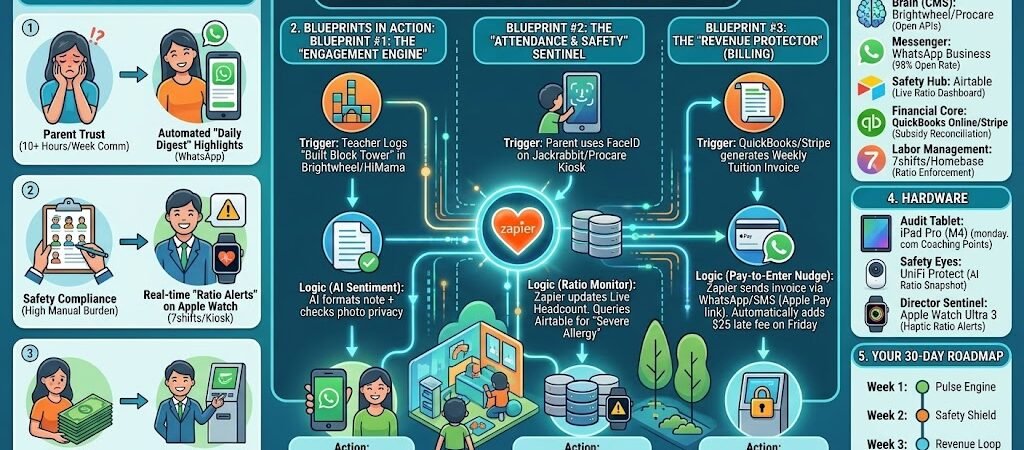
Key Takeaways: Zapier for Daycare Providers
- The “Daily Highlight” Reel: Connect Brightwheel or HiMama activity logs to WhatsApp. Zapier automatically sends a “Daily Win” photo and a summary of the child’s developmental milestones to parents at 4:00 PM.
- The “Contactless Check-In” Sync: Link your iPad Kiosk (Procare) to Airtable. When a child is checked in, Zapier pings the teacher’s Apple Watch with specific dietary or allergy alerts for that day.
- The “Zero-Chace” Billing Loop: Connect Stripe or QuickBooks to PandaDoc. If a payment is missed, Zapier generates a “Friendly Reminder” that includes a 1-click payment link and automatically restricts the “Next Month Enrollment” slot until resolved.
- The “Waitlist Concierge”: Use Jotform for inquiries. Zapier sends an AI-personalized tour invite based on the child’s age group and current capacity in Gusto or monday.com.
The “Childcare Chaos” of 2026
In 2026, daycare providers are caught in a “visibility squeeze.” Millennial and Gen Z parents no longer view digital updates as a luxury; they view them as a baseline safety and developmental requirement. Simultaneously, directors are facing a fragmented software landscape where the biggest challenge isn’t finding tools—it’s getting them to talk to each other.
For most providers, “running the business” feels like a series of manual hand-offs that lead to three critical frictions:
- The “Update Lag” (Parent Trust): Teachers spend 10+ hours a week manually logging naps and meals into one app, only to have the Director answer the same questions via email or WhatsApp later. This “Double-Entry” tax pulls teachers away from the children, reducing direct care quality.
- The “Ratio Tightrope” (Compliance): Maintaining a legal child-to-teacher ratio (e.g., 5:1 for toddlers) is a minute-by-minute struggle. In 2026, with 77% of workers occasionally operating below safety requirements due to sick leave, directors lose hours walking from room to room with clipboards to count heads. This “manual monitoring” is prone to errors that can lead to heavy fines or license suspension.
- The “Tuition Chase” (Cash Flow): Even in 2026, 15% of tuition remains late because parents miss portal notifications. For a business with 56% to 68% of its costs tied to labor, even a small delay in revenue can disrupt payroll and stability.
The Zapier Solution: Zapier for Daycare Providers acts as your Digital Assistant Director. It bridges the gap between your classroom tools (Brightwheel/Procare), your parent’s favorite chat apps (WhatsApp/Slack), and your financial core (QuickBooks/Stripe). By 2026, the goal is simple: Zero manual data entry between check-in and checkout.
Daycare Efficiency Benchmarks 2026
| Friction Category | 2026 Impact | Zapier Automation Fix |
| Parent Trust | 10+ Hours/Week Comm | Automated “Daily Digest” Highlights |
| Safety Compliance | High Manual Burden | Real-time “Ratio Alerts” on Apple Watch |
| Cash Flow | 15% Late Payment Rate | Automated “Pay-to-Enter” Billing Logic |
Practical AI Tip for 2026: Use AI by Zapier to “Predict Staffing Scrambles.” Have Zapier analyze your historical Monday morning drop-off data. If the AI predicts you’ll hit a ratio limit by 8:30 AM based on current check-ins, it pings your “On-Call” staff at 7:45 AM: “High volume alert: 90% chance of ratio breach in Infant Room. Please report for 8:15 AM arrival.”
Blueprint #1 – The “Engagement Engine” (Parent Comm)
In 2026, the “What did my child do today?” question shouldn’t wait for a 5:00 PM pickup conversation. With modern Millennial and Gen Z parents, proactive developmental updates are the #1 driver of school loyalty. This blueprint automates the transformation of raw classroom logs into warm, personalized milestones delivered directly to parents’ most-checked app: WhatsApp Business.
1. The Trigger: The “Daily Milestone” Entry
- The 2026 Tech: A teacher logs an activity (e.g., “Ate all carrots,” “Built a block tower,” or “Nap: 12 PM – 2 PM”) into a classroom management tool like Brightwheel, HiMama (Lillio), or Procare.
- The Action: Zapier monitors the “Activity Feed” for each child. When a high-value entry (like a photo or a new developmental observation) is posted, the workflow begins.
2. The Logic: The AI Sentiment & Privacy Filter
Zapier acts as your Digital Brand Ambassador, ensuring every message is professional and safe:
- The Privacy Guard: AI by Zapier (Analyze & Return Data) scans any attached photos. Using vision logic, it verifies that only the intended child is visible, redacting or flagging photos that accidentally include other students to maintain 2026 Privacy Compliance.
- The Tone Transformer: The AI takes a short teacher note (e.g., “Leo shared his toys”) and drafts a warm, engaging message: “Hi [Parent Name]! Leo had a wonderful morning—we noticed him practicing his sharing skills with friends today. We’re so proud of his progress!”
- The Multilingual Sync: For non-native English speaking families, Zapier automatically translates the update into the parent’s preferred language (e.g., Spanish or Hindi) before sending.
3. The Action: The “Instant Connection” Delivery
- The Mobile Nudge: Zapier sends the formatted update via WhatsApp Business. By 2026, WhatsApp has a 98% open rate compared to just 20% for traditional emails, ensuring parents see the “Daily Win” instantly.
- The Record Archive: A copy of the personalized message is logged back into Airtable or Google Sheets for the Director’s end-of-week “Engagement Report,” making it easy to see which families haven’t received a personal touch lately.
Engagement Engine Summary
| Step | Component | 2026 Recommended Tool |
| Trigger | Classroom Activity Log | Brightwheel / HiMama |
| Logic 1 | Privacy & Vision Audit | AI by Zapier (GPT-4o Vision) |
| Logic 2 | Warmth & Translation | AI by Zapier (Sentiment Mode) |
| Action 1 | Parent Mobile Update | WhatsApp Business |
| Action 2 | Engagement Audit Log | Airtable |
Practical AI Tip for 2026: Use AI Guardrails by Zapier to “Scan for Sensitive Data.” Before an AI-generated update goes to a parent, the Guardrail can check for PII (Personally Identifiable Information) or sensitive medical terms to ensure you never accidentally leak a child’s private health info in a text message.
Blueprint #2 – The “Attendance & Safety” Sentinel
In 2026, safety isn’t just about supervision—it’s about data-driven compliance. A single allergy oversight or a brief lapse in child-to-teacher ratios can lead to legal liability or licensing points. This blueprint turns your Attendance Kiosk into a real-time safety monitor, ensuring that every staff member knows exactly who is in the building and what their specific needs are, without the Director having to say a word.
1. The Trigger: The “Kiosk Check-In”
- The 2026 Tech: A parent or guardian completes the check-in process via QR code or FaceID on the Procare, Jackrabbit Care, or Kangarootime kiosk.
- The Action: Zapier detects the “Check-In” event, capturing the child’s name, room assignment, and the exact timestamp.
2. The Logic: The Compliance & Health Cross-Check
Zapier acts as your Virtual Safety Officer, scanning for potential risks in milliseconds:
- The Allergy & Medical Scrub: Zapier instantly queries your Airtable or Google Sheets “Medical Master List.” It identifies if the checked-in child has a “Critical Alert” (e.g., Peanut Allergy, EpiPen Location, or Asthma).
- The Ratio Calculator: Zapier updates a “Live Headcount” variable for that specific room (e.g., Infant Room A). It compares the number of checked-in children to the number of clocked-in teachers in 7shifts or Homebase.
- The Capacity Audit: If the room is within 90% of its legal capacity, Zapier prepares a “Staffing Alert” to prevent a ratio breach before it happens.
3. The Action: The “Safety Broadcast”
- The Wearable Alert: Zapier sends an urgent notification to the teacher’s Apple Watch or Mobile Device: “Checked In: Leo (Toddler B). ⚠️ ALLERGY ALERT: Severe Dairy. EpiPen in Bin #4.”
- The Director Escalation: If a ratio breach is imminent, Zapier pings the Director on Slack: “Emergency Ratio Alert: Infant Room 1 is at 4:1. State limit is 5:1. One more check-in will trigger a violation. Dispatch Float Teacher immediately.”
- The Live Dashboard: A Chromecast or tablet in the main office is automatically updated via Airtable Interface, showing a real-time “Safety Map” of the entire facility.
Attendance & Safety Sentinel Summary
| Step | Component | 2026 Recommended Tool |
| Trigger | Digital Kiosk Check-In | Procare / Jackrabbit Care |
| Logic 1 | Medical Alert Matching | Airtable |
| Logic 2 | Ratio Calculation | Zapier Formatter / 7shifts |
| Action 1 | Critical Safety Alert | Apple Watch / SMS |
| Action 2 | Ratio Escalation | Slack |
Practical AI Tip for 2026: Use AI by Zapier to “Monitor Immunization Expiries.” Have Zapier scan your digital student files every Sunday night. If a child’s vaccination record is set to expire in the next 14 days, Zapier can automatically draft a friendly WhatsApp to the parent: “Hi [Name], [Child]’s booster shots are due soon! Please upload the new record by next Friday to maintain enrollment.”
Blueprint #3 – The “Revenue Protector” (Billing)
In 2026, the “Awkward Money Talk” at pickup is a thing of the past. For a daycare, cash flow isn’t just a business metric—it’s what pays your teachers and keeps the lights on. This blueprint automates the entire “Tuition Lifecycle,” ensuring that billing is invisible for on-time parents and unavoidable for late payers, all while maintaining a warm, professional relationship.
1. The Trigger: The “Monday Morning” Invoice
- The 2026 Tech: Your accounting software (QuickBooks Online, Xero, or Stripe) generates the recurring tuition invoice based on the child’s enrollment plan.
- The Action: Zapier detects the “New Invoice” and pulls the parent’s contact details and the total balance due.
2. The Logic: The Behavioral Payment Nudge
Zapier acts as your Billing Coordinator, using “Multi-Channel Nudging” to ensure the bill stays top-of-mind:
- The Omni-Channel Send: Zapier sends the invoice via email AND a WhatsApp Business message. The message includes a “1-Click Pay” button using Apple Pay or Google Pay for 2026 convenience.
- The Escalation Path: If the invoice remains “Unpaid” by Wednesday, Zapier triggers a “Soft Nudge”: “Hi [Parent], just a reminder that tuition for this week is pending! Let us know if you have any questions.”
- The Late-Fee Auto-Add: On Friday at 6:00 PM, if the status is still “Unpaid,” Zapier updates the invoice in your ledger with a pre-set $25 Late Fee and sends a final “Action Required” alert.
3. The Action: The “Enrollment Lock” (Optional)
- The Gatekeeper: If the balance is still outstanding by the following Monday morning, Zapier updates the Attendance Kiosk (via Airtable or Webhooks).
- The Resolution: When the parent tries to check the child in, the kiosk displays a message: “Balance Outstanding. Please see the Director or pay via the link sent to your phone to complete check-in.” This ensures you never “chase” money—the system handles the boundary for you.
Revenue Protector Summary
| Step | Component | 2026 Recommended Tool |
| Trigger | New Weekly/Monthly Invoice | QuickBooks / Stripe |
| Logic 1 | Tiered Reminders | Zapier Paths (Status-Based) |
| Logic 2 | Late Fee Calculation | Zapier Formatter |
| Action 1 | Mobile Payment Link | WhatsApp / SMS |
| Action 2 | Kiosk Status Update | Airtable / Kiosk API |
Practical AI Tip for 2026: Use AI by Zapier to “Analyze Subsidy Discrepancies.” If you receive government childcare subsidies, have Zapier compare the “Check-In” hours in Procare to the subsidy payout. If there is a mismatch (e.g., the child was absent but the subsidy was claimed), Zapier can flag it for a “Compliance Review” before you submit your monthly tax reports.
The 2026 Daycare Provider Tech Stack
In 2026, the “Autonomous Daycare” isn’t run from a desktop; it’s run from the palm of your hand and the sensors in your hallways. To achieve the blueprints we’ve discussed, you need a “Single Pane of Glass” where all your data lives, connects, and acts.
1. The 2026 Core Stack
| Function | 2026 Recommended Tool | Why It Wins in 2026 |
| The Brain (CMS) | Brightwheel / Procare | These now offer open APIs that allow Zapier to pull “Activity Feeds” and “Check-in” data in real-time. |
| The Messenger | WhatsApp Business | With 2026 email fatigue, WhatsApp is the only way to guarantee a 98% open rate for developmental wins and billing alerts. |
| The Safety Hub | Airtable | This acts as your “Source of Truth” for medical alerts, live ratios, and immunization tracking. |
| The Financial Core | QuickBooks Online / Stripe | Essential for automated “Pay-to-Enter” logic and handling government subsidy reconciliations. |
| Labor Management | 7shifts / Homebase | Connects to your CMS via Zapier to ensure your “Staffed vs. Required” ratios are always legal. |
Export to Sheets
2. The 2026 “Care Hub” Circuitry
These are the invisible threads Zapier spins to keep your daycare running while you focus on the kids:
- The “Allergy Guard” Circuit: Connect Airtable to Slack. When a child with a “Severe Allergy” checks in, Zapier pings the kitchen and the teacher’s Apple Watch immediately.
- The “Lead Nurture” Circuit: Connect Jotform (Waitlist) to AI by Zapier. When a new parent inquires, AI drafts a personalized response based on their child’s age and your current vacancies, then schedules a tour in Google Calendar.
- The “Incident Auto-Log”: Connect your CMS to Google Drive. Any “Incident Report” logged by a teacher is automatically converted to a PDF, timestamped, and saved in a secure “Compliance Vault” for state auditors.
3. Hardware for the 2026 “Autonomous Daycare”
- The “Audit” Tablet: iPad Pro (M4). Used by the Director for “Classroom Deep Dives.” Zapier captures voice-to-text notes and turns them into “Teacher Coaching Points” in monday.com.
- Safety Eyes: Ubiquiti UniFi Protect cameras. Zapier can trigger a “Ratio Snapshot” at 10:00 AM daily, saving a visual record of compliance for your insurance provider.
- The “Director Sentinel”: Apple Watch Ultra 3. Receives the high-priority “Ratio Breach” or “Emergency Medical” alerts, allowing the Director to react without ever looking at a phone screen.
Conclusion: Your 30-Day “Autonomous” Roadmap
- Week 1: The Pulse Engine. Sync your Procare/Brightwheel check-ins to a live Airtable dashboard. See your building’s occupancy in real-time.
- Week 2: The Safety Shield. Set up the “Allergy & Medical” alerts. Ensure your teachers get a haptic nudge on their watches for critical health data.
- Week 3: The Revenue Loop. Connect QuickBooks to WhatsApp. Automate the “Monday Invoice” and “Friday Nudge” to stop chasing tuition.
- Week 4: The Engagement Flywheel. Use AI by Zapier to turn raw logs into warm “Daily Wins” for parents. Watch your parent satisfaction scores (and referrals) soar.

About the Author
Aapt DubeyAapt Dubey is an automation specialist and software developer dedicated to eliminating manual workflows for small businesses. With deep, hands-on experience building complex Zapier integrations, API connections, and real-world applications, Aapt writes actionable, tested tutorials to help businesses scale efficiently.