
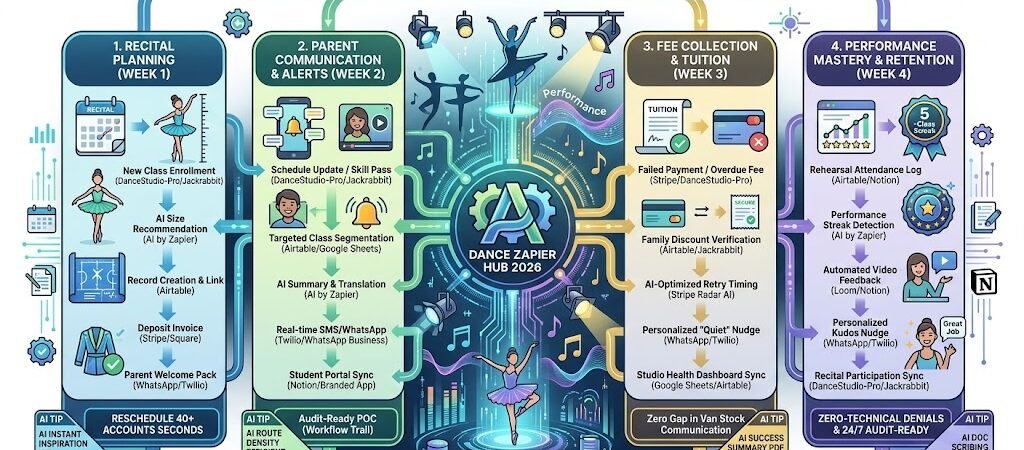
Key Takeaways: Zapier for Dance Studio Owners 2026
- The “Recital Readiness” Tracker: Use Zapier to sync DanceStudio-Pro or Jackrabbit with Google Sheets to automate costume sizing, music assignments, and stage cues.
- Omnichannel Parent Alerts: Link your registration form to WhatsApp and SMS via Twilio to send instant updates on rehearsal changes or “Pass-off” milestones.
- The “No-Hassle” Fee Collector: Connect Stripe or Square to your student roster to automate tuition, costume deposits, and competition fees without manual invoicing.
- AI-Driven Feedback: Use AI by Zapier to scan teacher notes and send personalized “Dancer of the Week” kudos to parents to boost retention.
The “Backstage Bottleneck” of 2026
In 2026, the global dance studio industry is valued at over $15 billion, driven by a massive surge in competitive dance and a “performance-first” culture fueled by social media. However, this growth has intensified the “Backstage Bottleneck”—the point where the complexity of managing hundreds of costumes, parent expectations, and tiered tuition plans begins to outpace the creative joy of teaching.
By 2026, a dance studio owner’s passion is often sidelined by three specific “Logistical Leaks”:
- The “Costume Coordination” Chaos: In 2026, recital production values are at an all-time high. Managing a mid-sized studio means tracking 500+ costume pieces across 15 vendors, each with unique sizing charts. Owners lose an average of 10 hours a week during peak season manually cross-referencing parent-submitted measurements with vendor SKUs. One sizing error doesn’t just cost money; it ruins a dancer’s big moment.
- The “Parent Pulse” Communication Gap: Today’s “Dance Moms and Dads” expect real-time, bite-sized updates. Information buried in a 20-page “Recital Handbook” PDF is essentially invisible. Studio managers spend 20% of their month answering the same three questions via email: “When is the dress rehearsal?”, “What color tights do we need?”, and “Where is the stage door?”
- The “Tuition & Fee” Friction: With the rise of “Competition Teams” and “Elite Tiers,” tuition is no longer a flat monthly rate. It now includes costume deposits, competition entry fees, and travel surcharges. Reconciling these fragmented payments manually is a burnout-inducing task that leads to “Revenue Leakage”—where fees are forgotten and never billed.
The Zapier Solution: Zapier acts as your “Digital Backstage Manager,” orchestrating the flow between your studio software (DanceStudio-Pro, Jackrabbit), your inventory tools (Airtable, Sheets), and parent communication channels (WhatsApp, Stripe). By 2026, an automated studio doesn’t “remind” a parent about a fee; Zapier has already detected the missing costume deposit and triggered a personalized text. You don’t “search” for a sizing chart; Zapier has already matched the student’s measurements to the correct SKU the moment the class was assigned.
Practical AI Tip for 2026: Use AI by Zapier to “Monitor Rehearsal Readiness.” Have Zapier scan your attendance logs. If a student in the “Competitive Team” misses two rehearsals in a row, the AI can automatically flag them in your Slack and draft a “Check-in” message to the parent to ensure they aren’t falling behind on the choreography.
Blueprint #1 – The “Recital Runway” Automation
In 2026, recital planning is no longer a manual race against the clock. Top-tier studios are using Zapier to connect their management software (DanceStudio-Pro, Jackrabbit) with visual databases like Airtable to orchestrate costumes, music, and stage cues in one fluid movement. This blueprint eliminates the “Sizing Stress” by automating the path from student registration to costume delivery.
1. The Trigger: The “Recital-Ready” Enrollment
- The 2026 Tech: A student is enrolled in a recital-eligible class in DanceStudio-Pro or Jackrabbit Dance.
- The Action: Zapier detects the “Student Enrolled” or “Class Added” trigger. It instantly pulls the student’s current measurements (height, girth, waist) and their assigned class genre.
2. The Logic: Robo-Sizing & Inventory Match
Zapier acts as your Digital Stage Manager, performing the complex matching usually done on paper:
- The Robo-Sizer Audit (AI by Zapier): Zapier sends the student’s measurements to an AI logic step that compares them against your pre-loaded vendor size charts (e.g., Weissman or Revolution). It identifies the “Recommended Size.”
- The Costume Sync (Airtable): Zapier creates a record in your Airtable “Recital Master” base. It links the student to their specific costume SKU, the music track for their dance, and their rehearsal time.
- The Financial Trigger: Zapier checks if a “Costume Deposit” has been paid. If not, it triggers a Stripe invoice for the deposit amount.
3. The Action: The “Backstage Brief” Delivery
Summary: The Recital Runway Zap
| Step | Component | 2026 Recommended Tool |
| Trigger | New Class Enrollment | DanceStudio-Pro / Jackrabbit |
| Logic 1 | AI Size Recommendation | AI by Zapier |
| Logic 2 | Record Creation & Link | Airtable |
| Action 1 | Deposit Invoice | Stripe / Square |
| Action 2 | Parent Welcome Pack | WhatsApp / Twilio |
Practical AI Tip for 2026: Use AI by Zapier to “Monitor Quick Changes.” Have Zapier scan your Recital Wizard lineup. If the AI detects a student has only one act between two different dances, it can automatically flag a “Quick Change Warning” in your Slack and add a “Backstage Assistant” task to help that specific student with their costume swap.
Blueprint #2 – The “Parent Pulse” Communication
In 2026, the #1 complaint from dance parents isn’t the cost of tuition—it’s information overload. When vital details like rehearsal changes or call times are buried in long email chains, parents get frustrated and studio phones start ringing off the hook. This blueprint uses Zapier to create a “Push-Notifcation Culture,” where the right information reaches the right parent at the exact moment they need it.
1. The Trigger: The “Schedule Shift” or “Milestone”
- The 2026 Tech: You update a “Rehearsal Time” in DanceStudio-Pro, or a teacher marks a student as having “Passed” a specific skill (e.g., Double Pirouette) in their mobile app.
- The Action: Zapier catches the update and instantly identifies the “Class Tag” (e.g., Junior Ballet) associated with the change.
2. The Logic: Target Routing & AI Tone-Filtering
Zapier acts as your Digital Communications Director, ensuring the message is clear, professional, and personalized:
- The Audience Filter: Zapier segments your contact list. If the change only affects “Elite Company,” it ignores the “Recreational” list entirely to avoid notification fatigue.
- The AI Summarizer (AI by Zapier): If you’ve uploaded a large “Recital Packet” to Google Drive, AI scans the document and extracts the 3 most important bullet points for that specific parent group.
- The Language Sync: If a parent’s profile is tagged as “Spanish-speaking,” Zapier uses DeepL or ChatGPT to translate the alert instantly.
3. The Action: Omnichannel Alerts
- The “Urgent” Nudge: For last-minute rehearsal changes, Zapier sends a WhatsApp or SMS via Twilio: “Quick Update: Junior Jazz rehearsal tomorrow moved to Studio B. Wear your black leotard. See you at 5 PM! [Link to Schedule]”
- The “Progress” Celebration: For skill milestones, Zapier triggers a personalized “Kudos” email to the parent: “Great news! [Student Name] just mastered their Double Pirouette! Check out the clip in your portal: [Link].”
- The Result: You eliminate 90% of “I didn’t see the email” excuses. Parents feel informed and connected, significantly increasing your studio’s “Net Promoter Score.”
Summary: The Parent Pulse Zap
| Step | Component | 2026 Recommended Tool |
| Trigger | Schedule Update / Skill Pass | DanceStudio-Pro / Jackrabbit |
| Logic 1 | Targeted Class Segmentation | Airtable / Google Sheets |
| Logic 2 | AI Summary & Translation | AI by Zapier |
| Action 1 | Real-time SMS/WhatsApp | Twilio / WhatsApp Business |
| Action 2 | Student Portal Sync | Notion / Branded App |
Practical AI Tip for 2026: Use AI by Zapier to “Monitor Parent Sentiment.” Have Zapier scan incoming emails for keywords like “confused,” “where,” or “time.” If the AI detects a parent is struggling with the schedule, it can automatically trigger a “Parent FAQ” WhatsApp message specifically tailored to their child’s classes.
Blueprint #3 – The “Auto-Tuition” Recovery Loop
In 2026, the leading cause of “Revenue Leakage” in dance studios isn’t high overhead—it’s administrative friction. With competition fees, costume deposits, and tiered tuition plans all hitting at different times, manually tracking down missing payments is a burnout-inducing chore. This blueprint uses Zapier and Stripe to create a “No-Hassle” financial ecosystem that handles collections quietly, protecting your cash flow and your relationship with parents.
1. The Trigger: The “Financial Hiccup”
- The 2026 Tech: A monthly tuition payment is missed, or a credit card on file expires in DanceStudio-Pro, Jackrabbit, or Stripe.
- The Action: Zapier detects the failed transaction or the “Overdue” status change.
2. The Logic: Sibling Discounts & Smart Retries
Zapier acts as your Virtual Accountant, ensuring every invoice is accurate before it’s sent:
- The Family Audit: Zapier checks your student database for “Sibling Tags.” If it finds multiple children, it verifies that the “Family Multi-Discount” has been applied correctly before triggering a retry.
- The Smart Retry Logic (Stripe Radar AI): Zapier waits for Stripe’s AI to attempt a re-charge at the optimal time (e.g., Tuesday morning vs. Friday night) to maximize the chance of success.
- The Fee Consolidation: If a student has both an overdue tuition payment and an upcoming costume deposit, Zapier can merge them into a single “Convenience Invoice” to reduce parent notification fatigue.
3. The Action: The “Quiet Collection”
- The Gentle Nudge: Zapier sends an automated WhatsApp (via Twilio): “Hi [Parent Name]! Your card for [Dancer’s Name] had a small hiccup with this month’s tuition. We’ve kept their spot in the Winter Showcase—you can quickly update your card here: [Link].”
- The Success Receipt: Once the payment is recovered, Zapier sends a “Payment Successful” confirmation and automatically marks the student as “Active” in your studio software.
- The Revenue Dashboard: Zapier pushes the updated totals to an Airtable or Google Sheets “Studio Health” dashboard so you can see your real-time profit margins at a glance.
Summary: The Auto-Tuition Zap
| Step | Component | 2026 Recommended Tool |
| Trigger | Failed Payment / Overdue Fee | Stripe / DanceStudio-Pro |
| Logic 1 | Family Discount Verification | Airtable / Jackrabbit |
| Logic 2 | AI-Optimized Retry Timing | Stripe Radar AI |
| Action 1 | Personalized “Quiet” Nudge | WhatsApp / Twilio |
| Action 2 | Studio Health Dashboard Sync | Google Sheets / Airtable |
Practical AI Tip for 2026: Use AI by Zapier to “Predict Late Payers.” Have Zapier analyze payment history. If a parent is consistently 5 days late, Zapier can automatically shift their “Reminder Date” forward by 3 days, providing a gentle early nudge to ensure the studio’s cash flow stays consistent without you ever having an awkward conversation.
The 2026 Dance Studio Tech Stack
In 2026, the elite dance studio is a High-Production Powerhouse. As recitals move toward immersive, cinematic experiences and competition standards tighten, your technology must transition from simple “class tracking” to a full Creative Operations Suite. The 2026 standard is a modular ecosystem where AI handles the logistics of 500+ costume pieces and automated video feedback, leaving you free to focus on artistry.
1. The 2026 Core Stack
| Function | 2026 Recommended Tool | Why It Wins in 2026 |
| Studio Command | Jackrabbit Dance / DanceStudio-Pro | Both now feature advanced Zapier “Webhook” support. Jackrabbit excels at large-scale competition logistics, while DSP is the go-to for mid-sized recital management. |
| Custom Workflows | Alpha TransForm | Rising as the 2026 leader for studios that outgrow templates. It allows you to build custom, offline-first apps for costume sizing and check-ins that sync with Zapier. |
| Backstage Inventory | Airtable / Costume Console | Used to track every sequin and leotard size. Airtable’s visual interface allows you to link student measurements to vendor SKUs automatically via Zapier. |
| Immersive Feedback | Notion / Activity Messenger | Activity Messenger focuses on the 2026 “Communication-First” studio, automating recital packets and parent correspondence with high-fidelity visual attachments. |
| Payment Ecosystem | Stripe / Square POS | Essential for handling multi-tier billing (tuition + costume + competition fees) with automated sibling discount logic. |
2. The 2026 “Performance” Circuitry
In 2026, Zapier acts as your “Backstage Manager,” routing data through these three growth-critical circuits:
- The “Costume-to-Cart” Circuit: Connect Jackrabbit to Airtable. When a student is assigned a recital dance, Zapier pulls their measurements, uses AI to recommend a vendor size, and adds the costume to their Stripe invoice automatically.
- The “Omnichannel Alert” Circuit: Link your Google Drive “Recital Packet” to Twilio (WhatsApp/SMS). When you upload a new schedule, Zapier uses AI to summarize the 3 biggest changes and pushes the update to parents’ phones in their preferred language.
- The “Progress Nudge” Circuit: Connect your Attendance Log to Notion. If a student hits a “5-Class Streak,” Zapier generates a digital “Achievement Badge” in Canva and pushes a celebratory clip to the parent portal.
3. Hardware for the 2026 “Spatial” Studio
- AI-Tracking Rehearsal Cameras: The Obsbot Tiny 3 or Insta360 Link 2 uses AI “Skeleton Tracking” to follow the lead dancer, ensuring choreography videos are always centered and professional-grade for the parent portal.
- Spatial Audio Monitors: Studios are adopting Q-SYS VisionSuite or Sonos Era 300 systems to simulate the “Recital Stage” acoustic environment during rehearsals, helping dancers adjust to large-venue sound.
- Dual-Screen Admin Hub: Using the ASUS Zenbook Duo (2026), owners keep the live studio feed on the top screen while managing costume measurements and parent chats on the bottom 3K touch panel.
- Gated Entry Kiosks: Many 2026 studios use Alpha TransForm on tablet kiosks at the door. Students scan a QR code on their phone to check in, which triggers a “Safe Arrival” notification to parents via Zapier.
Conclusion: Your 30-Day “Studio Autopilot” Roadmap
- Week 1: The Billing Shield. Connect Jackrabbit to Stripe to automate family-tiered tuition and competition fee recovery.
- Week 2: The Costume Bridge. Link student sizing data to Airtable so you can order 100+ costumes with one click.
- Week 3: The Rehearsal Nudge. Set up an automated “Packet-to-WhatsApp” flow to eliminate “When is my rehearsal?” emails.
- Week 4: The Performance Loop. Use AI by Zapier to turn rehearsal attendance into personalized progress notes for parents.

About the Author
Aapt DubeyAapt Dubey is an automation specialist and software developer dedicated to eliminating manual workflows for small businesses. With deep, hands-on experience building complex Zapier integrations, API connections, and real-world applications, Aapt writes actionable, tested tutorials to help businesses scale efficiently.