
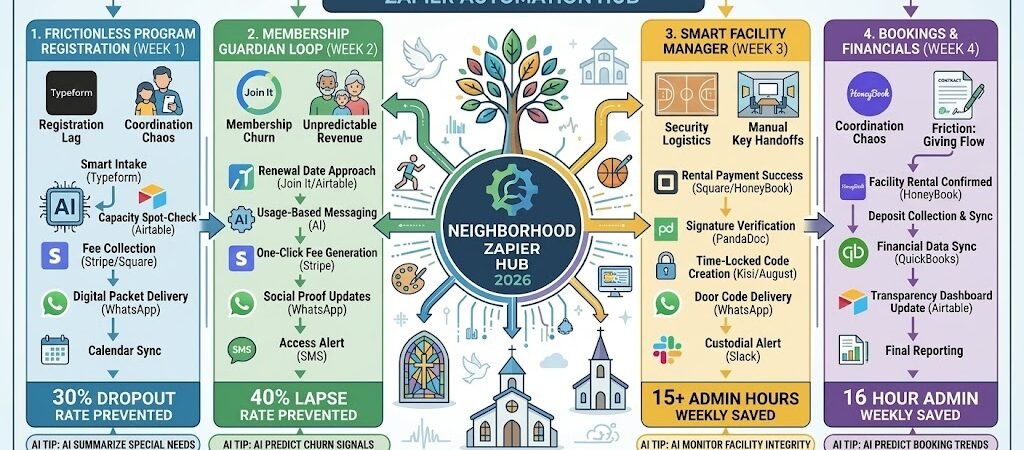
Key Takeaways: Zapier for Community Centers 2026
- The “Waitlist-to-Wallet” Sync: Connect Eventbrite/Jotform to Stripe, automatically inviting the next person on the waitlist and processing their payment the moment a spot opens up.
- The “Membership Guardian” Loop: Link your Member Database (Airtable/Join It) to Mailchimp, triggering a personalized 3-step renewal sequence that starts 30 days before expiry.
- The “Program Pilot” Automator: Use AI by Zapier to analyze registration trends and automatically suggest new class times based on when your community is most active.
- The “Instant Access” Bridge: Connect Square to your Smart Lock System (Kisi/August), automatically sending temporary door codes to members the second their facility rental is confirmed.
The “Community Friction” of 2026
In 2026, community centers have shifted from simple “physical spaces” to vital “Trust Layers” in a high-speed digital economy. As residents increasingly crave “unmistakably human” experiences to counter AI noise, centers are facing a paradox: the demand for in-person connection is skyrocketing, but the administrative capacity to manage it is shrinking. For a local hub, the primary threat isn’t a lack of interest—it’s the “Coordination Chaos” that burns out staff and turns a simple program registration into a bureaucratic ordeal.
Community centers in 2026 are currently navigating three critical “Frictions”:
- The “Amazon-Speed” Expectation Gap: Residents now expect “one-click” simplicity for local services. In 2026, if a parent has to wait 48 hours for a staff member to manually confirm a summer camp spot or “verify a membership,” they often abandon the registration. This “Registration Lag” causes a hidden churn of up to 30%, where interest is lost due to the friction of the sign-up process itself.
- The “Ghost Deflection” of Membership: Churn in 2026 rarely starts with a cancellation; it starts with “Invisible Disengagement.” When members feel like a number in an unpersonalized database, they stop attending. Without automated, personalized “Usage Nudges” (e.g., “We haven’t seen you at the gym in 10 days!”), membership lapse rates can hit 40%, making revenue unpredictable and community bonds fragile.
- The “Security vs. Access” Logistics: Managing facility rentals—from basketball courts to meeting halls—traditionally involves a logistical dance of manual key handoffs and late-night “where is the code?” phone calls. In 2026, this “Administrative Noise” consumes 15+ hours a week for center managers, time that could be spent developing high-impact community programming instead of managing deadbolts.
The Zapier Solution: Zapier acts as your “Digital Front Desk,” seamlessly connecting your Airtable membership directory, Typeform registrations, and Smart Lock systems. By 2026, a high-performing center doesn’t “re-key” data into spreadsheets; Zapier has already updated the roster and sent the door code. You don’t “guess” who might quit; Zapier has already triggered a renewal sequence based on real-time attendance data. This automation turns your staff from “paper-pushers” into Community Architects.
Community Center Efficiency Benchmarks 2026
| Friction Category | 2026 Impact | Zapier Automation Fix |
| Membership Churn | 40% Lapse Rate | Proactive “Usage” & Renewal Nudges |
| Registration Lag | 30% Dropout Rate | Instant “Form-to-Payment” Sync |
| Facility Security | 15+ Admin Hours/Week | Automated Smart Lock Code Delivery |
Practical AI Tip for 2026: Use AI by Zapier to “Predict Program Demand.” Have Zapier scan your Typeform waitlists and Airtable attendance. It can generate a monthly “Program Pilot” report: “The ‘Senior Yoga’ waitlist has hit 15 people three months in a row; Zapier suggests opening a new Thursday 10 AM slot to capture $[Amount] in additional revenue.”
Blueprint #1 – The “Frictionless” Program Registration
In 2026, a “form submission” should be the end of the administrative work, not the beginning. For a community center, registration is often the first point of contact with a new resident. This blueprint ensures that when someone signs up for senior yoga or a youth basketball league, every department—from the registrar to the coach—is updated instantly, and the registrant is onboarded with “Amazon-speed” efficiency.
1. The Trigger: The “Smart Intake”
- The 2026 Tech: A resident completes a registration form via Typeform, Zapier Forms, or Jotform.
- The Action: Zapier captures essential data: name, age/eligibility, emergency contact, and program choice.
2. The Logic: Capacity & Waitlist Management
Zapier acts as your Automated Registrar, handling the logic that usually takes staff hours:
- The Spot Verification: Zapier checks your Airtable “Program Roster.” If the class is full (e.g., 20/20 spots taken), Zapier immediately triggers the “Waitlist Logic.”
- The Waitlist Loop: Zapier moves the registrant to a “Waitlist” view in Airtable and sends an instant WhatsApp: “Class is full! You’re #3 on the waitlist. We’ll text you the moment a spot opens.”
- The Payment Gate: If a spot is available, Zapier generates a Stripe/Square checkout link. The registration is only marked “Confirmed” once the payment is processed.
3. The Action: The “Instant Onboarding” Kit
- The Action: Once payment hits, Zapier moves the record to “Enrolled.”
- The Digital Packet: Zapier uses PDF4me or Google Drive to generate a personalized “Program Welcome Packet” and sends it via WhatsApp or Email: “Welcome to Ceramics 101, [Name]! Here is your supply list and parking pass: [Link].”
- The Calendar Sync: Zapier adds the class dates directly to the resident’s Google Calendar and invites the instructor to the new roster.
Frictionless Registration Summary
| Step | Component | 2026 Recommended Tool |
| Trigger | Multi-Program Intake | Typeform / Zapier Forms |
| Logic 1 | Capacity Spot-Check | Airtable |
| Logic 2 | Automated Waitlist | Waitlist / Airtable |
| Action 1 | Fee Collection | Stripe / Square |
| Action 2 | Welcome Kit Delivery | WhatsApp / Google Drive |
Practical AI Tip for 2026: Use AI by Zapier to “Summarize Special Needs.” If a parent includes dietary restrictions or medical alerts in a camp registration, have the AI extract these and send a high-priority Slackalert to the specific Program Lead: “Alert: New camper in ‘Solar Explorers’ has a severe peanut allergy. Roster updated.”
Blueprint #2 – The “Membership Guardian” Loop
In 2026, a lapsed membership isn’t just a loss of revenue; it’s a break in the community fabric. Most members don’t “cancel”—they simply forget to renew or lose the habit of coming. This blueprint turns your Airtable or Join It database into a proactive retention machine. It identifies “At-Risk” members based on their activity levels and automates a 30-day renewal journey that feels like a personal invitation, not a bill.
1. The Trigger: The “Renewal & Usage” Monitor
- The 2026 Tech: Your membership database (Join It, Member365, or Airtable) identifies a member who is 30 days away from expiry.
- The Action: Zapier pulls the member’s name, their membership tier, and their “Last Check-in” date from your facility’s access system.
2. The Logic: Personalized Retention Pathing
Zapier acts as your Member Experience Manager, tailoring the message based on their actual relationship with the center:
- The “Power User” Path: If they have visited 5+ times this month, Zapier sends a “Loyalty Thank You” and an easy renewal link.
- The “At-Risk” Path: If they haven’t checked in for 20+ days, AI by Zapier drafts a “We Miss You” note: “Hey [Name], we noticed it’s been a while! We’d love to see you back. Renew this week and get a free guest pass for a friend.”
- The Payment Bridge: Zapier creates a custom Stripe Checkout link that automatically applies the member’s specific discount or tier price.
3. The Action: The Multi-Channel Nudge
- Day 30 (The Value Nudge): Zapier sends a WhatsApp with a highlight reel of next month’s center events.
- Day 7 (The Direct Ask): Zapier sends an Email with the “One-Click” renewal button.
- Day 1 (The Access Alert): Zapier sends an SMS: “Your gym access expires at midnight! Lock in your rate here to keep your key active: [Link]”
Membership Guardian Summary
| Step | Component | 2026 Recommended Tool |
| Trigger | Renewal Date Approach | Join It / Airtable |
| Logic 1 | Usage-Based Messaging | AI by Zapier |
| Logic 2 | One-Click Fee Generation | Stripe / Square |
| Action 1 | Social Proof (Video/Updates) | WhatsApp / Twilio |
| Action 2 | Multi-Stage Reminders | Mailchimp / SMS |
Practical AI Tip for 2026: Use AI by Zapier to “Predict Churn Signals.” Have Zapier scan your check-in data weekly. If it finds a member whose visits have dropped from 4/week to 0/week, it creates a Slack task for the Front Desk: “Check-in Opportunity: [Name] has stopped coming. Give them a friendly call to see if they need help with their fitness goals.”
Blueprint #3 – The “Smart Facility” Manager
If you rent out your community hall, gym, or meeting rooms, this blueprint eliminates the “Where are the keys?” phone call at 9 PM on a Friday. In 2026, manual key handoffs are a liability and a massive time-sink. This workflow connects your payment system directly to your building’s hardware, ensuring that only people who have paid and signed their waivers can step through the door.
1. The Trigger: The “Rental Confirmed”
- The 2026 Tech: A local group or resident completes their booking and pays the deposit via Square, HoneyBook, or your Airtable portal.
- The Action: Zapier captures the specific date, start time, and end time of the rental.
2. The Logic: Security & Compliance Gatekeeping
Zapier acts as your Digital Security Guard, verifying that all requirements are met before granting access:
- The Liability Gate: Zapier checks PandaDoc to see if the “Facility Use Agreement” and “Insurance Waiver” have been signed. If not, it sends a WhatsApp nudge: “Almost there! We just need your signature on the waiver before your door code can be generated: [Link]”
- The Time-Bound Provisioning: Zapier communicates with your Smart Lock System (Kisi, August, or Yale) to create a temporary PIN or “Mobile Key” that is only valid for the duration of the rental (plus a 15-minute buffer).
3. The Action: The “Virtual Key” Delivery
- The Action: 1 hour before the rental begins, Zapier sends a WhatsApp/SMS: “Your access to the North Gym is live, [Name]! Your door code is 4492. It will expire at 10 PM. Please remember to turn off the lights when you leave! 🏀”
- The Post-Rental Inspection: 15 minutes after the rental ends, Zapier pings the custodial staff on Slack: “Rental completed for North Gym. Ready for a quick reset/clean.”
Smart Facility Manager Summary
| Step | Component | 2026 Recommended Tool |
| Trigger | Rental Payment Success | Square / HoneyBook |
| Logic 1 | Signature Verification | PandaDoc / DocuSign |
| Logic 2 | Time-Locked Code Creation | Kisi / August Smart Lock |
| Action 1 | Access Code Delivery | WhatsApp / Twilio |
| Action 2 | Custodial Cleanup Alert | Slack |
Practical AI Tip for 2026: Use AI by Zapier to “Monitor Facility Integrity.” If you have a smart energy meter, have Zapier check it 30 minutes after a rental ends. If the “Power Usage” is still high (meaning the lights or AC were left on), Zapier can send a friendly automated text to the renter: “Hey! It looks like the lights might still be on in the hall. Could you double-check? Thanks for helping us keep costs down!”
The 2026 Community Center Tech Stack
In 2026, the most successful community centers act as “High-Tech, High-Touch” ecosystems. By automating the mechanical tasks of entry, registration, and billing, your staff is freed to do what they do best: foster human connection and build neighborhood resilience. The 2026 standard is a “Self-Governing Hub” where the facility manages itself, and the people manage the mission.
1. The 2026 Core Stack
| Function | 2026 Recommended Tool | Why It Wins in 2026 |
| Membership CRM | Join It / Airtable | Native nonprofit/community tiers with powerful Zapier triggers for membership status changes. |
| Registrations | Typeform / Zapier Forms | Superior mobile experience for busy parents and seniors; handles complex logic/waitlists effortlessly. |
| Security & Access | Kisi / August | Cloud-based locks that allow Zapier to “issue” and “revoke” digital keys based on payment status. |
| Communication | WhatsApp / Twilio | The primary channel for “Door Code” delivery and “Class Cancelled” emergency alerts. |
| Finances | Stripe / Square | Essential for “Waitlist-to-Wallet” automation and recurring membership billing. |
2. The 2026 “Neighborhood Engine” Circuitry
In 2026, Zapier acts as your “Digital Facility Manager,” routing data through three high-reliability circuits:
- The “Access” Circuit: Connect Square to Kisi. When a facility rental is paid, Zapier generates a time-bound door code and sends it via WhatsApp. No more physical key handoffs.
- The “Retention” Circuit: Link Airtable (Check-in data) to AI by Zapier. If a senior member hasn’t visited for two weeks, Zapier triggers a “Wellness Check” task for the staff or a friendly “We Miss You” text.
- The “Capacity” Circuit: Connect Typeform to Airtable. Zapier monitors class limits in real-time. When a spot opens in a sold-out yoga class, it automatically bills the first person on the waitlist and sends their confirmation.
3. Hardware for the 2026 “Smart Center”
- “Check-in” Pillars: iPad Pros at every entry running Airtable Interfaces. Members tap their phone to log attendance, which instantly triggers Zapier “Usage Nudges.”
- Smart Energy Sensors: Connected via Zapier. If the “Facility Rental” has ended in Airtable but motion is still detected, Zapier pings the manager’s Apple Watch Ultra 3 to check the room.
- The “Front Desk” Command Center: Using the ASUS Zenbook Duo (2026), the manager keeps the Airtablefacility calendar on the bottom screen and the Slack volunteer channel on the top.
- Smart Digital Signage: Screens in the lobby linked to your Airtable “Events” board. Zapier updates the daily schedule automatically so residents always know what’s happening “Now” and “Next.”
Conclusion: Your 30-Day “Community Hub” Roadmap
- Week 1: The Frictionless Sign-up. Replace your PDF registration forms with a Typeform that syncs directly to an Airtable roster.
- Week 2: The Security Hand-off. Install a Smart Lock and connect it to your booking system via Zapier to automate door code delivery.
- Week 3: The Membership Guardian. Set up an automated 30-day renewal sequence to stop “invisible churn” and secure recurring revenue.
- Week 4: The Smart Waitlist. Automate your class capacity logic so the “Next in Line” is billed and enrolled without a staff member lifting a finger.

About the Author
Aapt DubeyAapt Dubey is an automation specialist and software developer dedicated to eliminating manual workflows for small businesses. With deep, hands-on experience building complex Zapier integrations, API connections, and real-world applications, Aapt writes actionable, tested tutorials to help businesses scale efficiently.