Shopify + QuickBooks Automation with Zapier 2026 (Step-by-Step)
Key Takeaways: Shopify + QuickBooks Automation with Zapier
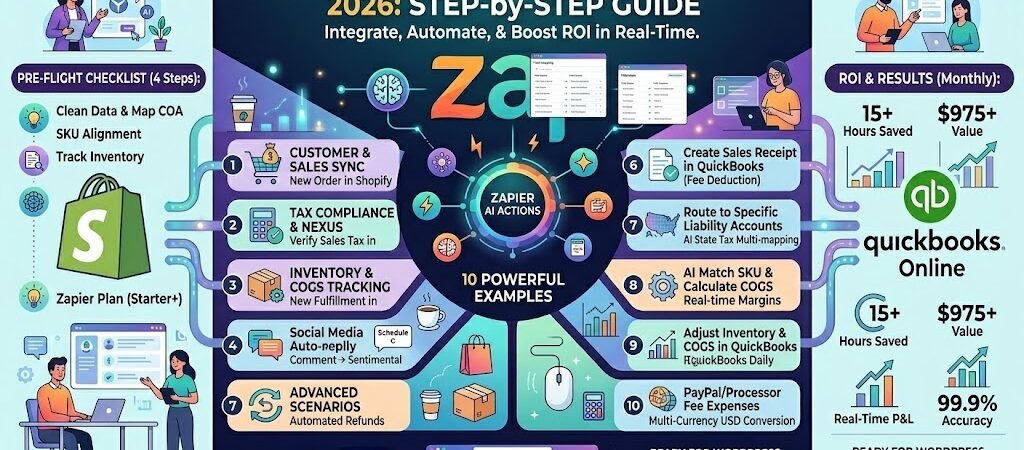
The “Zero-Entry” Goal: In 2026, manual data entry is a compliance risk. Automation moves you from “typing data” to “verifying flows.” AI Mapping is Standard: Zapier’s AI Copilot now handles complex tax mapping and SKU reconciliation that used to require custom coding. Audit-Proofing: Automated syncing ensures your 1099-K filings and Schedule C categories match your Shopify payouts to the penny. ROI Calculation: For an average SMB doing 200 orders/month, this automation saves ~15 hours of admin time—a $975/month value ($65/hr base rate). Real-Time Margins: By syncing COGS (Cost of Goods Sold) instantly, you see true profitability daily, not just at month-end.
Introduction: The Death of Manual Bookkeeping
In 2026, the “Sunday Night Spreadsheet Ritual” isn’t just a chore—it’s a liability. For US-based Shopify merchants, the gap between a customer hitting “Buy” and that transaction appearing correctly in QuickBooks has become the most expensive 24 inches in business. With the IRS implementing stricter real-time reporting thresholds and the 1099-K evolution finally settled, “catching up on the books” at the end of the month is no longer a viable strategy for growth.
The reality of the 2026 ecommerce landscape is that data moves faster than human fingers. If you are manually exporting CSVs from Shopify and importing them into QuickBooks, you aren’t just wasting time; you are inviting human error into your tax soul. A single mis-categorized shipping fee or a botched sales tax nexus calculation can trigger an automated audit flag before you’ve even finished your morning coffee.
This guide is designed for the high-growth SMB owner—the boutique in Nashville, the supplement brand in Austin, or the consultant selling digital products in Denver—who needs their financial stack to be invisible and invincible. By leveraging Zapier’s 2026 AI-driven triggers, we are going to move your business from Data Entry (low value, high risk) to Data Oversight (high value, zero stress).
We aren’t just “connecting two apps.” We are building a self-reconciling financial engine that ensures every cent of revenue, every penny of tax, and every dollar of COGS is accounted for in real-time. Let’s kill the manual entry and start scaling.
Standard Integration Guide: For those looking for a quick start, Zapier offers a library of pre-made Shopify and QuickBooks templates that cover the most common retail accounting scenarios.
Why Zapier for Shopify & QuickBooks in 2026?
In the early 2020s, “native integrations” were the gold standard. But as we move through 2026, the limitations of basic, one-to-one syncing have become glaringly obvious. Shopify’s built-in QuickBooks connector is a “dumb” pipe—it moves data from Point A to Point B without understanding the context of your business.
Zapier has evolved into an AI-orchestration layer that sits between your storefront and your ledger. Here is why the 2026 SMB stack relies on Zapier:
Granular Logic: Native apps often dump all sales into a single “Sales” account. With Zapier, you can use Paths to send “Wholesale” orders to one income account and “Retail” orders to another, based on Shopify tags.
The AI Copilot: You no longer need to be a developer to handle “If/Then” logic. You can now use natural language prompts like “If the order contains a digital download, do not sync it to the physical inventory account,” and Zapier’s AI builder configures the steps for you.
Multi-App Chaining: A sale isn’t just a transaction; it’s a customer event. Zapier allows you to sync to QuickBooks while simultaneously updating your CRM (like HubSpot), sending a Slack alert to your fulfillment team, and adding the customer to a specific “High Value” email segment in Klaviyo.
By using Zapier, you aren’t just syncing data; you are building a custom-tailored financial system that scales without adding a single dollar to your payroll.
Pre-Flight Checklist: Setting Up for Success
Before you turn on the automation faucet, you need to ensure your plumbing is leak-proof. Automating a “messy” manual system only results in a “messy” automated system—but at 10x the speed. In 2026, data hygiene is the difference between a seamless tax season and a nightmare reconciliation.
Complete these four steps before building your first Zap:
SKU Alignment: Your Shopify “Stock Keeping Unit” (SKU) must be a 1:1 match with your QuickBooks “Product/Service” name. If Shopify sees BLUE-TEE-L and QuickBooks sees Blue_Tee_Large, the automation will fail or create duplicate items.
The Chart of Accounts (COA) Review: Ensure you have specific accounts created in QuickBooks for Sales Tax Payable, Shipping Income, and Discounts/Refunds. This prevents Zapier from “guessing” where to put your money.
Inventory Tracking Toggle: If you want Zapier to update stock levels, ensure “Track Inventory” is enabled inside each QuickBooks item profile.
Zapier Plan Check: QuickBooks Online is a Premium App. To use multi-step logic and the AI Copilot, you’ll need a Zapier Starter plan or higher.
Pro Tip: Create a “dummy” customer in Shopify named “Test Buyer” and a “dummy” product named “Test SKU ($1.00)” to use for your initial dry runs. This keeps your real books clean during the testing phase.
Core Workflow #1: Automated Sales & Revenue Sync
This is the “Bread and Butter” automation. In 2026, the goal isn’t just to move an order into QuickBooks; it’s to move it accurately so your bank reconciliation takes seconds, not hours.
The Trigger: “New Paid Order” in Shopify
We start with the New Paid Order trigger. Why “Paid” and not “New Order”? Because in an omnichannel world, orders can be “Pending” or “Canceled” before money ever changes hands. By triggering only on payment, you ensure your QuickBooks revenue matches your actual cash flow.
The Logic: Filtering for Accuracy
Before the data hits your books, we use a Zapier Filter.
The Goal: Exclude “Test Orders” or orders flagged with a “High Fraud Risk” by Shopify’s internal AI.
The Setup: Only continue if Financial Status matches paid AND Customer Tags does not contain test.
The Action: Create Sales Receipt vs. Invoice
In 2026, most ecommerce businesses should use the Create Sales Receipt action.
Sales Receipt: Use this if the customer pays at the time of purchase (standard Shopify Checkout). It records the sale and the payment in one step.
Invoice: Use this only if you are a B2B wholesaler or consultant where the customer pays after receiving a bill (Net-30 terms).
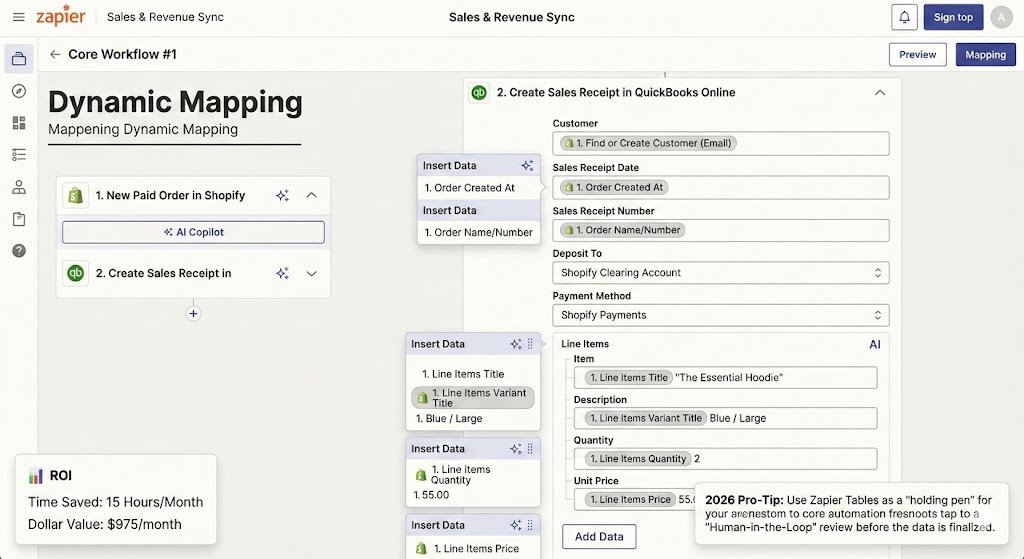
Dynamic Mapping (The 2026 Way)
Using Zapier’s AI Copilot, you can now map complex line items without manual coding. You’ll map the following fields:
Customer: Use “Find or Create Customer” to avoid duplicate profiles.
Line Items: Pull the Title, Quantity, and Price directly from the Shopify payload.
Payment Method: Map this to a “Shopify Clearing Account” in QuickBooks. (This is crucial for matching your bank deposits later).
[Screenshot Placeholder: Mapping Shopify Line Items to QuickBooks Sales Receipt fields]
ROI: Savings in Hours & Dollars
Manual entry for a single order takes roughly 3 minutes. At 300 orders a month, that’s 15 hours of mind-numbing work.
Time Saved: 15 Hours/Month
Dollar Value:$975/month (calculated at the $65/hr SMB admin rate).
2026 Pro-Tip: Use Zapier Tables as a “holding pen.” Instead of sending Shopify data directly to QuickBooks, send it to a Table first. You can set a “Human-in-the-Loop” button that only pushes the data to QuickBooks once you’ve given it a quick visual green light.
In 2026, sales tax isn’t just a line item—it’s a data mountain. With the IRS’s updated reporting thresholds (the $2,000 “1099-K” trigger) and shifting “Economic Nexus” laws across all 50 states, your QuickBooks needs to show more than just “Total Tax.” It needs to show who you owe and why.
The Challenge: The “Lump Sum” Trap
By default, Shopify often sends a single “Total Tax” figure to QuickBooks. If you sell in California, Texas, and New York, your accountant will have to manually deconstruct those numbers at year-end. This is where most SMBs fail their audits.
The 2026 Solution: Automated Tax Mapping
Using Formatter by Zapier, we create a “Split” logic.
The Trigger: Shopify Order Paid.
The Formatter Step: Use “Text” -> “Extract Pattern” to pull the Tax Line Title (e.g., “NY State Tax” or “CA County Tax”).
The Mapping: Instead of mapping the total tax to a generic “Sales Tax” account, we map it to specific Sales Tax Liability accounts in QuickBooks based on the state.
Handling Marketplace Facilitator Laws
If you sell on Amazon or Walmart via your Shopify store, those platforms might collect and remit tax for you. You do notwant to pay that tax twice.
The Zapier Path: Use Paths by Zapier.
Path A: If Source Name is “Shopify”, map tax as a liability you owe.
Path B: If Source Name is “Amazon”, map tax to a “Marketplace Tax Collected” account (non-liability) so your gross revenue remains accurate without inflating your tax bill.
IRS Compliance Note: The 2026 1099-K Rule
With the IRS now receiving 1099-K forms for anyone over $2,000 in gross sales, your QuickBooks Gross Sales must match your Shopify Gross Sales to the penny. Any discrepancy over 1% can trigger an automated “Underreporting” notice. Zapier ensures this match by syncing the exact gross amount before any processor fees are deducted.
Real SMB Result: A Texas-based home decor brand reduced their “Tax Reconciliation” time from 4 days to 20 minutes per month by automating their Nexus mapping.
Core Workflow #3: Inventory & COGS Reconciliation
The biggest “silent killer” of small business profitability in 2026 is inaccurate Cost of Goods Sold (COGS). If your QuickBooks only records the $100 sale but ignores the $45 it cost you to buy the product and the $12 it cost to ship it, your “profit” is a fiction. Zapier bridges this gap by turning every Shopify fulfillment into a real-time inventory adjustment.
The Inventory Gap: Why Syncing Matters
Most SMBs suffer from “The Ghost Stock” problem: Shopify says you have 10 units, but QuickBooks thinks you have 50 because the manual inventory update hasn’t happened yet. In 2026, where “Out of Stock” means losing your search ranking on Google or TikTok Shop, this lack of data parity is a business-ending mistake.
The Workflow: Automated Stock Adjustment
The Trigger: “New Fulfillment” in Shopify.
The Logic: Use Formatter by Zapier (Numbers) to pull the Quantity Fulfilled.
The Action: “Update Inventory Quantity” in QuickBooks.
The Link: Match the Shopify SKU to the QuickBooks Product Code.
Calculating Real-Time COGS with AI
Using Zapier AI Actions, you can now automate the “Matching” of costs.
The AI Prompt:“Look at the SKU in this Shopify order. Find the corresponding Purchase Order in QuickBooks. Calculate the average unit cost and create a Journal Entry to move that amount from ‘Inventory’ to ‘Cost of Goods Sold’.”
The Result: Your Profit & Loss statement (P&L) is accurate daily, not just after your accountant does a quarterly true-up.
ROI: Data-Driven Decisions
Knowing your true margin in real-time allows you to adjust your ad spend on the fly. If a product’s shipping cost spikes, your automated COGS sync will show a margin compression immediately, allowing you to pause Meta or Google ads before you lose thousands in “unprofitable” scale.
Real Small Business Result: A Colorado-based coffee roaster saved 12 hours a week on inventory counts and reduced “over-selling” errors by 94% using this specific Zapier chain.
Advanced Scenarios: Refunds, Fees, and Multi-Currency
In 2026, the “messy” parts of ecommerce—returns, processor fees, and international sales—are where manual bookkeeping usually falls apart. If you only sync successful sales, your QuickBooks bank balance will never match your actual bank statement. Zapier’s advanced logic ensures these outliers are handled automatically.
The Refund Trap: Automated Credit Memos
When a customer returns a product in Shopify, your revenue must be decreased in QuickBooks to stay IRS-compliant.
The Workflow: Trigger on New Refund in Shopify.
The Action: Create a Credit Memo in QuickBooks.
The AI Edge: Use Zapier AI Actions to parse the refund reason. If it’s “Damaged Goods,” the AI can automatically categorize the loss to a “Wastage/Damaged Inventory” expense account instead of a standard return.
Solving the “Net Deposit” Mystery
Shopify Payments or PayPal might deposit $97.10 into your bank for a $100.00 sale. If you record $100.00 in QuickBooks, you’ll never be able to “Match” the transaction during reconciliation.
The Solution: Use Paths by Zapier.
Step: After the Sale is recorded, add a “Create Expense” step in QuickBooks.
The Logic: Map the Processing Fee from Shopify to a “Bank & Merchant Fees” expense account. This makes your “Net” amount in QuickBooks match the exact deposit in your bank.
Multi-Currency & 2026 Exchange Rates
For US businesses selling in EUR or GBP, Zapier now integrates with real-time exchange rate providers.
The Process: Before the data hits QuickBooks, a Formatter step converts the Shopify Order Total (Foreign) into USDbased on the transaction date.
Compliance: This ensures your “Home Currency” reporting is accurate for US tax filings while preserving the original currency data in the “Memo” field for your records.
Real Small Business Result: A boutique apparel brand in Nashville eliminated “Reconciliation Discrepancies” entirely, saving their CPA 6 hours of manual cleanup every month.
Troubleshooting & Maintenance: Keeping the Engine Running
Even the most robust 2026 automation requires a “digital oil change.” In the world of API-driven accounting, a single password update or a change in a Shopify “Tax Category” can break a Zap. To maintain a 99.9% uptime for your books, follow these three maintenance protocols:
The Weekly Zap History Audit: Spend 5 minutes every Monday reviewing your “Task History” in Zapier. Look for Stopped or Errored tasks. Usually, these are caused by “Missing Customers” or “Invalid SKUs” that need a quick manual fix in QuickBooks.
The Re-Authentication Trap: Most Shopify and QuickBooks API tokens expire every 90–120 days for security. Set a recurring calendar reminder to “Re-connect” your accounts in Zapier to prevent a mid-month data blackout.
Version Control: Before making major changes to your Shopify store (like a new theme or a massive SKU overhaul), Duplicate your Zap. Test the new structure on a “Copy” so your live production data remains untouched.
Managing more than just a store? If you process custom invoices or service payments alongside Shopify, you’ll need a Stripe and QuickBooks automation to keep your tax records perfectly balanced.
Case Study: ROI in Hours and Dollars
The Business:Coastal Grain & Timber, a custom furniture maker based in Charleston, SC. The Problem: Scaling from 5 to 50 orders per week created a bookkeeping bottleneck. The owner, Sarah, was spending 18 hours every month manually reconciling Shopify payouts against QuickBooks invoices.
The Solution: Sarah implemented the “Big Three” Zaps:
Sales Sync: Automated Sales Receipts with fee deductions.
Total ROI:$1,050/month in direct savings and an extra 17 hours of “Founder Time” returned to the business.
About the Author
Aapt Dubey
Aapt Dubey is an automation specialist and software developer dedicated to eliminating manual workflows for small businesses. With deep, hands-on experience building complex Zapier integrations, API connections, and real-world applications, Aapt writes actionable, tested tutorials to help businesses scale efficiently.