
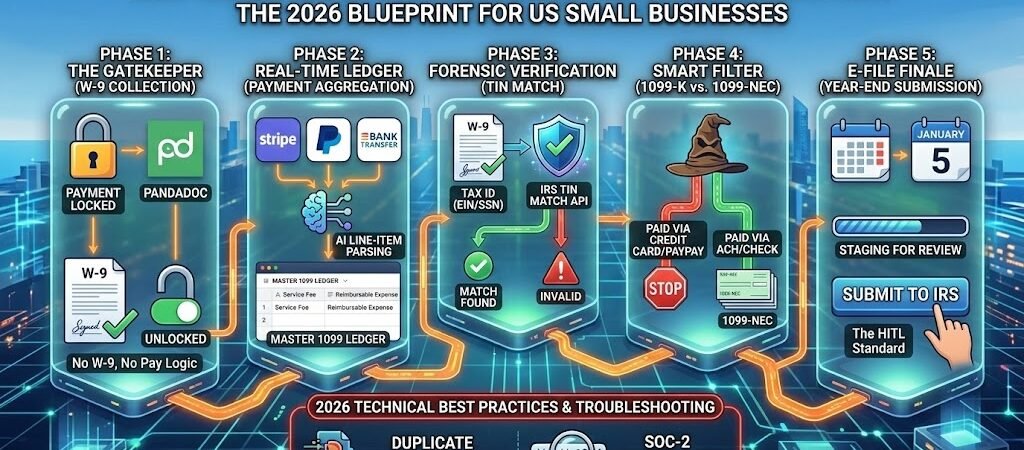
Key Takeaways: IRS-Compliant 1099 Tracking (The 2026 Automation Blueprint)
- Shift to Real-Time Hygiene: In 2026, 1099 tracking is no longer a “January project”—it is a persistent, background Data Plumbing process that validates every contractor before the first payment is issued.
- The “No W-9, No Pay” Rule: Modular Zaps now act as digital compliance officers, automatically pausing payments in your accounting software (like QuickBooks or Bill.com) until a verified Tax ID (TIN) is on file.
- Eliminating Double-Reporting: Advanced Filter by Zapier logic is used to distinguish between 1099-NEC (Direct Pay) and 1099-K (Third-party processors), ensuring you don’t over-report income to the IRS.
- Forensic Audit Trails: By syncing “Raw JSON” data from payment triggers into a master ledger (like Airtable), you create an immutable, search-friendly audit log that survives IRS scrutiny.
Introduction: The 2026 IRS Compliance Landscape
The 2026 tax season marks a definitive end to “paper-trail” accounting for US small businesses. With the IRS now mandating electronic filing for any business with more than 10 employees, the margin for manual data entry error has effectively vanished. For the modern SMB owner, 1099 compliance has shifted from a tax problem to a Data Management problem.
In previous years, businesses could get away with a “Forensic Scramble” in January—hunting through Gmail threads for W-9s and cross-referencing bank statements against PayPal logs. In 2026, this approach is a recipe for B-Notices (IRS mismatched Tax ID penalties) which can cost hundreds of dollars per occurrence.
The Rise of the “Continuous Audit”
The IRS’s increased processing speed means that mismatches are flagged almost instantly. To counter this, high-growth businesses have implemented Modular Compliance Stacks. Instead of one giant, fragile Zap, they use a series of “Gatekeeper” and “Ledger” workflows. These Zaps ensure that:
- Contractors are vetted during onboarding, not during the first billing cycle.
- Tax IDs are verified against IRS databases in real-time using specialized APIs.
- Payment types are filtered so that credit card payments (reported by the processor) aren’t accidentally double-reported by the business.
By automating these “Forensic” checks, you transform 1099 season from a 40-hour administrative nightmare into a 10-minute “Review and Submit” session. You aren’t just saving time; you are building a “Zero-Gap” system that ensures your books are audit-ready every single day of the year.
Compliance Automation: Staying tax-ready requires precise records. Look into Zapier’s financial automation solutions to see how other US businesses automate expense tracking and tax documentation.
Phase 1: The “Gatekeeper” Workflow (W-9 Collection)
In 2026, the most expensive mistake a US small business can make is paying a contractor before their tax identity is verified. The “Gatekeeper” workflow ensures that compliance isn’t a post-payment afterthought—it’s a prerequisite for the transaction itself.
The “No W-9, No Pay” Logic
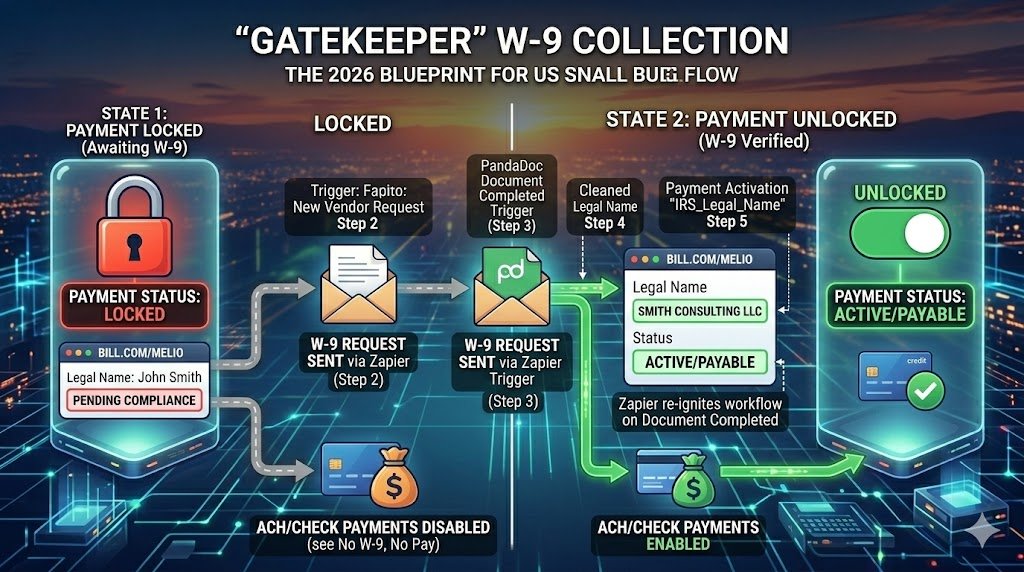
The goal of this phase is to create a digital deadlock: the payment account cannot be activated until a signed W-9 is filed. By using Zapier to bridge your onboarding tool (like PandaDoc or DocuSign) and your payment platform (like Bill.com or Melio), you remove the human element of “forgetting” to ask for paperwork.
Template: The Automated Onboarding Gatekeeper
The Stack: PandaDoc (W-9 Template) + Zapier + Bill.com (or QuickBooks)
- Step 1: The Trigger (New Vendor Request) When a project manager adds a new vendor to your internal “Contractor Request” Google Sheet or Airtable, the Zap kicks off.
- Step 2: The Action (PandaDoc) Zapier automatically sends a pre-filled W-9 form to the contractor’s email.
- Technical Detail: Use the “Create Document from Template” action.
- Step 3: The Delay (The Holding Pattern) The Zap “waits” for the document to be signed. In 2026, we use the “Document Completed” trigger in PandaDoc to re-ignite the flow.
- Step 4: The Data Clean (Formatter) Before pushing data to your payment app, use Formatter by Zapier -> Text-> Capitalize to ensure the “Legal Business Name” is perfectly formatted. This prevents “mismatch” errors in the IRS e-file system later.
- Step 5: The Action (Payment Activation) Only after the signature is verified does Zapier “Update Vendor” in Bill.com, changing their status from “Pending Compliance” to “Active/Payable.”
Technical Fix: Mapping the “Legal Name” Field
A common “Forensic Error” occurs when a contractor signs as “John Smith” but their business is registered as “Smith Consulting LLC.” To fix this:
- In your PandaDoc template, create a specific field labeled
IRS_Legal_Name. - In Zapier, map that specific field—not the “Sender Name”—to the Vendor Name field in your accounting software.
- The Result: Your 1099-NEC will exactly match the name the IRS has on file for that Tax ID, eliminating “B-Notice” penalties.
The 2026 “Audit-Ready” Pro-Tip
Always add a final step to this Zap that uploads the completed W-9 PDF into a dedicated Google Drive folder named 2026_W9_Vault. Use the naming convention: [Legal_Name]_[Tax_ID_Last4].pdf. This ensures that if you are ever audited, you have a centralized, searchable vault of physical proof for every single contractor payment.
Phase 2: Real-Time Payment Aggregation (The “Audit Log” Engine)
In 2026, the IRS doesn’t just look at the total amount you paid a contractor; they look at the nature of those payments. A common audit trigger occurs when “Reimbursed Expenses” (like travel or materials) are accidentally lumped into “Non-Employee Compensation” (Box 1 on the 1099-NEC).
Phase 2 focuses on Real-Time Data Plumbing. Instead of waiting until December to categorize bank statements, this Zap builds a “Forensic Ledger” as every dollar moves.
Template: The “Master 1099 Ledger” Zap
The Stack: Stripe/PayPal + QuickBooks Online + Airtable (The Source of Truth)
This workflow ensures that every payment is “split” and categorized before it ever hits your accounting books.
- Step 1: The Trigger (New Successful Payout/Expense) This kicks off when a payment is marked as “Contractor Services” in Stripe or synced from your bank feed.
- Step 2: The Action (AI Line-Item Parsing) In 2026, we use GPT-5 Mini (via OpenAI) to read the invoice description.
- Prompt: “Extract ‘Service Fee’ and ‘Reimbursable Expense’ from this invoice text: [Invoice_Description]. Return as two separate numerical values.”
- Step 3: The Filter (1099 Threshold Check) Use Filter by Zapier to check: “Is the cumulative payment to this Vendor > $600?”
- Note: Even if the current payment is small, the Filter tracks the “Roll-up” total in your Ledger.
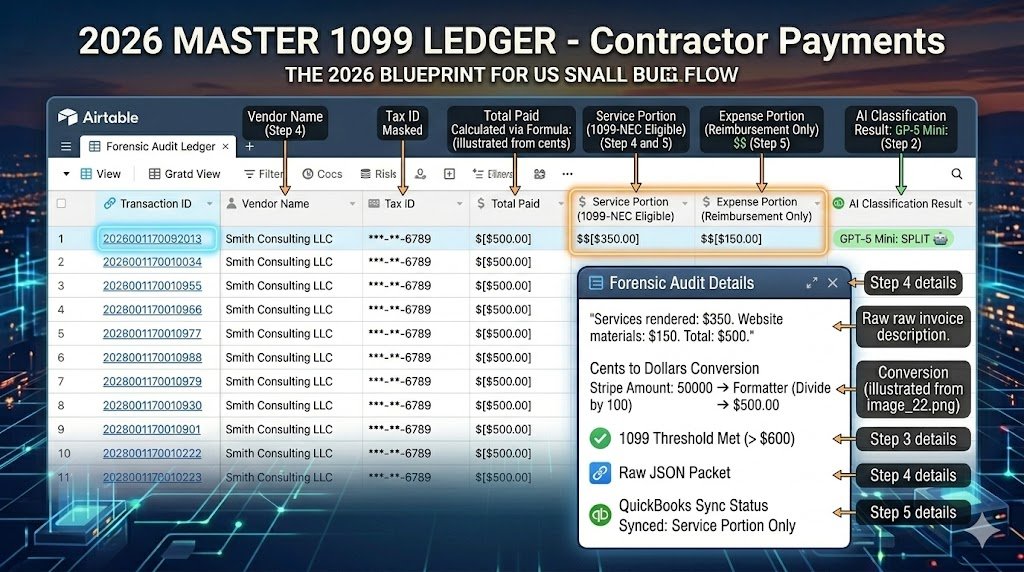
- Step 4: The Action (Airtable – The Forensic Audit) Create a new record in your “2026 Master 1099 Ledger.”
- Fields: Vendor Name, Tax ID (masked), Total Paid, Service Portion, Expense Portion, and Raw JSON Link.
- Step 5: The Action (QuickBooks) Sync the Service Portion only to the 1099-NEC category in QuickBooks, ensuring your “Taxable Compensation” stays accurate.
Technical Fix: The “Cents to Dollars” Consistency
Referencing our earlier “Format Mismatch” guide (from image_22.png), Stripe often sends values in cents (50000 for $500.00).
- Always insert a Formatter -> Numbers -> Perform Math step.
- Divide by 100 before sending the data to Airtable or QuickBooks.
- The Result: Your Master Ledger matches your bank statement to the penny, providing an ironclad defense during a “Forensic Audit.”
The 2026 Forensic Rule: The “Raw JSON” Backup
In 2026, data APIs can be “unstable” during high-traffic tax months. For every payment in Phase 2, map the “Raw Data”or “JSON URL” from the trigger into a hidden field in Airtable. If a payment is ever questioned, you can click that link to see the exact metadata packet the payment processor sent at the moment of the transaction. This is the ultimate “Receipt” for the digital age.
Phase 3: The “Forensic” Tax ID Validation (The Real-Time Shield)
In 2026, the IRS has significantly shortened the window for identifying Tax ID (TIN) mismatches. Waiting for a “B-Notice” in the mail is no longer a viable strategy; high-growth businesses now use Real-Time TIN Matching to verify a contractor’s identity the moment their W-9 is submitted.
The “TIN Match” Logic
The goal of Phase 3 is to eliminate the risk of the “Invalid TIN” penalty (which can reach $330 per form in 2026). By connecting Zapier to an IRS-authorized verification service (like Tax1099, TaxBandits, or TINCheck), you ensure that the Name/TIN combination is 100% accurate before the vendor is even eligible for their first payment.
Template: The Real-Time Verification Zap
The Stack: PandaDoc (W-9) + Zapier + Tax1099/TaxBandits + Slack
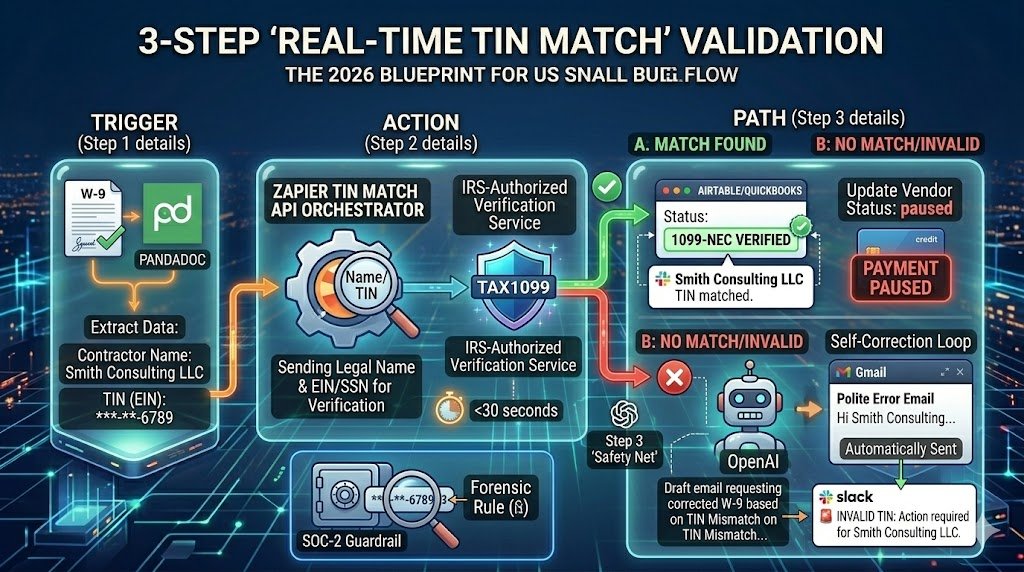
- Step 1: The Trigger (Document Completed) The flow starts when a contractor signs their electronic W-9 in PandaDoc.
- Step 2: The Action (TIN Verification Service) Zapier sends the Legal Name and EIN/SSN directly to the verification API.
- Technical Detail: Most 2026 tax APIs return a result in under 30 seconds.
- Step 3: The Path (The Logic Fork)
- Path A: Match Found. Update the vendor in QuickBooks/Airtable with a “Verified” badge and notify the team.
- Path B: No Match/Invalid. This is the “Safety Net.” Zapier immediately pauses the vendor in your payment system and triggers a Slack alert.
Technical Fix: Handling “Mismatch” Notifications
When Path B is triggered, the automation shouldn’t just stop. It should initiate a Self-Correction Loop:
- Action (OpenAI): “Draft a polite email to [Contractor Name] stating that the TIN provided ([TIN]) does not match IRS records for [Legal Name]. Ask them to double-check their SSN/EIN or provide a corrected W-9.”
- Action (Gmail): Send the email automatically.
- The Result: You solve the compliance issue in minutes rather than discovering it during the January filing rush.
The 2026 Forensic Rule: The “SOC-2” Guardrail
Because you are handling sensitive SSNs and EINs, your Phase 3 Zaps must use Zapier’s Secure Portals or Environment Variables to mask the Tax ID in your logs. Never map a full Social Security Number into a Slack message or a public Google Sheet. In 2026, keeping an “Audit Ready” log means storing the Result of the TIN match (e.g., Status: MATCHED), not the sensitive data itself.
Phase 4: The 1099-K vs. 1099-NEC Filter (The “Double-Reporting” Shield)
In 2026, the IRS has ramped up its automated matching systems. One of the most common (and expensive) errors for US small businesses is double-reporting income. This happens when you report a payment on a 1099-NEC that was already reported by a third-party settlement organization (like PayPal, Stripe, or a Credit Card processor) on a 1099-K.
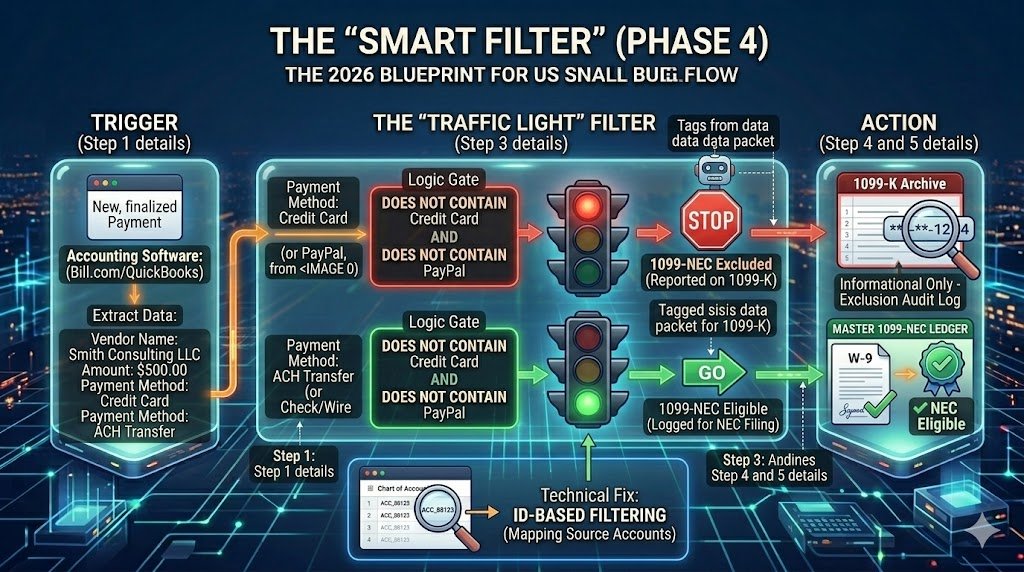
The goal of Phase 4 is to build a “Smart Filter” that identifies the Payment Method and ensures only “Direct Pay” (Check, ACH, or Wire) transactions hit your 1099-NEC filing list.
Template: The “Payment Method” Classifier Zap
The Stack: QuickBooks Online (or Xero) + Filter by Zapier + Airtable (Master Ledger)
This workflow acts as a sorting hat for every dollar that leaves your business.
- Step 1: The Trigger (New Expense/Bill Payment) Triggered whenever a payment is finalized in your accounting software.
- Step 2: The Action (Formatter – Extract Text) Look at the “Payment Method” or “Account” field. We are searching for keywords like “Credit Card,” “PayPal,” or “Venmo.”
- Step 3: The Filter (The “Logic Gate”)
- Logic: Only continue if “Payment Method” does not contain “Credit Card” AND does not contain“PayPal.”
- Step 4: The Action (Airtable – 1099-NEC Ledger) If the payment passes the filter (meaning it was ACH or Check), it is added to the “1099-NEC Eligible” view in your ledger.
- Step 5: The Path (Optional: The 1099-K Archive) If it fails the filter, send it to a separate “Informational Only” table so you have a record for your own books, but it won’t be included in your year-end IRS filing.
Technical Fix: Mapping “Source Accounts”
In 2026, many businesses use “hidden” sub-accounts for different payment rails. To ensure your filter is airtight:
- Audit your Chart of Accounts: Identify every account that represents a “Third-Party Processor.”
- Use ID-based Filtering: Instead of filtering by the name “Stripe,” filter by the unique Account ID in your accounting software. This prevents the Zap from failing if someone renames the account to “Stripe – Main.”
- The Result: You avoid the “IRS Matching Notice” that occurs when a contractor’s reported income doesn’t align with their 1099-K records.
The 2026 Forensic Rule: The “Exclusion Audit”
Always keep a “Filtered Out” log. In 2026, a “Forensic Audit” doesn’t just ask “Who did you pay?”; it asks “Why did you exclude these payments?” By having a dedicated Airtable view showing every transaction that was filtered out—along with the specific reason (e.g., “Paid via Amex Corporate Card”)—you can answer an IRS inquiry in under 60 seconds.
Phase 5: Year-End Filing Automation (The “Review & Click” Finale)
In 2026, the traditional “January 31st Panic” is replaced by a structured, automated filing day. Because Phases 1 through 4 have ensured your data is clean, verified, and filtered, Phase 5 is simply about pushing that “Master Ledger” into the IRS’s electronic intake system.
The “1099 Submission” Logic
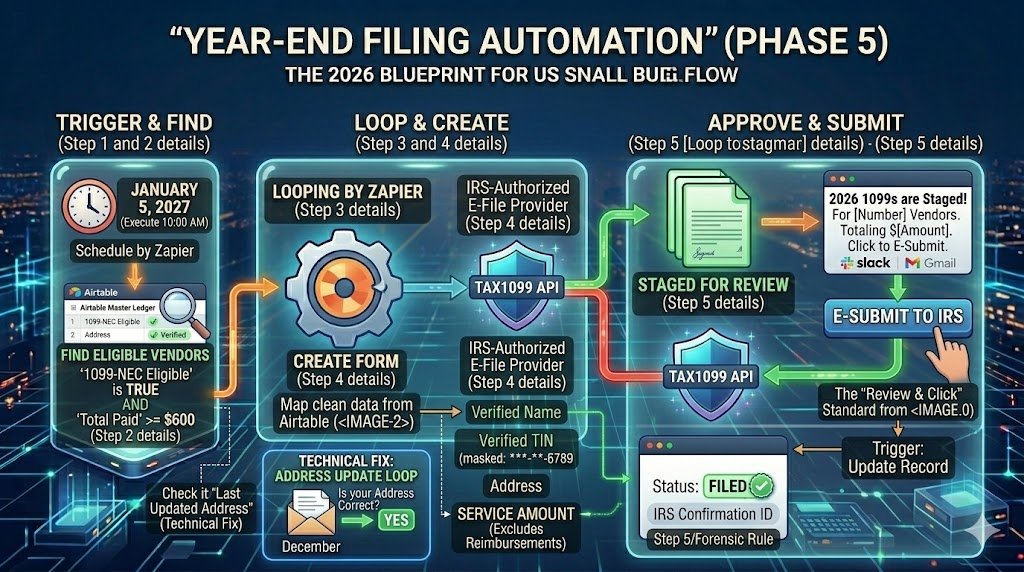
The goal of Phase 5 is to move from Airtable (Your Source of Truth) to an IRS-Authorized E-File Provider (like Tax1099, Track1099, or Yearli). In 2026, these providers have robust APIs that allow Zapier to stage your forms for a final human “sanity check” before they are broadcast to the IRS and your contractors.
Template: The 10-Minute Filing Zap
The Stack: Airtable + Zapier + Tax1099 (or similar) + Gmail
- Step 1: The Trigger (Schedule by Zapier) Set this to run on January 5th. This gives you a five-day buffer to account for any final end-of-year bank reconciliations.
- Step 2: The Action (Airtable – Find Records) Search for all vendors in your “2026 Master Ledger” where the “1099-NEC Eligible” status is TRUE and the “Total Paid” is >= $600.
- Step 3: The Loop (Looping by Zapier) For every vendor found, Zapier will perform the following actions individually to ensure no data is dropped.
- Step 4: The Action (Tax1099 – Create Form) Map the clean data from Airtable: Legal Name, Verified TIN, Address, and Service Amount.
- Forensic Note: Ensure the “Service Amount” excludes the “Reimbursements” we filtered in Phase 2.
- Step 5: The Action (Slack/Gmail – The Final Approval) Once the forms are staged, Zapier sends a summary to the Business Owner: “2026 1099s are staged for [Number] vendors totaling $[Amount]. Click here to review and E-Submit.”
Technical Fix: Handling “Mailing Address” Updates
A common 2026 “Forensic Failure” occurs when a contractor moves during the year.
- The Fix: In Step 2, have the Zap check a “Last Updated” timestamp on the W-9 record.
- If the W-9 is older than 6 months, have Zapier send a quick automated email in December: “Hi [Name], we’re prepping your 1099. Is [Address] still your correct mailing address? Reply ‘YES’ to confirm or click here to update.”
- The Result: You eliminate “returned mail” and the need for corrected filings (1099-X), which are a red flag for IRS audits.
The 2026 Forensic Rule: The “Digital Receipt” Loop
Once you click “Submit” in your e-file provider, set up a final “Cleanup Zap”:
- Trigger: Form Submitted in Tax1099.
- Action: Update the Airtable record with the IRS Confirmation Number.
- The Benefit: If the IRS ever claims a form wasn’t filed, you have the exact electronic timestamp and confirmation ID attached to the vendor record.
Final Takeaway
By the time you reach Phase 5, you aren’t “doing taxes”—you are simply confirming a system. This modular approach transforms a high-stress compliance burden into a predictable, 10-minute administrative task.
Technical Best Practices & Troubleshooting (The Forensic Audit)
In 2026, a “successful” Zap is not the same as a “compliant” Zap. To survive an IRS audit, your automation must leave a clear, documented trail of how every dollar was categorized.
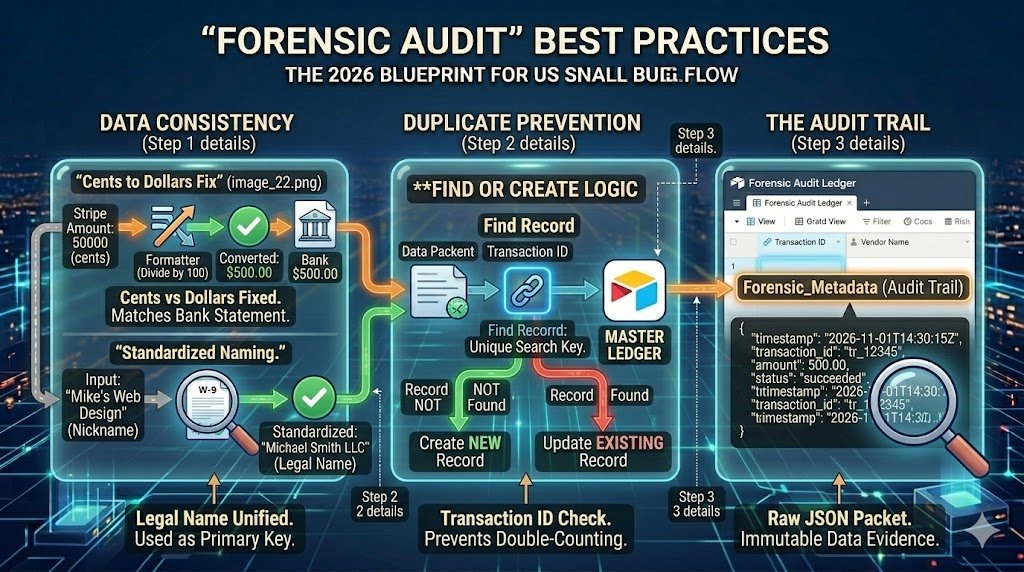
1. Data Consistency (Reference Image_22.png)
The most common audit trigger is a discrepancy between your Bank Statements and your 1099-NEC filings.
- The “Cents to Dollars” Fix: Ensure your Formatter steps are applied universally. If App A sends
$500.00and App B sends50000, your ledger will be inflated by 100x. - Standardized Naming: Always use the Legal Name from the W-9 as the primary key. Avoid using “Nickname” fields (e.g., “Mike’s Web Design” vs. “Michael Smith LLC”) in your 1099 workflows.
2. Duplicate Prevention & Search Keys
If a Zap fails and you perform a Mass Replay (as discussed in our earlier guides), you risk double-counting payments.
- The Solution: Use the Transaction ID from the payment processor (Stripe/PayPal) as a “Unique Search Key” in Airtable.
- The Logic: Before creating a new record, have Zapier “Find Record.” If the Transaction ID already exists, Updatethe record instead of creating a duplicate.
3. The “Audit Trail” Field
In your Master Ledger, create a long-text field labeled Forensic_Metadata.
- Action: Map the Raw JSON body from the Zapier trigger into this field.
- The Benefit: If the IRS questions a specific $601 payment three years from now, you won’t need to hunt for old emails. You can point to the exact timestamped data packet that authorized the payment.
Conclusion: Peace of Mind in 2026
The transition from “Tax Season” to “Tax Systems” is the ultimate competitive advantage for a US small business. By 2026, the complexity of IRS electronic mandates makes manual tracking not just tedious, but financially dangerous.
By implementing this 5-Phase Modular Blueprint, you move away from the high-stakes “January Scramble” and into a state of continuous compliance. You are no longer “doing your taxes” at the end of the year; you are simply verifying a system that has been working accurately in the background for 365 days.
With Verified TINs, Filtered 1099-K payments, and a Forensic Audit Log, you can face tax season with the confidence that your data is ironclad.
Back to the E-commerce core. Contractor tracking is just one part of your financial stack. To see how these workflows fit into your overall store management, review our fundamental guide on Shopify QuickBooks accounting.

About the Author
Aapt DubeyAapt Dubey is an automation specialist and software developer dedicated to eliminating manual workflows for small businesses. With deep, hands-on experience building complex Zapier integrations, API connections, and real-world applications, Aapt writes actionable, tested tutorials to help businesses scale efficiently.