
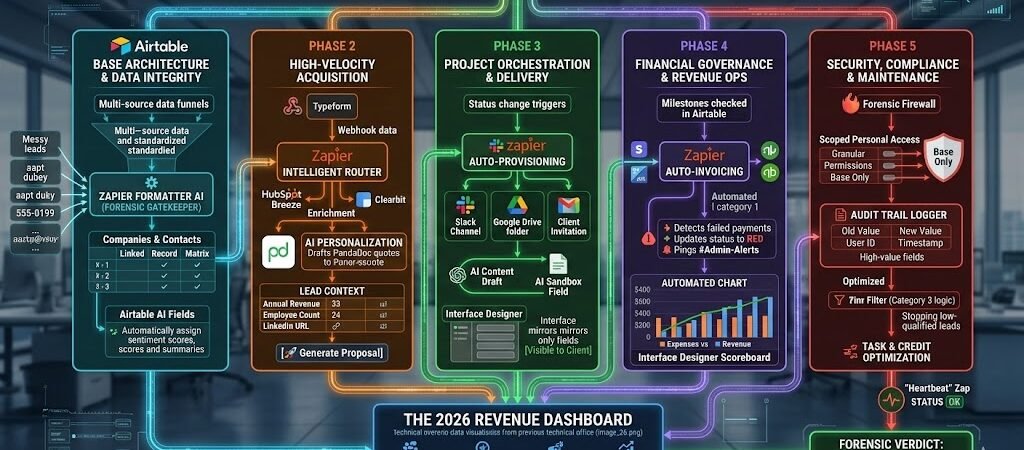
Key Takeaways: The 2026 Airtable + Zapier Blueprint (Airtable Zapier Ultimate Guide )
- From Flat to Relational: In 2026, “Flat Data” (simple rows/columns) is dead. Success depends on Linked Records—connecting a “Client” to their “Invoices,” “Tasks,” and “Contracts” so your AI agents have full context.
- Airtable as the “Headless UI”: Use Airtable as your back-end database and Zapier as the “Operator” that pushes data to front-end tools like Softr (for client portals) or Slack (for team alerts).
- The AI Field Advantage: Leverage Airtable’s native AI Fields to summarize Zapier-transcribed meetings or categorize leads the moment they hit your base.
- Forensic Data Hygiene: Use Zapier Formatter AI as a gatekeeper. Never let a lead enter your base until the name is Title Cased and the phone number is converted to the E.164 global standard.
Introduction: The Age of the “Relational Engine”
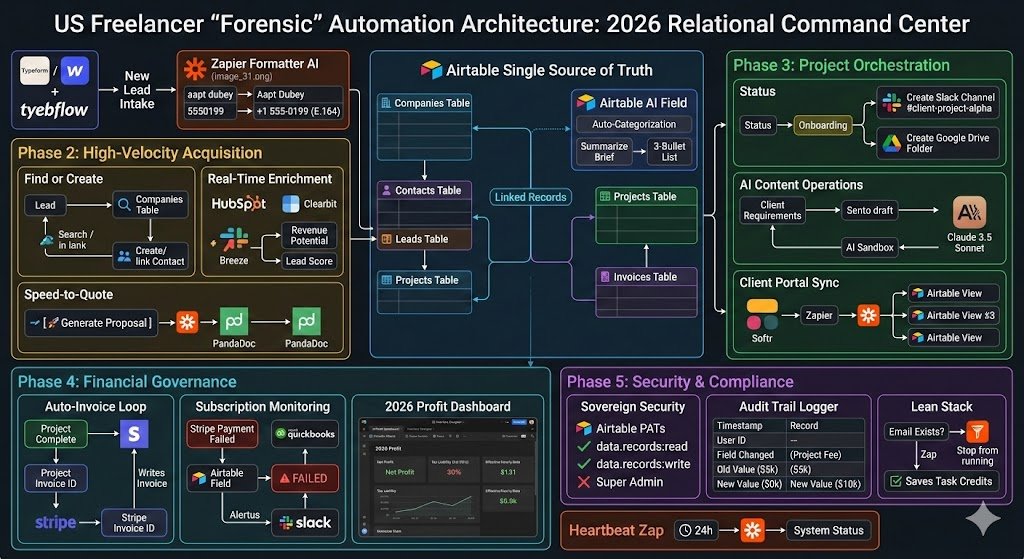
In 2026, the boundary between “Data Entry” and “Software Engineering” has officially dissolved. For the US freelancer or a small team of three, the goal is no longer to work harder, but to build a Relational Engine that works while they sleep.
The 2026 Shift: Beyond the Spreadsheet
Previously, we used tools like Excel or Google Sheets to “track” things. But tracking is passive. In 2026, we use Airtable to trigger things.
- The Old Way: You get a lead, you type it into a sheet, and you manually send an email.
- The 2026 Forensic Way: A lead hits your site → Zapier enriches the data with Breeze Intelligence → Airtable creates a “Linked Record” → An AI-drafted proposal is sent instantly.
Why “Relational” is Your Competitive Moat
A “Flat” database treats every row as an island. A Relational database (Airtable) understands that Company A is the parent of Contact B, who is responsible for Project C.
When Zapier feeds this relational structure, your automation becomes Agentic. Your AI doesn’t just see a name; it sees a history of interactions, billing status, and project health. This is the “Headless” business model: Airtable stores the truth, Zapier executes the logic, and you focus on high-level strategy.
Forensic Pro-Tip: In 2026, your Airtable base is your “Digital Twin.” If a business process isn’t mapped in your base architecture, it cannot be automated by Zapier.
Advanced Data Management: If you are building complex relational databases, refer to the Airtable connection documentation. This explains how to handle “Find or Create” logic to prevent duplicate records.
Phase 1: Base Architecture & Data Integrity (The “Foundation”)
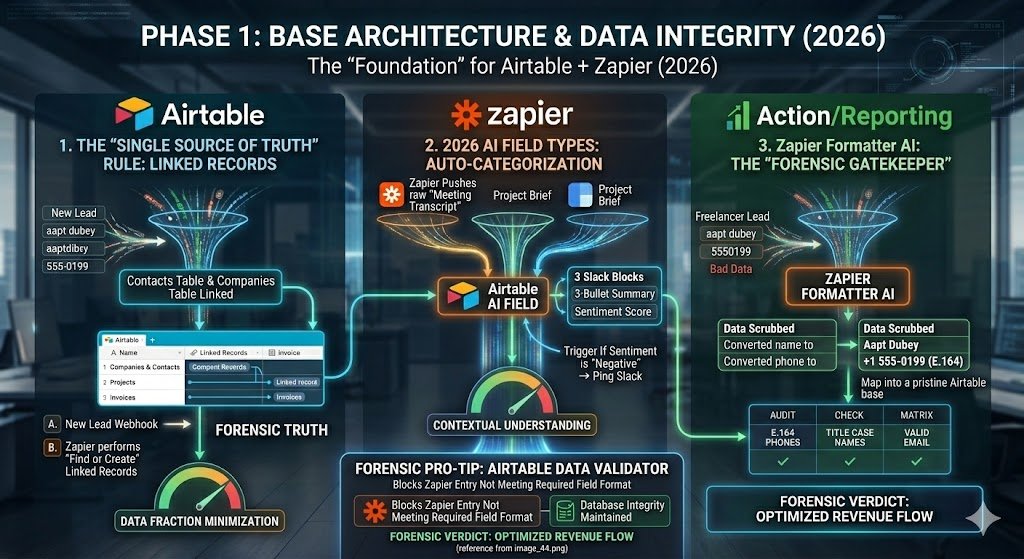
In 2026, your Airtable base is the “Single Source of Truth.” If the foundation is cracked—meaning your data is flat, duplicated, or messy—your Zapier automations will fail. Phase 1 focuses on building a Relational Command Centerthat is “AI-Ready” from day one.
1. The “Single Source of Truth” Rule: Linked Records
The biggest mistake US freelancers make is treating Airtable like a fancy Google Sheet. In 2026, Linked Records are your primary automation lever.
- The Logic: Never type a Company Name into a “Lead” record. Instead, create a Companies Table and a Contacts Table. Link the Contact to the Company.
- The Zapier Advantage: When a new lead hits your site, Zapier doesn’t just “create a row.” It performs a Find or Create step. It looks for the Company first; if it exists, it links the new Contact to it.
- The Result: You avoid “Data Fragmentation.” Your Airtable interface now shows a 360-degree view of every interaction with a client, across all projects and invoices.
2. 2026 AI Field Types: Auto-Categorization
Airtable’s native AI Fields (introduced in late 2024 and perfected by 2026) act as a “Post-Processor” for your Zapier data.
- The Logic: When Zapier pushes a raw “Meeting Transcript” or “Project Brief” into a Long Text field, the Airtable AI field automatically summarizes it into a 3-bullet list or assigns a “Sentiment Score.”
- The Result: Your database is no longer just a “bucket” for text. It’s a machine that understands context. You can now build Zapier triggers based on that AI summary (e.g., If Sentiment is “Negative” → Ping Slack).
3. Zapier Formatter AI: The “Forensic Gatekeeper”
“Bad data in, bad automation out.” In 2026, we use Zapier Formatter AI (image_31.png) to scrub data before it touches Airtable.
- The Logic: A freelancer lead enters “aapt dubey” with phone “5550199.”
- The Formatter Step: Zapier catches this → Formatter AI converts name to “Aapt Dubey” → Formatter converts phone to +1 555-0199 (E.164).
- The Result: Your Airtable base remains pristine. This ensures that when your Auto-Invoice Zap triggers later, the client’s name and contact info are professional and legally compliant for US billing.
Forensic Pro-Tip: In 2026, use Airtable’s “Data Validator” extensions to block any Zapier entry that doesn’t meet your required field formats. It’s better to have a Zap “error out” than to pollute your database with 1,000 messy records.
Phase 2: High-Velocity Acquisition (The “Growth” Zaps)
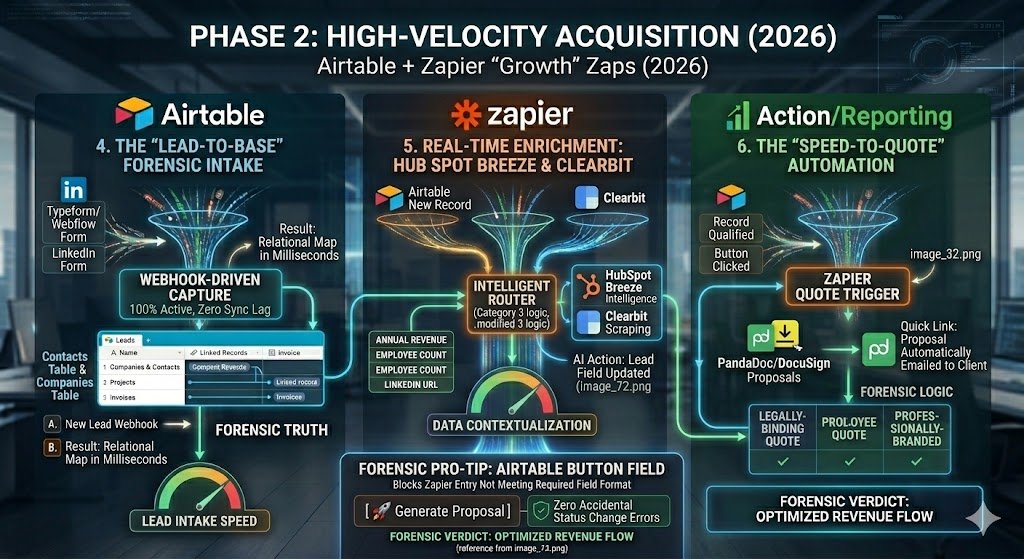
In 2026, the “Inbound Lead” is a decaying asset. Every minute a lead sits in your inbox without a response, your conversion probability drops by 10%. Phase 2 transforms Airtable from a passive storage bin into an Autonomous Sales Agent that enriches data and issues quotes while you’re offline.
4. The “Lead-to-Base” Forensic Intake
Stop copy-pasting from email notifications. In 2026, your “Capture” layer must be 100% webhook-driven to ensure zero “Sync Lag.”
- The Logic: Lead submits a Typeform or Webflow Form → Zapier catches the webhook → Zapier performs a “Find or Create” in Airtable for the Company, then creates the Contact and links them.
- The Forensic Edge: Zapier automatically tags the lead’s “Source” (e.g., Paid Search or LinkedIn) and “Timestamp” into hidden Airtable fields.
- The Result: Your Airtable “Leads” view updates in milliseconds. You now have a relational map of who the person is and which organization they represent before you even open the app.
5. Real-Time Enrichment: HubSpot Breeze & Clearbit
A name and an email address are “Low-Context” data. For a US freelancer to close a $10k+ contract, they need to know if the lead is a “Whale” or a “Tiddler.”
- The Logic: New Record created in Airtable → Zapier triggers HubSpot Breeze Intelligence or Clearbit → These tools scrape the web for the company’s Annual Revenue, Employee Count, and the lead’s LinkedIn URL.
- The AI Action: Zapier pushes this data back into the Airtable record, updating the “Lead Score” field.
- The Result: Your Airtable interface highlights “High-Value” leads in green. You can now prioritize your day based on Revenue Potential rather than “First-In, First-Out.”
6. The “Speed-to-Quote” Automation
The “Winner” of a 2026 freelance contract is often the person who sends the professional proposal first.
- The Logic: You move an Airtable record to the “Qualified” status → Zapier pulls the project details and pricing from Airtable → Pushes that data into a PandaDoc or DocuSign template.
- The Action: The proposal is automatically emailed to the client.
- The Result: The client receives a legally-binding, professionally-branded quote within 60 seconds of your discovery call ending.
Forensic Pro-Tip: Use Airtable’s “Button Field” to trigger this Zap. Instead of relying on a status change (which can be accidental), create a button labeled [🚀 Generate Proposal]. This ensures a “Human-in-the-Loop” check before the automation fires.
Phase 3: Project Orchestration & Delivery (The “Efficiency” Zaps)
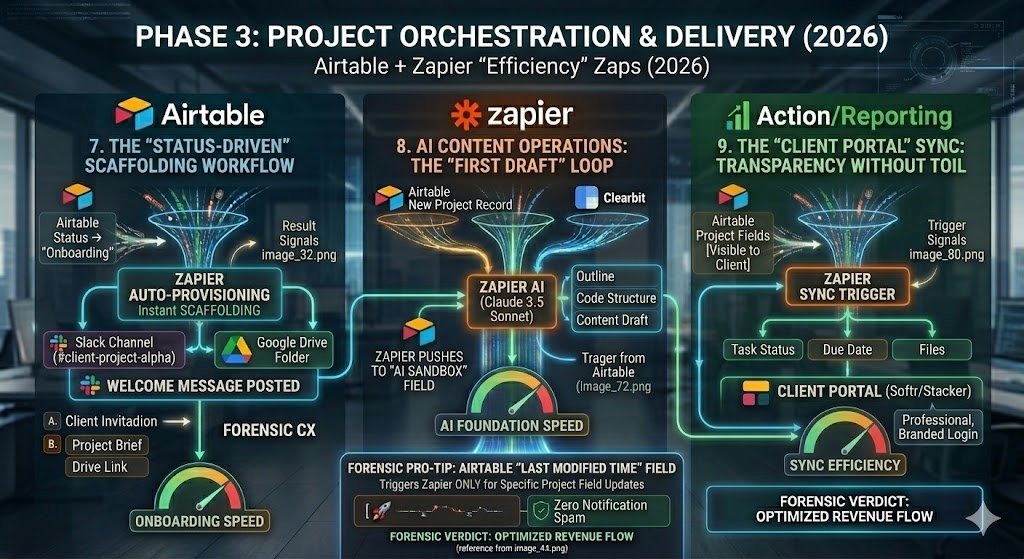
In 2026, “Delivery” is where most US freelancers lose their margins to “Administrative Bleed.” If you are manually creating folders, inviting clients to Slack, or chasing content briefs, you are working for free. Phase 4 uses Zapier to automate the Project Scaffolding so you can focus entirely on high-value execution.
7. The “Status-Driven” Scaffolding Workflow
The moment a contract is signed, the “Customer Experience” clock starts ticking. In 2026, we don’t “onboard”—we auto-provision.
- The Logic: Airtable Status changes to “Onboarding” → Zapier creates a dedicated Slack Channel (e.g.,
#client-project-alpha) → Zapier creates a Google Drive Folder → Zapier invites the client’s email to both. - The Forensic Edge: Zapier posts a “Welcome Message” in the new Slack channel containing the Airtable-linked Project Brief and a link to the Google Drive.
- The Result: Your client feels the “White Glove” treatment instantly, and you avoid 45 minutes of manual setup for every new project.
8. AI Content Operations: The “First Draft” Loop
Whether you are a developer, designer, or writer, 2026 workflows start with an AI Foundation.
- The Logic: New Project Record created in Airtable → Zapier sends the “Client Requirements” field to Claude 3.5 Sonnet → AI generates a project outline, initial code structure, or content draft.
- The Action: Zapier pushes that AI-generated draft back into a hidden “AI Sandbox” field in Airtable for your review.
- The Result: You never start with a blank page. You open Airtable to find a 60% completed “v1” waiting for your human expertise.
9. The “Client Portal” Sync: Transparency Without Toil
Clients in 2026 demand real-time visibility, but giving them access to your internal Airtable base is a security risk.
- The Logic: Use Softr or Stacker as a “Headless UI” for your Airtable base → Zapier syncs only the fields marked “Client Visible” (e.g., Task Status, Due Date, Files).
- The Forensic Edge: When you check a box in Airtable labeled [Visible to Client], Zapier triggers a “Push” to the portal.
- The Result: The client has a professional, branded login to track progress 24/7. This reduces “Status Update” emails by 90%, freeing up hours of your week.
Forensic Pro-Tip: Use Airtable’s “Last Modified Time” field to trigger these Zaps. This ensures Zapier only pings the client portal when a specific project field is updated, preventing “Notification Spam.”
Phase 4: Financial Governance & Revenue Ops
tay tax-ready. Using Airtable as your central source of truth makes financial compliance much easier. See how to sync your records to maintain IRS-compliant 1099 tracking for all your contractors and vendors.
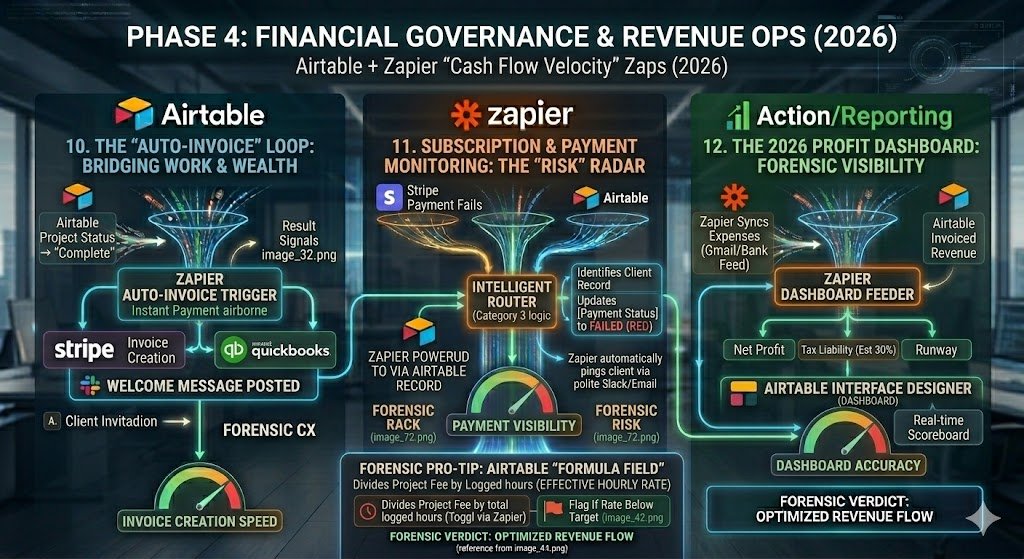
In 2026, a US freelancer’s survival depends on Cash Flow Velocity. If you wait until the end of the month to “do the books,” you are already behind. Phase 4 treats your Airtable base as a Real-Time General Ledger, using Zapier to automate the transition from “Work Done” to “Money in Bank.”
10. The “Auto-Invoice” Loop: Bridging Work & Wealth
Manual invoicing is the #1 cause of “Revenue Leakage.” In 2026, the moment a project is validated, the payment request should be airborne.
- The Logic: Airtable Project Status changes to “Complete” (or a specific Milestone is checked) → Zapier pulls the “Total Fee” and “Client Email” from the linked Records → Triggers Stripe or QuickBooks to generate and send a hosted invoice.
- The Forensic Edge: Zapier writes the Stripe Invoice ID back into the Airtable record.
- The Result: You eliminate the “Invoice Creation” lag. The client receives the bill while the value of your work is still fresh in their mind.
11. Subscription & Payment Monitoring: The “Risk” Radar
For freelancers on retainers, a failed payment is a silent killer. You cannot afford to work for two weeks on a “Churned” account.
- The Logic: Stripe payment fails → Zapier identifies the associated Client Record in Airtable → Updates a field labeled [Payment Status] to “FAILED” (colored bright red).
- The Action: Zapier automatically pings the client via a polite Slack/Email template and tags the freelancer in
#Admin-Alerts. - The Result: You halt work instantly upon payment failure, protecting your most valuable asset: your time.
12. The 2026 Profit Dashboard: Forensic Visibility
Stop guessing your margins. In 2026, we use Airtable Interface Designer to build a live scoreboard fueled by Zapier.
- The Logic: Zapier syncs your business expenses (from a dedicated “Expenses” Gmail label or bank feed) into an “Outgoings” table in Airtable.
- The 2026 Visualization: You build an Airtable Interface that subtracts these expenses from your “Invoiced Revenue.”
- The Result: You have a real-time view of your Net Profit, Tax Liability (estimated at 30%), and Runway. You can make “Go/No-Go” decisions on new software or hires based on hard data, not gut feeling.
Forensic Pro-Tip: Use Airtable’s “Formula Field” to calculate your “Effective Hourly Rate.” Divide the Project Fee by the total hours logged (synced from a tool like Toggl via Zapier). If a project’s rate drops below your target, Zapier pings you to “Review Scope” before the next billing cycle.
Phase 5: Security, Compliance & Maintenance
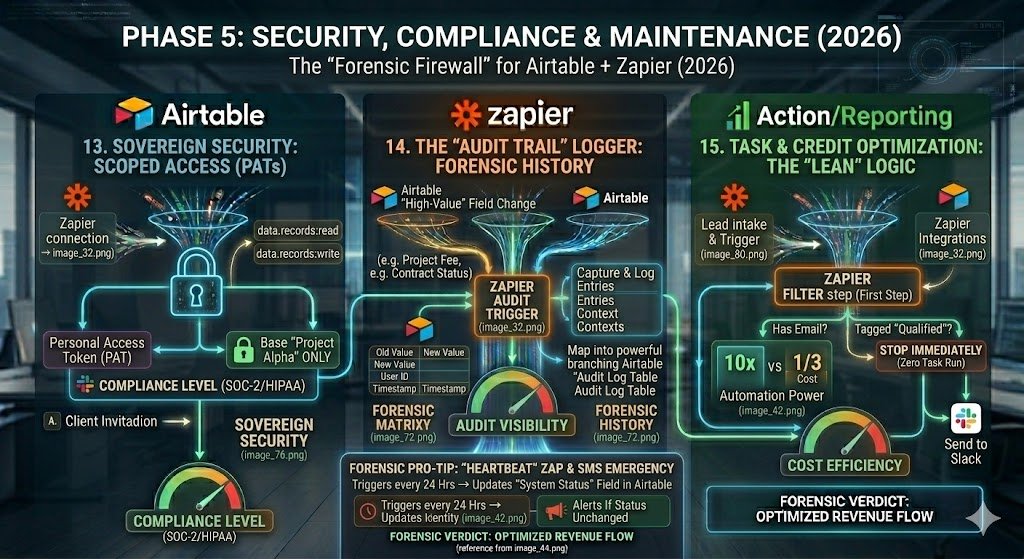
In 2026, as your Airtable + Zapier ecosystem becomes the “brain” of your business, it also becomes your single point of failure. For a US freelancer or a small team, a data breach or a “broken Zap” isn’t just an inconvenience—it’s a liability. Phase 5 builds the Forensic Firewall around your operations.
13. Sovereign Security for US Teams: Scoped Access
In 2026, “Over-Privileged” automations are a primary security threat. If a Zapier connection has “Super Admin” rights to your entire Airtable workspace, a single compromised Zap can expose every client record you own.
- The Logic: Use Airtable’s Personal Access Tokens (PATs) with Scoped Permissions.
- The Forensic Edge: Instead of giving Zapier access to your entire workspace, create a token that only has
data.records:readanddata.records:writeaccess to a specific Base. - The Result: You satisfy US compliance standards (like SOC-2 or HIPAA-lite) and ensure that if one project’s automation is compromised, the rest of your business remains “Sovereign” and secure.
14. The “Audit Trail” Logger: Forensic History
Client disputes in 2026 are often settled by “Who changed the contract status?” or “When was this file uploaded?” You cannot rely on Airtable’s native “History” view for high-stakes audits.
- The Logic: Create a dedicated “Audit Log” table in Airtable.
- The Zapier Action: Any time a “High-Value” field is changed (e.g., Project Fee, Contract Status, or Due Date), Zapier captures the
Old Value,New Value,User ID, andTimestamp. - The Result: You have a permanent, unalterable record of every critical business decision. If a client questions a billing change, you can provide a “Forensic Report” in seconds.
15. Task & Credit Optimization: The “Lean” Logic
By 2026, Zapier’s pricing is based on “Task Velocity.” If you aren’t careful, a busy month of leads can cost you hundreds of dollars in unnecessary “Task Runs.”
- The Logic: Use Airtable Automations for internal logic (e.g., When Status is X, Update Field Y) and save Zapierfor external integrations (e.g., Send to Slack).
- The Forensic Check: Use Zapier’s “Filter” step as the first step in every Zap. If a record doesn’t have an email address or a “Qualified” tag, the Zap should stop immediately before it consumes a task credit.
- The Result: You maintain a “Lean Stack.” You get 10x the automation power for 1/3 the cost by choosing the right tool for the right logic.
Forensic Pro-Tip: Set up a “Heartbeat Zap.” Every 24 hours, have Zapier update a single “System Status” field in Airtable. If that field hasn’t been updated in 25 hours, have Airtable send you an Emergency SMS. This ensures you never go a full day with a “broken” business engine without knowing it.
Conclusion: Building Your “Self-Driving” Business
In 2026, automation is no longer an “extra”—it is the prerequisite for survival. By moving from flat spreadsheets to a Relational Engine, you have effectively hired a digital Chief Operating Officer that never sleeps, never forgets a lead, and never misses an invoice.
The “Self-Driving” business isn’t about removing the human; it’s about elevating the human. When the “Forensic Scaffolding” of your business is handled by Airtable and Zapier, you are finally free to do the high-level strategy and creative work that actually drives your $10k+ contracts.

About the Author
Aapt DubeyAapt Dubey is an automation specialist and software developer dedicated to eliminating manual workflows for small businesses. With deep, hands-on experience building complex Zapier integrations, API connections, and real-world applications, Aapt writes actionable, tested tutorials to help businesses scale efficiently.