
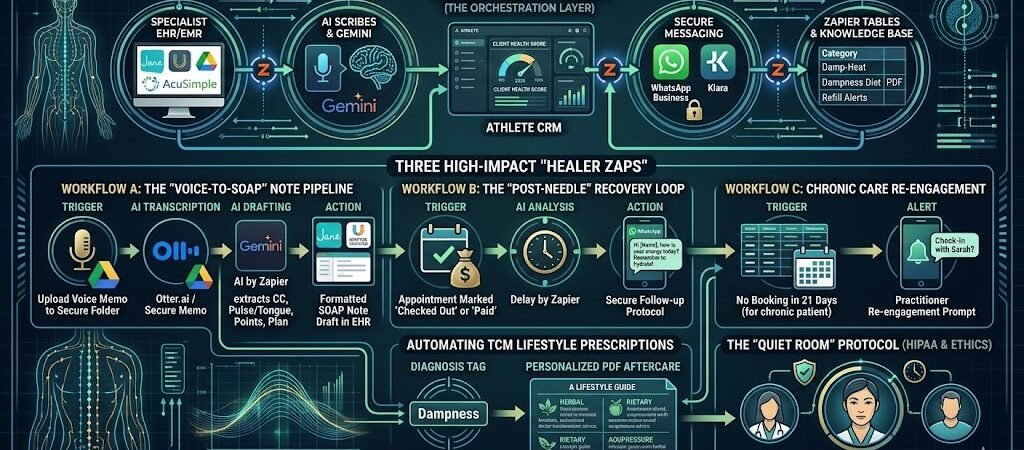
Key Takeaway: Zapier for Acupuncturists
In 2026, the elite acupuncturist uses automation to bridge the gap between “in-clinic” treatment and “at-home” healing. By using Zapier for Acupuncturists, you can automate the administrative friction of charting and scheduling, while triggering personalized follow-up protocols that ensure your patients feel cared for long after they leave the table.
The Modern Zen Workspace
In 2026, the most successful acupuncture practices aren’t just defined by needle technique, but by the patient’s experience between sessions. If a patient feels “abandoned” the moment they leave your clinic, your clinical efficacy drops.
Manual administration is the enemy of the healing state.
For many practitioners, the “Golden Hour” of healing is followed by the “Dark Hour” of charting, billing, and rescheduling. This administrative fatigue doesn’t just lead to burnout; it leaks into your patient care. Zapier for Acupuncturists acts as your “Digital Office Manager,” ensuring that every patient receives a high-touch, concierge experience without you ever having to touch a keyboard between treatments.
The Shift to Holistic Continuity
The 2026 model of care is about continuity.
- The Old Way: The patient leaves, and you don’t hear from them until they realize their back pain has returned two weeks later.
- The 2026 Way: Zapier triggers a sequence of care. It sends a “What to expect” text immediately after the session, a “Hydration Reminder” 4 hours later, and a “Rest Nudge” in the evening. This makes the patient feel held in a “healing container,” increasing the perceived value of your sessions and significantly improving long-term outcomes.
The Clinical Tech Stack (The Practitioner’s Cockpit)
The goal of your 2026 tech stack is to make the technology invisible. Patients should feel your presence, not your presence behind a laptop screen. By using Zapier to orchestrate these tools, you ensure that data flows silently in the background while you focus on the pulse and the points.
1. The Entry Point: Specialist EHR/EMR
In 2026, the market has consolidated around platforms that understand the nuance of TCM (Traditional Chinese Medicine).
- The Tools: Jane App, Unified Practice, or AcuSimple.
- The Zapier Role: These serve as your “Primary Trigger.” Every action—from a new booking to a payment—starts here and ripples out to your other tools.
2. The Intelligence Layer: AI Scribes & Gemini
The biggest time-sink for any acupuncturist is the SOAP note. 2026 technology has solved this.
- The Voice Layer: Use Otter.ai or a secure voice-memo app.
- The Automation: After a session, you record a 60-second summary: “Liver Qi Stasis, points used LV3, LI4, GB34. Patient felt immediate relief.” Zapier sends this to Gemini, which formats it into a professional, insurance-ready SOAP note and saves it to your EHR.
3. The Communication Layer: Secure Messaging
Acupuncture is deeply personal. Your follow-ups shouldn’t feel like “marketing.”
- The Tools: WhatsApp Business or Klara (for HIPAA-compliant secure messaging).
- The Integration: Zapier connects your calendar to these apps. If a patient is in for “Fertility Support,” Zapier ensures the follow-up messages are tailored to that specific journey, rather than a generic “Thanks for coming in” text.
4. The Knowledge Base: Zapier Tables
Instead of hunting through textbooks for herbal formulas or lifestyle advice, you build a custom “Prescription Library” in Zapier Tables.
- The Function: When you tag a patient’s chart with “Damp-Heat,” Zapier automatically pulls the relevant dietary PDF (e.g., “Foods to Avoid for Dampness”) from your Table and emails it to the patient.
The 2026 Healer’s Stack Map
| Category | 2026 Recommended Tools | The “Zap” Value |
| Scheduling/EHR | Jane App / Unified Practice | Automates the “Business” of the clinic. |
| Charting | Voice Memo + AI by Zapier | Reclaims 1–2 hours of desk time daily. |
| Patient Care | WhatsApp / SMS by Zapier | Extends the “Healing Container” home. |
| Prescriptions | Zapier Tables / Google Drive | Delivers custom TCM advice instantly. |
The 2026 Edge: The “Data-Driven Healer” doesn’t use tech to replace the needle; they use it to replace the clipboard. When the admin is automated, the practitioner can return to the state of “Wu Wei”—effortless action.
Three High-Impact “Healer Zaps” for 2026
These Zaps are designed to protect the practitioner’s energy. By automating the transition from the treatment room to the office, you ensure that no patient—and no chart note—falls through the cracks.
Workflow A: The “Voice-to-SOAP” Note Pipeline
The Goal: Eliminate “Charting Homework” at the end of the day.
- Trigger: You upload a 60-second voice memo to a secure folder (e.g., Dropbox or Google Drive) immediately after a session.
- The AI Analysis: AI by Zapier (via Gemini) transcribes the audio and extracts key clinical data: Chief Complaint, Pulse/Tongue diagnosis, Point Protocol, and Plan.
- Action: Zapier formats this into a professional SOAP note and sends it as a draft to your EHR (Jane App or Unified Practice), or emails it to your assistant for final review.
Workflow B: The “Post-Needle” Recovery Loop
The Goal: Extend the clinical “Healing Container” into the patient’s home.
- Trigger: An appointment is marked as “Checked Out” or “Paid” in your booking system.
- The Logic (Delay by Zapier): Zapier waits exactly 24 hours.
- Action: Zapier sends a personalized WhatsApp Business or SMS check-in: “Hi [Name], just checking in after yesterday’s session. It’s normal to feel a bit ‘zen’ or slightly tired today. Make sure to stay hydrated and keep your neck/shoulders warm! See you next time.”
Workflow C: The “Chronic Care” Safety Net
The Goal: Prevent “dropout” for patients who need long-term care but forget to book.
- Trigger: A patient is tagged as “Chronic” or “Fertility” in your CRM/Table.
- The Logic (Filter by Zapier): Zapier checks your calendar every Sunday. If that patient has not had a booking in the last 21 days and has no future sessions scheduled:
- Action: Zapier sends a “Re-engagement” prompt to the practitioner: “Hey Doc, [Name] hasn’t been in for 3 weeks. Would you like me to send them the ‘Maintenance Session’ invite?” (This keeps the practitioner in control while automating the tracking).
The 2026 “Zen” ROI
Practitioner Insight: Acupuncturists using these Zaps report saving an average of 90 minutes per day on administrative tasks. That is time that can be spent on extra patients, personal meditation, or simply leaving the clinic on time.
Automating TCM Lifestyle Prescriptions
In a traditional practice, lifestyle advice (diet, herbs, and acupressure) is often scribbled on a sticky note or mentioned in passing as the patient walks out the door. In 2026, the “High-Touch Healer” uses Zapier Tables to deliver professional, automated, and hyper-personalized care plans.
1. The Digital “Herbal & Lifestyle” Dispensary
Instead of hunting for PDFs or re-typing the same “Liver Qi Stasis” diet every time, you build a “Knowledge Bank” in Zapier Tables.
- The Table Structure: Columns for Diagnosis Tag (e.g., Spleen Qi Deficiency), Dietary Advice, Recommended Herbs, and Acupressure Homework.
- The Automation: When you tag a patient’s session as “Dampness” in your EHR, Zapier looks up that row in your Table and assembles a custom “Aftercare Portal” for the patient instantly.
2. Automated “Acupressure Homework” Nudges
Healing doesn’t stop when the needles come out. You can use Zapier to ensure your patients are actually doing the “homework” you prescribed.
- The Trigger: A specific diagnosis tag in your chart note.
- The Action: Zapier triggers a series of WhatsApp messages over the next three days: “Hi [Name], just a reminder to spend 2 minutes massaging ST36 (below the knee) today to keep your digestion strong.”
- The Result: Patients see faster results, and you are viewed as a concierge partner in their health.
3. Smart Inventory & Herbal Refills
If your practice sells herbs or supplements, Zapier Tables acts as your automated stock manager.
- Tracking: When you log an herbal formula in your chart, Zapier subtracts that bottle from your inventory table.
- The “Safety Net”: When stock hits a minimum threshold (e.g., 3 bottles of Xiao Yao San left), Zapier sends you a Slack alert or even drafts a re-order email to your supplier.
4. Visual Treatment Timelines
In 2026, patients want to see their progress. By connecting your Zapier Table to a Zapier Interface, you can give each patient a “Healing Dashboard.”
- What they see: A timeline of their pulse/tongue changes over the last six months and a checklist of their lifestyle goals.
- The Psychology: Seeing a visual “upward trend” in their health markers significantly increases patient retention and commitment to the treatment plan.
The 2026 Strategy: In a world of “quick-fix” medicine, your value is your thoroughness. Zapier Tables allows you to provide the deep, comprehensive TCM care of a large institution with the overhead of a solo practitioner.
The “Quiet Room” Protocol (Ethics, Privacy & The Human Touch)
Acupuncture is an intimate, energetic practice. If a patient feels like they are being monitored by a machine or if you are constantly looking at a screen, the therapeutic alliance is broken. In 2026, the “Quiet Room” protocol ensures that automation protects the sanctity of the treatment room.
1. HIPAA & Security in the AI Era
In 2026, data privacy is non-negotiable. When using Zapier to move patient data:
- End-to-End Encryption: Ensure all Zaps involving patient names or diagnoses are routed through HIPAA-compliant versions of Zapier (Enterprise) and your connected apps.
- The “Zero-Retainment” Rule: Use AI models (like Gemini) that offer enterprise-grade privacy, ensuring that your patient’s clinical data is used to generate the SOAP note but never stored to train the public model.
2. Automation as a “Presence Multiplier”
The goal of automation isn’t to replace your voice; it’s to free your mind.
- The Rule: Never use a screen in the treatment room. Use Zapier Central or a voice-activated assistant to “tag” a session (e.g., “End session, Spleen Qi protocol”) only after the patient has left or while you are washing your hands.
- The Benefit: Because you know the “Post-Needle Loop” and “Chart Drafting” are handled, you can be 100% present during the pulse and tongue diagnosis, making eye contact instead of typing.
3. The “Human-in-the-Loop” Verification
Automation in 2026 is a “Co-Pilot,” not an “Auto-Pilot.”
- The Checkpoint: Before an AI-drafted SOAP note is finalized, or before a complex herbal recommendation is sent, Zapier should send a notification to your tablet or phone: “Review draft for [Patient Name]?”
- The Result: One tap from you confirms the clinical accuracy, keeping the legal and energetic responsibilityfirmly in the practitioner’s hands.
4. Detecting the “Healing Crisis”
AI by Zapier can be trained to look for red flags in patient replies to your automated check-ins.
- The Safety Net: If a patient replies to an automated text with words like “dizzy,” “pain increased,” or “bruising,”Zapier immediately bypasses the “Bot” and triggers an urgent notification to your personal phone.
- The Connection: This allows you to step in personally at the exact moment the patient feels vulnerable.
The 2026 Mantra: We use the Code to manage the Clinic, but we use the Heart to manage the Heal. Automation should be the wind beneath the practitioner’s wings, not the wall between the doctor and the patient.
Implementation Guide—The “Path to Zen” Roadmap
Don’t let the technical possibilities overwhelm your clinical practice. Follow this phased approach to ensure your systems are stable and your patients feel supported.
Phase 1: The Administrative Foundations (Days 1–30)
Start with the “bottlenecks” that occur outside the treatment room.
- The Seamless Intake: Link your booking software (Jane App or Unified Practice) to your email/SMS tool. Automation should trigger the intake form, the “Clinic Directions” video, and the “First Visit Preparation” guide the moment they book.
- The Payment Loop: Ensure successful payments automatically trigger a receipt and update your Zapier Table for end-of-month accounting.
- The Goal: Eliminate 100% of the manual “copy-pasting” involved in onboarding a new patient.
Phase 2: The “Healing Container” Extension (Days 31–60)
Once your admin is silent, focus on the patient experience post-treatment.
- The 24-Hour Nudge: Set up your first “Post-Needle” Zap. Keep it simple: one message sent 24 hours after the session to check on energy levels.
- Automated Recommendations: Link your “Diagnosis Tags” in your EHR to your Zapier Table library of dietary and lifestyle PDFs.
- The Goal: Increase the perceived value of your care by providing support when the patient is at home.
Phase 3: The Intelligence Layer (Days 61–90)
Finally, tackle the most time-consuming task: documentation.
- Voice-to-SOAP: Experiment with recording voice memos after sessions and using AI by Zapier to draft the notes. Start with 2–3 patients until you trust the AI’s formatting.
- The Chronic Care Safety Net: Implement the “Sunday Review” Zap that flags patients who haven’t booked in three weeks, allowing you to reach out with a personal touch.
- The Goal: Reclaim at least 60–90 minutes of your daily life by eliminating “charting homework.”
Conclusion: The Future of Traditional Medicine
In 2026, the competitive advantage of the acupuncturist isn’t just their knowledge of the meridians—it is their presence. By leveraging Zapier for Acupuncturists, you are not “digitizing” a sacred practice; you are protecting it.
Automation allows you to be a practitioner who is fully present for the pulse, fully engaged during the needles, and fully rested at the end of the day. You become the “High-Touch Healer” in a high-tech world, providing a level of care that feels both ancient and futuristic.
Start your first “Recovery Loop” Zap today. Give your patients the gift of your attention, and let the machine handle the rest.

About the Author
Aapt DubeyAapt Dubey is an automation specialist and software developer dedicated to eliminating manual workflows for small businesses. With deep, hands-on experience building complex Zapier integrations, API connections, and real-world applications, Aapt writes actionable, tested tutorials to help businesses scale efficiently.