
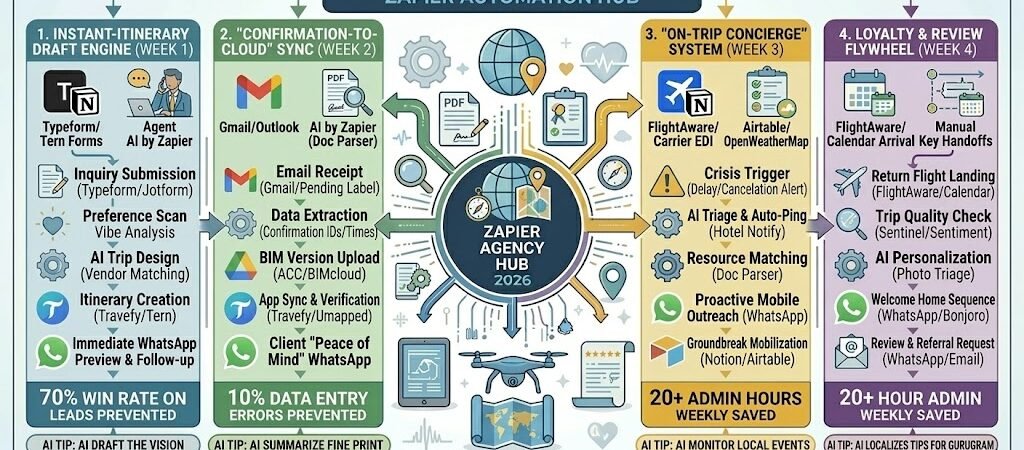
Key Takeaways: Zapier for Small Travel Agents 2026
- The “Dream-to-Draft” Sync: Connect your Typeform inquiry to AI by Zapier. The AI analyzes traveler preferences and pre-populates a draft itinerary in Travefy or Umapped, ready for your expert polish.
- The “Live-Booking” Triage: Link your Gmail to Google Sheets. When a hotel or airline confirmation hits your inbox, Zapier extracts the confirmation number and check-in time, updating the client’s mobile itinerary instantly.
- The “On-Trip” Guardian: Connect FlightAware to WhatsApp. If a client’s flight is delayed by >30 minutes, Zapier pings the hotel to notify them of a late arrival and texts the client: “I see the delay—I’ve already updated the hotel. Relax and I’ll see you at the lounge!”
- The “Post-Vacation” Glow: Automate the 48-hour post-trip check-in. Zapier triggers a “Welcome Home” WhatsApp with a link to a Google Review and a prompt to start dreaming of their next destination.
The “Travel Friction” of 2026
In 2026, the small travel agency is no longer just a booking service; it is a “Logistics Safeguard.” As “Agentic AI” (autonomous systems that don’t just suggest but act) becomes the new baseline for consumer travel planning, the human agent’s value has shifted from finding the flight to “Managing the Chaos.” For a boutique agency, the primary threat to profitability is “Administrative Fragmentation.”
Small travel agents in 2026 are navigating three critical “Frictions”:
- The “Tab-Juggling” Tax: In 2026, a single multi-city trip requires an average of 12 different platforms (GDS, hotel portals, niche tour operators, and separate payment gateways). Agents lose 20+ hours a week manually transferring confirmation numbers and check-in times from emails into client itineraries. This “Manual Sync” error rate remains a top cause of “On-Trip Friction,” where a client arrives to find their mobile app doesn’t match the hotel’s reality.
- The “Volatility Gap”: With extreme weather events and geopolitical shifts increasing, 2026 is the year of the “Non-Stop Rebook.” When a flight is canceled, travelers expect an instant solution. Without automation, an agent spends hours on hold with airlines while the client is left in the dark at the terminal. This “Support Lag” accounts for a 40% drop in client retention for agencies that rely on manual triage.
- The “Data-Entry” Drain: New 2026 sustainability mandates require agents to document the carbon footprint of every trip for corporate and “eco-conscious” leisure travelers. Manually calculating emissions for a 5-stop itinerary is a 4-hour administrative tax per booking. Without an automated “Spec-to-Sustainability” loop, the paperwork of modern travel outpaces the profit of the commission.
The Zapier Solution: Zapier acts as your “Digital Concierge,” seamlessly connecting your Gmail inbox, your Travefyitineraries, and your CRM. By 2026, a high-performing agent doesn’t “update” an itinerary; Zapier has already extracted the confirmation from the email and pushed it to the client’s phone. You don’t “check” for delays; Zapier has already alerted the hotel and sent a “Don’t Panic” WhatsApp to the traveler.
Travel Efficiency Benchmarks 2026
| Friction Category | 2026 Impact | Zapier Automation Fix |
| Itinerary Building | 6-8 Hours per Trip | AI-Assisted Draft Generation from Lead Forms |
| Booking Management | 10% Manual Sync Errors | Automated Email Extraction & App Sync |
| On-Trip Support | 5+ Crisis Calls per Trip | Proactive Delay Alerts & Auto-Hotel Pings |
Practical AI Tip for 2026: Use AI by Zapier to “Draft the Vision.” When a client fills out your inquiry form, have Zapier analyze the “Vibe” (e.g., “Millennial Wellness”) and automatically generate a 3-paragraph “Trip Narrative” in your itinerary tool, complete with a custom greeting and the 2026 “Sustainability Score” for their proposed hotels.
Blueprint #1 – The “Instant-Itinerary” Draft Engine
In 2026, travel planning is a race against “Decision Fatigue.” With endless options available on social media and OTAs (Online Travel Agencies), the client who receives a curated “Vision” within minutes of their inquiry is significantly more likely to book. This blueprint ensures that while other agents are still reading the inquiry, you have already delivered a personalized, interactive draft.
1. The Trigger: The “Deep-Dive” Inquiry
- The 2026 Tech: A lead fills out a Typeform or Jotform on your site. Unlike 2024 forms, 2026 forms use “Agentic Logic” to ask for specific vibe markers (e.g., “Quiet Luxury” vs. “High-Octane Adventure”).
- The Action: Zapier captures the traveler profiles, budget, dates, and “Dream Destinations.”
2. The Logic: The AI Trip Architect
Zapier acts as your Creative Associate, doing the “first pass” of research based on your agency’s expertise:
- The Style Analysis: AI by Zapier scans the inquiry for keywords and sentiment. It checks your internal Airtable“Vetted Vendor” list for hotels and tours that match the client’s specific taste.
- The Draft Population: Zapier pushes the dates and destination data into Travefy or Tern, creating a skeleton itinerary.
- The Narrative Draft: The AI writes a custom “Introduction” for the trip, explaining why these specific choices were made (e.g., “Based on your interest in sustainable viticulture, I’ve included a private tour of the biodynamic vineyards in Mendoza…”).
3. The Action: The “Instant Vision” Delivery
- The WhatsApp Hook: Zapier sends a branded WhatsApp: “Hi [Name]! I’m so excited about your [Destination] trip. I’ve already put together a preliminary ‘Vision Board’ and draft timeline for you to explore: [Link]. Take a look, and I’ll call you at [Time] to start refining the details!”
- The CRM Log: The inquiry and the link to the draft are saved in your Tern or HubSpot dashboard, tagged as “Draft Delivered – Follow Up Required.”
Instant-Itinerary Draft Summary
| Step | Component | 2026 Recommended Tool |
| Trigger | High-Logic Lead Form | Typeform / Tern Forms |
| Logic 1 | Style & Vendor Matching | AI by Zapier + Airtable |
| Logic 2 | Skeleton Trip Creation | Travefy / Umapped |
| Action 1 | Immediate Mobile Preview | WhatsApp Business |
| Action 2 | Lead Status Update | Tern / HubSpot |
Practical AI Tip for 2026: Use AI by Zapier to “Localize the Tips.” If the client is from Gurugram and traveling to London, have the AI insert a specific note: “Since you’re used to the heat in Haryana, remember that London evenings in April can be quite chilly—don’t forget to pack a light trench coat!”
Blueprint #2 – The “Confirmation-to-Cloud” Sync
In 2026, the #1 complaint from travelers using small agencies is “Information Fragmentation.” If a client has to search through their email for a hotel address or a tour operator’s phone number while standing at a terminal, the agency’s value proposition fails. This blueprint turns your inbox into a “Smart Data Entry Clerk,” ensuring the client’s mobile itinerary is always the “Single Source of Truth.”
1. The Trigger: The “Reservation Harvest”
- The 2026 Tech: A booking confirmation from a GDS, a boutique hotel, or a wholesaler (like Classic Vacations or Marriott) hits your Gmail or Outlook inbox.
- The Action: Zapier monitors for specific “Confirmation” keywords or labels (e.g., “Reservation Confirmed”) and triggers the extraction workflow.
2. The Logic: The AI Itinerary Auditor
Zapier acts as your Operations Manager, ensuring no detail is missed:
- The High-Precision Extraction: AI by Zapier (Doc Parser) scans the email body and any attached PDFs. It pulls the Confirmation Code, Check-in/Check-out Times, Room Category, and Emergency Contact.
- The Duplicate Check: Zapier searches your Travefy or Umapped account for an itinerary matching the client’s name and travel dates.
- The “Audit” Scan: The AI checks for inconsistencies (e.g., if the hotel check-in date is one day after the flight arrival, it flags a “Gap Alert” in your CRM).
3. The Action: The “Live-App” Synchronization
- The Itinerary Update: Zapier pushes the extracted details into the specific day and slot in the Travefy mobile app.
- The “Peace of Mind” WhatsApp: Zapier sends a notification to the traveler: “Hotel confirmed! Your stay at [Hotel Name] is now live in your app. Confirmation: [Code]. I’ve also verified their 24-hour concierge number is included for your late arrival.”
- The File Archive: Zapier saves a copy of the original confirmation PDF into a “Travel Docs” folder in Google Drive, organized by [Client Name] > [Trip Date].
Confirmation-to-Cloud Sync Summary
| Step | Component | 2026 Recommended Tool |
| Trigger | Confirmation Receipt | Gmail / Outlook |
| Logic 1 | AI Data Extraction | AI by Zapier (Doc Parser) |
| Logic 2 | Gap & Error Detection | Zapier Paths |
| Action 1 | App Sync | Travefy / Umapped |
| Action 2 | Client Confirmation |
Practical AI Tip for 2026: Use AI by Zapier to “Summarize Fine Print.” Have the AI scan the confirmation for “Resort Fees” or “Cancellation Deadlines.” Add these as a bold note in the itinerary: “Note: This property charges a $40/night resort fee payable locally.” This transparency prevents “invoice shock” at checkout.
Blueprint #3 – The “Loyalty & Review” Engine
In 2026, the “Travel Cycle” doesn’t end when the plane lands—it ends when the next trip is dreamt of. The 48 hours after a traveler returns home is the “Golden Window” for capturing high-emotion reviews and generating referrals. This blueprint automates the “Welcome Home” experience, ensuring you capitalize on the “Vacation Glow” before it fades into the reality of everyday life.
1. The Trigger: The “Wheels Down” Event
- The 2026 Tech: The client’s final return flight is marked as “Arrived” in FlightAware or your Google Calendaritinerary.
- The Action: Zapier triggers a “Return Sequence,” but adds a 48-hour delay to allow the client to unpack and recover from jet lag.
2. The Logic: The Trip Quality Check
Zapier acts as your Marketing & Experience Lead, ensuring you only ask for reviews after a successful experience:
- The “Issue” Filter: Zapier checks your Tern or monday.com “Trip Log.” If there was a “Critical Issue” (e.g., a major hotel complaint or lost luggage) logged during the trip, the automation pauses and pings the agent to handle the follow-up personally.
- The Photo Triage: AI by Zapier scans for any photos the client may have tagged you in on Instagram or uploaded to a shared Google Photos link during the trip.
- The Personalization Layer: The AI drafts a message referencing the specific destination (e.g., “Hope the sunsets in Santorini were as magical as they looked!”).
3. The Action: The “Welcome Home” Referral Loop
- The WhatsApp Outreach: Zapier sends a warm message: “Welcome home, [Name]! I hope your [Destination] adventure was everything you imagined. I’d love to hear your favorite highlight—and if you have 60 seconds, could you share a quick review of your experience with us? [Google Review Link].”
- The “Dreaming” Prompt: 7 days later, Zapier sends a follow-up: “Now that you’re back in the swing of things, I’ve added a few ‘Next Adventure’ ideas to your portal based on your love for [Preference]. Let’s keep the momentum going!”
- The Referral Reward: If they leave a review, Zapier triggers an automated “Thank You” email with a referral code for their friends.
Loyalty & Review Engine Summary
| Step | Component | 2026 Recommended Tool |
| Trigger | Return Flight Arrival | FlightAware / Calendar |
| Logic 1 | Sentiment/Issue Check | Tern / HubSpot |
| Logic 2 | AI Personalization | AI by Zapier |
| Action 1 | Mobile Review Request | WhatsApp Business |
| Action 2 | Referral Incentive | Email / CRM |
Practical AI Tip for 2026: Use AI by Zapier to “Auto-Sort Photos.” If a client shares a trip folder with you, have the AI identify the “Hero Shot” (the most beautiful scenery photo) and use it as the header for their “Welcome Home” email or as the thumbnail for their next trip proposal.
The 2026 Small Travel Agent Tech Stack
In 2026, the independent agent’s competitive edge is “Human Intelligence, Artificially Accelerated.” While AI can book a hotel, it cannot provide the peace of mind that comes from knowing a human expert is watching the “Digital Twin” of your trip. The 2026 standard is a “Live Itinerary Environment” where the agent, the traveler, and the automation hub (Zapier) work in perfect sync.
1. The 2026 Core Stack
| Function | 2026 Recommended Tool | Why It Wins in 2026 |
| Itinerary Platform | Travefy / Umapped | Features robust mobile apps that allow clients to receive real-time updates and chat with their agent during the trip. |
| Travel CRM | Tern / Ternary | Specifically built for the “New Agent,” managing commissions, client vaulting (passports/CCs), and multi-vendor tracking in one UI. |
| Visual Inquiries | Typeform | Uses conditional logic to capture the “vibe” of a trip, which Zapier then uses to trigger AI-drafted itinerary visions. |
| Post-Trip Loyalty | Loom / Bonjoro | Used to send “Welcome Home” videos that feel personal and high-touch, significantly boosting referral rates. |
| Operations Hub | Airtable | Acts as your agency’s “Brain,” storing vetted vendor lists, sustainability scores, and “Experience Credits” for loyal clients. |
2. The 2026 “Concierge” Circuitry
In 2026, Zapier acts as your “Invisible Assistant,” ensuring that the administrative heavy lifting happens in the background while you focus on the “Magic Moments”:
- The “Passport Guardian” Circuit: Connect your Tern CRM to WhatsApp. When a client’s passport is 6 months from expiration, Zapier triggers an automated reminder with a link to renewal services.
- The “Weather Triage” Circuit: Link OpenWeatherMap to your Airtable trip log. If a “Category 3” storm or higher is forecast for a client’s destination, Zapier pings the agent to begin proactive rebooking.
- The “Sustainability Score” Circuit: Link Travefy to a Carbon Offset API. Zapier calculates the trip’s footprint and automatically adds a “Green Impact” summary and offset options to the final proposal.
3. Hardware for the 2026 “Wanderlust Office”
- The “Site Inspection” Tablet: The iPad Pro 13-inch (M4). Use it to film high-res 4K walk-throughs of new properties; Zapier then pushes these clips to your Instagram and Website simultaneously.
- Real-Time Translation: The Google Pixel Buds Pro 2. When meeting local tour operators in non-English speaking regions, Zapier can capture the translated transcript and save it as “Site Inspection Notes” in your CRM.
- The “Always-On” Sentinel: The Apple Watch Ultra 3. Receives high-priority “Flight Canceled” or “Emergency Support” alerts from Zapier, allowing you to respond from anywhere—even while you are traveling yourself.
Conclusion: Your 30-Day “Concierge Mastery” Roadmap
- Week 1: The Vision Engine. Connect your Typeform to Travefy via Zapier. Start delivering “Draft Itineraries” in minutes, not days.
- Week 2: The Confirmation Loop. Set up the Gmail-to-Travefy sync. Stop the manual copy-pasting of booking codes and start auditing your data instead.
- Week 3: The Support Sentinel. Link FlightAware to WhatsApp. Be the first to know about delays and provide “Proactive Protection” before the client even realizes there’s a problem.
- Week 4: The Loyalty Flywheel. Automate the 48-hour “Welcome Home” sequence. Turn every successful trip into a Google Review and a new referral.

About the Author
Aapt DubeyAapt Dubey is an automation specialist and software developer dedicated to eliminating manual workflows for small businesses. With deep, hands-on experience building complex Zapier integrations, API connections, and real-world applications, Aapt writes actionable, tested tutorials to help businesses scale efficiently.