
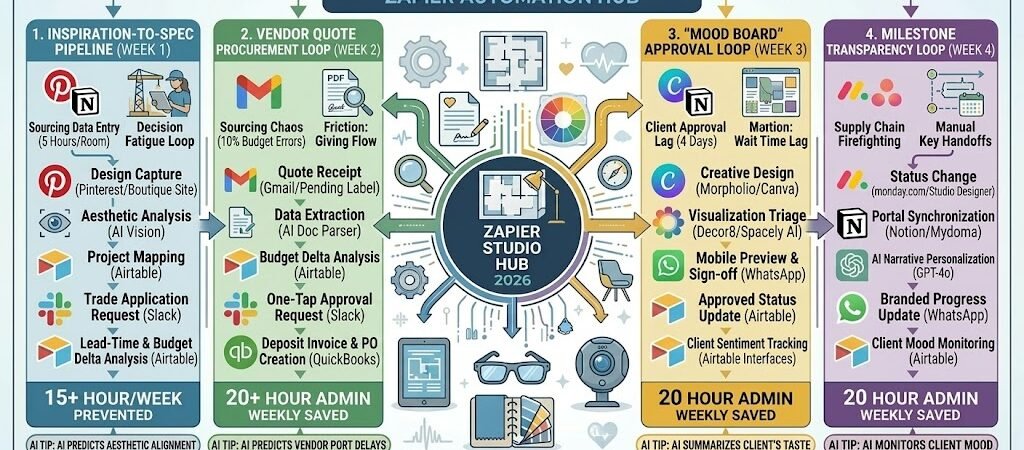
Key Takeaways: Zapier for Interior Designers
- The “Pinterest-to-Project” Sync: Connect Pinterest or your web clipper to Airtable. When you save an inspiration image, Zapier automatically creates a new “Product Record” with the source URL and image attached for later sourcing.
- The “Mood Board” Approval Loop: Link Morpholio Board or Canva to WhatsApp. Once a mood board is updated, Zapier sends a preview image to the client with a “Click to Approve” button, slashing days off the design phase.
- The “Vendor Quote” Triage: Connect Gmail to Google Sheets. When a vendor sends a quote, AI by Zapierextracts the lead time, price, and SKU, entering it directly into your procurement sheet.
- The “Milestone” Celebration: Automate a Slack notification to your team and a “Project Progress” email to the client every time a phase (e.g., “Schematic Design”) is marked complete in monday.com.
The “Designer Friction” of 2026
In 2026, the interior design industry has shifted from a “visual-first” to an “experience-first” model. As clients become more digitally fluent and informed, they no longer just pay for your aesthetic eye—they pay for your ability to curate and navigate a complex, volatile global market. For a modern studio, the primary threat to profitability isn’t a lack of creative vision; it’s “Administrative Fragmentation.”
Interior designers in 2026 are currently navigating three critical “Frictions”:
- The “Sourcing Data” Sinkhole: With the resurgence of “Handcrafted Bespoke” and “Adaptive Reuse” trends, designers are sourcing from a wider, more fragmented network of local artisans and global vendors. Manually re-typing product dimensions, lead times, and SKUs from disparate websites into project spreadsheets is a 5-hour-per-room burden. If your sourcing data isn’t synced in real-time, you risk presenting items that are already out of stock or have doubled in price by the time the client says “Yes.”
- The “Decision Fatigue” Loop: In 2026, luxury clients arrive with “limitless options” but “zero time.” The traditional 4-day wait for a mood board revision or a physical swatch delivery creates a “Momentum Gap.”Without instant, mobile-first approval loops and 3D visualization triage, projects stall in endless “What do you think of this?” WhatsApp threads. Speed to decision is now the #1 factor in maintaining project momentum.
- The “Supply Chain Firefighting”: Structural volatility is the new norm. Between shifting trade rules and port delays, the “expected ship date” is often a moving target. Designers lose 15+ hours a week manually checking vendor portals for shipping updates and “firefighting” client anxieties when a custom rug is delayed. Without automated procurement alerts, the designer becomes the bearer of bad news rather than the manager of the dream.
The Zapier Solution: Zapier acts as your “Digital Studio Manager,” seamlessly connecting your Pinterest inspirations, Airtable spec sheets, and WhatsApp client feeds. By 2026, a high-performing designer doesn’t “track” an order; Zapier has already updated the project dashboard. You don’t “copy” a URL; Zapier has already extracted the lead time and price. This automation ensures your creative energy is spent on experiential design and neuro-responsive layouts rather than data entry.
Interior Design Efficiency Benchmarks 2026
| Friction Category | 2026 Impact | Zapier Automation Fix |
| Sourcing Data Entry | 5 Hours/Room | Web Clipper to Airtable Auto-Sync |
| Client Approval Lag | 4-Day Average Delay | Instant Mobile Previews & One-Tap Sign-off |
| Procurement Churn | 15+ Admin Hours/Week | AI Extraction of Vendor Quotes & Ship Dates |
Practical AI Tip for 2026: Use AI by Zapier to “Predict Aesthetic Alignment.” Have the AI scan a client’s “Home Goals” intake form and compare it to your current sourcing list. It can flag: “Client requested ‘Warm Minimalism,’ but the selected marble has ‘Cold Gray’ veining. Suggesting a Honed Travertine alternative from Vendor X.”
Blueprint #1 – The “Inspiration-to-Spec” Pipeline
In 2026, the gap between “I love this look” and “Here is the price and lead time” must be near-zero. Creative inspiration happens everywhere—on site visits, Instagram, or trade shows—but the friction of turning a photo into a line item in a project budget is where most designers lose hours of billable time. This blueprint ensures that every “spark” is captured, categorized, and costed automatically.
1. The Trigger: The “Design Capture”
- The 2026 Tech: You save a product image to a specific Pinterest board, use a Chrome Extension on a boutique vendor’s site, or snap a photo of a custom fabric at a showroom.
- The Action: Zapier detects the new “Save” or “Upload” and pulls the image URL, the source website, and any available metadata (like the item name).
2. The Logic: The AI Design Assistant
Zapier acts as your Digital Junior Designer, doing the heavy lifting of data organization:
- The Vision Scan: AI by Zapier (Vision) analyzes the image. It identifies the item type (e.g., “Curved Velvet Sofa”), the primary color palette, and the material.
- The Automated Sourcing: Zapier searches your Airtable “Vendor Master” to see if you have an account with the site. If it’s a new vendor, it flags them for a “Trade Application” request in Slack.
- The Project Mapping: Based on the Pinterest board name (e.g., “Project_Gurugram_LivingRoom”), Zapier automatically assigns the item to the correct client and room category.
3. The Action: The “Smart Spec” Entry
- The Action: Zapier creates a new record in your Airtable “Project Specs” sheet with the image attached and the initial data populated.
- The Lead-Time Alert: If the AI detects the phrase “Made to order” or “16-week lead time” on the source page, it highlights the “Status” column in Red to warn you during the next design review.
Inspiration-to-Spec Summary
| Step | Component | 2026 Recommended Tool |
| Trigger | Inspiration Capture | Pinterest / Web Clipper / Photos |
| Logic 1 | Aesthetic Analysis | AI by Zapier (Vision) |
| Logic 2 | Project Categorization | Airtable / Notion |
| Action 1 | Automatic Spec Entry | Airtable |
| Action 2 | Procurement Warnings | Slack / Email |
Practical AI Tip for 2026: Use AI by Zapier to “Auto-Calculate Markup.” Have Zapier look at the vendor’s retail price, apply your specific trade discount (e.g., 20%), and then calculate your design markup. It can populate a “Client-Facing Price” column in Airtable instantly, ensuring you never present a budget that hasn’t accounted for your profit margin.
Blueprint #2 – The “Vendor Quote” Procurement Loop
In 2026, the success of a design project often hinges on the speed of the procurement department. With custom lead times fluctuating and shipping costs rising, getting a quote approved and turned into a purchase order is a race against the clock. This blueprint turns your inbox into a “High-Speed Procurement Hub,” using AI to extract critical data from vendor emails and keep your project budget balanced in real-time.
1. The Trigger: The “Incoming Quote”
- The 2026 Tech: A custom rug manufacturer or lighting vendor sends an email with a PDF quote attached to your studio’s Gmail or Outlook.
- The Action: Zapier monitors your inbox for a specific label (e.g., “Procurement/Pending”) or scans for attachments containing the word “Quote.”
2. The Logic: The AI Purchasing Agent
Zapier acts as your Digital Procurement Manager, doing the data entry that usually takes hours:
- The Document Parse: AI by Zapier (Document Parser) or GPT-4o reads the PDF. It ignores the fine print and targets the Total Price, Shipping Cost, Tax, and the Estimated Ship Date.
- The Budget Reconciliation: Zapier compares the quoted price against the “Estimated Budget” in your AirtableProject Base.
- The Variance Check: If the quote is >10% over the initial estimate, Zapier flags the record in Red and pings the Lead Designer.
3. The Action: The “Approval-Ready” Push
- The Action: Zapier updates the item record in Airtable with the new price and attaches the quote PDF for easy access.
- The “One-Tap” Approval: Zapier sends a Slack alert to the Designer: “Quote received for [Client Name] Sofa! Budgeted: $4,500 | Quoted: $4,200. Lead time: 12 weeks. Click ‘Approve’ to trigger the client invoice.”
- The Invoicing Trigger: Once you click “Approve,” Zapier triggers QuickBooks Online or Xero to draft the deposit invoice for the client.
Vendor Quote Procurement Summary
| Step | Component | 2026 Recommended Tool |
| Trigger | Quote Receipt | Gmail / Outlook |
| Logic 1 | Data Extraction | AI by Zapier (Doc Parser) |
| Logic 2 | Budget Delta Analysis | Airtable |
| Action 1 | Record Update | Airtable |
| Action 2 | Financial Kick-off | QuickBooks Online / Xero |
Practical AI Tip for 2026: Use AI by Zapier to “Predict Port Delays.” Have Zapier scan the vendor’s location. If the vendor is in a region currently experiencing shipping strikes or port congestion (scanned via Google Search), Zapier can add a “Risk Buffer” of 2 weeks to the estimated delivery date, ensuring you manage client expectations accurately.
Blueprint #3 – The “Milestone” Transparency Loop
In 2026, the “Radio Silence” period between a client paying a deposit and the furniture arriving is the #1 cause of project anxiety. When a client doesn’t hear from you, they assume nothing is happening—even if you’re working 14-hour days coordinating vendors. This blueprint automates a “Visual Journey” for the client, turning every internal task completion into a high-touch progress update.
1. The Trigger: The “Task Done” Event
- The 2026 Tech: You or your assistant moves a project stage (e.g., “Lighting Selection” or “Custom Cabinetry Ordered”) to “Complete” in your project management tool (monday.com, Asana, or Studio Designer).
- The Action: Zapier detects the status change and pulls the associated “Mood Board” image or “Product Render” from the project folder.
2. The Logic: The AI Client Concierge
Zapier acts as your Client Relations Director, crafting a narrative that makes the client feel prioritized:
- The Status Update: Zapier triggers a status change in your client’s private Notion Portal, moving the “Phase” bar to 75% complete.
- The AI Progress Draft: AI by Zapier drafts a personalized message based on the task: “Great news, [Client Name]! Your custom kitchen cabinetry has officially moved into the ‘Production’ phase with our woodshop. We are one step closer to your dream kitchen!”
- The Asset Attachment: Zapier grabs a photo of the wood sample or the technical drawing to include as a visual “teaser.”
3. The Action: The “Momentum” Delivery
- The Mobile Notification: Zapier sends a WhatsApp or branded email: “Project Update for [Property Address]: We’ve hit a new milestone! View your updated timeline and a sneak peek of the cabinetry here: [Link]”
- The Feedback Loop: The message includes a “Love it!” button. If the client clicks it, Zapier logs their positive sentiment in Airtable, helping you track client satisfaction in real-time.
Milestone Transparency Summary
| Step | Component | 2026 Recommended Tool |
| Trigger | Status Change | monday.com / Studio Designer |
| Logic 1 | Portal Synchronization | Notion / Client Portal |
| Logic 2 | AI Personalization | AI by Zapier (GPT-4o) |
| Action 1 | Branded Progress Update | WhatsApp / Twilio |
| Action 2 | Sentiment Tracking | Airtable |
Practical AI Tip for 2026: Use AI by Zapier to “Monitor Client Mood.” Have the AI scan the client’s WhatsApp replies. If the AI detects a “Confused” or “Frustrated” tone (e.g., “Is it still 12 weeks away?”), Zapier can trigger an immediate Slack alert to the Designer: “Priority Check-in: [Client Name] is feeling anxious about the timeline. Recommend a 5-minute personal call today.”
The 2026 Interior Design Tech Stack
In 2026, the interior design studio is defined by “Integrated Visualization.” As photorealistic AI rendering becomes a standard client expectation, your competitive edge shifts from the “image” to the “infrastructure.” The 2026 standard is a “Live Project Environment” where design concepts, real-world inventory, and client feedback exist in a single, automated loop.
1. The 2026 Core Stack
| Function | 2026 Recommended Tool | Why It Wins in 2026 |
| Studio Management | Mydoma / Studio Designer | Mydoma excels in client-facing “packages” and portals; Studio Designer is the 2026 gold standard for complex procurement and integrated accounting. |
| Visual Sourcing | DesignFiles | Features the industry’s most advanced “Product Clipper,” allowing you to pull trade pricing and lead times directly into your design boards with one click. |
| AI Visualization | Foyr Neo / Decor8 AI | Foyr Neo delivers 10-minute photorealistic renders in the cloud; Decor8 AI specializes in transforming a smartphone photo of an empty room into 50+ staged styles. |
| Space Planning | SketchUp Pro + V-Ray | The 2026 favorite for 3D modeling. When paired with V-Ray, it produces magazine-quality visuals that are indistinguishable from photography. |
| Project Logistics | monday.com | Acts as the “Traffic Controller,” connecting your design milestones to vendor shipping updates via 200+ native integrations. |
2. The 2026 “Creative Flow” Circuitry
In 2026, Zapier acts as your “Digital Design Assistant,” ensuring that your creative bursts don’t create administrative debt:
- The “Mood-to-Market” Circuit: Connect Pinterest to Airtable. When you “Pin” a sofa for a project, Zapier uses AI to find the closest match in your Airtable “Trade Vendor” library and populates the current lead time.
- The “One-Tap Approval” Circuit: Link Canva (Mood Boards) to WhatsApp. Once you finish a board, Zapier sends a high-res preview to the client. Their “Approved” reply instantly triggers the first deposit invoice in QuickBooks.
- The “Vastu-Compliance” Circuit: (For relevant markets) Link Google Drive to Vastu AI by MOA. When a floor plan is uploaded, Zapier triggers an AI analysis for directional alignment and posts the “Energy Score” back to your project Slack.
3. Hardware for the 2026 “Mobile Studio”
- “Design-First” Tablets: The iPad Pro 13-inch (M4) remains the benchmark for color accuracy when reviewing swatches. For a more rugged field experience, the Samsung Galaxy Tab Active5 offers IP68 protection for dusty construction sites.
- Pro-Grade Stylus: The Apple Pencil Pro (with haptic feedback) is essential for “Morpholio Trace” markups on-site, allowing you to sketch over photos and have Zapier instantly sync those sketches to the contractor’s Airtableview.
- 360° Site Capture: Tools like the Insta360 X4 allow you to capture an entire room in one shot. Zapier routes these views to Homestyler to generate an instant 3D layout for your team.
Conclusion: Your 30-Day “Studio Mastery” Roadmap
- Week 1: The Inspiration Engine. Install a web clipper and connect it to Airtable so every item you source is automatically categorized by room and price.
- Week 2: The Approval Pulse. Set up a Zap to send mood board previews via WhatsApp; stop waiting days for email replies and start getting “One-Tap” approvals.
- Week 3: The Procurement Triage. Use AI by Zapier to scan vendor PDFs. Let the AI do the boring work of extracting lead times and shipping costs into your budget.
- Week 4: The Client Portal. Launch a Notion or Mydoma client portal where progress bars update automatically as you finish tasks in your PM tool.

About the Author
Aapt DubeyAapt Dubey is an automation specialist and software developer dedicated to eliminating manual workflows for small businesses. With deep, hands-on experience building complex Zapier integrations, API connections, and real-world applications, Aapt writes actionable, tested tutorials to help businesses scale efficiently.