
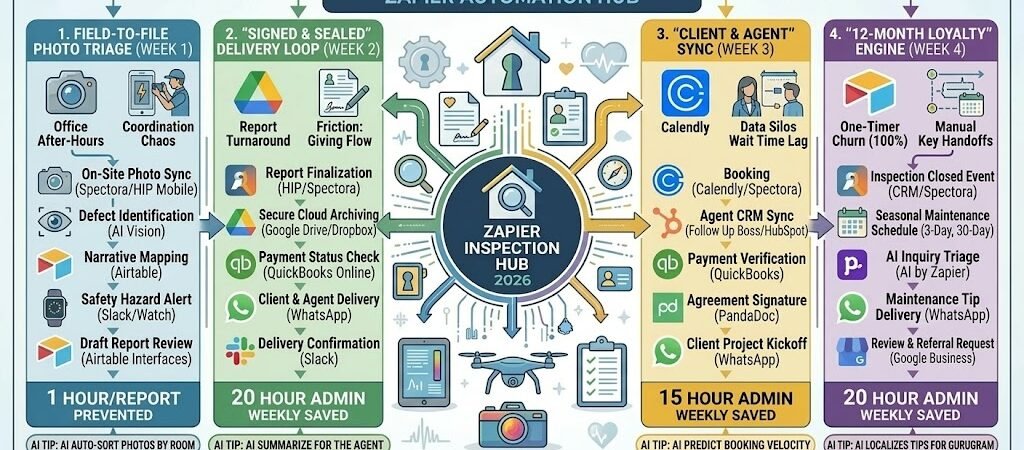
Key Takeaways: The 2026 “Inspector-on-Autopilot” (Zapier for Home Inspectors)
- The “Zero-Latency” Report: Connect Spectora or Home Inspector Pro to Google Drive, automatically archiving a PDF version of every signed report the second it’s finalized.
- The “AI Photo-to-Comment” Loop: Link your Photo App to AI by Zapier. Have AI scan your uploaded photos for “water damage” or “exposed wiring” and draft the specific narrative comments in Airtable for your final review.
- The “Agent & Client” Sync: Connect Calendly to Follow Up Boss. When an inspection is booked, Zapier automatically updates the Realtor’s CRM with the timeline, ensuring everyone stays in the loop.
- The “Referral Guardian”: Automate a 12-month “Home Maintenance” sequence that sends seasonal tips (e.g., “Time to check the gutters!”) to past clients, keeping your name top-of-mind for their next move.
The “Inspection Friction” of 2026
In 2026, the home inspection industry has moved from being a simple checklist service to a high-stakes “Closing Catalyst.” As the real estate market rebounds with more inventory and steadier sales, the pressure on inspectors has shifted. Buyers are no longer waiving inspections; instead, they are more selective and demand “Amazon-speed” transparency. For a modern inspector, the primary threat to profitability isn’t a lack of technical knowledge—it’s “Administrative Latency.”
Home inspectors in 2026 are navigating three critical “Frictions”:
- The “Post-Inspection” Reporting Gap: In a high-speed market, the “24-hour turnaround” is becoming a deal-breaker. Buyers and agents expect interactive, digital findings often before they even leave the driveway. Spending 10+ hours a week of “Office After-Hours” manually re-typing notes and labeling photos is no longer sustainable. If your report isn’t instant, you are the bottleneck in the transaction.
- The “Photo Triage” Bottleneck: With modern inspections often requiring 100–150 high-resolution photos (including drone and thermal shots), the manual sorting and labeling process is the single largest drain on inspector utilization. In 2026, if you are still manually dragging and dropping photos into folders, you are losing an estimated $75–$150 in billable potential per job.
- The “One-and-Done” Referral Churn: Most inspectors lose touch with their clients the moment the report is delivered. With the 2026 housing stock aging and maintenance becoming a primary concern for homeowners, the failure to provide ongoing value results in a 100% “One-Timer” rate. Without automated maintenance nudges, you miss out on recurring “Maintenance Inspection” revenue and long-term referral loops from real estate agents.
The Zapier Solution: Zapier acts as your “Virtual Admin,” seamlessly connecting your Spectora/Home Inspector Profield data with your Airtable narrative library and WhatsApp communication channels. By 2026, a high-performing inspector doesn’t “write” a report at home; Zapier has already triaged the photos and archived the PDF. You don’t “hope” for a referral; Zapier has already scheduled the first 12 months of maintenance tips for your client.
Home Inspection Efficiency Benchmarks 2026
| Friction Category | 2026 Impact | Zapier Automation Fix |
| Report Turnaround | 24-Hour Average Delay | Instant “Finish-to-PDF” Delivery & Sync |
| Photo Management | 1 Hour+ per Inspection | AI-Powered Triage & Auto-Labeling |
| Customer Retention | 100% “One-Timer” Rate | 12-Month “Maintenance Concierge” Loops |
Practical AI Tip for 2026: Use AI by Zapier (Vision) to “Pre-Label” defects. When you upload a photo of a “double-tapped breaker” or “fogged window seal” to your drive, have the AI identify the defect and pull the corresponding narrative from your Airtable library. This can cut your “Final Review” time in half.
Blueprint #1 – The “Field-to-File” Photo Triage
In 2026, you shouldn’t be manually sorting 150 photos at your desk. The “Office After-Hours” grind is the single biggest drain on an inspector’s hourly rate. This blueprint automates the organization and initial analysis of your site assets, using AI Vision to pre-label defects so your final report is 80% written before you even leave the property.
1. The Trigger: The “Rapid Fire” Sync
- The 2026 Tech: You snap photos of deficiencies (e.g., a double-tapped breaker or a fogged window seal) using the HIP Camera (Home Inspector Pro) or Spectora mobile app.
- The Action: Zapier detects the new media upload in your inspection project or watches a synced Google Drive“Job Folder.”
2. The Logic: AI Defect Detection & Tagging
Zapier acts as your Senior Inspector, performing an instant digital triage:
- The Image Analysis: AI by Zapier (Vision) or Google Cloud Vision scans the photo. It identifies the object (e.g., “Electrical Panel”) and the defect (e.g., “Double-tap on 20A breaker”).
- The Narrative Mapping: Zapier searches your Airtable comment library for the matching narrative: “Observed: Multiple conductors connected to a single circuit breaker terminal. Recommendation: Evaluation by a licensed electrician.”
- The High-Priority Flag: If the AI detects a safety hazard (like gas leaks or charred wiring), it sends an immediate haptic alert to your Apple Watch Ultra 3 via Slack.
3. The Action: The “Ready-to-Review” Roster
- The Action: Zapier takes the AI-generated comment and the photo, then creates a new record in your Airtable“Report Review” board.
- The Final Polish: When you sit down for the final review, you simply “Approve” or “Edit” the AI-drafted narrative. No more re-typing the same 50 comments every day.
Field-to-File Photo Triage Summary
| Step | Component | 2026 Recommended Tool |
| Trigger | On-Site Photo Sync | Spectora / HIP Mobile |
| Logic 1 | Defect Identification | AI by Zapier (Vision) |
| Logic 2 | Narrative Library Sync | Airtable |
| Action 1 | Safety Hazard Alert | Slack / Apple Watch |
| Action 2 | Draft Report Generation | Airtable Interfaces |
Practical AI Tip for 2026: Use AI by Zapier to “Auto-Sort” your photos by room. Have the AI look for visual cues (e.g., “Cabinets” = Kitchen, “Toilet” = Bathroom) and automatically move the files into the correct section of your report template, saving an average of 45 minutes of manual dragging and dropping.
Blueprint #2 – The “Signed & Sealed” Delivery Loop
Stop the “Did you get my email?” phone calls. In 2026, the moment you finish an inspection, the clock starts ticking for the buyer’s contingency period. This blueprint ensures that as soon as you hit “Publish,” your report is securely archived, and the delivery is confirmed via a high-visibility mobile notification.
1. The Trigger: The “Report Published” Event
- The 2026 Tech: You mark the inspection as “Complete” or “Published” in Home Inspector Pro (HIP) Office or Spectora.
- The Action: Zapier detects the “Report Sent” or “Completed Order” trigger. It pulls the client’s name, the agent’s contact info, and the secure PDF link.
2. The Logic: Secure Multi-Point Distribution
Zapier acts as your Back-Office Manager, ensuring the data goes exactly where it needs to be for liability and convenience:
- The Long-Term Archive: Zapier creates a client-specific folder in Google Drive or Dropbox and uploads the PDF. This ensures you have a permanent record even if the client loses their original link.
- The Financial Verification: Zapier checks QuickBooks Online. If the inspection is marked “Unpaid,” it pauses the notification and sends a polite automated payment reminder instead.
- The Agent Sync: Zapier identifies the Referring Agent and updates their record in your CRM (Follow Up Boss or HubSpot) so they know the report is ready for their client.
3. The Action: The “Instant Value” Notification
- The Mobile Delivery: Zapier sends a WhatsApp or SMS to both the Client and the Agent: “Hi [Name]! The inspection report for [Property Address] is finalized. You can view the full interactive report and download the PDF here: [Link].”
- The Confirmation Alert: Zapier pings your Apple Watch via Slack: “Report Delivered: [Property Address]. Archive saved to Google Drive.”
Signed & Sealed Delivery Summary
| Step | Component | 2026 Recommended Tool |
| Trigger | Report Finalization | Home Inspector Pro / Spectora |
| Logic 1 | Secure Cloud Archiving | Google Drive / Dropbox |
| Logic 2 | Payment Status Check | QuickBooks Online |
| Action 1 | Client & Agent Delivery | WhatsApp / Twilio |
| Action 2 | Delivery Confirmation | Slack |
Practical AI Tip for 2026: Use AI by Zapier to “Summarize for the Agent.” Agents are often on the go. Have Zapier draft a specific text for the Realtor: “Hey [Agent Name], [Client Name]’s report is out. Top 3 issues are the HVAC age, roof shingles, and the GFCI outlets. All other major systems were solid!”
Blueprint #3 – The “12-Month Loyalty” Engine
In 2026, most inspectors are forgotten the moment the keys are handed over. This is a massive missed opportunity, especially as the average home age continues to rise. This blueprint turns a one-time service into a year-long “Home Concierge” experience, positioning you as the homeowner’s long-term technical advisor and ensuring your name is the only one they share with friends and neighbors.
1. The Trigger: The “Inspection Closed” Status
- The 2026 Tech: The deal status is updated to “Closed” or “Sold” in your CRM (Follow Up Boss, HubSpot, or Spectora).
- The Action: Zapier triggers a 12-month automated communication sequence, starting with a “Welcome Home” message that includes a digital copy of their maintenance manual.
2. The Logic: The Seasonal Maintenance Concierge
Zapier acts as your Automated Marketing Manager, scheduling proactive touchpoints that provide genuine value rather than just “checking in”:
- The 3-Month “Spring Prep” (March): Zapier sends a checklist focused on water management: “Time to check your gutters and downspouts before the spring rains. Remember, water moving away from the foundation is your home’s #1 defense!”
- The 6-Month “Summer Systems” (June): A nudge to service AC units and check window seals to keep energy bills low.
- The 9-Month “Fall Prep” (September): A reminder to check attic insulation and clean dryer vents (a top fire hazard).
- The AI Referral Filter: If the client replies to a tip with a question, AI by Zapier can categorize the inquiry. If they ask about a specific repair, Zapier automatically forwards your “Preferred Vendor List” (e.g., local plumbers or roofers) to them.
3. The Action: The “Trusted Pro” Referral Loop
- The Google Review Nudge: On Day 45 post-inspection, Zapier sends a WhatsApp: “Hope you’re loving the new place! If our report gave you peace of mind during the closing, would you mind sharing that on our Google page? [Link]”
- The “Warranty” Reminder: On Month 11, Zapier triggers a final alert: “Your 12-month builder warranty (or home warranty) may be expiring soon. Want us to do a quick ‘Warranty Check’ to find any issues before your coverage ends?”
12-Month Loyalty Engine Summary
| Step | Component | 2026 Recommended Tool |
| Trigger | Sale/Closing Finalized | Follow Up Boss / HubSpot |
| Logic 1 | Seasonal Maintenance Schedule | Zapier Delay / Schedule |
| Logic 2 | AI Inquiry Sorting | AI by Zapier |
| Action 1 | Proactive Maintenance Tips | WhatsApp / Email |
| Action 2 | Review & Referral Request | Google Business Profile |
Practical AI Tip for 2026: Use AI by Zapier to “Localize” your tips. If your city is expecting a record-breaking freeze or a week of heavy rain, have the AI draft an emergency alert: “Hi [Name], Gurugram is expecting heavy monsoons next week. Quick tip: Make sure your balcony drains are clear of debris today to prevent indoor flooding!”
The 2026 Home Inspector Tech Stack
In 2026, the most successful home inspectors are those who view themselves as “Data Curators” rather than just technicians. As homes become “smarter” and real estate transactions faster, your value lies in how quickly you can turn a physical site visit into a digital, narrative-rich asset. The 2026 standard is a “High-Resolution Inspection” where every defect is backed by visual evidence and delivered before you leave the driveway.
1. The 2026 Core Stack
| Function | 2026 Recommended Tool | Why It Wins in 2026 |
| Inspection Software | Spectora / Inspector Toolbelt | The “Operating System” for modern inspectors. Features mobile-first report writing and high-end interactive PDF generation. |
| CRM & Lead Flow | Follow Up Boss / HubSpot | Essential for managing relationships with real estate agents. High-trust automation ensures you’re their first recommendation. |
| Field Triage | AI by Zapier (Vision) | Automatically identifies defects from photos (e.g., “corroded pipes”) and suggests the correct narrative from your library. |
| Document Storage | Google Drive / Dropbox | Your “Liability Shield.” Automates the long-term archiving of every report, photo, and signed agreement. |
| Financials | QuickBooks Online | Linked to your inspection software to automate invoicing only after a report is marked “Clear to Deliver.” |
2. The 2026 “Inspector-on-Autopilot” Circuitry
In 2026, Zapier acts as your “Digital Apprentice,” handling the high-volume data moves that usually eat up your evenings:
- The “Zero-Latency” Circuit: Connect Spectora to Google Drive. The second you hit “Publish” in the field, Zapier creates a client-branded folder, saves the PDF, and pings the agent via WhatsApp.
- The “Smart Triage” Circuit: Link your Mobile Photo App to Airtable. Zapier uses AI to scan your day’s photos; if it sees “Active Leakage” or “Hazardous Wiring,” it flags those items for your “Summary” section immediately.
- The “Referral Guardian” Circuit: Connect your Signed Contract to a 12-month Zapier Delay sequence. This sends “Home Maintenance Nudges” (e.g., HVAC filter reminders) to the homeowner every 90 days.
3. Hardware for the 2026 “Precision Inspector”
- “Pro-Series” Thermal Drones: Models like the DJI Mavic 3T (2026 edition) allow you to scan a roof for moisture intrusion or heat loss in 5 minutes, with data synced directly to your report via Zapier.
- Smart Borescopes & 360 Cameras: Tools like zInspector or Insta360 capture entire rooms in one click. Zapier routes these “Virtual Walkthroughs” to the client’s portal.
- The “Field Tablet” Standard: Inspectors use ruggedized iPad Pro M4s. With Zapier running in the background, a voice-to-text observation about a “foundation crack” is instantly formatted into a professional comment.
- Haptic Wearables: Your Apple Watch Ultra 3 vibrates when a client opens a report or when a “High Priority” AI defect is identified, allowing you to stay focused while staying informed.
Conclusion: Your 30-Day “Inspector Mastery” Roadmap
- Week 1: The Instant Archive. Connect your inspection software to Google Drive to ensure every report is backed up and organized by property address automatically.
- Week 2: The Mobile Delivery. Set up a Zap that texts the report link to the Client and Agent via WhatsApp the moment it’s published.
- Week 3: The AI Assistant. Experiment with AI by Zapier (Vision) to see if it can pre-label 20% of your common defects (e.g., “broken roof tiles”).
- Week 4: The Loyalty Sequence. Launch your 12-month “Maintenance Concierge” sequence to stay top-of-mind for future inspections and referrals.

About the Author
Aapt DubeyAapt Dubey is an automation specialist and software developer dedicated to eliminating manual workflows for small businesses. With deep, hands-on experience building complex Zapier integrations, API connections, and real-world applications, Aapt writes actionable, tested tutorials to help businesses scale efficiently.