
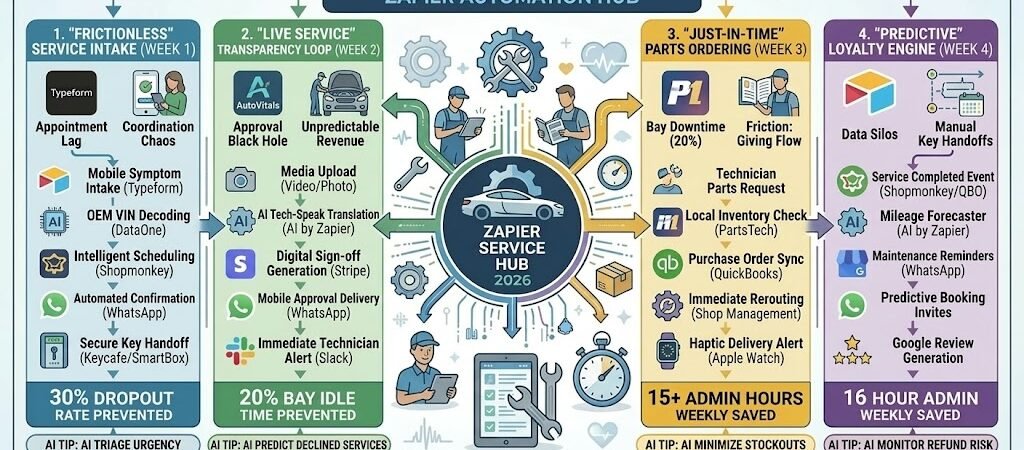
Key Takeaways: Zapier for Auto Repair Shops 2026
- The “Zero-Wait” Intake: Connect Typeform or your website booking tool to Airtable, automatically checking your shop’s capacity and sending a text confirmation with a “Key Drop” code.
- The “Just-In-Time” Parts Loop: Link Shopmonkey/Mitchell 1 to PartsTech. When a technician marks a repair as “Parts Needed,” Zapier checks local inventory and drafts an order instantly.
- The “Transparent Technician” Feed: Connect your Shop App to WhatsApp, automatically sending the customer a “Health Report” video and a digital estimate for approval the moment the diagnostic is finished.
- The “Service Life” Guardian: Automate a 6-month “Predictive Maintenance” sequence based on the customer’s mileage and service history, ensuring they book their next oil change or tire rotation before a light hits the dash.
The “Automotive Friction” of 2026
In 2026, the local auto shop is no longer just competing with the garage down the street—it is competing with the “Instant Convenience” expectations set by the entire digital economy. With vehicles becoming increasingly complex “computers on wheels,” the primary threat to a shop’s profitability isn’t a lack of mechanical skill; it’s “Administrative Latency.” When a car sits idle in a bay because a parts order is delayed or a customer hasn’t answered their phone for an estimate approval, you aren’t just losing time—you’re losing revenue and trust.
Auto repair shops in 2026 are currently navigating three critical “Frictions”:
- The “Diagnostic Lockdown” & Data Delay: Modern vehicles (especially EVs and Hybrids) now require secure digital authorizations for even basic repairs. In 2026, “Diagnostic Lockdown” is a reality. If your shop management system doesn’t communicate instantly with OEM gateways, your technicians spend 30% of their day simply trying to “talk” to the car’s computer. This digital latency creates a massive bottleneck before a single wrench is even turned.
- The “Approval Black Hole”: “Phone Tag” is the silent killer of shop efficiency. In 2026, customers are digitally native and rarely answer unscheduled calls. A 3-hour delay in getting a brake job approved doesn’t just stall that car; it creates a “Bay Blockage” that ripples through your entire day. Without automated, mobile-first Digital Vehicle Inspections (DVIs) and instant SMS approval links, your shop’s “Cycle Time” (drop-off to ready) remains 40% slower than necessary.
- The “Technician Efficiency” Gap: With the 2026 technician shortage, every minute is a premium asset. When a lead tech has to walk to the front counter to check if a part has arrived or re-key a VIN into a separate ordering tool, they are doing “Administrative Busywork” instead of billable labor. This “Friction Loss” can cost a 4-bay shop over $2,500 a week in uncaptured labor revenue.
The Zapier Solution: Zapier acts as your “Digital Service Advisor,” seamlessly connecting your Shopmonkey/Mitchell 1 management system, your PartsTech ordering hub, and your WhatsApp customer communication. By 2026, a high-performing shop doesn’t “call the customer”; Zapier has already sent the diagnostic video and the “Approve Now” button. You don’t “check the shelf”; Zapier has already verified the part’s arrival and pinged the tech’s tablet.
Auto Repair Efficiency Benchmarks 2026
| Friction Category | 2026 Impact | Zapier Automation Fix |
| Approval Lag | 3-Hour Average Delay | Photo-Driven DVIs & Instant SMS Approvals |
| Bay Utilization | 20% Idle Time | “Just-in-Time” Parts & Capacity Scheduling |
| Data Silos | 15+ Admin Hours/Week | Seamless VIN-to-Parts-to-Invoice Sync |
Practical AI Tip for 2026: Use AI by Zapier to “Translate Tech-Speak.” Technicians often write internal notes like “R&R lower control arm, bushings shot.” Have Zapier trigger an AI to rewrite this for the customer’s WhatsApp: “Our safety inspection found that a front suspension part is worn out, which can cause shaky steering. We’ll replace it to keep your drive smooth and safe.”
Blueprint #1 – The “Frictionless” Service Intake
In 2026, the “Service Intake” is no longer just a clipboard on a counter; it is the first digital handshake. Customers are looking for an experience that mimics their favorite apps: low-friction, self-service, and immediate. This blueprint ensures that when a customer’s “Check Engine” light comes on, your shop is the easiest and fastest solution they find.
1. The Trigger: The “Symptoms & Schedule” Form
- The 2026 Tech: A customer visits your site (or scans a QR code on your direct mailer) and fills out a Typeform.
- The Action: They select their vehicle symptoms (e.g., “Squeaky brakes,” “EV Charging fault”), upload a photo of the dashboard light, and choose a drop-off time.
2. The Logic: Smart Capacity & Prep
Zapier acts as your Digital Service Writer, preparing the bay before the car even arrives:
- The Real-Time Calendar Check: Zapier checks your Shopmonkey or Google Calendar for “Diagnostic Bay” availability. It only presents slots that don’t overlap with existing high-intensity jobs (like engine swaps).
- The VIN Deep-Dive: Zapier sends the VIN to DataOne or a similar decoder to pull the specific OEM maintenance schedule.
- The “Pre-Order” Prediction: If the customer selected “Oil Change” and “Brake Service,” AI by Zapier looks at the car model and checks your Airtable inventory for the correct filter and pad types.
3. The Action: The “Ready-to-Drop” Welcome
- The Action: Zapier sends a WhatsApp confirmation: “You’re all set for Tuesday at 8:00 AM, [Name]! We’ve reserved Bay 2 for your [Vehicle Model].”
- The After-Hours Protocol: If they selected an early drop-off, Zapier generates a unique code for your Smart Key Box and sends it via SMS: “Your key drop code is 8821. Just drop the fob and we’ll handle the rest!”
Frictionless Intake Summary
| Step | Component | 2026 Recommended Tool |
| Trigger | Mobile Symptom Intake | Typeform / Zapier Forms |
| Logic 1 | Intelligent Scheduling | Shopmonkey / Google Calendar |
| Logic 2 | OEM Data Retrieval | DataOne / VIN Decoder |
| Action 1 | Automated Confirmation | WhatsApp / Twilio |
| Action 2 | Secure Key Handoff | Smart Lock / Key Box |
Practical AI Tip for 2026: Use AI by Zapier to “Triage Urgency.” If a customer types “My brakes are grinding and the pedal feels soft,” have the AI flag this as “Safety Priority” in Slack and automatically move them to the top of the morning’s diagnostic queue.
Blueprint #2 – The “Live Service” Transparency Loop
Stop the “Phone Tag” game. In 2026, customers don’t want a phone call explaining a leak; they want to see it for themselves on their screen. This blueprint uses Digital Vehicle Inspections (DVI) to build undeniable trust and secure instant repair approvals, keeping your bays moving and your profit margins healthy.
1. The Trigger: The “Diagnostic Asset” Upload
- The 2026 Tech: A technician uses a tablet or smartphone to record a 30-second video of a worn part (e.g., a frayed serpentine belt or a leaking strut) and uploads it to the Shopmonkey or Tekmetric mobile app.
- The Action: Zapier detects the “Status Update” or “Media Uploaded” event in your shop management system.
2. The Logic: The AI-Assisted Estimate
Zapier acts as your Digital Service Writer, preparing a professional, high-trust presentation:
- The AI Translation: AI by Zapier takes the technician’s shorthand notes (e.g., “belt cracked, needs R&R”) and rewrites them into customer-friendly language: “Our safety check found significant cracking on your drive belt, which could cause a breakdown. We recommend replacing it today for long-term reliability.”
- The Approval Link Generation: Zapier triggers your payment/estimate tool (Stripe or Shopmonkey) to generate a unique “Click-to-Approve” link for the specific line items.
- The Asset Routing: Zapier attaches the video and photos to the customer’s record in Airtable for a permanent service history.
3. The Action: The “Instant Approval” Nudge
- The Action: Zapier sends the video and the estimate directly via WhatsApp or SMS: “Hi [Name], your vehicle inspection is complete. Watch the 30-second video of what we found and approve the repair here: [Link]”
- The Real-Time Notification: Once the customer clicks “Approve,” Zapier pings the technician’s Apple Watch or tablet via Slack: “Bay 3 Approved! Parts order initiated.”
Live Service Transparency Summary
| Step | Component | 2026 Recommended Tool |
| Trigger | Media Upload (Video/Photo) | Shopmonkey / Tekmetric App |
| Logic 1 | AI Technical Translation | AI by Zapier (GPT-4o) |
| Logic 2 | Digital Sign-off Generation | Stripe / Shopmonkey |
| Action 1 | Mobile Approval Delivery | WhatsApp / Twilio |
| Action 2 | “Go-Ahead” Tech Alert | Slack |
Practical AI Tip for 2026: Use AI by Zapier to “Predict Declined Services.” If a customer declines a non-critical repair (like a cabin air filter), have Zapier tag that item in Airtable. Two months later, Zapier can send a follow-up: “Hey [Name], just a reminder that your air filter was getting dusty back in March. We have a new shipment in; want us to swap it out for you next week?”
Blueprint #3 – The “Predictive” Loyalty Engine
In 2026, the most profitable auto shops don’t wait for a breakdown; they manage their customers’ vehicle lifecycles. If a customer only thinks of you when their car is on a tow truck, you’ve lost the relationship. This blueprint uses service history and mileage tracking to turn your QuickBooks or Shopmonkey data into a proactive “Maintenance Concierge” that keeps your bays full even during “slow” months.
1. The Trigger: The “Service Completed” Event
- The 2026 Tech: A technician marks the job as “Finished” or the invoice is marked “Paid” in QuickBooks Onlineor Shopmonkey.
- The Action: Zapier pulls the vehicle’s current mileage, the specific services performed, and the date.
2. The Logic: The Maintenance Timer
Zapier acts as your Automated Retention Manager, calculating exactly when that customer needs to return:
- The Mileage Forecaster: AI by Zapier looks at the time between the last two visits to estimate the customer’s average monthly mileage. It then calculates the exact date they will likely hit their next oil change or tire rotation interval.
- The “Health Check” Delay: Zapier sets a 7-day “Post-Op” delay.
- The VIP Filter: If the repair was major (e.g., an engine rebuild or EV battery service), Zapier flags the account for a personalized “Human” follow-up in Airtable.
3. The Action: The “Service Concierge” Outreach
- The 7-Day Follow-up: Zapier sends a WhatsApp: “Hi [Name]! Just checking in to make sure your [Vehicle Model] is running smoothly after its brake service. Any questions? Just reply here!”
- The 5-Month “Predictive” Invite: Five months later, Zapier sends a booking link: “Your [Vehicle Model] is about 500 miles away from its next milestone. We’ve saved a slot for you on Tuesday morning—want to lock it in?”
- The Social Proof Request: If the customer clicks the “Running Great” button, Zapier sends a link to your Google Business Profile to capture a 5-star review while the positive experience is fresh.
Predictive Loyalty Engine Summary
| Step | Component | 2026 Recommended Tool |
| Trigger | Invoice Finalization | QuickBooks Online / Shopmonkey |
| Logic 1 | Mileage & Interval Logic | AI by Zapier |
| Logic 2 | Customer Satisfaction Pulse | Typeform / WhatsApp |
| Action 1 | Maintenance Reminders | WhatsApp / Twilio |
| Action 2 | Review Generation | Google Business Profile |
Practical AI Tip for 2026: Use AI by Zapier to “Monitor Refund Risk.” Have the AI scan incoming WhatsApp replies. If a customer uses words like “squeak,” “still,” or “light’s back on,” Zapier should instantly ping the Shop Manager’s Apple Watch via Slack: “High Priority: [Name] reports a comeback on Bay 4. Call now to prevent a bad review.”
The 2026 Auto Repair Tech Stack
In 2026, the most successful auto repair shops function as “High-Tech Service Hubs.” As the industry shifts toward EVs and “Software-Defined Vehicles,” your competitive advantage is no longer just a wrench—it’s your ability to master the “Software Handshake.” The 2026 standard is a “Transparent Garage” where data flows seamlessly from the car’s computer to the customer’s phone.
1. The 2026 Core Stack
| Function | 2026 Recommended Tool | Why It Wins in 2026 |
| Shop Management | Garage360 / Tekmetric | Cloud-native “Operating Systems” that handle the entire lifecycle from VIN decoding to AI-guided repair insights. |
| Digital Inspection (DVI) | AutoVitals / Torque360 | Specialized tools to send high-def video evidence to customers, proven to increase approval rates by 30%. |
| Parts Procurement | PartsTech / Epicor | Integrates directly with your Shop Management to show real-time local availability across multiple vendors on one screen. |
| Secure Key Handoff | Keycafe / ABUS SmartBox | Automated lockboxes that allow for 24/7 drop-offs/pick-ups with time-bound codes sent via Zapier. |
| Compliance & Data | ProDemand / ALLDATA | Essential for navigating “Diagnostic Gateways” and OEM-authorized access tokens for 2026 model years. |
2. The 2026 “Service Velocity” Circuitry
In 2026, Zapier acts as your “Digital Service Writer,” eliminating “Phone Tag” and manual data entry through three high-speed circuits:
- The “Approval” Circuit: Connect Shopmonkey to Stripe. When a tech finishes a DVI, Zapier generates a mobile payment link and sends it via WhatsApp. Once paid, it instantly pings the tech’s tablet to “Start Repair.”
- The “Smart Key” Circuit: Link Typeform (booking) to Keycafe. When a customer books an early-bird drop-off, Zapier generates a unique PIN and texts it to them automatically: “Your 8 AM drop-off is confirmed. Key Box Code: 8821.”
- The “Maintenance” Circuit: Connect QuickBooks Online to AI by Zapier. Based on the last service date and estimated mileage, Zapier schedules a “Predictive Maintenance” nudge 6 months out to keep your bays full.
3. Hardware for the 2026 “Connected Bay”
- “Tech-Tablet” Pros: Every technician carries a ruggedized iPad Pro. Zapier ensures that when they snap a photo of a leak, it’s instantly attached to the customer’s Airtable history.
- Smart OBD-II Gateways: Connected to your shop Wi-Fi. As soon as a car enters the lot, Zapier pulls the trouble codes and drafts the initial Repair Order (RO) for the Service Writer.
- The “Service Command” Zenbook: The Shop Manager uses a dual-screen ASUS Zenbook Duo—scheduling on the bottom, live “Profitability per Bay” dashboards on the top.
- Apple Watch Ultra 3 Integration: For technicians under the hood. When a parts order arrives or an estimate is approved, they get a haptic “Vibration Alert,” so they never have to stop work to check a screen.
Conclusion: Your 30-Day “Shop Mastery” Roadmap
- Week 1: The Digital Handshake. Replace paper clipboards with a Typeform intake that automatically decodes VINs and adds them to your calendar.
- Week 2: The Video Sell. Start using AutoVitals to send 30-second “Evidence Videos” with every estimate; watch your average repair order (ARO) climb.
- Week 3: The 24/7 Bay. Install a Smart Key Box and automate code delivery via Zapier to capture revenue from customers who can’t make it during 9-to-5 hours.
- Week 4: The Predictive Nudge. Set up your loyalty automation to “invite” customers back for maintenance based on their actual driving habits and mileage.

About the Author
Aapt DubeyAapt Dubey is an automation specialist and software developer dedicated to eliminating manual workflows for small businesses. With deep, hands-on experience building complex Zapier integrations, API connections, and real-world applications, Aapt writes actionable, tested tutorials to help businesses scale efficiently.