
Key Takeaways: Zapier for Churches 2026
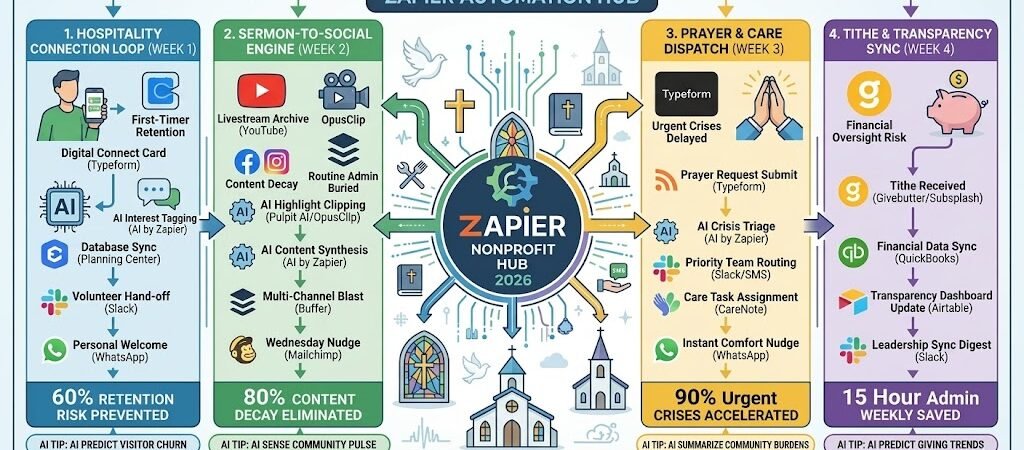
The “Tithe & Transparency” Sync: Connect Givebutter/Subsplash to QuickBooks, ensuring donors receive real-time updates on how their tithes are funding specific community projects.
The “One-Click” Sermon Workflow: Connect Zoom/YouTube to Airtable and Social Media, automatically slicing your sermon into “Reels” and “Shorts” for weekday inspiration.
The “Radical Hospitality” Intake: Link your Connect Card (Typeform) to Planning Center, triggering an automated “Welcome Video” from the Pastor via WhatsApp within 2 hours.
The “Prayer Force” Automator: Use AI by Zapier to categorize prayer requests from your website and instantly route them to the relevant small group leader’s Slack or SMS.
The “Ministry Friction” of 2026
In 2026, the local church is fighting a battle against “Digital Distance.” While the physical sanctuary remains the heart of the community, the “Monday-through-Saturday” experience has moved entirely online. For a modern ministry, the primary obstacle isn’t a lack of faith—it’s the “Sacred Admin” that keeps leadership buried in spreadsheets instead of in people’s lives.
Churches in 2026 are currently fighting three critical “Ministry Frictions”:
- The “First-Timer” Engagement Gap: In 2026, visitors decide whether they will return to a church within the first 24 hours. If a visitor fills out a “Connect Card” on Sunday morning and doesn’t hear a personal word until Thursday, the hospitality window has effectively slammed shut. Manually reaching out to every new face with personal detail is a 20-hour weekly drain that most small-to-midsize staffs cannot sustain.
- The “Content Decay” Crisis: A powerful Sunday sermon has a shelf life of about 12 hours before it is buried by the Monday morning news cycle. Without a way to automatically slice, transcribe, and distribute the message into “Bite-Sized Devotionals,” 80% of your spiritual content goes unheard by the people who need it most during the work week.
- The “Member Care” Oversight: As a congregation grows, it becomes impossible for a Pastor to know every crisis. Without an automated triage system, Urgent Prayer Requests (hospitalizations, family losses) can sit in a general inbox for days. This “Care Lag” is the #1 reason members feel disconnected or “unseen” by their church leadership.
The Zapier Solution: Zapier acts as your “Digital Deacon,” bridging the gap between your Planning Center database, your YouTube/Zoom livestreams, and your WhatsApp community groups. By 2026, a healthy church doesn’t “hope” someone welcomed the visitor; Zapier has already triggered the Pastor’s welcome video. You don’t manually type out sermon quotes; Zapier has already posted them to Instagram. This automation ensures your staff’s energy is reserved for pastoral care and spiritual guidance.
Church Efficiency Benchmarks 2026
| Friction Category | 2026 Impact | Zapier Automation Fix |
| First-Timer Retention | 50% “One-and-Done” | Instant Welcome & Engagement Loops |
| Sermon Reach | 80% Content Decay | Automated Social Slicing & Archives |
| Member Care | Missed Prayer Requests | AI-Routed Support & Follow-ups |
Practical AI Tip for 2026: Use AI by Zapier to “Sense the Spirit of the Room.” Have Zapier scan the text of your weekly prayer requests. It can generate a private “Community Pulse” report for the leadership team: “This month, 40% of requests are related to financial stress; perhaps we should focus our next series on Stewardship and Peace.”
Blueprint #1 – The “Hospitality” Connection Loop
In 2026, the “Digital Front Door” of your church is often the visitor’s first experience of your community’s heart. If a newcomer shares their contact information on Sunday but doesn’t hear from a leader until Wednesday, they’ve already mentally moved on. This blueprint ensures that your “Radical Hospitality” is both instant and deeply personal, bridging the gap between a physical seat in a pew and a digital relationship.
1. The Trigger: The “Digital Connect Card”
- The 2026 Tech: During the service, the visitor scans a QR code on the seatback or screen, leading to a Typeformor an Airtable Form optimized for mobile.
- The Action: The visitor provides their name, phone number, and checks boxes for interests (e.g., “Kids Ministry,” “Small Groups,” or “Baptism”).
2. The Logic: Smart Interest Triage
Zapier acts as your Hospitality Coordinator, routing the new visitor data exactly where it needs to go:
- The Database Sync: Zapier instantly creates a new “Person” record in Planning Center People or Church Community Builder (CCB).
- The AI Personalization: AI by Zapier scans their interests. If they mentioned “Kids Ministry,” the AI drafts a specific welcome message highlighting your “Check-in Security” and upcoming family events.
- The Volunteer Hand-off: If they checked “Small Groups,” Zapier pings the Small Group Coordinator in Slack: “New Connection: [Name] is interested in groups. Reach out? [Link to Profile]”
3. The Action: The “Personal Touch” Delivery
- The 2-Hour Nudge: To avoid looking like a bot, Zapier waits 2 hours (just as the service is ending or lunch is beginning).
- The “Pastor’s Welcome”: Zapier sends a WhatsApp video (pre-recorded by the Pastor) or a personalized text: “Hi [Name]! I’m Pastor [Name]. It was a joy to have you at [Church Name] today! We’d love to invite you to our ‘Newcomers Coffee’ next Sunday. Hope to see you there!”
Hospitality Connection Summary
| Step | Component | 2026 Recommended Tool |
| Trigger | Digital Connect Card | Typeform / Airtable |
| Logic 1 | AI Interest Analysis | AI by Zapier |
| Logic 2 | Database Update | Planning Center / CCB |
| Action 1 | Ministry Leader Alert | Slack |
| Action 2 | Personalized Welcome | WhatsApp / Twilio |
Practical AI Tip for 2026: Use AI by Zapier to “Map the Journey.” Have Zapier check if a visitor has attended three Sundays in a row. On the third visit, it can trigger a special message: “We’ve loved seeing you these past few weeks! Are you ready to find your place in a Small Group? Here are three starting this week near you.”
Blueprint #2 – The “Sermon-to-Social” Engine
In 2026, the lifespan of a Sunday sermon shouldn’t end when the final “Amen” is spoken. However, for most church staffs, manually editing a 40-minute message into social-ready clips is a grueling, multi-day task. This blueprint uses Zapier and specialized Church AI to turn one sermon into a full week of digital discipleship content—from viral Reels to Wednesday devotionals—without touching a single video editing timeline.
1. The Trigger: The “Livestream Archive”
- The 2026 Tech: Your service ends, and the recording is automatically saved to Google Drive, Dropbox, or your YouTube channel.
- The Action: Zapier detects the new file and initiates the “Content Multiplier” sequence.
2. The Logic: AI Content Repurposing
Zapier acts as your Creative Director, sending the raw video to specialized 2026 sermon tools:
- The Highlight Clip Generation: Zapier sends the link to Pulpit AI or Sermon Shots. These tools use AI to identify the “Hooks,” “Scripture Moments,” and “Emotional Highs,” automatically generating 10+ vertical clips with 2026-style animated captions.
- The “Virality” Scoring: Tools like OpusClip assign a “Virality Score” to each segment. Zapier filters for only the top-scoring clips (e.g., Score > 85) to ensure your social feeds stay high-quality.
- The Devotional Draft: AI by Zapier scans the transcript and drafts a 300-word “Mid-week Devotional” and a “Small Group Discussion Guide” based exactly on the Pastor’s points.
3. The Action: The Multi-Channel Blast
- The Visual Grid: Zapier pushes the top clips to Buffer or Metricool for scheduled posting throughout the week on Instagram Reels, TikTok, and YouTube Shorts.
- The Wednesday Nudge: Zapier schedules a Mailchimp or Flocknote email for Wednesday morning, delivering the AI-generated devotional and the video recap directly to the congregation’s inbox.
Sermon-to-Social Summary
| Step | Component | 2026 Recommended Tool |
| Trigger | Video Upload | YouTube / Google Drive |
| Logic 1 | AI Sermon Clipping | Pulpit AI / Sermon Shots |
| Logic 2 | AI Content Synthesis | AI by Zapier |
| Action 1 | Social Media Scheduling | Buffer / Metricool |
| Action 2 | Weekly Email Devotional | Mailchimp / Flocknote |
Practical AI Tip for 2026: Use AI by Zapier to “Predict the Small Group Topic.” Have the AI scan the sermon transcript and suggest the top three “Ice-breaker” questions for your Small Group leaders. Zapier can then push these questions into the Slack channel for all group leaders on Monday morning, ensuring they are prepared for the week’s discussions.
Blueprint #3 – The “Prayer & Care” Dispatch
In 2026, a church’s health is measured by its “Response Velocity” during a member’s crisis. Without a system, urgent prayer requests can sit in a general inbox for days, or worse, get buried under routine administrative emails. This blueprint uses AI by Zapier to act as a 24/7 “Care Triage Officer,” ensuring every request is categorized, routed to the right team, and answered with immediate empathy.
1. The Trigger: The “Prayer Request” Entry
- The 2026 Tech: A member submits a request via your church app, a Typeform on your site, or by texting a keyword like “PRAY” to your Text In Church number.
- The Action: Zapier captures the raw text of the request, the member’s name, and their contact information.
2. The Logic: AI Sentiment & Crisis Triage
Zapier acts as your Pastoral Care Assistant, filtering for urgency and sensitivity:
- The “Red-Flag” Scan: AI by Zapier scans the text for “Crisis Keywords” such as hospital, loss, surgery, suicide,or emergency.
- The Intelligent Routing: * Urgent: If a crisis is detected, Zapier triggers an immediate SMS alert to the Pastoral Care Team: “🚨 URGENT CARE NEED: [Member Name] is in the hospital. See details: [Link]”
- Routine: General requests (e.g., “Pray for my job interview”) are added to the Airtable “Weekly Prayer List” and shared with the Intercessory Team.
- The Care Assignment: Zapier automatically creates a task in CareNote or Planning Center Interactions, assigning it to the specific Small Group leader associated with that member.
3. The Action: The “Instant Comfort” Reply
- The Response: Zapier sends a WhatsApp or SMS within 5 minutes: “We’ve received your request, [Name]. Please know our team is praying for you right now. Someone from our Care Team will be reaching out shortly to see how we can specifically support you. 🙏”
- The Leadership Sync: A summary of all prayer needs is compiled and sent to the Elders or Lead Pastor via a Slack Digest every Friday morning for their weekly review.
Prayer & Care Dispatch Summary
| Step | Component | 2026 Recommended Tool |
| Trigger | Prayer Request Submission | Typeform / Text In Church |
| Logic 1 | AI Crisis Keyword Triage | AI by Zapier |
| Logic 2 | Priority Team Routing | Slack / SMS |
| Action 1 | Care Task Assignment | CareNote / Planning Center |
| Action 2 | Instant Comfort Nudge | WhatsApp / Twilio |
Practical AI Tip for 2026: Use AI by Zapier to “Summarize the Weekly Burdens.” On Monday mornings, have the AI look at all prayer requests from the previous week and identify the top three themes (e.g., “Anxiety,” “Family Harmony,” “Financial Provision”). This allows the Pastor to tailor the Sunday morning pastoral prayer or sermon application to the actual current needs of the flock.
The 2026 Church Tech Stack
In 2026, the most effective churches are those that use technology to “clear the path” for the Holy Spirit. When administrative friction is removed, your staff can return to their true calling: discipleship and ministry. The 2026 standard is a “Hybrid Sanctuary”—a physical community supported by a digital backbone that ensures no member is ever truly alone.
1. The 2026 Core Stack
| Function | 2026 Recommended Tool | Why It Wins in 2026 |
| Church Management (ChMS) | Planning Center | The industry leader. It handles everything from check-ins to volunteer scheduling and syncs perfectly with Zapier. |
| Giving & Tithes | Subsplash / Givebutter | Offers seamless mobile giving with 2026-compliant security and instant tax-receipt generation. |
| Sermon Multiplying | Pulpit AI / Sermon Shots | Specialized AI tools that automatically turn a 40-minute sermon into 10+ social reels and study guides. |
| Direct Messaging | Flocknote / WhatsApp | Essential for high-open-rate communication. Much more effective than email for urgent prayer alerts or event updates. |
| Care Tracking | CareNote | A specialized CRM for pastoral care to ensure follow-ups aren’t missed during hospital visits or crises. |
2. The 2026 “Digital Deacon” Circuitry
In 2026, Zapier acts as your “Invisible Staff Member,” routing data through three high-impact circuits:
- The “Hospitality” Circuit: Connect Typeform to Planning Center. When a visitor scans a QR code, Zapier adds them to the database and pings the Pastor to send a personalized WhatsApp welcome.
- The “Social Discipleship” Circuit: Link YouTube to Buffer. As soon as the Sunday service ends, Zapier sends the link to an AI tool to generate a week’s worth of Instagram and TikTok clips, keeping the message alive on Monday morning.
- The “Crisis” Circuit: Connect your Church App to Twilio. If AI detects a high-urgency keyword in a prayer request, Zapier bypasses the “routine” folder and sends a high-priority SMS to the Care Pastor’s watch.
3. Hardware for the 2026 “Connected Sanctuary”
- Check-in Kiosks (iPad Pro): Mounted at every entrance. Linked via Zapier to the volunteer schedule—if a volunteer checks in, it automatically updates the “Attendance” board in the office.
- The “Social” iPad (M4): Used by the creative team to record “Behind the Scenes” content that Zapier automatically uploads to the church’s Google Drive for later AI processing.
- The “Pastor’s Dashboard” (Zenbook Duo): The Lead Pastor keeps the Planning Center Sunday order on the bottom screen and the CareNote prayer list on the top for a holistic view of the congregation’s health.
- Smart Soundboard Integration: High-end boards now trigger Zapier events. When the “Sermon” fader is pushed up, Zapier can automatically start the YouTube stream and set the church website to “Live Mode.”
Conclusion: Your 30-Day “Church Mastery” Roadmap
- Week 1: The Digital Welcome. Create a mobile-friendly “Connect Card” and set up an automated 2-hour WhatsApp welcome for every first-time visitor.
- Week 2: The Sermon Multiplier. Connect your sermon video folder to an AI clipping tool via Zapier to automate your social media presence.
- Week 3: The Care Triage. Build an automated prayer request flow that identifies “Red-Flag” crises and alerts your care team via SMS.
- Week 4: The Financial Pulse. Sync your giving platform with QuickBooks to give your finance committee real-time transparency on mission-fund goals.

About the Author
Aapt DubeyAapt Dubey is an automation specialist and software developer dedicated to eliminating manual workflows for small businesses. With deep, hands-on experience building complex Zapier integrations, API connections, and real-world applications, Aapt writes actionable, tested tutorials to help businesses scale efficiently.