
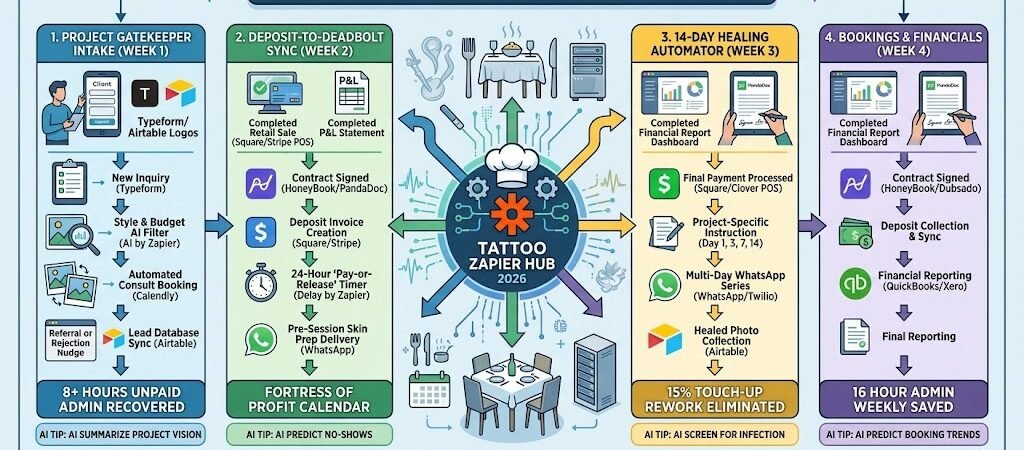
Key Takeaways: Zapier for Tattoo Artists 2026
- The “Vibe Check” Intake: Connect Instagram DMs or Typeform to Airtable, filtering out “tyre-kickers” by requiring reference photos and placement details before a consult is ever booked.
- The “Secure-the-Spot” Deposit: Use Zapier to link HoneyBook/Dubsado to Square, automatically cancelling “tentative” appointments if a deposit isn’t paid within 24 hours.
- Digital Design Approval: Use Airtable to send a “Secure Preview” of the line work 48 hours before the session, allowing for minor tweaks and reducing “stencilling stress” on the day.
- The “Infection Guard” Aftercare: Connect your POS to a WhatsApp sequence that sends specific instructions for Day 1, Day 3 (the “itchy phase”), and Day 14.
The “Studio Friction” of 2026
In 2026, a Tattoo Artist’s career is no longer defined solely by their ability to pull a clean line; it is defined by their “Project Velocity.” As the industry shifts toward high-concept, multi-session pieces, the administrative burden of managing a client from “Initial DM” to “Healed Masterpiece” has become a major revenue bottleneck. For a studio owner or independent artist, the primary enemy isn’t the competition—it’s the “Admin Drag.”
Modern Tattoo Professionals are currently fighting three critical “Studio Frictions”:
- The “Inquiry Inbox” Black Hole: In 2026, artists are bombarded across Instagram, TikTok, and WhatsApp with vague requests like “How much for a sleeve?” Manually filtering these “tyre-kickers” to find the serious projects with adequate budgets costs the average artist 8+ hours a week of unpaid “drawing time.”
- The “Tentative Calendar” Ghosting: A booking without a deposit is just a suggestion. Many artists lose thousands in revenue annually because they hold dates for clients who never send the deposit. Without an automated “Deposit-to-Deadbolt” system, your calendar is a “Swiss Cheese” of unpaid gaps that could have been filled by serious collectors.
- The “Touch-up” Revenue Drain: 15% of an artist’s time in 2026 is often spent on “Free Touch-ups” caused by poor client aftercare. Most clients forget the verbal instructions given at the end of an 8-hour session. If you aren’t delivering “Haptic Aftercare” directly to their phone during the critical Day 3 “Itchy Phase,” you are paying for their negligence with your own chair time.
The Zapier Solution: Zapier acts as your “Digital Studio Manager,” bridging the gap between your Instagram/Typeform inquiries, your Square/Stripe payments, and your Airtable project boards. By 2026, a top-tier studio doesn’t “chase” deposits; Zapier has already cancelled the unconfirmed slot. You don’t “hope” they heal well; Zapier has already delivered the Day 3 moisturizing guide. This automation ensures you spend your time with the needle on skin, not the thumb on the screen.
Tattoo Efficiency Benchmarks 2026
| Friction Category | 2026 Impact | Zapier Automation Fix |
| No-Show Losses | $500+/Week | Automated Deposit-to-Calendar Lock |
| Design Revision | 2 Hours/Session | Pre-Session Visual Approval Loop |
| Aftercare Issues | 15% Touch-up Rate | Automated 14-Day WhatsApp Support |
Practical AI Tip for 2026: Use AI by Zapier to “Grade the Inquiry.” Have the AI scan incoming forms in Airtable. If it identifies a project that perfectly matches your “Blackwork Realism” specialty and a high budget, it can automatically move that lead to the top of your list and trigger a “VIP Consult” link, ensuring you never miss a dream project in a sea of small scripts.
Blueprint #1 – The “Project Gatekeeper” Intake
In 2026, your “Link in Bio” is your most important employee. If you are still answering “How much?” in your DMs, you are acting as a receptionist instead of an artist. This blueprint creates a digital filter that qualifies leads, collects the necessary reference material, and only allows serious projects onto your calendar.
1. The Trigger: The “Inquiry Form” Submission
- The 2026 Tech: A potential client clicks your booking link and completes a Typeform or Airtable Form.
- The Action: The form requires specific inputs: placement (with a photo of the area), approximate size in centimeters, and at least three reference images.
- The Gate: If a client leaves these fields blank, Zapier sends a friendly WhatsApp nudge: “Hey [Name]! I love the concept, but I can’t give you an accurate quote without seeing the placement. Please upload a photo here: [Link]”
2. The Logic: Smart Project Triage
Zapier acts as your Creative Gatekeeper, sorting the gold from the noise:
- The “Style” Match: AI by Zapier scans the “Project Description.” If the client asks for “Full Color Realism” but you only do “Blackwork,” Zapier sends an automated referral to a partner artist: “I’m currently only taking on Blackwork projects, but [Artist Name] at the studio would be a perfect fit for this! Check them out here: [Link].”
- The Budget Filter: If the client’s budget is below your shop minimum, Zapier sends a polite “Not a fit” message or suggests a smaller-scale version of the design.
- The Artist Board Sync: Qualified inquiries are pushed into a “New Leads” view in Airtable, where the reference photos are neatly gallery-viewed for your morning coffee review.
3. The Action: The “Consultation Invite”
- The Action: For projects that pass the filter, Zapier sends a WhatsApp with your Calendly link: “This looks right up my alley! Let’s do a 15-minute video consult to finalize the details. Pick a time that works for you here: [Link]”
Project Gatekeeper Summary
| Step | Component | 2026 Recommended Tool |
| Trigger | Detailed Inquiry Submission | Typeform / Airtable Forms |
| Logic 1 | Style & Budget AI Filter | AI by Zapier |
| Logic 2 | Referral or Rejection Nudge | WhatsApp / Twilio |
| Action 1 | Lead Database Sync | Airtable |
| Action 2 | Automated Consult Booking | Calendly |
Practical AI Tip for 2026: Use AI by Zapier to “Summarize the Vision.” Have the AI read the client’s long, rambling project description and generate a 3-bullet-point summary for your Airtable record: 1. Geometric Sleeve, 2. Forearm Placement, 3. Includes Cover-up. This saves you from reading through paragraphs of text to find the technical requirements.
Blueprint #2 – The “Deposit-to-Deadbolt” Sync
In 2026, a “tentative” booking is a liability. Every hour your chair sits empty because of a no-show is lost revenue that you can never recover. This blueprint ensures your calendar is a “Fortress of Profit” by making the financial commitment a literal gatekeeper for the appointment slot. If they don’t pay, the slot doesn’t stay.
1. The Trigger: The “Design Quote & Contract” Approval
- The 2026 Tech: After your consultation, you move the lead to “Approved” in Airtable.
- The Action: Zapier triggers HoneyBook or PandaDoc to send the digital project contract and the waiver/consent form.
2. The Logic: The Financial Gatekeeper
Zapier acts as your Business Manager, ensuring the “Project Security” is handled:
- The Invoice Generation: As soon as the contract is signed, Zapier generates a $150 “Non-Refundable Deposit” invoice in Square or Stripe.
- The 24-Hour Expiry: Zapier starts a “Delay” timer. If the invoice isn’t marked as “Paid” within 24 hours, Zapier sends a WhatsApp warning: “Hey [Name]! I’ve got your date held, but it expires in 4 hours. Pay your deposit to lock it in: [Link]”
- The Automatic Release: If the timer hits zero without payment, Zapier deletes the “Pending” event from Google Calendar and moves the client back to “Lapsed” in Airtable, opening the spot for someone else.
3. The Action: The “Official Lock” & Prep Guide
- The Action: Once the payment is confirmed, Zapier moves the calendar event to “CONFIRMED” (changing the color to Green).
- The Prep Delivery: Zapier immediately sends the “7-Day Skin Prep Guide” (e.g., “Stay hydrated, avoid sun exposure, and moisturize the area”) to ensure the canvas is ready for the needle.
Deposit-to-Deadbolt Summary
| Step | Component | 2026 Recommended Tool |
| Trigger | Digital Contract Signed | HoneyBook / PandaDoc |
| Logic 1 | Deposit Invoice Creation | Square / Stripe |
| Logic 2 | 24-Hour “Pay-or-Release” Timer | Delay by Zapier |
| Action 1 | Calendar “Confirmed” Status | Google Calendar |
| Action 2 | Pre-Session Skin Prep Delivery | WhatsApp / Twilio |
Practical AI Tip for 2026: Use AI by Zapier to “Predict the Flake.” Have the AI look at the client’s past booking history in Airtable. If they have a history of late payments or rescheduling, Zapier can automatically increase their required deposit to 50% instead of the standard $150, protecting your time from high-risk clients.
Blueprint #3 – The “14-Day Healing” Automator
In 2026, your reputation leaves the studio on the client’s skin. However, most clients forget your detailed aftercare speech the moment they step into the sunlight. Poor healing leads to “ink dropout,” which results in “free touch-ups” that cost you time and money. This blueprint automates a 14-day “Healing Concierge” that coaches the client through every stage of the recovery process.
1. The Trigger: The “Session Closed”
- The 2026 Tech: You finalize the remaining balance on your Square or Clover POS.
- The Action: Zapier detects the “Payment Completed” status and identifies the project type (e.g., “Fine Line,” “Full Color,” or “Cover-up”) to tailor the advice.
2. The Logic: The Haptic Aftercare Timeline
Zapier acts as your Clinical Assistant, sending the right advice at the exact moment the client needs it:
- Day 1 (The Wrap): 4 hours post-session, Zapier sends a WhatsApp: “Time to remove the wrap! Wash with lukewarm water and unscented soap. Pat dry—do not rub. 🧼”
- Day 3 (The Itch): The “peeling phase” begins. Zapier sends a nudge: “Feeling itchy? That’s normal! DO NOT pick or scratch. Apply a thin layer of the balm we discussed. Keep it breathable. 🚫 fingernails!”
- Day 7 (The Dull Phase): The tattoo might look “milky” or dull. Zapier sends a reassurance: “Your ink might look a bit dull today—this is just new skin forming. Keep moisturizing!”
3. The Action: The “Portfolio Gold” Request
- The Action: On Day 14, Zapier sends a final follow-up: “Your masterpiece should be healed! I’d love to see how it looks. Send over a ‘Healed Photo’ and I’ll send you a 10% discount code for your next session! 📸”
- The Social Sync: Once the client replies with a photo, Zapier pushes it into your Airtable “Portfolio” gallery for your next social media update.
14-Day Healing Summary
| Step | Component | 2026 Recommended Tool |
| Trigger | Final Payment Processed | Square / Clover |
| Logic 1 | Stage-Specific Timing | Delay by Zapier |
| Logic 2 | Project-Specific Instructions | Zapier Tables |
| Action 1 | Multi-Day WhatsApp Series | WhatsApp / Twilio |
| Action 2 | Healed Photo Collection | Airtable |
Practical AI Tip for 2026: Use AI by Zapier (Vision) to “Screen for Infection.” If a client replies to an aftercare text with a photo and asks, “Is this normal?”, have the AI scan the image for excessive redness or swelling. If flagged, Zapier sends an Urgent Slack Alert to the artist: “Potential healing issue for [Client Name]. Check WhatsApp immediately.”
The 2026 Tattoo Artist Tech Stack
In 2026, the elite tattoo artist is a “Visual Project Manager.” Because high-end work now involves complex multi-session schedules and medical-grade aftercare, your tech stack must be as precise as your needle grouping. The 2026 standard is a “Digital Atelier” where the “Admin Drag” is handled by automation, allowing the artist to stay in the creative flow.
1. The 2026 Core Stack
| Function | 2026 Recommended Tool | Why It Wins in 2026 |
| Project CRM | Airtable | The visual “Brain.” Stores reference images, high-res stencil drafts, medical history, and “Healed” galleries in one database. |
| Payments | Square / Stripe | Essential for instant deposit collection and “Card-on-File” billing for long-day sessions. |
| Contracts & Waivers | PandaDoc / HoneyBook | Handles legally binding digital waivers, age verification, and “Copyright Release” forms automatically. |
| Communication | WhatsApp / Twilio | The highest engagement channel for Day-of “Skin Prep” reminders and 14-day “Healing” guides. |
| Project Intake | Typeform | Use this to force-collect reference photos and placement details before you even talk to the lead. |
2. The 2026 “Needle-on-Skin” Circuitry
In 2026, Zapier acts as your “Digital Apprentice,” routing data through three high-stakes circuits:
- The “Deposit-Lock” Circuit: Connect Square to Google Calendar. When a deposit hits $0.00, Zapier automatically deletes the “Tentative” booking to free up the slot. When it hits $150.00, it turns the event Green and locks it.
- The “Stencil-Approval” Circuit: Link Procreate (via iPad/Google Drive) to WhatsApp. When you export a stencil draft to a specific folder, Zapier sends a “Private Preview” link to the client for final size/placement confirmation.
- The “Ink-Health” Circuit: Connect Square to Twilio. Zapier triggers a 14-day messaging sequence that “holds the client’s hand” from the moment they leave the chair until the tattoo is fully settled.
3. Hardware for the 2026 “Digital Studio”
- iPad Pro 13″ (M4): The primary drawing tool. Linked via Zapier so that every “Project Folder” in Procreate automatically syncs with the client’s Airtable file.
- Smart Thermal Stencil Printers: Connected via Zapier. When you move a client to “Arrived” in your CRM, the stencil starts printing at the station before the guest even sits down.
- The “Studio Master” Laptop: Using the ASUS Zenbook Duo (2026), the artist keeps the Airtable reference board on the bottom screen and the Square POS or Spotify studio playlist on the top.
- Haptic “Session” Wearables: Artists wear the Apple Watch Ultra 3. Zapier sends a subtle vibration every 90 minutes as a “Stretch & Hydrate” reminder, ensuring the artist maintains peak focus during 8-hour sessions.
Conclusion: Your 30-Day “Tattoo Mastery” Roadmap
- Week 1: The Gatekeeper. Build a Typeform intake that requires “Reference Photos” and “Placement” to stop the DM noise.
- Week 2: The Deposit Deadbolt. Connect your Square invoices to Google Calendar to automatically release unpaid slots after 24 hours.
- Week 3: The Healing Concierge. Set up your 14-day WhatsApp aftercare sequence to reduce “Free Touch-up” requests.
- Week 4: The Portfolio Auto-Sync. Use Zapier to collect “Healed Photos” on Day 14 and push them directly into your Airtable portfolio.

About the Author
Aapt DubeyAapt Dubey is an automation specialist and software developer dedicated to eliminating manual workflows for small businesses. With deep, hands-on experience building complex Zapier integrations, API connections, and real-world applications, Aapt writes actionable, tested tutorials to help businesses scale efficiently.