
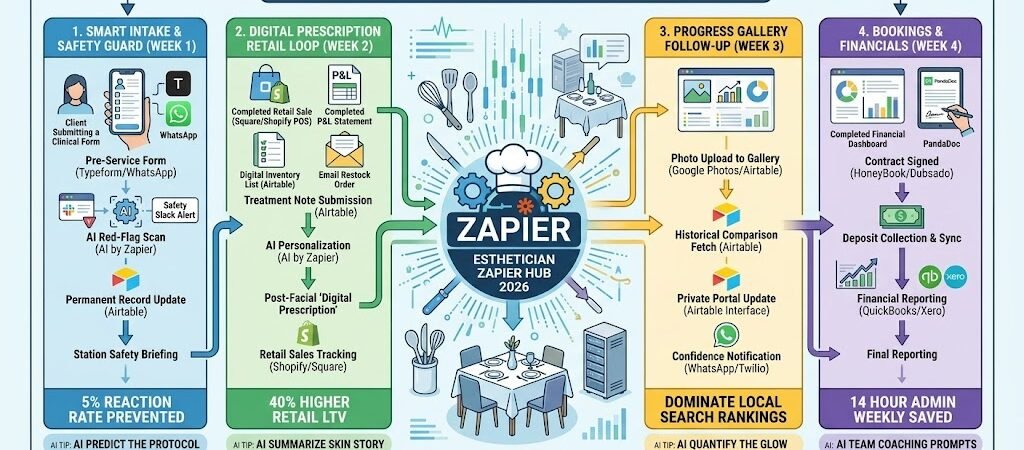
Key Takeaways: Zapier for Estheticians 2026
- The “Clinical Intake” Workflow: Connect Typeform to Airtable, automatically flagging contraindications (like Retinol use or pregnancy) for the Esthetician before the client arrives.
- The “Visual Skin Journal”: Use Zapier to link Photos to Airtable, creating a time-stamped gallery of “Before & After” results that guests can access via a private portal.
- AI-Powered Prescription: Use AI by Zapier to analyze treatment notes (e.g., “High sensitivity, dehydrated”) and automatically draft a personalized WhatsApp product recommendation list.
- The “Serum Restock” Nudge: Connect Square sales to a 60-day timer, texting the client: “Your Vitamin C serum should be running low! Click here to reorder and maintain your glow.”
The “Consultation Friction” of 2026
In 2026, the Esthetician is no longer just a service provider; they are a “Skin Intelligence Officer.” As clinical-grade treatments like microneedling, chemical peels, and LED therapy become the norm, the margin for error has narrowed. For an “Expert Hair Stylist” or salon owner expanding into esthetics, the primary obstacle isn’t the treatment itself—it’s the Data Fragmentation that happens before and after the guest is on the table.
Modern Estheticians are currently fighting three critical “Consultation Frictions”:
- The “Safety Information” Gap: In 2026, clients use a complex rotation of active ingredients (Retinols, AHAs, Prescription Topicals). If a guest forgets to mention they started a new prescription two days ago, a standard facial can turn into a chemical burn. Manually checking paper forms for these “red flags” is a 5% reaction risk that your business cannot afford.
- The “Retail Amnesia” Revenue Leak: 80% of skin results happen at home, yet the industry average for retail conversion remains a stagnant 15%. Why? Because clients forget the names of the “magic serums” you used the moment they leave the zen environment of your treatment room. If you aren’t putting a clickable “Digital Prescription” in their hand within an hour, you are leaving thousands in retail profit on the table.
- The “Invisible Progress” Plateau: Skin changes are incremental. After three sessions, a client might feel their hyperpigmentation “isn’t moving,” simply because they see their face in the mirror every day. Without a data-backed way to show them a side-by-side “Visual Skin Journal,” you lose the trust required to keep them on a high-value, 6-month treatment plan.
The Zapier Solution: Zapier acts as your “Clinical Assistant,” bridging the gap between your Vagaro/Mindbodybooking, Typeform clinical intakes, and Airtable skin journals. By 2026, a top-tier Esthetician doesn’t “hope” they caught an allergy; Zapier has already flagged it in red on their tablet. You don’t “suggest” a serum; Zapier has already sent a pre-loaded Shopify cart to the client’s phone. This automation ensures you spend your time on advanced skin analysis, not digging through digital folders.
Esthetician Efficiency Benchmarks 2026
| Friction Category | 2026 Impact | Zapier Automation Fix |
| Safety Risks | 5% Reaction Rate | Automated Contraindication Flagging |
| Retail Conversion | 15% (Industry Avg) | Post-Facial “Digital Prescription” |
| Admin Drag | 14 Hours/Week | Automated Charting & Follow-up |
Practical AI Tip for 2026: Use AI by Zapier to “Summarize the Skin Story.” Have the AI scan a client’s last three treatment notes in Airtable and generate a one-sentence brief for the Esthetician: “Client’s redness has decreased by 20% since January, but dehydration is peaking; prioritize the Hyaluronic Infusion today.”
Blueprint #1 – The “Smart Intake” & Safety Guard
In 2026, a “luxury” facial is defined by its safety and precision. With the rise of high-potency home skincare and prescription topicals (like Tretinoin or Accutane), the risk of adverse reactions during professional peels or microneedling has skyrocketed. This blueprint ensures you are never surprised by a client’s “hidden” skincare habits, protecting both their skin and your professional liability.
1. The Trigger: The “Clinical Intake” Submission
- The 2026 Tech: 24 hours before their appointment, Zapier triggers an automated WhatsApp or Email containing a Typeform clinical intake.
- The Action: The client provides their current product list, recent sun exposure, and medical updates (medications, pregnancy, or recent surgeries).
2. The Logic: Automated Contraindication Triage
Zapier acts as your Digital Safety Officer, scanning the data before the client even walks in:
- The AI Red-Flag Scan: AI by Zapier scans the response for high-risk keywords. If a client mentions “Retin-A,” “Accutane,” or “Peanut Allergy,” Zapier immediately tags the record as “High Alert.”
- The Protocol Match: If a contraindication is found (e.g., client is on blood thinners but booked for Microneedling), Zapier checks your Vagaro service list for a safe alternative.
- The Manager Alert: An Urgent Slack notification is sent to the Esthetician: “Safety Alert: 3 PM Guest (Aapt) reported Retinol use last night. Switch ‘Advanced Peel’ to ‘Enzyme Glow’ to avoid irritation.”
3. The Action: The “At-a-Glance” Skin Chart
- The Sync: Zapier pushes the entire intake into the client’s Airtable “Skin Master” file.
- The Station Display: When the Esthetician opens the client’s file on their station iPad, the most critical safety data is pinned to the top in bold red text, ensuring it is seen before the first product is applied.
Smart Intake & Safety Summary
| Step | Component | 2026 Recommended Tool |
| Trigger | 24-Hour Pre-Service Form | Typeform / WhatsApp |
| Logic 1 | Keyword Risk Detection | AI by Zapier |
| Logic 2 | Service Adjustment Alert | Slack |
| Action 1 | Permanent Record Update | Airtable |
| Action 2 | Station Safety Briefing | Airtable Interface |
Practical AI Tip for 2026: Use AI by Zapier to “Predict the Protocol.” Have the AI look at the client’s self-reported concerns (e.g., “My skin feels tight and looks dull”) and suggest a 2026-standard treatment add-on, like “Oxygen Infusion,” in a private note to the Esthetician.
Blueprint #2 – The “Digital Prescription” Retail Loop
In 2026, Estheticians are seen as “Skin Coaches,” yet the industry-standard retail conversion remains low because clients forget the names of the “magic serums” used during their treatment. If you aren’t putting a clickable “Digital Prescription” in their hand before they reach their car, you are losing a massive recurring revenue stream. This blueprint automates the transition from treatment room to home care.
1. The Trigger: The “Treatment Note” Entry
- The 2026 Tech: Immediately following the session, the Esthetician records the service details. Using a mobile-optimized Airtable Form or Zapier Central, you log the products used and the client’s “Prescribed Routine.”
- The Input: You select checkboxes for “Hyaluronic Acid Serum,” “PDRN Regenerative Mist,” or “Barrier Repair Cream” based on the day’s skin analysis.
2. The Logic: Personalized Cart Creation
Zapier acts as your Virtual Retail Manager, ensuring the recommendation is effortless to fulfill:
- The Product Match: Zapier looks up the selected items in your Shopify or Square Online catalog to pull live pricing and direct product links.
- The AI Summary: AI by Zapier scans your treatment notes (e.g., “Client skin showed high transepidermal water loss”) and drafts a personalized “Why” for each product: “I’ve recommended the Lipid Balm to help repair the dehydration we saw during your analysis today.”
- The Bundle Logic: If you’ve prescribed a 3-step routine, Zapier creates a Shopify Draft Order or a “Shared Cart” link.
3. The Action: The “Home Care” WhatsApp
- The Delivery: Zapier sends a high-value WhatsApp (via Twilio) 30 minutes after the appointment: “Your skin is glowing, [Name]! ✨ To maintain these results at home, I’ve put together your 2026 Digital Prescription here: [Link to Pre-Filled Cart]. Your custom routine is also saved in your skin journal.”
- The Tracking: Zapier updates the client’s file in Airtable to show the “Recommendation Sent” date, allowing you to follow up if they haven’t purchased within 7 days.
Digital Prescription Summary
| Step | Component | 2026 Recommended Tool |
| Trigger | Treatment Note Submission | Airtable / Zapier Forms |
| Logic 1 | Product Link Retrieval | Shopify / Square |
| Logic 2 | AI Personalization | AI by Zapier |
| Action 1 | One-Click Checkout Link | Shopify Draft Orders |
| Action 2 | Home-Care Instructions | WhatsApp / Twilio |
Practical AI Tip for 2026: Use AI by Zapier to “Predict the Empty Bottle.” If a client buys a 30ml Vitamin C serum, Zapier can set a 60-day delay based on average usage and send a friendly WhatsApp: “Your Vitamin C should be running low! Click here to restock and keep that morning glow consistent.” This “Auto-Restock” logic can increase your retail LTV (Lifetime Value) by 40%.
Blueprint #3 – The “Progress Gallery” Follow-up
In 2026, clinical results are the only currency that matters. Because skin improvements are often incremental, clients can suffer from “Results Blindness,” where they fail to notice the gradual fading of hyperpigmentation or the softening of fine lines. This blueprint automates the delivery of professional “Before & After” proof, turning a subjective “I think it’s working” into an objective “I can see it’s working.”
1. The Trigger: The “Post-Service Photo”
- The 2026 Tech: After the treatment is complete, the Esthetician takes a high-resolution photo of the client’s skin using a station iPad and uploads it to a specific Airtable field or a Google Drive folder labeled “Client Progress.”
- The Action: Zapier detects the new file and matches it to the client’s unique ID and the current date.
2. The Logic: Branding & Comparison Logic
Zapier acts as your Clinical Content Manager, preparing the “Proof of Result”:
- The Brand Overlay: Zapier uses BannerBear or Cloudinary to automatically overlay your salon’s logo and the treatment date onto the image, making it “Social Media Ready” for the client to share.
- The Side-by-Side Fetch: Zapier looks back at the Airtable records for this client. It pulls the “Initial Consultation” photo from 3 months ago to prepare a side-by-side comparison.
- The Portal Update: The new photo is automatically added to a private, client-facing Airtable Interface (their “Skin Journal”).
3. The Action: The “Confidence” Notification
- The Delivery: Zapier waits 2 hours—just long enough for the client to be home and likely inspecting their skin in their own bathroom lighting.
- The Message: Zapier sends a WhatsApp: “Check out that 2026 glow, [Name]! 🔥 I’ve just uploaded your ‘After’ photo to your Skin Journal. If you look at it next to your January photo, you can really see the texture smoothing out! View your progress here: [Private Link]”
Progress Gallery Summary
| Step | Component | 2026 Recommended Tool |
| Trigger | Photo Upload to Gallery | Airtable / Google Photos |
| Logic 1 | Automatic Brand Watermarking | BannerBear |
| Logic 2 | Historical Comparison Fetch | Airtable |
| Action 1 | Private Portal Update | Airtable Interface |
| Action 2 | “Results Ready” WhatsApp | WhatsApp / Twilio |
Practical AI Tip for 2026: Use AI by Zapier (Vision) to “Quantify the Glow.” In 2026, AI can analyze skin images for “Luminosity” and “Redness” levels. Have Zapier scan the photo and include a data point in the text: “Your skin luminosity has increased by 12% since your last peel! Let’s keep that momentum going.” This data-backed praise makes your services feel scientifically essential.
The 2026 Esthetician Tech Stack
In 2026, the elite Esthetician operates as a “Dermal Data Scientist.” Because your services are results-oriented and often involve high-potency actives, your tech stack must prioritize safety, historical tracking, and frictionless retail. The 2026 standard is a “Clinical-Grade Studio” where every allergy is flagged by AI and every home-care recommendation is just one tap away from a purchase.
1. The 2026 Core Stack
| Function | 2026 Recommended Tool | Why It Wins in 2026 |
| Booking & PMS | Vagaro / Mindbody | These platforms excel at managing “Service Series” (e.g., a 6-week Microneedling course) and tracking pre-paid treatment packages. |
| Clinical Records | Airtable | The “Brain” of the shop. Airtable handles high-res photo galleries, treatment “formulas” (peel %, LED wavelength), and clinical intake data. |
| Retail & E-commerce | Shopify | Essential for the “Digital Prescription” workflow. Allows you to send pre-filled carts directly to a client’s WhatsApp. |
| Communication | WhatsApp / Twilio | The primary channel for sending high-value aftercare videos, “Before & After” galleries, and “Serum Refill” reminders. |
| Safety Logic | AI by Zapier | Acts as an automated “Contraindication Filter,” scanning intake forms for dangerous active ingredient combinations. |
2. The 2026 “Skin Intelligence” Circuitry
In 2026, Zapier acts as your “Clinical Assistant,” routing data through three trust-building circuits:
- The “Red-Flag” Circuit: Connect Typeform to Slack. If a client mentions a medication like “Accutane” or “Tretinoin” on their intake, Zapier pings the Esthetician instantly so the treatment plan can be pivoted before the guest arrives.
- The “Prescription-to-Cart” Circuit: Link Airtable to Shopify. When the Esthetician checks a box for “Post-Peel Serum” in the treatment notes, Zapier drafts a Shopify order and texts the checkout link to the client.
- The “Visual Proof” Circuit: Connect Google Photos to Airtable. When a “Post-Glow” photo is snapped, Zapier watermarks it with your logo and adds it to the client’s private “Skin Journal” portal.
3. Hardware for the 2026 “Clinical Studio”
- Wall-Mounted Analysis iPads: Used for high-res skin photography and showing clients their “Progress Sliders” (side-by-side comparisons of their skin from 3 months ago).
- Smart “Serum” Scales: Linked via Zapier to track backbar usage. When your $200 professional-grade Vitamin C bottle hits 10% weight, Zapier automatically drafts a restock order.
- The “Diagnostics” Laptop: Using the ASUS Zenbook Duo (2026), the Esthetician keeps the Vagaro schedule on top and the Airtable “Skin Intelligence” dashboard on the bottom for deep-dive consultations.
- Haptic “Treatment” Wearables: Estheticians wear Apple Watch Ultra 3. Zapier pushes a subtle vibration when a chemical peel has reached its 3-minute “Neutralize” window, ensuring perfect timing without noisy alarms.
Conclusion: Your 30-Day “Esthetics Mastery” Roadmap
- Week 1: The Safety Shield. Set up a Typeform intake that uses AI by Zapier to flag medication risks in Slack.
- Week 2: The Digital Prescription. Link your Airtable notes to Shopify so you can send “One-Click Buy” links after every facial.
- Week 3: The Results Portal. Use Airtable Interface Designer to create a private “Skin Journal” where clients can see their progress photos.
- Week 4: The Refill Engine. Set up a 60-day automated WhatsApp nudge for clients who purchased retail products to encourage restocks.

About the Author
Aapt DubeyAapt Dubey is an automation specialist and software developer dedicated to eliminating manual workflows for small businesses. With deep, hands-on experience building complex Zapier integrations, API connections, and real-world applications, Aapt writes actionable, tested tutorials to help businesses scale efficiently.