
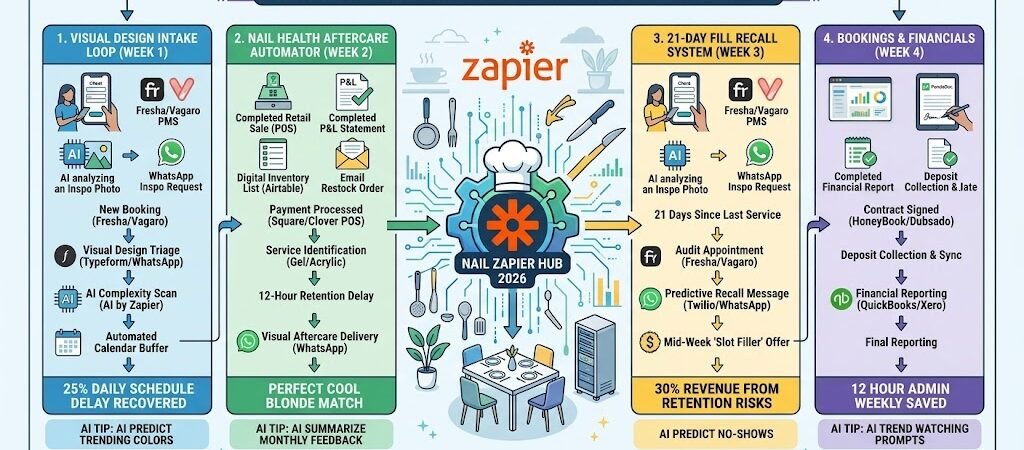
Key Takeaways: Zapier for Nail Salons 2026
The “Perfect Timing” Recall: Connect your PMS to Twilio, automatically texting clients 3 weeks post-service: “Time for a fill! Your current set is 21 days old—let’s keep your natural nails healthy.”
The “Visual Intake” Workflow: Connect Instagram DMs or Typeform to Airtable, allowing clients to upload “Inspiration Photos” during booking so you can allocate the correct time for intricate nail art.
The “Nail Health” Guard: Use AI by Zapier to identify the service (e.g., “Acrylic Full Set”) and send a automated WhatsApp aftercare guide 24 hours later to prevent lifting and breakages.
Smart Supply Sync: Link your Square/Shopify sales to Airtable, triggering an “Order Request” for trending gel colors before they sell out on social media.
The “Detail Friction” of 2026
In 2026, the premium nail salon industry has moved beyond simple manicures into the realm of high-fashion “wearable art.” However, this complexity has introduced a massive operational bottleneck: The Estimation Gap. For an “Expert Hair Stylist” or salon owner, failing to account for the technical nuances of a Gel-X application versus a basic polish can derail an entire day’s profit.
Modern nail salon owners are currently fighting three critical “Detail Frictions”:
- The “Service Creep” Schedule Crash: A client books a 45-minute “Basic Gel” online but arrives with a Pinterest board featuring 3D charms, chrome powders, and hand-painted French tips. Without a way to pre-verify these designs, your technicians are forced to either rush the art (lowering quality) or run 30 minutes late for every subsequent client, leading to a 25% daily schedule delay.
- The “Lapse” Retention Risk: Unlike a haircut which can wait an extra week, nail enhancements have a biological “expiration date.” After 21 days, the apex of an acrylic or gel set shifts, increasing the risk of painful lifting or natural nail damage. In 2026, waiting for the client to remember to book is a 30% revenue risk; you need a system that predicts their regrowth cycle.
- The “Aftercare Re-work” Drain: 10% of salon time in 2026 is often wasted on “complimentary fixes”—chipped gel or popped-off tips—usually caused by the client using their nails as tools or neglecting cuticle oil. Without automated, service-specific education, you are paying your technicians to fix mistakes that could have been prevented with a simple WhatsApp guide.
The Zapier Solution: Zapier acts as your “Design & Health Concierge,” creating a seamless data bridge between your Fresha/Vagaro booking system, Typeform visual intakes, and WhatsApp aftercare delivery. By 2026, a top-tier nail salon doesn’t guess the design time; Zapier has already captured the photo and adjusted the calendar. You don’t hope they come back for a fill; Zapier has already nudged them based on their specific service date. This automation ensures your technicians spend their time on precision art, not apologies for being late.
Nail Salon Efficiency Benchmarks 2026
| Friction Category | 2026 Impact | Zapier Automation Fix |
| Service Overruns | 25% Daily Schedule Delay | Visual Design Intake & Time Buffers |
| Client Retention | 4-Week “Lapse” Risk | Automated 21-Day “Fill” Reminders |
| Aftercare Issues | 10% Rework/Fixes | Automated WhatsApp Aftercare PDFs |
Practical AI Tip for 2026: Use AI by Zapier to “Scan for Complexity.” When a client uploads an inspiration photo to your intake form, have the AI analyze the image. If it detects “Intricate Art” or “Charms,” Zapier can automatically send a Slack alert to the manager: “Complexity Alert: Room 4 guest wants 3D Art. Ensure the ‘Master Artist’ is assigned or extend the slot by 20 mins.”
Blueprint #1 – The “Visual Design” Intake Loop
In 2026, “I’ll show you when I get there” is the phrase that kills salon profitability. Complex sets involving 3D charms, airbrushing, or Gel-X extensions require specific tools and prep time that a standard “Mani/Pedi” booking slot doesn’t provide. This blueprint automates the collection of inspiration photos, allowing you to curate the perfect appointment before the client even steps through the door.
1. The Trigger: The “New Booking” Discovery
- The 2026 Tech: A client completes a booking through Fresha or Vagaro.
- The Action: Zapier detects the new appointment and filters for “Nail Art” or “Full Set” categories.
2. The Logic: Visual Triage & AI Assessment
Zapier acts as your Digital Art Director, ensuring the technician is prepared:
- The Inspiration Request: Zapier sends a WhatsApp (via Twilio): “We’ve got your chair ready, [Name]! To make sure we have your colors and charms in stock, please upload your ‘Inspo’ photo here: [Link to Typeform]”
- The AI Complexity Scan: Once the photo is uploaded, AI by Zapier analyzes the image. If it detects “Intricate Hand-Painting” or “3D Charms,” it flags the appointment as “High Complexity” in your Airtable dashboard.
- The Buffer Logic: If the AI confirms high complexity, Zapier checks your Google Calendar. If there is space, it automatically adds a 15-minute “Art Buffer” to the end of the slot to prevent the next client from waiting.
3. The Action: The “Station Prep” Dossier
- The Action: Zapier pushes the inspiration photo and the client’s past “Color Formula” (stored in Airtable) directly to the technician’s station tablet.
- The Alert: The assigned technician receives a Slack notification: “Heads up! Your 2 PM guest wants ‘Aura Nails’ with chrome. Station 4 is prepped with the airbrush kit.”
Visual Design Intake Summary
| Step | Component | 2026 Recommended Tool |
| Trigger | New Appointment Confirmed | Fresha / Vagaro |
| Logic 1 | Visual Upload Request | Typeform / WhatsApp |
| Logic 2 | Design Complexity Analysis | AI by Zapier |
| Action 1 | Automated Calendar Buffer | Google Calendar |
| Action 2 | Technician Station Prep | Airtable / Slack |
Practical AI Tip for 2026: Use AI by Zapier to “Inventory Match.” Have the AI look at the colors in the uploaded photo. If the client wants a specific “Neon Coral” and your Airtable inventory shows you are down to the last bottle, Zapier can send a Slack alert to the manager to “Reserve Bottle #402 for the 2 PM client.”
Blueprint #2 – The “Nail Health” Aftercare Automator
In 2026, a set of nails is only as good as its longevity. High-end services like Gel-X, Chrome, or 3D sets are prone to lifting or dulling if the client treats them like “tools” rather than “jewels.” This blueprint eliminates the “complimentary fix” drain by educating the client at the exact moment they are most likely to forget your verbal instructions.
1. The Trigger: The “Check-Out”
- The 2026 Tech: The service is marked “Paid” in Square, Clover, or your PMS.
- The Action: Zapier catches the “Transaction Complete” event and identifies the specific service provided (e.g., “Acrylic Full Set”).
2. The Logic: Service-Specific Education
Zapier acts as your Lead Technician, ensuring the advice matches the material:
- The Material Match: Zapier identifies the service type. If it was Chrome, it prepares a guide on avoiding harsh chemicals that strip the shine. If it was Extensions, it focuses on proper removal and cuticle oil use.
- The Emotional Delay: Zapier waits 12 hours. This ensures the message arrives after the “salon high” has worn off and the client is back in their normal routine, where they are most likely to cause damage.
3. The Action: The “Stay Fresh” Digital Guide
- The Action: Zapier sends a WhatsApp (via Twilio) with a personalized link: “Your new set looks amazing, [Name]! To keep that Chrome shining and prevent any lifting, here is our 3-step aftercare guide: [Link to PDF/Video].”
- The Upsell: At the bottom of the guide, Zapier includes a “Buy Again” button for your salon’s custom cuticle oil on your Shopify store.
Nail Health Aftercare Summary
| Step | Component | 2026 Recommended Tool |
| Trigger | Payment Processed | Square / Clover |
| Logic 1 | Service Type Identification | Zapier Tables |
| Logic 2 | 12-Hour “Retention” Delay | Delay by Zapier |
| Action 1 | Visual Aftercare Delivery | WhatsApp / Twilio |
| Action 2 | Retail Upsell Integration | Shopify |
Practical AI Tip for 2026: Use AI by Zapier to “Scan for Trouble.” If a client replies to the aftercare text with a keyword like “Chipped” or “Lifting,” Zapier can automatically create a high-priority task in Slack: “Urgent: Client [Name] reporting an issue with their 24h-old set. Call to schedule a fix before they leave a review.”
Blueprint #3 – The “21-Day Fill” Recall System
In 2026, client retention is built on biology, not just branding. After 21 days, the “apex” (the strongest point) of a gel or acrylic set has grown out, leaving the natural nail vulnerable to breakage and the set prone to lifting. If a client waits 5 weeks to return, they aren’t just a “late booking”—they are a high-risk service that takes longer to fix. This blueprint automates the recall process, ensuring your chairs stay full and your clients’ nails stay healthy.
1. The Trigger: The “Day 21 Milestone”
- The 2026 Tech: It has been exactly 21 days since the client’s last transaction was recorded in Square or Fresha.
- The Action: Zapier pings your Airtable CRM to check the client’s status.
2. The Logic: Predictive Retention Check
Zapier acts as your Loyalty Officer, ensuring you only nudge the clients who haven’t already taken action:
- The Appointment Audit: Zapier checks your Fresha/Vagaro calendar. If the client already has a future booking, the automation stops (to avoid being spammy).
- The Service Lifetime: If the last service was a simple “Classic Manicure” (which lasts 7-10 days), Zapier adjusts the trigger to 10 days instead of 21.
- The “Lapse” Risk: If the client hasn’t visited in 35+ days, Zapier tags them as “At Risk” for a more aggressive “We Miss You” discount.
3. The Action: The “Healthy Nails” Nudge
- The Personalized Message: Zapier sends an SMS or WhatsApp: “Hi [Name]! Your current set is hitting the 3-week mark. To keep your natural nails strong and prevent any lifting, we recommend a refresh this week. We have a few spots open this Thursday—grab one here: [Booking Link]”
- The Slot Filler: For slow mid-week mornings, Zapier adds a “Mid-week Perk”: “Book for Tuesday or Wednesday and get a complimentary paraffin wax treatment! ✨”
21-Day Fill Recall Summary
| Step | Component | 2026 Recommended Tool |
| Trigger | 21 Days Since Last Service | Square / Clover |
| Logic 1 | Existing Appointment Audit | Fresha / Vagaro |
| Logic 2 | Service-Specific Timing | Airtable |
| Action 1 | Predictive Recall Message | WhatsApp / Twilio |
| Action 2 | Mid-Week “Slot Filler” Offer | Zapier Tables |
Practical AI Tip for 2026: Use AI by Zapier to “Predict the Lapse.” If a client who usually visits every 18 days (a “Frequent Flyer”) hasn’t booked by day 20, have Zapier send a high-priority “Specialist Alert” to the manager: “VIP Client [Name] is off-schedule. Send a personal note?” This keeps your highest-value clients from drifting to a competitor.
The 2026 Nail Salon Tech Stack
In 2026, the leading nail salons have transitioned from “service providers” to “Visual Aesthetic Partners.” Because nail trends move at the speed of social media, your tech stack must be agile enough to handle a viral “Chrome” trend one day and a “3D Jewel” trend the next. The 2026 standard is a “High-Resolution Studio” where the guest’s inspiration board is digitally synced to the technician’s station before they even sit down.
1. The 2026 Core Stack
| Function | 2026 Recommended Tool | Why It Wins in 2026 |
| Booking & PMS | Fresha / Vagaro | The gold standard for handling complex “Add-on” services (removals, art, length) that dictate appointment timing. |
| Visual Intake | Typeform / Airtable | Essential for collecting and storing “Inspiration Photos.” Typeform handles the guest’s upload, and Airtable stores it in the client’s permanent file. |
| POS & Retail | Square / Shopify | Seamlessly tracks the $120 full-set alongside the $15 cuticle oil upsell, triggering inventory updates in real-time. |
| Guest Comms | WhatsApp / Twilio | In 2026, nails are visual. WhatsApp allows you to send high-res aftercare PDFs and video tutorials on “How to Remove at Home” safely. |
| Inventory Brain | Airtable | Tracks your “Trend Stock.” If a certain gel color is featured in 10 “Inspo Photos” this week, it alerts you to order more. |
2. The 2026 “Precision” Circuitry
In 2026, Zapier acts as your “Design Concierge,” routing data through three precision-focused circuits:
- The “Inspo-to-Chair” Circuit: Connect Typeform to Airtable. When a client uploads an image, Zapier pings the Slack channel for that specific technician so they can prep the correct powders and charms in advance.
- The “Apex-Health” Circuit: Link Square to Delay by Zapier. Zapier “remembers” the service date and triggers a 21-day “Health Check” message to ensure the set is filled before it causes natural nail damage.
- The “Trend-to-Vendor” Circuit: Connect Airtable to Gmail. When “Chrome Powder” stock hits a specific weight (via smart scales), Zapier drafts a restock order to your distributor.
3. Hardware for the 2026 “Visual Salon”
- Station iPads (Pro Series): Technicians use these to view the high-res “Inspo Photo” side-by-side with the client’s previous sets and color formulas.
- Smart UV Lamps (IoT-Enabled): Linked via Zapier to track usage. After 500 cures, Zapier pings the manager: “Bulb strength potentially dropping. Order replacements to ensure 2026 cure standards.”
- The “Creative” Laptop: Using the ASUS Zenbook Duo (2026), the manager uses the top screen for the Freshamaster calendar and the bottom screen for the Airtable gallery of upcoming design requests.
- Haptic “Time-Check” Wearables: Technicians wear Apple Watch Ultra 3. If an intricate design is taking longer than the AI-estimated time, Zapier sends a subtle “vibration” to the wrist: “10 minutes remaining in slot.”
Conclusion: Your 30-Day “Nail Mastery” Roadmap
- Week 1: The Visual Intake. Set up your Typeform link to capture inspiration photos for every “Nail Art” booking.
- Week 2: The Health Guard. Connect your POS to WhatsApp to automate service-specific aftercare guides.
- Week 3: The 21-Day Recall. Link your Square data to Twilio to trigger automated “Fill” reminders based on the 3-week regrowth cycle.
- Week 4: The Trend Tracker. Use Airtable to begin logging every “Inspo Photo” to identify which colors and styles are trending in your local market.

About the Author
Aapt DubeyAapt Dubey is an automation specialist and software developer dedicated to eliminating manual workflows for small businesses. With deep, hands-on experience building complex Zapier integrations, API connections, and real-world applications, Aapt writes actionable, tested tutorials to help businesses scale efficiently.