
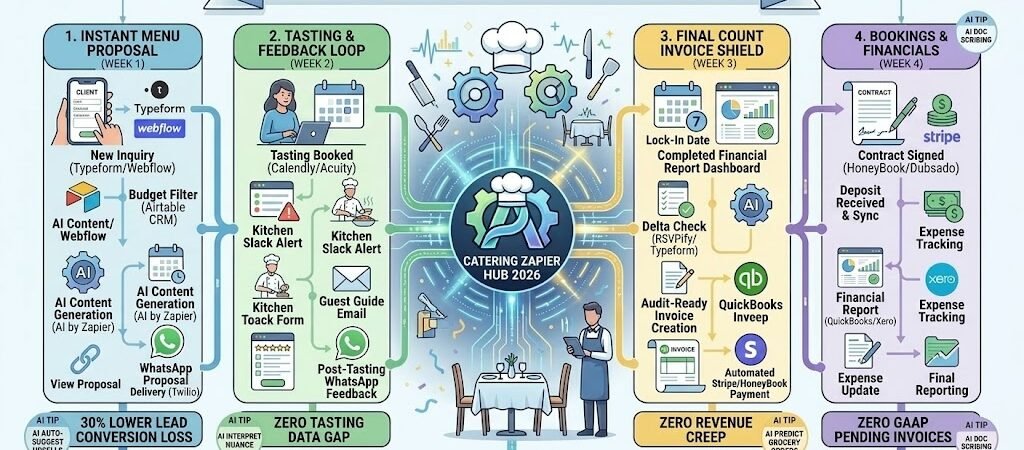
Key Takeaways: Zapier for Caterers 2026
- The “Smart Menu” Architect: Link Typeform inquiry data to Airtable, automatically generating a custom menu proposal based on the client’s budget, guest count, and dietary restrictions.
- Automated Tasting Concierge: Connect Calendly to Zapier Central, allowing clients to book tastings that automatically trigger kitchen prep alerts and personalized “What to Expect” guides.
- The “Zero-Leak” Invoice: Use Zapier to link HoneyBook or Dubsado to QuickBooks, ensuring final headcounts from RSVPs are automatically reflected in the final invoice sent 72 hours before the event.
- Real-Time Ingredient Scoping: Connect your “Approved Menu” to a Google Sheet that calculates total ingredient weights and sends a “Quote Request” to your wholesalers instantly.
The “Logistic Overload” of 2026
In 2026, catering success is won in the office long before the first stove is lit. While the culinary execution remains the heart of the business, the administrative burden of managing custom menus, shifting guest counts, and complex logistics has become the primary source of burnout for independent caterers.
Modern catering operations are currently fighting three critical “Coordination Frictions”:
- The “Proposal Delay” Lead Loss: In 2026, clients expect near-instant gratification. If it takes three days to manually calculate a quote and draft a menu based on their dietary needs, you’ve likely already lost the contract to a competitor using automated “Menu Engineering.” Speed to lead is no longer an advantage; it is a requirement.
- The “Headcount Creep” Revenue Leak: One of the biggest drains on catering margins is the “Final Count” mismatch. Manually updating invoices to reflect last-minute RSVP additions or subtractions is prone to human error. Without an automated sync between your guest list and your billing department, you are essentially giving away food and labor for free.
- The “Tasting Feedback” Gap: Client tastings are your strongest sales tool, yet the feedback is often scribbled on napkins or lost in long email threads. This lack of structured data leads to “Kitchen Confusion” on the day of the event, where specific modifications discussed weeks prior are forgotten, resulting in a diminished guest experience.
The Zapier Solution: Zapier acts as your “Digital Banquet Manager,” ensuring that every detail shared by the client—from their budget to their allergy to cilantro—is instantly routed to the kitchen, the warehouse, and the accounting department. By 2026, a high-efficiency caterer doesn’t “re-calculate” a quote; Zapier has already updated the Airtableinventory master and drafted a HoneyBook contract. This automation allows you to return to the art of the menu, while the “digital manager” handles the logistics.
Catering Efficiency Benchmarks 2026
| Friction Category | 2026 Impact | Zapier Automation Fix |
| Proposal Delays | 30% Lower Conversion | Instant AI-Generated Menu Proposals |
| Headcount Errors | 15% Food Waste | Auto-Sync RSVPs to Final Invoices |
| Payment Chasing | 10 Days Late (Avg) | Automated Milestone Payment Reminders |
Practical AI Tip for 2026: Use AI by Zapier to “Predict the Rental List.” Have Zapier scan your finalized menu in Airtable. If the menu includes a “Five-Course Plated Service,” the AI can automatically calculate the exact number of forks, chargers, and wine glasses needed (plus a 10% safety buffer) and draft a quote request for your preferred rental vendor.
Blueprint #1 – The “Instant Menu” Proposal
In 2026, the caterer who responds first with a tailored plan wins the contract. Waiting 48 hours to “crunch the numbers” is no longer an option when clients are used to instant digital experiences. This blueprint automates the “Creative Pitch,” turning a cold inquiry into a professional, visual proposal in minutes.
1. The Trigger: The “Detailed Inquiry”
- The 2026 Tech: A client completes a high-conversion, multi-step inquiry form on Typeform or your Webflow site.
- The Action: Zapier catches the specific event DNA: date, budget-per-head, guest count, dietary restrictions (e.g., “Vegan & Nut-Free”), and “Vibe” (e.g., “Coastal Chic”).
2. The Logic: AI Menu Engineering
Zapier acts as your Digital Executive Chef, filtering your vast recipe library through the client’s specific constraints:
- The Budget Filter: Zapier checks the client’s “Cost Per Head” against your Airtable pricing tiers to ensure the suggested dishes are profitable.
- The AI Draft (AI by Zapier): AI analyzes the “Vibe” and dietary needs to select 3 distinct menu concepts from your master list that fit the theme perfectly.
- The Margin Guard: Zapier cross-references current wholesale ingredient prices in your Google Sheets to flag if a requested item (like “Premium Scallops”) will squeeze your margins too thin.
3. The Action: The “Visual Pitch”
- The Document Generation: Zapier pushes the selected menu and client data into PandaDoc or HoneyBook, creating a personalized, branded PDF proposal.
- The Instant Delivery: Zapier sends a WhatsApp (via Twilio): “Hi [Name]! We’re thrilled about your event. 🥂 Based on your ‘Coastal Chic’ vision, I’ve drafted 3 menu concepts for you here: [Link]. Let me know which one sparks your interest!”
- The Task Alert: Zapier adds a “Follow-up” task to your Todoist for 24 hours later if the proposal hasn’t been opened.
Instant Menu Proposal Summary
| Step | Component | 2026 Recommended Tool |
| Trigger | Detailed Lead Intake | Typeform / Webflow |
| Logic 1 | Menu & Budget Matching | Airtable |
| Logic 2 | AI Content Generation | AI by Zapier / OpenAI |
| Action 1 | Digital Proposal Creation | PandaDoc / HoneyBook |
| Action 2 | One-Click Client Delivery | WhatsApp / Gmail |
Practical AI Tip for 2026: Use AI by Zapier to “Auto-Suggest Upsells.” If a client’s budget has a $10/head “gap” compared to your premium tier, have the AI automatically add a “Late Night Snack” or “Signature Cocktail” add-on to the proposal to maximize your booking value.
Blueprint #2 – The “Tasting & Feedback” Loop
The tasting is your biggest sales tool—it is where the client falls in love with the food and where you lock in the contract. In 2026, managing these sessions requires more than just a clean table; it requires data synchronization. This blueprint ensures that every specific modification discussed during a tasting is recorded and routed to the kitchen staff who will execute the actual event.
1. The Trigger: The “Tasting Booked”
- The 2026 Tech: After the initial proposal is approved, the client picks a slot for their tasting in Calendly or Acuity Scheduling.
- The Action: Zapier catches the appointment and creates a “Tasting Event” in your Airtable event tracker, linked to the client’s master file.
2. The Logic: Kitchen & Guest Prep
Zapier acts as your Front-of-House (FOH) Coordinator, preparing both your team and your guest for the experience:
- The Kitchen Alert: Zapier sends a Slack notification to the Chef: “Tasting Alert: Saturday at 2 PM. Menu Concept: Rustic Italian. Notes: Bride has a severe Shellfish allergy.”
- The “What to Expect” Guide: Zapier sends an automated email to the client containing the parking map, a “Meet the Chef” video, and a digital menu of what they will be sampling.
- The Prep Sync: Zapier adds the tasting ingredients to your Google Sheets “Weekly Market List” so the items are ordered with your regular wholesale delivery.
3. The Action: The “Post-Tasting” Pivot
- The Feedback Request: Exactly 2 hours after the tasting ends, Zapier sends a WhatsApp with a “Dish Rating” link (via Typeform): “We loved hosting you! Which dish was your favorite? Rate the samples here so we can finalize your event menu.”
- The Menu Update: As the client submits ratings, Zapier updates the “Status” of each dish in Airtable. Dishes marked as “Approved” are automatically moved to the “Final Event Menu” section.
- The Final Signature: If all dishes are approved, Zapier triggers a HoneyBook notification to send the formal contract for digital signature.
Tasting & Feedback Loop Summary
| Step | Component | 2026 Recommended Tool |
| Trigger | Tasting Appointment | Calendly / Acuity |
| Logic 1 | Team & Guest Briefing | Slack / Gmail |
| Logic 2 | Dynamic Prep List Sync | Google Sheets / Airtable |
| Action 1 | Post-Tasting Feedback | WhatsApp / Typeform |
| Action 2 | Contract Lock-in | HoneyBook / PandaDoc |
Practical AI Tip for 2026: Use AI by Zapier to “Interpret Feedback Nuance.” If a client writes a comment like “The steak was good, but maybe a bit too salty for my grandmother,” the AI can flag a Slack alert for the Chef: “Recipe Adjustment: Reduce salt in Red Wine Reduction by 15% for [Event Name].”
Blueprint #3 – The “Final Count” Invoice Shield
In 2026, the most common source of revenue loss for caterers is failing to bill for last-minute guest additions. Manually reconciling RSVP lists with final invoices is a recipe for “Headcount Creep”—where you end up prepping for 150 guests but only billing for the initial 135. This blueprint closes that gap, ensuring your billing is as precise as your mise en place.
1. The Trigger: The “Lock-In Date”
- The 2026 Tech: Zapier monitors your Google Calendar or Airtable for the “7-Day Pre-Event” milestone.
- The Action: Zapier triggers a “Final Reconciliation” workflow, pulling the latest guest data.
2. The Logic: Data Reconciliation & Math
Zapier acts as your Financial Controller, comparing your original contract to the real-time reality of the event:
- The Headcount Pull: Zapier pulls the “Final Confirmed” count from RSVPify, Typeform, or your client’s shared Google Sheet.
- The Delta Check: Zapier compares this new number to the original deposit invoice. If the count has increased from 100 to 112, it calculates the additional cost based on your “Per Head” rate.
- The “Add-on” Audit: Zapier checks the event’s “Change Log” in Airtable for any last-minute upgrades (e.g., “Upgraded to Premium Glassware” or “Added Late Night Pizza Station”).
3. The Action: The “Final Settlement”
- The Invoice Update: Zapier automatically generates a “Balance Due” invoice in QuickBooks Online or Xero, reflecting the exact final headcount and any additions.
- The Payment Request: Zapier sends a WhatsApp (via Twilio): “We’re so excited for your event in 7 days! 🥂 Based on your final count of 112 guests, your final invoice is ready for payment here: [Link].”
- The Kitchen Sync: Once the invoice is marked as “Sent,” Zapier updates the “Total Prep Quantity” in your Kitchen Slack channel so the Chef knows exactly how many plates to fire.
Final Count & Invoice Shield Summary
| Step | Component | 2026 Recommended Tool |
| Trigger | 7-Day Pre-Event Date | Google Calendar / Airtable |
| Logic 1 | RSVP vs. Contract Math | Zapier Tables / Formatter |
| Logic 2 | Add-on & Upgrade Audit | Airtable Change Log |
| Action 1 | Balanced Invoice Creation | QuickBooks / Xero |
| Action 2 | Automated Payment Nudge | WhatsApp / Stripe |
Practical AI Tip for 2026: Use AI by Zapier to “Flag Missing Info.” If it’s 7 days before the event and the RSVP count is significantly lower than the “Guaranteed Minimum,” Zapier can send a Slack alert to the sales team: “Warning: [Event Name] is 20 guests under the minimum. Contact client to confirm if they want to invite more guests or adjust the menu.”
The 2026 Catering Tech Stack
In 2026, the successful caterer is a Logistics Architect. As the scale of events grows and client expectations for personalization rise, your tech stack must bridge the gap between creative menu design and surgical financial precision. The 2026 standard is a “Synchronized Kitchen” where every guest RSVP and dietary preference automatically updates your prep lists and final invoices.
1. The 2026 Core Stack
| Function | 2026 Recommended Tool | Why It Wins in 2026 |
| CRM & Sales | HoneyBook / Dubsado | The hub for contracts and deposits. Deep Zapier integration ensures lead data flows into your operational tools instantly. |
| Inquiry & Feedback | Typeform | Its conversational UI is perfect for gathering complex dietary data and post-tasting reviews without frustrating the client. |
| Operations Brain | Airtable | Acts as your “Master Event Database.” It stores recipes, ingredient costs, and real-time headcount adjustments. |
| Staff & Prep Comms | Slack | Essential for instant “Kitchen Alerts” regarding last-minute menu changes or allergy warnings for the floor staff. |
| Accounting | QuickBooks Online | Automatically receives final guest counts via Zapier to generate “Audit-Ready” final invoices 72 hours before the event. |
2. The 2026 “Event Intelligence” Circuitry
In 2026, Zapier acts as your “Digital Banquet Manager,” routing data through three profit-protecting circuits:
- The “Menu-to-Market” Circuit: Connect HoneyBook to Airtable. When a menu is selected, Zapier calculates the total ingredient weights needed and sends a “Price Check” email to your wholesalers.
- The “RSVP-to-Invoice” Circuit: Link RSVPify to QuickBooks. As guests confirm their attendance, Zapier updates the final balance in real-time, ensuring you never miss a billable head.
- The “Preference-to-Plate” Circuit: Connect Typeform (dietary inquiry) to Slack. Any allergy or restriction is pushed to a “Dietary Master List” for the Chef, complete with the guest’s table number.
3. Hardware for the 2026 “High-Volume” Kitchen
- Smart “Prep-Station” Displays: Large iPads running Airtable Interface Designer. Zapier pushes real-time recipe adjustments based on the final headcount directly to the prep line.
- Bluetooth Ingredient Probes: Using Meater or Thermoworks synced to Zapier. If a bulk roast reaches temperature, Zapier pings the Chef’s Apple Watch Ultra 3 and logs the safety data for compliance.
- The “Logistics Command” Laptop: Using the ASUS Zenbook Duo (2026), planners keep the event floor plan on the bottom screen while managing the live Zapier automation logs on the top.
- Wearable “Service” Cues: Front-of-house leads wear Apple Watch Ultra 3. Zapier pushes a haptic “vibration” for “VIP Arrival,” “Speech Starting in 5 Mins,” or “Final Payment Received.”
Conclusion: Your 30-Day “Catering Command” Roadmap
- Week 1: The Instant Proposal. Connect your inquiry form to PandaDoc/HoneyBook to automate your first-response menu pitches.
- Week 2: The Tasting Loop. Set up Calendly triggers to alert the kitchen and send automated feedback forms to clients post-tasting.
- Week 3: The Invoice Shield. Link your RSVP tool to QuickBooks to ensure final headcounts are accurately billed before the event starts.
- Week 4: The Ingredient Scout. Connect your Airtable menu master to your Email/WhatsApp to automate vendor quote requests based on event volume.

About the Author
Aapt DubeyAapt Dubey is an automation specialist and software developer dedicated to eliminating manual workflows for small businesses. With deep, hands-on experience building complex Zapier integrations, API connections, and real-world applications, Aapt writes actionable, tested tutorials to help businesses scale efficiently.