
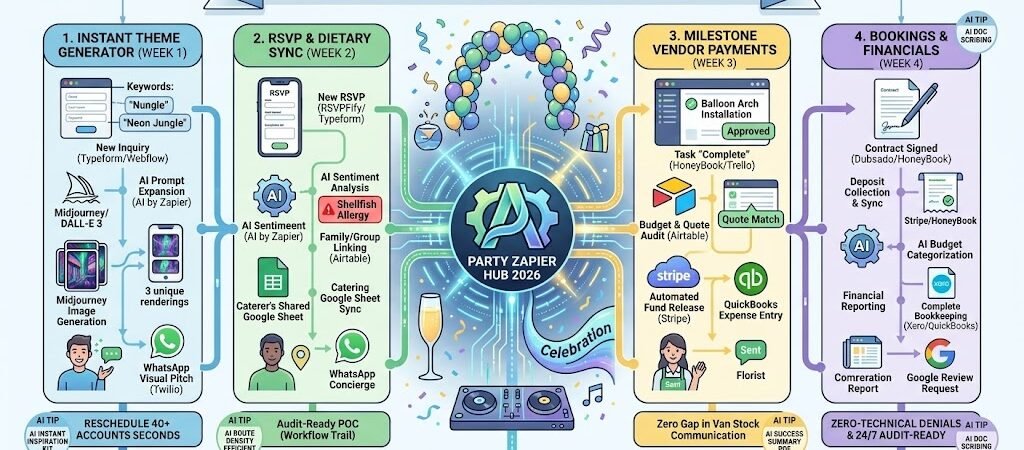
Key Takeaways: Zapier for Party Planners 2026
- AI-Powered Vision Boards: Link Typeform inquiry data to DALL-E 3 or Midjourney via Zapier to instantly send clients custom theme visualizations based on their keywords.
- The “Zero-Chasing” RSVP: Connect RSVPify or Paperless Post to Airtable and WhatsApp, automatically triggering personalized nudges to guests who haven’t responded.
- Frictionless Vendor Settlements: Use Zapier to link HoneyBook or Stripe to QuickBooks, ensuring vendor payments are scheduled the moment a “Milestone” is marked complete.
- Real-Time Guest Concierge: Connect a Google Sheet guest list to a WhatsApp AI Agent to answer guest questions about dress codes or parking 24/7.
The “Planning Fatigue” of 2026
In 2026, social celebrations—from milestone birthdays to luxury galas—have evolved into immersive “mini-productions.” Clients no longer want just a party; they want a curated, shareable experience that looks as good on a headset as it does in person. However, this demand for hyper-perfection has led to a massive spike in Planning Fatigue.
Planners in the social sector are currently losing significant revenue and “creative headspace” to three specific administrative drains:
- The “Coordination Drag”: Planners spend an average of 18+ hours a week on manual follow-ups. Whether it’s chasing a client to choose between three balloon arch textures or re-sending the venue address to a forgetful guest for the fifth time, these “micro-tasks” kill the momentum of high-level design.
- The “RSVP Uncertainty” Gap: In 2026, guest responsiveness is at an all-time low. Planners are often stuck in a “Data Limbo,” unable to give caterers final headcounts or finalize seating charts until the 11th hour. This uncertainty leads to rushed orders, increased rush fees, and unnecessary stress for both the planner and the host.
- The “Design-to-Reality” Friction: Translating a client’s vague Pinterest board into a concrete, executable theme is a labor-intensive process of back-and-forth emails. By the time a concept is approved, the planner has often spent dozens of unbillable hours on “mood board revisions.”
The Zapier Solution: Zapier acts as your “Digital Event Assistant,” bridge-building between your creative vision and logistical reality. By 2026, a top-tier party planner doesn’t just “track” RSVPs; Zapier has already synced the guest’s dietary needs to the caterer’s Google Sheet and sent the guest a personalized WhatsApp with the event’s location pin. You don’t “brainstorm” themes for hours; Zapier uses AI to generate visual concepts the moment an inquiry hits your inbox. This shifts your role from “Admin Manager” to “Experience Architect.”
Practical AI Tip for 2026: Use AI by Zapier to “Analyze Party Vibe.” Have Zapier monitor your inquiry forms. The AI can analyze the client’s keywords (e.g., “Understated Luxury,” “Wild Child,” “Electric Disco”) and automatically suggest a curated list of 3 vendors from your Airtable database that perfectly match that specific aesthetic.
Blueprint #1 – The “Instant Theme” Generator
In 2026, the “Inquiry-to-Inspiration” speed is what closes the deal. High-end clients expect you to understand their “vibe” before the first discovery call. If they have to wait three days for a mood board, they’ve already found a planner who is faster. This blueprint uses Zapier and AI to instantly visualize a client’s dream party, making your inquiry response feel like a personalized concierge experience.
1. The Trigger: The “Dream Inquiry”
- The 2026 Tech: A potential client fills out your inquiry form on Webflow, WordPress, or Typeform.
- The Action: Zapier captures the key “Aesthetic Keywords” (e.g., “Vintage Circus,” “Cyberpunk Wedding,” “Minimalist Zen Garden”).
2. The Logic: AI Visual Engineering
Zapier acts as your Digital Creative Director, turning text into a visual mood board instantly:
- The Prompt Architect (AI by Zapier): AI takes the client’s raw keywords and expands them into a high-fidelity image prompt. It adds professional descriptors like “Cinematic lighting, 8k resolution, luxury event design, velvet textures.”
- The Image Generation (DALL-E 3 / Midjourney): Zapier sends the prompt to an image generator to create 3 unique conceptual renderings of the event space or decor.
- The Designer Sort: Zapier saves these images to a dedicated Google Drive folder labeled with the client’s name and date.
3. The Action: The “Instant Wow” Response
- To the Client: Zapier sends a WhatsApp (via Twilio): “Hi [Name]! I’m already obsessed with your ‘[Theme]’ idea. Just to get our creative juices flowing, I’ve generated 3 visual concepts based on your notes. Which direction feels most like you? [Link to Images]”
- To the Planner: Zapier pings you in Slack: “New Lead: [Name]. AI-Mood Board sent. Client is currently viewing the ‘Neon Jungle’ concept.”
- The Result: You bypass the “Let me get back to you” phase. You have provided value within 5 minutes of their inquiry, positioning you as the most innovative planner in their inbox.
Summary: The Instant Theme Zap
| Step | Component | 2026 Recommended Tool |
| Trigger | Inquiry Form Submission | Typeform / Webflow |
| Logic 1 | AI Prompt Expansion | AI by Zapier |
| Logic 2 | Concept Visualization | DALL-E 3 / Midjourney |
| Action 1 | Immediate Visual Pitch | WhatsApp / Twilio |
| Action 2 | Lead Notification | Slack / Microsoft Teams |
Practical AI Tip for 2026: Use AI by Zapier to “Color-Match Vendors.” Have the AI identify the dominant hex codes in the generated mood board and automatically cross-reference them with your Airtable vendor list to suggest the best florist or linen provider for that specific color palette.
Blueprint #2 – The “RSVP & Dietary” Sync
In 2026, a “Confirmed Guest” is more than a headcount; they are a profile of data that dictates your catering budget and floor plan. Manually updating a spreadsheet every time an email comes in is a recipe for error. This blueprint uses Zapierto create a “Live Guest Intelligence” system that updates your vendors in real-time.
1. The Trigger: The “Digital Response”
- The 2026 Tech: A guest completes an RSVP via RSVPify, Typeform, or Paperless Post.
- The Action: Zapier catches the submission, including the guest’s name, attendance status, and specific dietary needs.
2. The Logic: Smart Sorting & Priority Alerts
Zapier acts as your Digital Maitre D’, ensuring no detail is overlooked:
- The Attendance Filter: Zapier sorts guests into “Confirmed,” “Regret,” and “Maybe” categories in your AirtableMaster Guest List.
- The “Red Flag” Allergy Detection (AI by Zapier): If a guest enters a severe allergy (e.g., “Anaphylactic Peanut Allergy”), AI flags the record as “HIGH PRIORITY” and adds it to a special view for the catering lead.
- The Sibling/Plus-One Link: If the guest is part of a “Family Group” (like your kids Ananya and Rihaan), Zapier ensures the entire group’s status is updated simultaneously to avoid disjointed seating.
3. The Action: The “Catering & Concierge” Push
- To the Caterer: Zapier updates a dedicated Google Sheet shared with the kitchen: “Final Count: 142. New Allergy Alert: Table 4 (Shellfish).”
- To the Guest: Zapier sends a “Confirmation Card” via WhatsApp: “We’ve got you down for the [Party Name]! 🥂 Here is the Google Maps pin for the venue: [Link]. We’ve also noted your [Dietary Request]—see you there!”
- The Nudge: For guests who haven’t responded by the 14-day mark, Zapier automatically triggers a “Gentle Reminder” text.
Summary: The RSVP Sync Zap
| Step | Component | 2026 Recommended Tool |
| Trigger | RSVP Submission | RSVPify / Typeform |
| Logic 1 | Allergy Sentiment Analysis | AI by Zapier |
| Logic 2 | Family/Group Linking | Airtable |
| Action 1 | Real-time Catering Sync | Google Sheets |
| Action 2 | Automated Guest Concierge | WhatsApp / Twilio |
Practical AI Tip for 2026: Use AI by Zapier to “Auto-Assign Seating.” Have the AI analyze guest relationships and interests (if collected in the RSVP). It can suggest a preliminary seating chart in Airtablethat places “Introverts” in quieter areas and “Party Starters” near the dance floor.
Blueprint #3 – The “Milestone Payment” Loop
In 2026, the hallmark of a professional party planner isn’t just a beautiful event—it’s a frictionless financial ecosystem. Keeping high-quality vendors (florists, DJs, caterers) requires fast, reliable payments. This blueprint uses Zapier to automate your accounts payable, ensuring that when a job is done, the vendor is paid, and your books are updated without a single manual bank transfer.
1. The Trigger: The “Milestone Approval”
- The 2026 Tech: You mark a task as “Complete” or “Approved” in your project management tool (HoneyBook, Dubsado, or Trello).
- The Action: Zapier detects the status change for a specific vendor milestone (e.g., “Balloon Arch Installation Approved”).
2. The Logic: Budget Guardrails & AI Auditing
Zapier acts as your Virtual Controller, protecting your profit margins:
- The Budget Cross-Check: Zapier looks at your Airtable “Event Budget” to ensure the payment amount matches the original quote. If there’s a discrepancy (e.g., an unexpected “Rush Fee”), Zapier pauses the payment and pings you for approval.
- The Tax & Compliance Check: Zapier verifies that the vendor has a valid W-9 or tax ID on file.
- The Date Buffer: Zapier schedules the payment in Stripe or Bill.com based on your contract terms (e.g., “Net 15”or “Immediate on Completion”).
3. The Action: The “Frictionless Settlement”
- The Payment Release: Zapier triggers the fund transfer via Stripe or sends an automated payout via PayPal/Wise.
- The Accounting Sync: Zapier creates an expense entry in QuickBooks or Xero, attaching the vendor’s original invoice for an audit-ready trail.
- The “Payment Sent” Alert: Zapier sends a WhatsApp to the vendor: “Great working with you today! 🎈 Your payment for [Event Name] has been released. You should see it in your account within 24 hours. Looking forward to the next one!”
Summary: The Milestone Payment Zap
| Step | Component | 2026 Recommended Tool |
| Trigger | Task Marked “Complete” | HoneyBook / Trello |
| Logic 1 | Budget & Quote Audit | Airtable / Google Sheets |
| Logic 2 | Tax Compliance Check | Zapier Filter |
| Action 1 | Automated Fund Release | Stripe / Bill.com |
| Action 2 | Real-time Bookkeeping | QuickBooks / Xero |
Practical AI Tip for 2026: Use AI by Zapier to “Forecast Cash Flow.” Have Zapier look at your upcoming vendor milestones and compare them to your “Client Deposit” schedule. If your vendor payouts are due before the next client payment, Zapier can send you a Slack alert 7 days in advance so you can adjust your cash reserves.
The 2026 Party Planner Tech Stack
In 2026, the elite party planner is an Experience Architect. As social events shift toward “Instagrammable” hyper-personalization, your tech stack must move from simple lists to Real-Time Aesthetic Logistics. The 2026 standard is a “Creative Command Center” where AI handles the repetitive guest updates and vendor settlements, leaving you free to focus on the “Wow” factor.
1. The 2026 Core Stack
| Function | 2026 Recommended Tool | Why It Wins in 2026 |
| Inquiry & RSVP | Typeform / RSVPify | Mobile-first interfaces that guests actually enjoy. Typeform’s 2026 AI features allow for conversational RSVP-ing. |
| Aesthetic Design | Midjourney / DALL-E 3 | Used with Zapier to turn client inquiry keywords into instant visual “Mood Concepts” for your pitch. |
| Logistics Base | Airtable | The “Single Source of Truth.” Tracks guest lists, dietary needs, and inventory in one collaborative grid. |
| Financial Ops | HoneyBook / Stripe | Essential for automating the client-to-planner and planner-to-vendor cash flow with milestone triggers. |
| Instant Comms | WhatsApp Business | The 2026 gold standard for “Day-Of” coordination and sending location pins/digital invites to guests. |
2. The 2026 “Celebration” Circuitry
In 2026, Zapier acts as your “Digital Event Assistant,” routing data through these three growth-critical circuits:
- The “Visual Pitch” Circuit: Connect your Typeform inquiry to Midjourney. When a client says “Neon Jungle,” Zapier generates the concept art and sends it to their WhatsApp in minutes.
- The “Dietary Alert” Circuit: Link RSVPify to Airtable. If a guest notes a severe allergy, Zapier flags it in red and pings your catering lead’s Slack channel immediately.
- The “Vendor Payout” Circuit: Connect HoneyBook to QuickBooks. When you mark a decor setup as “Approved,” Zapier releases the payment to the florist and logs the expense automatically.
3. Hardware for the 2026 “Experiential” Planner
- AI-Check-in Tablets: Using Alpha TransForm on iPads at the door. Guests scan a QR code, which triggers a “Welcome” message and updates the live guest count in Airtable.
- 3D Site-Visit Tools: Using the Insta360 Flow Pro (2026), planners capture 3D walkthroughs of venues. Zapier automatically uploads these to the client’s Notion portal for virtual “Walk-through” meetings.
- The “Admin-on-the-Go” Duo: Using the ASUS Zenbook Duo (2026), planners manage the “Day-Of” timeline on the top screen while handling guest seating changes on the bottom touch panel.
- Wearable Cue-Haptics: Planners use Apple Watch Ultra 3 vibrations to receive “Silent Cues” (e.g., Cake Cutting in 5 Mins) without looking at a phone in front of the host.
Conclusion: Your 30-Day “Party Autopilot” Roadmap
- Week 1: The Design Shield. Connect your inquiry form to AI to automate instant theme visualization for new leads.
- Week 2: The RSVP Bridge. Link your RSVP tool to Airtable to automate guest list and dietary management.
- Week 3: The Payment Loop. Set up automated vendor payouts to trigger on milestone completion in your CRM.
- Week 4: The Guest Concierge. Set up an automated “Day-Before” WhatsApp alert with parking, dress code, and venue pins.

About the Author
Aapt DubeyAapt Dubey is an automation specialist and software developer dedicated to eliminating manual workflows for small businesses. With deep, hands-on experience building complex Zapier integrations, API connections, and real-world applications, Aapt writes actionable, tested tutorials to help businesses scale efficiently.