
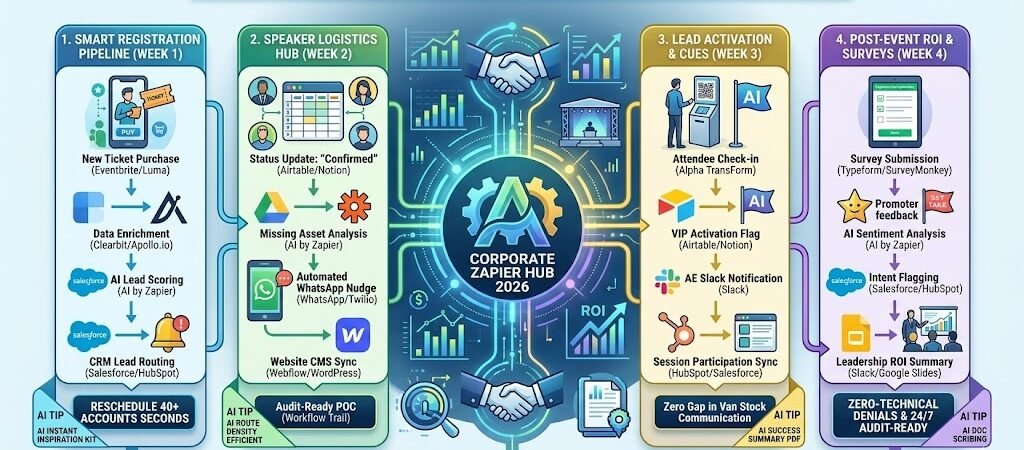
Key Takeaways: Zapier for Corporate Event Planners 2026
- The “Zero-Data-Entry” Registration: Link Eventbrite or Luma to Salesforce or HubSpot to ensure every attendee is instantly synced as a warm lead.
- Automated Speaker Concierge: Use Zapier to track speaker headshots, bios, and travel details in Airtable, triggering automated reminders for missing assets.
- Real-Time LinkedIn Integration: Connect your attendee list to LinkedIn Ads via Zapier to build “Lookalike Audiences” for future events automatically.
- Instant Survey Feedback: Link Typeform to AI by Zapier to sentiment-analyze attendee feedback and summarize the “Top 3 Wins” for the executive board within minutes of the closing keynote.
The “Operational Overhead” of 2026
In 2026, corporate events are no longer just “gatherings”; they have evolved into high-value strategic assets and core growth infrastructure. However, with this elevation comes a crushing increase in operational complexity. The 2026 corporate planner is expected to operate with the rigor of a CFO, proving hard ROI and pipeline contribution while managing a “phygital” (physical + digital) hybrid landscape.
The modern corporate studio is currently battling three primary “Operational Leaks”:
- The “Data Fragmentation” Drain: Industry research shows that 81% of planners are juggling between 2 and 5 different software tools per event. Manually reconciling registrant data from platforms like Eventbrite into CRMs like Salesforce or HubSpot creates “Information Latency”—where sales leads go cold because the data export took 48 hours to process.
- The “Speaker Asset” Bottleneck: Managing a roster of 50+ speakers involves a constant cycle of chasing headshots, bios, and slide decks. With lead times for large venues extending to 18-24 months, the administrative burden of tracking these assets across distributed time zones results in over 25 hours of manual labor per event cycle.
- The “Accountability” Gap: In 2026, “gut-feel” decision-making is obsolete. Leadership teams now demand real-time visibility into attendee engagement and lead quality. Without automated systems, planners spend the first 72 hours post-event “data-crunching” instead of nurturing the high-value connections made during the sessions.
The Zapier Solution: Zapier acts as your “Digital Operations Director,” creating a unified tech stack that eliminates manual data entry. By 2026, a high-performance event team doesn’t “move” data; Zapier has already enriched the registrant’s profile via Clearbit, synced it to the sales team’s Slack channel, and triggered an automated speaker asset request the moment a contract is signed. This shift allows your lean team (often just 1–3 people in 2026) to focus on experiential design and human connection rather than spreadsheets.
Practical AI Tip for 2026: Use AI by Zapier to “Auto-Score Registrants.” Have Zapier monitor your registration platform. As new attendees sign up, the AI can cross-reference their company size and job title against your “Ideal Customer Profile” (ICP) and automatically tag them as “High-Intent VIP” in your CRM, ensuring your sales team prioritizes them for 1-on-1 meeting invites before the event even starts.
Blueprint #1 – The “Smart Registration” Pipeline
In 2026, a “New Registrant” is more than just a name on a list; they are a data point that must be activated instantly to maximize event ROI. If a high-value prospect registers for your summit, waiting 24 hours for a manual CRM sync is a missed opportunity. This blueprint uses Zapier to turn your registration platform into a high-speed lead enrichment engine.
1. The Trigger: The “Instant Enrollment”
- The 2026 Tech: A participant completes a registration form on Eventbrite, Luma, or Zoom Events.
- The Action: Zapier catches the “New Attendee” webhook, capturing their email, company name, and job title.
2. The Logic: Enrichment & VIP Routing
Zapier acts as your Digital Analyst, gathering intelligence on the attendee before the confirmation email even hits their inbox:
- The Profile Enrichment (Clearbit / Apollo.io): Zapier sends the attendee’s work email to an enrichment tool to pull their LinkedIn URL, company revenue, and tech stack.
- The AI Lead Scoring (AI by Zapier): AI evaluates the data. If the attendee is a “Decision Maker” (VP or C-Suite) from a company with $50M+ revenue, they are tagged as “VIP Tier 1.”
- The Sales Sync (Salesforce / HubSpot): Zapier creates a new Lead or updates an existing Contact. It automatically assigns the Lead to the correct Account Executive based on territory.
3. The Action: The “High-Touch” Engagement
- To the Sales Team: Zapier sends a Slack alert: “🚨 VIP ALERT: [Name], CTO of [Company], just registered for the Q3 Summit. They are a Target Account. Reach out for a 1-on-1 VIP dinner invite?”
- To the Attendee: Zapier triggers a personalized Mailchimp or HubSpot email sequence. Instead of a generic “Thanks,” the email includes a link to book a VIP breakout session or a tailored “Industry Track” guide.
- To the Ads Team: Zapier pushes the email to a LinkedIn Matched Audience, allowing you to serve retargeting ads to registrants with “Know Before You Go” content to increase the “Show-Up Rate.”
Summary: The Smart Registration Zap
| Step | Component | 2026 Recommended Tool |
| Trigger | New Ticket Purchase | Eventbrite / Luma |
| Logic 1 | Data Enrichment | Clearbit / Apollo.io |
| Logic 2 | AI Lead Scoring | AI by Zapier |
| Action 1 | CRM Lead Routing | Salesforce / HubSpot |
| Action 2 | VIP Slack Alert | Slack |
Practical AI Tip for 2026: Use AI by Zapier to “Predict Meal Preferences.” If your registration form includes a free-text field for “Special Requests,” have the AI categorize these into “Vegan,” “Gluten-Free,” or “Nut Allergy” and automatically update a running total in your Catering Airtable to avoid last-minute spreadsheet panics.
Blueprint #2 – The “Speaker Logistics” Hub
In 2026, managing speakers is the ultimate “herding cats” challenge. A single corporate conference can have 50+ breakout presenters, each needing to submit headshots, bios, tech requirements, and slide decks. If one speaker forgets their W-9 or submits a low-resolution photo, it stalls the website launch and the print production. This blueprint uses Zapier to act as a Virtual Speaker Concierge, ensuring every asset is collected on time without you sending a single manual reminder.
1. The Trigger: The “Speaker Confirmed” Milestone
- The 2026 Tech: You update a speaker’s status to “Confirmed” in your Airtable “Speaker Master” base or Notionproject board.
- The Action: Zapier detects the status change and instantly creates a personalized “Speaker Asset Folder” in Google Drive or Dropbox.
2. The Logic: The Asset Gap Audit
Zapier acts as your Digital Asset Manager, performing a persistent “Gap Analysis” on your roster:
- The Compliance Check: Zapier looks at the record for that speaker. Is the “Bio” field empty? Is the “W-9” file missing?
- The Dynamic Deadline: Zapier calculates the deadline based on the event date (e.g., Event Date minus 30 days).
- The Resource Retrieval: Zapier pulls a “Speaker Kit” PDF from Notion that includes slide templates and stage dimensions.
3. The Action: The “Friendly Persistent” Nudge
- The Outreach: Zapier sends a personalized WhatsApp (via Twilio): “Hi [Speaker Name]! We are thrilled to have you for the Q3 Keynote. 🎤 We just need your headshot and bio to go live on the site. You can upload them here in 30 seconds: [Link]. Here is your slide template to get started!”
- The Escalation Loop: If the assets aren’t uploaded within 7 days, Zapier triggers a second nudge. If still missing at 14 days, it sends a Slack alert to the Event Director: “High Risk: Keynote Speaker [Name] has not submitted assets. Manual intervention required.”
- The Web Update: Once the files are uploaded, Zapier automatically pushes the bio and headshot to a “Pending Review” status in your Webflow or WordPress site.
Summary: The Speaker Logistics Zap
| Step | Component | 2026 Recommended Tool |
| Trigger | Status Update: “Confirmed” | Airtable / Notion |
| Logic 1 | Missing Asset Analysis | AI by Zapier |
| Logic 2 | Deadline Countdown | Zapier Formatter / Delay |
| Action 1 | Automated WhatsApp Nudge | WhatsApp / Twilio |
| Action 2 | Website CMS Sync | Webflow / WordPress |
Practical AI Tip for 2026: Use AI by Zapier to “Auto-Format Bios.” If a speaker submits a 500-word bio but your website only allows 150 words, have the AI automatically summarize the text into a professional 150-word version and save it as a “Draft” for your review, saving you hours of editing.
Blueprint #3 – The “Closing Loop” (ROI & Surveys)
In 2026, the success of a corporate event is no longer determined when the last attendee leaves; it is determined by how quickly you can turn feedback into actionable business intelligence. If your leadership team has to wait two weeks for a post-event report, the strategic momentum is lost. This blueprint uses Zapier to close the loop instantly, turning raw Typeform data into an executive-ready ROI Dashboard.
1. The Trigger: The “Session End” or “Survey Submit”
- The 2026 Tech: The event “End Time” is reached in Google Calendar, or an attendee submits a feedback form via Typeform or SurveyMonkey.
- The Action: Zapier catches the submission and instantly links it to the attendee’s record in your CRM (Salesforceor HubSpot).
2. The Logic: Sentiment Analysis & Lead Warming
Zapier acts as your Digital Data Scientist, processing qualitative feedback at scale:
- The Sentiment Filter (AI by Zapier): AI reads the open-text feedback. It labels the response as “Promoter,” “Neutral,” or “Detractor.”
- The “Hot Take” Summary: If an attendee leaves a high rating and a comment like “I want to see a demo of the new software,” Zapier flags this as a “High-Intent Signal.”
- The Resource Match: Zapier identifies the speaker or topic the attendee enjoyed most and selects a relevant whitepaper or “Deep Dive” video from your Google Drive.
3. The Action: The “Instant Value” Delivery
- To the Attendee: Zapier sends an automated LinkedIn Message or Email: “Thanks for joining us, [Name]! Since you mentioned enjoying the ‘AI Strategy’ session, I thought you’d find this technical whitepaper useful. Let’s keep the conversation going! [Link]”
- To the Leadership Team: Zapier pushes a “Real-Time Event Pulse” to a Slack “Executive” channel: “Event Update: 85% of attendees rated the Keynote as ‘Excellent’. Top 3 pain points identified: 1. Budgeting, 2. AI Implementation, 3. Talent Retention.”
- To the CRM: Zapier updates the “Event Influence” field in Salesforce, calculating how many attendees from “Target Accounts” were present and their average engagement score.
Summary: The Closing Loop Zap
| Step | Component | 2026 Recommended Tool |
| Trigger | Survey Submission | Typeform / SurveyMonkey |
| Logic 1 | AI Sentiment Analysis | AI by Zapier |
| Logic 2 | Intent Flagging | Salesforce / HubSpot |
| Action 1 | Personalized Follow-up | LinkedIn / Gmail |
| Action 2 | Leadership ROI Summary | Slack / Google Slides |
Practical AI Tip for 2026: Use AI by Zapier to “Auto-Generate Testimonials.” Have the AI scan positive survey feedback and draft a 2-sentence “Social Proof” blurb. Zapier can then send a WhatsApp to the attendee asking: “You said some great things about the event! Do we have permission to share this quote on our 2027 event page? [Yes/No]”
The 2026 Corporate Event Tech Stack
In 2026, the corporate event planner has transitioned from a “logistics lead” to a Revenue Operations (RevOps) partner. As events become the primary engine for high-intent B2B leads, your tech stack must prioritize data integrity and speed to lead. The 2026 standard is an integrated ecosystem where your registration platform, CRM, and communication tools function as a single, living unit.
1. The 2026 Core Stack
| Function | 2026 Recommended Tool | Why It Wins in 2026 |
| Registration Hub | Luma / Eventbrite | Luma is the 2026 breakout for corporate meetups due to its clean UI and “Community” features; Eventbrite remains the king of deep API integrations. |
| Data Enrichment | Clearbit / Apollo.io | Essential for 2026 “Zero-Form” registration. You capture an email, and these tools pull the LinkedIn, Job Title, and Revenue data via Zapier. |
| Speaker/Asset CRM | Airtable | The only tool flexible enough to track speaker headshots, W-9s, and slide deck versions in a shared, collaborative grid. |
| Revenue Sync | Salesforce / HubSpot | The “Single Source of Truth.” Zapier ensures every attendee action (check-in, survey, session attendance) is logged for ROI reporting. |
| Real-Time Alerts | Slack / Pushcut | Used to alert the sales team the moment a “Target Account” registrant walks through the door. |
2. The 2026 “Operations” Circuitry
In 2026, Zapier acts as your “Digital Ops Director,” routing data through these three growth-critical circuits:
- The “Lead Activation” Circuit: Connect Luma to Clearbit and Salesforce. When a VIP registers, Zapier enriches the lead data and pings the assigned Account Executive in Slack within 60 seconds.
- The “Speaker Asset” Circuit: Link Airtable to WhatsApp (Twilio). If a speaker’s bio or slide deck is missing 14 days before the event, Zapier sends a friendly, automated nudge with a direct upload link.
- The “Post-Event ROI” Circuit: Connect Typeform to AI by Zapier. As feedback rolls in, AI summarizes the “Top 5 Takeaways” and pushes a sentiment report to the Leadership Slack channel.
3. Hardware for the 2026 “High-Yield” Planner
- AI-Gated Check-in Tablets: Using Alpha TransForm on iPad Pro, attendees check in via face-match or QR. This triggers an instant “Arrival Alert” to their host or sales rep via Zapier.
- Spatial Audio Podcasting: For 2026 conferences, planners are using RodeCaster Video hubs to stream live “Keynote Breakouts” directly to LinkedIn, with Zapier automatically archiving the sessions to Notion.
- The “Command Center” Laptop: Using the ASUS Zenbook Duo (2026), planners keep the live attendee roster on the bottom screen while monitoring the AV cues and speaker timing on the top 3K panel.
- Wearable “Crew” Comms: Planners are moving away from heavy walkie-talkies to Apple Watch Ultra 3haptics. Zapier sends silent “Cue Alerts” (e.g., Keynote finishing in 5 mins) directly to the planner’s wrist.
Conclusion: Your 30-Day “Corporate Autopilot” Roadmap
- Week 1: The Data Shield. Connect your registration tool to Salesforce to ensure 100% lead capture.
- Week 2: The Speaker Bridge. Link Airtable to WhatsApp for automated headshot and slide collection.
- Week 3: The VIP Alert. Set up a “Check-in to Slack” trigger to alert your sales team when high-value prospects arrive.
- Week 4: The Feedback Loop. Automate your Typeform survey to trigger an AI sentiment summary for your board report.

About the Author
Aapt DubeyAapt Dubey is an automation specialist and software developer dedicated to eliminating manual workflows for small businesses. With deep, hands-on experience building complex Zapier integrations, API connections, and real-world applications, Aapt writes actionable, tested tutorials to help businesses scale efficiently.