
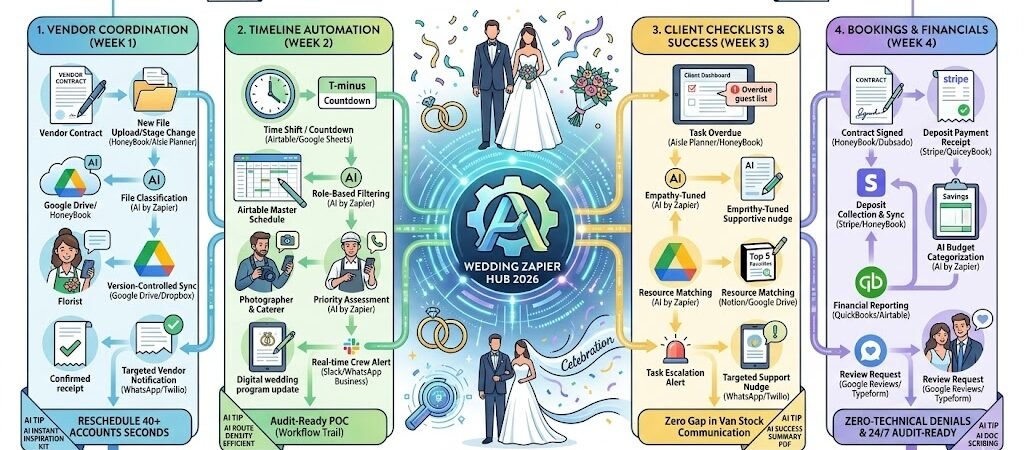
Key Takeaways: Zapier for Wedding Planners 2026
- The “Zero-Leak” Vendor Sync: Use Zapier to link Aisle Planner or HoneyBook with Google Drive to ensure every vendor always has the latest floor plan and BEO (Banquet Event Order).
- Dynamic Timeline Updates: Connect your master schedule in Airtable to Slack or WhatsApp to push real-time countdowns and cue shifts to the catering and photo teams on the big day.
- The “Nudge” Engine: Use AI by Zapier to monitor client checklists. If a bride or groom is 3 days late on “Guest List Finalization,” Zapier sends a friendly, AI-drafted nudge.
- Automated “Day-Of” Command: Link Typeform guest check-ins to a live Notion dashboard, allowing you to see exactly who has arrived at the venue in real-time.
The “Planning Paralysis” of 2026
In 2026, weddings have evolved into multi-day “Brand Experiences,” often involving welcome parties, recovery brunches, and high-fidelity production. While the industry is thriving, wedding planners are facing a new crisis: Planning Paralysis. As guest expectations for “instant” updates rise, planners are becoming human switchboards, spending more time relaying messages than designing events.
By 2026, a planner’s profitability is often drained by three specific “Operational Leaks”:
- The “Version Control” Nightmare: With mood boards, guest counts, and floor plans changing weekly, ensuring that the florist, caterer, and rental company all have the latest version is a high-stakes game. Owners lose an average of 10 hours a week manually emailing updated PDFs. In 2026, a single outdated BEO (Banquet Event Order) can result in a $5,000+ mistake on the wedding day.
- The “Nudge” Fatigue: Planners spend 30% of their month playing the role of a professional “nag.” Whether it’s chasing the groom for his tuxedo measurements or reminding the couple to finalize their seating chart, these repetitive follow-ups create a “friction-filled” relationship rather than a collaborative one.
- The “Day-Of” Information Gap: On the wedding day, the “Single Source of Truth” often lives in the planner’s brain or a physical binder. When the photographer needs to know if the first look has been pushed back 10 minutes, they have to physically find the lead planner. This “Information Latency” leads to missed shots and schedule slippage.
The Zapier Solution: Zapier acts as your “Digital Lead Coordinator,” ensuring that your creative tools (Aisle Planner, HoneyBook) talk to your logistical tools (Airtable, Slack) and your communication tools (WhatsApp, Google Drive). By 2026, an automated planning firm doesn’t “send” an update; Zapier has already detected a file change and synced it to every vendor’s shared folder. You don’t “remind” a client; Zapier identifies an overdue task and sends a supportive, AI-crafted nudge that keeps the project moving without you saying a word.
Practical AI Tip for 2026: Use AI by Zapier to “Auto-Categorize Vendor Invoices.” Have Zapier monitor your email. When a vendor sends an invoice, the AI can read the line items, determine if it’s for “Floral,” “Catering,” or “Rentals,” and automatically update the couple’s Aisle Planner budget and the planner’s QuickBooks ledger simultaneously.
Blueprint #1 – The “Vendor Harmony” Circuit
In 2026, the #1 cause of day-of disasters isn’t a lack of talent—it’s information latency. When a couple changes their floral palette or a caterer updates their power requirements, the update often sits in an inbox while vendors continue working off “Version 2” of the plan. This blueprint uses Zapier to create a “Living Ecosystem” where every vendor always has the most current “Single Source of Truth.”
1. The Trigger: The “Design Update” or “Contract Sign”
- The 2026 Tech: You upload a new Mood Board, Floor Plan, or BEO (Banquet Event Order) to HoneyBook, Aisle Planner, or Dubsado.
- The Action: Zapier detects the “New File” or “Project Stage Change” and immediately initiates the synchronization protocol.
2. The Logic: Automated Permissions & AI Sorting
Zapier acts as your Digital Document Controller, ensuring the right people see only what they need:
- The AI File Classifier (AI by Zapier): AI reads the file name and content. It identifies if the document is for the “Florist,” “Caterer,” “DJ,” or “Rentals.”
- The Folder Sync (Google Drive / Dropbox): Zapier moves the file to the specific vendor’s shared folder. It also deletes the previous version to ensure there is zero confusion about which file is current.
- The “Vendor Portal” Update (Notion): Zapier updates the status of the “Master Vendor Dashboard” in Notion, tagging the vendor that a new “Action Item” is waiting for them.
3. The Action: The “Instant Alert” Broadcast
- To the Vendor: An automated WhatsApp (via Twilio) is sent: “Hi [Caterer Name]! [Planner Name] has just updated the BEO for the [Couple’s Name] wedding. The final guest count and dietary restrictions are now live in your shared folder: [Link]. Please confirm receipt!”
- The Confirmation Loop: When the vendor clicks the link, Zapier can log that they have “Seen” the update in your Airtable tracker.
- The Result: You stop being a “PDF Forwarder” and start acting as a high-level creative director. Your vendors feel supported, and your couple feels confident.
Summary: The Vendor Harmony Zap
| Step | Component | 2026 Recommended Tool |
| Trigger | File Upload / Stage Change | HoneyBook / Aisle Planner |
| Logic 1 | AI File Classification | AI by Zapier |
| Logic 2 | Version-Controlled Sync | Google Drive / Dropbox |
| Action 1 | Targeted Vendor Notification | WhatsApp / Twilio |
| Action 2 | Receipt Tracking Log | Airtable / Notion |
Practical AI Tip for 2026: Use AI by Zapier to “Summarize Change Logs.” When you update a 20-page wedding timeline, have the AI compare the new version to the old one and generate a “What’s Changed” bulleted list (e.g., “Ceremony start moved from 4:00 to 4:15”). Zapier then pushes this summary to the vendors so they don’t have to hunt for changes.
Blueprint #1 – The “Vendor Harmony” Circuit
In 2026, the #1 cause of day-of disasters isn’t a lack of talent—it’s information latency. When a couple changes their floral palette or a caterer updates their power requirements, the update often sits in an email inbox while vendors continue working off “Version 2” of the plan. This blueprint uses Zapier to create a “Living Ecosystem” where every vendor always has the most current “Single Source of Truth.”
1. The Trigger: The “Design Update” or “Contract Sign”
- The 2026 Tech: You upload a new Mood Board, Floor Plan, or BEO (Banquet Event Order) to HoneyBook, Aisle Planner, or Dubsado.
- The Action: Zapier detects the “New File” or “Project Stage Change” and immediately initiates the synchronization protocol.
2. The Logic: Automated Permissions & AI Sorting
Zapier acts as your Digital Document Controller, ensuring the right people see only what they need:
- The AI File Classifier (AI by Zapier): AI reads the file name and content. It identifies if the document is for the “Florist,” “Caterer,” “DJ,” or “Rentals.”
- The Folder Sync (Google Drive / Dropbox): Zapier moves the file to the specific vendor’s shared folder. It also archive-tags the previous version to ensure there is zero confusion about which file is current.
- The “Vendor Portal” Update (Notion): Zapier updates the status of the “Master Vendor Dashboard” in Notion, tagging the vendor that a new “Action Item” is waiting for them.
3. The Action: The “Instant Alert” Broadcast
- To the Vendor: An automated WhatsApp (via Twilio) is sent: “Hi [Caterer Name]! [Planner Name] has just updated the BEO for the [Couple’s Name] wedding. The final guest count and dietary restrictions are now live in your shared folder: [Link]. Please confirm receipt!”
- The Confirmation Loop: When the vendor clicks the link, Zapier can log that they have “Seen” the update in your Airtable tracker.
- The Result: You stop being a “PDF Forwarder” and start acting as a high-level creative director. Your vendors feel supported, and your couple feels confident.
Summary: The Vendor Harmony Zap
| Step | Component | 2026 Recommended Tool |
| Trigger | File Upload / Stage Change | HoneyBook / Aisle Planner |
| Logic 1 | AI File Classification | AI by Zapier |
| Logic 2 | Version-Controlled Sync | Google Drive / Dropbox |
| Action 1 | Targeted Vendor Notification | WhatsApp / Twilio |
| Action 2 | Receipt Tracking Log | Airtable / Notion |
Practical AI Tip for 2026: Use AI by Zapier to “Summarize Change Logs.” When you update a 20-page wedding timeline, have the AI compare the new version to the old one and generate a “What’s Changed” bulleted list (e.g., “Cocktail hour start moved from 5:00 to 5:15”). Zapier then pushes this summary to the vendors so they don’t have to hunt for changes.
Blueprint #2 – The “Timeline Autopilot”
In 2026, the wedding day is a high-speed production where “Information Latency”—the time it takes for a change to reach the crew—is the enemy of a perfect event. If the “First Look” runs 15 minutes over, the caterer, the DJ, and the transport team all need to know instantly. This blueprint uses Zapier to turn your master schedule into a living, breathing “Command Center.”
1. The Trigger: The “Countdown” or “Manual Shift”
- The 2026 Tech: You adjust a time slot in your Airtable “Day-Of Master” base, or a pre-set timer (e.g., T-minus 30 minutes to Grand Entrance) is reached.
- The Action: Zapier detects the time change or the countdown trigger and identifies which “Crew Roles” are impacted by that specific block.
2. The Logic: Role-Based Routing & Priority Filters
Zapier acts as your Digital Stage Manager, ensuring only the relevant people get pinged:
- The Role Router: If the “Cake Cutting” is moved up, Zapier identifies that the Photographer, DJ, and Catering Lead need an alert, but the Transport Team does not.
- The AI Urgency Check (AI by Zapier): AI scans the notes. If you’ve marked a shift as “Critical,” Zapier bypasses standard notifications and sends an “Emergency Alert” with haptic feedback to vendor phones.
- The “Next Up” Queue: Zapier looks 15 minutes ahead in the Airtable schedule to prepare the next set of vendors for their “Ready Position.”
3. The Action: The “Real-Time Cue” Broadcast
- To the Vendor Crew: A notification is pushed to the Slack “Wedding-Day” channel or a WhatsApp group: “🚨 SCHEDULE SHIFT: Grand Entrance moved to 7:15 PM. DJ, please cue ‘Marry You’. Photo/Video, be in position at the main stairs by 7:10 PM.”
- The Guest-Facing Update: If using a digital program or a Notion guest site, Zapier automatically updates the “Live Schedule” so guests aren’t standing around wondering when dinner starts.
- The Result: You stop running across the venue to find the photographer. The entire team moves in perfect sync, and you remain the calm, composed “Director” of the day.
Summary: The Timeline Autopilot Zap
| Step | Component | 2026 Recommended Tool |
| Trigger | Time Shift / Countdown | Airtable / Google Sheets |
| Logic 1 | Role-Based Filtering | AI by Zapier |
| Logic 2 | Priority Assessment | AI by Zapier |
| Action 1 | Real-time Crew Alert | Slack / WhatsApp Business |
| Action 2 | Live Program Update | Notion / Digital Signage |
Practical AI Tip for 2026: Use AI by Zapier to “Predict Ripple Effects.” When you move the “Speeches” back by 20 minutes, have the AI automatically calculate how that affects the “Main Course” service time and the “Band Start” time. Zapier can then send a “Proactive Brief” to the Caterer: “Speeches are running long; please delay plating by 15 minutes to ensure dinner stays hot.”
Blueprint #3 – The “Client Success” Checklist
In 2026, the biggest source of stress for wedding planners isn’t the event itself—it’s the “Decision Fatigue” of the couple. When a client stalls on a seating chart or a guest list, it creates a “Logistical Logjam” that delays rentals, catering, and stationary. This blueprint uses Zapier to transform you from a “nagging” admin into a supportive “Success Coach,” using automated, high-empathy nudges to keep the couple on track.
1. The Trigger: The “Overdue” or “Stalled” Task
- The 2026 Tech: A task in Aisle Planner, HoneyBook, or Trello (e.g., “Finalize Meal Choices”) remains incomplete 48 hours past its due date.
- The Action: Zapier detects the “Overdue” status and pulls the couple’s names and the specific task details.
2. The Logic: Empathy-First AI Tone Check
Zapier acts as your Digital Diplomat, ensuring your follow-up builds trust rather than tension:
- The Tone Filter (AI by Zapier): AI analyzes the task’s complexity. If it’s a “Big Task” (like the Guest List), it drafts a message that offers help. If it’s a “Quick Task” (like approving a song), it drafts a short, fun nudge.
- The “Decision Support” Retrieval: Zapier scans your Notion “Resource Library” for a helpful tool (e.g., a “Seating Chart Template” or a “Tuxedo Sizing Guide”) and attaches it to the nudge.
- The Relationship Buffer: Zapier checks your calendar. If the couple is currently on their “Engagement Moon” or it’s a holiday, it pauses the nudge until they return.
3. The Action: The “Supportive Nudge” Delivery
- To the Couple: An automated WhatsApp (via Twilio) or iMessage is sent: “Hi Aapt & Priya! 🥂 Just a gentle nudge on the meal choices so we can finalize the caterer’s BEO. I’ve attached our ‘Top 5 Menu Favorites’ guide here to help you decide! [Link]”
- The “Escalation” Loop: If the task remains unfinished after 5 days, Zapier creates an “Urgent Call” task for you in Slack, including a summary of why the delay is critical (e.g., “Catering deposit will increase if not settled by Friday”).
- The Result: The couple feels guided rather than pressured, and you maintain your role as the “Zen” leader of their wedding experience.
Summary: The Client Success Zap
| Step | Component | 2026 Recommended Tool |
| Trigger | Task Overdue | Aisle Planner / HoneyBook |
| Logic 1 | Empathy-Tuned AI Draft | AI by Zapier / ChatGPT-4o |
| Logic 2 | Resource Matching | Notion / Google Drive |
| Action 1 | Targeted Support Nudge | WhatsApp / Twilio |
| Action 2 | Planner “Red Flag” Alert | Slack / Microsoft Teams |
Practical AI Tip for 2026: Use AI by Zapier to “Batch Decisions.” Instead of sending five separate emails for five tasks, have Zapier wait until the end of the week. The AI can then compile all incomplete tasks into a single “Sunday Afternoon Sprint” WhatsApp message: “Here are the 3 quick items we need to clear this week to keep us on budget! 🚀”
The 2026 Wedding Planner Tech Stack
In 2026, the elite wedding planner is an Architect of Experience. As weddings become more decentralized and production-heavy, your tech stack must move beyond simple “checklists” and into Real-Time Logistics Management. The 2026 standard is a “Connected Command Center” that allows you to manage 20+ vendors and high-net-worth clients with zero “Information Latency.”
1. The 2026 Core Stack
| Function | 2026 Recommended Tool | Why It Wins in 2026 |
| Project Command | Aisle Planner / HoneyBook | The gold standards. Aisle Planner wins for design-heavy, multi-vendor coordination; HoneyBook wins for client-facing financial automation. |
| Logistics Engine | Airtable | Used as the “Master Day-Of Dashboard.” Its ability to create “Linked Records” between guests, vendors, and timing makes it the 2026 industry leader. |
| Spatial Planning | AllSeated / SocialTables | Essential for 2026 3D walkthroughs. Zapier can push guest list changes from your CRM directly into these seating tools. |
| Crew Comms | Slack / WhatsApp Business | The “Back-Channel” for the vendor crew. Used with Zapier to automate real-time cue alerts on the wedding day. |
| Resource Hub | Notion | Acts as the “Client Portal” where Zapier pushes mood boards, budget trackers, and “homework” tasks for the couple. |
2. The 2026 “Planning” Circuitry
In 2026, Zapier acts as your “Digital Lead Coordinator,” routing data through these three growth-critical circuits:
- The “Vendor Sync” Circuit: Connect Aisle Planner to Google Drive. When a contract is signed, Zapier creates a dedicated vendor folder, shares permissions, and sends an automated “Welcome to the Team” brief via WhatsApp.
- The “Timeline Broadcast” Circuit: Link Airtable to Slack. When you update the “First Look” time, Zapier automatically pings the photographer, hair/makeup, and transport leads with the updated cue.
- The “Client Nudge” Circuit: Connect HoneyBook tasks to AI by Zapier. If a couple is 3 days late on their guest list, AI drafts a supportive, empathy-tuned nudge and sends it to their preferred messaging app.
3. Hardware for the 2026 “High-Touch” Planner
- Dual-Screen Planning Hub: Using the ASUS Zenbook Duo (2026), planners keep the master budget on the bottom screen while reviewing the 3D floor plan on the top 3K OLED panel.
- AI-Gated Check-in Kiosks: Many 2026 planners use Alpha TransForm on iPads at the entrance. As guests arrive, they scan a QR code which triggers a “Safe Arrival” notification to the couple and updates the seating chart in real-time.
- Wearable Cue-Haptics: Planners are adopting Apple Watch Ultra 3 or Garmin systems that vibrate specifically for “T-minus 5 Minutes” cues, allowing them to keep their eyes on the event, not their phone.
- Spatial Recording Tools: Using Insta360 Flow Pro, planners capture high-stability “Site Visit” videos that Zapier automatically uploads to the Notion portal for the couple to view in 3D.
Conclusion: Your 30-Day “Planning Autopilot” Roadmap
- Week 1: The Document Shield. Connect your CRM to Google Drive to automate version-controlled folder sharing for all vendors.
- Week 2: The Timeline Bridge. Link your Airtable master schedule to Slack to automate “Day-Of” vendor alerts.
- Week 3: The Success Nudge. Set up AI by Zapier to monitor client task deadlines and send supportive, automated follow-ups.
- Week 4: The Feedback Loop. Automate a “Post-Honeymoon” survey and a Google Review request to trigger 14 days after the wedding date.

About the Author
Aapt DubeyAapt Dubey is an automation specialist and software developer dedicated to eliminating manual workflows for small businesses. With deep, hands-on experience building complex Zapier integrations, API connections, and real-world applications, Aapt writes actionable, tested tutorials to help businesses scale efficiently.