
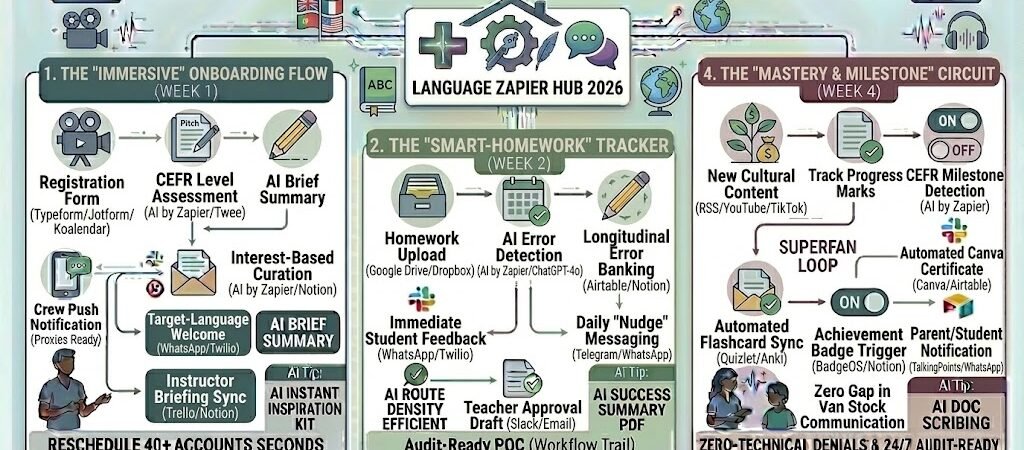
Key Takeaways: Zapier for Language Teachers 2026
- The “Zero-Latency” Reminder: Use Zapier to send automated WhatsApp or Telegram nudges in the target language 2 hours before class to prime the student’s brain.
- Agentic Homework Audits: Link Google Drive or Classroom to AI by Zapier to instantly scan student essays for “fossilized errors” and draft a personalized feedback brief.
- Cultural Resource Stream: Automatically pull trending news or TikToks from the target country via RSS or YouTube and push them to a student’s Notion dashboard based on their interests.
- The “Mastery” Certificate: Use Zapier to detect when a student hits a “Can-Do” milestone in Airtable and instantly generate a Canva certificate of achievement.
The “Linguistic Logjam” of 2026
In 2026, the global language learning market is projected to reach $101.5 billion, fueled by a massive shift toward “Immersive Learning” which is growing at over 24% annually. However, this boom has created a “Linguistic Logjam”—a paradox where teachers have more students than ever but less time to actually teach them.
By 2026, a language teacher’s effectiveness is often throttled by three specific “Cognitive Friction” factors:
- The “Context-Switching” Drain: Modern learners demand hyper-personalization. They don’t want a generic Spanish lesson; they want “Medical Spanish for Nurses” or “Business Japanese for Tech.” Manually curating these specific cultural and technical resources for 20+ students consumes 12+ hours a week. If you aren’t automating your content pipeline, you are essentially a human search engine instead of a linguistic mentor.
- The “Homework Black Hole”: 2026 research shows that feedback on language production (speaking and writing) loses 50% of its effectiveness if it isn’t delivered within 4 hours of the student’s effort. Tutors spend 15% of their month manually correcting grammar and pronunciation in shorthand. In 2026, waiting until “next Tuesday’s lesson” to give feedback is a relic that stalls student progress.
- The “Target Language” Inertia: The hardest part of learning a language in 2026 is staying in the “Target Language Zone” between classes. Teachers lose students to “Silent Churn” because the brain defaults back to the native language the moment the Zoom link closes. Manually sending “nudge” messages to keep students engaged in the target culture is an administrative nightmare that leads to instructor burnout.
The Zapier Solution: Zapier acts as your “Digital Cultural Concierge” and “Linguistic Assistant.” It bridges the gap between your communication tools (WhatsApp, Slack), your grading systems (AI by Zapier, Google Classroom), and your resource libraries (YouTube, RSS, Notion). By 2026, a high-performance studio doesn’t “find” homework; Zapier has already scanned the student’s submission, flagged the fossilized errors, and drafted a feedback report before you even open the file. You don’t “remind” students about culture; Zapier pushes a simplified daily news summary in their target language directly to their phone every morning.
Practical AI Tip for 2026: Use AI by Zapier to “Auto-Level Authentic Content.” Have Zapier monitor an RSS feed of a foreign news site (e.g., El País). When a new article is published, the AI can automatically create three versions—Beginner (A1), Intermediate (B1), and Advanced (C1)—and push the relevant version to each student’s Notion dashboard based on their proficiency tag.
Blueprint #1 – The “Immersive Onboarding” Flow
In 2026, a language teacher’s first impression isn’t made during the trial lesson—it’s made in the ten seconds after a student hits “Submit” on your registration form. Modern learners expect instant confirmation and immediate, localized access to their learning environment. If you wait until the next day to manually send a syllabus, you’ve already lost the “excitement window.” This blueprint uses Zapier to turn your intake process into an automated, immersive onboarding engine.
1. The Trigger: The “Instant Intake” Form
- The 2026 Tech: A prospective student completes your Typeform, Jotform, or Koalendar registration widget on PracticalAISMB.com.
- The Action: Zapier catches the data—target language, interests (e.g., “K-Dramas” or “Italian Cooking”), and a short self-introduction text.
2. The Logic: Automated CEFR Vetting & Personalization
Zapier acts as your Digital Registrar, preparing the student’s ecosystem without you lifting a finger:
- The Level Audit (AI by Zapier + Twee/TeacherMatic): Zapier sends the student’s self-intro text to an AI level-checker. Within seconds, it assigns a CEFR level (e.g., A2.1) and identifies specific grammatical strengths or “fossilized errors.”
- The Studio Management Entry (MyClassPro / Google Classroom): Zapier creates a new student profile and tags them with their level and interests.
- The Cultural Welcome Pack (Notion / Google Drive): Using the student’s interests, Zapier pulls three “Authentic Resources” (e.g., a recipe PDF or a trending YouTube trailer) from your pre-vetted library that match their exact level.
3. The Action: The “Ready-to-Learn” Multi-Channel Launch
- To the Student: An automated WhatsApp (via Twilio) is sent in the target language at their level: “¡Hola! He preparado tu portal de Notion con recetas españolas para nuestro nivel A2. ¡Nos vemos el martes!”
- To the Teacher: A new “Student Card” is created in Trello or Notion, containing the AI’s level assessment and a prep brief so you can start the first lesson at 100% speed.
- The Result: The student feels fully supported and “immersed” from second one. You walk into the first lesson with their profile already built and their introductory materials already in their hands.
Summary: The Immersive Onboarding Zap
| Step | Component | 2026 Recommended Tool |
| Trigger | New Registration | Koalendar / Typeform |
| Logic 1 | CEFR Level Assessment | AI by Zapier / Twee |
| Logic 2 | Interest-Based Curation | AI by Zapier / Notion |
| Action 1 | Target-Language Welcome | WhatsApp / Twilio |
| Action 2 | Instructor Briefing Sync | Trello / Notion |
Practical AI Tip for 2026: Use AI by Zapier to “Predict Learning Styles.” Have the AI scan the student’s registration responses for keywords like “visual,” “books,” or “speaking.” Zapier can then automatically toggle their Notion dashboard to prioritize video content, reading lists, or conversation prompts, ensuring their learning environment matches their brain’s natural wiring.
Blueprint #2 – The “Smart-Homework” Tracker
In 2026, the value of homework isn’t in the completion—it’s in the speed of the feedback loop. Research shows that if a student receives a correction within minutes of a mistake, the “neural rewiring” for the correct linguistic form is 4x more effective. This blueprint uses Zapier and AI to act as a 24/7 teaching assistant that pre-grades assignments and identifies patterns before you even open your laptop.
1. The Trigger: The “Submission” Pulse
- The 2026 Tech: A student uploads a voice recording to Dropbox, submits a writing assignment via Google Classroom, or records a video on Loom.
- The Action: Zapier detects the new file and immediately sends it to the “Diagnostic Pipeline.”
2. The Logic: Agentic Feedback & Error Banking
Zapier acts as your Linguistic Auditor, analyzing the work with professional-grade precision:
- The Transcription & Scan (AI by Zapier / Whisper): If it’s audio, Zapier transcribes it. If it’s text, the AI scans for “Fossilized Errors”—repeated mistakes that hinder fluency (e.g., incorrect gender agreement in French).
- The “Win/Work” Breakdown: AI identifies three things the student did well (the “Win”) and one specific concept to focus on for the next session (the “Work”).
- The Mastery Log (Airtable / Google Sheets): Zapier logs the specific error types. Over time, this creates a “Heat Map” of the student’s weaknesses, allowing you to prepare a targeted 12-week curriculum.
3. The Action: The “Instant Insight” Delivery
- To the Student: A WhatsApp nudge arrives: “I’ve received your homework! Your use of the past tense was excellent. I noticed a small pattern in your prepositions—I’ve added a 2-minute ‘Quick-Fix’ video to your portal to help!”
- To the Teacher: A notification in Slack or Microsoft Teams provides the AI-generated draft feedback. You can simply hit “Approve” or add a 10-second voice note to finalize it.
- The Result: The student feels consistently coached throughout the week, and you save +5 hours typically spent on red-penning basic grammar.
Summary: The Smart-Homework Zap
| Step | Component | 2026 Recommended Tool |
| Trigger | Homework Upload | Google Drive / Dropbox |
| Logic 1 | AI Error Detection | AI by Zapier / ChatGPT-4o |
| Logic 2 | Longitudinal Error Banking | Airtable / Notion |
| Action 1 | Immediate Student Feedback | WhatsApp / Twilio |
| Action 2 | Teacher Approval Draft | Slack / Email |
Practical AI Tip for 2026: Use AI by Zapier to “Auto-Generate Practice Quizzes.” Once the AI identifies an error pattern (e.g., German adjective endings), have Zapier automatically create a 5-question Quizlet or Kahoot set based on that specific mistake and push it to the student’s dashboard for immediate review.
Blueprint #3 – The “Cultural Pulse” Automation
In 2026, the biggest barrier to fluency is the “Native Language Gravity”—the tendency for a student’s brain to shut off the target language the moment they leave your lesson. Traditional “homework” feels like a chore, but content feels like a reward. This blueprint uses Zapier to transform your students’ phones into a “Cultural Concierge,” delivering bite-sized, level-appropriate immersion every single day.
1. The Trigger: The “Authentic Source” Pulse
- The 2026 Tech: A new article, video, or post appears in a pre-vetted RSS Feed (e.g., Corriere della Sera for Italian), a specific YouTube channel, or a Substack dedicated to the target culture.
- The Action: Zapier catches the new content and initiates the “Personalization Pipeline.”
2. The Logic: Smart Summarization & Level-Matching
Zapier acting as your Content Editor, ensuring the material is challenging but not overwhelming:
- The CEFR Simplifier (AI by Zapier): AI analyzes the text of the article. It creates three versions: A1/A2 (short, simple sentences), B1/B2 (standard news style), and C1 (original text with high-level vocab notes).
- The Interest Filter: Zapier checks the student’s tags in Airtable. If the student is interested in “Fashion,” they receive the Vogue Italia summary; if they like “Politics,” they get the La Repubblica brief.
- The Vocab Extraction: AI pulls 3-5 “Keywords of the Day” from the content and adds them to the student’s personal Quizlet or Anki deck.
3. The Action: The “Immersive Nudge”
- To the Student Portal: The level-appropriate summary and video link are pushed to the student’s Notion “Daily Feed.”
- To the Student’s Phone: A WhatsApp or Telegram message arrives: “Buongiorno [Name]! Here is today’s 1-minute read about Milan Fashion Week. Try to use the word ‘tessuto’ (fabric) today! [Link]”
- The Result: The student maintains a “low-stakes” connection to the language daily. By the time they see you for their next lesson, they are already “warmed up” with current cultural context.
Summary: The Cultural Pulse Zap
| Step | Component | 2026 Recommended Tool |
| Trigger | New Cultural Content | RSS / YouTube / TikTok |
| Logic 1 | AI Level-Simplification | AI by Zapier / ChatGPT-4o |
| Logic 2 | Interest-Based Filtering | Airtable / Notion |
| Action 1 | Automated Flashcard Sync | Quizlet / Anki |
| Action 2 | Daily “Nudge” Messaging | Telegram / WhatsApp |
Practical AI Tip for 2026: Use AI by Zapier to “Monitor Engagement.” If a student hasn’t clicked on their daily cultural nudge for 4 days, have Zapier trigger a “Pivot Nudge.” The AI will pick a completely different topic (e.g., switching from “News” to “Music”) and send a personalized message: “I found this Japanese indie track I think you’d love—the lyrics are great for practicing your particles!”
The 2026 Language Teacher Tech Stack
In 2026, the elite language teacher is part educator, part Linguistic Architect. As AI-driven translation reaches near-perfection, your value shifts from being a “human dictionary” to being a cultural guide and conversation strategist. This tech stack is designed to automate the “Mechanics of Grammar” so you can focus on the “Magic of Communication.”
1. The 2026 Core Stack
| Function | 2026 Recommended Tool | Why It Wins in 2026 |
| Class Command | MyClassPro / Google Classroom | Centralizes grades and assignments with 2026 AI that “Auto-Levels” text for specific CEFR ranks. |
| Immersion Hub | Notion / Padlet | Acts as the student’s “Cultural Portfolio,” housing AI-curated news, videos, and personalized vocabulary banks. |
| Oral Proficiency | Speechling / ELSA Speak | Zapier pulls pronunciation data from these apps to help you identify specific phonemes the student struggles with. |
| AI Teaching Aide | Twee / TeacherMatic | Specifically built for language teachers to create exercises, transcripts, and reading tasks in seconds. |
| Messaging | TalkingPoints / WhatsApp Business | TalkingPoints automatically translates admin messages into 150+ languages, perfect for communicating with parents. |
2. The 2026 “Linguistic Assistant” Circuitry
In 2026, Zapier acts as your “In-House Content Editor,” routing data through these three growth-critical circuits:
- The “Zero-Latency” Feedback Circuit: Connect Google Drive to AI by Zapier and WhatsApp. The second a student uploads an essay, Zapier scans for “Fossilized Errors,” drafts a professional correction brief, and nudges the student to review the most critical mistake before their next lesson.
- The “Authentic Content” Circuit: Link an RSS Feed (e.g., Der Spiegel for German) to Notion. Zapier pulls the latest article, uses AI to simplify it to the student’s current CEFR level (A2, B1, etc.), and pushes it to their “Daily Reading” feed.
- The “Milestone” Recognition Circuit: Connect Airtable to Canva. When you check a “Level Up” box in your database, Zapier automatically generates a personalized “CEFR Certificate,” emails it to the parent, and posts a “Congratulations” badge to the student’s portal.
3. Hardware for the 2026 “Immersive” Tutor
- Spatial Audio Headphones: Tutors use headsets like the Apple Vision Pro or Sony WH-1000XM6 to simulate “Spatial Immersion.” This allows students to hear the directionality of sounds, which is critical for mastering tonal languages like Mandarin or Vietnamese.
- Dual-Screen Pedagogy: Using the ASUS Zenbook Duo 2026, teachers keep the student’s video feed at eye level while using the bottom screen as an interactive, AI-powered whiteboard that transcribes the lesson in real-time.
- AI-Enhanced Webcams: Tools like the Obsbot Tiny 3 feature gesture-controlled AI tracking and “Whiteboard Focus,” ensuring that when you point to a conjugation chart or cultural map, the student sees it in crystal-clear 4K.
- Haptic Feedback Tools: For specialized phonetic training, some 2026 tutors use wearable haptic devices that vibrate when a student’s mouth position matches the target phoneme, providing a “physical” anchor for pronunciation.
Conclusion: Your 30-Day “Fluency Autopilot” Roadmap
- Week 1: The Reminder Shield. Connect Calendly to WhatsApp to automate lesson reminders in the target language.
- Week 2: The Insight Bridge. Set up the Section 3 workflow to turn shorthand homework notes into professional AI-generated feedback.
- Week 3: The Immersion Loop. Link an RSS Feed to your student Notion boards for automated daily cultural updates.
- Week 4: The Revenue Guard. Automate your Stripe renewal invoices based on student session balances to ensure you’re never teaching “off the clock.”

About the Author
Aapt DubeyAapt Dubey is an automation specialist and software developer dedicated to eliminating manual workflows for small businesses. With deep, hands-on experience building complex Zapier integrations, API connections, and real-world applications, Aapt writes actionable, tested tutorials to help businesses scale efficiently.