
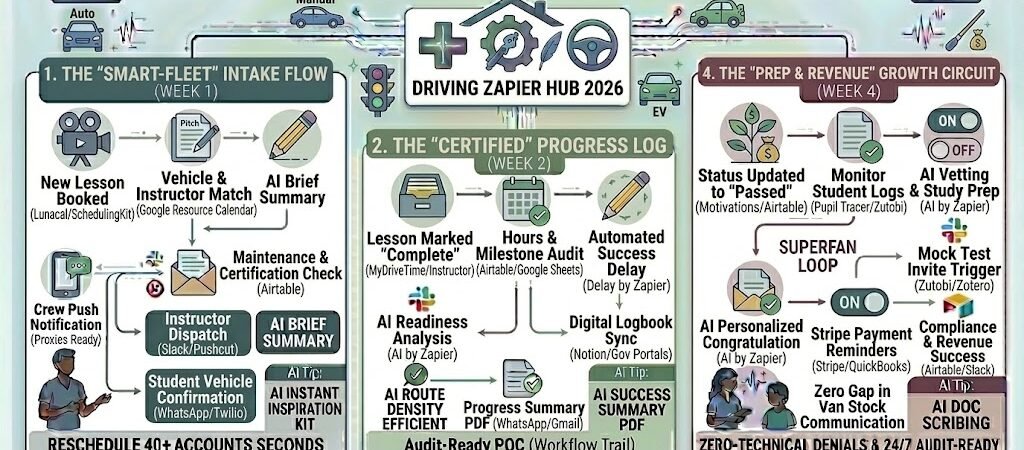
Key Takeaways: Zapier for Driving Instructors 2026
- The “Three-Way” Match: Use Zapier to sync Calendly or SchedulingKit with your fleet calendar, ensuring an instructor, a student, and a specific vehicle type (Manual vs. Auto) are never double-booked.
- Automated Logbook Sync: Trigger a Google Sheets or Airtable entry the moment a lesson ends, automatically calculating “Highway Hours” and “Night Driving” for state/DVSA requirements.
- The “Test-Ready” Nudge: Use AI by Zapier to scan student progress and automatically send a “Mock Test” invite when they reach 90% of their required curriculum milestones.
- Reputation Autopilot: Link Stripe to Google Business Profile to trigger a review request text exactly 24 hours after a student passes their road test.
The “Operational Gridlock” of 2026
In 2026, the driving school industry is navigating a high-speed transformation. With the global market projected to surpass $28 billion, the demand for professional instruction is soaring, driven by stricter licensing reforms and a massive shift toward automatic and electric vehicle (EV) training. However, this growth has created a new kind of “Operational Gridlock” for instructors.
By 2026, a driving instructor’s business is often stalled by three critical “Traffic Jams”:
- The “Resource Collision” (Vehicle & Staff Sync): In 2026, managing a fleet is complex. You aren’t just matching a student to a time slot; you’re matching them to a specific transmission type (Manual vs. Auto/EV). Instructors lose an average of 8 hours a week manually cross-referencing instructor diaries with vehicle availability. A single double-booking—sending a manual-only student to an automatic car—isn’t just a mistake; it’s a lost day of revenue and a hit to your reputation.
- The “Digital Compliance” Bottleneck: 2026 regulations now demand real-time digital progress tracking. Governments are moving toward sensor-based automated testing and mandatory digital logbooks. Tutors spend 15% of their working month manually updating lesson hours, highway miles, and skill checklists. If your data isn’t “Audit-Ready” and instantly accessible to parents or regulators, your school is a compliance risk.
- The “Test-Backlog” Anxiety: With road test centers shifting to AI-supported sensor evaluation, the stakes for a “First-Time Pass” are higher than ever. Managing a student’s “Test Readiness” requires constant data monitoring. Without automated systems to flag when a student has hit their 40-hour milestone or mastered “Parallel Parking,” instructors find themselves manually auditing hundreds of records to decide who is ready for the road.
The Zapier Solution: Zapier acts as your “Digital Dispatcher” and “Compliance Officer.” It bridges the gap between your booking engine (Lunacal, Picktime), your curriculum logs (Airtable, Google Sheets), and parent communication tools (WhatsApp, Gmail). By 2026, an automated school doesn’t “check” if a car is free; Zapier has already locked the vehicle resource the moment the student selected “Manual” on the booking form. You don’t “write” a logbook entry; Zapier logs the GPS data and skill markers the moment you tap “Complete” in your mobile app.
Practical AI Tip for 2026: Use AI by Zapier to “Predict Test Success.” Have Zapier scan your students’ recent mock test scores and instructor feedback notes. If the AI detects a pattern of “Lane Discipline” errors three sessions in a row, it can automatically trigger a targeted “Revision Video” on lane management to the student’s phone 24 hours before their next lesson.
Blueprint #1 – The “Smart-Fleet” Intake Flow
In 2026, a driving school’s efficiency lives or dies by its resource allocation. With the rise of hybrid and electric vehicle (EV) training alongside traditional manual and automatic options, you are no longer just booking a person—you are booking a specific mechanical asset. This blueprint uses Zapier to ensure that an instructor, a student, and the correct vehicle transmission type are perfectly synced, eliminating the “wrong car” nightmare.
1. The Trigger: The “Transmission-Specific” Booking
- The 2026 Tech: A student visits your site—PracticalAISMB.com—and uses a booking widget like Lunacal or SchedulingKit.
- The Action: The student selects their lesson type (e.g., “Manual Initial” or “EV Highway Prep”). Zapier captures the student’s ID, the instructor’s availability, and, crucially, the Vehicle Class required.
2. The Logic: Asset Verification & Conflict Resolution
Zapier acts as your Digital Fleet Dispatcher, performing a three-way check in milliseconds:
- The Fleet Audit (Google Resource Calendar): Zapier checks a dedicated “Vehicle Calendar.” It ensures that Car #4 (Automatic EV) isn’t already assigned to Instructor B during that specific window.
- The Transmission Match: Zapier cross-references the student’s choice with the instructor’s certifications in Airtable. It ensures you aren’t sending a “Manual” student to an instructor who only operates the school’s “Automatic” fleet.
- The Maintenance Check: If a vehicle is flagged for “Service” in your database, Zapier automatically bypasses that car and suggests the next available asset in that class.
3. The Action: Multi-Point Confirmation
- To the Instructor: A push notification via Slack or Pushcut: “New Lesson: [Student Name] – [Time]. Vehicle Assigned: Toyota bZ4X (EV). Key Location: Box B.”
- To the Student: A WhatsApp (via Twilio) confirming the lesson, including a photo of the specific vehicle and the instructor’s profile.
- To the Fleet Log: Zapier creates a “Pending Trip” entry in your Google Sheets to track projected mileage for the day.
Summary: The Smart-Fleet Zap
| Step | Component | 2026 Recommended Tool |
| Trigger | New Lesson Booked | Lunacal / SchedulingKit |
| Logic 1 | Vehicle & Instructor Match | Google Resource Calendar |
| Logic 2 | Maintenance/Certification Check | Airtable |
| Action 1 | Instructor Dispatch | Slack / Pushcut |
| Action 2 | Student Vehicle Confirmation | WhatsApp / Twilio |
Practical AI Tip for 2026: Use AI by Zapier to “Optimize Routing.” If a student books a lesson starting at a specific location, have Zapier check the previous student’s drop-off point. If the gap is less than 15 minutes and the distance is more than 5 miles, Zapier can automatically nudge the new student to adjust their start time by 10 minutes, protecting your instructor’s sanity and your fuel/charge costs.
Blueprint #2 – The “Certified” Progress Log
In 2026, governments and licensing authorities (like the DVSA or state DMVs) have shifted toward mandatory Digital Learner Log Books. Relying on paper records is no longer just inconvenient; it’s a compliance risk that can lead to test refusals. This blueprint uses Zapier to transform every lesson into an “audit-ready” data point, giving students and parents real-time visibility into their “Test Readiness Score.”
1. The Trigger: The “Engine Off” Update
- The 2026 Tech: Immediately after a lesson, you tap “Complete” in your specialized instructor app (e.g., MyDriveTime, Instructor, or Motivations).
- The Action: Zapier catches the lesson metadata: duration, night driving minutes, highway miles, and specific maneuvers mastered (e.g., “Emergency Stop: Level 5”).
2. The Logic: Milestone Calculation & Data Sync
Zapier acting as your Compliance Officer, ensuring the student’s logbook is always perfectly balanced:
- The Logbook Entry (Airtable / Google Sheets): Zapier appends a new row to the student’s “Master Log.” It automatically calculates the running total of supervised hours.
- The Milestone Audit (AI by Zapier): AI scans the cumulative data against local requirements (e.g., “Does the student have the 5 mandatory night hours?”).
- The Progress Visualization: Zapier updates a “Mastery Bar” in a shared Notion or Airtable dashboard, turning dry numbers into a clear visual for the parent.
3. The Action: The “Session Recap” Delivery
- To the Student/Parent: An automated Gmail or WhatsApp is sent: “Great drive today! You’ve now completed 32 of your 50 required hours. You’ve officially mastered ‘Roundabouts’ and ‘Reverse Parallel Parking’. Your Test Readiness is now 78%.”
- To the Regulatory Portal: If supported by your local authority, Zapier can push a copy of the validated hours directly to a Government Digital ID or logbook portal (like Learn&Log).
- The Result: Zero manual math. Zero lost logbooks. The student stays motivated because they can see the “finish line” moving closer after every lesson.
Summary: The Progress Log Zap
| Step | Component | 2026 Recommended Tool |
| Trigger | Lesson Marked “Complete” | MyDriveTime / Instructor |
| Logic 1 | Hours & Milestone Audit | Airtable / Google Sheets |
| Logic 2 | AI Readiness Analysis | AI by Zapier |
| Action 1 | Digital Logbook Sync | Notion / Gov Portals |
| Action 2 | Progress Summary PDF | WhatsApp / Gmail |
Practical AI Tip for 2026: Use AI by Zapier to “Flag Skill Plateaus.” If a student’s progress on a specific maneuver (like “Controlled Stop”) hasn’t improved in three lessons, Zapier can automatically add a “Special Focus” note to the instructor’s next lesson plan and suggest a specific instructional video to the student’s portal.
Blueprint #3 – The “Road Test” Success Loop
In 2026, a “Pass” is more than just a certificate; it is your most powerful marketing asset. In a market where students choose instructors based on social proof and AI-driven reputation scores, capturing that “Day of Pass” excitement is critical. This blueprint uses Zapier to turn every successful road test into a reputation-building machine while the student is still buzzing with the thrill of their new license.
1. The Trigger: The “Pass” Status Change
- The 2026 Tech: You update the student’s record to “Passed” in Motivations, MyDriveTime, or Airtable.
- The Action: Zapier detects the status change and initiates the “Reputation Growth” sequence.
2. The Logic: Strategic Delay & Channel Selection
Zapier acting as your Marketing Manager, ensuring you ask for the review at the peak moment of satisfaction:
- The 24-Hour Buffer: Zapier adds a “Delay by Zapier” step. You don’t want to ask for a review while they are still in the car; you want to ask once they’ve had a chance to show off their license to friends and family.
- The Success Verification: Zapier checks your Stripe or payment log to ensure the “Test Day Fee” has been settled.
- The AI Tone-Filter (AI by Zapier): AI drafts a personalized “Congratulations” message that mentions a specific maneuver they conquered (e.g., “Congrats on that perfect Reverse Parallel Park!”).
3. The Action: The “Reputation Autopilot” Request
- The Review Request: Zapier triggers a request via NiceJob, Google Business Profile, or a direct WhatsAppnudge.
- The Social Proof Sync: Once the review is posted, Zapier can automatically:
- Post a “New Pass Alert” to your school’s Instagram or Facebook (using a template that overlays their name on a ‘Passed’ graphic).
- Add their testimonial to the “Success Stories” page on PracticalAISMB.com.
- The Result: You build a “Wall of Proof” that runs 24/7. Your reviews grow consistently without you ever having to send an awkward “Could you leave a comment?” text manually.
Summary: The Success Loop Zap
| Step | Component | 2026 Recommended Tool |
| Trigger | Status Updated to “Passed” | Motivations / Airtable |
| Logic 1 | Automated Success Delay | Delay by Zapier |
| Logic 2 | AI Personalized Congratulation | AI by Zapier |
| Action 1 | Review Request Text | NiceJob / Twilio |
| Action 2 | Social Media “Pass” Post | Instagram / Facebook |
Practical AI Tip for 2026: Use AI by Zapier to “Analyze Review Sentiment.” If a student leaves a review that is 4 stars or lower, have Zapier immediately flag it in your Slack and draft a “Recovery Response” for you to approve, ensuring you maintain a perfect 2026 reputation score.
The 2026 Driving Instructor Tech Stack
In 2026, the elite driving school is a data-driven enterprise. As licensing authorities shift toward AI-supported sensor evaluation and mandatory digital logs, your value is proven through a “Surround-Sound” educational experience. The goal is a high-transparency school where the admin is automated, the vehicles are tracked, and the student’s progress is visible in real-time.
1. The 2026 Core Stack
| Function | 2026 Recommended Tool | Why It Wins in 2026 |
| Fleet Command | Lunacal / MyDrivingSchool | The 2026 standard for matching instructors, students, and transmission-specific vehicles (Manual/Auto/EV) without conflicts. |
| Digital Logbook | Motivations / Pupil Tracer | Specifically built for driving schools; features built-in curriculum tracking and direct sync to regulatory portals. |
| AI Driver Monitor | Zutobi Instructor | Provides high-quality video simulations and an “AI GradeBook” for real-time student performance visualization. |
| Reputation Hub | NiceJob / Google Business | Zapier triggers these to request reviews automatically 24 hours after a student’s status changes to “Passed.” |
| Financial Tracker | Stripe / QuickBooks | Automates the “Test-Day Surcharge” and “Package Renewal” billing to ensure you are never chasing payment at the roadside. |
2. The 2026 “Digital Dispatcher” Circuitry
In 2026, Zapier acts as your “Behind-the-Scenes Fleet Manager,” routing data through these three growth-critical circuits:
- The “Three-Way” Match Circuit: Connect Lunacal to Google Resource Calendar. When a new student selects a transmission type, Zapier verifies instructor availability and locks a specific car (e.g., EV Car #3) for that slot. You show up with the right car every time.
- The “Audit-Ready” Compliance Circuit: Link MyDriveTime to Airtable. The second you mark a lesson “Complete,” Zapier logs the duration, night hours, and mastered skills into a digital logbook that is shared with both the parent and the regulator.
- The “Pass-Day” Viral Circuit: Connect Airtable to NiceJob and Instagram. When you update a status to “Passed,” Zapier triggers a 24-hour delay, sends a congrats text with a review link, and posts a “Success Story” graphic to your social media.
3. Hardware for the 2026 “Smart Fleet”
- AI-Powered Dash Cams: Teachers use cams like the Viofo A329S or Motive Smart Dashcam. These feature hardware-level AI that identifies distracted driving or rolling stops in real-time, providing an objective “AI Engagement Score” for the student’s progress log.
- Dual-Display Management: Using the ASUS Zenbook Duo 2026, instructors keep the fleet calendar and GPS tracking on the bottom screen while maintaining a full-size pupil record or curriculum map on the top screen during breaks.
- AI-Enhanced Document Cameras: For classroom theory, the IPEVO V4K-PRO 120 features AI noise reduction and ultra-wide lenses to clearly share physical diagrams or state-specific road handbooks during remote sessions.
- OBD-II Smart Monitors: Tools like Nextbase iQ plug into your fleet’s diagnostics, allowing Zapier to notify you of mechanical issues or “Hard Braking” events before they lead to vehicle downtime.
Conclusion: Your 30-Day “Fleet Autopilot” Roadmap
- Week 1: The Booking Shield. Connect Lunacal to your Google Resource Calendar to stop vehicle transmission conflicts.
- Week 2: The Logbook Bridge. Set up the Section 3 workflow to turn lesson completions into automated “Audit-Ready” logs.
- Week 3: The Prep Nudge. Use AI by Zapier to send automated “Mock Test” invites when a student hits 80% of their curriculum requirements.
- Week 4: The Revenue Guard. Automate Stripe payment reminders for student packages to ensure your cash flow remains as steady as your driving.

About the Author
Aapt DubeyAapt Dubey is an automation specialist and software developer dedicated to eliminating manual workflows for small businesses. With deep, hands-on experience building complex Zapier integrations, API connections, and real-world applications, Aapt writes actionable, tested tutorials to help businesses scale efficiently.