
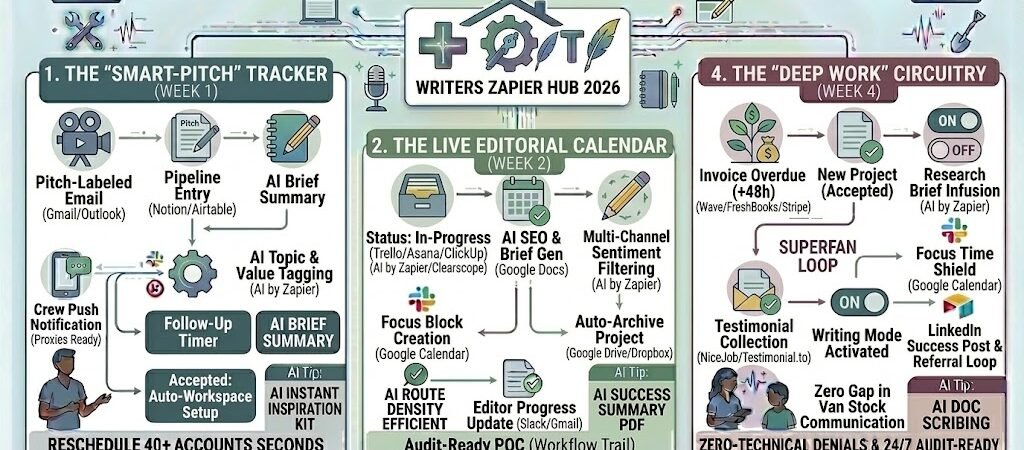
Key Takeaways: Zapier for Freelance Writers 2026
- The “Pitch-to-Pipeline” Engine: Use Zapier to instantly turn sent emails into tracked leads in your CRM.
- Agentic Research Briefing: Automatically pull SEO data and top-ranking competitors into a Google Doc the moment a pitch is accepted.
- Editorial Calendar Sync: Link your project management tool to your Google Calendar to visually track deadlines and avoid over-scheduling.
- The “Zero-Awkwardness” Payment Loop: Set up automated multi-stage reminders for overdue invoices to ensure you get paid without manual follow-ups.
The “Administrative Drift” of 2026
In 2026, the value of a freelance writer is measured by “Deep Work” output—the ability to produce nuanced, expert-led content that AI cannot replicate. However, the paradox of the modern writer is that as your authority grows, so does the volume of administrative noise. This is known as Administrative Drift, where the “business of being a writer” slowly cannibalizes the actual time spent writing.
By 2026, a freelance writer’s productivity is threatened by three specific “Operational Leaks”:
- The “Pitching Black Hole”: Writers spend an average of 8 hours per week manually tracking sent pitches across multiple editors, checking for replies, and remembering when to follow up. In 2026, an untracked pitch is a lost opportunity; if your pipeline isn’t automated, your income becomes a “feast or famine” cycle driven by memory rather than momentum.
- The “Context-Switching” Tax: The manual setup of a project—finding SEO keywords, creating a folder structure, and setting up a research document—can take 45 to 60 minutes per article. This fragmented work shatters your focus. In 2026, the transition from “Pitch Accepted” to “First Draft Started” must be instantaneous to preserve your creative flow.
- The “Invoice Anxiety” Loop: Freelancers often lose 3-5 hours a month playing “Debt Collector.” Manually checking bank accounts and sending awkward “just checking in” emails is not just a time-sink; it’s an emotional drain that affects the quality of your next piece of writing.
The Zapier Solution: Zapier acts as your “Virtual Editorial Assistant.” It creates a “Neural Link” between your communication tools (Gmail, Slack) and your production tools (Notion, Google Docs, Airtable). By 2026, an automated writer doesn’t “remember” to follow up on a pitch; Zapier has already moved the lead to a “Nudge” status in their CRM. You don’t “set up” a research brief; Zapier has already pulled the top-ranking SERP data and competitor word counts into a pre-formatted Google Doc the moment an editor hit “Reply.”
Practical AI Tip for 2026: Use AI by Zapier to “Auto-Label” your inbox. Have Zapier scan incoming emails for keywords like “deadline,” “revision,” or “payment.” The AI can automatically prioritize these in your task manager, ensuring you see a “Revision Request” from a top-tier editor before a generic newsletter.
Blueprint #1 – The “Smart-Pitch” Tracker
In 2026, the difference between a high-earning freelancer and one who is struggling is the size and health of their Pitch Pipeline. High-volume pitching is a numbers game, but manually tracking dozens of ideas across different editors is an recipe for “Opportunity Leakage.” This blueprint uses Zapier to turn your sent folder into a self-managing CRM, ensuring no story idea ever goes to waste.
1. The Trigger: The “Pitch-Labeled” Email
- The 2026 Tech: You send your pitch via Gmail or Outlook and apply a specific label or tag (e.g.,
Status: Pitched). - The Action: Zapier detects this specific label and immediately extracts the “To” address (the editor), the subject line (your working title), and the date sent.
2. The Logic: Pipeline Entry & AI Enrichment
Zapier acting as your Editorial Agent, organizing your ideas for maximum visibility:
- The CRM Log (Notion / Airtable): Zapier creates a new record in your “Editorial Pipeline” database.
- The AI Categorization (AI by Zapier): The AI scans the body of your pitch to assign a “Topic Tag” (e.g., AI Tech, Lifestyle, SaaS) and estimates the “Project Value” based on the publication name.
- The Follow-Up Timer: Zapier calculates a “Nudge Date” exactly 7 days from today and adds it to the record.
3. The Action: The “Accepted” Workflow Trigger
- The Status Update: When the editor replies with a “Yes,” you move the card in Notion to “Accepted.”
- The Workspace Setup: This status change triggers a second Zap that:
- Creates a new Google Drive folder:
/2026_Projects / [Publication] / [Title]. - Generates a Google Doc from your “Master Article Template,” which already includes your bio, social handles, and standard formatting.
- Creates a new Google Drive folder:
- The Result: You stop “hoping” you’ll remember to follow up. Your dashboard tells you exactly who to nudge every Tuesday morning, and your writing environment is ready the moment the “Yes” hits your inbox.
Summary: The Smart-Pitch Zap
| Step | Component | 2026 Recommended Tool |
| Trigger | Labeled Outgoing Email | Gmail / Outlook |
| Logic 1 | Pipeline Entry | Notion / Airtable |
| Logic 2 | AI Topic & Value Tagging | AI by Zapier |
| Action 1 | Automatic Folder Setup | Google Drive |
| Action 2 | Draft Document Creation | Google Docs |
Practical AI Tip for 2026: Use AI by Zapier to “Repurpose the Rejection.” If an editor says “This isn’t for us,” have Zapier move that pitch to a “Recycle” folder and use AI to suggest 3 alternative publications that might be a better fit based on the topic and tone.
Blueprint #2 – The Live Editorial Calendar
In 2026, the greatest threat to a writer’s output isn’t a lack of ideas—it’s deadline fragmentation. Managing multiple projects across different publications often leads to “Stacking,” where three major articles end up due on the same Tuesday. This blueprint uses Zapier to turn your task manager into a living, breathing Editorial Calendar that proactively protects your “Deep Work” hours.
1. The Trigger: The “In-Progress” Milestone
- The 2026 Tech: You move an article card to “In Progress” or “Writing” in your project manager (Trello, Asana, or ClickUp).
- The Action: Zapier triggers a multi-step workflow that syncs your creative schedule with your actual availability.
2. The Logic: Automated Research & Shielding
Zapier acts as your Editorial Producer, prepping your environment so you can hit the ground running:
- The “Focus-Shield” (Google Calendar): Zapier creates a “Focus Time” event in Google Calendar 48 hours before the deadline. In 2026, this native feature can be set to automatically decline meeting invites and mute Slacknotifications, ensuring you have an uninterrupted 3-hour writing block.
- The SEO Research Brief (AI by Zapier): Using a webhook to an SEO tool (like LowFruits or Clearscope), Zapier pulls:
- The top 3 primary keywords for the topic.
- The average word count of the current top 5 ranking articles.
- A list of “People Also Ask” questions.
- The Document Enrichment: Zapier appends this data to the top of your Google Doc draft, so your research is sitting there the moment you open the file.
3. The Action: The “Status Bridge”
- The Stakeholder Sync: Zapier sends a brief update to your client via Slack or Email: “Hi [Editor]! Just a heads-up that I’ve started the draft for ‘[Article Title]’. On track for the Thursday deadline.”
- The Personal Dashboard: Your “Daily Digest” in Todoist is updated with the estimated time-to-completion, based on the word count goal.
- The Result: You stop managing your calendar and start letting your calendar manage your focus.
Summary: The Live Calendar Zap
| Step | Component | 2026 Recommended Tool |
| Trigger | Status: In-Progress | Trello / Asana / ClickUp |
| Logic 1 | AI SEO & Brief Gen | AI by Zapier / Clearscope |
| Logic 2 | Focus Block Creation | Google Calendar |
| Action 1 | Document Enrichment | Google Docs |
| Action 2 | Editor Progress Update | Slack / Gmail |
Practical AI Tip for 2026: Use AI by Zapier to “Batch Your Chronotype.” Have Zapier analyze your most productive writing days over the last month. It can then suggest the optimal “Focus Blocks” for future projects, automatically moving deadlines in your calendar to match your peak energy levels.
The “Gentle-But-Firm” Payment Loop
In 2026, playing “debt collector” is a choice, not a necessity. For freelance writers, the psychological toll of chasing an overdue invoice is often worse than the financial delay itself—it creates an awkward friction with editors you want to keep working with. This blueprint uses Zapier to remove the emotion from the transaction by automating a professional, multi-stage escalation that ensures you get paid without ever having to send a manual “just checking in” email.
1. The Trigger: The “Overdue” Invoice
- The 2026 Tech: You issue an invoice via Wave, FreshBooks, or QuickBooks Online.
- The Action: Zapier monitors the status of the invoice. If the “Status” is still “Unpaid” 48 hours after the due date, the sequence is automatically initiated.
2. The Logic: The 3-Step Escalation Path
Zapier acts as your Accounts Receivable Manager, tailoring the follow-up based on time elapsed:
- Stage 1 (48 Hours Late): The “System Check.” Zapier sends a polite automated email: “Hi [Editor]! My system shows invoice #123 is still outstanding. I’ve attached a copy here in case it got lost in the shuffle.”
- Stage 2 (7 Days Late): The “Professional Nudge.” Zapier uses AI by Zapier to check your previous email sentiment. It then sends a slightly more formal follow-up via Gmail and pings a notification to your Slack so you’re aware of the delay.
- Stage 3 (14 Days Late): The “Direct Line.” Zapier triggers a Twilio SMS or a LinkedIn message (via automation tools): “Hi [Name], reaching out regarding invoice #123. Please let me know the status of the payment today. Thanks!”
3. The Action: The “Paid & Prosper” Loop
- The Payment Detection: The second the money hits your account, Zapier detects the “Paid” status.
- The Instant Gratification: * Zapier sends a “Thank You” email automatically.
- It moves the project folder in Google Drive from
/Activeto/Archive. - It triggers a NiceJob or Trustpilot request: “Glad we wrapped this project! Would you mind leaving a quick 2-minute review of our collaboration?”
- It moves the project folder in Google Drive from
Summary: The Payment Gatekeeper Zap
| Step | Component | 2026 Recommended Tool |
| Trigger | Invoice Overdue (+48h) | Wave / FreshBooks / Stripe |
| Logic 1 | Multi-Channel Escalation | Gmail / Twilio / LinkedIn |
| Logic 2 | AI Sentiment Filtering | AI by Zapier |
| Action 1 | Auto-Archive Project | Google Drive / Dropbox |
| Action 2 | Testimonial Collection | NiceJob / Testimonial.to |
Practical AI Tip for 2026: Use AI by Zapier to “Predict Late Payers.” By analyzing your past 12 months of data, Zapier can tag specific clients in your CRM as “Slow Payers.” For these clients, Zapier can automatically adjust your contract terms to require a 50% upfront deposit before the “Accepted” workflow even begins.
The 2026 Freelance Writer Tech Stack
In 2026, the “Writer’s Room” has gone digital. To maintain high-output quality without burnout, your tech stack must act as a protective barrier around your creative focus. The goal is to move from “Managing Tasks” to “Orchestrating Outcomes.” This stack is designed to minimize your “Admin-to-Writing” ratio, ensuring that for every hour of logistics, you get ten hours of deep, profitable work.
1. The 2026 Core Stack
| Function | 2026 Recommended Tool | Why It Wins in 2026 |
| Project Brain | Notion / Airtable | Centralizes your pitch pipeline, editorial calendar, and client database in one view. |
| Drafting Canvas | Google Docs / Lex | Deeply integrated with Zapier for automated brief injection and archive triggers. |
| Accounting | Wave / QuickBooks | Essential for automated invoice tracking and the “Gentle-But-Firm” payment loops. |
| Research Engine | Perplexity / AI by Zapier | Replaces hours of manual “Tab-Hopping” with automated, cited research summaries. |
| Reputation Hub | Testimonial.to / NiceJob | Automatically collects social proof the moment an invoice is marked “Paid.” |
2. The 2026 “Deep Work” Circuitry
In 2026, Zapier acts as your “Editorial Assistant,” routing data through these three growth-critical circuits:
- The “Zero-Prep” Drafting Circuit: Connect Notion to Google Docs. When a pitch moves to “Accepted,” Zapier creates the doc, applies your template, and pulls in the SEO research brief. You open the doc and start writing—no setup required.
- The “Focus-Shield” Circuit: Link Trello to Google Calendar. When you move a task to “Writing Mode,” Zapier creates a “Do Not Disturb” block on your calendar, updates your Slack status to “✍️ Writing,” and mutes non-emergency notifications.
- The “Authority-Building” Circuit: Connect QuickBooks to LinkedIn. Once an invoice is paid, Zapier triggers a reminder for you to share the published link on LinkedIn, while simultaneously asking the client for a testimonial to keep your referral engine warm.
3. Hardware for the 2026 “High-Output” Writer
- E-Ink Secondary Displays: 2026 writers use 13-inch E-Ink monitors (like the Boox Mira) for research and outlining. This reduces blue-light exposure, allowing for 8-10 hour research sessions without eye strain.
- Mechanical Focus Keyboards: Low-profile mechanical keyboards (like the NuPhy Air) paired with 2026 “Distraction-Free” firmware that disables internet access at the hardware level during a “Deep Work” session.
- AI-Voice Note Bridges: Use a Plaud Note or similar 2026 recorder to capture “Shower Ideas.” Zapier can then transcribe these via Whisper and automatically add them to your “Idea Bank” in Notion as new pitch leads.
Conclusion: Your 30-Day “Writer’s Autopilot” Roadmap
- Week 1: The Pitch Pipeline. Connect Gmail to Notion to automate your pitching and follow-up tracking.
- Week 2: The Research Bridge. Use AI by Zapier to auto-generate SEO briefs and competitor outlines for every new project.
- Week 3: The Payment Gatekeeper. Automate your Invoice Follow-Ups in Wave or QuickBooks to stop playing debt collector.
- Week 4: The Archive & Review Loop. Set up automated testimonial requests and project archiving to keep your workspace and reputation clean.

About the Author
Aapt DubeyAapt Dubey is an automation specialist and software developer dedicated to eliminating manual workflows for small businesses. With deep, hands-on experience building complex Zapier integrations, API connections, and real-world applications, Aapt writes actionable, tested tutorials to help businesses scale efficiently.