
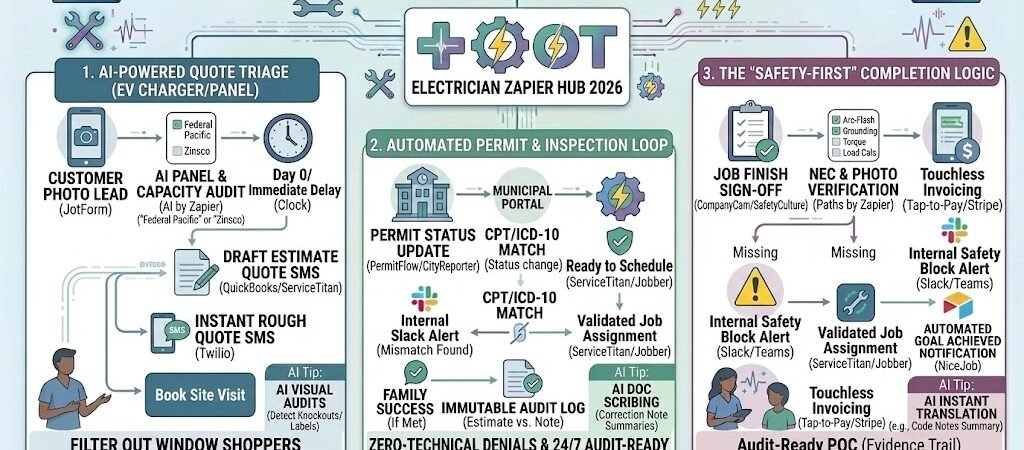
Key Takeaways: Zapier for Electricians guide
- The 60-Second Quote: Use AI to analyze site photos and generate preliminary estimates for EV chargers and panel swaps.
- Automated Permit Tracking: Sync your CRM with municipal portals to alert your team the moment a permit is approved.
- Digital Safety Guardrails: Mandatory automated checklists that prevent a job from being “Closed” until safety photos are uploaded.
- Real-Time Inventory Sync: Automate the “Wire-to-Wallet” link to ensure specialized materials (like copper and breakers) are billed at current 2026 market rates.
The “Compliance Crunch” of 2026 Electrical Shops
In 2026, electrical contracting has evolved into a high-stakes documentation game. Driven by the massive surge in EV infrastructure, smart-grid upgrades, and stricter NEC (National Electrical Code) digital logging requirements, the “back-office” workload for electricians has nearly doubled. We are now in the era of the “Compliance Crunch,” where doing the work is only half the battle—proving it is the other.
By 2026, the average electrical shop loses 15% of its potential margin to three specific “Systemic Shorts”:
- The Permit Bottleneck: Manually checking municipal portals for permit approvals or inspection statuses is a massive drain. In 2026, “Admin Drag” while waiting for a city inspector can stall a high-value panel upgrade for days, leading to scheduling overlaps and frustrated crews.
- The “Shadow” Material Leak: With the price of copper and specialized breakers remaining volatile in 2026, failing to log materials at the site of service means you are likely billing at outdated rates. Most shops lose thousands annually simply because “a few extra feet of Romex” weren’t added to the digital invoice.
- The Liability Gap: Insurance providers in 2026 now prioritize “Digital Proof of Compliance.” Without automated, timestamped photos of grounding rods, torque markings, and neutral bonds, a shop faces higher premiums or, worse, rejected claims in the event of a fire investigation.
The Zapier Solution: Zapier acts as your “Digital Compliance Officer.” It bridges the gap between your field tools (ServiceTitan, Jobber, or Workiz) and your documentation vaults. By 2026, an automated shop doesn’t wait for the tech to return to the office; the moment a wire is pulled and a photo is snapped, Zapier is already updating the permit status, logging the material cost, and archiving the safety proof for your insurer.
Practical AI Tip for 2026: Use AI by Zapier to perform “Automated Visual Audits.” Have your techs take a photo of the finished panel. The AI can scan the photo to ensure every breaker is labeled and no “knockouts” are left open. If a safety violation is detected, Zapier alerts the tech before they leave the driveway, saving you a costly and embarrassing “fix-it” trip.
Blueprint #1 – AI-Powered Quote Triage
In 2026, the “Site Visit” is the most expensive part of your sales process. With the explosion of EV charger installations and home battery backups, electrical shops are being flooded with quote requests. Driving across town just to tell a homeowner their 100-amp service can’t handle a Level 2 charger is a massive waste of billable time. This blueprint uses AI to turn the customer’s smartphone into your preliminary estimator.
1. The Trigger: The Photo-First Lead
- The 2026 Tool: Your website features a JotForm Enterprise or Typeform optimized for mobile.
- The Action: The customer is prompted to upload three specific photos: 1. Their main electrical panel (wide shot), 2. The panel’s manufacturer label, and 3. The desired location for the EV charger or appliance.
- The Key: Zapier triggers as soon as the “Photo Lead” is submitted.
2. The Logic: Automated Site Analysis (AI by Zapier)
Zapier sends these photos to a vision-enabled AI model to “read” the job site:
- The Panel Audit: The AI identifies the brand. If it sees Federal Pacific or Zinsco, it flags the lead as a “Mandatory Panel Upgrade” due to safety risks.
- Capacity Analysis: The AI estimates the number of open breaker slots. If the panel is full, Zapier adds a “Sub-panel” or “Service Upgrade” line item to the draft quote.
- The Distance Calc: AI estimates the distance between the panel and the charger location based on the customer’s description and photos.
3. The Action: The “60-Second” Rough Estimate
- The Delivery: Zapier drafts a “Preliminary Estimate” in QuickBooks Online or ServiceTitan and sends a text via Twilio: “Thanks for the photos! Based on our AI analysis, your home is ready for a Level 2 charger. Your estimated range is $1,400–$1,800. Click here to pay a $50 deposit and lock in your formal on-site inspection.”
- The Result: You filter out “window shoppers” and only put your high-paid technicians in front of qualified, high-intent customers.
Summary: The AI Quoting Zap
| Step | Component | 2026 Recommended Tool |
| Trigger | Photo Lead Submission | JotForm Enterprise |
| Logic | Visual Panel & Capacity Audit | AI by Zapier |
| Action 1 | Draft Estimate Creation | QuickBooks Online / ServiceTitan |
| Action 2 | Instant “Rough Quote” SMS | Twilio (SMS) |
| Action 3 | High-Priority Lead Alert | Slack (Sales Channel) |
Practical AI Tip for 2026: Use AI by Zapier to check “Permit Density.” If the AI sees the customer is in a municipality known for slow 2026 permit approvals, have Zapier automatically add a “4-Week Lead Time” disclaimer to the quote to manage customer expectations from day one.
Blueprint #2 – Automated Permit & Inspection Loop
In 2026, project delays are most often caused by the “Permit Black Box.” For an electrician, waiting for a municipality to approve a service panel upgrade or a solar tie-in can stall a crew for weeks. If you aren’t checking the portal daily, you might miss the exact moment a permit is issued, pushing your install date back unnecessarily. This blueprint eliminates the manual “Refresh” by connecting municipal status updates directly to your scheduling board.
1. The Trigger: Permit Status Change
- The 2026 Connection: While some cities now offer native Webhooks, most 2026 electrical shops use a specialized middleman like PermitFlow or CityReporter that integrates with Zapier.
- The Action: Zapier monitors your “Pending Permits” list. The moment a status changes from “Under Review” to “Approved” or “Issued,” the Zap triggers.
2. The Logic: Schedule Optimization (Paths by Zapier)
Zapier doesn’t just notify you; it prepares the job for the field:
- The “Ready to Work” Path: If the permit is approved, Zapier searches ServiceTitan or Jobber for the specific Job ID and updates the status to “Ready to Schedule.”
- The “Correction Required” Path: If the permit is flagged with “Revisions Needed,” Zapier creates an urgent task in Asana or ClickUp for the project manager to address the code notes immediately.
3. The Action: The Instant Dispatch Notification
- The Delivery: An automated SMS is sent to the customer: “Great news! Your city permit for the EV charger was approved this morning. We are moving you to our priority scheduling list—keep an eye out for a booking link in the next hour.”
- The Internal Update: A message is pushed to the Slack #Field-Crew channel: “Permit Issued: Job #EL-552 (123 Maple St). Techs, check your tablets for the approved site plans.”
Summary: The Permit Tracker Zap
| Step | Component | 2026 Recommended Tool |
| Trigger | Permit Status Update | PermitFlow / CityReporter |
| Logic | Approval vs. Correction | Paths by Zapier |
| Action 1 | CRM Status Change | ServiceTitan / Jobber / Workiz |
| Action 2 | Customer Success SMS | Twilio (SMS) |
| Action 3 | Project Manager Task | ClickUp / Asana |
Practical AI Tip for 2026: Use AI by Zapier to summarize the “Correction Notes” from the city. Instead of reading a 5-page PDF of code comments, the AI can give you a bulleted list: “1. Change wire gauge to #6 AWG; 2. Add labeling to sub-panel.” This allows your team to fix errors and resubmit in minutes, not days.
Blueprint #3 – The “Safety-First” Completion Logic
In 2026, a job isn’t finished when the lights turn on; it’s finished when the Digital Audit Trail is sealed. With the 2026 NEC updates mandating expanded arc-flash labeling and documented load calculations for nearly all non-dwelling installations, “safety” is now a data-entry requirement. This blueprint ensures your shop meets these high-voltage standards by making safety documentation the “key” that unlocks your final invoice.
1. The Trigger: “Pending Completion” Status
- The 2026 Standard: A technician marks the work as “Done” in the field app (ServiceTitan, Jobber, or Procore).
- The Action: Before the job can be moved to “Closed,” Zapier triggers a final Compliance Audit.
2. The Logic: Mandatory Safety Guardrails (Paths by Zapier)
Zapier acts as your Automated Safety Inspector, checking for specific 2026 requirements:
- The Photo Audit: Zapier verifies that three mandatory photos are attached: 1. The new Arc-Flash Hazard Label(with a 2026 assessment date), 2. The main grounding bond, and 3. The torque-marking on all high-voltage lugs.
- The Load Verification: If the job involved an EV charger or heat pump, Zapier checks if an updated Load Calculation form is attached to meet the new Article 120 (formerly Article 220) code.
- The Action (The Safety Block): If any item is missing, Zapier sends an immediate Slack/Teams notification to the tech: “Safety Block: Job #EL-2026 cannot be closed. Please upload the Arc-Flash label photo to satisfy NEC 110.16(B).”
3. The Action: The “Audit-Proof” Evidence Packet
- The Delivery: Once all safety items are verified, Zapier generates a branded “Certificate of Electrical Safety”PDF.
- The Distribution: * To the Client: An automated email: “Your installation is complete and has passed our 12-point safety audit. View your digital compliance certificate here.”
- To the Insurer: The packet is automatically filed in your HIPAA-secure Google Drive or Airtable, creating an immutable record in case of a future liability claim or insurance audit.
Summary: The Safety Compliance Zap
| Step | Component | 2026 Recommended Tool |
| Trigger | Job Finish / Sign-off | ServiceTitan / SafetyCulture |
| Logic | Photo & Code Verification | Paths by Zapier |
| Action 1 | Internal Safety Alert | Slack / Microsoft Teams |
| Action 2 | Compliance PDF Generation | Formstack / Google Docs |
| Action 3 | Secure Evidence Archiving | Airtable (HIPAA Tier) |
Practical AI Tip for 2026: Use AI by Zapier to scan your technicians’ safety photos. In 2026, AI can detect if a breaker is missing a proper label or if a wire gauge looks incorrect for the OCPD (Overcurrent Protective Device) listed. This “AI Supervisor” catches 100% of visual code violations before your truck even leaves the driveway.
The 2026 Electrician Tech Stack
To survive the “Compliance Crunch” of 2026, your tech stack must be as grounded as your electrical systems. The goal is to move from manual data entry to a “Single Source of Truth” where your field work, safety logs, and accounting are perfectly synchronized.
1. The 2026 Core Stack
| Function | 2026 Recommended Tool | Why It Wins in 2026 |
| Field Management | ServiceTitan / Jobber | Robust Zapier triggers for job status, inventory, and material tracking. |
| Visual Evidence | CompanyCam / SafetyCulture | Essential for timestamped, “Audit-Proof” photos required by insurers. |
| Permit Management | PermitFlow / CityReporter | Bridges the gap between the municipal portal and your scheduling board. |
| Digital Calculations | Electrical Calc Elite / JotForm | Automates 2026 NEC load calculations and voltage drop data. |
| Accounting | QuickBooks Online | The standard for real-time P&L and automated invoicing after safety checks. |
2. The 2026 “Circuitry” of Automation
In 2026, Zapier acts as the “Main Panel,” routing data through these critical circuits:
- The Lead Circuit: Connect Google Local Services Ads directly to JotForm. Once the customer uploads their panel photo, Zapier triggers the AI estimate, ensuring you never chase a dead-end lead.
- The Compliance Circuit: Link CompanyCam to Airtable. Every safety photo is automatically archived with a job ID, date, and GPS tag, creating an immutable record of your work quality.
- The Inventory Circuit: Connect your Field App to your Wholesaler’s API. When a tech logs a 200-amp main breaker, Zapier pings your supplier to verify current 2026 pricing and updates the invoice instantly.
3. Hardware for the 2026 “Smart Truck”
- Lidar-Enabled Tablets: Lead techs should use tablets with Lidar sensors (standard in 2026) to create instant 3D room scans for precise conduit and wiring runs.
- Bluetooth Torque Wrenches: Use tools that log “Proof of Torque” via Bluetooth. Zapier can pull this data and attach it to your Safety Completion Packet.
- 5G EV-Telematics: If your fleet is electric, connect your van’s state-of-charge to Zapier. It can automatically route “Low-Battery” vans to jobs near charging hubs during lunch breaks.
Conclusion: Your 30-Day “Code-Compliant” Roadmap
- Week 1: The Photo Intake. Add a panel-photo upload field to your website to launch Blueprint #1.
- Week 2: The Permit Bridge. Connect your city’s status updates to your Slack channel using Blueprint #2.
- Week 3: The Safety Guardrail. Implement the “No Photo, No Invoice” rule in your field app using Blueprint #3.
- Week 4: The Audit Archive. Set up a HIPAA-secure Airtable to store every job’s “Safety Evidence Packet” for insurance renewals.

About the Author
Aapt DubeyAapt Dubey is an automation specialist and software developer dedicated to eliminating manual workflows for small businesses. With deep, hands-on experience building complex Zapier integrations, API connections, and real-world applications, Aapt writes actionable, tested tutorials to help businesses scale efficiently.