
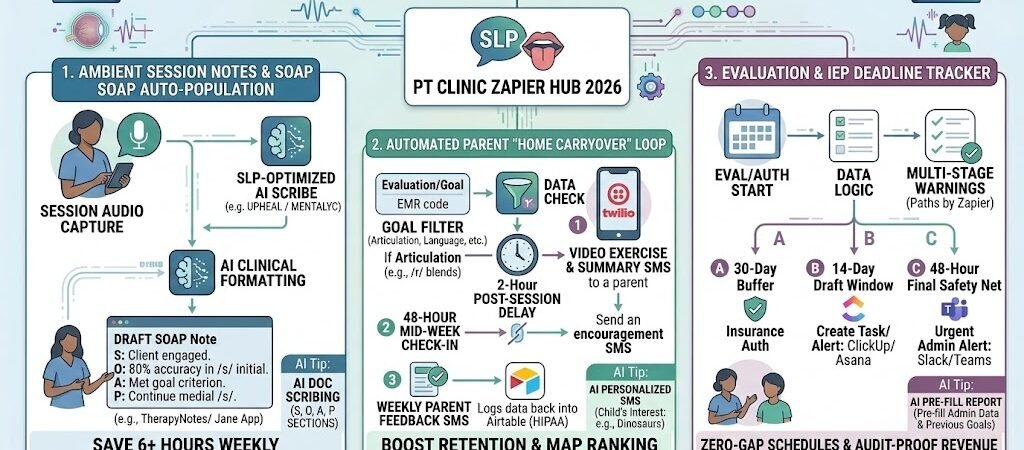
Key Takeaways: Zapier for Speech-Language Pathologists 2026
- The “Ambient Scribe” Revolution: Use AI to turn session recordings into structured SOAP notes, saving 6+ hours of paperwork weekly.
- Parent Coaching Loops: Automated “Home Carryover” SMS sequences ensure therapy doesn’t stop when the session ends.
- HIPAA-First Automation: Implement the “Secure Bridge” protocol to move session data without exposing Protected Health Information (PHI).
- Referral Velocity: Automate the “Evaluation-to-Report” pipeline to reduce waitlists and increase clinic throughput.
The “Note-Taking Trap” of 2026 SLP Practices
In 2026, Speech-Language Pathologists (SLPs) are navigating a high-pressure environment where the demand for specialized services—particularly in Myofunctional Therapy and Early Intervention—has reached an all-time high. However, the modern SLP is caught in a “Note-Taking Trap”: the more patients they help, the deeper they sink into a mountain of administrative “shadow work.”
The average 2026 SLP loses 6 to 8 hours per week to three specific “Documentation Drains”:
- The Narrative Burden: Drafting detailed SOAP (Subjective, Objective, Assessment, Plan) notes after every 45-minute session. By 2026, insurance providers (both private and Medicaid) have tightened documentation requirements, often rejecting claims that lack specific, data-driven “Trial Accuracy” metrics.
- The “Parent Carryover” Gap: Research in 2026 confirms that 70% of therapy success depends on home practice. Yet, manual emailing of “Home Programs” or “Exercise of the Week” is the first task to be dropped when a therapist’s schedule is full.
- Evaluation Latency: Transitioning from a clinical evaluation to a finalized, 10-page diagnostic report can take days. In many 2026 clinics, this delay creates a “Waitlist Bottleneck” that prevents new patients from starting care.
The Zapier Solution: Zapier acts as your “Virtual Clinical Assistant.” It creates a “Digital Nervous System” for your practice, connecting your EMR (TherapyNotes, Jane, or SimplePractice) with AI transcription and automated messaging. By 2026, top-tier SLP practices are using these “invisible pipelines” to ensure that as soon as a session ends, the data begins moving—drafting the note and updating the parent—without the SLP ever touching a keyboard.
Practical AI Tip for 2026: Automation isn’t just for notes; it’s for Clinical Insight. Use Zapier to flag any patient who hasn’t met a “Trial Accuracy” threshold of 80% over three consecutive sessions. This “Clinical Red Flag” allows you to pivot your treatment plan before the next session begins.
The 2026 HIPAA & Pediatric Security Protocol
When working with speech-language pathology, you aren’t just handling medical records—you are often handling the sensitive development data of minors. In 2026, the Office for Civil Rights (OCR) has increased scrutiny on “Pediatric Digital Privacy,” making the security of your automation stack a non-negotiable clinical requirement.
The golden rule for 2026 SLP automation is: Zapier is the courier, but the “Secure Bridge” is the armored car.
1. The “Secure Bridge” Strategy
Standard Zapier accounts do not sign a Business Associate Agreement (BAA). To remain compliant while moving session data, you must use a “Secure Bridge” to de-identify data before it enters the automation pipeline.
- The Vault (HIPAA Tier): Use JotForm Enterprise or Airtable (Enterprise/HIPAA) to collect raw session data, audio transcripts, or parent intake info. These platforms encrypt data at rest and provide the necessary BAA.
- The De-identified Pipe: Zapier should only handle Record IDs or Unique Client Codes.
- Safe Zap: “Client #882 mastered /r/ blends” -> Trigger parent SMS.
- Unsafe Zap: “Charlie Smith mastered /r/ blends” -> Send unencrypted email.
2. The 2026 SLP Security Checklist
Before connecting your first session-note Zap, verify your digital clinic meets these 2026 benchmarks:
- Transcription Consent: Your 2026 Consent for Treatment forms must explicitly include a “Digital Processing & AI-Assisted Documentation” clause. Families must opt-in to ambient recording.
- The BAA Chain: You must have a signed BAA with every link in your chain: Your EMR (TherapyNotes), your Form Tool, and your Secure SMS provider (Twilio HIPAA or Spruce Health).
- Audit-Ready Logs: Ensure all automated workflows are logged. In 2026, “I didn’t know the data was unencrypted” is no longer a valid defense against HITECH Act fines.
3. Comparison: Where SLP Data Lives vs. Where Zaps Live
| Data Category | Secure Vault (EMR/JotForm) | Zapier Pipeline (The Pipe) |
| Child’s Full Name/DOB | Encrypted & Stored | Hidden (Use Record ID) |
| Clinical Diagnosis (ICD-10) | Encrypted & Stored | Hidden (Use Category Code) |
| Session Time & Duration | Visible | Visible (Operational Data) |
| Therapist NPI Number | Visible | Visible (Operational Data) |
| Goal Mastery Status | Visible | Visible (Triggers Home Program) |
Practical AI Tip for 2026: For multi-therapist clinics (5+ SLPs), consider Keragon. It is a 2026 leader in healthcare-specific automation that signs a BAA for the entire platform, allowing you to move pediatric PHI seamlessly without the manual de-identification required by standard Zapier workflows.
Blueprint #1 – Ambient Session Notes (SOAP Note Automation)
By 2026, the “Gold Standard” for SLP documentation has shifted from manual typing to Ambient Clinical Scribing. This blueprint eliminates the “Note-Taking Trap” by capturing the clinical essence of a session through audio and automatically structuring it into a compliant SOAP note.
1. The Trigger: The Secure Session Capture
- The 2026 Tool: Clinicians use a HIPAA-compliant voice-capture tool like Upheal, Mentalyc (SLP Edition), or a secure recording module within their EMR (SimplePractice or Jane).
- The Action: At the end of a session, or during a 2-minute “recap” after the child leaves the room, the SLP dictates the key outcomes.
- The Voice Prompt: “Client #442 worked on /s/ in initial position. Accuracy was 75% with moderate verbal cues. Client was fatigued but remained engaged. Plan to move to medial position next session.”
2. The Logic: Clinical Structure (AI by Zapier)
Zapier doesn’t just transcribe; it acts as a Clinical Editor to ensure the note meets 2026 insurance and IEP standards.
- The Step: Zapier takes the raw transcript and runs it through an AI by Zapier prompt.
- The Instruction: “Take this transcript and format it into a structured SLP SOAP note. Categorize ‘75% accuracy’ under Objective and ‘Plan to move to medial position’ under Plan. Ensure the tone is clinical and professional.”
3. The Action: The EMR “Draft Deposit”
- The Delivery: Zapier pushes the formatted text directly into the “Drafts” or “Pending Review” section of your EMR.
- The Result: Instead of starting from a blank page at the end of a long day, the SLP simply reviews the AI-generated draft, makes any necessary clinical adjustments, and signs off. This reduces documentation time by over 65%.
Summary: The SOAP Note Zap
| Step | Component | 2026 Recommended Tool |
| Trigger | Recording Uploaded | Upheal / Mentalyc / Spruce |
| Logic | SLP-Specific AI Formatting | AI by Zapier |
| Action 1 | EMR Draft Population | TherapyNotes / SimplePractice |
| Action 2 | QA Notification | Slack / Microsoft Teams |
Practical AI Tip for 2026: In 2026, many SLPs use “Template Shorthand.” You can tell the AI, “Use my ‘Articulation Standard’ template for this note,” and Zapier will automatically apply your specific phrasing and formatting style to the draft.
Blueprint #2 – Automated “Home Carryover” & Parent Coaching
In 2026, the clinical consensus is clear: speech therapy is most effective when it moves from the clinic to the living room. However, the manual effort of emailing “Home Programs” or texting reminders to busy parents is often the first thing to drop when an SLP’s schedule is full. This blueprint automates the “Home Carryover” loop, ensuring consistent practice without adding a single task to the therapist’s to-do list.
1. The Trigger: EMR Goal Tagging
- The 2026 Standard: Use an EMR like TherapyNotes or SimplePractice that allows for custom patient tags.
- The Action: When a therapist tags a patient with a specific focus (e.g.,
#Articulation_Sor#Language_Sequencing), Zapier triggers a personalized coaching sequence. - Pro Tip: In 2026, many SLPs use JotForm (HIPAA Tier) to quickly select a “Goal of the Week” from a dropdown menu at the end of a session, which feeds directly into the Zap.
2. The Logic: Drip-Feed Coaching (Delay by Zapier)
Zapier doesn’t just send one message; it creates a structured “Practice Week” for the parent:
- Day 1 (Post-Session): Zapier sends a “Success Summary” via Twilio (HIPAA Tier): “Great job today! Client #442 worked on /s/ initial. Our home goal: 5 minutes of ‘I spy’ for /s/ words today.”
- Day 3 (Mid-Week Nudge): Zapier sends a 30-second video link showing the correct tongue placement for the targeted sound.
- Day 6 (Feedback Loop): A final text asks the parent: “How did home practice go this week? Reply 1 for Great, 2 for OK, 3 for Challenging.”
3. The Action: Closing the Clinical Loop
- The Data Sync: Parent responses are automatically logged back into the Airtable (HIPAA Tier) patient dashboard.
- The Clinical Alert: If a parent replies “3” (Challenging), Zapier sends an internal Slack alert to the SLP: “Heads up: Parent of Client #442 reported difficulty with home practice. Adjust plan for next session?”
- The Result: The therapist enters the next session with real-world data, allowing them to pivot the treatment plan immediately rather than spending the first 10 minutes playing catch-up.
Summary: The Parent Coaching Zap
| Step | Component | 2026 Recommended Tool |
| Trigger | Goal Tag Added | TherapyNotes / JotForm |
| Logic | Multi-Day Drip Sequence | Delay by Zapier |
| Action 1 | Educational Video/Text | Twilio (HIPAA) / Spruce |
| Action 2 | Parent Feedback Survey | Twilio (HIPAA) SMS |
| Action 3 | Clinical Dashboard Update | Airtable (HIPAA Tier) |
Practical AI Tip for 2026: Use AI by Zapier to personalize the coaching texts based on the child’s interests. If the EMR record mentions the child loves “Dinosaurs,” the AI can tweak the home practice suggestion to: “Can you find any dinosaur names with the ‘S’ sound today?” This small touch increases parent engagement by over 40%.
Blueprint #3 – Evaluation & IEP Deadline Tracker
Managing state-mandated Individualized Education Program (IEP) deadlines or private insurance re-authorizations is a high-stakes logistical puzzle. In 2026, missing a “re-eval” date by just 24 hours can result in a complete lapse of funding or legal non-compliance. This blueprint transforms your calendar into a proactive compliance engine, ensuring you are “Survey-Ready” and fully authorized for every minute of therapy.
1. The Trigger: Evaluation Date or “Auth” Start
- The 2026 Tool: Zapier monitors your EMR (TherapyNotes) or a dedicated intake board in ClickUp (HIPAA Tier).
- The Action: A new Evaluation is scheduled, or a 6-month insurance authorization is approved. Zapier captures the “End Date” or “Due Date” instantly.
2. The Logic: Multi-Stage Warning System
Zapier doesn’t just send one reminder on the due date; it manages a recounting timeline (Delay by Zapier):
- 30 Days Out (The Insurance Buffer): Zapier checks if a “Re-authorization Request” has been sent. If not, it pings the billing admin.
- 14 Days Out (The Draft Window): Zapier creates a “High Priority” task in the therapist’s ClickUp or Asana: “Start IEP Draft for Client #442. Evaluation data is ready in the Secure Vault.”
- 48 Hours Out (The Final Safety Net): If the status in your EMR isn’t marked “Finalized,” Zapier triggers an urgent Slack notification.
3. The Action: Automated Report Population
- The Step: Zapier pulls the “Template ID” for the specific school district or insurance carrier.
- The Integration: Using Google Docs (with a signed BAA) or PandaDoc (HIPAA Tier), Zapier pre-fills the administrative data: Client ID, Therapist NPI, ICD-10 codes, and previous goals.
- The Result: The therapist opens a document that is already 40% complete, allowing them to focus entirely on the clinical interpretation of the new testing data.
Summary: The Deadline & Compliance Zap
| Step | Component | 2026 Recommended Tool |
| Trigger | Evaluation / Auth Start | TherapyNotes / ClickUp |
| Logic | Multi-Stage “Safety Net” | Delay by Zapier |
| Action 1 | Task Creation | ClickUp (HIPAA) / Asana |
| Action 2 | Administrative Pre-fill | Google Docs (Enterprise/BAA) |
| Action 3 | Urgent Deadline Alert | Slack / Microsoft Teams |
Practical AI Tip for 2026: Use Zapier Central to audit your “Evaluation Throughput.” In 2026, the AI can identify if a specific therapist’s reports are consistently hitting the 48-hour warning mark and suggest a caseload adjustment before burnout occurs.
Conclusion: Your 30-Day “Speech-First” Roadmap
Transitioning to an automated 2026 SLP practice is a marathon, not a sprint:
- Week 1: The Documentation Audit. Identify where your “Notes Debt” is highest. Is it daily SOAP notes or long-form evaluations?
- Week 2: Secure the Infrastructure. Sign your BAAs with your AI scribe and form tools.
- Week 3: Launch Blueprint #1. Start using Ambient Documentation for your most repetitive articulation sessions.
- Week 4: Launch Blueprint #2 & #3. Connect your parents to the coaching loop and set up your deadline safety nets.

About the Author
Aapt DubeyAapt Dubey is an automation specialist and software developer dedicated to eliminating manual workflows for small businesses. With deep, hands-on experience building complex Zapier integrations, API connections, and real-world applications, Aapt writes actionable, tested tutorials to help businesses scale efficiently.