
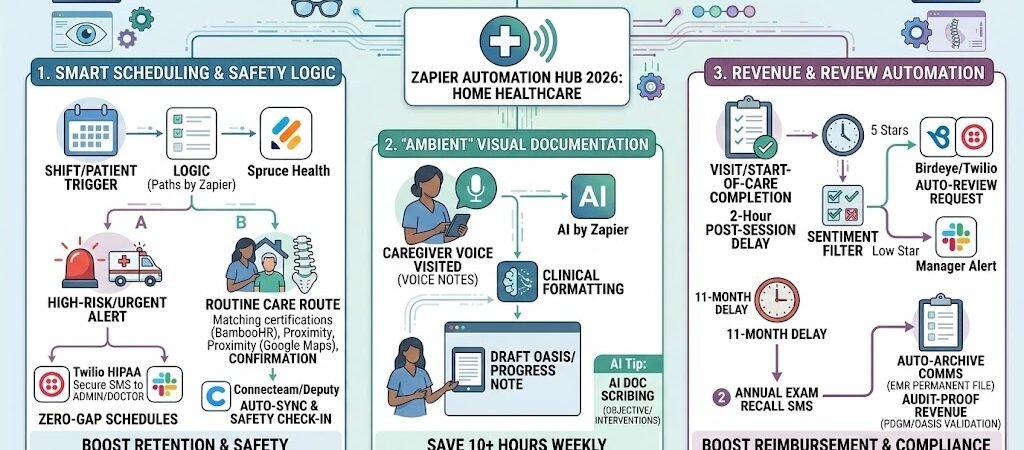
Key Takeaways: Zapier for Home Healthcare 2026
- The “Ambient” OASIS Shift: In 2026, clinical documentation must be consistent across all clinicians. Automation now drafts these records in the background to prevent technical denials.
- Zero-Gap Scheduling: Automated shift syncing reduces “coverage anxiety” by instantly re-routing caregivers when a gap is detected.
- Safety as Compliance: 2026 regulations treat caregiver safety as a core compliance pillar. Zaps now trigger “Safe Environment” checks before a shift begins.
- The HIPAA Vault: All automations must use a “Secure Bridge” (e.g., JotForm Enterprise or Airtable HIPAA) to move data without exposing PHI.
The “Operational Squeeze” of 2026 Home Care
Home healthcare is entering 2026 under immense pressure. With the Patient-Driven Groupings Model (PDGM)becoming more exacting, agencies are buried in paperwork while facing a critical caregiver shortage. The “Operational Squeeze” refers to the shrinking gap between rising regulatory demands and a dwindling labor pool.
By 2026, the average home health agency is losing 14+ hours per week to three specific “Efficiency Leaks”:
- The Documentation Debt: Clinicians often spend 2x more time on documentation (OASIS-E, progress notes, and care plans) than they do on actual patient care. This leads to “charting at night,” which is the #1 driver of caregiver burnout.
- Start-of-Care (SOC) Latency: Manual data entry from referral sources to the EHR causes delays. In 2026, a 48-hour delay in SOC can result in a 15% reduction in reimbursement under new CMS quality-of-care metrics.
- The Coordination Chaos: Managing a mobile workforce across dozens of zip codes leads to “phone tag” for shift changes, patient status updates, and safety checks.
The Zapier Solution: Zapier acts as your “Automated Clinical Coordinator.” By orchestrating data flow between your EHR (Alora, Homebase, or Kantime) and your field tools, Zapier eliminates the “manual re-entry” that leads to human error and audit failures. In 2026, agencies using these “invisible pipelines” report a 22% increase in clinician satisfaction and a significant reduction in technical denials.
Practical AI Tip for 2026: Automation isn’t just about speed; it’s about Revenue Integrity. Use Zapier to flag any “Start of Care” record that hasn’t been updated within 24 hours. This “Safety Net Zap” ensures you never miss a 2026 CMS billing window.
The 2026 Compliance & “Secure Bridge” Protocol
In 2026, the intersection of home healthcare and digital automation is a high-priority zone for regulators. While home health agencies have always been subject to HIPAA, the 2026 HIPAA Security Rule Update has introduced the most significant changes in over a decade. The traditional distinction between “addressable” and “required” safeguards has been eliminated—meaning controls like Multi-Factor Authentication (MFA) and end-to-end encryption are now mandatory for every agency, regardless of size.
1. The “Secure Bridge” Strategy
Because you are moving data from private residences into a central system, you are handling Protected Health Information (PHI) at every step. The 2026 golden rule for automation is: Zapier is the engine, but a “Secure Bridge” is the vault.
- The Vault (Storage): You must use a tool that signs a Business Associate Agreement (BAA), such as JotForm Enterprise (HIPAA Tier) or Airtable (Enterprise/HIPAA). These are the only environments where raw patient names, medication lists, or OASIS data can safely sit.
- The Pipe (Zapier): Zapier does not sign a BAA for standard or small business plans. Therefore, you must de-identify data before it enters a Zap.
- Safe Workflow: A caregiver submits a visit note in JotForm. JotForm securely stores the PHI and sends only a “Record ID” and “Visit Status: Complete” to Zapier.
- The Action: Zapier uses that ID to trigger a billing alert in your accounting software or a shift-update in your scheduler, without ever “seeing” the patient’s medical details.
2. The 2026 Home Health Security Checklist
Before activating your first caregiver workflow, verify your “Digital Agency” meets these updated 2026 benchmarks:
- Mandatory MFA: Multi-Factor Authentication must be active on your EHR, your Zapier account, and all caregiver mobile devices.
- 72-Hour Restoration: Your technical safeguards must now include a tested backup system capable of restoring patient data within 72 hours of a cyber incident (e.g., ransomware).
- The BAA Chain: You must have a signed BAA not just with your EHR provider, but with your form builder, your secure SMS provider (Twilio HIPAA Tier), and your cloud storage.
- Zero-Trust Mobile Access: Since home health is mobile by nature, all devices used for “Ambient Documentation” must have automatic log-offs and remote-wipe capabilities enabled.
3. Comparison: Data Visibility in Your Zaps
| Data Type | Protected Vault (JotForm/EMR) | Zapier Pipeline (The Pipe) |
| Patient Name/DOB | Encrypted & Stored | Hidden (Use Record ID) |
| Clinical Diagnosis | Encrypted & Stored | Hidden (Use Category Code) |
| Shift Time/Date | Visible | Visible (Operational Data) |
| Caregiver Name | Visible | Visible (Operational Data) |
| Billing Status | Visible | Visible (Operational Data) |
Practical AI Tip for 2026: If your agency manages more than 50 active caregivers, consider Keragon. It is a 2026 leader in healthcare-specific automation that signs a BAA for the entire platform, allowing you to move PHI seamlessly between systems without the complex de-identification required by Zapier.
Blueprint #1 – Automated Caregiver Shift & Safety Logic
In 2026, scheduling for home healthcare is no longer just about filling a calendar slot; it is about dynamic matching and proactive safety. With the rise in remote work and the increasing complexity of home-based acuity, agencies that rely on manual calling to fill shifts are seeing a 30% higher turnover rate. This blueprint automates the “Shift-to-Safety” lifecycle, ensuring the right caregiver is in the right home at the right time.
1. The Trigger: The “Open Shift” or New Admission
- The 2026 Standard: Use a mobile-first scheduling platform like Deputy, Connecteam, or your native EHR scheduler (Alora/Homebase).
- The Action: A new patient is admitted, or a caregiver marks themselves “unavailable.” Zapier monitors the “Unassigned Shift” or “New Patient” trigger in real-time.
2. The Logic: Smart Matching & Triage (Paths by Zapier)
Zapier uses Paths to ensure the patient’s clinical needs match the caregiver’s specific skill set:
- Path A (Specialized Care): If the patient requires “Ventilator Support” or “Complex Wound Care,” Zapier filters your caregiver database (in Airtable or BambooHR) for those with current certifications and pings them first via Twilio (HIPAA Tier).
- Path B (Proximity & Logistics): For routine visits, Zapier calculates the distance between the caregiver’s last visit and the new patient’s home, offering the shift to the person with the shortest commute.
- Path C (Safety Protocol): 30 minutes before any shift in a “High-Risk” area or with a new patient, Zapier triggers a Safety Check-In.
3. The Action: The “Safety First” SMS Loop
In 2026, caregiver safety is a core compliance pillar. Automation ensures you are monitoring your staff without needing a 24/7 dispatch team.
- The Check-In: The caregiver receives a secure text: “Shift starting in 30 mins at [Record ID]. Please confirm you have arrived safely and the environment is secure. Reply 1 for SECURE, 2 for CALL ME.”
- The Escalation: If the caregiver replies “2” or fails to check in within 15 minutes of the shift start, Zapier immediately triggers an Emergency Alert to the Clinical Director via Slack and places an automated call via Twilio.
Summary: The Shift & Safety Zap
| Step | Component | 2026 Recommended Tool |
| Trigger | New/Unassigned Shift | Deputy / Connecteam |
| Logic | Skill & Proximity Match | Paths by Zapier |
| Action 1 | Secure Shift Offer | Twilio (HIPAA) / Spruce |
| Action 2 | Pre-Shift Safety Check | Twilio (HIPAA) SMS |
| Action 3 | Emergency Escalation | Slack / Automated Voice Call |
Practical AI Tip for 2026: Use Zapier Central to monitor “Shift Fatigue.” If the AI sees a caregiver has picked up more than 50 hours in a week, it can automatically flag the scheduler to prioritize other staff members, preventing burnout and reducing the risk of clinical errors.
Blueprint #2 – “Ambient” Patient Records & Documentation
In 2026, the #1 cause of clinician burnout in home health isn’t the travel—it’s the “Documentation Debt.” Between OASIS-E assessments and detailed progress notes, field clinicians often spend 3 hours at a keyboard for every 6 hours of patient care. This blueprint utilizes Ambient Clinical Scribing to turn “drive time” into “charting time,” moving your agency toward a “Zero-Note-Backlog” standard.
1. The Trigger: The Mobile “Visit Summary”
- The 2026 Tool: Clinicians use a HIPAA-compliant voice-capture tool like Upheal, Mentalyc, or the native mobile app of their EHR (Alora or Kantime).
- The Action: While walking back to their car or during a brief post-visit sit-down, the clinician dictates a 90-second summary of the visit.
- The Voice Prompt: “Patient [Record ID] shows improved gait. Wound on left lower extremity is granular, 2cm x 2cm. No signs of infection. Education provided on medication adherence. Patient’s daughter was present and verbalized understanding.”
2. The Logic: AI-Powered Formatting (AI by Zapier)
Zapier doesn’t just transcribe the audio; it acts as a Clinical Editor to ensure the note meets 2026 audit standards.
- The Step: Zapier takes the raw transcript and runs it through an AI by Zapier prompt.
- The Instruction: “Take this transcript and format it into a structured Home Health Progress Note. Extract the ‘Objective’ findings and ‘Interventions’ performed. Ensure it aligns with PDGM documentation requirements for medical necessity.”
3. The Action: The EHR “Draft Deposit”
- The Delivery: Zapier pushes the formatted text directly into the “Drafts” or “Pending Review” section of your EHR.
- The Result: When the clinician returns to the office (or their home) at the end of the day, they aren’t staring at a blank screen. They are simply reviewing and signing off on pre-populated notes. This reduces charting time by over 70%.
Section 4 Summary: The Ambient Documentation Zap
| Step | Component | 2026 Recommended Tool |
| Trigger | Voice Recording Ends | Upheal / Mentalyc / Spruce |
| Logic | Clinical Logic Formatting | AI by Zapier |
| Action 1 | EHR Draft Population | Alora / Homebase / Kantime |
| Action 2 | QA Notification | Slack / Email |
Practical AI Tip for 2026: Privacy is non-negotiable. Always ensure your Patient Consent forms include a clause about AI-assisted documentation. In 2026, most families appreciate this, as it ensures the clinician is focused on the patient’s care rather than a laptop screen during the visit.
Blueprint #3 – Audit-Proof Compliance Logging
In 2026, home health audits have shifted from “periodic checks” to Continuous Monitoring. CMS and state surveyors now utilize AI-driven “Red Flag” systems to identify agencies with documentation gaps or expired credentials in real-time. This blueprint ensures your agency stays “Survey-Ready” 24/7 by automating the administrative paper trail that usually takes hours of manual tracking.
1. The Trigger: Compliance Events & Document Expirations
- The Tools: Zapier monitors your HR platform (BambooHR or Gusto) and your credentialing database.
- The Action: An event occurs—a caregiver’s nursing license is 30 days from expiring, a CPR certification is due, or a new OASIS-E assessment is submitted in the EHR.
2. The Logic: Automated Validation & Alerting
Zapier acts as your Digital Compliance Officer, cross-referencing dates and requirements without human intervention.
- Logic (Filter by Zapier): If a document expiration date is < 30 days, or if a “Start of Care” (SOC) note is missing a required physician signature.
- The Action (Internal Alert): Zapier sends a high-priority Slack or Microsoft Teams notification to the HR Manager: “Action Required: RN Sarah J.’s license expires in 30 days. Automated renewal reminder sent to caregiver.”
3. The Action: The “Immutable” Audit Log
- The Delivery: Zapier pushes a “Compliance Snapshot” into a secure, read-only Airtable (HIPAA Tier) base.
- The Record: Every SOC, Recertification, and Discharge is logged with a timestamp and a link to the corresponding (de-identified) EHR record.
- The Result: When a surveyor walks into your office, you don’t scramble through filing cabinets. You pull up a single, filtered dashboard that proves 100% compliance across your entire roster and patient base.
Summary: The Compliance & Audit Zap
| Step | Component | 2026 Recommended Tool |
| Trigger | Document Date / EHR Event | BambooHR / Alora / Kantime |
| Logic | Expiration & Signature Check | Filter by Zapier |
| Action 1 | Caregiver Renewal Reminder | Twilio (HIPAA) / Email |
| Action 2 | Central Compliance Log | Airtable (HIPAA Tier) |
| Action 3 | Admin Escalation | Slack / Microsoft Teams |
Practical AI Tip for 2026: Use Zapier Central to perform “Sentiment Audits” on your clinicians’ notes. The AI can scan for phrases like “decline in condition” or “safety risk” and ensure these have been escalated to the Physician or the Clinical Director, closing the loop on “Medical Necessity” requirements.
Conclusion: Your 30-Day “Care-First” Roadmap
Transforming your home health agency into a 2026-ready operation is a staged journey:
- Week 1: The Logistics Audit. Map out your “Communication Gaps.” Where does a shift request or a clinical update get lost?
- Week 2: Secure the Bridge. Finalize your BAA with JotForm and your secure SMS provider.
- Week 3: Launch Blueprint #1 & #2. Automate your shift safety checks and start testing “Ambient Scribing” for one clinical team.
- Week 4: Launch Blueprint #3. Build your “Audit-Proof” log to protect your agency from 2026 regulatory fines.

About the Author
Aapt DubeyAapt Dubey is an automation specialist and software developer dedicated to eliminating manual workflows for small businesses. With deep, hands-on experience building complex Zapier integrations, API connections, and real-world applications, Aapt writes actionable, tested tutorials to help businesses scale efficiently.