
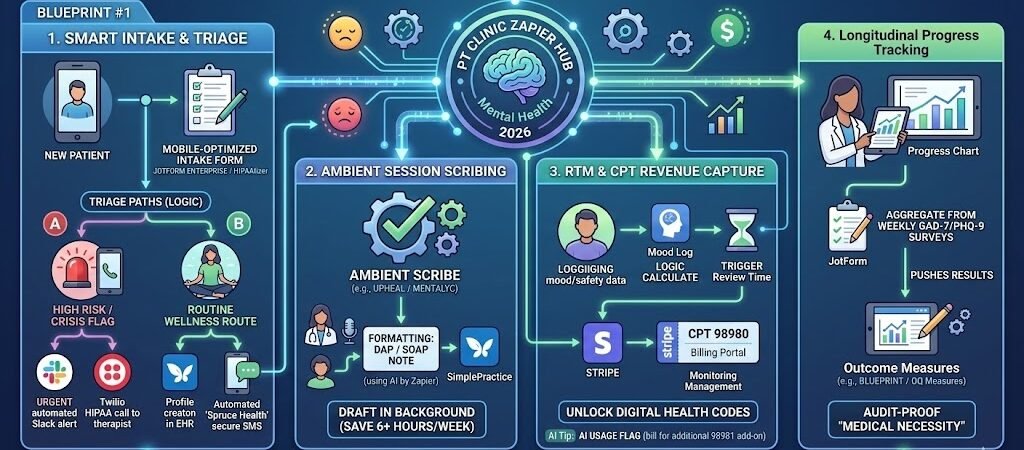
Key Takeaways: Zapier for Mental Health Therapists
- The 6-Hour Gift: AI-powered documentation Zaps reduce weekly charting time by an average of 6 hours in 2026.
- Denial Defense: Automated pre-visit eligibility checks can lower insurance claim denial rates by up to 22%.
- HIPAA & The BAA Wall: In 2026, standard Zapier is strictly for non-PHI tasks. For clinical data, you must use a “Secure Bridge” like HIPAAtizer or the Enterprise tiers of JotForm/Airtable that sign a BAA.
- The Revenue Pivot: 2026 CPT codes (like 98980) now allow for billing digital “Remote Therapeutic Monitoring.” Automation is the only way to track this data without losing money on admin.
- Topical Moat: Automation isn’t just “reminders”—it’s ambient session drafting and automated longitudinal progress tracking.
The “Clinical Note Debt” Crisis of 2026
Mental health therapy in 2026 is at a critical breaking point. With a nationwide therapist shortage and a 30% increase in patient complexity, the average practitioner is no longer just a healer—they are a high-volume data manager. This has led to the rise of “Clinical Note Debt,” where solo and group practitioners carry 15–20 unwritten session notes by Friday afternoon, looming over their weekends.
The administrative weight isn’t just a nuisance; it is a primary driver of compassion fatigue. Therapists are burning out from the “Manual Tax” of 2026 practice:
- “Pajama Time” Charting: Spending 1.5 to 2 hours every evening typing out SOAP or DAP notes because the 10-minute gap between sessions isn’t enough to stay current.
- The Eligibility Loop: Manually checking insurance portals for coverage changes every month to avoid the dreaded “unpaid claim” surprise.
- Fragmented Data: Struggling to track longitudinal progress because mood scores, intake forms, and clinical notes live in three different, disconnected apps.
The Zapier Solution: Zapier acts as your “Clinical Coordinator,” creating a silent layer of automation that moves data invisibly behind the scenes. In 2026, the goal is “Presence-First” therapy. By automating the repetitive data-shoveling—like syncing intake forms to your EHR or triggering eligibility checks—the “50-minute hour” finally becomes 50 minutes of actual connection, not 40 minutes of talk and 10 minutes of frantic typing.
Practical AI Tip: In 2026, the cost of clinician turnover due to burnout is estimated at $75,000 per therapist. Implementing a robust automation stack is no longer an “IT project”—it is the most effective retention and mental health strategy a clinic owner can deploy for their own team.
The 2026 HIPAA & BAA Protocol (Safety First)
In 2026, the Office for Civil Rights (OCR) has significantly tightened its oversight of “Shadow AI” and non-compliant automation. For a Mental Health Therapist, a data breach isn’t just a legal liability; it is a profound breach of clinical trust.
The most critical technical reality for your 2026 blog is this: Standard Zapier plans do not provide the necessary security for PHI (Protected Health Information). If you are passing a client’s trauma history or even their full name through a basic Zap, you are likely out of compliance.
1. The “Secure Bridge” Strategy
To automate safely, you must utilize the “Secure Bridge” protocol. This involves using intermediaries that will sign a Business Associate Agreement (BAA) to act as the vault for your sensitive data.
- Intake & Records: Use the Enterprise/Healthcare Tiers of tools like JotForm or HIPAAtizer. These platforms sign a BAA and ensure data is encrypted at rest.
- The Zapier Gap: Since Zapier itself is often the “pipe” and not the “vault,” your bridge tool must de-identify the data before it enters the automation stream.
- Example: JotForm sends a notification to Zapier that “Record ID #442” has been updated. Zapier then triggers a task in your EHR. The actual clinical details stay locked inside the BAA-compliant JotForm environment.
2. The 2026 Therapist Security Checklist
Before connecting your first clinical Zap, ensure your practice meets these “Gold Standard” 2026 benchmarks:
- Zero-Trust Identity: Enable MFA (Multi-Factor Authentication) on Zapier and all connected apps. In 2026, credential stuffing is the #1 cause of healthcare data leaks.
- The BAA Chain: Confirm you have signed BAAs with your EHR (SimplePractice/TherapyNotes), your Form Provider, and your Communication Tool (e.g., Twilio’s HIPAA tier).
- Data Minimization: Only move the absolute minimum data required. If a Zap only needs to notify you that a form was submitted, do not include the patient’s phone number or address in that specific Zapier step.
3. Comparison: Where PHI Lives vs. Where Zaps Live
| Data Category | Storage Location (Vault) | Zapier’s Role (Pipe) |
| Clinical Notes (SOAP) | Encrypted EHR (SimplePractice) | Trigger Only (e.g., “Note Signed”) |
| Patient Financials | Stripe / Billing Gateway | Action Only (e.g., “Send Invoice”) |
| Session Transcripts | Ambient Scribe (Upheal) | Webhooks (Secure data transfer) |
| Internal Ops | Slack / Microsoft Teams | Coordination (Alerts by Record ID) |
Practical AI Tip: If you are a group practice with more than five clinicians, we recommend looking at Keragon. It is a 2026 leader in healthcare-specific automation that signs a BAA for the entire platform, removing the “De-identification” hurdle required with Zapier.
Blueprint #1 – Smart Intake & Triage (The “First Impression” Zap)
In the mental health landscape of 2026, the intake process is no longer just about gathering names and addresses; it is about clinical risk assessment and load balancing. A delay in responding to a high-risk referral is a safety issue, while manual data entry for routine wellness cases is a waste of your specialized training.
This blueprint creates an “Intelligent Triage” system that sorts your waiting list, flags urgent needs, and handles the initial documentation without you lifting a finger.
1. The Trigger: The HIPAA-Compliant Gateway
- The 2026 Standard: Use JotForm Enterprise (HIPAA Tier) or HIPAAtizer.
- The Action: A prospective client clicks the “Check Availability” link on your profile. They complete a comprehensive intake including history, insurance, and—most importantly—a validated screening tool like the PHQ-9 (Depression) or GAD-7 (Anxiety).
- Pro Tip: In 2026, tools like PlatoForms can now use AI to scan the patient’s uploaded insurance card and automatically verify eligibility in real-time, notifying the client immediately if you are “Out of Network.”
2. The Logic: Triage Paths (The “Clinician’s Shield”)
Zapier uses Paths to decide where each lead goes based on their clinical score:
- Path A (The Crisis Flag): If a client selects “Self-Harm” or scores in the “Severe” range on the PHQ-9, Zapier bypasses your standard queue. It triggers a high-priority notification via a secure Slack channel or an automated call to your triage team.
- Path B (The Routine Workflow): If the score is low-to-moderate, Zapier automatically creates a patient profile in your EHR (SimplePractice or TherapyNotes) and adds them to your “Standard Intake” list.
3. The Action: The “Instant Connection” SMS
- The Delivery: Via Twilio (HIPAA Tier) or Spruce Health.
- The Message: “Hi [Name], we’ve received your intake forms. Our team is reviewing them now. To help us get started, please securely upload your photo ID here: [Secure Link].”
- Why it works: In 2026, clients stay with the therapist who communicates first. By providing an immediate “next step,” you provide a sense of containment and care before the first session even starts.
Summary: The Smart Triage Zap
| Step | Component | 2026 Recommended Tool |
| Trigger | Web Intake Submission | JotForm (HIPAA) / HIPAAtizer |
| Logic | Crisis vs. Routine Triage | Paths by Zapier |
| Action 1 | Urgent Clinical Alert | Slack / Spruce Health |
| Action 2 | EHR Profile Creation | SimplePractice / TherapyNotes |
| Action 3 | Automated Secure SMS | Twilio (HIPAA) / Spruce Health |
Practical AI Tip: Use Zapier Central (your AI agent) to monitor your “Intake-to-Session” ratio. If a client submits a form but hasn’t booked within 24 hours, the AI can detect the gap and send a gentle, personalized “Checking in” nudge, recovering an average of 15% of lost referrals.
Blueprint #2 – Ambient Documentation & Note Drafting
By 2026, “Typing” has become a legacy skill in mental health. The most significant advancement for therapists is the move toward Ambient Clinical Scribing. Instead of splitting your focus between the client’s eyes and your laptop screen, you can now stay 100% present, knowing your documentation is being drafted in the background.
1. The Trigger: The “Ambient Session” Completion
- The Tools: Use 2026 leaders like Upheal, Mentalyc, or Twofold.
- The Action: You record the session via a HIPAA-compliant microphone or within your telehealth platform. Once you hit “Stop,” the ambient AI summarizes the key clinical themes, interventions, and client responses.
2. The Logic: AI-Powered Formatting (AI by Zapier)
Zapier doesn’t just move the text; it refines it to match your specific clinical orientation (CBT, DBT, Psychodynamic, etc.).
- The Step: Zapier takes the raw transcript summary and runs it through an AI by Zapier prompt.
- The Custom Instruction: “Take this session summary and format it into a standard SOAP note. Ensure the ‘Assessment’ section highlights the client’s progress toward their goal of ‘Reduced Social Anxiety’ and utilizes clinical terminology appropriate for an LCSW.”
3. The Action: The EHR “Draft Deposit”
- The Delivery: Zapier pushes the formatted text directly into the “Pending” or “Draft” notes section of your EHR (SimplePractice, Jane App, or TherapyNotes).
- The Result: When you finish your day, you aren’t staring at a blank screen. You are simply reviewing, editing, and signing off on pre-written drafts. This reduces the cognitive load of “starting from scratch” by over 80%.
Summary: The Ambient Note Zap
| Step | Component | 2026 Recommended Tool |
| Trigger | Session Recording Ends | Upheal / Mentalyc / Twofold |
| Logic | Clinical Logic Formatting | AI by Zapier |
| Action 1 | EHR Draft Population | SimplePractice / TherapyNotes |
| Action 2 | Progress Note Notification | Slack / Email |
Practical AI Tip for 2026: Privacy is paramount. Always ensure your Informed Consent documents include a specific clause about the use of AI-assisted documentation. In 2026, most clients actually prefer this, as it means their therapist is looking at them, not a screen.
Blueprint #3 – Billing Automation & “Remote Monitoring” Revenue
In 2026, the financial landscape for mental health has shifted. The American Medical Association (AMA) and CMS have fully integrated Remote Therapeutic Monitoring (RTM) and Behavioral Health Integration (BHI) into the standard fee schedule. This means you can finally get reimbursed for the “in-between” work you already do—monitoring patient safety, reviewing mood logs, and adjusting care plans outside of session hours.
1. The Strategy: Capturing “Unbilled” Clinical Time
The 2026 CPT code set includes specific triggers for digital health. Key codes to watch include:
- CPT 98980: The first 20 minutes of RTM treatment management per month (requires at least one interactive communication).
- CPT 98979 (New for 2026): A “short-duration” code for 10–19 minutes of monitoring—perfect for quick weekly check-ins.
- CPT 96127: Brief emotional/behavioral assessment (e.g., automated GAD-7/PHQ-9 scoring).
2. The Zap: Automated Engagement Tracking
Manual tracking of these minutes is a profit-killer. Zapier automates the data collection so your biller (or billing software) has a ready-made report at the end of the month.
- The Trigger: A patient completes a weekly “Mood & Safety” survey via a HIPAA-compliant app or JotForm.
- The Logic (Formatter by Zapier): Zapier calculates the time spent by the clinician reviewing the data and the “Interactive Communication” (e.g., a secure 5-minute Spruce Health call).
- The Action: Zapier appends this data to a “Monthly Revenue Log” in Airtable (HIPAA Tier) or pushes a “Pending Charge” directly into your EHR’s billing module.
3. The Result: Audit-Proof Revenue
The biggest fear in 2026 is an insurance “clawback.” Zapier helps you audit-proof your claims by creating a timestamped paper trail.
- The Sync: Every time a digital assessment is completed or an RTM alert is triggered, Zapier auto-archives the metadata (time, date, and specific device/software version) into the patient’s chart.
- The ROI: By capturing just two units of 98980 and a few 96127 screenings per month, a solo practitioner can add $1,500 – $2,200 in monthly revenue that previously went unbilled.
Summary: The Revenue Capture Zap
| Step | Component | 2026 Recommended Tool |
| Trigger | Digital Assessment / App Log | Flourish / JotForm (HIPAA) |
| Logic | Time & Engagement Math | Formatter by Zapier |
| Action 1 | Clinical Data Archiving | SimplePractice / TherapyNotes |
| Action 2 | Billing Entry Generation | Stripe / EHR Billing Module |
| Action 3 | Compliance Audit Log | Airtable (HIPAA Tier) |
Practical AI Tip for 2026: Use Zapier Central to flag “High-Utilizers.” If the AI sees you’ve spent 40+ minutes on a patient’s remote monitoring, it can notify you to bill for CPT 98981 (the add-on code for additional 20-minute increments), ensuring you never leave money on the table for complex cases.
Conclusion: Your 30-Day Therapist Automation Roadmap
Transforming your practice into a 2026 “Presence-First” clinic is a 30-day journey:
- Week 1: The “Pain Point” Audit. Track your “Note Debt.” How many hours are you losing to typing?
- Week 2: Secure the Bridge. Get your BAA signed with JotForm and Twilio.
- Week 3: Launch Blueprint #1. Automate your intake to stop the referral leak.
- Week 4: Launch Blueprint #2. Connect an ambient scribe to your EHR and reclaim your weekends.

About the Author
Aapt DubeyAapt Dubey is an automation specialist and software developer dedicated to eliminating manual workflows for small businesses. With deep, hands-on experience building complex Zapier integrations, API connections, and real-world applications, Aapt writes actionable, tested tutorials to help businesses scale efficiently.