
Key Takeaways: Zapier for Chiropractors
- The 40% Admin Relief: Clinics using AI-integrated Zapier workflows for documentation report a 40% reduction in “after-hours” charting in 2026.
- Intake Error Reduction: Automation that scans and syncs patient ID and insurance cards reduces manual entry errors by up to 95%.
- HIPAA/PHI Security is Non-Negotiable: Because chiropractors process a mix of medical and extensive financial data, you must use HIPAA-compliant intermediaries (like HIPAAtizer, JotForm Enterprise, or specialized HIPAA Tiers of Twilio) that sign BAAs. Standard Zapier is not enough.
- Open EMR is the Standard: “Closed” desktop software is obsolete. In 2026, your EMR must be Zapier-native (e.g., ChiroTouch, ChiroFusion, or Jane App).
- Topical Moat: Automation in 2026 isn’t just “reminders”—it’s AI-driven objective finding extraction and automated audit-proofing.
The “Adjustment Crisis” and Documentation Delays
In 2026, the demand for non-pharmacological pain management is at an all-time high, driving record patient numbers into chiropractic clinics. However, this growth is a double-edged sword. While patient volume is up, federal and private payer reimbursement rates are under increasing pressure, and documentation mandates (MACRA and MIPS 2026 benchmarks) are stricter than ever.
The average chiropractor is trapped in the “Documentation Delay.” The #1 constraint on your ability to treat is no longer your adjusting skill—it is the time required to “feed the data monster.” Clinicians aren’t burning out from delivering adjustments; they are burning out from:
- The “Re-typing” Tax: Spending 15 minutes manually transferring postural assessment findings and range-of-motion scores from an intake form into the EMR (ChiroTouch or Jane App).
- The Subjective Grind: Asking the same three questions (“Where is your pain today?” and “Rate it 1–10”) 60 times a day, every single day.
- The “Pajama Time” Trap: Arriving at the clinic at 7:00 AM, adjusting until 6:00 PM, and then spending two “pajama-time” hours after clinical hours trying to finish notes that are often 80% identical from patient to patient.
The Zapier Solution: Zapier functions as your “Digital Chiropractic Tech” and “Documentation Assistant.” In 2026, high-growth practices don’t rely on manual data entry; they rely on agentic automation. Zapier creates a silent, invisible data pipeline that handles the data flow from patient intake to the draft SOAP note. This allows you and your hands to stay focused on what matters most: delivering the precise adjustment the patient needs.
Practical AI Tip for 2026: Clinic overhead in 2026 is tight. The cost of hiring a part-time documentation scribe to handle SOAP notes can exceed $25,000/year. A $50/month Zapier plan that automates the “S” and “O” sections of your note provides a 40x return on investment almost instantly.
The Chiropractic HIPAA & Security Directive (The 2026 Audit-Proofing Strategy)
In 2026, the intersection of chiropractic clinical data and digital automation is a high-risk zone. While other small businesses can “move fast and break things,” a healthcare practice cannot. Because you handle a sensitive high-volume mix of Protected Health Information (PHI) and financial payment data (Stripe/Square), your clinic is a primary target for federal audits and cyber-security breaches.
The most critical technical reality for your blog is this: Standard Zapier plans are NOT HIPAA-compliant. If you transmit a patient’s “Reason for Visit” (e.g., Sciatica) or their subjective pain scale through a standard Zapier account, you are in direct violation of the HITECH Act and subject to massive fines.
1. The “Secure Bridge” Strategy
To automate safely in 2026, you must follow the “Secure Bridge” strategy. This involves using specialized intermediaries that will sign a Business Associate Agreement (BAA) with your practice to handle the heavy lifting of data encryption.
- Intake & Documentation: You must use the Enterprise or Healthcare Tiers of tools like JotForm or HIPAAtizer. These platforms provide the encryption needed to satisfy both HIPAA and state-level consumer privacy laws (e.g., California/Indiana 2026 mandates).
- The Zapier Gap: Since Zapier won’t sign a BAA for SMB-tier plans, your “Bridge” tool must de-identify the data before it hits the Zap.
- Example: JotForm sends an alert to Zapier that “Form #9928” has been submitted at 10:00 AM. Zapier triggers an email to the DC. The email contains a secure, encrypted link back to the JotForm vault, rather than containing the patient’s name or pain diagnosis in the text body.
2. The 2026 DC Security Checklist
Before you connect your first clinical Zap, your “Digital Office” must meet these 2026 security benchmarks:
- Zero-Trust Access: Ensure your Zapier account has Multi-Factor Authentication (MFA) enabled. In 2026, 80% of healthcare data breaches are caused by simple password compromises.
- The BAA Chain: You must have a signed BAA with your EMR (ChiroTouch/Jane), your Form Provider, and your Communication Tool (e.g., Twilio’s HIPAA tier for SMS).
- Data Minimization: Only pass the absolute minimum amount of data required for the automation to work. If a Zap only needs a timestamp and a record ID to trigger, do not include the patient’s diagnosis or date of birth.
- Encryption Standard: Verify that all your connected apps use TLS 1.3 (the current 2026 encryption standard).
3. Comparison: Where PHI Lives vs. Where Zaps Live
| Data Category | Storage Location | Zapier Role |
| Medical Records (SOAP) | Encrypted EMR (ChiroTouch/Jane) | Trigger only (e.g., “Note Signed”) |
| Financial Records | Stripe / Billing Gateway | Action only (e.g., “Send Invoice”) |
| Patient Communications | Twilio HIPAA / RingCentral | Delivery (No PHI in text body) |
| Internal Ops (Staff) | Slack / Microsoft Teams | Coordination (General alerts only) |
Practical AI Tip: For high-volume multi-clinic operations (3+ DCs), we suggest moving toward Make.com’s Enterprise tier if you require a platform-wide BAA for complex, high-task data processing. It offers more granular control over data residency for US-based practices.
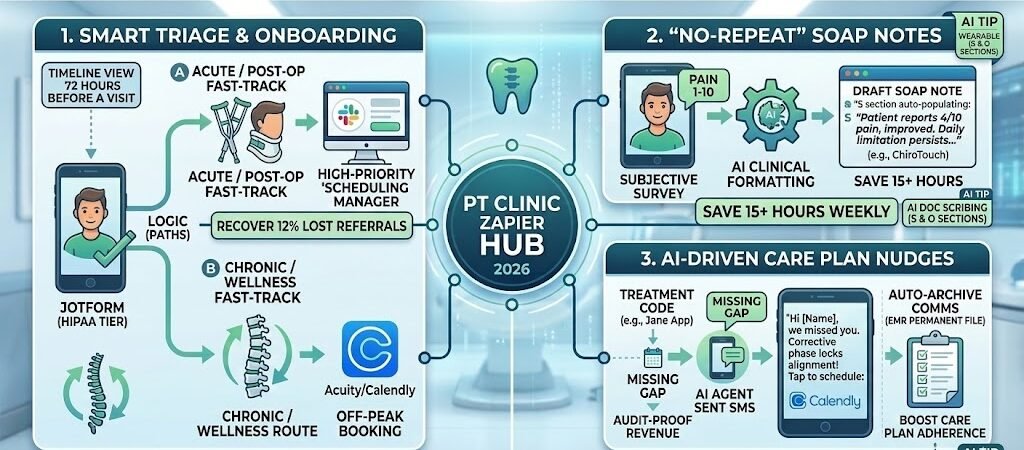
Blueprint #1 – Automated Intake & “One-Touch” Scheduling
In the high-volume 2026 chiropractic clinic, “Inputting New Patients” is the single biggest operational friction point. When a new patient is in acute pain, they will often call three different clinics. The practice that responds first—and makes the intake process the easiest—wins the patient.
This blueprint creates a “Fast-Track” intake system that qualifies patients and pre-fills your schedule while your staff is busy adjusting on the floor.
1. The Trigger: The HIPAA-Gateway Intake
- The 2026 Standard: Use JotForm Enterprise (HIPAA Tier) or HIPAAtizer.
- The Action: A patient clicks the “Start My Recovery” button on your site. They complete a mobile-optimized intake form that includes their chief complaint, insurance details, and surgical history.
- Pro Tip: In 2026, PlatoForms or JotForm can now use AI to scan the patient’s uploaded insurance card and automatically extract the Group and Member ID, reducing manual entry errors by 95%.
2. The Logic: Smart Triage (Paths by Zapier)
Zapier doesn’t just “pass” the data; it prioritizes it using Paths.
- Path A (The “Acute/Post-Op” Fast-Track): If the patient selects “Post-Op (Less than 2 weeks)” or “Pain Level 8-10,” Zapier triggers a high-priority alert in Slack for your scheduling manager: “URGENT: Post-op patient needs evaluation ASAP.”
- Path B (The “Chronic/Wellness” Route): If it’s a long-term issue (e.g., “Back pain for 6 months”), Zapier automatically sends the patient a Calendly link to book an evaluation during off-peak hours (e.g., Tuesday mornings).
3. The Action: The “Instant Engagement” SMS
- The Delivery: Via Twilio (HIPAA Tier) or RingCentral.
- The Message: “Hi [Name], we’ve received your intake! Our team is verifying your benefits now. To speed up your first visit, please upload a photo of your referral here: [Secure Link].”
- Why it works: Engaging the patient with a small task (uploading the referral) “locks them in” mentally to your clinic, reducing the likelihood they will keep shopping for other providers.
Summary: The Onboarding Zap
| Step | Component | 2026 Recommended Tool |
| Trigger | Web Intake Submission | JotForm (HIPAA) / HIPAAtizer |
| Logic | Acute vs. Chronic Triage | Paths by Zapier |
| Action 1 | Internal Admin Alert | Slack / Microsoft Teams |
| Action 2 | Booking & Engagement SMS | Twilio (HIPAA) / Calendly |
| Action 3 | EMR Pre-Registration | ChiroTouch / Jane App (API-Sync) |
Practical AI Tip: Use Zapier Central (your AI agent) to monitor your “Lead-to-Booking” ratio. In 2026, the AI can detect if a lead hasn’t booked within 4 hours of intake and automatically send a personalized “Need help with scheduling?” text, recovering an average of 12% of lost referrals.
Blueprint #2 – The “No-Repeat” SOAP Note & Subjective Sync
In a high-volume 2026 chiropractic clinic, the “S” (Subjective) section of a SOAP note is often the biggest daily time-sink. Asking every patient “How are you feeling today?” and “Rate your pain 1–10” for the 100th time that month is repetitive for you and tedious for them.
This blueprint automates the collection of subjective data so that when you walk into the adjusting room, the first half of your medical record is already drafted.
1. The Automated Check-In Trigger
- The Zap: 2 hours before the patient’s scheduled appointment time in your EMR (Jane App or ChiroTouch), Zapier triggers a “Pre-Visit Subjective Survey.”
- The Tool: Use a HIPAA-compliant tool like JotForm or Zonka Feedback.
- The Delivery: The patient receives a text: “Hi [Name], we’re looking forward to seeing you at 2 PM! To save time, please quickly update your pain levels here: [Secure Link].”
2. The Data Extraction (AI by Zapier)
Once the patient submits the form, Zapier doesn’t just pass the raw numbers; it uses AI by Zapier to format them into clinical language for your record.
- The AI Prompt: “Summarize the following into a professional clinical subjective note: Patient reports 4/10 lower back pain, improved from 6/10 last visit. Mentions stiffness is better in the morning but worse after sitting at work for 4 hours.”
- The Result: Instead of “Back feels okay,” your draft note says: “Patient reports moderate improvement in lumbar symptoms; pain intensity decreased by 2 points. Daily functional limitation persists during prolonged sitting (4+ hours).”
3. The Action: The EMR Sync
- The Delivery: Zapier pushes this formatted text directly into the “Subjective” field of the Draft SOAP Note in your EMR.
- The Big Win: You walk into the room, scan the already-completed “S” section, and move immediately to the physical exam and adjustment.
Summary: The SOAP Note Sync
| Step | Component | 2026 Recommended Tool |
| Trigger | Scheduled Appointment | Jane App / ChiroTouch |
| Action 1 | Mobile Subjective Survey | JotForm (HIPAA) / Zonka |
| Action 2 | AI Clinical Formatting | AI by Zapier |
| Action 3 | Draft Note Population | Jane App (via Webhooks) |
Practical AI Tip for 2026: If you use the Jane App, you can leverage their 2026 “Smart Macros.” Combine your Zapier-automated subjective data with Jane’s built-in macros to finish a full SOAP note in under 45 seconds per patient.
Blueprint #3 – AI-Driven Care Plan Adherence & Audit-Proofing
In 2026, insurance payers (including Medicare and major private carriers) have shifted toward strict value-based care audits. It is no longer enough to say a patient needs 12 visits; you must prove “Medical Necessity” through consistent objective improvement and care plan adherence. If a patient “drops off” after three visits because their pain subsided—but before their spinal stability has been restored—you face the risk of claim clawbacks and poor long-term outcomes.
1. The Problem: The “Feel Better, Quit Early” Trap
The biggest hurdle in chiropractic care is the patient who stops coming once the acute pain vanishes. In 2026, this results in incomplete clinical records and “Red Flags” for insurance adjusters who see a prescribed 12-visit plan with only 4 visits completed. Without documented follow-up, the payer may view those initial visits as unnecessary.
2. The 2026 “Care Nudge” (AI by Zapier)
This blueprint uses an AI Agent to monitor your schedule and intervene the moment a patient deviates from their prescribed plan.
- The Trigger: A patient “No-Shows” or fails to book their next follow-up within 48 hours of their last adjustment in the EMR (ChiroTouch or Jane App).
- The Action: Zapier’s AI Agent reviews the patient’s “Phase of Care” (e.g., Relief, Corrective, or Wellness).
- The Delivery: It sends a personalized, high-empathy SMS via Twilio (HIPAA Tier): “Hi [Name], we noticed you haven’t scheduled your next session. Remember, the ‘Corrective Phase’ is where we lock in your spinal alignment so the pain doesn’t return. Tap here to grab a spot: [Link].”
3. Automated Audit-Proofing: The “Single Source of Truth”
In 2026, if it isn’t documented in the permanent medical file, it didn’t happen.
- The Sync: Zapier automatically archives every SMS communication, survey response, and “Exercise Adherence” check-in into the Patient Files section of your EMR.
- The ROI: When an insurance auditor asks why a patient didn’t finish their plan, you have a timestamped, automated log of every outreach attempt you made. This proves “Doctor’s Due Diligence” and protects your revenue from recoupment.
Summary: The Adherence & Audit Zap
| Step | Component | 2026 Recommended Tool |
| Trigger | Missing Appointment Gap | ChiroTouch / Jane App |
| Logic | Care Plan Phase Analysis | AI by Zapier |
| Action 1 | Personalized Care Nudge | Twilio (HIPAA Tier) |
| Action 2 | Booking Link Delivery | Calendly / Acuity |
| Action 3 | Communication Archiving | EMR Patient Portal |
Practical AI Tip for 2026: Connect your Zap to Zapier Central. You can teach the AI to recognize “At-Risk” patients—those whose subjective pain scores have plateaued for three visits—and alert you to change your treatment protocol before the patient gets frustrated and quits.
Conclusion: Your 30-Day DC Automation Roadmap
Transforming your clinic into a 2026 powerhouse requires architectural change, not more effort:
- Week 1: The Documentation Audit. Track exactly how many hours you spend on SOAP notes after the last patient leaves. This is the time you are “buying back.”
- Week 2: Secure the Gateways. Set up your BAA-compliant intake (JotForm) and SMS communication (Twilio HIPAA) tools.
- Week 3: Launch Blueprint #1. Automate your intake and scheduling to stop the front-desk “phone tag.”
- Week 4: Launch Blueprint #2. Automate the “S” section of your SOAP notes and save 15+ hours of documentation weekly.
By Day 30, you won’t just have a more efficient clinic; you’ll have a practice that runs on systems, allowing you to focus entirely on the power of the adjustment.

About the Author
Aapt DubeyAapt Dubey is an automation specialist and software developer dedicated to eliminating manual workflows for small businesses. With deep, hands-on experience building complex Zapier integrations, API connections, and real-world applications, Aapt writes actionable, tested tutorials to help businesses scale efficiently.