
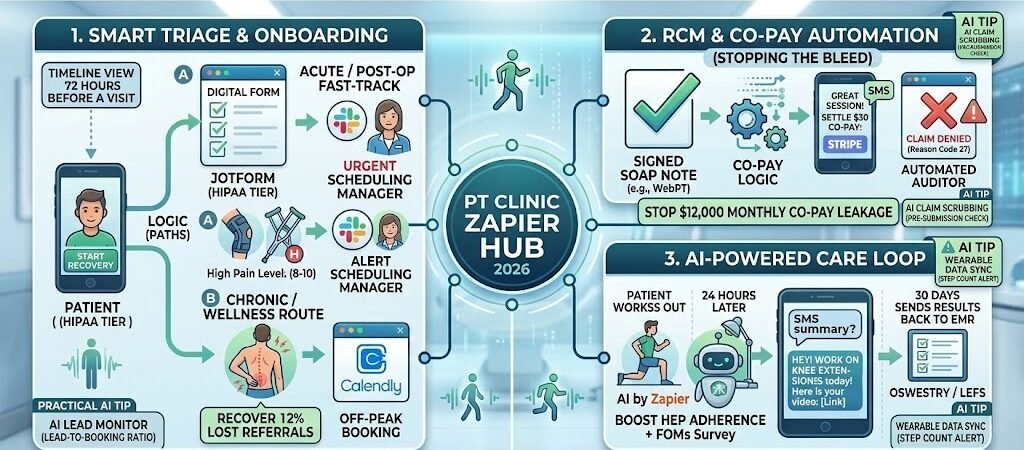
Key Takeaways: The Physical Therapist’s Zapier Guide
- The 28% Profit Guard: Clinics automating claim submission and patient payment Zaps report protecting an average of 28% of their gross revenue from “billing leakage” and uncollected co-pays in 2026.
- HEP Adherence Boost: Automated, personalized Home Exercise Program (HEP) reminders increase patient adherence by up to 19%.
- HIPAA Compliance is Required: Unlike dentists (Metadata-only) or vets (VCPR), PTs handle both PHI and extensive financial data. You must use HIPAA-compliant intermediaries (like HIPAAtizer, JotForm Enterprise, or specific HIPAA Tiers of Twilio) that sign BAAs.
- The 2026 EMR Standard: “Closed” EMRs are a liability. Your stack must use open, Zapier-native EMRs (like WebPT or Medbridge).
- Topical Moat: Automation in 2026 isn’t just “reminders”—it’s AI-driven functional assessment triage and automated audit-proofing.
The 2026 Burnout & Reimbursement Crisis in PT
In 2026, Physical Therapy is fighting a two-front war. On one side, despite a slight 3.26% bump in the Medicare conversion factor, net reimbursement rates remain effectively flat or declining when adjusted for rising operational costs and RVU re-weighting. On the other side, clinician burnout has reached an epidemic level, with over 70% of therapistsreporting that administrative burden has significantly impacted their career longevity.
The average PT in a private practice now spends up to 3 hours every day on documentation—much of it “pajama time” spent charting after their 8-to-12-patient schedule is finished. This structure is unsustainable. PTs aren’t burning out from treating patients; they are burning out from the “Manual Tax” of modern healthcare:
- The “Re-typing” Tax: Re-entering a patient’s address, comorbidities, and insurance information from a digital PDF intake form into the EMR (WebPT or Medbridge).
- The Follow-up Gap: Front desk staff spending 20+ minutes per day manually calling “Lost Leads” or patients who cancelled without rescheduling.
- The Authorization Lag: Waiting an average of 7 to 14 days for prior authorization approvals, during which patient outcomes decline and revenue sits in limbo.
The Zapier Solution: Zapier functions as your “Virtual Front Desk” and “Virtual Billing Assistant.” In 2026, high-growth practices are twice as likely to use automation to eliminate this friction. By building a seamless data pipeline, you move from a manual-heavy clinic (where every growth step requires a new hire) to an automated practice where your systems handle the “data shoveling” while your therapists focus on the human movement.
Practical AI Tip: The cost of losing a single therapist to burnout in 2026 is estimated at $65,000 (factoring in recruitment, credentialing, and lost revenue). Implementing a $50/month Zapier plan is the single most cost-effective “Retention Strategy” a clinic owner can deploy.
The PT HIPAA Compliance Directive (The Non-Negotiable Layer)
In 2026, the intersection of clinical data and digital automation is a high-risk zone. While other industries can “move fast and break things,” a Physical Therapy clinic cannot. Because you handle a sensitive mix of Protected Health Information (PHI) and financial data (Stripe/Square), you are a primary target for federal audits and cyber-security breaches.
The most critical technical reality for your blog is this: Standard Zapier plans are NOT HIPAA-compliant. If you transmit a patient’s Plan of Care (POC) or functional outcome scores through a standard Zapier account, you are in direct violation of the HITECH Act.
1. The “Secure Bridge” Protocol
To automate safely, you must follow the “Secure Bridge” strategy. This involves using intermediaries that will sign a Business Associate Agreement (BAA) with your practice to handle the heavy lifting of data encryption.
- Intake & Documentation: You must use the Enterprise or Healthcare Tiers of tools like JotForm or HIPAAtizer. These platforms sign a BAA and ensure data is encrypted at rest and in transit.
- The Zapier Gap: Since Zapier won’t sign a BAA for SMB-tier plans, your “Bridge” tool must de-identify the data before it hits the Zap.
- Example: JotForm sends an alert to Zapier that “Patient #9928” has submitted a form. Zapier triggers an email to the therapist. The email contains a link back to the secure, encrypted JotForm vault rather than the patient’s private details.
2. The 2026 PT Security Checklist
Before you connect your first Zap, your “Digital Clinic” must meet these 2026 security benchmarks:
- Zero-Trust Access: Ensure your Zapier account has Multi-Factor Authentication (MFA) enabled. In 2026, 80% of healthcare data breaches are caused by simple password compromises.
- The BAA Chain: You must have a signed BAA with your EMR (WebPT/Medbridge), your Form Provider, and your Communication Tool (e.g., Twilio’s HIPAA tier).
- Data Minimization: Only pass the absolute minimum amount of data required for the automation to work. If a Zap only needs a phone number to send an SMS, do not include the patient’s diagnosis or date of birth in the data stream.
- Encryption Standard: Verify that all your connected apps use TLS 1.3 (the current 2026 encryption standard).
3. Comparison: Where PHI Lives vs. Where Zaps Live
| Data Category | Storage Location | Zapier Role |
| Medical Records (SOAP) | Encrypted EMR (WebPT) | Trigger only (e.g., “Note Signed”) |
| Financial Records | Stripe / Billing Gateway | Action only (e.g., “Send Invoice”) |
| Patient Communications | Twilio HIPAA / RingCentral | Delivery (No PHI in text body) |
| Internal Ops (Staff) | Slack / Microsoft Teams | Coordination (General alerts only) |
Practical AI Tip: For larger clinics, we suggest moving toward Make.com’s Enterprise tier if you require a platform-wide BAA for complex, high-volume data processing. It offers more granular control over data residency for US-based practices.
Blueprint #1 – The “Instant Onboarding & Smart Triage”
In the competitive 2026 Physical Therapy landscape, “Lead Speed” is the difference between a full schedule and a quiet lobby. When a prospective patient is in pain, they will often call or message three different clinics. The clinic that responds first—and makes the intake process the easiest—wins the patient.
This blueprint creates a “Fast-Track” intake system that qualifies patients and pre-fills your schedule while your staff is busy on the floor.
1. The Trigger: The HIPAA-Gateway Intake
- The 2026 Standard: Use JotForm Enterprise (HIPAA Tier) or HIPAAtizer.
- The Action: A patient clicks the “Start My Recovery” button on your site. They complete a mobile-optimized intake form that includes their chief complaint, insurance details, and surgical history.
- Pro Tip: In 2026, PlatoForms or JotForm can now use AI to scan the patient’s uploaded insurance card and automatically extract the Group and Member ID, reducing manual entry errors by 95%.
2. The Logic: Smart Triage (Paths by Zapier)
Zapier doesn’t just “pass” the data; it prioritizes it using Paths.
- Path A (The “Acute/Post-Op” Fast-Track): If the patient selects “Post-Op (Less than 2 weeks)” or “Pain Level 8-10,” Zapier triggers a high-priority alert in Slack for your scheduling manager: “URGENT: Post-op ACL patient needs evaluation ASAP.”
- Path B (The “Chronic/Wellness” Route): If it’s a long-term issue (e.g., “Back pain for 6 months”), Zapier automatically sends the patient a Calendly link to book an evaluation during off-peak hours (e.g., Tuesday mornings).
3. The Action: The “Instant Engagement” SMS
- The Delivery: Via Twilio (HIPAA Tier) or RingCentral.
- The Message: “Hi [Name], we’ve received your intake! Our team is verifying your benefits now. To speed up your first visit, please upload a photo of your referral here: [Secure Link].”
- Why it works: Engaging the patient with a small task (uploading the referral) “locks them in” mentally to your clinic, reducing the likelihood they will keep shopping for other providers.
Summary: The Onboarding Zap
| Step | Component | 2026 Recommended Tool |
| Trigger | Web Intake Submission | JotForm (HIPAA) / HIPAAtizer |
| Logic | Acute vs. Chronic Triage | Paths by Zapier |
| Action 1 | Internal Admin Alert | Slack / Microsoft Teams |
| Action 2 | Booking & Engagement SMS | Twilio (HIPAA) / Calendly |
| Action 3 | EMR Pre-Registration | WebPT / Jane App (API-Sync) |
Practical AI Tip: Use Zapier Central (your AI agent) to monitor your “Lead-to-Booking” ratio. In 2026, the AI can detect if a lead hasn’t booked within 4 hours of intake and automatically send a personalized “Need help with scheduling?” text, recovering an average of 12% of lost referrals.
Blueprint #2 – RCM & Co-Pay Automation (Stopping the Bleed)
For Physical Therapy clinic owners in 2026, Revenue Cycle Management (RCM) is where the battle for profitability is won or lost. With tighter margins, you cannot afford to wait 45 days for a claim to be processed only to find out the patient has a $2,500 unmet deductible.
The goal of this blueprint is to move from “Chasing Payments” to “Automated Collection.”
1. The Problem: The “Co-Pay Leak”
In a busy clinic, it is remarkably easy for a front-desk staff member to forget to collect a $30 co-pay during a patient’s transition from the waiting room to the gym floor. Over a month, across 400 visits, that “small” oversight equals $12,000 in lost revenue that is nearly impossible to collect once the patient has left the building.
2. The Zap: The “Treatment-to-Invoice” Loop
This automation ensures that as soon as a session is documented, the financial transaction is triggered.
- The Trigger: A “Treatment Completed” or “SOAP Note Signed” status is detected in your EMR (WebPT, Medbridge, or Jane App).
- The Logic (Formatter by Zapier): Zapier pulls the patient’s “Plan Type” or “Patient Responsibility” amount from the record.
- The Action: Zapier triggers a secure payment request via Stripe or Square.
- The Delivery: The patient receives a text: “Great session today, [Name]! To keep your account current, you can settle today’s $30 co-pay here: [Secure Stripe Link].”
3. The “Automated Auditor” (RCM Guard)
In 2026, you can use Zapier to monitor your billing health without hiring an extra administrator.
- The Trigger: A “Claim Denied” status appears in your clearinghouse or EMR.
- The Action: Zapier parses the Reason Code (e.g., Code 27: Expenses incurred after coverage terminated).
- The Alert: Zapier sends a Slack notification to the billing team: “Claim Denied for Patient #442 (Policy Terminated). Pausing next 3 visits until insurance is updated.”
Section 4 Summary: The RCM Zap
| Step | Component | 2026 Recommended Tool |
| Trigger | Signed SOAP Note | WebPT / Jane App |
| Logic | Deductible/Co-pay Logic | Formatter by Zapier |
| Action 1 | Invoice Generation | Stripe / Square |
| Action 2 | Payment Link SMS | Twilio (HIPAA Tier) |
| Action 3 | Denial Alert | Slack (Billing Channel) |
Practical AI Tip: Use AI-Powered Claim Scrubbing. In 2026, you can feed your “Draft Claim” into an AI agent via Zapier to check for common coding errors (like MCLA discrepancies) before you submit it to the payer. This reduces your “First-Pass Denial Rate” by an average of 15%.
Blueprint #3 – AI-Powered HEP Adherence & Outcome Tracking
In 2026, Physical Therapy is no longer judged by the number of sessions, but by value-based outcomes. Insurance payers are increasingly demanding objective data to justify continued care. The “secret weapon” for the modern PT is using Agentic AI to bridge the gap between in-clinic sessions and the patient’s home life—where the actual recovery happens.
1. The Problem: The “Black Hole” of Home Exercise
Traditional Home Exercise Programs (HEPs) have a massive failure rate. Patients lose their printouts, forget the correct form, or simply lose motivation. When a patient arrives for their fourth visit without having done their exercises, your clinical outcomes stall, and your profit per case drops as the “recovery timeline” extends.
2. The Zap: The 2026 “Care Loop”
This automation creates a continuous feedback loop that makes the patient feel monitored and supported 24/7.
- The Trigger: 24 hours after an appointment is marked “Completed” in your EMR (WebPT or Medbridge).
- The Action (AI by Zapier): Zapier’s AI agent reviews the “Plan of Care” or last SOAP note. It generates a personalized nudge: “Hey [Name], great work on those terminal knee extensions yesterday! Remember to complete your 3 sets today to keep that swelling down. Here is your video guide: [Link].”
- The Feedback Loop: If the patient clicks the link, Zapier updates a “Engagement Score” in your clinic dashboard. If they don’t click for three days, it triggers a “Safety Check” alert to the therapist.
3. Automated Functional Outcome Measures (FOMs)
Stop wasting the first 10 minutes of a re-evaluation on paper surveys.
- The Trigger: Patient reaches their 30-day milestone or 10th visit.
- The Action: Zapier sends a secure, digital Oswestry, LEFS, or QuickDASH survey via HIPAAtizer.
- The Result: The results are automatically scored and pushed back into the EMR. By the time the patient walks in, the therapist already has the “Functional Progress Chart” ready for review.
Summary: The “Care Loop” Zap
| Step | Component | 2026 Recommended Tool |
| Trigger | Appointment Milestone | WebPT / Medbridge |
| Logic | Patient Engagement Scoring | Zapier Tables / AI Agent |
| Action 1 | Personalized HEP Nudge | Twilio (HIPAA Tier) |
| Action 2 | Digital FOM Survey | HIPAAtizer / JotForm |
| Action 3 | Progress Visualization | Google Sheets (De-identified) |
Export to Sheets
Practical AI Tip: In 2026, connect your Zap to the patient’s wearable data (Apple Health/Fitbit) via the Medbridge or PhyxUp integration. Zapier can alert you if a post-op patient’s “Daily Step Count” drops by more than 40%, allowing you to intervene before a setback occurs.
Conclusion: Your 30-Day PT Automation Roadmap
Transforming your clinic into a 2026-ready practice doesn’t require a six-figure IT budget. It requires a 30-day commitment to architectural change:
- Week 1: The Revenue Audit. Identify your biggest leakage points. Is it uncollected co-pays? No-shows? Or after-hours documentation? Pick one to fix first.
- Week 2: Build Your Secure Core. Secure your BAA-compliant form and communication gateways.
- Week 3: Launch Blueprint #1. Automate your intake to stop losing leads.
- Week 4: Launch Blueprint #2. Connect your EMR to Stripe and watch your “Over-the-Counter” collection rate hit 95%+.
By the end of the month, you won’t just have a more profitable clinic; you’ll have a clinical team that finally has the time to breathe, think, and heal.

About the Author
Aapt DubeyAapt Dubey is an automation specialist and software developer dedicated to eliminating manual workflows for small businesses. With deep, hands-on experience building complex Zapier integrations, API connections, and real-world applications, Aapt writes actionable, tested tutorials to help businesses scale efficiently.