
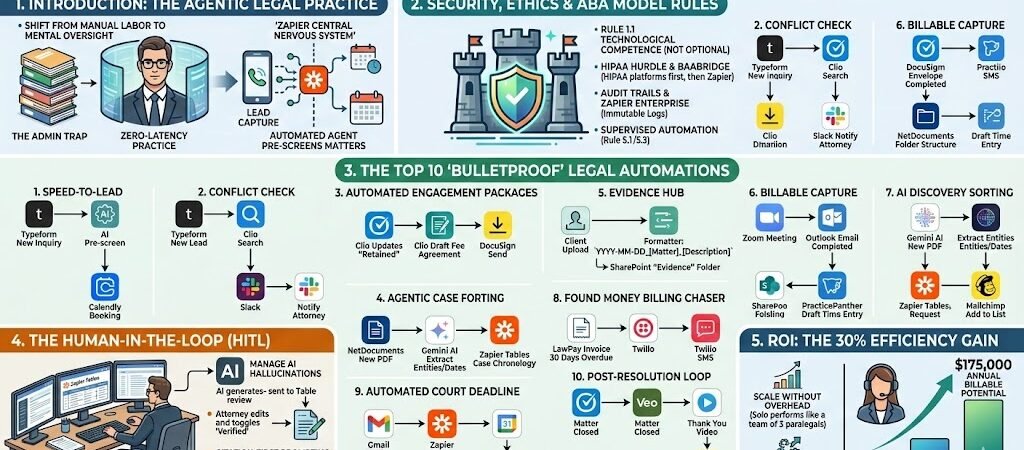
Key Takeaways: Zapier for Law Firms & Solo Attorneys
- Velocity as a Competitive Edge: In 2026, “Speed-to-Lead” is the primary driver of new business. Automating the intake-to-engagement pipeline ensures you capture clients before they call the next firm.
- The Rise of Agentic Workflows: We have moved beyond “If This, Then That.” 2026 workflows use AI agents to proactively sort discovery, check for conflicts, and draft time entries based on your calendar activity.
- Security & Ethics are First-Class Citizens: Automation must adhere to ABA Model Rule 1.6. Secure firms use Zapier Enterprise and “Data Minimization” to ensure PII remains in encrypted silos like NetDocuments or Clio.
- The Death of Billable Leakage: By automating the “Capture” of billable events (Zoom calls, emails, research), attorneys are reclaiming 15–20% of previously unrecorded revenue.
Introduction: The Agentic Legal Practice
The 2026 legal landscape is defined by a shift from manual labor to mental oversight. For decades, solo attorneys and small firms were tethered to “The Admin Trap”—a cycle of manual lead screening, tedious document drafting, and the constant chase for signed engagement letters. In this legacy model, an attorney’s growth was strictly capped by the number of administrative hours they (or their paralegals) could endure.
As we move into 2026, Artificial Intelligence has matured into a proactive “Agentic” partner. The modern US law firm uses Zapier as its Central Nervous System, connecting practice management software (Clio, MyCase) with specialized AI models and communication tools. This isn’t just about “productivity”; it’s about Zero-Latency.
When a prospective client submits a form at 11:00 PM, they don’t wait for a callback the next morning. Instead, an automated agent pre-screens the matter for conflicts, checks it against the firm’s expertise, and—if qualified—invites them to book a consultation immediately. The goal of the 2026 firm is to automate the “Invisible Tasks” so the attorney can focus exclusively on the “Irreplaceable Tasks”: high-level strategy, courtroom advocacy, and client empathy.
Legal Tech Integration: Modern law firms rely on specific management software. Check out the legal automation overview on Zapier to see how to connect tools like Clio or MyCase.
Security, Ethics, and the ABA Model Rules
In 2026, the American Bar Association (ABA) has made one thing clear: Technological Competence (Model Rule 1.1) is no longer optional. As automation becomes the infrastructure of the US legal system, attorneys have an affirmative duty to understand not just how to use these tools, but the ethical risks they pose to the attorney-client relationship.
Confidentiality and Model Rule 1.6
The cornerstone of legal practice is the duty of confidentiality. When you build a Zap, you are essentially introducing a “third-party service provider” into your client’s matter. ABA Formal Opinion 512 (the landmark 2024 guidance that governs 2026 practice) explicitly states that lawyers must evaluate the security and privacy policies of any AI or automation tool before inputting client data.
To remain compliant, 2026 firms utilize Data Minimization. Instead of sending an entire sensitive PDF through a sequence, you use a “bridge” to extract only the necessary metadata (like Matter ID or Filing Date). This ensures that the bulk of your privileged information remains in an encrypted “Zero-Knowledge” silo like NetDocuments or SharePoint, while Zapier acts as the secure air traffic controller.
The HIPAA Hurdle & Secure Data Residency
For personal injury or medical malpractice attorneys, HIPAA compliance is the primary barrier to automation. While Zapier is SOC2 Type II compliant, as of 2026, it generally does not sign Business Associate Agreements (BAAs).
- The 2026 Solution: High-stakes data is routed through HIPAA-compliant platforms like Microsoft Power Automate or Clio for the initial processing. Once the data is anonymized or stripped of Protected Health Information (PHI), Zapier handles the administrative “hand-off” to your billing or task management systems.
- Audit Trails: Every automation must be “Audit-Ready.” By using Zapier Enterprise, firms maintain immutable logs of every data movement, providing a clear defense if a court ever questions the chain of custody for digital evidence.
Supervised Automation (Rules 5.1 & 5.3)
The ABA treats an AI agent exactly like a junior associate or a paralegal. You are ethically responsible for its “work product.” In 2026, this means you cannot have a “set it and forget it” mentality. Every automated draft—whether it’s an engagement letter or a case summary—must pass through a Human-in-the-Loop (HITL) staging area (like Zapier Tables) where a licensed attorney verifies the output for “hallucinations” or errors before it is finalized.
The Top 10 “Bulletproof” Legal Automations
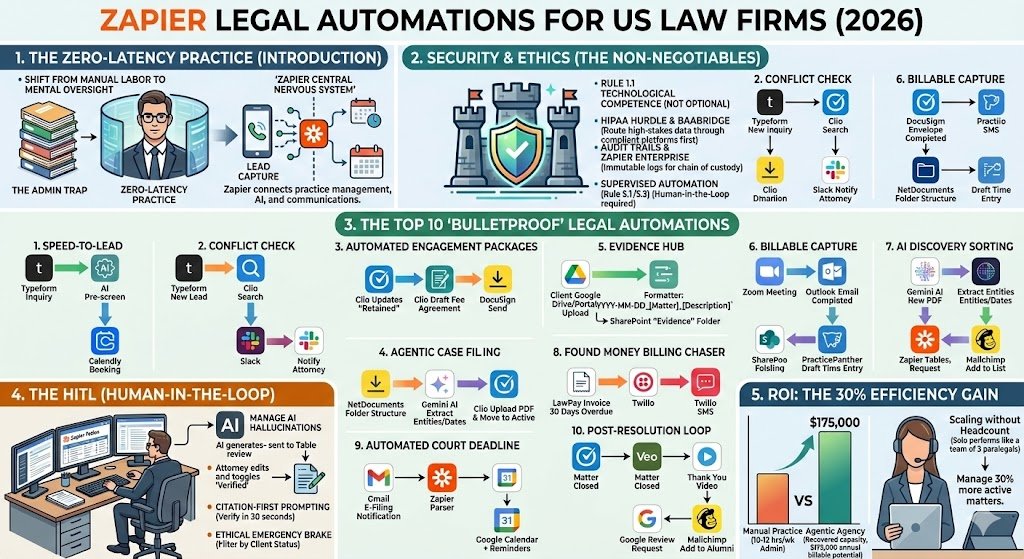
In 2026, the most successful US law firms distinguish themselves by their responsiveness. These ten automations transition your firm from a reactive stance to a proactive, high-velocity operation.
1. “Speed-to-Lead” Intake
- The Friction Point: 78% of legal consumers hire the first firm that responds to them. If you take four hours to call a lead back, you’ve already lost the case.
- The Technical Setup: Trigger: Typeform (New Inquiry) → Action: AI by Zapier (Pre-screen for Conflict/Practice Area) → Action: Calendly (Send Booking Link to Qualified Leads).
- The ROI: Converts “window shoppers” into “retained clients” in minutes, often before they even leave your website.
2. The “Conflict Check” Bridge
- The Friction Point: Manual conflict checks are tedious and prone to human error, risking ethical violations.
- The Technical Setup: Trigger: Typeform (New Lead) → Action: Clio (Search Contacts for Name/Adverse Party) → Action: Slack (Notify Attorney: “No Match Found” or “Potential Conflict Detected”).
- The ROI: Protects your license by ensuring conflict checks happen before the first consultation, not days later.
3. Automated Engagement Packages
- The Friction Point: Waiting for an attorney to manually “draft” a fee agreement often leads to lead drop-off.
- The Technical Setup: Trigger: Clio (Update Matter Status to “Retained”) → Action: Clio Draft (Generate Fee Agreement) → Action: DocuSign (Send for Signature with 48h Reminders).
- The ROI: Shortens the sales cycle from days to minutes.
4. Agentic Case Filing
- The Friction Point: “Where is the signed contract?” Paralegals spend hours moving files from email to case folders.
- The Technical Setup: Trigger: DocuSign (Envelope Completed) → Action: NetDocuments (Create Folder Structure) → Action: Clio (Upload Signed PDF and Move to “Active” Phase).
- The ROI: Zero manual filing. Every active case is perfectly organized from the moment of signature.
5. The “Evidence Hub” Uploader
- The Friction Point: Clients texting or emailing evidence creates a security nightmare and a disorganized file.
- The Technical Setup: Trigger: Google Drive/Portal (New Client Upload) → Action: Formatter by Zapier(Standardize Name:
YYYY-MM-DD_[Matter]_[Description]) → Action: SharePoint (Save to “Evidence” Folder). - The ROI: Maintains a clean, court-ready record of evidence with no manual renaming.
6. Real-Time Billable Capture
- The Friction Point: “Billable Leakage”—forgetting to log a 0.2h call or 0.1h email, costing solo attorneys $20k+ a year.
- The Technical Setup: Trigger: Zoom/Outlook (Meeting/Email Completed) → Action: PracticePanther (Create Draft Time Entry with Duration).
- The ROI: Reclaims lost revenue by capturing work the moment it happens, requiring only a “One-Click” approval at the end of the day.
7. AI-Powered Discovery Sorting
- The Friction Point: Paralegals spend days indexing 500+ pages of discovery to find key dates.
- The Technical Setup: Trigger: NetDocuments (New Discovery PDF) → Action: Gemini AI (Extract Entities and Dates) → Action: Zapier Tables (Update Case Chronology).
- The ROI: Turns a “data dump” into a “case strategy” in seconds.
8. The “Found Money” Billing Chaser
- The Friction Point: Attorneys hate “playing debt collector,” but overdue invoices kill cash flow.
- The Technical Setup: Trigger: LawPay (Invoice 30 Days Overdue) → Action: Twilio (Send SMS: “Hi [Name], your payment is overdue. Click here to pay securely.”)
- The ROI: Increases collection rates by 25% without the awkwardness of a manual phone call.
9. Automated Court Deadline Sync
- The Friction Point: Missing a court deadline (Statute of Limitations) is the #1 cause of malpractice claims.
- The Technical Setup: Trigger: Gmail (New E-Filing Notification) → Action: Zapier Parser (Extract Date) → Action: Google Calendar (Add Event + Reminders 7/3/1 days prior).
- The ROI: A “fail-safe” system that ensures you are never surprised by a court date.
10. Post-Resolution “Stay Sticky” Loop
- The Friction Point: Once a case is won, the client is forgotten, losing potential referrals.
- The Technical Setup: Trigger: Clio (Matter Closed) → Action: Veo (Generate Personal ‘Thank You’ Video) → Action: Google Reviews (Request Link) → Action: Mailchimp (Add to “Alumni” List).
- The ROI: Automates your referral engine, ensuring happy clients become long-term brand advocates.
The Human-in-the-Loop: Managing AI “Hallucinations”
In the legal field, “good enough” is a liability. While AI in 2026 is exponentially more capable than its predecessors, it is still prone to hallucinations—the confident generation of false case law or fabricated facts. To protect your practice from a “Mata v. Avianca” scenario, you must implement a Human-in-the-Loop (HITL) architecture.
The Staging Area: Zapier Tables
Professional legal automations never push AI-generated content directly to a client or a court filing. Instead, they utilize Zapier Tables as a mandatory staging area.
- The Logic: When an AI agent drafts a summary of a deposition or a preliminary motion, the output is sent to a private table.
- The Safeguard: The attorney or senior paralegal receives a Slack notification with a link to that specific row. They review the draft, make edits, and toggle a “Verified” status.
- The Action: Only after the “Verified” checkbox is checked does Zapier trigger the final step—sending the document to the client portal or drafting the email.
Verification Logic & Citation Requirements
To streamline your review process, your prompts must be engineered for accountability. In 2026, attorneys use “Citation-First” prompting.
The Pro Method: Configure your AI steps to include a mandatory instruction: “For every legal assertion made, provide a pinpoint citation to the uploaded document or the specific section of the US Code/State Statute. If the information is not present in the source, state ‘Information not found’—do not infer.”
This allows the reviewing attorney to perform a “30-second audit” by clicking the cited page rather than re-reading the entire 200-page file.
The Ethical Emergency Brake
Every 2026 legal automation stack should include a Global Filter. By connecting your Zaps to a “Client Status” field in your Practice Management system, you can ensure that if a client’s representation is terminated or a conflict is discovered mid-case, all automated reminders, document requests, and billing chasers for that specific matter stop instantly. This prevents the ethical nightmare of automated systems continuing to interact with a client after the relationship has legally ended.
ROI: The 30% Efficiency Gain
The Return on Investment for a “Zapier-First” law firm in 2026 is not merely about saving time; it is about increasing your billable ceiling. For the average US solo attorney, administrative drag—intake, scheduling, and manual time entry—claims roughly 10 to 12 hours per week.
The Math of the “Recovered Hour”
If your billable rate is $350/hour, automating 10 hours of weekly administrative friction recovers $3,500 in weekly billable potential, or over $175,000 annually. Even if you choose to use that recovered time for personal rest rather than more work, the efficiency gain allows you to maintain the same revenue while operating at a significantly lower cost-basis.
Scaling Without Overhead
In 2026, the most significant expense for a law firm is high-quality support staff. Automation allows a solo practitioner to operate with the horsepower of a firm with three paralegals. By delegating the “chasing” and “filing” to agentic workflows, you can manage 30% more active matters without adding a single dollar to your monthly payroll. This “Lean Firm” model is the most profitable path for the modern attorney, turning overhead into pure profit.
Conclusion: The Future-Proof Attorney
The legal industry is no longer immune to the disruption of speed. In 2026, clients expect their attorneys to be as responsive as their favorite apps and as precise as a surgeon. Building a secure, automated infrastructure isn’t just a “tech upgrade”—it is the only way to remain competitive in a landscape where velocity is a value proposition.
Technology doesn’t replace the lawyer; it replaces the legal assistant’s manual data entry. By reclaiming your time from the “admin trap,” you return to the core of your calling: advocacy, strategy, and justice. Start today by identifying the one task you dread most every morning—the intake call, the billing chaser, or the filing process—and “Zap” it. —
ext stop: The Books. Once the legal work is done, the billing must be perfect. We’ve tailored our advice for financial professionals in our guide on Zapier for US accountants, focusing on tax deadlines and audit trails.

About the Author
Aapt DubeyAapt Dubey is an automation specialist and software developer dedicated to eliminating manual workflows for small businesses. With deep, hands-on experience building complex Zapier integrations, API connections, and real-world applications, Aapt writes actionable, tested tutorials to help businesses scale efficiently.