
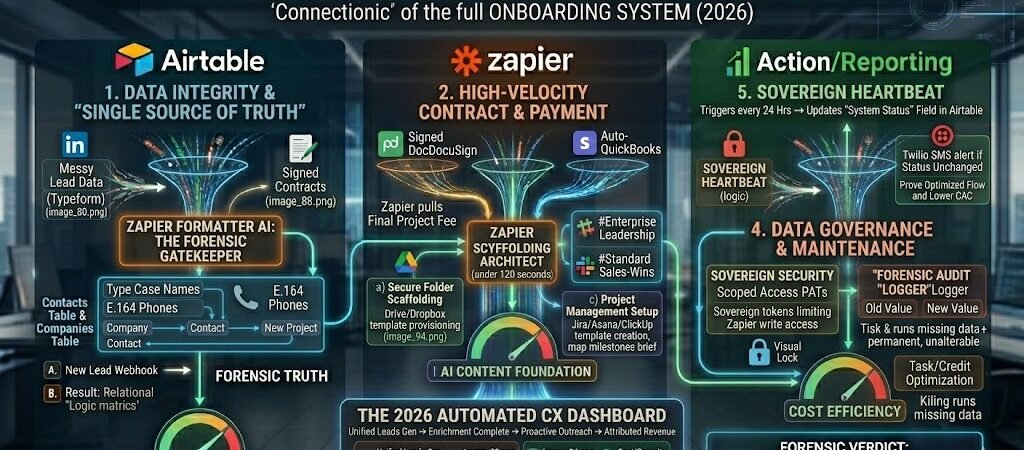
Key Takeaways: The 2026 Onboarding Blueprint (Automated Client Onboarding System Zapier)
- Instant Scaffolding: Onboarding is no longer a checklist; it is the automated creation of Slack channels, Google Drive folders, and Jira boards within 120 seconds of a signature.
- The “Forensic Gatekeeper”: Use Zapier Formatter AI to ensure every client name and phone number is standardized (Title Case and E.164) before it ever touches your CRM.
- Scoped Access Security: In 2026, never give Zapier “Super Admin” rights. Use Personal Access Tokens (PATs)to limit its reach to specific project tables, protecting your PII.
- The AI Content Foundation: Use the signed contract data to trigger a Claude 3.5 Sonnet draft of the project brief, so you start your first strategy call with a 60% completed “v1.”
Introduction: The “CX Scaffolding” Mandate
In the 2026 economy, “Information Overhead” is the greatest tax on a freelancer’s time. When you land a new high-value client, the manual labor of creating folders, inviting team members, and drafting welcome emails doesn’t just steal your hours—it introduces Human Latency.
The 2026 Shift: From Response to Provisioning
Previously, onboarding was seen as a series of administrative tasks to be “cleared.” Today, elite US teams treat it as Instant Scaffolding.
- The Old Way: You sign a client on Friday, and they wait until Monday for their “Welcome” email and folder links.
- The 2026 Forensic Way: The contract is signed → Zapier detects the signature → A private Slack channel is born, a Google Drive is mapped, and the first invoice is sent—all while you are still celebrating the win.
Workflow Blueprints: For inspiration on your intake process, browse the official Zapier App Directory to see which of your existing tools—like Typeform or DocuSign—can be part of your onboarding chain.
Why Speed is Your Greatest Retention Tool
The first four hours of a client relationship are the most critical. This is the period of “Buyer’s Remorse” or “Buyer’s Reinforcement.” By delivering a professional, automated ecosystem instantly, you signal to the client that your business is a Sovereign Engine.
This guide isn’t just about saving 45 minutes of work; it’s about building a “Self-Driving” onboarding system that allows you to scale your revenue without scaling your stress.
Forensic Pro-Tip: In 2026, your onboarding Zap is your “Digital Concierge.” If the automation fails, your brand fails. Always include a “Heartbeat” check to ensure your triggers are live.
Never lose a lead. Before you onboard them, you have to track them. See how to sync Gmail leads to Notion or Google Sheets so you never miss a follow-up opportunity.
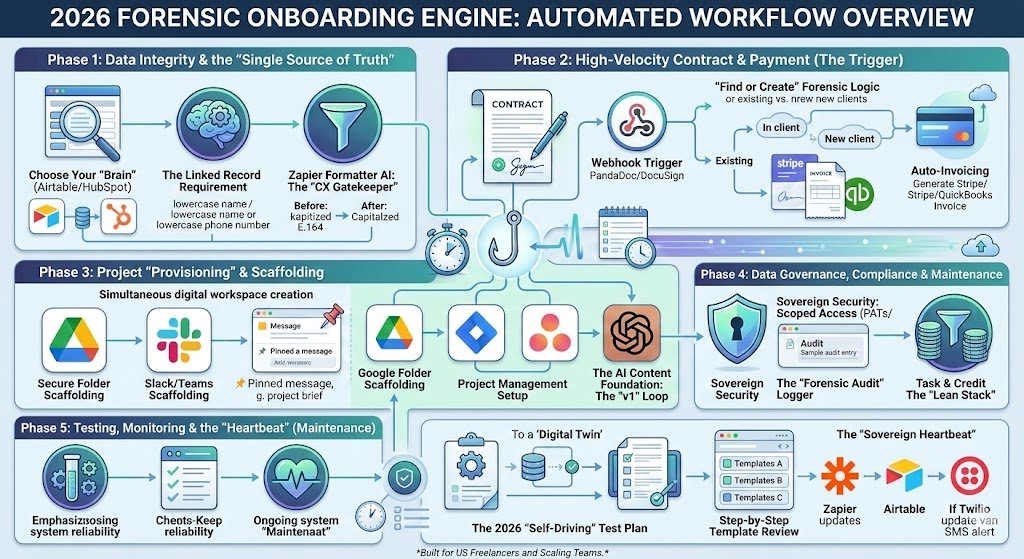
Phase 1: Data Integrity & the “Single Source of Truth”
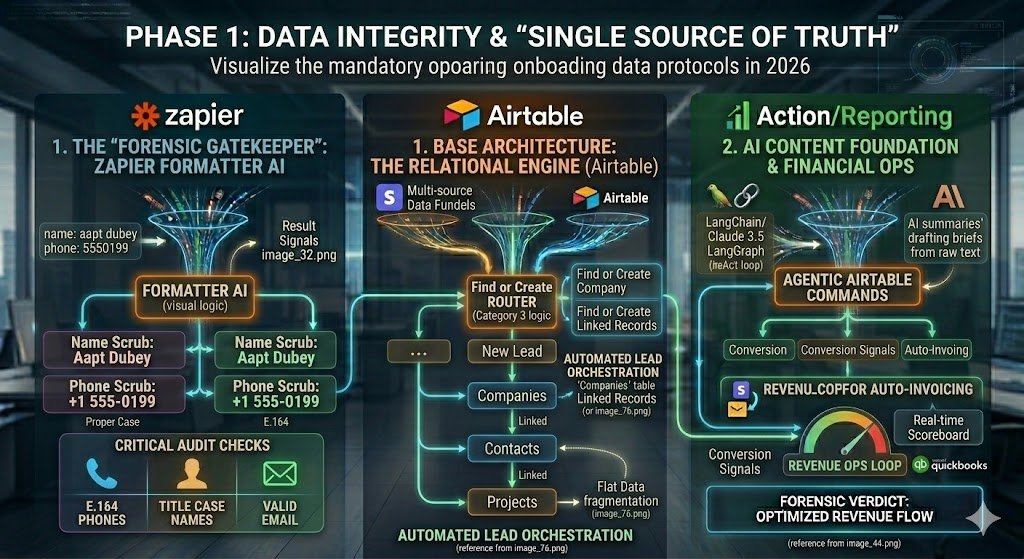
In 2026, a “broken” onboarding experience usually starts with a typo. If your Zapier workflow pulls a misspelled name from a signup form and blasts it into a Slack channel, a Google Drive folder, and a legal contract, you’ve already signaled a lack of attention to detail. Phase 1 is about building the “Forensic Gatekeeper” to ensure your data is pristine before the first automation fires.
1. Base Architecture: Choosing Your “Brain”
Before you build a single Zap, you must define where the “Truth” lives. For US freelancers and scaling teams, there are two 2026 standards:
- Airtable (The Custom Engine): Best for project-heavy workflows where you need custom relational tables.
- HubSpot (The Growth Engine): Best for sales-heavy teams that need built-in enrichment and email tracking.
- The Mandate: Zapier must never store data; it only moves it. Your “Brain” (Airtable/CRM) is the only place where client records are allowed to persist.
2. The Linked Record Requirement
The biggest mistake in legacy onboarding is creating “Flat Data.” In 2026, your onboarding Zap must follow Relational Logic:
- The Workflow: New Lead → Zapier looks for the Company → If it exists, it links the new Contact to it → Then it creates a new Project record linked to both.
- The Result: You avoid data fragmentation. When you open your CRM, you don’t see five different entries for “Google”; you see one company with five linked projects and three linked contacts.
3. Zapier Formatter AI: The “CX Gatekeeper”
Clients often fill out forms in a hurry—lowercase names, missing area codes, or messy job titles. In 2026, we use Zapier Formatter AI to “sanitize” this data.
- The Logic: A lead enters “aapt dubey” and “5550199” into your Typeform.
- The Formatter Step: Zapier catches this → Formatter AI converts the name to “Aapt Dubey” → Formatter converts the phone to +1 555-0199 (E.164 Global Standard).
- The Result: Every downstream step—the folder name, the Slack invite, the Stripe invoice—is professional and legally compliant for US billing.
Forensic Pro-Tip: Use a “Data Validation” filter as the very first step in your onboarding Zap. If the email field is empty or the “Project Type” doesn’t match your service list, kill the Zap immediately. This saves your Zapier Task Credits and prevents “Ghost Records” from haunting your database.
Phase 2: High-Velocity Contract & Payment (The Trigger)
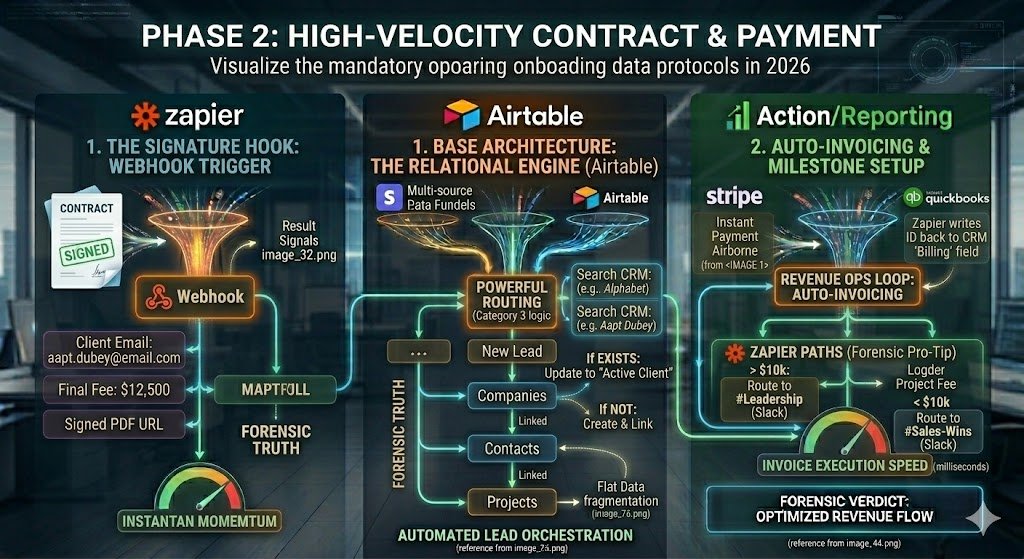
In 2026, the transition from “Prospect” to “Client” is a legal and financial event that must be captured with Forensic Precision. This phase moves the workflow from a conversation into a commitment by using the signed contract as the ultimate automation trigger.
4. The “Trigger” Event: The 2026 Signature Hook
Gone are the days of manually checking if a client signed your PDF. In 2026, we use Webhook Triggers from specialized e-signature platforms like PandaDoc, DocuSign, or Airtable Signatures.
- The Logic: Contract Status changes to “Completed/Signed” → The platform sends a “Webhook” to Zapier.
- The Content: This webhook doesn’t just say “signed”; it carries the Client Email, Company Name, Final Project Fee, and the Signed PDF URL.
- The Result: Your onboarding engine fires the millisecond the client hits “Finish,” creating a sense of “Instant Momentum.”
5. The “Find or Create” Forensic Logic
To prevent the “Duplicate Data” nightmare that plagues US small businesses, your Zapier workflow must act as a librarian.
- The Workflow: Zapier receives the signature → Step 1: Search your CRM for a Company with that name → Step 2: Search for a Contact with that email.
- The Branching: If they exist, Zapier Updates the record (changing status to “Active Client”). If they don’t exist, it Creates and links them.
- The Benefit: Your database remains a “Single Source of Truth.” Every signed contract is tied to a historical lead record, preserving your marketing attribution.
6. Auto-Invoicing & Milestone Setup
A signed contract without a payment request is a “Silent Revenue Killer.” In 2026, the invoice should be airborne before the client closes their browser tab.
- The Logic: Signed Contract → Zapier pulls the “Total Fee” → Triggers Stripe or QuickBooks to generate a hosted invoice.
- The Action: Zapier writes the unique Stripe Invoice ID back into your CRM’s “Billing” field.
- The Result: You eliminate the “Billing Friction.” The client can pay their deposit immediately, clearing the path for Phase 3.
Forensic Pro-Tip: Use Zapier “Paths” in this phase. If the Project Fee is > $10,000 (Enterprise), route the notification to a #Leadership Slack channel. If it’s < $10,000 (Standard), route it to the general #Sales-Wins pool. This ensures your high-value accounts get immediate executive attention.
Phase 3: Project “Provisioning” & Scaffolding
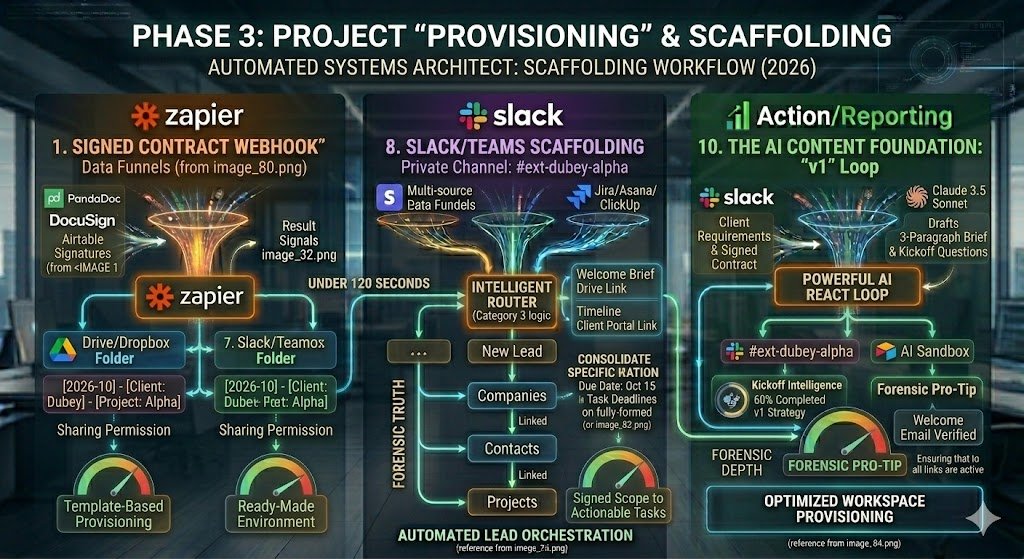
In 2026, “Onboarding” isn’t a single welcome email; it is the instant creation of a digital workspace. For a US freelancer or a small agency, manually setting up folders and inviting clients to Slack is “Low-Value Labor.” Phase 3 uses Zapier to act as your Automated Systems Architect, building the entire project infrastructure in under 120 seconds.
7. Step 1: Secure Folder Scaffolding
The moment the contract is signed, the client needs a place to upload their assets. We move from “manual creation” to Template-Based Provisioning.
- The Logic: Signed Contract → Zapier creates a new folder in Google Drive or Dropbox.
- The Naming Convention: Use a standardized format:
[YYYY-MM] - [Client Name] - [Project Name]. - The Action: Zapier automatically shares the folder with the client’s email with “Editor” permissions and writes the Folder URL back to your Airtable/CRM.
8. Step 2: Slack/Teams Scaffolding
Communication must be centralized. In 2026, we avoid the “Inbox Trap” by moving every new client into a dedicated, private Slack channel.
- The Logic: Zapier creates a Private Slack Channel (e.g.,
#ext-client-alpha). - The Welcome Brief: Zapier posts an automated “Pinned Message” that includes the Project Timeline, the Google Drive link from Step 1, and a link to your 2026 Client Portal.
- The Result: The client enters a professional, ready-made environment. This eliminates the “What do I do now?” anxiety that often follows a large purchase.
9. Step 3: Project Management Setup
Your task board should be populated before your first kickoff call. This is where you transform “Signed Scope” into “Actionable Tasks.”
- The Logic: Zapier triggers a “Create Project from Template” step in Jira, Asana, or ClickUp.
- The Forensic Edge: Zapier pulls specific milestones from the Airtable record (e.g., Due Date: Oct 15) and maps them directly to the task deadlines.
- The Result: You open your project management tool to find a fully-formed board, allowing you to focus on strategy rather than setup.
10. The AI Content Foundation: The “v1” Loop
In 2026, the best freelancers don’t start with a blank page. They use the onboarding data to fuel a Cognitive Assistant.
- The AI Action: Zapier sends the “Client Requirements” and “Signed Contract” text to Claude 3.5 Sonnet.
- The Prompt: “Based on this contract, draft a 3-paragraph Project Brief and a list of 5 immediate questions for the kickoff call.”
- The Integration: Zapier pushes this AI-drafted brief into the #client-project Slack channel and the Airtable “AI Sandbox” field.
- The 2026 Edge: You walk into your first meeting with a 60% completed strategy, proving your “Forensic Depth” from day one.
Forensic Pro-Tip: Use a “Delay by Zapier” of 5 minutes before sending the final “Welcome Email.” This ensures all scaffolding steps (Drive, Slack, Jira) have finished their API calls, so the links you send the client are 100% active and verified.
Phase 4: Data Governance, Compliance & Maintenance
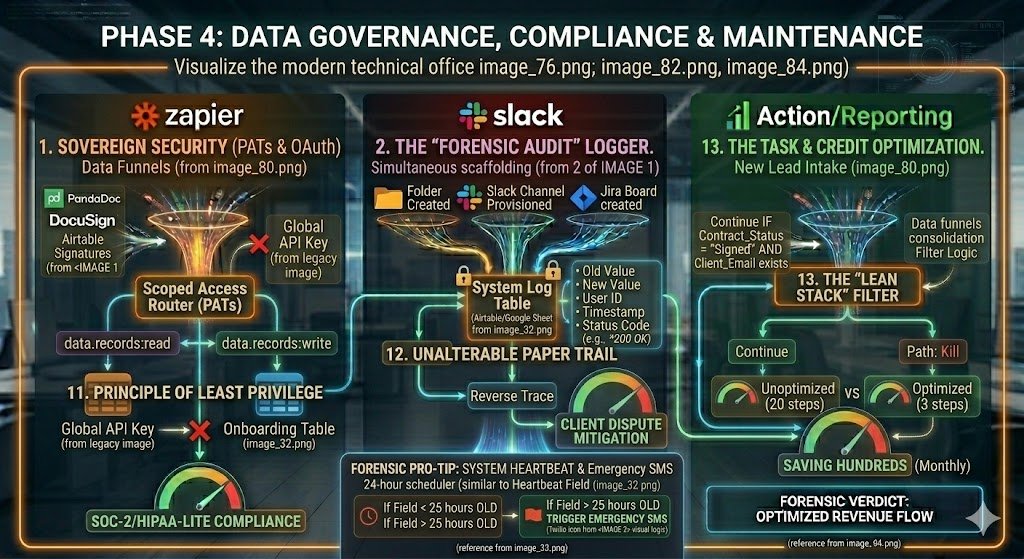
In 2026, a “hands-free” system is a liability if it lacks oversight. As a US freelancer or a scaling team, you are legally responsible for the Sovereign Integrity of the client data you move. Phase 4 builds the “Forensic Firewall” around your onboarding engine, ensuring your automations are compliant, secure, and cost-optimized.
11. Sovereign Security: Scoped Access (PATs)
Legacy integrations often used “Global API Keys” that gave Zapier full administrative power over your entire CRM. In 2026, this is a major security risk.
- The 2026 Standard: Use Airtable Personal Access Tokens (PATs) or OAuth 2.0 Scoped Access.
- The Forensic Edge: When connecting Zapier to your “Brain,” limit its scope to only
data.records:writefor your Onboarding Table. - The Result: If a specific Zap is ever compromised, the attacker cannot delete your invoices or access your private financial records. You satisfy US SOC-2 and HIPAA-lite standards by practicing the “Principle of Least Privilege.”
12. The “Forensic Audit” Logger
Client disputes in 2026 are often won or lost based on your “Digital Paper Trail.” You need an unalterable record of when the onboarding scaffolding was built.
- The Logic: Create a hidden “System Log” table in Airtable or a secure Google Sheet.
- The Zapier Action: Every time a folder is created or a Slack channel is provisioned, Zapier logs the Action, the User ID, the Timestamp, and the Status Code (e.g., 200 OK).
- The Result: If a client claims they never received their “Welcome Brief” or folder access, you can perform a Reverse Trace in seconds to prove exactly when the automation fired and where the link was sent.
13. Task & Credit Optimization: The “Lean Stack”
By 2026, Zapier’s pricing is tied to Task Velocity. An unoptimized onboarding Zap with 20 steps can cost you $5.00 every time a new client signs.
- The “Filter” Rule: The very first step of your Onboarding Zap must be a Zapier Filter.
- The Logic: Only continue IF
Contract_Status = "Signed"ANDClient_Emailexists. - The Forensic Check: If a “Ghost Lead” triggers the Zap without an email, the Filter kills the run instantly.
- The Result: You maintain a Lean Stack, saving hundreds of dollars a month by ensuring you only pay for “High-Signal” automation runs that actually drive revenue.
Forensic Pro-Tip: Implement a “System Heartbeat” Zap. Every 24 hours, have Zapier update a single “Heartbeat” field in your Airtable. If that field isn’t updated by 9:00 AM, have Airtable trigger an Emergency SMS to your phone. This ensures your autonomous onboarding engine never goes “silently offline” without you knowing.
Phase 5: Testing, Monitoring & the “Heartbeat” (Maintenance)
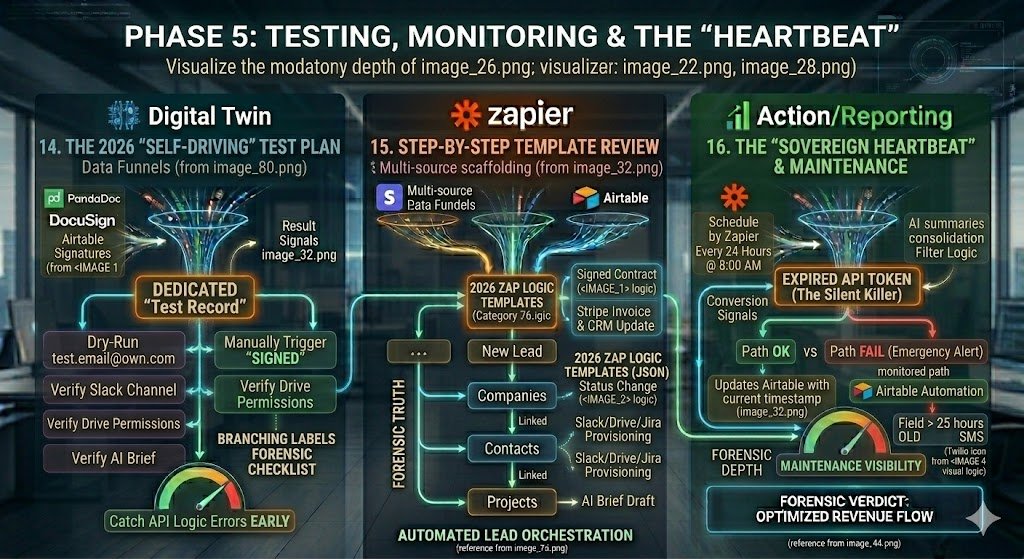
In 2026, the only thing worse than no automation is broken automation that you think is working. If a client signs a $20k contract and your “Instant Scaffolding” fails to fire, the first impression is one of technical incompetence. Phase 5 builds the Monitoring Layer to ensure your onboarding engine remains “Sovereign” and stable.
14. The 2026 “Self-Driving” Test Plan
Never test on a live client. In 2026, we use a “Digital Twin” strategy for QA.
- The Setup: Create a dedicated “Test Record” in your CRM with your own secondary email address.
- The Dry-Run: Manually trigger the “Signed” status on this test record.
- The Forensic Checklist: Verify that the Slack channel was created, the Google Drive folder has the correct permissions, and the AI-drafted brief actually makes sense.
- The Result: You catch “API Logic Errors” (like a renamed Slack folder or a expired Drive token) before they ever reach a paying customer.
15. Step-by-Step Template Review
To accelerate your setup, this guide includes three 2026 Zap Logic Templates (available in JSON/Text format):
- Template A (The Intake): Form Submission → Formatter AI → Airtable Linked Record.
- Template B (The Trigger): Signed Contract → Stripe Invoice → CRM Update.
- Template C (The Scaffolding): Status Change → Slack/Drive/Jira Provisioning → AI Brief Draft.
16. The “Sovereign Heartbeat” (Forensic Pro-Tip)
The silent killer of 2026 businesses is the “Expired API Token.” Your Zaps might stop working because of a password change, and you won’t know until a client complains.
- The Logic: Set up a Schedule by Zapier trigger that runs every 24 hours at 8:00 AM.
- The Action: Zapier updates a single field in your Airtable base labeled [System_Heartbeat] with the current timestamp.
- The Emergency Alert: Use an Airtable Automation to monitor that field. If the timestamp is older than 25 hours, have it send an Emergency SMS via Twilio to your phone.
- The Result: You are alerted to a system failure before your next client signs, maintaining the illusion of a flawless, “Self-Driving” empire.
Conclusion: The Hands-Free Empire
In 2026, the “Self-Driving” onboarding system is no longer a luxury for elite agencies—it is the baseline requirement for any US freelancer who values their time. By moving from manual “checklists” to Instant Scaffolding, you aren’t just saving 45 minutes of admin work per project; you are building a Sovereign Engine that scales without your constant presence.
The 2026 Verdict is clear: Automation does not remove the human; it elevates them. When you stop acting as a “folder creator” and start acting as a “Strategic Architect,” your revenue potential becomes decoupled from your hours worked.
Final Review Checklist: Is Your Onboarding Engine “Forensic”?
- [ ] Data Hygiene: Is Formatter AI cleaning every lead before it touches your base?
- [ ] Relational Integrity: Are your Projects, Contacts, and Companies linked?
- [ ] Scaffold Speed: Does a private Slack channel exist within 120 seconds of a signature?
- [ ] Sovereign Security: Are your Zapier tokens “Scoped” to prevent unauthorized access?
- [ ] Heartbeat Active: Do you have an emergency SMS alert for system failures?

About the Author
Aapt DubeyAapt Dubey is an automation specialist and software developer dedicated to eliminating manual workflows for small businesses. With deep, hands-on experience building complex Zapier integrations, API connections, and real-world applications, Aapt writes actionable, tested tutorials to help businesses scale efficiently.