
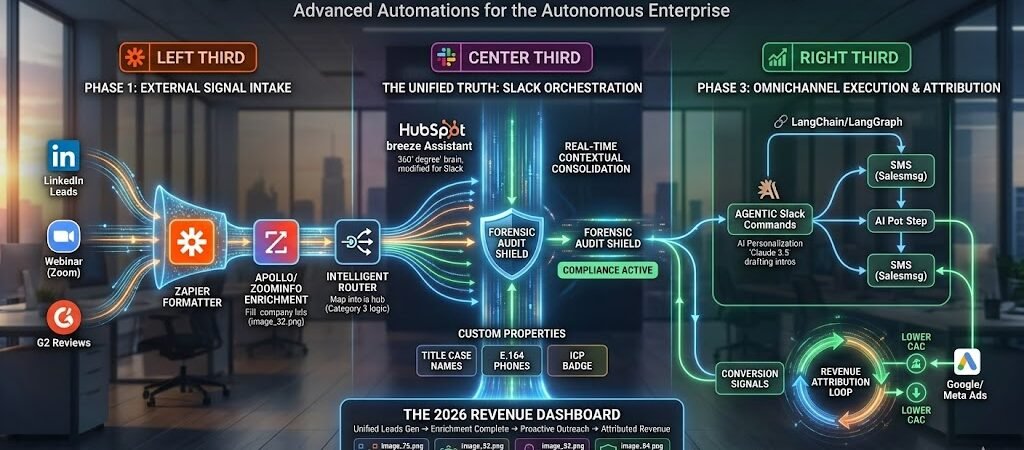
Key Takeaways: The 2026 Slack + Zapier Masterclass
- Slack as the “Headless UI”: Stop switching tabs. Use Slack as the primary interface for your AI agents to report findings, request approvals, and trigger downstream workflows.
- The Emoji Trigger Logic: In 2026, emojis are Executive Commands. Learn to use specific reactions (e.g.,
:ticket:or:legal-review:) to move data between Slack, Jira, and your CRM. - Contextual Intelligence: Use Zapier to “pre-process” data before it hits a channel. Never post a raw link when you can post an AI-generated summary that saves your team 5 minutes of reading.
- Signal Governance: Implement “Channel-Level Scoping.” High-signal alerts (Revenue/Security) go to locked channels; low-signal updates (Social/General) are batched into a daily Zapier Digest to protect team focus.
The “Signal over Noise” Mandate
In 2026, the average US knowledge worker is bombarded by over 200 notifications per day. This is the Notification Apocalypse. When everything is an “Alert,” nothing is a priority.
The goal of this Masterclass is to move your organization from Passive Chat to Actionable Intelligence.
The 2026 Shift: From “What” to “So What?”
Most basic Slack integrations simply dump data into a channel.
- The 2025 Approach: “A new lead just signed up: John Doe.”
- The 2026 Forensic Approach: “A new High-Intent Lead (John Doe, $50M Rev) just signed up. He is 80% similar to our ‘Elite’ segment. [Approve Sales Sequence] [Assign to Rep]“
By using Zapier as a Cognitive Filter, you ensure that every message appearing in a “Priority” channel has passed a logic test. If a lead doesn’t meet your ICP (Ideal Customer Profile) criteria, Zapier quietly logs it in a spreadsheet and stays out of Slack.
Building the “Command Center”
To succeed in 2026, your Slack architecture must mirror your business’s Forensic Hierarchy:
- Level 1: The Pulse (Public): Automated wins and culture updates to maintain momentum.
- Level 2: The Action (Team-Specific): Real-time triggers requiring human intervention (Approvals, Tickets, Leads).
- Level 3: The Audit (Private): Secure logs of database changes and security authorizations for compliance.
Forensic Rule: Every automated Slack message must include an Actionable Next Step. If a team member can’t do something with the information provided, it shouldn’t be a real-time alert—it should be a batched digest.
Mastering Team Alerts: To get the most out of your communication, explore the official Slack integration page. It provides a deep dive into every available trigger—from channel creations to specific keyword mentions.
The “Signal over Noise” Mandate
In 2026, the average US knowledge worker is bombarded by over 200 notifications per day. This is the Notification Apocalypse. When everything is an “Alert,” nothing is a priority.
The goal of this Masterclass is to move your organization from Passive Chat to Actionable Intelligence.
The 2026 Shift: From “What” to “So What?”
Most basic Slack integrations simply dump data into a channel.
- The 2025 Approach: “A new lead just signed up: John Doe.”
- The 2026 Forensic Approach: “A new High-Intent Lead (John Doe, $50M Rev) just signed up. He is 80% similar to our ‘Elite’ segment. [Approve Sales Sequence] [Assign to Rep]“
By using Zapier as a Cognitive Filter, you ensure that every message appearing in a “Priority” channel has passed a logic test. If a lead doesn’t meet your ICP (Ideal Customer Profile) criteria, Zapier quietly logs it in a spreadsheet and stays out of Slack.
Building the “Command Center”
To succeed in 2026, your Slack architecture must mirror your business’s Forensic Hierarchy:
- Level 1: The Pulse (Public): Automated wins and culture updates to maintain momentum.
- Level 2: The Action (Team-Specific): Real-time triggers requiring human intervention (Approvals, Tickets, Leads).
- Level 3: The Audit (Private): Secure logs of database changes and security authorizations for compliance.
Forensic Rule: Every automated Slack message must include an Actionable Next Step. If a team member can’t do something with the information provided, it shouldn’t be a real-time alert—it should be a batched digest.
Category 1: Revenue & Lead Intelligence (The “Profit” Zaps)
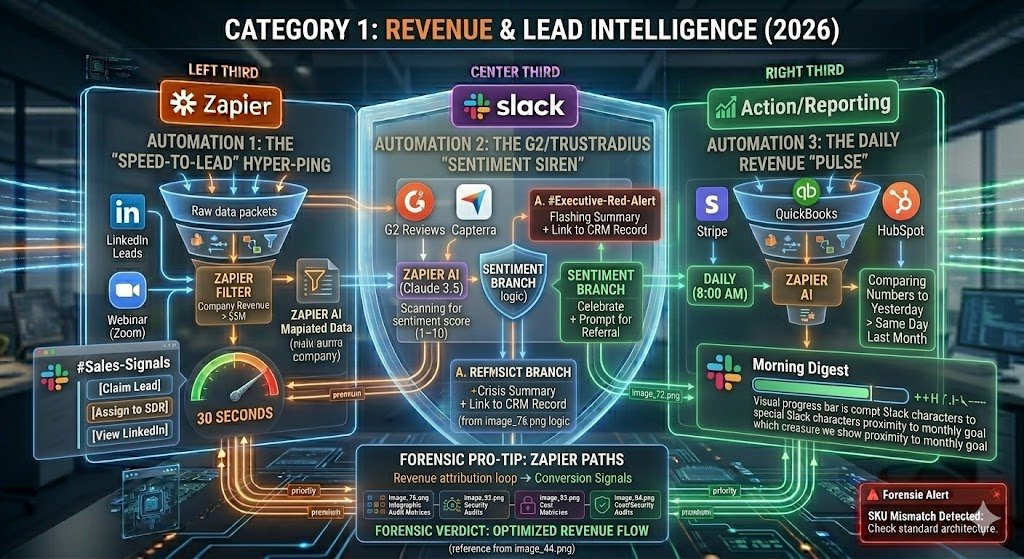
In the 2026 economy, Revenue is a game of milliseconds. The distance between a lead entering your ecosystem and a salesperson engaging them is the single greatest predictor of your closing rate. These three “Profit Zaps” ensure your team isn’t just informed—they are positioned to win.
Automation 1: The “Speed-to-Lead” Hyper-Ping
Most CRM notifications are lost in a sea of emails. This Zap turns Slack into a real-time auction house for your best opportunities.
- The Logic: New Lead (HubSpot/Typeform) → Zapier Filter (checks Company Revenue > $5M) → Slack Alertsent to the
#Sales-Signalschannel. - The Forensic Edge: The alert isn’t a wall of text. It uses Slack Blocks to display three buttons: [Claim Lead], [Assign to SDR], and [View LinkedIn].
- The 2026 Result: By clicking “Claim Lead,” Zapier updates the HubSpot owner and pings the lead via SMS—completing a high-value handoff in under 30 seconds.
Automation 2: The G2/TrustRadius “Sentiment Siren”
Public sentiment in 2026 moves markets instantly. You cannot afford to wait for a weekly marketing report to find out a client is unhappy.
- The Logic: New Review (G2/TrustRadius/Capterra) → Zapier AI (Claude 3.5) scans the text for sentiment score (1–10).
- The Branching Action: * If Score < 4: Zapier pings
#Executive-Red-Alertwith a “Crisis Summary” and a link to the reviewer’s CRM record.- If Score > 8: Zapier pings
#Sales-Winsto celebrate and prompts the Account Manager to ask for a referral.
- If Score > 8: Zapier pings
- The 2026 Result: You transform reactive reputation management into a proactive “Forensic Rescue” operation.
Automation 3: The Daily Revenue “Pulse”
Dashboards are where data goes to be forgotten. The “Pulse” brings the scoreboard to the team where they already live.
- The Logic: Daily Schedule (8:00 AM) → Zapier pulls data from Stripe, QuickBooks, and HubSpot → Zapier AIcompares the numbers to “Yesterday” and “Same Day Last Month.”
- The Forensic Edge: The message uses a visual progress bar (via Slack’s special characters) to show how close the team is to the monthly goal.
- The 2026 Result: Leadership starts the day with a “Morning Digest” that answers the only question that matters: “Are we on track, and if not, where is the leak?”
Forensic Pro-Tip: Use Zapier “Paths” to route these notifications. Send “Enterprise” leads to a locked leadership channel and “SMB” leads to a general sales pool to ensure your top closers aren’t distracted by low-value noise.
Category 2: AI-Powered Productivity & Summarization
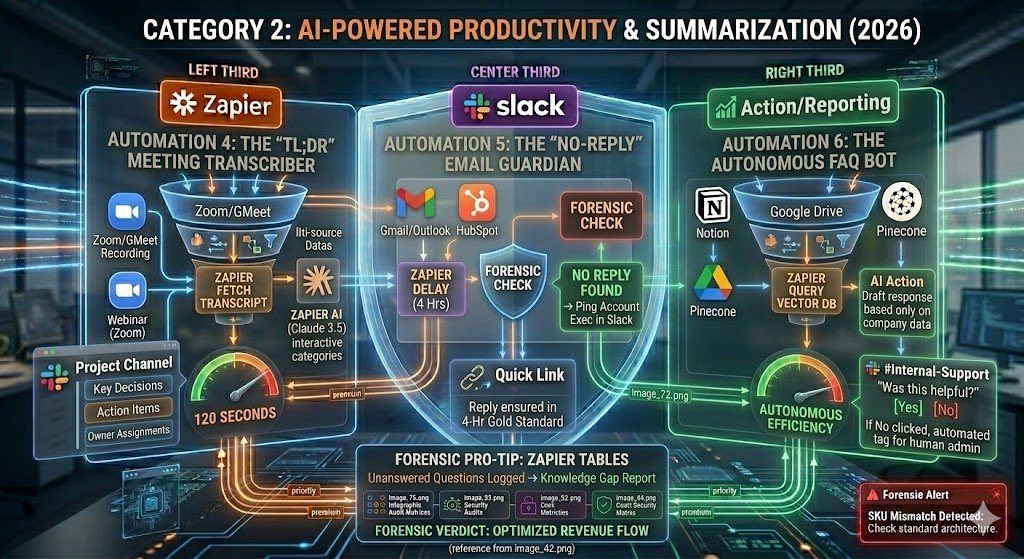
In 2026, the greatest tax on your team’s output is “Information Overhead.” Between back-to-back meetings and overflowing inboxes, critical details are often lost in the shuffle. This category uses Zapier as a Cognitive Assistant to distill hours of raw data into seconds of actionable insight.
Automation 4: The “TL;DR” Meeting Transcriber
The 2026 workforce no longer takes manual notes. We let AI handle the “Forensic Capture” while humans handle the strategy.
- The Logic: Zoom/Google Meet recording ends → Zapier fetches the transcript → Zapier AI (Claude 3.5)summarizes the transcript into three distinct categories: Key Decisions, Action Items, and Owner Assignments.
- The Result: A clean, formatted summary is posted to the relevant project Slack channel within 120 seconds of the meeting ending.
- The 2026 Edge: If a team member was mentioned by name in the transcript (e.g., “Aapt will handle the SEO audit”), Zapier sends them a Direct Message with the specific context so they never miss a handoff.
Automation 5: The “No-Reply” Email Guardian
In a high-velocity 2026 environment, a missed email from a VIP client is a “silent killer” of revenue.
- The Logic: New Email arrives (Gmail/Outlook) from a contact labeled “Customer” in HubSpot → Zapier starts a “Delay” timer for 4 hours.
- The Forensic Check: After 4 hours, Zapier checks if there is a sent reply in the thread. If NO REPLY is found →Zapier pings the Account Executive in Slack.
- The Result: The alert includes a “Quick Link” to the email thread, ensuring that 100% of client inquiries are addressed within the “Gold Standard” 4-hour window.
Automation 6: The Autonomous FAQ Bot
Stop answering the same question twice. This Zap transforms your Slack history into a Living Knowledge Base.
- The Logic: A team member asks a question in
#Internal-Support(detected via the “?” keyword or a specific emoji) →Zapier queries your Notion, Pinecone, or Google Drive vector database. - The AI Action: The AI drafts a response based only on your proprietary company data and replies in the Slack thread.
- The Result: The bot adds a disclaimer: “Based on our 2026 Benefits Guide, the answer is X. Was this helpful?” If the user clicks “No,” Zapier automatically tags a human admin to jump in.
Forensic Pro-Tip: Use Zapier’s “Tables” to log every question the FAQ Bot can’t answer. This creates a weekly “Knowledge Gap Report” that tells you exactly which internal documents need updating to improve future AI performance.
Category 3: Ops, Security & Forensic Governance
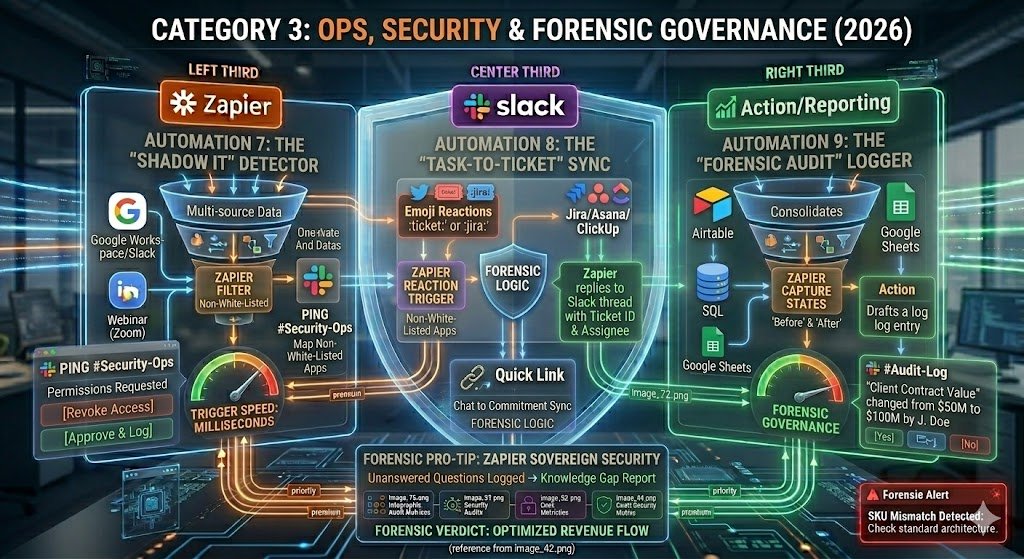
In 2026, Slack is the window into your company’s digital integrity. As you scale, “Manual Oversight” becomes a mathematical impossibility. This category moves beyond productivity into Systemic Protection, using Zapier to act as an automated compliance officer and infrastructure guardian.
Automation 7: The “Shadow IT” Detector
In 2026, a single unapproved app connection can bypass your SOC-2 compliance. This Zap ensures your “Connective Tissue” is always audited.
- The Logic: New App Authorized in Google Workspace/Slack → Zapier filters for “Non-White-Listed” apps →Pings
#Security-Ops. - The Forensic Edge: The Slack alert includes the permissions requested by the app (e.g., “Read/Write Emails”) and a button to [Revoke Access] or [Approve & Log].
- The 2026 Result: You move from “Reactive Cleanup” to “Real-time Governance,” preventing data leaks before they happen.
Automation 8: The “Task-to-Ticket” Sync
Great ideas often die in Slack threads because they are never properly “ticketed.” We solve this using Reaction-Based Triggering.
- The Logic: Specific Emoji Reaction added to a message (e.g.,
:ticket:or:jira:) → Zapier scrapes the message content and the link to the thread → Creates a task in Jira, Asana, or ClickUp. - The Forensic Logic: Zapier replies to the Slack thread with the Ticket ID and the Assignee’s name.
- The 2026 Result: Your team can turn a “Chat” into a “Commitment” without leaving the flow of work.
Automation 9: The “Forensic Audit” Logger
For 2026 compliance (HIPAA/FINRA), you need a record of who changed what in your core databases (Airtable, SQL, or Google Sheets).
- The Logic: High-Value Row Updated (e.g., “Client Contract Value” or “Employee Access Level”) → Zapiercaptures the “Before” and “After” states.
- The Action: Logs the change into a private, locked
#Audit-Logchannel in Slack. - The 2026 Result: If a dispute or security incident occurs, your team can perform a “Reverse Trace” in seconds by searching the Slack audit channel, rather than digging through raw database logs.
Forensic Pro-Tip: Use Zapier’s “Sovereign Security” features (available in 2026) to ensure that sensitive audit data is encrypted at rest and never leaves your designated data region (e.g., US-only storage).
Category 4: Team Culture & Employee Experience
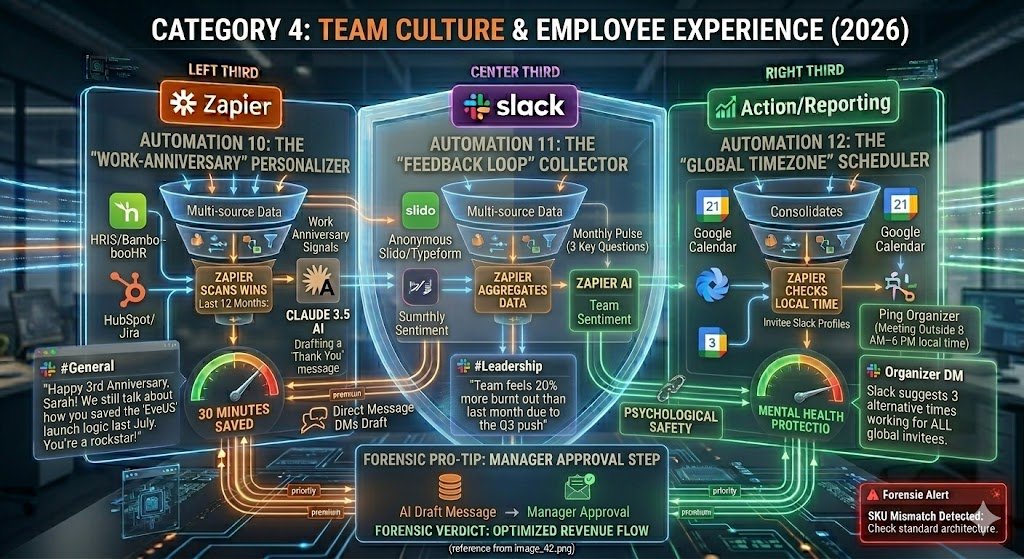
In 2026, with the rise of distributed “Agentic Teams,” maintaining a human connection is a strategic advantage. If your team feels like they are just “cogs in an AI machine,” retention will plummet. This category uses Zapier to automate the emotional labor of management, ensuring every milestone is celebrated with forensic personal touch.
Automation 10: The “Work-Anniversary” Personalizer
Generic “Happy Anniversary” messages are ignored. In 2026, we use Historical Data to make recognition meaningful.
- The Logic: Date is Work Anniversary (HRIS/BambooHR) → Zapier scans the employee’s “Wins” in HubSpot or Jira from the past 12 months → Claude 3.5 drafts a custom “Thank You” message highlighting their specific impact.
- The Result: A post in
#Generalthat says: “Happy 3rd Anniversary, Sarah! We still talk about how you saved the ‘EvenUS’ launch logic last July. You’re a rockstar!” - The 2026 Edge: It saves the manager 30 minutes of research while making the employee feel truly seen.
Automation 11: The “Feedback Loop” Collector
Psychological safety is the foundation of 2026 productivity. This Zap ensures leadership isn’t operating in a vacuum.
- The Logic: Monthly Schedule → Zapier sends an anonymous Slido/Typeform poll to the
#Teamchannel asking 3 key “Pulse” questions. - The Action: Zapier aggregates the raw data → Zapier AI summarizes the “Team Sentiment” (e.g., “Team feels 20% more burnt out than last month due to the Q3 push”) → Posts a visual chart to
#Leadership. - The Result: Leaders can address morale issues in the Monday stand-up before they turn into resignations.
Automation 12: The “Global Timezone” Scheduler
In a world of global talent, nothing says “I don’t value your time” like pings at 3:00 AM.
- The Logic: New Calendar Event Created (Google Calendar) → Zapier checks the ‘Local Time’ of all invitees (based on their Slack profile) → If the meeting falls outside of 8 AM–6 PM for anyone, Zapier pings the organizer.
- The Forensic Suggestion: The Slack alert suggests three alternative times that work for all timezones involved.
- The Result: You eliminate “Scheduling Friction” and protect the mental health of your international workforce.
Forensic Pro-Tip: For the Anniversary Zap, use a “Manager Approval Step” in Zapier. The AI drafts the message and DMs it to the manager first. The manager can click [Post to Channel] or [Edit First]. This keeps the “Human-in-the-Loop” to ensure the tone is perfect.
From conversation to record. While Slack is great for quick alerts, you need a structured home for your long-term project data. Discover how to build Airtable Zapier database workflows to turn your team’s chat updates into organized database records.
Implementation & Governance
Scaling to 12+ advanced automations requires a Forensic Governance Framework. Without it, your Slack workspace quickly devolves from a “Command Center” into a “Digital Swamp” of overlapping logic and redundant pings. To maintain a high Signal-to-Noise Ratio in 2026, follow these three pillars of automation discipline.
1. The “One Zap, One Channel” Rule
To prevent “Logic Collision,” map each automation to a specific, purpose-built channel.
- Avoid: Posting Revenue alerts, Security logs, and Birthday wishes all in
#general. - The 2026 Standard: Create a naming convention that reflects the priority. Use prefixes like
#alert-high-revenue,#log-security-audit, and#feed-team-culture. This allows users to mute “Low-Signal” channels while keeping “High-Signal” notifications unmuted.
2. The “Cognitive Tax” Audit
Every time Zapier pings a channel, it consumes a “Task” and, more importantly, a team member’s attention. Perform a Monthly Forensic Audit of your Zapier task usage.
- Pruning: If a “Daily Revenue Pulse” has a low engagement rate (tracked via Slack’s message analytics), move it from a real-time post to a Weekly Zapier Digest.
- Loop Prevention: Ensure your FAQ bots aren’t triggering off their own messages—a “Systemic Loop” can exhaust your monthly Zapier budget in minutes.
3. Sovereign Security & Scoped Access
For US businesses in regulated industries (HIPAA, SOC-2), security happens at the Connective Tissue.
- Scoped Access: Never connect Zapier using a “Super Admin” Slack account. Use a dedicated “Automation User”with access only to the specific channels required for the Zaps.
- Data Residency: Ensure your Zapier 2026 settings are locked to US-based servers if you are handling sensitive PII (Personally Identifiable Information) to remain compliant with federal mandates.
Forensic Rule: If an automation hasn’t been “acted upon” (clicked, replied to, or reacted to) in 30 days, archive it. In 2026, a “quiet” Slack is a sign of a well-governed engine.
Conclusion: Your 2026 Command Center
The transition from a “Company that Chats” to a “Company that Executes” is the defining competitive advantage of the 2026 landscape. By implementing these 12 advanced automations, you aren’t just saving time; you are building a Forensic Operating System that scales without adding headcount.
As you move forward, remember that the most effective Slack workspace is the one that stays silent until it has something Actionable to say. Start by picking one “Profit” Zap and one “Productivity” Zap to build momentum, then scale into the security and culture layers as your team’s “Automation Literacy” grows.

About the Author
Aapt DubeyAapt Dubey is an automation specialist and software developer dedicated to eliminating manual workflows for small businesses. With deep, hands-on experience building complex Zapier integrations, API connections, and real-world applications, Aapt writes actionable, tested tutorials to help businesses scale efficiently.