
Key Takeaways: build custom AI agents with Zapier
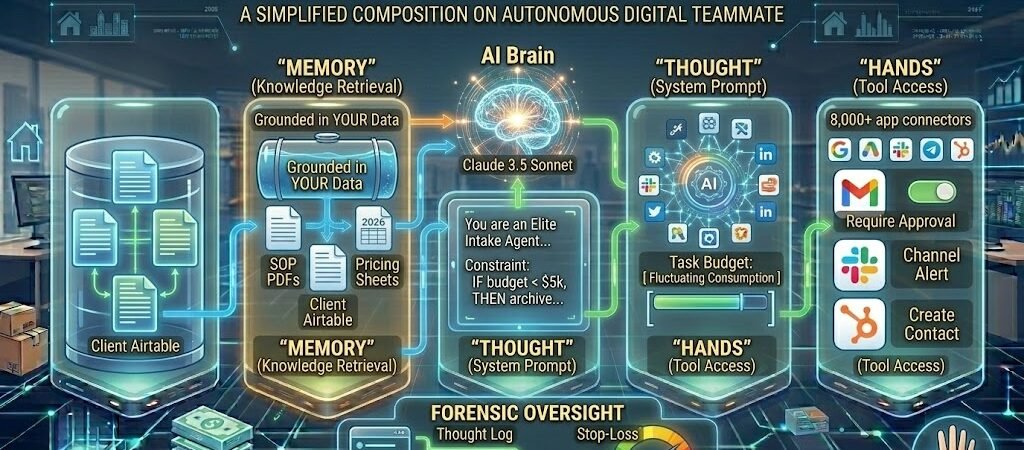
- From Linear to Logic-Based: Unlike traditional Zaps that follow a fixed A→B path, 2026 AI Agents use “Reasoning Loops” to decide which tool to use based on the specific context of the incoming data.
- The “Grounding” Gold Standard: An agent is only as good as its data. Success in 2026 depends on Knowledge Retrieval—syncing your agent with live company PDFs, Airtable databases, or Notion wikis so it never “hallucinates” your pricing or policies.
- The “Toolbox” Philosophy: You don’t build a flow for an agent; you give it Tool Access. You authorize the agent to use specific apps (Gmail, Slack, HubSpot), and the agent decides when and how to use them to reach the goal you set.
- Forensic Oversight: Because agents consume tasks dynamically based on their “thinking” steps, managing your 2026 Task Budget requires setting strict “Stop-Loss” limits on agent reasoning to prevent infinite loops.
Introduction: The Agentic Revolution of 2026
For over a decade, automation was synonymous with the “If This, Then That” (IFTTT) model. If a lead filled out a form, then an email was sent. It was reliable, but it was rigid. It couldn’t handle “gray areas” or make decisions.
In 2026, the rigid Zap is extinct.
The modern US small business now operates via Agentic Orchestration. Instead of building thousands of individual, brittle workflows, we are now building Custom AI Agents. These are specialized digital teammates living within Zapier Central that possess three unique capabilities:
- Reasoning: They don’t just move data; they analyze it. They can distinguish between a “high-priority complaint” and “general feedback.”
- Memory (Grounding): They are “grounded” in your specific business data. They know your 2026 Q1 refund policy because they have read your internal PDF.
- Tool Fluency: They have “hands.” They can reach into your CRM to update a deal, jump into Slack to alert a human, or browse the live web to research a competitor.
The “No-Code” promise has finally been fulfilled. You no longer need a computer science degree to build a custom AI workforce. You simply need to be a good “Workforce Manager” who can define a role, provide the right training data, and set clear boundaries. This guide will take you from a total beginner to a pro Agent Architect, using the Elite Intake Agent as our primary build example.
Deploy Your Agents: Ready to start building? You can access the Zapier Central interface directly to begin training your custom AI agents on your specific business data.
Step 1: Ideation & Forensic Architecture
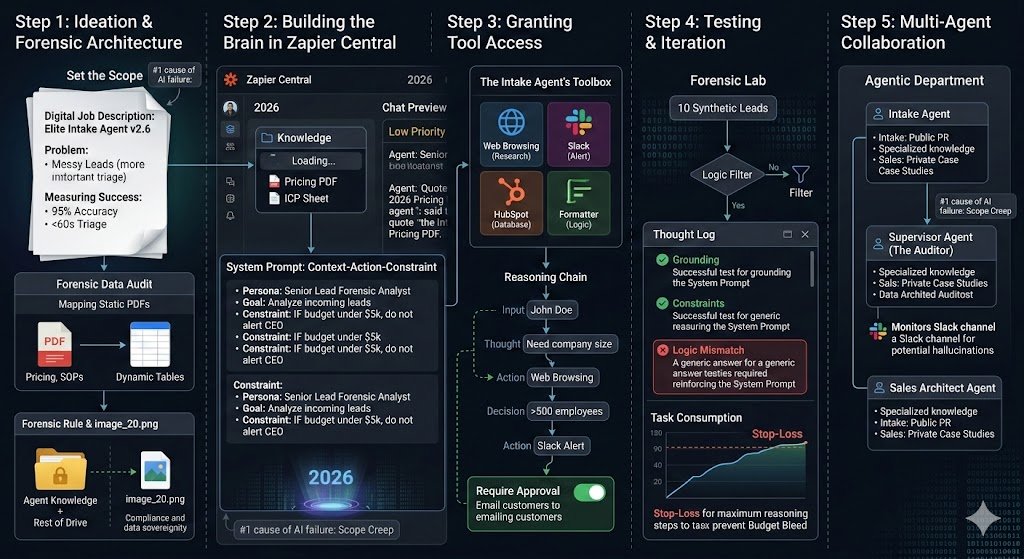
In 2026, the #1 cause of AI failure is “Scope Creep.” Most US SMB owners attempt to build a “General Assistant” that handles “Marketing” or “Sales.” These agents inevitably fail because they lack a specific Forensic Objective. To build an agent that actually generates ROI, you must treat the build like a high-level hiring process.
1. Defining the “Digital Job Description”
Before touching Zapier Central, you must draft a clear, measurable problem statement for your agent. If the task doesn’t require judgment, adaptation, or natural language understanding, use a traditional Zap. If it does, define it narrowly.
- The “Elite Intake Agent” Profile: * The Problem: Leads from your website are messy—some are spam, some are high-value, and others are existing customers asking for support.
- The Agent’s Role: Triage every incoming lead, research the company’s 2026 market position via the live web, and decide if they should go to a Sales Rep, a Support Tech, or the “Archive.”
- Success Metric: 95% accuracy in lead classification with a response/triage time under 60 seconds.
2. The Forensic Data Audit (Grounding)
An agent is only as intelligent as the “Source of Truth” you provide. In 2026, we call this Grounding. You must map out exactly where the agent’s knowledge will come from to prevent hallucinations.
- Knowledge Base Mapping: * Static Data: Your 2026 Service Level Agreements (SLAs), pricing PDFs, and internal SOPs.
- Dynamic Data: Connect the agent to a live Zapier Table or Airtable containing your current “High-Value Client” list.
- Forensic Rule: Never give an agent access to your entire Google Drive. Create a dedicated “Agent Knowledge” folder to ensure strict data sovereignty and security (referencing image_20.png compliance).
3. The Tool Access Audit
What “hands” does your agent need to fulfill its job? In 2026, Zapier provides over 8,000 “Tools” (actions) that an agent can choose to deploy.
- The Intake Agent’s Toolbox:
- Research Tool: Web Browsing (to look up the lead’s LinkedIn/Company site).
- Communication Tool: Slack (to alert the team).
- Database Tool: HubSpot or Salesforce (to create or update the lead record).
- Logic Tool: Formatter by Zapier (to clean up phone numbers or currency).
2026 Architecture Checklist
| Component | Forensic Requirement | Why? |
| Scope | One specific workflow (e.g., Lead Triage) | Prevents “Decision Fatigue” in the LLM. |
| Grounding | Verified PDFs & Live Tables | Ensures the agent uses your facts, not training data. |
| Toolbox | 3-5 Essential App Actions | Reduces task consumption and prevents “Tool Hallucination.” |
| Safety | Human-in-the-Loop (HITL) | Mandatory for any action that contacts a customer directly. |
The 2026 Forensic Rule: Build absurdly narrow. An agent that does one thing perfectly is worth 100 agents that do everything mediocrely.
Step 2: Building the Brain in Zapier Central (The Core)
In 2026, Zapier Central is the command center for your agentic workforce. This is where you move beyond “automating a task” and begin “training a teammate.” The “Brain” of your agent consists of three elements: the Model, the Knowledge, and the System Prompt.
1. Accessing the 2026 Interface
Log in to your Zapier dashboard and select “Central” from the sidebar.
- Click “Create Agent” and name it (e.g., Elite Intake Specialist v2.6).
- Model Selection: In 2026, you have a choice of LLMs. For most SMB logic, GPT-5 Mini is the forensic favorite because it balances high-speed reasoning with low task-consumption costs. For high-stakes legal or medical triage, choose the full GPT-5 or Claude 3.5 Sonnet for superior nuance.
2. Grounding the Agent (Knowledge)
This is where you prevent “AI Hallucinations.” By adding Knowledge Sources, you tell the agent: “Ignore what you learned on the open internet; only use these specific facts.”
- Upload Static Files: Drag in your 2026 PDF Price Lists, Refund Policies, and “Ideal Customer Profile” (ICP) documents.
- Sync Dynamic Data: Connect to a Zapier Table or Google Sheet.
- Pro Tip: If a lead’s company is on your “Blacklist” table, the agent will see this instantly and archive the lead without you writing a single line of code.
3. The System Prompt: The “Persona” Logic
The System Prompt is the most critical step in 2026. It is the permanent set of instructions that governs every decision the agent makes. Use the “Context-Action-Constraint” formula:
The Elite Intake Formula:
- Persona: “You are a Senior Lead Forensic Analyst for [Company Name].”
- Goal: “Analyze incoming leads. Determine if they match our ICP based on the ‘Ideal Customer’ PDF in your knowledge base.”
- Constraint: “If a lead has a Gmail address, search their company name on the web to find a corporate domain. If the budget is under $5,000, mark as ‘Low Priority’ and do not alert the CEO.”
- Tone: “Professional, concise, and data-driven.”
4. Testing the Initial “Thought Process”
Before adding tools, use the Chat Preview on the right side of the screen.
- The Test: Type, “I am a lead from a startup with a $2k budget. What should you do?”
- The Forensic Check: The agent should reply, “Based on the 2026 Pricing PDF, you are below our $5k threshold. I will categorize you as ‘Low Priority’ and send our automated resources.” If it gives a generic answer, your Grounding is weak. If it tries to sell to them, your Constraints are missing.
The 2026 Forensic Rule: Never “chat” with your agent like a friend. Direct it like a subordinate. Use bullet points and explicit “IF/THEN” logic within the System Prompt to ensure 99% reliability.
Step 3: Granting “Tool Access” (Orchestration)
In 2026, an AI Agent without tools is just a chatbot. To turn your “Brain” into a “Teammate,” you must grant it “Hands.”This is the stage where you authorize the agent to perform specific actions across your tech stack—from sending Slack alerts to researching the live web.
1. Connecting the “Toolbox”
In Zapier Central, navigate to the “Tools” tab. Here, you aren’t building a linear sequence; you are providing a library of capabilities the agent can “call” whenever it deems necessary.
- Native Tools (AI-Powered): Always enable Web Browsing. This allows the agent to leave the “Knowledge Base” and verify real-time 2026 data, such as a lead’s recent LinkedIn post or a company’s latest funding round.
- App Tools (8,000+ Connections): Add the specific actions you want the agent to take.
- Example: Slack: Send Channel Message.
- Example: HubSpot: Create/Update Contact.
- Example: Gmail: Send Reply.
2. Structuring the “Reasoning Path” (Category 1 Logic)
Unlike a traditional Zap where Step 1 leads to Step 2, an Agent uses Reasoning Chains. You must define the instructions for when to use each tool in the “Tool Instructions” field.
Forensic Instruction Example: “Use the Web Browsing tool to find the ‘Company Size’ of any lead. If the company is >500 employees, use the Slack tool to notify #high-value-leads. If the company is <10 employees, use the Gmail tool to send the ‘Starter Kit’ template.”
3. Managing “Forensic Hygiene” & Security
Granting an AI “hands” comes with risk. In 2026, the “Forensic Audit” (image_20.png) is essential to prevent your agent from accidentally spamming a database or leaking sensitive info.
- Require Approval: For high-impact tools (like sending a live email to a client), toggle on “Require Approval.”The agent will draft the email and wait for you to click “Send” in the Zapier Central interface.
- Tool Triggers: Ensure the agent only acts when a specific event occurs. Do not give it “Global Edit” access to your CRM. Limit its scope to “Create” or “Update” only for the lead it is currently processing.
4. The “Reasoning Loop” Check
When you test the agent now, you will see a “Thinking…” state. In the background, the agent is performing a Category 2 logic check:
- Input: New Lead “John Doe”.
- Thought: “I need to know John’s company size to triage him.”
- Action: Calls Web Browsing Tool.
- Observation: “John works at a 1,000-person firm.”
- Decision: “High Value. I will call the Slack Tool.”
The 2026 Forensic Rule: Only give an agent the tools it absolutely needs to finish its job description. Every extra tool increases the chance of a “Logic Loop” that drains your task budget
Step 4: Testing & Iteration (The AI Forensic Lab)
In 2026, you don’t “debug” an AI Agent; you audit it. Because agents make autonomous decisions, you must verify their “Reasoning Chain” before letting them touch live customer data. This is the Forensic Lab phase, where you pressure-test the agent’s logic against edge cases.
1. The “Sandbox” Methodology
Never test a new agent on your actual HubSpot or Gmail account during the first run.
- Create a “Test Table”: Use a Zapier Table filled with 10 “Synthetic Leads”—some perfect matches, some competitors, and some incomplete data.
- Point the Agent to the Sandbox: Temporarily change the agent’s tool access so it only writes to a “Test Slack Channel” or a “Drafts” folder.
2. Reviewing the “Reasoning Chain”
In Zapier Central, every interaction generates a Thought Log. This is a forensic breakdown of the agent’s internal Category 2 logic.
- What to look for: Did the agent choose the right tool? Did it correctly interpret your “Ideal Customer” PDF?
- The “Thought” vs. “Action” Audit: If the agent says, “I think this is a high-value lead,” but then fails to trigger the Slack alert, your Tool Instructions in Step 3 are likely too vague.
3. Identifying “Logic Mismatches” (Forensic Alerts)
In 2026, the most common error is a Knowledge Mismatch. This happens when the agent’s general training conflicts with your specific “Grounding” data.
- Scenario: The agent offers a 20% discount to a lead because “that’s standard in the industry,” even though your 2026 Pricing PDF says “No Discounts.”
- The Fix: Update your System Prompt (Step 2) with a “Negative Constraint”: “NEVER offer discounts. If a user asks for one, refer them to the ‘Standard Pricing’ section of the PDF.”
4. Stress-Testing for “Budget Bleed”
Every “Thought” and “Tool Call” in 2026 consumes tasks (as seen in our Pricing Audit).
- The Loop Test: If your agent gets stuck in a loop (e.g., searching the web indefinitely for a company that doesn’t exist), it will drain your monthly task limit in minutes.
- The “Stop-Loss” Rule: In the Agent Settings, set a “Maximum Reasoning Steps” limit (usually 5–7 steps). This forces the agent to stop and ask for help if it can’t find an answer quickly.
The Forensic Lab Checklist
| Test Phase | What to Verify | Pass Criteria |
| Grounding Test | Ask a question only in your PDF. | Agent quotes the PDF accurately. |
| Tool Accuracy | Provide a lead that requires a Slack alert. | Alert triggers in the correct channel. |
| Constraint Test | Provide a “Blacklisted” lead. | Agent archives them immediately. |
| Edge Case | Provide a lead with a “typo” in the email. | Agent uses Web Browsing to find the correct info. |
The 2026 Forensic Rule: If an agent fails a test, don’t just fix the specific error. Ask yourself: “Is my System Prompt too broad, or is my Knowledge Base outdated?”
Step 5: Advanced “Multi-Agent” Collaboration
In 2026, the most sophisticated US SMBs have moved beyond a single “Do-It-All” agent. They have built an Agentic Department. Just as you wouldn’t ask your receptionist to also perform a forensic accounting audit, you shouldn’t ask your Intake Agent to also handle complex Sales Negotiations.
1. The “Handoff” Architecture (Agent-to-Agent)
The 2026 Zapier Central update allows one agent to “call” another as a tool. This creates a clean “Chain of Command” and prevents a single agent’s “Brain” from becoming cluttered with too many instructions.
- The Workflow: 1. The Intake Agent (built in Steps 1-4) triages the lead and researches their 2026 market data. 2. The Handoff: If the lead is “High Value,” the Intake Agent triggers the Sales Architect Agent. 3. The Sales Agenttakes the “Research Brief,” looks up your 2026 Case Studies in its own specialized Knowledge Base, and drafts a bespoke pitch.
2. Specialized Knowledge Silos
By splitting agents, you can give them different Sovereign Data (referencing image_20.png).
- Intake Agent: Access to Public PR and General Pricing PDFs.
- Sales Agent: Access to Private Case Studies, Client Testimonials, and Custom Quote Templates.
- Support Agent: Access to the Technical Troubleshooting Wiki and Jira logs.
3. The “Manager Agent” (The 2026 Supervisor)
For complex operations, you can build a Supervisor Agent. Its only “Job Description” is to monitor the outputs of the other agents.
- Forensic Oversight: The Supervisor Agent reads the Slack alerts from the Intake Agent. If it detects a “hallucination” (e.g., an agent offering a service you no longer provide), it pauses the workflow and pings a human.
4. Budgeting for Multi-Agent Systems
Remember the 2026 Forensic Rule of Consumption: Every time an agent “calls” another agent, it consumes logic tasks (Category 1 & 2 logic).
- Efficiency Tip: Ensure your “Handoff” data is pre-formatted. If the Intake Agent sends a messy, 1,000-word transcript to the Sales Agent, the Sales Agent will spend more “Reasoning Steps” (and more of your budget) trying to summarize it.
The Multi-Agent ROI Matrix
| Agent Role | Unique Knowledge | Primary Tool | ROI Impact |
| The Researcher | Live Web / Crunchbase | Web Browsing | Saves 4 hours of manual Googling/day. |
| The Triage | Internal ICP PDF | Zapier Tables | Eliminates 90% of “Spam” leads instantly. |
| The Drafter | Past Success Stories | Gmail / LinkedIn | Increases “Lead-to-Meeting” rate by 30%. |
| The Auditor | Compliance SOPs | Slack (Alerts) | Prevents 100% of “AI Hallucination” leaks. |
Which engine is smartest? Zapier is great, but other platforms offer different AI “brains.” Take a moment to compare AI agent platforms like Make and n8n before you scale.
The 2026 Forensic Rule: Think of your agents as a team, not a tool. If a process is too complex for one person to explain in 60 seconds, it’s too complex for one AI Agent. Split the logic, and you’ll gain 10x the reliability.
Conclusion: Managing Your 2026 Digital Workforce
The transition from building Zaps to architecting Agents is the most significant leap for US SMBs in 2026. You are no longer just an “Automator”; you are a Digital Workforce Manager. The success of your custom AI agents depends less on your coding ability and entirely on your ability to provide Forensic Clarity.
- The “Grounding” Rule: An agent is only as reliable as the data it is anchored to. In 2026, a “hallucination” is a management failure, not a technical one. Ensure your Knowledge Base is clean, updated, and narrow.
- The “Toolbox” Rule: Give your agents exactly the “hands” they need and no more. Over-provisioning tools leads to “Logic Loops” and unpredictable task consumption.
- The “Forensic Audit” Rule: Always maintain Human-in-the-Loop (HITL) oversight for any action that affects your revenue or your reputation. Use the Zapier Central Thought Logs to audit your agents’ reasoning like you would a new hire’s first week of reports.
In 2026, the competitive advantage belongs to the founder who can delegate the repetitive “Thinking Tasks” to a well-trained agent, freeing up their own Unique Creative Genius to focus on strategy and high-value relationships.

About the Author
Aapt DubeyAapt Dubey is an automation specialist and software developer dedicated to eliminating manual workflows for small businesses. With deep, hands-on experience building complex Zapier integrations, API connections, and real-world applications, Aapt writes actionable, tested tutorials to help businesses scale efficiently.